Sales Force Automation (SFA) is the use of software technology to automate sales processes, manage customer relationships, and streamline sales activities within a CRM system. In Salesforce, SFA encompasses automated lead management, opportunity tracking, contact management, and sales pipeline visibility.
Modern sales teams rely on Sales Force Automation to eliminate manual data entry, standardize sales processes, and provide real-time insights into sales performance. Salesforce CRM serves as the leading platform for implementing comprehensive SFA solutions across organizations of all sizes.
What is Sales Force Automation
Sales Force Automation is the process of utilizing computer hardware and Salesforce CRM software to provide automatic collection of Contacts, Accounts, Opportunities, and related sales data.
Sales Force Automation involves utilization of Information Technology applications to support salespeople and different sales functions. Salesforce Automation software helps to track company sales activities. Through Sales Force Automation we can control different phases required in the sales process within a Customer Relationship Management system. When Sales Force Automation is activated in different phases, we can minimize the time spent by sales representatives in each phase.
Sales Force Automation Ecosystem
Sales Force Automation ecosystem consists of three core systems:
- Software Vendors – CRM platforms like Salesforce, HubSpot, and Microsoft Dynamics
- Hardware and Infrastructure Vendors – Cloud providers, mobile device manufacturers, and networking equipment
- Service Providers – Implementation partners, consultants, and system integrators
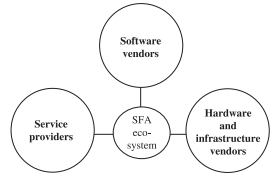
Sales Force Automation software must run on various hardware systems including cloud infrastructure, mobile devices, and desktop computers. Modern SFA solutions are typically cloud-based, accessible through web browsers and mobile applications.
Core Components of Salesforce Automation
Lead Management
Automated lead capture from web forms, email campaigns, and social media channels. Salesforce automatically assigns leads based on territory rules, lead scoring, and round-robin distribution.
Opportunity Management
Track deals through customizable sales stages with automated probability calculations, close date predictions, and pipeline forecasting. Sales teams can set up approval processes for discounts and contract terms.
Contact and Account Management
Centralized customer database with automated data enrichment, duplicate detection, and relationship mapping. Account hierarchies and contact roles are maintained automatically.
Activity Tracking
Automatic logging of emails, calls, meetings, and tasks. Integration with email clients and calendar applications ensures complete activity history.
Advantages of Sales Force Automation
- Improves data quality through validation rules and automated data entry
- Reduces time spent on administrative tasks by sales representatives
- Tracks and records each stage in the sales process for new and existing customers
- Creates standard and customized views for different user roles and territories
- Provides accurate reporting with real-time dashboards and analytics
- Increases sales revenue through better pipeline visibility and forecasting
- Higher win rates from improved lead qualification and nurturing
- Better quality management reports with automated data collection
- More closing opportunities through systematic follow-up processes
- Increases customer relations with complete interaction history and personalized communication
Salesforce CRM Sales Force Automation Features
Sales Force Automation can be performed with the Sales application in Salesforce.com. In the Sales application, you can find different tabs like Accounts, Opportunities, Contacts, Campaigns, Leads, and more.

Account Management Automation
In Sales Force Automation, Accounts can be managed using the Accounts tab. Accounts can be sorted using standard views and customized views. Activities for those accounts can also be managed automatically through workflow rules and process automation.
Automated Sales Processes
Salesforce provides workflow rules, Process Builder, and Flow to automate repetitive sales tasks:
- Automatic task creation for follow-up activities
- Email alerts for stage changes and milestones
- Field updates based on specific criteria
- Approval processes for pricing and contracts
Implementation Best Practices
Data Migration and Cleanup
Before implementing Sales Force Automation, clean existing customer data and establish data quality standards. Use Salesforce Data Loader or third-party tools for bulk data import.
User Training and Adoption
Provide comprehensive training on Salesforce login procedures, navigation, and daily workflows. Create user guides specific to different sales roles and territories.
Integration with Existing Systems
Connect Salesforce with email systems, marketing automation platforms, and ERP systems using APIs or middleware solutions. This ensures data consistency across all business applications.
Visual Force and Lightning Experience
Visual Force pages can be customized to create specific sales automation interfaces. However, Lightning Experience provides modern, mobile-responsive interfaces that enhance user productivity and adoption rates.
Lightning components offer drag-and-drop customization for sales dashboards, opportunity management, and pipeline reporting without requiring Visual Force development skills.
Measuring Sales Force Automation Success
Key Performance Indicators
- Sales cycle length reduction
- Lead conversion rates
- Pipeline velocity and accuracy
- User adoption and activity levels
- Data quality scores
ROI Calculation
Calculate return on investment by measuring time savings, increased deal closure rates, and improved sales productivity. Most organizations see positive ROI within 6-12 months of implementation.
Frequently Asked Questions
What is the difference between CRM and Sales Force Automation?
CRM (Customer Relationship Management) is a broader strategy for managing all customer interactions, while Sales Force Automation is a specific component of CRM focused on automating sales processes. SFA is typically one module within a comprehensive CRM system like Salesforce.
How does Salesforce login work for sales teams?
Salesforce login provides secure access through username/password authentication, often enhanced with two-factor authentication. Sales teams can access Salesforce through web browsers, mobile apps, or integrated desktop applications. Single sign-on (SSO) integration allows seamless access from corporate networks.
What are the main benefits of Sales Force Automation?
Key benefits include reduced administrative time, improved data accuracy, better sales forecasting, increased win rates, and enhanced customer relationships. Sales teams can focus more on selling activities rather than manual data entry and reporting tasks.
Can small businesses use Sales Force Automation?
Yes, Salesforce offers editions designed for small businesses, including Essentials and Professional editions. These provide core SFA functionality at lower price points, with the ability to scale up as the business grows.
How long does it take to implement Sales Force Automation?
Implementation time varies from 2-4 weeks for basic setups to 3-6 months for complex, customized deployments. Factors include data migration complexity, integration requirements, customization needs, and user training scope.