SOAP web service classes can be generated automatically from WSDL documents in Salesforce. This process allows developers to create Apex classes that handle callouts to external web services without writing the integration code from scratch.
The WSDL-to-Apex generation creates stub classes that include all necessary methods, data types, and authentication handling for the target web service. This approach reduces development time and ensures proper SOAP protocol implementation.
Prerequisites for WSDL-to-Apex Generation
Before generating Apex classes from WSDL, ensure you have:
- A valid WSDL document (XML file) from the target web service
- System Administrator or Developer permissions in your Salesforce org
- Understanding of the web service operations you plan to call
- Network access configured for the target endpoint (Remote Site Settings)
How to Generate Apex Class from WSDL Document
Follow these steps to create SOAP web service classes from a WSDL file:
Step 1: Access Apex Classes Setup
1. Navigate to Setup → Custom Code → Apex Classes
2. Click the “Generate from WSDL” button

Step 2: Upload WSDL Document
3. Click “Choose File” to select your WSDL document (XML file)
4. The WSDL document serves as the blueprint for generating the Apex class structure
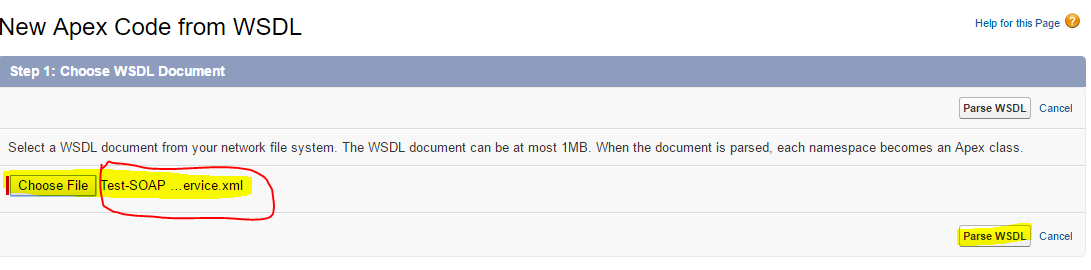
In this example, a Test-SOAP webservice WSDL file is selected (highlighted in red). Choose your WSDL file using the “Choose File” button.
Step 3: Parse and Validate WSDL
5. Click “Parse WSDL” to validate the WSDL document contents
6. The system generates a default class name based on the WSDL structure
7. Any errors will be reported if the WSDL contains unsupported schema types or if the resulting classes exceed the 1-million-character limit
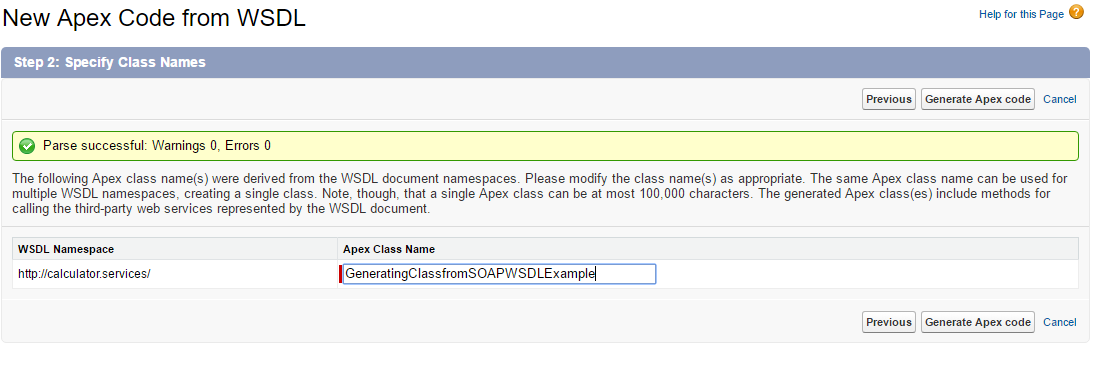
Step 4: Generate Apex Classes
8. Optionally rename the class to follow your naming conventions
9. Click “Generate Apex” to create the classes
10. The final page shows which classes were successfully generated and provides links to view the generated code
Understanding Generated Apex Classes
When you generate Apex classes from WSDL, Salesforce creates two types of classes:
- Synchronous class: Uses the name you specified for immediate callouts
- Asynchronous class: Prefixed with “Async” for future method callouts
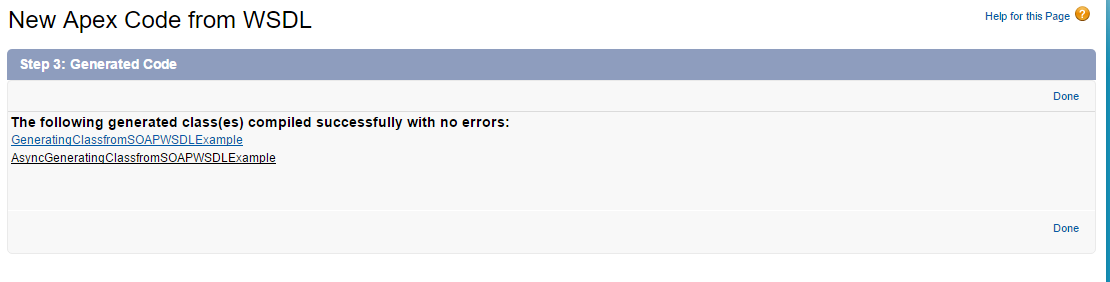
The generated classes include:
- Stub classes for calling web service methods
- Type classes representing complex data structures
- Authentication and endpoint configuration
- Error handling mechanisms
Writing Test Classes for SOAP Web Service Classes
Every generated SOAP web service class requires test coverage for deployment. Here’s how to write test classes for schedulable and batch Apex classes that use SOAP callouts:
Test Class for Schedule Class with SOAP Callouts
@isTest
private class TestSOAPScheduleClass {

    @isTest
    static void testScheduledSOAPCallout() {
        // Create test data
        String cronExpression = '0 0 0 * * ?';

        Test.startTest();

        // Set mock callout response
        Test.setMock(WebServiceMock.class, new MockSOAPWebService());

        // Schedule the job
        String jobId = System.schedule('Test SOAP Schedule', cronExpression, new SOAPScheduleClass());

        Test.stopTest();

        // Verify job was scheduled
        System.assertNotEquals(null, jobId, 'Job should be scheduled successfully');

        // Query scheduled job
        CronTrigger ct = [SELECT Id, CronExpression FROM CronTrigger WHERE Id = :jobId];
        System.assertEquals(cronExpression, ct.CronExpression, 'Cron expression should match');
    }

    // Mock class for SOAP web service
    private class MockSOAPWebService implements WebServiceMock {
        public void doInvoke(
            Object stub,
            Object request,
            Map response,
            String endpoint,
            String soapAction,
            String requestName,
            String responseNS,
            String responseName,
            String responseType
        ) {
            // Mock response logic here
            response.put('response_x', 'Mock response data');
        }
    }
}
Test Class for Schedulable Batch Class
@isTest
private class TestSOAPBatchSchedule {

    @isTest
    static void testSchedulableBatchClass() {
        // Create test records
        List testAccounts = new List();
        for(Integer i = 0; i < 5; i++) {
            testAccounts.add(new Account(Name = 'Test Account ' + i));
        }
        insert testAccounts;

        Test.startTest();

        // Set mock for SOAP callouts
        Test.setMock(WebServiceMock.class, new MockSOAPResponse());

        // Execute schedulable batch
        SOAPBatchSchedule schedulable = new SOAPBatchSchedule();
        String jobId = System.schedule('Test Batch Schedule', '0 0 0 * * ?', schedulable);

        Test.stopTest();

        // Assertions
        System.assertNotEquals(null, jobId, 'Schedulable job should be created');

        // Verify batch execution results
        List updatedAccounts = [SELECT Id, Name FROM Account WHERE Name LIKE 'Test Account%'];
        System.assertEquals(5, updatedAccounts.size(), 'All test accounts should be processed');
    }

    private class MockSOAPResponse implements WebServiceMock {
        public void doInvoke(
            Object stub,
            Object request,
            Map response,
            String endpoint,
            String soapAction,
            String requestName,
            String responseNS,
            String responseName,
            String responseType
        ) {
            // Return mock success response
            response.put('response_x', 'Success');
        }
    }
}
Using System.assertEquals in Test Classes
System.assertEquals is essential for validating SOAP web service responses and batch processing results:
// Validate SOAP response data
System.assertEquals('Expected Value', actualResponse.fieldName, 'Response field should match expected value');

// Verify record processing count
System.assertEquals(expectedCount, processedRecords.size(), 'Processed record count should match expected');

// Check batch job completion
System.assertEquals('Completed', batchJob.Status, 'Batch job should complete successfully');
Common Issues and Solutions
Previous Load of Class Failed Error
This error occurs when:
- The WSDL contains unsupported schema constructs
- Generated classes exceed the 1-million-character limit
- Circular references exist in the WSDL structure
- Invalid XML namespace declarations
Solutions:
- Simplify the WSDL by removing unused operations
- Split large WSDLs into smaller, focused documents
- Validate WSDL syntax using external tools
- Check for proper namespace declarations
Best Practices for SOAP Web Service Integration
- Always implement proper error handling in your callout code
- Use asynchronous classes for long-running operations
- Configure Remote Site Settings for external endpoints
- Implement retry logic for failed callouts
- Monitor API governor limits (100 callouts per transaction)
- Use Test.setMock() for comprehensive test coverage
- Validate WSDL documents before generation
Frequently Asked Questions
How do I write a test class for a schedulable class in Salesforce?
Create a test class using @isTest annotation, use Test.setMock() for SOAP callouts, call System.schedule() with your schedulable class, and use System.assertEquals to verify the job was scheduled correctly. Always test within Test.startTest() and Test.stopTest() blocks.
What is System.assertEquals used for in Apex test classes?
System.assertEquals compares expected and actual values in test methods. It validates that your code produces the correct results. The method takes three parameters: expected value, actual value, and an optional error message for failed assertions.
How do I test schedulable batch classes with SOAP callouts?
Use Test.setMock(WebServiceMock.class, mockInstance) to simulate SOAP responses, create test data, execute the schedulable batch using System.schedule(), and verify results with System.assertEquals. Test both successful and error scenarios.
What causes “previous load of class failed” error in WSDL generation?
This error occurs when the WSDL contains unsupported schema types, exceeds the 1-million-character limit, has circular references, or contains invalid XML. Simplify the WSDL, validate its syntax, and ensure proper namespace declarations to resolve this issue.
What are the limitations of WSDL-to-Apex generation?
Limitations include: 1-million-character limit per class, no support for certain schema constructs, inability to handle circular references, and limited support for complex authentication schemes. Some WSDLs may require manual code modifications after generation.
For more detailed information about SOAP callouts in Salesforce, refer to the official Trailhead module on Apex Integration Services.