Before deploying a salesforce case change, review the Salesforce Release Notes for your target release, especially when Service Cloud, Agentforce Service, case object Salesforce setup, or support case Salesforce intake screens change.
A salesforce case is the standard Service Cloud record for a customer issue, internal request, product defect, billing question, or service task that needs an owner, status, priority, and resolution history. Use cases when the work needs routing, queues, SLAs, email threading, comments, knowledge articles, reports, or agent collaboration instead of storing support work in a custom object.
This guide explains how to design the Case object, route work to the right team, automate status changes, secure case data, and report on support operations. It is written for admins, developers, and architects who need a production-ready pattern, not only a field description.
Use this salesforce case checklist in this order: model the case object Salesforce fields, define the support case Salesforce intake channels, then configure routing, automation, agent workspace, and reporting. A salesforce case rollout becomes hard to support when those layers are designed separately.
| Design layer | Question to answer | Why it matters |
|---|---|---|
| salesforce case lifecycle | What status means the agent, customer, or another team owns the next step? | Reports and list views depend on clear status meaning. |
| case object Salesforce field model | Which fields drive routing, SLA, security, and reporting? | Extra fields slow agents and create inconsistent data. |
| support case Salesforce intake | Which channel creates the record and what data is trusted? | Routing fails when email, web, and API cases populate different fields. |
| salesforce case automation | Which tool owns each update: Flow, assignment rule, Omni-Channel, macro, or Apex? | One owner for each automation decision reduces loops. |
Salesforce Case: what it is and when to use it
The salesforce case record sits at the center of standard case management. Salesforce describes the Case object as the object used to manage cases for an organization in the platform object reference: Case object reference. In Service Cloud, a case can connect to an Account, Contact, Asset, Entitlement, EmailMessage, CaseComment, CaseTeamMember, Knowledge article association, and child case records.
In enterprise orgs, the decision is usually not “Case or no Case.” The better question is whether the work needs the service model that Salesforce already provides. If the answer includes ownership, follow-up, email conversation history, service level tracking, queues, routing, or escalation, a salesforce case usually gives the team a safer starting point than a custom object.
Case object Salesforce data in plain terms
The phrase case object Salesforce usually refers to the standard Case object and its related records. A case stores the main support request, while related records store comments, emails, team members, milestones, activities, and attachments. The standard fields that most implementations touch first are CaseNumber, Subject, Description, Status, Priority, Origin, OwnerId, AccountId, ContactId, ParentId, IsClosed, and ClosedDate.
A custom object can work for a narrow internal ticket, but the standard Case object gives you platform behavior that would otherwise require custom development. Before building custom support records, confirm that standard cases cannot meet the requirement with record types, support processes, page layouts, dynamic forms, flows, queues, and sharing.
For a salesforce case build, document the case object Salesforce fields before automation starts. That document should explain each required field, default value, picklist owner, reporting purpose, and any dependency on Email-to-Case, Omni-Channel, entitlement rules, or API integrations.
| Requirement | Use a Salesforce Case? | Design note |
|---|---|---|
| Customer asks for help by email or web form | Yes | Use Email-to-Case, Web-to-Case, Experience Cloud, or an integration that creates Case records. |
| Internal team requests access or a data correction | Often | Use a separate record type and queue if the request needs ownership, SLA, or audit history. |
| Long-running project delivery work | Usually no | Use a project, work order, or custom object when milestones, tasks, and billing do not fit case management. |
| One-off logging with no follow-up | Usually no | Do not create cases only to store notes. Use activities, notes, or a custom log object. |
How do Salesforce Case channels and routing work?
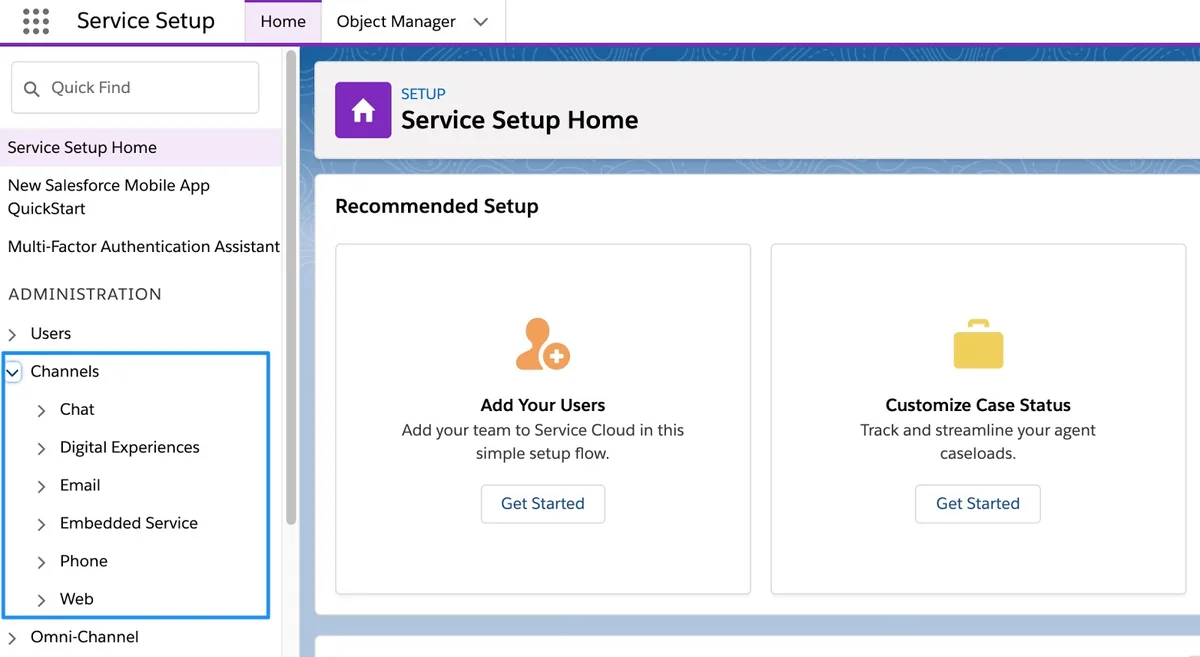
A salesforce case starts through a channel: email, phone, web form, chat, messaging, portal submission, API integration, or agent-created record. Treat the channel as a source of work, not as a process by itself. The process begins after Salesforce has enough data to assign the case, choose the right support process, start any SLA logic, and guide the agent.
Support case Salesforce intake options
A support case Salesforce implementation normally uses more than one intake path. Phone agents may create cases manually. Email-to-Case can convert inbound email into cases and keep email replies in the case thread. Experience Cloud can expose case creation to customers or partners. APIs can create cases from products, billing systems, monitoring tools, or mobile apps.
Use the Origin field for the broad channel, then add controlled custom fields for product, issue type, severity, region, entitlement type, and data source. Do not overload Origin with values like “Mobile App Password Reset P1.” That makes routing rules hard to maintain and reports hard to read.
A support case Salesforce channel should create predictable data. When an email case, web case, and API case for the same issue produce different required fields, agents lose time fixing intake data instead of working the salesforce case.
Assignment rules, queues, and Omni-Channel
Assignment rules set the initial case owner based on criteria such as product, country, record type, language, priority, or customer tier. Queues hold work for a group. Omni-Channel can distribute work to agents based on configured routing, agent capacity, presence status, and service channel setup. Trailhead’s case management unit covers queues, automatic assignment, escalation, and automatic responses for service teams: Enhance Customer Service with Automated Case Management.
In enterprise orgs, keep routing logic in a small number of places. A common failure pattern is this: Email-to-Case sets one owner, a record-triggered flow changes it, an assignment rule changes it again, and Omni-Channel later redistributes it. Choose one owner-setting layer for each intake path and document the exception rules.
How should the case object Salesforce data model be designed?
A clean case object Salesforce design starts with the support process, not with field creation. Define what agents must know at intake, what must be updated during investigation, what proves resolution, and what leadership needs in reports. Then map those needs to standard fields, record types, support processes, validation rules, and page layouts.
Case object Salesforce fields that matter first
For most implementations, focus on fewer fields and better definitions. Use Status for lifecycle, Priority for business urgency, Origin for source channel, Type or a custom issue field for classification, and OwnerId for accountability. Add custom fields only when they drive routing, SLA, agent work, or reporting.
The case object Salesforce field model should be small enough that agents can complete a case while talking to the customer. If a field does not route a salesforce case, prove an SLA, protect data, or improve reporting, make it optional or remove it from the main page.
| Field or feature | Use it for | Implementation warning |
|---|---|---|
| Status | Case lifecycle and open/closed reporting | Map status values to support processes. Avoid values that describe multiple meanings. |
| Priority | Relative urgency for queues and reports | Do not let customer-entered priority become the only routing signal. |
| Origin | Channel analysis | Keep values broad: Email, Phone, Web, Chat, API, Portal. |
| Record Type | Different support processes and layouts | Use it when the lifecycle differs, not for every product or team. |
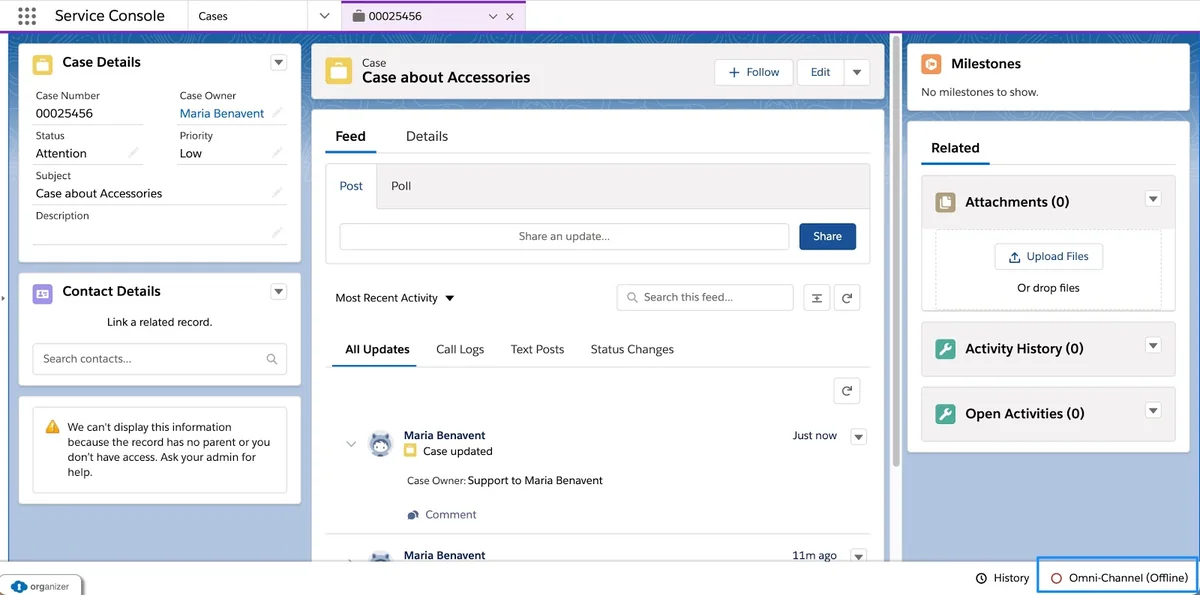
| Entitlement and Milestone records | SLA tracking | Design business hours and pause rules before enabling SLA reports. |
Ownership, sharing, and case teams
A case owner can be a user or a queue. Use queues when work should wait for a group, and assign to a user when one person owns the next action. Sharing must follow your organization-wide defaults, role hierarchy, sharing rules, queues, teams, and manual sharing requirements. If multiple specialists often work on the same case, enable Case Teams so users can add defined collaborators and roles. Salesforce Help explains that case teams help groups of people work together on cases and can be predefined for frequent collaborators: Case Teams.
Do not use Case Teams as a substitute for ownership. A team member can help, but the owner still carries responsibility for the next action, SLA, and queue metrics. For regulated support, also review field-level security for customer data, internal notes, compliance fields, and agent-only fields.
Security review is part of case object Salesforce design, not a final deployment task. Check whether partner users, customer users, integration users, and internal agents should see the same comments, files, emails, and escalation fields on a salesforce case.
How to configure a support case Salesforce process
A support case Salesforce process works best when the admin can explain the lifecycle in one sentence. Example: “New cases enter a triage queue, move to Working when an agent accepts them, move to Waiting on Customer when the customer owes information, and close only when a resolution reason is captured.” That sentence becomes the basis for status values, automation, page layout rules, reports, and SLA design.
Keep the support case Salesforce process separate from sales tasks, onboarding tasks, and project work unless the same team uses the same lifecycle. A salesforce case process should make queues, status, and escalation rules easier to explain.
- Define case types. Separate customer support, partner support, billing support, product defect, and internal helpdesk only when the lifecycle or security differs.
- Create support processes. Limit each process to status values that the team actually uses.
- Create record types only where needed. Tie record type to process, layout, and automation. Do not create record types for every queue.
- Build intake fields. Capture issue type, product, severity, contact, account, and channel before routing where possible.
- Configure assignment. Route to a queue first unless an agent should own the case immediately.
- Add escalation or entitlement logic. Use entitlement milestones when response and resolution times have contractual or internal SLA meaning.
- Design the agent workspace. Use the Lightning Service Console, quick actions, macros, flows, and knowledge components to reduce clicks.
- Test with real paths. Test new email, customer reply, agent reply, closed case reply, duplicate case, high-priority case, and missing data.
When to use entitlements and milestones
Entitlements help determine whether a customer is eligible for support, and milestones represent required time-based support steps such as first response or resolution. Salesforce Help notes that milestones are time-dependent steps in a support process and entitlement processes apply milestones to support records: Set Up and Manage Entitlements and Milestones.
Use milestones when the business cares about elapsed time. Do not add them only because management wants a report. First define business hours, holiday calendars, pause conditions, target times, violation actions, and what counts as first response. A common mistake is measuring only the first reply while ignoring stale follow-up. Add fields such as Next_Step__c and Follow_Up_On__c when agents need a visible promise date.
How can Salesforce Case status updates be automated?
A salesforce case status should change because ownership or next action changed. It should not change only because a field was edited. Good status automation helps agents find cases where the customer replied, prevents forgotten work, and keeps reports honest.
Use Flow for straightforward status updates and Apex only when the rule needs shared logic, bulk handling across related records, or testable branching that becomes hard to maintain in Flow. For example, an incoming email on an open case can move the case from Waiting on Customer to Customer Responded. A customer reply to a closed case may either reopen the same case, create a new case, or send an auto-response depending on your policy.
For every salesforce case status update, record the trigger event, allowed starting statuses, target status, owner change, notification, and reporting effect. This avoids hidden rules where a support case Salesforce flow changes the case after a macro or assignment rule already changed it.
Flow pattern for customer replies
For a declarative pattern, create a record-triggered flow on EmailMessage after save. Check that Incoming is true, ParentId points to a case, and the related case status is one of the values your process allows to move. Update only the related case fields needed for the next action. Do not update the case on every email, because outbound agent replies can create loops or incorrect status changes.
Apex example for bulk-safe email status updates
The example below shows a bulk-safe Apex pattern. Replace the status values with values that exist in your org. Keep this logic small, and cover it with tests for incoming email, outgoing email, no parent case, open case, and closed case. In API v67.0 and later, Salesforce developer documentation directs Apex developers away from WITH SECURITY_ENFORCED and toward user-mode access patterns for security-sensitive queries and DML: Apex Security and Sharing Model.
trigger CaseEmailMessageTrigger on EmailMessage (after insert) {
    CaseEmailMessageHandler.afterInsert(Trigger.new);
}
public inherited sharing class CaseEmailMessageHandler {
private static final String WAITING_ON_CUSTOMER = 'Waiting on Customer';
private static final String CUSTOMER_RESPONDED = 'Customer Responded';
private static final String REOPENED = 'Reopened';
public static void afterInsert(List<EmailMessage> newMessages) {
Set<Id> caseIds = new Set<Id>();
for (EmailMessage messageRecord : newMessages) {
if (messageRecord.Incoming == true
&& messageRecord.ParentId != null
&& messageRecord.ParentId.getSObjectType() == Case.SObjectType) {
caseIds.add(messageRecord.ParentId);
}
}
if (caseIds.isEmpty()) {
return;
}
Map<Id, Case> casesById = new Map<Id, Case>([
SELECT Id, Status, IsClosed
FROM Case
WHERE Id IN :caseIds
]);
List<Case> casesToUpdate = new List<Case>();
for (Case caseRecord : casesById.values()) {
if (caseRecord.IsClosed) {
casesToUpdate.add(new Case(
Id = caseRecord.Id,
Status = REOPENED
));
} else if (caseRecord.Status == WAITING_ON_CUSTOMER) {
casesToUpdate.add(new Case(
Id = caseRecord.Id,
Status = CUSTOMER_RESPONDED
));
}
}
if (!casesToUpdate.isEmpty()) {
update casesToUpdate;
}
}
}This trigger does one SOQL query and one DML statement for the full transaction, so it follows bulkification rules. It also ignores outbound email and non-case email parents. If you expose similar logic through LWC, invocable Apex, or a custom API, use WITH USER_MODE, Security.stripInaccessible, or user-mode DML where appropriate so object permissions and field-level security are enforced.
How should agents work a Salesforce Case in the Service Console?
The Lightning Service Console gives agents workspace tabs, subtabs, highlights, related records, quick actions, utility bar items, macros, and embedded flows. Salesforce Help describes the Service Console as a standard Lightning console app for service needs that admins can customize: Lightning Service Console.
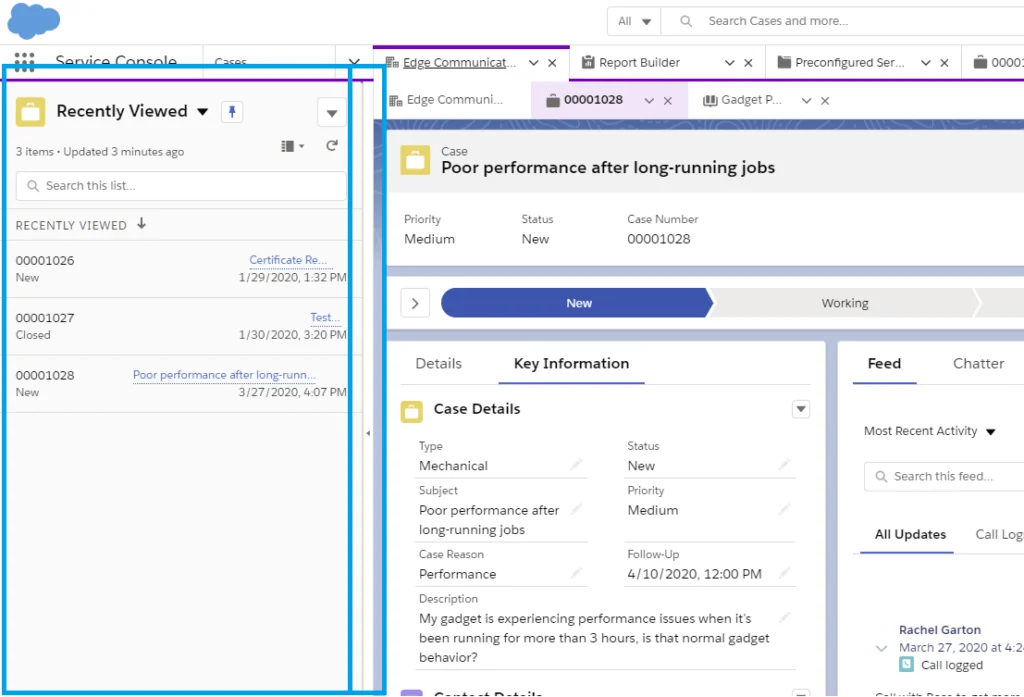
Configure the console around the agent’s next action. Place the case highlights panel, path or status component, email publisher, related contact, account summary, knowledge suggestions, entitlements, and recent activity where agents can use them without scrolling through unused fields. A support case Salesforce page should answer three questions fast: who needs help, what is blocking resolution, and what should happen next?
A salesforce case page that shows every field is not an agent workspace. Group the case object Salesforce fields by intake, investigation, customer communication, SLA, and closure so the agent can work from top to bottom.
Screen flows for repeatable case work
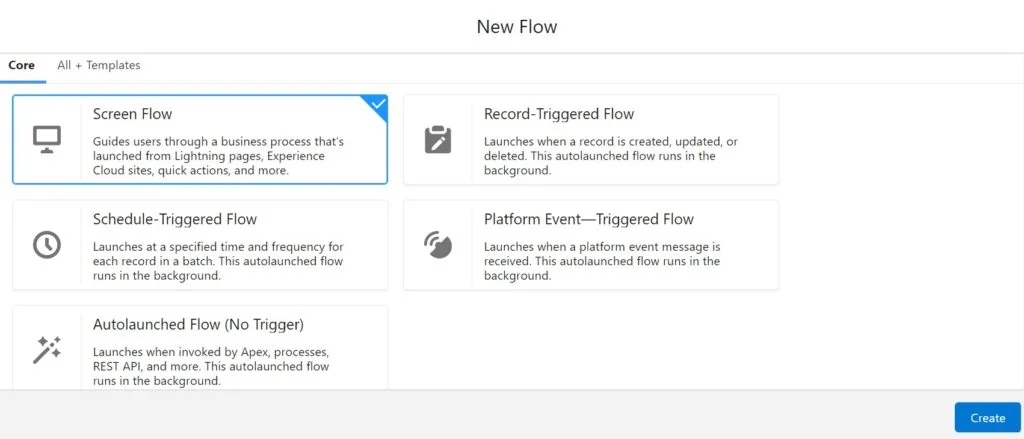
Use screen flows when agents must follow controlled steps: identity verification, refund approval, warranty intake, defect classification, replacement shipment, or escalation review. A flow can collect data, update the case, create related records, and guide the agent through decisions. Keep each screen focused. Do not place a full policy manual in a flow screen.
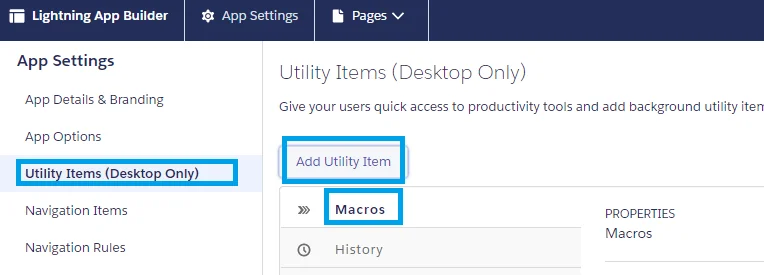
Macros for repeatable case actions
Macros can perform multiple actions for agents, such as filling an email subject and updating case status. Salesforce Help documents macros as a way to automate repetitive tasks: Automate Repetitive Tasks with Macros. Use macros for predictable steps such as sending a standard troubleshooting message, closing a case with a resolution template, escalating to a tier-two queue, or attaching a knowledge article.
How does Email-to-Case affect support case Salesforce design?
Email-to-Case can create cases from inbound email and associate email messages with case conversations. Salesforce Help provides setup guidance for configuring Email-to-Case settings and routing addresses: Set Up Email-to-Case. For many teams, this is the first intake path for a salesforce case, so design it carefully before adding more automation.
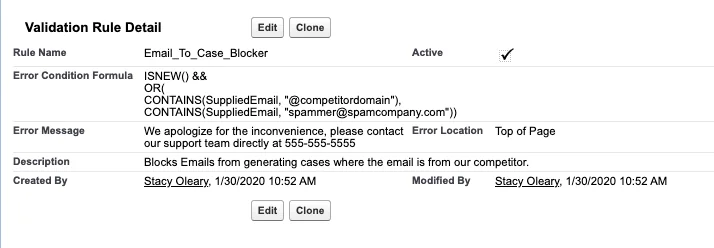
Use dedicated routing addresses such as support, billing, renewals, or priority support only when each address drives a different process. If every address ends in the same queue and same status, one address plus classification fields may be easier to maintain. Review auto-replies, out-of-office loops, spam filtering, threading, attachments, and customer identity rules before enabling the channel for production volume.
For support case Salesforce email intake, test the first email, customer reply, agent reply, forwarded thread, attachment, bounced email, and out-of-office response. These tests show whether the salesforce case thread stays intact before customers depend on it.
Closed case replies: reopen, create new, or respond?
Choose a closed-case reply policy before launch. Reopening the same case preserves context and can reduce customer friction, but it can complicate SLA reporting. Creating a new case gives clean SLA tracking, but it can split one issue across multiple records. Sending an auto-response can work for low-risk channels, but it can frustrate customers when the original issue was not resolved. The right answer depends on entitlement rules, reporting needs, and how often customers reply after closure.
How should Salesforce Case priority, duplicates, and reporting be handled?
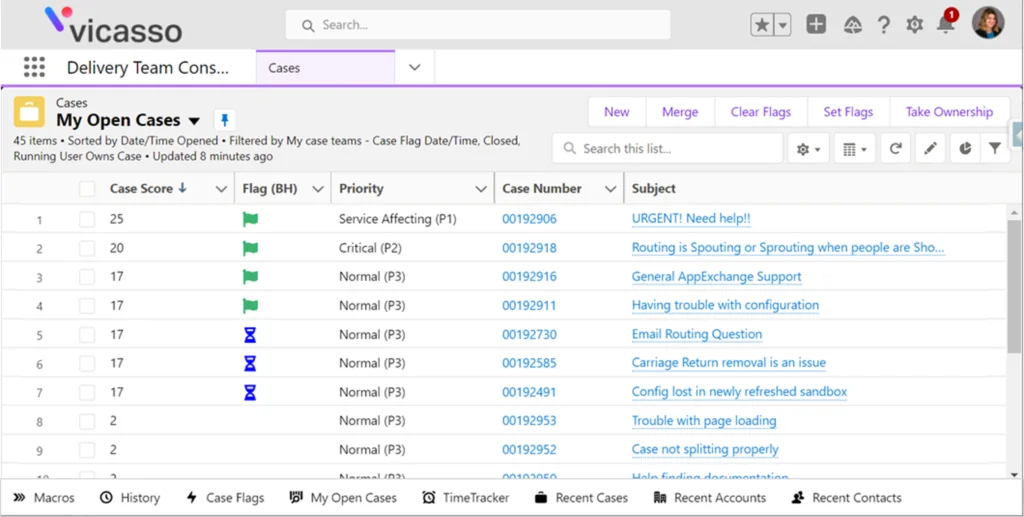
A salesforce case priority model should combine customer impact, account tier, entitlement, product area, issue type, age, and risk. Customer-entered priority can help, but it should not be the only signal. In production, add a calculated score only when agents and managers understand the formula and reports explain why a case appears at the top of a queue.
Priority scoring example
Start simple. A support case Salesforce score can add points for production outage, premium entitlement, high-value account, security issue, open milestone violation, or age over a threshold. Store the formula in a field description or admin runbook. If you use Flow, keep the scoring logic in one autolaunched flow or one formula field so future changes do not drift across record types.
The scoring field belongs in the case object Salesforce reporting model. Agents need to know why a salesforce case is ranked above another case, and managers need to see whether the score matches real service risk.
Example case priority score:
+40 = Production system unavailable
+25 = Premium support entitlement
+20 = Security or data loss risk
+10 = Case age is greater than 24 business hours
-15 = Waiting on customer

Queue sort order:
Priority Score DESC, Follow-Up On ASC, Created Date ASC
Duplicate case handling
Duplicate cases appear when customers contact support through multiple channels, forward a thread to another address, or several internal users create records for the same incident. Use duplicate rules, agent training, clear email threading, and list views that expose related open cases for the same account or contact.
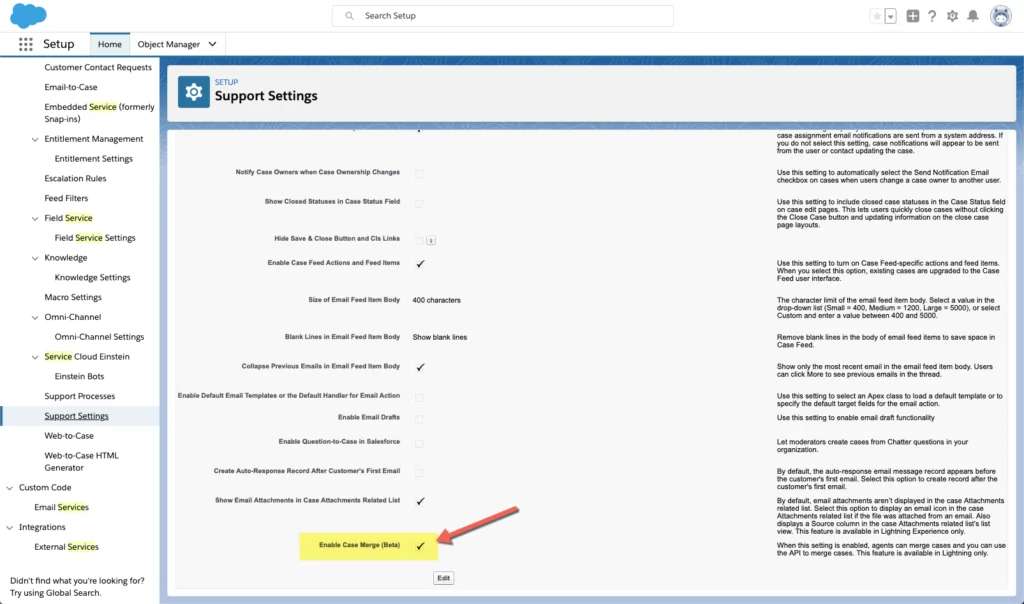
Before enabling merge behavior or building a custom merge process, test related data. Check email messages, case comments, attachments, tasks, entitlements, milestones, case teams, and custom child objects. A bad merge process can make reports look cleaner while losing the operational trail agents need.
Duplicate cleanup is part of support case Salesforce governance. Define who can merge, which salesforce case becomes the master record, and how the case object Salesforce related lists behave after the merge.
Reports that leadership will actually use
Start with reports that drive decisions: new cases by channel, backlog by queue, first response milestone breaches, average age by status, reopen rate, duplicate rate, cases closed by reason, and cases waiting on customer. Add dashboards only after the team agrees on definitions. For example, “closed” can mean final resolution, duplicate closure, auto-closed stale case, or spam. Those should not all mean the same thing in executive reporting.
Best practices for Salesforce Case deployment and maintenance
A salesforce case implementation touches admins, developers, support managers, agents, customers, and integration owners. Treat it as an operating model, not only a Salesforce configuration task.
- Keep status values tied to next action. Agents should know who owns the next step by reading the status.
- Bulk-test automation. Import 200 cases, insert 200 email messages, and verify flows and triggers stay within governor limits.
- Use user-mode access for user-facing Apex. For controllers, APIs, and invocable actions called by users, enforce sharing, object permissions, and field-level security.
- Do not split routing logic across tools without a reason. Decide where assignment rules, Flow, Omni-Channel, and Apex each own a part of routing.
- Document closed-case behavior. Agents, customers, and reporting owners must understand what happens after a customer replies to a closed record.
- Report on stale cases. Add follow-up fields and list views so waiting work does not disappear behind a good first response metric.
- Use sandboxes and release testing. Test Email-to-Case, flows, triggers, queues, console actions, macros, and milestones before deploying to production.
Use the same terms in admin documentation, release notes, and training for every salesforce case change. Call the record a salesforce case, call the data model the case object Salesforce configuration, and call customer-facing intake the support case Salesforce process. This shared language helps admins, developers, and support managers discuss the same salesforce case behavior without mixing up routing, fields, and agent work.
During backlog reviews, separate salesforce case issues from case object Salesforce configuration defects and support case Salesforce operating-process gaps. That separation keeps technical fixes, field changes, and team training in the right workstream. The final release checklist should name the case object Salesforce owner and the support case Salesforce process owner so field changes and operating changes do not get approved by the wrong team.
Release checklist for a Salesforce Case build
| Checklist item | What to verify |
|---|---|
| salesforce case creation | Every channel creates the expected record type, owner, origin, required fields, and case object Salesforce defaults. |
| salesforce case status | Status changes only when the next action changes. |
| case object Salesforce security | Profiles, permission sets, sharing, and field-level security match support roles. |
| case object Salesforce reporting | Reports use consistent definitions for open, closed, reopened, duplicate, and stale work. |
| support case Salesforce routing | Email, web, phone, portal, and API cases reach the correct queue. |
| support case Salesforce closure | Resolution reason, customer communication, and closed-case reply behavior are tested. |
| salesforce case automation | Flows, macros, assignment rules, and Apex do not update the same field in conflict. |
Run this checklist in a full sandbox with sample data before production deployment. A salesforce case process that passes only happy-path tests will fail when customers reply through a different channel, submit duplicates, or send incomplete information.
For related implementation topics, see Service Cloud setup and architecture, Omni-Channel routing in Salesforce, Salesforce Flow automation patterns, and Salesforce API integration patterns.
Frequently Asked Questions
What is a salesforce case?
A salesforce case is a standard record used to track a support request, customer issue, internal service request, or other work item that needs ownership and resolution. It stores status, priority, subject, description, account, contact, owner, channel, and related activity such as emails and comments.
What is the case object Salesforce admins configure?
The case object Salesforce admins configure is the standard Case object. Admins usually configure fields, record types, support processes, page layouts, dynamic forms, assignment rules, queues, escalation rules, validation rules, and related lists for emails, comments, teams, milestones, and activities.
How is a support case Salesforce record created?
A support case Salesforce record can be created manually by an agent, by Email-to-Case, by Web-to-Case, through Experience Cloud, through chat or messaging, or through the Salesforce API. The intake channel should set enough data for routing, reporting, and entitlement evaluation.
Should customer replies reopen closed cases?
Customer replies should reopen closed cases only if your reporting and entitlement design can handle that lifecycle. Some orgs reopen the same salesforce case to preserve context. Other orgs create a new case so SLA tracking starts cleanly. Decide the policy before enabling Email-to-Case automation.
What is the difference between case status and priority?
Status describes the lifecycle or next action, such as New, Working, Waiting on Customer, Escalated, or Closed. Priority describes urgency or impact. A high-priority case can still be Waiting on Customer, and a low-priority case can still be Working.
When should I use Case Teams?
Use Case Teams when multiple people often collaborate on the same salesforce case and need defined roles or visibility. Do not use a team as a replacement for a single accountable owner. The owner should still represent the person or queue responsible for the next action.
Can Apex update Case records safely?
Yes, Apex can update Case records safely when the code is bulkified, tested, and designed around governor limits. For user-facing code, enforce sharing, object permissions, and field-level security. For trigger automation, avoid SOQL or DML inside loops and test with bulk case and email data.