Field level security in Salesforce controls whether users can view, edit, or access specific fields on objects based on their profile or permission set. This security layer operates independently of page layouts and affects field access across the entire platform including API calls, reports, list views, and related lists.
Unlike page layouts that only control field visibility on record detail and edit pages, field level security provides comprehensive data protection. When you remove a field from a page layout, users can still access that field data through reports, API calls, or other platform features. Field level security prevents all access to restricted fields.
How Field Level Security Works in Salesforce
Field level security operates at the profile and permission set level. Each field has three possible access levels:
- Visible: Users can view and edit the field (if they have object-level edit permissions)
- Read Only: Users can view the field but cannot edit it
- No Access: Users cannot view or edit the field anywhere in the platform
This security model integrates with Salesforce’s broader security framework including object-level permissions, sharing rules, and organization-wide defaults.
Configuring Field Level Security Step-by-Step
Follow these steps to configure field level security for any object in your Salesforce org:
- Navigate to Setup → Security → Field Accessibility
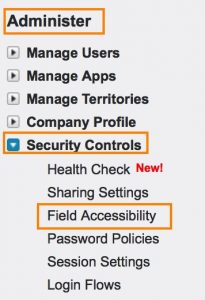
- Select the object whose field security you want to modify from the object list
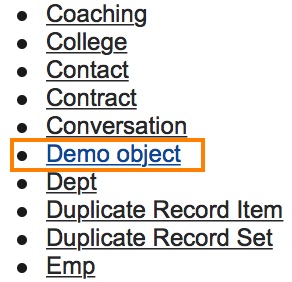
The interface displays all standard and custom objects in your organization. Choose the specific object containing the fields you need to secure.
- Choose your view preference:
- View by Field: Configure security for one field across all profiles
- View by Profile: Configure security for multiple fields within a single profile
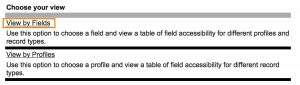
- Select the field from the dropdown menu and click the edit link under “Field Accessibility”
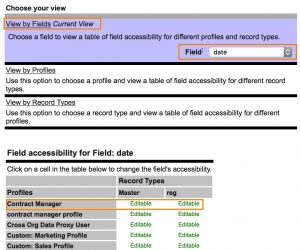
- Configure the field access level for each profile:
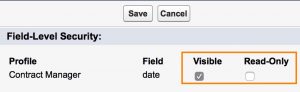
- Visible: Grants full read and edit access to the field
- Read Only: Allows viewing but prevents editing
- Leave unchecked for no access
- Click Save to apply the field level security settings
Verifying Field Level Security Settings
To verify your field level security configuration:
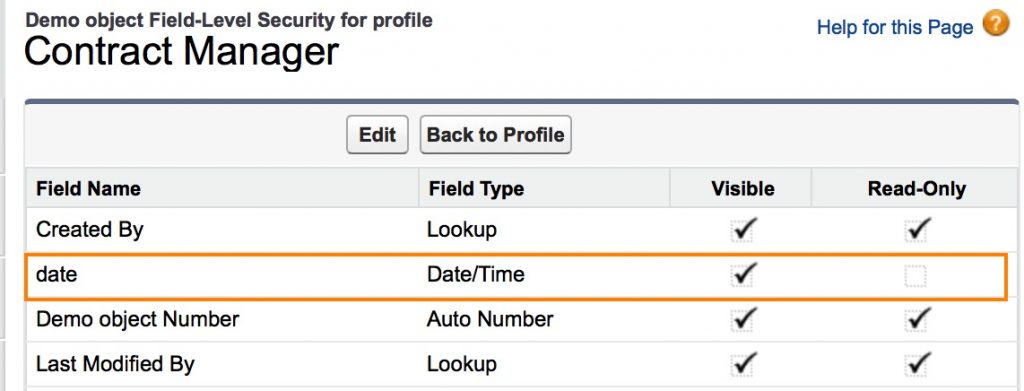
- Navigate to Setup → Users → Profiles
- Select the target profile (e.g., Contract Manager)
- Scroll to Custom Object Permissions or Standard Object Permissions
- Click View next to the object name
- Review the field-level security settings in the permissions matrix
Field Level Security Best Practices
Implement these best practices when configuring field level security:
Security-First Approach
- Start with minimal access and grant permissions as needed
- Use permission sets to grant additional access rather than modifying profiles
- Document field security decisions for compliance audits
Performance Considerations
- Field level security does not impact query performance
- Restricted fields are filtered at the platform level, not in SOQL queries
- Use selective queries with indexed fields for optimal performance
Testing and Validation
- Test field access with different user profiles before deployment
- Verify field security in reports, list views, and API responses
- Use “Login As” functionality to validate user experience
Common Field Level Security Scenarios
Sensitive Data Protection
For fields containing sensitive information like Social Security numbers or salary data:
- Remove access for most profiles
- Grant read-only access to managers
- Provide full access only to HR and payroll administrators
Compliance Requirements
When regulatory compliance requires data access controls:
- Document field security justifications
- Implement regular access reviews
- Use permission sets for temporary access grants
Integration Considerations
For fields used in integrations:
- Ensure integration users have appropriate field access
- Test API responses with restricted field access
- Consider using dedicated integration profiles
Field Level Security vs Other Security Controls
| Security Control | Scope | Use Case |
|---|---|---|
| Field Level Security | Individual fields | Sensitive data protection |
| Page Layouts | UI visibility only | User experience optimization |
| Record Types | Field availability by record type | Business process control |
| Validation Rules | Data quality enforcement | Business rule compliance |
Troubleshooting Field Level Security Issues
Field Not Visible Despite Page Layout
If a field appears on the page layout but users cannot see it:
- Check field level security settings for the user’s profile
- Verify permission set assignments
- Confirm object-level read permissions
API Access Denied
When API calls fail to retrieve field data:
- Verify the integration user’s profile has field access
- Check if field level security applies to the API user
- Review SOQL query field references
Frequently Asked Questions
What is field level security in Salesforce?
Field level security in Salesforce controls whether users can view, edit, or access specific fields based on their profile or permission set. It provides comprehensive data protection across the entire platform including UI, API, reports, and integrations.
How does field level security differ from page layouts?
Page layouts only control field visibility on record detail and edit pages. Field level security prevents access to fields across all platform features including API calls, reports, list views, and related lists. Users can still access field data through other means if only page layouts restrict visibility.
Can field level security be applied to standard fields?
Yes, field level security can be applied to most standard fields in Salesforce. However, some system fields like Id, CreatedDate, and LastModifiedDate cannot be restricted as they are required for platform functionality.
How do I test field level security settings?
Test field level security by using the “Login As” feature to impersonate users with different profiles. Verify field access in record detail pages, reports, list views, and API responses. Create test records and attempt to view/edit restricted fields.
Does field level security affect Salesforce integration patterns?
Yes, field level security applies to integration users and API calls. If an integration user’s profile lacks access to specific fields, API queries will not return that field data. Ensure integration profiles have appropriate field permissions for your integration patterns.
What are common Salesforce admin interview questions about field level security?
Common interview questions include: How does field level security differ from page layouts? When would you use read-only vs no access? How do you troubleshoot field visibility issues? How does field level security affect reports and API access? What are best practices for sensitive data protection?