Choosing between Apex and Flow determines your approach to Salesforce automation and customization. Flow offers declarative “clicks not code” development for admins, while Apex provides programmatic control for complex business logic. This guide compares both tools with practical examples, performance considerations, and integration patterns to help you make the right choice for your Salesforce development needs.
Understanding when to use declarative tools like Flow versus programmatic solutions like Apex is essential for effective Salesforce development. Each tool serves distinct use cases, and combining them strategically creates robust, maintainable solutions that scale with your organization’s needs.
What is Salesforce Flow?
Salesforce Flow is a declarative automation tool that enables business process automation through a visual, drag-and-drop interface. Flow Builder allows admins and business users to create complex workflows without writing code, making it accessible to non-technical team members.
Flow Types and Capabilities
- Screen Flows: Guide users through multi-step processes with custom UI components
- Autolaunched Flows: Execute automatically via Process Builder, workflow rules, or Apex
- Record-Triggered Flows: Replace Process Builder for record-based automation (available from Spring ’20)
- Platform Event-Triggered Flows: Respond to platform events for real-time integration
- Scheduled Flows: Run on time-based schedules for batch processing
Flow Performance Considerations
Flow execution is subject to specific governor limits:
- Maximum 2,000 elements per flow
- 50 DML operations per transaction
- 100 SOQL queries per transaction
- Interview limit of 200 active interviews per user
For high-volume scenarios, consider bulkification patterns or Apex alternatives.
What is Apex in Salesforce Development?
Apex is Salesforce’s proprietary, strongly-typed programming language that runs on the Salesforce Platform. Apex provides complete control over business logic, data manipulation, and system integrations, making it essential for complex customizations that exceed declarative tool capabilities.
Apex Development Features
- Object-Oriented Programming: Classes, interfaces, inheritance, and polymorphism
- Database Operations: Direct SOQL/SOSL queries and DML operations
- Integration Capabilities: REST/SOAP callouts, platform events, and external services
- Asynchronous Processing: Future methods, Queueable, Batch, and Schedulable interfaces
- Testing Framework: Built-in test classes with 75% minimum code coverage requirement
Apex Governor Limits
Apex execution operates within strict governor limits to ensure platform stability:
- 100 SOQL queries per synchronous transaction (200 for asynchronous)
- 50,000 records returned by SOQL queries
- 150 DML statements per transaction
- 10,000 records processed by DML operations
- 6MB heap size limit (12MB for asynchronous)
Understanding these limits is crucial for writing efficient, scalable Apex code.
Apex vs Flow: Technical Comparison
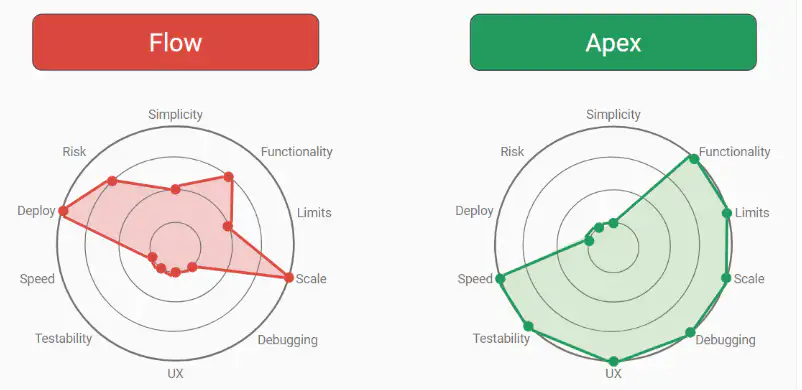
The choice between Apex and Flow depends on complexity, performance requirements, and team expertise. Here’s a detailed comparison:
| Aspect | Salesforce Flow | Apex |
|---|---|---|
| Development Approach | Declarative (clicks not code) | Programmatic (code-based) |
| Skill Requirements | Admin-level, no coding required | Developer expertise in OOP concepts |
| Complexity Handling | Simple to moderate business logic | Complex algorithms and integrations |
| Performance | Optimized for standard use cases | Fine-tuned control over execution |
| Testing | Manual testing through Flow Builder | Automated test classes (75% coverage required) |
| Version Control | Limited versioning capabilities | Full source control integration |
| Debugging | Flow debug logs and runtime inspection | Developer Console, VS Code, debug logs |
| Maintenance | Visual updates, admin-friendly | Requires developer for modifications |
Salesforce Integration Patterns: Flow vs Apex
Integration requirements often determine the choice between Flow and Apex. Each tool supports different integration patterns:
Flow Integration Capabilities
- External Services: Call REST APIs through declarative configuration
- Platform Events: Publish and subscribe to events for real-time integration
- Apex Actions: Invoke custom Apex methods from Flow for complex operations
- Data Cloud Integration: Connect to external data sources via Data Cloud connectors
Apex Integration Patterns
- REST/SOAP Callouts: Direct HTTP requests with custom headers and authentication
- Batch Integration: Process large datasets using Batch Apex
- Streaming API: Real-time data synchronization with external systems
- Custom REST Services: Expose Salesforce data through custom REST endpoints
For simple API calls with standard authentication, Flow’s External Services suffice. Complex integrations requiring custom error handling, retry logic, or data transformation require Apex.
Practical Use Cases: When to Choose Each Tool
Choose Flow When:
- Creating user-guided processes with screen flows
- Automating standard record updates and field calculations
- Building approval workflows with standard business logic
- Implementing data validation rules beyond formula fields
- Creating simple integration flows with External Services
- Rapid prototyping of business processes
Choose Apex When:
- Complex business logic requiring loops, collections, or algorithms
- High-volume data processing exceeding Flow governor limits
- Custom integration patterns with external systems
- Advanced error handling and transaction control
- Performance-critical operations requiring optimization
- Custom Lightning Web Component backend logic
Hybrid Approach: Combining Flow and Apex
Many enterprise solutions benefit from combining both tools:
// Apex class called from Flow for complex calculations
public class FlowApexHelper {
    @InvocableMethod(label='Calculate Commission' description='Complex commission calculation')
    public static List<CommissionResult> calculateCommission(List<CommissionRequest> requests) {
        List<CommissionResult> results = new List<CommissionResult>();

        for (CommissionRequest request : requests) {
            CommissionResult result = new CommissionResult();
            // Complex calculation logic here
            result.commissionAmount = performComplexCalculation(request);
            results.add(result);
        }

        return results;
    }

    private static Decimal performComplexCalculation(CommissionRequest request) {
        // Implementation details
        return 0.0;
    }

    public class CommissionRequest {
        @InvocableVariable public Decimal salesAmount;
        @InvocableVariable public String productCategory;
        @InvocableVariable public Integer salesRep;
    }

    public class CommissionResult {
        @InvocableVariable public Decimal commissionAmount;
    }
}
Salesforce Admin Interview Questions: Flow vs Apex
Q1: When would you recommend Flow over Apex for a business process?
A: Flow is preferable for processes that require user interaction, standard record operations, and can be maintained by admins. Examples include lead qualification workflows, approval processes, and data collection forms. Flow provides faster development cycles and doesn’t require developer resources for maintenance.
Q2: What are the governor limit differences between Flow and Apex?
A: Flow has specific limits like 2,000 elements per flow and 200 active interviews per user. Apex operates within transaction-based limits: 100 SOQL queries and 150 DML statements per synchronous transaction. Apex provides more granular control over resource consumption and better bulk processing capabilities.
Q3: How do you handle complex business logic that exceeds Flow capabilities?
A: Create an Apex class with @InvocableMethod annotation to handle complex calculations or data processing, then call it from Flow. This hybrid approach maintains Flow’s visual interface while leveraging Apex’s computational power. Ensure proper error handling and bulkification in the Apex code.
Q4: What testing strategies apply to Flow versus Apex?
A: Flow testing relies on manual execution through Flow Builder’s debug feature and runtime inspection. Apex requires comprehensive test classes with minimum 75% code coverage, including positive, negative, and bulk test scenarios. Apex testing is automated and integrates with CI/CD pipelines.
Q5: How do integration patterns differ between Flow and Apex?
A: Flow supports External Services for standard REST API calls and platform events for real-time integration. Apex provides complete control over HTTP requests, custom authentication, error handling, and complex data transformation. Choose Flow for simple integrations, Apex for complex integration patterns requiring custom logic.
Performance and Scalability Considerations
Flow Performance Optimization
- Minimize the number of database operations within loops
- Use Get Records elements efficiently with proper filtering
- Avoid unnecessary screen elements that impact user experience
- Consider bulkification when processing multiple records
- Monitor flow interview limits in high-usage scenarios
Apex Performance Best Practices
- Implement proper bulkification patterns for DML and SOQL operations
- Use selective SOQL queries with indexed fields
- Leverage asynchronous processing for time-intensive operations
- Implement proper exception handling and logging
- Monitor heap size usage in complex calculations
For enterprise-scale implementations, Apex typically provides better performance and resource utilization, especially for batch processing and complex data transformations.
Security Considerations in Flow vs Apex
Flow Security Model
- Runs in system context by default (no sharing rule enforcement)
- User context available through “Run As” settings
- Field-level security respected based on running user permissions
- External Service callouts inherit user session security
Apex Security Implementation
- Choose between “with sharing” and “without sharing” keywords
- Implement CRUD/FLS checks using Security.stripInaccessible()
- Custom permission validation through FeatureManagement class
- Explicit security context control in integration scenarios
Apex provides more granular security control, while Flow offers simpler security management for standard use cases.
Frequently Asked Questions
What is the main difference between Apex and Flow in Salesforce development?
Apex is a programmatic, code-based approach requiring developer skills, while Flow is a declarative, visual tool that allows admins to build automation through clicks, not code. Apex handles complex business logic and integrations, while Flow excels at standard processes and user-guided workflows.
When should I use Flow instead of Apex for Salesforce automation?
Use Flow for screen-based user processes, standard record updates, approval workflows, and simple integrations. Flow is ideal when you need rapid development, admin-maintainable solutions, and don’t require complex algorithms or high-volume data processing.
Can Apex and Flow work together in the same solution?
Yes, Apex and Flow complement each other effectively. Use @InvocableMethod in Apex classes to create custom actions callable from Flow. This hybrid approach combines Flow’s visual interface with Apex’s computational power for complex business logic.
What are the performance differences between Apex and Flow?
Apex provides better performance for complex calculations, bulk data processing, and resource-intensive operations. Flow performs well for standard use cases but has specific governor limits like 2,000 elements per flow and 200 active interviews per user that may impact high-volume scenarios.
Which tool is better for Salesforce integration patterns?
Apex excels at complex integration patterns requiring custom authentication, error handling, and data transformation. Flow’s External Services work well for simple REST API calls with standard authentication. Choose based on integration complexity and customization requirements.
How do testing approaches differ between Flow and Apex?
Flow testing relies on manual execution through Flow Builder’s debug feature and runtime inspection. Apex requires automated test classes with minimum 75% code coverage, including comprehensive test scenarios for positive, negative, and bulk operations.
Conclusion
The choice between Apex and Flow in Salesforce development depends on your specific requirements, team expertise, and long-term maintenance considerations. Flow provides rapid development and admin-friendly maintenance for standard business processes, while Apex delivers the flexibility and performance needed for complex customizations and integrations.
Successful Salesforce implementations often combine both tools strategically: Flow for user-facing processes and standard automation, Apex for complex business logic and system integrations. Understanding each tool’s strengths and limitations ensures you build scalable, maintainable solutions that grow with your organization’s needs.
Consider your team’s technical capabilities, performance requirements, and maintenance resources when making this decision. Both tools have their place in modern Salesforce development, and mastering when to use each one is key to successful platform implementations.