Salesforce Marketing Cloud (SFMC) is a comprehensive digital marketing automation platform that enables organizations to create, manage, and optimize customer journeys across email, SMS, social media, mobile apps, and web channels. Originally acquired from ExactTarget in 2013, SFMC has evolved into a sophisticated ecosystem of marketing tools that integrate with Salesforce CRM to deliver personalized customer experiences at scale.
This guide covers everything you need to know about SFMC, from core functionality to advanced features, helping Salesforce professionals understand when and how to implement Marketing Cloud solutions effectively.
What is Salesforce Marketing Cloud?
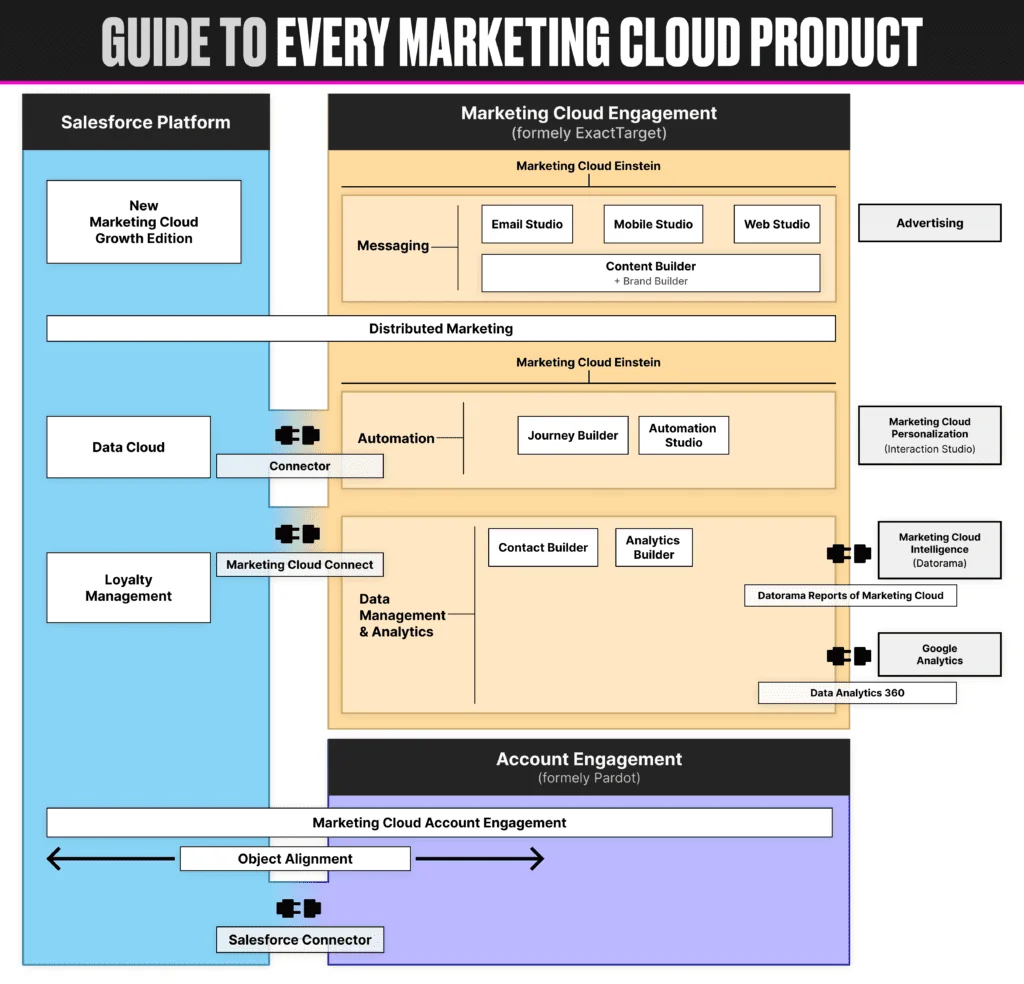
Salesforce Marketing Cloud is a cloud-based marketing automation platform designed for B2C marketers who need to manage high-volume, multi-channel campaigns. Unlike Salesforce’s core CRM platform, SFMC operates as a separate system that connects to your Salesforce org through Marketing Cloud Connect.
Key capabilities include:
- Email marketing with advanced personalization and A/B testing
- SMS and MMS messaging through MobileConnect
- Push notifications and in-app messaging via MobilePush
- Journey automation with visual workflow builders
- Data management and segmentation tools
- Cross-channel campaign orchestration
- Real-time personalization and AI-powered optimization
SFMC Meaning and Architecture
SFMC meaning refers to “Salesforce Marketing Cloud,” but understanding its architecture is crucial for implementation success. The platform organizes functionality into two main categories:
Marketing Cloud Studios
Studios focus on channel-specific content creation and campaign management:
- Email Studio: Design, test, and send email campaigns using drag-and-drop editors or HTML coding
- Mobile Studio: Manage SMS campaigns (MobileConnect) and push notifications (MobilePush)
- Web Studio: Create landing pages, microsites, and web forms through CloudPages
- Advertising Studio: Sync CRM data with advertising platforms for lookalike audience targeting
- Automation Studio: Build data processing workflows including imports, exports, and SQL queries
Marketing Cloud Builders
Builders handle data management, automation logic, and cross-channel orchestration:
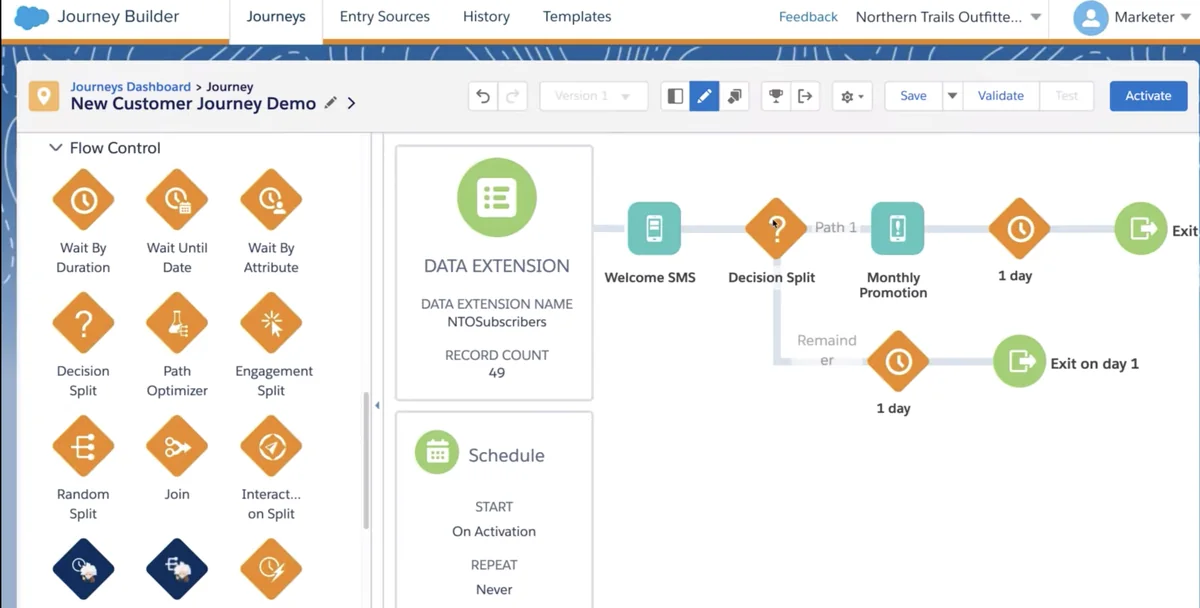
- Journey Builder: Visual campaign automation tool for creating multi-step customer journeys
- Contact Builder: Centralized contact data management with attribute groups and populations
- Content Builder: Reusable content blocks and templates for emails and landing pages
- Analytics Builder: Reporting and analytics dashboards for campaign performance
Marketing Cloud ExactTarget Legacy
The marketing cloud exacttarget connection is important for understanding SFMC’s current capabilities. ExactTarget was a leading email service provider that Salesforce acquired in 2013 for $2.5 billion. This acquisition brought:
- Mature email marketing infrastructure capable of handling billions of sends
- Advanced deliverability and reputation management tools
- Sophisticated segmentation and personalization engines
- Enterprise-grade security and compliance features
Today’s SFMC retains ExactTarget’s email marketing DNA while expanding into omnichannel marketing automation. The platform still uses ExactTarget’s AMPscript scripting language for dynamic content and advanced personalization.
Core Marketing Cloud Features
Email Marketing Capabilities
Email Studio provides comprehensive email marketing tools:
- Content Builder Integration: Drag-and-drop email builder with reusable content blocks
- AMPscript Support: Server-side scripting for dynamic content and personalization
- A/B Testing: Subject line, content, and send time optimization
- Deliverability Tools: Spam testing, reputation monitoring, and inbox placement tracking
- Send Classifications: Manage sender profiles, delivery profiles, and CAN-SPAM compliance
Journey Automation
Journey Builder enables sophisticated marketing automation:
- Visual Workflow Design: Drag-and-drop interface for building customer journeys
- Decision Splits: Route contacts based on demographics, behavior, or engagement
- Wait Activities: Time-based delays and engagement-based holds
- Multi-Channel Activities: Email, SMS, push notifications, and data updates in single journeys
- Einstein AI Integration: Send time optimization and engagement scoring
Data Management
Contact Builder and Automation Studio handle data operations:
- Data Extensions: Relational database tables for storing contact attributes and behavioral data
- Import Activities: Automated file imports from FTP, SFTP, or API sources
- SQL Query Activities: Custom data processing using SQL syntax
- Filter Activities: Segment contacts based on multiple criteria
- Data Extract Activities: Export data for external systems or reporting
Marketing Cloud Connect Integration
Marketing Cloud Connect synchronizes data between Salesforce CRM and SFMC:
Synchronized Objects
- Contacts: Person Accounts or Contacts sync as Subscribers in SFMC
- Leads: Lead records sync for nurture campaigns
- Campaigns: Salesforce Campaigns link to SFMC sends for ROI tracking
- Custom Objects: Product data, order history, and custom attributes
Integration Benefits
- Unified customer view across sales and marketing
- Automated lead scoring and qualification
- Closed-loop reporting from email engagement to revenue
- Trigger-based campaigns from CRM events
Advanced Marketing Cloud Technologies
Einstein AI Features
Marketing Cloud Einstein adds AI capabilities:
- Send Time Optimization: AI determines optimal send times per subscriber
- Engagement Scoring: Predictive scoring for email engagement likelihood
- Content Selection: Automated content recommendations based on subscriber behavior
- Copy Insights: AI analysis of email content performance factors
Personalization and CDP
- Marketing Cloud Personalization: Real-time website personalization based on visitor behavior
- Customer Data Platform: Unified customer profiles from multiple data sources
- Audience Studio: Data management platform for advertising audience creation
Implementation Best Practices
Data Architecture Planning
Successful SFMC implementations require careful data modeling:
- Design data extensions with proper primary keys and relationships
- Implement data retention policies to manage storage costs
- Plan for data synchronization frequency and volume
- Consider GDPR and privacy compliance requirements
Deliverability Management
Maintain high email deliverability through:
- Proper sender authentication (SPF, DKIM, DMARC)
- List hygiene and suppression management
- Engagement-based sending strategies
- IP warming for dedicated IP addresses
Performance Optimization
- Use SQL Query Activities instead of Filter Activities for large datasets
- Implement data extension indexing for faster queries
- Optimize AMPscript code for send performance
- Monitor API call limits and usage patterns
Marketing Cloud vs Other Salesforce Products
Marketing Cloud vs Sales Cloud
- Sales Cloud: Focuses on lead-to-opportunity management and sales process automation
- Marketing Cloud: Handles marketing campaign execution and customer journey automation
- Integration: Both platforms work together through Marketing Cloud Connect for complete customer lifecycle management
Marketing Cloud vs Account Engagement (Pardot)
- Account Engagement: B2B marketing automation with lead nurturing and scoring
- Marketing Cloud: B2C marketing automation with high-volume email and multi-channel campaigns
- Use Cases: Account Engagement for complex B2B sales cycles, Marketing Cloud for transactional B2C communications
Frequently Asked Questions
What does SFMC stand for in Salesforce?
SFMC stands for Salesforce Marketing Cloud. It’s the commonly used abbreviation for Salesforce’s digital marketing automation platform that handles email, SMS, social media, and multi-channel campaign management.
Is Salesforce Marketing Cloud built on the Salesforce platform?
No, Salesforce Marketing Cloud runs on separate infrastructure from the core Salesforce platform. It was originally ExactTarget before Salesforce acquired it in 2013. The two systems integrate through Marketing Cloud Connect, which synchronizes data bidirectionally between platforms.
What are Marketing Cloud Studios used for?
Marketing Cloud Studios are channel-specific tools for content creation and campaign management. Email Studio handles email campaigns, Mobile Studio manages SMS and push notifications, Web Studio creates landing pages, and Automation Studio builds data processing workflows.
How much does Salesforce Marketing Cloud cost?
Marketing Cloud pricing varies by edition and contact volume. Basic editions start around $1,250/month for up to 10,000 contacts, while Enterprise editions can cost $3,750+/month. Additional features like Einstein AI, Audience Studio, and premium support add to the base cost. Contact Salesforce for current pricing based on your specific requirements.
Can Marketing Cloud integrate with other CRM systems besides Salesforce?
While Marketing Cloud integrates most seamlessly with Salesforce CRM through Marketing Cloud Connect, it can connect to other systems through APIs, FTP imports, and third-party integration tools. However, you’ll lose some native functionality like synchronized objects and real-time data sharing that comes with Salesforce CRM integration.
What’s the difference between Journey Builder and Automation Studio?
Journey Builder focuses on customer-facing marketing automation with visual workflows for email, SMS, and multi-channel campaigns. Automation Studio handles backend data processing tasks like file imports, SQL queries, and data exports. Journey Builder uses activities created in Automation Studio but serves different purposes in the marketing workflow.