Audience: Salesforce admins, platform developers, integration architects, and enterprise teams planning ERP integration.
Salesforce SAP integration connects front-office CRM data with ERP data such as customers, orders, products, prices, credit status, invoices, deliveries, and payments. A good design does not copy every SAP table into Salesforce; it chooses which data should be replicated, which data should be read in real time, and which system owns each business process.
In enterprise orgs, the hard part is rarely the first API call. The hard part is agreeing on data ownership, handling SAP identifiers, avoiding duplicate customer records, respecting Salesforce limits, and giving users the SAP information they need inside Account, Opportunity, Case, Order, or custom Lightning pages.
What is Salesforce SAP integration?
Salesforce SAP integration is the controlled exchange of data and process events between Salesforce and SAP ECC or SAP S/4HANA. Salesforce usually owns sales, service, marketing, partner, and customer interaction data. SAP usually owns finance, logistics, inventory, procurement, billing, material master, and order fulfillment data.
The integration should make each system better at its job. Sales reps should not open SAP GUI to check invoice status. Finance users should not search Salesforce to confirm whether a sold-to account is active. A well-designed integration gives each team the right view while keeping the system of record clear.
| Business process | Common Salesforce record | Common SAP source | Recommended pattern |
|---|---|---|---|
| Customer master alignment | Account | Business Partner or customer master | Replicate selected fields with an SAP customer number stored in Salesforce |
| Product catalog and price books | Product2, Pricebook2, PricebookEntry | Material master and pricing conditions | Replicate active products; calculate complex prices in SAP or middleware |
| Quote or order creation | Opportunity, Quote, Order | Sales order APIs or integration layer | Send a validated payload from Salesforce, then store the SAP document number |
| Invoice visibility | Account related component or custom object | Billing documents | Read in real time when volume is high or values change often |
| Inventory availability | Opportunity line, order line, service request | ATP or inventory service | Real-time request with timeout handling and user feedback |
For Salesforce platform basics, see Salesforce integration patterns, Salesforce REST API examples, and Salesforce platform events.
Salesforce SAP Integration Architecture Patterns
Most projects use one of four patterns. The right choice depends on latency, transaction volume, SAP interface availability, security, licensing, and support ownership. Do not choose a pattern only because it is easy to demo.

Integrating Salesforce With SAP through middleware
Integrating Salesforce with SAP through middleware is the most common enterprise pattern because the middleware can translate protocols, transform payloads, retry failed messages, store logs, and expose a Salesforce-friendly API. This is useful when SAP exposes BAPIs, RFC-enabled functions, IDocs, SOAP services, OData services, or custom APIs that should not be called directly from Salesforce.
A middleware layer can also protect Salesforce from SAP changes. For example, an Apex class can call /orders on the middleware, while the middleware decides whether that request goes to SAP S/4HANA OData, an RFC adapter, a queue, or a staging database. This design reduces the amount of SAP-specific logic inside Apex and Lightning Web Components.
SAP integration with Salesforce by direct API callouts
SAP integration with Salesforce can use direct Apex HTTP callouts when SAP or an API gateway exposes a secure HTTPS endpoint that accepts REST or SOAP. Direct callouts work well for narrow use cases, such as reading invoice summaries or checking an order status. Salesforce Help documents Named Credentials and External Credentials for authenticated callouts, and Salesforce recommends using them instead of storing endpoints or secrets in code.
Use direct callouts only when the contract is stable, the response time is acceptable, and the failure path is clear. Apex callouts have transaction limits, so a trigger that loops through records and calls SAP one record at a time will fail under load. Bulk work belongs in Queueable Apex, Batch Apex, Platform Events, or middleware.
SAP SFDC integration with events and queues
SAP SFDC integration often needs asynchronous messaging. Order submission, customer master updates, product replication, and delivery notifications should not depend on a user waiting on a screen. Salesforce Pub/Sub API supports publishing and subscribing to platform events and Change Data Capture events, which makes it a better fit than polling for many event-driven scenarios.
Use events when Salesforce or SAP needs to react to a change without blocking the original transaction. For example, a Salesforce order can publish an event after validation. Middleware subscribes, creates or updates the SAP sales order, then publishes a result event that updates the Salesforce Order with the SAP document number and processing status.
How to connect Salesforce to SAP with Salesforce Connect
Some teams ask whether they can connect Salesforce to SAP without copying records. Salesforce Connect can expose external objects when the external data source is available through a supported adapter such as OData. This can be a fit for read-heavy reference data, but it still needs security design, indexing awareness, and realistic performance tests.
External objects behave differently from standard and custom objects. You should check reporting, search, relationship, formula, and Apex requirements before promising a Salesforce Connect solution to business users. Salesforce documentation states that external objects are used with Salesforce Connect and map to external data, commonly through OData producers.
When to use a hybrid architecture
A hybrid design is usually the safest design. Replicate stable master data that users filter and report on. Read volatile or high-volume data from SAP in real time. Use events for business process updates where eventual consistency is acceptable.
| Data category | Better as Salesforce data | Better as real-time SAP data | Why it matters |
|---|---|---|---|
| Customers | Active sold-to, bill-to, ship-to attributes required by sales and service | Rarely used finance-only attributes | Users need customer context in Salesforce, but not every SAP field |
| Products | Active product catalog and selling attributes | Detailed plant-level availability | Product search should be local; ATP should remain accurate |
| Prices | Simple list prices and price book entries | Account-specific pricing, discounts, taxes, and freight | SAP pricing logic can be difficult to reproduce correctly |
| Invoices | Summary snapshots for analytics, if required | Invoice lists, document details, and payment status | Billing values can change and can be too large to store fully in Salesforce |
What SAP data should Salesforce store?
Start with the user task, not with the SAP table list. Watch how users quote, sell, approve, fulfill, and support customers. Then document which SAP values they need inside Salesforce, how often those values change, and what happens if the value is stale.
In enterprise orgs, an integration design workshop should produce at least four documents: object ownership, field mapping, interface contracts, and error handling rules. These documents prevent arguments later when a field exists in both systems but has different business meaning.
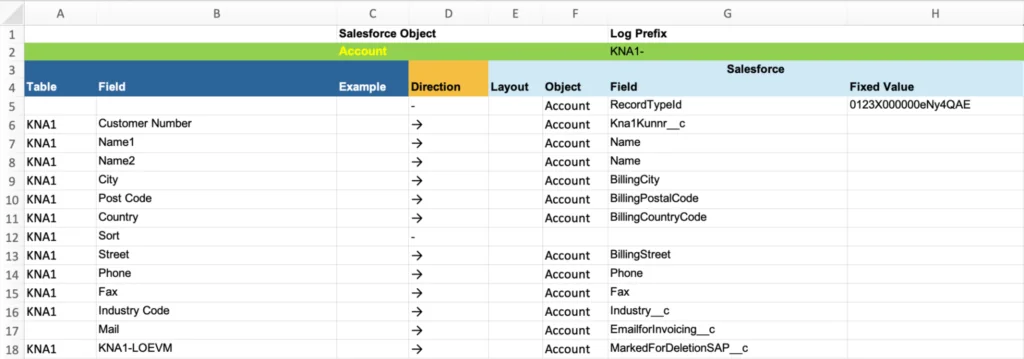
Data ownership rules
Every integrated field needs one owning system. If Account.Name is mastered in SAP, users should not freely edit it in Salesforce unless the edit starts an approved change process. If the sales region is assigned in Salesforce, SAP should not overwrite it during nightly synchronization.
Use a simple ownership matrix:
- System of record: Salesforce, SAP, or a third-party master data system.
- Direction: SAP to Salesforce, Salesforce to SAP, or bidirectional with conflict rules.
- Timing: real time, near real time, scheduled batch, or manual sync.
- Data quality rule: required fields, valid values, length, format, and duplicate logic.
- Error owner: Salesforce admin, SAP functional consultant, middleware team, or business operations.
Identifier strategy
Never match Salesforce and SAP records by name alone. Store SAP keys in Salesforce fields such as SAP_Customer_Number__c, SAP_Material_Number__c, or SAP_Sales_Order_Number__c. Mark fields as unique or external ID where appropriate, and decide how leading zeros, company codes, sales areas, and partner functions affect uniqueness.
For record upsert operations into Salesforce, use an external ID field and a bulk-safe process. For reporting and SOQL, keep key fields indexed where possible and avoid filters that require scanning large data volumes. For SOQL syntax refreshers, see Salesforce SOQL query examples.
Filtering SAP data before it reaches Salesforce
Do not replicate inactive customers, blocked materials, old invoices, or plant-level data unless a user story needs it. Filters should be explicit. For example, replicate only active customers in selected sales organizations, active products in selected divisions, and invoices from the last 24 months unless legal or service requirements say otherwise.
Filtering also reduces security risk. A Salesforce user who can view an Account should not automatically gain access to all SAP financial details for that customer. Design the data scope before building the interface.
How to implement Salesforce SAP integration for invoices
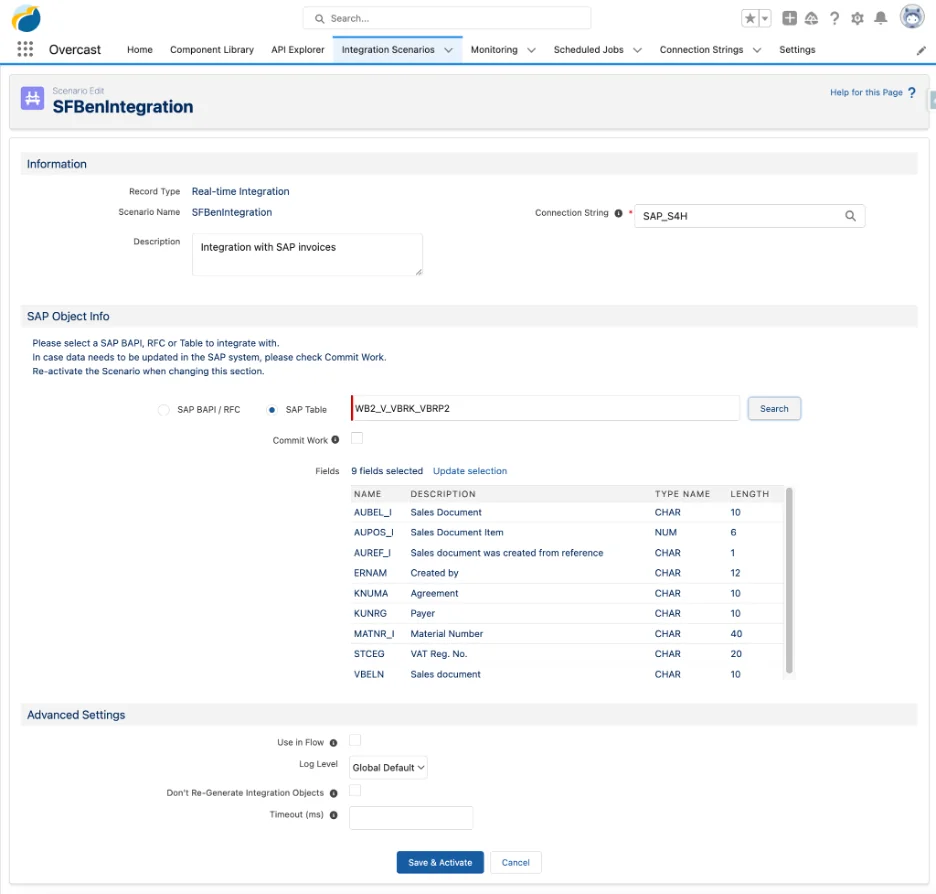
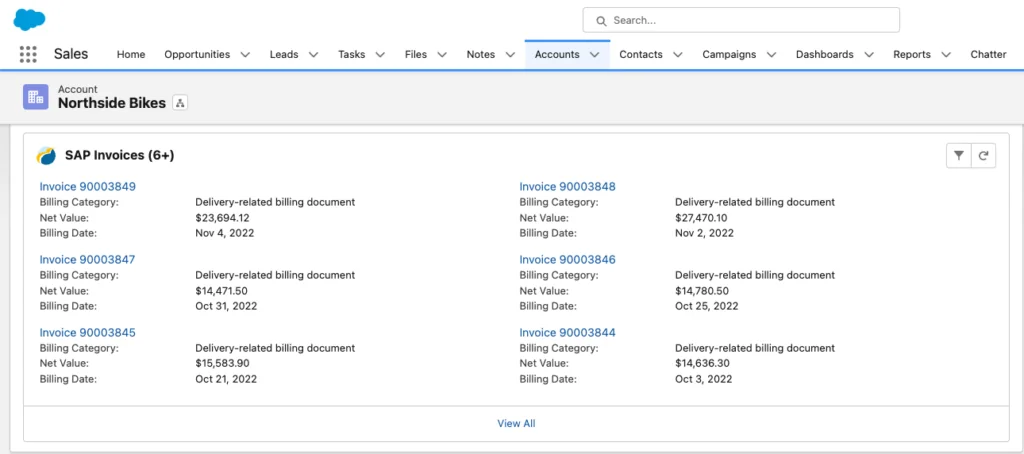
This example shows a practical pattern: display SAP invoice summaries on the Salesforce Account page without storing every invoice in Salesforce. The Account stores the SAP customer number. A Lightning component calls Apex. Apex uses a Named Credential to call a middleware or SAP Gateway endpoint. The response is shown to the user.
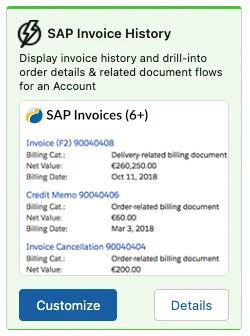
Step 1: Define the integration scenario
Write the scenario as a business contract before writing Apex.
- Name: Read SAP invoice summaries for Salesforce Account.
- Trigger: User opens the Account invoice component or clicks refresh.
- Input: Salesforce Account Id and mapped SAP customer number.
- Output: Invoice number, billing date, billing category, currency, and net value.
- Latency target: Return fast enough for an interactive page; otherwise show an async status.
- Failure behavior: Show a user-safe message and log the technical response for support.
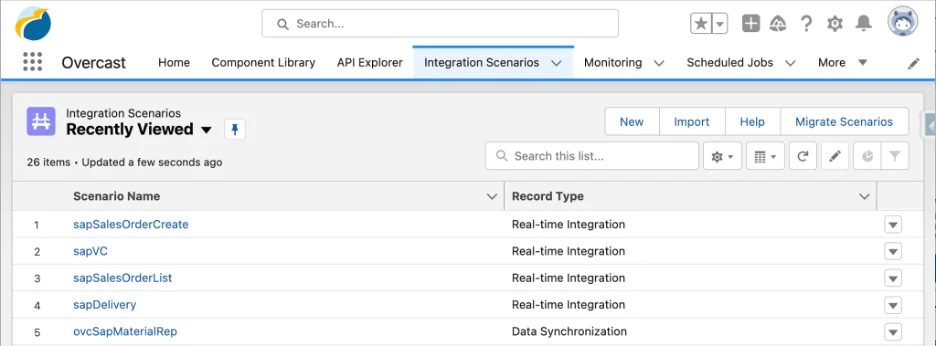
Step 2: Create the Named Credential
Create an External Credential and Named Credential for the SAP endpoint or middleware endpoint. Salesforce Help describes Named Credentials as a way to define the endpoint URL and authentication for outbound callouts. Use per-user authentication only if SAP authorization must follow the Salesforce user. Use named principal authentication for shared technical-user access where business policy allows it.
Recommended setup checklist:
- Create the authentication method in Setup > Named Credentials.
- Use HTTPS and avoid secrets in Apex, Custom Metadata, Custom Settings, or LWC code.
- Grant access to the external credential principal through permission sets.
- Set short, realistic timeout values for interactive screens.
- Log correlation IDs so the Salesforce, middleware, and SAP teams can trace the same request.
Official reference: Create Named Credentials and External Credentials.
Step 3: Build a read-only Apex service
The following Apex example assumes an Account field named SAP_Customer_Number__c and a Named Credential named SAP_GATEWAY. The endpoint shown is intentionally a neutral integration endpoint. In production, let middleware or SAP Gateway expose the contract and version it.
public with sharing class SapInvoiceService {
    public class InvoiceSummary {
        @AuraEnabled public String invoiceNumber;
        @AuraEnabled public String billingCategory;
        @AuraEnabled public Decimal netValue;
        @AuraEnabled public String currencyIsoCode;
        @AuraEnabled public Date billingDate;
    }

    private class InvoiceEnvelope {
        public List<InvoiceSummary> invoices;
    }

    @AuraEnabled
    public static List<InvoiceSummary> getInvoices(Id accountId) {
        if (accountId == null) {
            throw new AuraHandledException('Account Id is required.');
        }

        Account accountRecord = [
            SELECT Id, SAP_Customer_Number__c
            FROM Account
            WHERE Id = :accountId
            WITH USER_MODE
            LIMIT 1
        ];

        if (String.isBlank(accountRecord.SAP_Customer_Number__c)) {
            return new List<InvoiceSummary>();
        }

        String customerNumber = EncodingUtil.urlEncode(
            accountRecord.SAP_Customer_Number__c,
            'UTF-8'
        );

        HttpRequest request = new HttpRequest();
        request.setEndpoint('callout:SAP_GATEWAY/invoices?customer=' + customerNumber);
        request.setMethod('GET');
        request.setHeader('Accept', 'application/json');
        request.setTimeout(20000);

        HttpResponse response = new Http().send(request);

        if (response.getStatusCode() == 404) {
            return new List<InvoiceSummary>();
        }

        if (response.getStatusCode() < 200 || response.getStatusCode() >= 300) {
            throw new AuraHandledException(
                'Invoice data is not available right now. Try again later.'
            );
        }

        InvoiceEnvelope parsedResponse = (InvoiceEnvelope) JSON.deserialize(
            response.getBody(),
            InvoiceEnvelope.class
        );

        return parsedResponse == null || parsedResponse.invoices == null
            ? new List<InvoiceSummary>()
            : parsedResponse.invoices;
    }
}
Governor limit note: Salesforce documents a maximum of 100 callouts in a single Apex transaction. This example makes one callout for one Account page request. Do not place callouts inside a loop over records. For bulk synchronization, use Queueable Apex, Batch Apex, Platform Events, or middleware.
Security note: The query uses WITH USER_MODE so object and field permissions are enforced for the running user in supported API versions. For code that must modify records after a callout, also validate CRUD/FLS on writes and consider Security.stripInaccessible() for payloads mapped into sObjects.
Step 4: Test callouts with HttpCalloutMock
Apex tests cannot call a live SAP endpoint. Use HttpCalloutMock to test success, empty, and error responses. Also test Accounts without SAP customer numbers.
@IsTest
private class SapInvoiceServiceTest {
    private class InvoiceMock implements HttpCalloutMock {
        public HTTPResponse respond(HTTPRequest request) {
            System.assertEquals('GET', request.getMethod());
            System.assert(request.getEndpoint().contains('callout:SAP_GATEWAY/invoices'));

            HttpResponse response = new HttpResponse();
            response.setStatusCode(200);
            response.setHeader('Content-Type', 'application/json');
            response.setBody(
                '{"invoices":[{"invoiceNumber":"90003489","billingCategory":"Delivery-related billing document","netValue":23964.12,"currencyIsoCode":"USD","billingDate":"2026-05-15"}]}'
            );
            return response;
        }
    }

    @IsTest
    static void returnsInvoiceSummaries() {
        Account testAccount = new Account(
            Name = 'Integration Test Account',
            SAP_Customer_Number__c = '0000100042'
        );
        insert testAccount;

        Test.setMock(HttpCalloutMock.class, new InvoiceMock());

        Test.startTest();
        List<SapInvoiceService.InvoiceSummary> invoices =
            SapInvoiceService.getInvoices(testAccount.Id);
        Test.stopTest();

        System.assertEquals(1, invoices.size());
        System.assertEquals('90003489', invoices[0].invoiceNumber);
    }
}
Salesforce requires at least 75% Apex code coverage for deployment, but coverage alone is not a test strategy. For Salesforce SAP integration, test timeout behavior, invalid payloads, missing identifiers, duplicate keys, partial failures, retry logic, and permission boundaries.
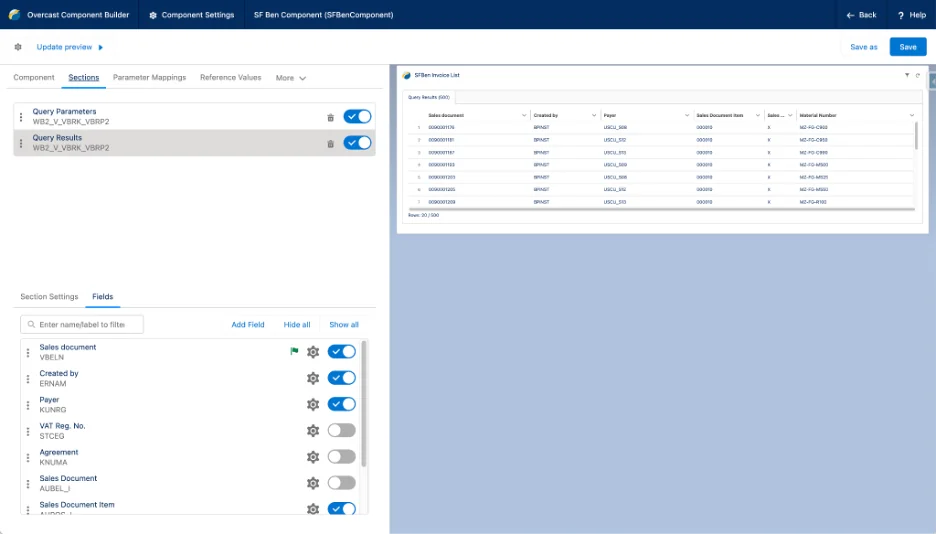
Step 5: Configure and preview the UI
The UI should not expose SAP technical errors. Show users a clear message such as “Invoice data is not available right now,” and write the detailed response to a secure log object or monitoring system. If the same Account page includes several SAP components, avoid multiple independent callouts that compete for the same transaction and page load time.
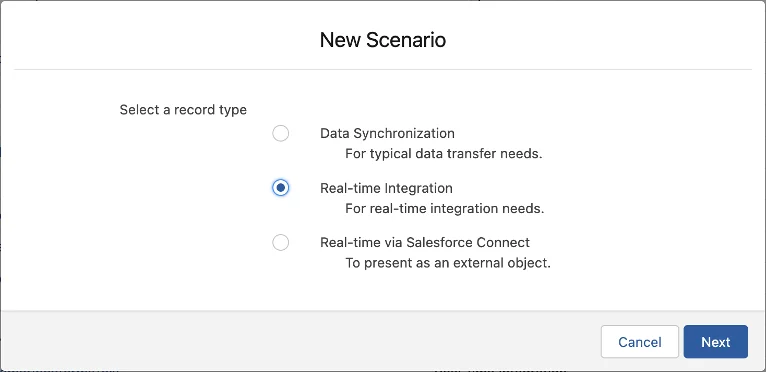
Best practices for Salesforce SAP integration security and limits
Security design must cover Salesforce users, integration users, middleware credentials, SAP authorization, field visibility, network paths, and logs. A secure endpoint is not enough if the response contains fields that the Salesforce user should not see.
Authentication and secret handling
Use Named Credentials and External Credentials for outbound Salesforce callouts. They keep endpoint and authentication configuration out of Apex and make permission assignment clearer. For inbound calls from SAP to Salesforce, use OAuth flows that match the integration pattern and assign the least privileges through permission sets.
Do not store SAP usernames, passwords, API keys, or OAuth tokens in Custom Metadata, Custom Settings, labels, LWC JavaScript, or Apex constants. Those values become hard to rotate and hard to audit.
CRUD, FLS, sharing, and SAP authorization
Apex runs in system context unless you explicitly enforce permissions. Use with sharing for row-level sharing where appropriate. Use WITH USER_MODE, user-mode DML, describe checks, or Security.stripInaccessible() to enforce object and field permissions depending on your API version and use case.
Salesforce permission does not replace SAP authorization. If SAP finance data is sensitive, decide whether the integration uses a shared SAP technical user with server-side filtering or per-user SAP authorization. The answer affects audit trails, caching, support, and licensing.
Governor limits and transaction design
Salesforce limits protect multitenant resources. Apex callouts, heap size, CPU time, SOQL queries, DML statements, queueable jobs, and API requests all matter in an integration. The Salesforce Platform API Trailhead module explains the main API choices: REST, SOAP, Bulk API, and Pub/Sub API.
Follow these rules:
- Do not call SAP once per record inside a trigger loop.
- Batch records into one request when the target API supports it.
- Use Bulk API 2.0 for large Salesforce data loads and exports.
- Use Pub/Sub API, Platform Events, or Change Data Capture for event-driven synchronization.
- Use idempotency keys so retries do not create duplicate SAP documents.
- Record request and response metadata, but do not log secrets or sensitive payloads.
Official references: Apex callout limits, Salesforce Platform API basics, and Pub/Sub API.
How to choose between replication and real-time access
Replication is useful when Salesforce users need filtering, reporting, list views, automation, or offline-friendly access to data. Real-time access is useful when SAP remains the only reliable source for the current value or when copying the data would create storage, security, or freshness problems.
| Question | Choose replication when… | Choose real-time access when… |
|---|---|---|
| Does the user need Salesforce reports? | Yes, users need dashboards, list views, forecasting, or automation. | No, users only need to view the current SAP value. |
| How often does the data change? | The data changes slowly or a short delay is acceptable. | The data changes often and stale data could cause a wrong decision. |
| How much data exists? | The filtered data set is small enough to store and govern in Salesforce. | The data volume is large, historical, or rarely used. |
| Where is the business logic? | The Salesforce copy is a simple field value. | SAP must calculate the result using pricing, taxes, credit, or plant rules. |
A common split is to replicate Account, product, and selected pricing data, then read invoice, delivery, credit, and availability values from SAP when a user asks for them. That gives Salesforce enough local data for selling and service processes without turning Salesforce into an SAP data warehouse.
Common errors with Salesforce SAP integration
The following issues appear often during delivery and support.
No clear system of record
If both systems can update the same customer field, the last sync wins and users lose trust. Fix this by assigning ownership for each field and blocking unsupported edits through page layout, validation rules, Flow, or integration logic.
One callout per record
A trigger that sends one SAP request for each record will fail at scale. Bulkify the design. Combine records into one payload, publish an event, or enqueue one job that processes a set of IDs.
Missing correlation IDs
Support teams need one identifier that appears in Salesforce logs, middleware logs, and SAP logs. Generate a correlation ID per transaction and return it in user-facing support messages when an error occurs.
Uncontrolled bidirectional sync
Bidirectional sync is not two one-way syncs. It needs conflict detection, timestamp rules, source priority, retry behavior, and human review for disputed values.
Ignoring SAP data semantics
SAP terms can hide process meaning. A customer number may be tied to sales area. A material may be active in one plant and blocked in another. An invoice value may depend on cancellation or credit memo rules. Include SAP functional experts in mapping reviews.
Deployment checklist for integrating Salesforce with SAP
Before go-live, run the integration through a checklist that includes platform, SAP, business, and support requirements.
- Confirm data ownership for every field and object.
- Confirm SAP keys, Salesforce external IDs, and duplicate rules.
- Review Named Credential, External Credential, OAuth, certificate, and network settings.
- Run bulk tests with realistic record counts and payload sizes.
- Run negative tests for SAP downtime, timeout, malformed payloads, and authorization failures.
- Check Apex callout, SOQL, CPU, heap, and API usage limits under expected load.
- Validate CRUD, FLS, sharing, and SAP authorization with real user profiles or permission sets.
- Prepare monitoring dashboards, alert thresholds, retry rules, and manual recovery steps.
- Document who owns each failure type: Salesforce, SAP, middleware, network, or business data.
- Train users on what data is real time, what data is synchronized, and what message to expect during outages.
Frequently Asked Questions
What is the best way to connect Salesforce to SAP?
The best way to connect Salesforce to SAP depends on the interface and the business process. Use middleware when SAP protocols, retries, transformations, and monitoring matter. Use direct Apex callouts only for small, stable HTTPS APIs. Use Salesforce Connect for read-only external data where OData and external object behavior fit the requirement.
Should invoices be replicated into Salesforce or read from SAP in real time?
Read invoices from SAP in real time when invoice volume is high, values change often, or users only need invoice visibility from an Account page. Replicate invoice summaries only when Salesforce reporting, automation, or analytics requires local records.
Can Salesforce call SAP BAPIs directly?
Apex callouts use HTTP-based services such as REST and SOAP. SAP BAPIs exposed through RFC normally require an SAP connector, middleware, or an API layer that converts the SAP interface into an HTTPS service Salesforce can call. This is one reason many Salesforce SAP integration projects use middleware.
Which Salesforce API is used for SAP SFDC integration?
SAP SFDC integration can use several Salesforce APIs. REST API and SOAP API work for transactional record operations, Bulk API 2.0 works for large data loads, and Pub/Sub API works for event-driven integration with platform events and Change Data Capture. The correct API depends on volume, latency, and whether the process is synchronous or asynchronous.
How do you secure SAP integration with Salesforce?
Secure SAP integration with Salesforce by using Named Credentials or OAuth-based inbound authentication, least-privilege permission sets, TLS, field-level security checks, SAP-side authorization, and masked logs. Do not store secrets in Apex, Custom Metadata, Custom Settings, or client-side JavaScript.
Summary
Salesforce SAP integration works best when the team designs the process before the interface. Decide which system owns each field, choose replication or real-time access based on user needs, enforce security in both systems, and build for failure. A small proof of concept can prove connectivity, but production success depends on mapping, limits, monitoring, and support ownership.