Lead routing is the Salesforce process that decides who owns a new Lead record after it enters the org. A good routing design assigns the lead to a user or queue fast, respects existing account ownership where needed, and gives Sales Ops a clear way to fix exceptions.
This guide covers Salesforce-native options first: Lead Assignment Rules, Flow, Apex, queues, custom metadata, and reporting. It assumes you already use the Lead object and want an implementation that admins can maintain without hiding the business logic in one trigger.
Lead Routing: what it does before a seller works the lead
Lead routing starts after lead capture and before seller outreach. The input can be Web-to-Lead, an integration, a list import, a manual entry, or a partner submission. The output is usually Lead.OwnerId, but a mature design also records why the lead went to that owner.
Salesforce Help describes assignment rules as the standard way to automate lead and case assignment. For leads, you configure rule entries from Setup and assign records to users or queues. Official reference: Guidelines for Assignment Rules.
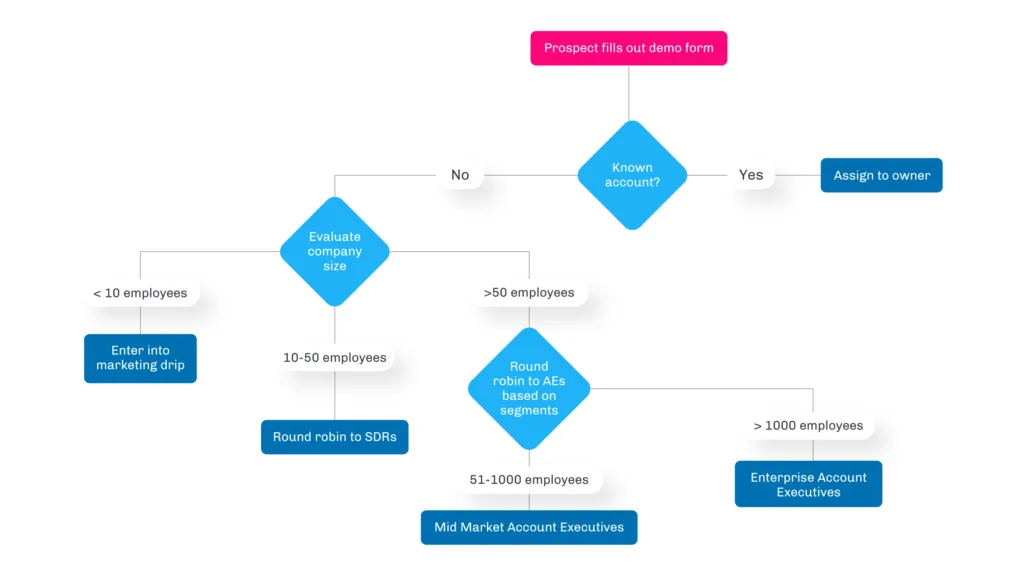
In enterprise orgs, the routing decision should not depend on one field only. A lead from Germany with 8,000 employees, an existing customer domain, and a security product interest should not follow the same path as a student inquiry from a trial form. Use a routing order that handles the most specific ownership rules before general pools.
Recommended routing order
- Reject or quarantine bad records: missing company, blocked domain, test data, or invalid email.
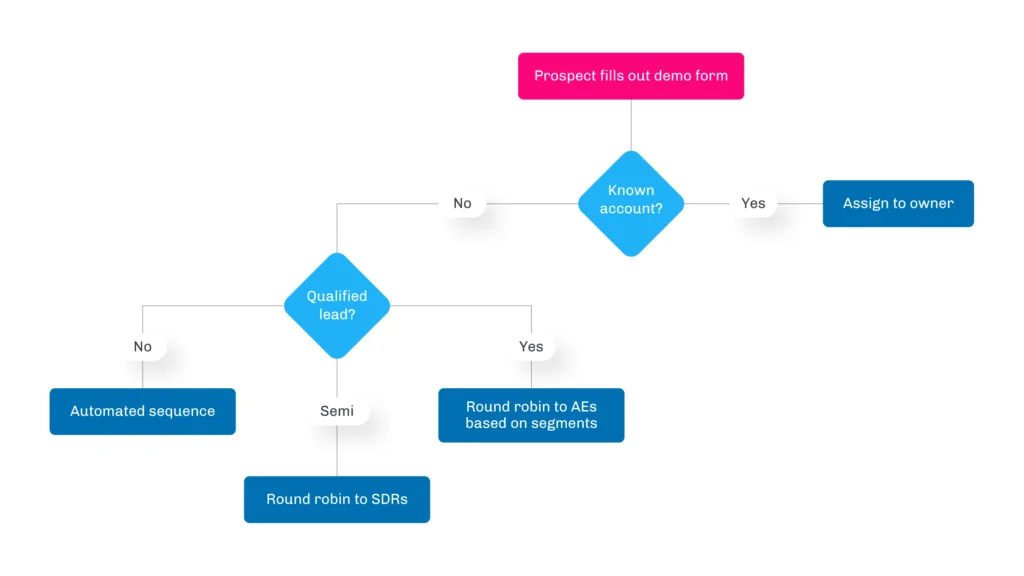
- Respect known ownership: matched account owner, named account owner, partner owner, or open opportunity owner.
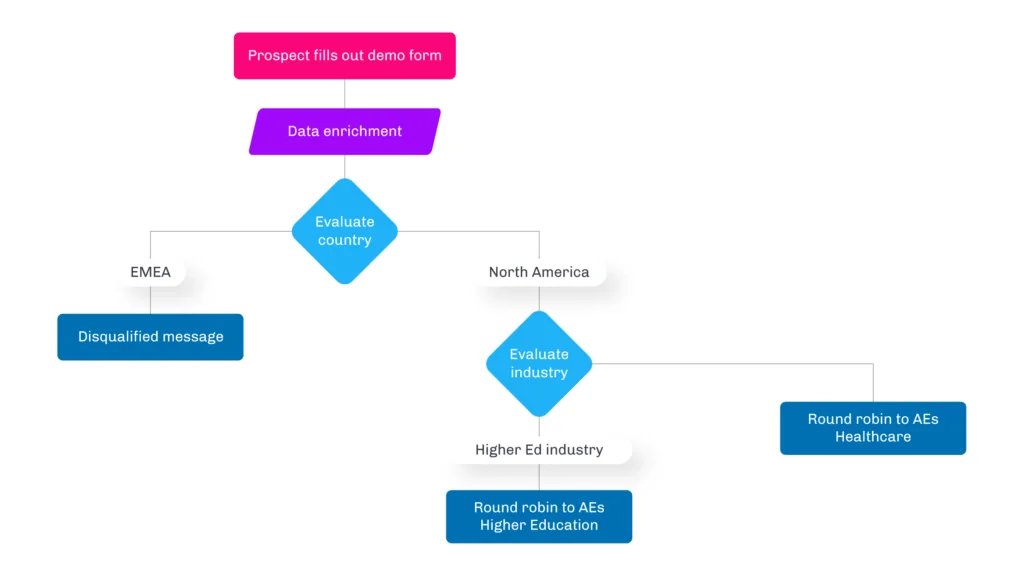
- Apply segmentation: region, country, employee band, product, language, or industry.
- Assign to a seller pool: queue, named user, or round robin group.
- Log the decision: store route reason, matched rule key, and fallback reason.
Salesforce Lead Routing options
Salesforce lead routing can be built with declarative rules, Flow, Apex, or a combination. The right choice depends on how often the rules change, whether you need related-record matching, and how much audit detail Sales Ops needs.
| Routing tool | Use it when | Watch for | Official reference |
|---|---|---|---|
| Lead Assignment Rules | Rules use Lead fields and assign to users or Lead queues. | Only one lead assignment rule is active at a time. Rule entry order matters. | Set Up Assignment Rules |
| Record-triggered Flow | You need data cleanup, owner lookup, notifications, or simple branching before assignment. | Keep the flow bulk-safe. Avoid repeated Get Records inside loops. | Record-Triggered Flows |
| Apex | You need account matching, round robin locking, custom metadata matrices, or reusable logic. | Enforce CRUD/FLS where user context matters and stay inside governor limits. | Apex Governor Limits |
| Integration or REST API | An external marketing platform creates or updates leads and must request assignment processing. | Do not hide routing rules in middleware unless Salesforce users can audit the result. | Setting DML Options |
Salesforce lead routing prerequisites
Before you build Salesforce lead routing, align Sales Ops and Salesforce admins on the fields that drive ownership. At minimum, confirm the source of truth for country, state, product interest, employee count, industry, partner involvement, and account match status.
- Lead queues: create queues for fallback and team-based assignment, and confirm the queue supports the Lead object.
- Active users: do not route directly to inactive users. Add a fallback queue for every rule set.
- Normalized fields: store country, state, industry, and segment in controlled values. Free-text routing fields create exception volume.
- Audit fields: add fields such as
Routing_Status__c,Routing_Rule_Key__c, andRouting_Error__c. - Access model: confirm who can transfer leads and who can edit routing configuration.
For related setup topics, see Lead Source field best practices, Salesforce Flow automation guide, and Salesforce dashboard reporting basics.
Lead routing Salesforce architecture options
The phrase lead routing Salesforce often means more than a single assignment rule. In production, the architecture usually has three layers: data preparation, decision logic, and exception handling. Keep these layers separate so that a sales territory change does not require a developer deployment.
| Layer | Example | Recommended owner |
|---|---|---|
| Data preparation | Set Normalized_Country__c, derive employee segment, parse email domain. |
Admin or RevOps |
| Decision logic | Match route key to owner using assignment rules, Flow decision, or custom metadata. | Sales Ops with admin governance |
| Exception handling | Send unmatched records to a queue and notify SDR managers. | Sales Ops |
How to configure lead routing with Lead Assignment Rules
Lead Assignment Rules are the simplest Salesforce-native entry point for lead routing. Use them for lead routing when the rule can be expressed as field criteria on the Lead record and the result is a user or queue.
- From Setup, enter Lead Assignment Rules in Quick Find.
- Create a rule, give it a name such as Inbound Lead Routing, and mark it active only when ready.
- Add rule entries with a clear sort order, starting with the narrowest rule.
- Set criteria such as country, state, product interest, employee segment, or lead source.
- Assign the matching lead to a user or a Lead queue.
- Add an email template only when the owner or queue should receive an assignment notification.
- Test with records that match each rule and at least one record that should fall through to the default queue.
Keep rule entry names readable. A rule called NA_ENT_SECURITY_001 is easier to audit than a rule called Rule 1. Add the same rule key to a field on the Lead through Flow if you need reporting by routing path.
Assignment rule example matrix
| Sort order | Criteria | Assigned owner | Reason |
|---|---|---|---|
| 10 | Country = United States, Employees >= 1000, Product Interest = Security | Enterprise Security Queue | Large-account specialist team |
| 20 | Country = United States, Employees < 1000 | North America SDR Queue | Regional SDR coverage |
| 30 | Country = Germany, Language = German | DACH SDR Queue | Language and region coverage |
| 999 | All other inbound leads | Lead Triage Queue | Fallback review |
If an integration creates leads through Apex or API and you want Salesforce assignment rules to run, review the Salesforce Developer documentation for Database.DMLOptions and AssignmentRuleHeader. The header can use the default assignment rule or a specific assignment rule Id for Case or Lead records.
Database.DMLOptions options = new Database.DMLOptions();
options.assignmentRuleHeader.useDefaultRule = true;

Lead inboundLead = new Lead(
    LastName = 'Patel',
    Company = 'Nimbus Manufacturing',
    Email = 'maya.patel@example.com',
    LeadSource = 'Website'
);

inboundLead.setOptions(options);
Database.insert(inboundLead, false);
This Apex snippet runs assignment rules during insert. It does not replace validation, duplicate handling, or field normalization. In a bulk import or integration, set DML options once per record and use one DML statement for the list.
How to use Flow and Apex for lead routing
Use Flow for lead routing when admins need to see the logic and the rule set is not too large. Use Apex when the routing logic must compare many records, lock a round robin counter, read custom metadata, or return structured error messages to Flow.
Flow pattern for admin-owned routing
- Create a before-save record-triggered flow for field normalization only.
- Create an after-save record-triggered flow for owner assignment, notifications, and logging.
- Use a Decision element for broad categories such as partner lead, existing account lead, regional lead, or fallback.
- Use one Get Records element per required lookup, outside loops.
- Update the Lead once after the owner and routing status are known.
- Add a fault path that updates
Routing_Status__cand sends an internal alert.
Trailhead’s record-triggered flow module explains the trigger, criteria, and action structure. For routing, that structure keeps the automation reviewable by admins instead of scattering owner changes across several automations.
Apex pattern for custom metadata routing
The following example uses custom metadata for a routing matrix. It is intentionally bulk-safe: one Lead query, one custom metadata query, one User query, one Queue query, and one DML operation. Compile this style of class on a current API version. For Summer ’26 API v67.0 and later, use WITH USER_MODE instead of WITH SECURITY_ENFORCED in Apex SOQL, following the Salesforce SOQL documentation.
Create a custom metadata type named Lead_Routing_Rule__mdt with these fields before using the code.
| Field | Type | Purpose |
|---|---|---|
Priority__c |
Number | Lower number wins first. |
Country__c |
Text | Country value or * for any country. |
State__c |
Text | State value or *. |
Industry__c |
Text | Industry value or *. |
Segment__c |
Text | SMB, Mid-Market, Enterprise, or *. |
OwnerId__c |
Text | 18-character User Id or Lead queue Id. |
Active__c |
Checkbox | Controls whether the rule participates in routing. |
public with sharing class LeadRoutingService {
    public class Request {
        @InvocableVariable(required=true)
        public Id leadId;
    }

    public class Result {
        @InvocableVariable public Id leadId;
        @InvocableVariable public Id ownerId;
        @InvocableVariable public String status;
        @InvocableVariable public String message;

        public Result() {}

        public Result(Id leadId, Id ownerId, String status, String message) {
            this.leadId = leadId;
            this.ownerId = ownerId;
            this.status = status;
            this.message = message;
        }
    }

    @InvocableMethod(label='Route Leads by Metadata')
    public static List<Result> route(List<Request> requests) {
        List<Result> response = new List<Result>();
        if (requests == null || requests.isEmpty()) {
            return response;
        }

        Set<Id> leadIds = new Set<Id>();
        for (Request request : requests) {
            if (request != null && request.leadId != null) {
                leadIds.add(request.leadId);
            }
        }

        if (leadIds.isEmpty()) {
            return response;
        }

        Map<Id, Lead> leadsById = new Map<Id, Lead>([
            SELECT Id, Country, State, Industry, NumberOfEmployees, OwnerId
            FROM Lead
            WHERE Id IN :leadIds
            WITH USER_MODE
        ]);

        List<Lead_Routing_Rule__mdt> rules = [
            SELECT DeveloperName, Priority__c, Country__c, State__c,
                   Industry__c, Segment__c, OwnerId__c, Active__c
            FROM Lead_Routing_Rule__mdt
            WHERE Active__c = true
            ORDER BY Priority__c ASC
        ];

        Set<Id> userOwnerIds = new Set<Id>();
        Set<Id> queueOwnerIds = new Set<Id>();

        for (Lead_Routing_Rule__mdt rule : rules) {
            String ownerText = String.valueOf(rule.OwnerId__c).trim();
            if (String.isBlank(ownerText)) {
                continue;
            }

            try {
                Id ownerId = (Id) ownerText;
                if (ownerText.startsWith('005')) {
                    userOwnerIds.add(ownerId);
                } else if (ownerText.startsWith('00G')) {
                    queueOwnerIds.add(ownerId);
                }
            } catch (Exception ignored) {
                // Invalid Id values are handled as routing errors below.
            }
        }

        Map<Id, User> activeUsersById = new Map<Id, User>();
        if (!userOwnerIds.isEmpty()) {
            activeUsersById = new Map<Id, User>([
                SELECT Id
                FROM User
                WHERE Id IN :userOwnerIds AND IsActive = true
                WITH USER_MODE
            ]);
        }

        Set<Id> leadQueueIds = new Set<Id>();
        if (!queueOwnerIds.isEmpty()) {
            for (QueueSobject queueLink : [
                SELECT QueueId
                FROM QueueSobject
                WHERE QueueId IN :queueOwnerIds AND SobjectType = 'Lead'
            ]) {
                leadQueueIds.add(queueLink.QueueId);
            }
        }

        if (!Schema.sObjectType.Lead.isUpdateable()
            || !Schema.sObjectType.Lead.fields.OwnerId.isUpdateable()) {
            throw new SecurityException('Current user cannot update Lead ownership.');
        }

        Map<Id, Result> resultsByLeadId = new Map<Id, Result>();
        List<Lead> updates = new List<Lead>();

        for (Id leadId : leadIds) {
            Lead leadRecord = leadsById.get(leadId);
            if (leadRecord == null) {
                resultsByLeadId.put(
                    leadId,
                    new Result(leadId, null, 'ERROR', 'Lead was not visible to the running user.')
                );
                continue;
            }

            String segment = employeeSegment(leadRecord.NumberOfEmployees);
            Lead_Routing_Rule__mdt matchedRule = firstMatchingRule(rules, leadRecord, segment);

            if (matchedRule == null) {
                resultsByLeadId.put(
                    leadId,
                    new Result(leadId, null, 'NO_MATCH', 'No active routing rule matched this lead.')
                );
                continue;
            }

            Id targetOwnerId;
            try {
                targetOwnerId = (Id) String.valueOf(matchedRule.OwnerId__c).trim();
            } catch (Exception e) {
                resultsByLeadId.put(
                    leadId,
                    new Result(leadId, null, 'ERROR', 'Matched rule has an invalid OwnerId__c value.')
                );
                continue;
            }

            Boolean isActiveUser = activeUsersById.containsKey(targetOwnerId);
            Boolean isLeadQueue = leadQueueIds.contains(targetOwnerId);

            if (!isActiveUser && !isLeadQueue) {
                resultsByLeadId.put(
                    leadId,
                    new Result(leadId, targetOwnerId, 'ERROR', 'Target owner is not an active user or Lead queue.')
                );
                continue;
            }

            updates.add(new Lead(Id = leadId, OwnerId = targetOwnerId));
            resultsByLeadId.put(
                leadId,
                new Result(leadId, targetOwnerId, 'PENDING', 'Matched rule ' + matchedRule.DeveloperName)
            );
        }

        if (!updates.isEmpty()) {
            SObjectAccessDecision decision =
                Security.stripInaccessible(AccessType.UPDATABLE, updates);

            List<SObject> safeRecords = decision.getRecords();
            Database.SaveResult[] saveResults = Database.update(safeRecords, false);

            for (Integer index = 0; index < saveResults.size(); index++) {
                Id leadId = (Id) safeRecords[index].get('Id');
                Result result = resultsByLeadId.get(leadId);

                if (saveResults[index].isSuccess()) {
                    result.status = 'ROUTED';
                    result.message = 'Lead owner updated.';
                } else {
                    result.status = 'ERROR';
                    result.message = saveResults[index].getErrors()[0].getMessage();
                }
            }
        }

        for (Id leadId : leadIds) {
            response.add(resultsByLeadId.get(leadId));
        }

        return response;
    }

    private static Lead_Routing_Rule__mdt firstMatchingRule(
        List<Lead_Routing_Rule__mdt> rules,
        Lead leadRecord,
        String segment
    ) {
        for (Lead_Routing_Rule__mdt rule : rules) {
            if (matches(rule.Country__c, leadRecord.Country)
                && matches(rule.State__c, leadRecord.State)
                && matches(rule.Industry__c, leadRecord.Industry)
                && matches(rule.Segment__c, segment)) {
                return rule;
            }
        }
        return null;
    }

    private static Boolean matches(String ruleValue, String leadValue) {
        if (String.isBlank(ruleValue) || ruleValue == '*') {
            return true;
        }
        return leadValue != null && ruleValue.equalsIgnoreCase(leadValue);
    }

    private static String employeeSegment(Integer employees) {
        if (employees == null || employees <= 0) {
            return 'Unknown';
        }
        if (employees <= 50) {
            return 'SMB';
        }
        if (employees <= 1000) {
            return 'Mid-Market';
        }
        return 'Enterprise';
    }
}
Governor limit notes: the method processes all input leads as one batch. It avoids SOQL and DML inside loops. If you add account-domain matching, query Accounts once by normalized domain rather than querying for each lead. If you add external enrichment, move the callout to Queueable Apex or an asynchronous Flow path and respect Apex callout limits.
Round robin with locking
Round robin routing needs a shared counter. Without locking, two transactions can read the same counter and assign two leads to the same seller. In Apex, use FOR UPDATE when reading the counter record, then update the counter in the same transaction.
Routing_Counter__c counter = [
    SELECT Id, Last_Index__c
    FROM Routing_Counter__c
    WHERE Name = :poolName
    LIMIT 1
    FOR UPDATE
];

Integer nextIndex = Math.mod(Integer.valueOf(counter.Last_Index__c) + 1, activeSellerIds.size());
Id nextOwnerId = activeSellerIds[nextIndex];
counter.Last_Index__c = nextIndex;
update counter;
Use this pattern only after you decide how to exclude unavailable users. Salesforce does not know your sales team’s coverage calendar unless you model it with user fields, custom records, or an integration.
Lead routing seller assignments by industry
Lead routing seller assignments by industry works when your sellers specialize by vertical. It fails when industry data is blank, inconsistent, or too granular. Start with a short industry taxonomy that Sales and Marketing both use.
| Lead Industry | Normalized vertical | Owner target | Fallback |
|---|---|---|---|
| Banking, Financial Services, Insurance | Financial Services | FSI SDR Queue | Enterprise SDR Queue |
| Hospital, Medical Practice, Health Tech | Healthcare | Healthcare SDR Queue | Regional SDR Queue |
| Software, SaaS, IT Services | Technology | Technology SDR Queue | Commercial SDR Queue |
| Blank or Other | Unknown | Lead Triage Queue | Sales Ops Queue |
Do not hard-code every seller name in Flow decisions. Use queues, public groups, custom metadata, or a custom routing object. That lets Sales Ops update lead routing seller assignments by industry without editing and redeploying automation.
Account ownership, matching, and round robin
Before round robin, decide whether existing account ownership should win. If a lead uses a domain that belongs to an existing customer account, many B2B teams route the lead to the account owner or a customer team. Salesforce can help detect duplicates with matching and duplicate rules, but domain-to-account assignment often needs a normalized domain field and custom logic.
Account matching design
- Store
Email_Domain__con Lead andWebsite_Domain__con Account in lowercase. - Exclude personal domains such as gmail.com and outlook.com from ownership matching.
- Prefer exact normalized-domain matching. Avoid broad contains searches in triggers.
- If several accounts match the same domain, route to a review queue unless your business has a clear parent-account rule.
- Log the matched Account Id and the reason for the owner decision.
This is where lead routing Salesforce projects often become data-quality projects. A clean matching key does more for assignment accuracy than a larger automation diagram.
Best practices for lead routing governance
Routing logic changes whenever territories, products, seller capacity, or partner agreements change. Treat it as operational configuration, not a one-time setup.
- Use a default queue. Every lead routing rule set needs a safe destination for unmatched records.
- Separate routing from notification. Owner assignment and email alerts should be easy to test independently.
- Keep one source of truth. Do not split the same lead routing decision across assignment rules, Flow, Apex, and middleware.
- Version the matrix. Add active dates or version fields when Sales Ops changes territories each quarter.
- Report on outcomes. Build lead routing dashboards for routed count, fallback count, average time to owner, and error count.
- Test in bulk. Import at least 200 sample leads in a sandbox to expose lead routing loop, DML, and query problems.
- Check security. Apex that reads fields should use current security patterns such as
WITH USER_MODEfor SOQL andSecurity.stripInaccessiblebefore DML when user permissions must be respected.
For related technical reading, use Apex code examples for Salesforce admins and Salesforce API integration patterns.
Common errors with lead routing and how to fix them
| Error | Likely cause | Fix |
|---|---|---|
| Lead assigned to the wrong region | Country or state values are not normalized before assignment. | Normalize fields before the assignment decision and test common aliases. |
| Lead assigned to an inactive user | Owner Id is hard-coded in Flow, Apex, or custom metadata. | Validate active users before assignment and use a fallback queue. |
| Round robin assigns unevenly | Counter update is not locked or unavailable users remain in the pool. | Use a locked counter record and filter eligible sellers before selection. |
| Existing customer routed to new-business SDR | Account matching runs after the generic routing rule or not at all. | Run account ownership checks before region or round robin rules. |
| Flow fails during import | Get Records, Update Records, or Apex calls run inside a loop. | Bulk-test the flow and move repeated lookups to collection-based logic or Apex. |
Inbound SDR routing error response email template
An inbound sdr routing error response email template should go to the internal team that can fix the record. Do not send routing errors to prospects. Use the template below as an internal alert from Flow, Apex, or an email alert.
Subject: Lead routing error for {!Lead.Company} - {!Lead.Id}

Hi Sales Ops,

Salesforce could not complete lead routing for this inbound lead.

Lead: {!Lead.Name}
Company: {!Lead.Company}
Lead Id: {!Lead.Id}
Lead Source: {!Lead.LeadSource}
Country: {!Lead.Country}
State: {!Lead.State}
Industry: {!Lead.Industry}
Employee Count: {!Lead.NumberOfEmployees}
Matched Rule Key: {!Lead.Routing_Rule_Key__c}
Error: {!Lead.Routing_Error__c}
Current Owner: {!Lead.OwnerId}

Please review the field values, correct the routing data if needed, and assign the lead to the right SDR or queue.

Lead record:
{!Lead.Link}
Keep the subject line searchable. Sales Ops should be able to filter the inbox by “lead routing error” and review lead routing failures during daily triage.
Testing checklist before deployment
- Create sandbox test leads for every route, fallback, and error path.
- Test Web-to-Lead, API insert, manual create, list import, and lead update if each path exists in your org.
- Confirm Lead queues receive records and queue members can accept or transfer them.
- Verify assignment notification emails only go to the intended internal users.
- Run bulk tests with at least 200 leads to check governor limit behavior.
- For Apex, include positive, fallback, invalid owner, inactive user, and bulk tests. Salesforce deployment still requires at least 75% Apex code coverage at org level.
- Confirm dashboard metrics: routed leads, fallback leads, routing errors, and average time from created date to owner assignment.
Official Salesforce references
- Salesforce Help: Guidelines for Assignment Rules
- Salesforce Help: Set Up Assignment Rules
- Salesforce Developer Docs: DmlOptions.AssignmentRuleHeader
- Salesforce Developer Docs: Setting DML Options
- Salesforce SOQL Reference: WITH USER_MODE
- Trailhead: Record-Triggered Flows
Frequently Asked Questions
What is lead routing in Salesforce?
Lead routing is the process that assigns a new or updated Lead record to the right user or queue. In Salesforce, simple routing usually starts with Lead Assignment Rules. Flow and Apex are used when the logic depends on account ownership, round robin pools, custom metadata, territory models, or seller availability.
Should I use Lead Assignment Rules or Flow for salesforce lead routing?
Use Lead Assignment Rules when criteria are stable and based on Lead fields such as country, product interest, or lead source. Use Flow when the rule needs data preparation, related-record lookup, scheduled handling, or notifications. Use Apex when the routing must be bulk-safe across complex matching, locking, or custom metadata.
How do I handle lead routing seller assignments by industry?
Create an industry-to-owner matrix outside hard-coded automation, usually in custom metadata or a custom object. Normalize the Lead Industry value, map it to an active user or Lead queue, and add a fallback owner for blank or unmapped industries.
Can Salesforce route leads by round robin?
Yes, but the design matters. A small org can use the Salesforce round robin assignment pattern described in Help. Enterprise orgs usually need Flow or Apex with a locked counter record so two lead inserts do not pick the same seller at the same time.
What should an inbound SDR routing error response email template include?
An inbound SDR routing error response email template should include the Lead Id, company, routing field values, error reason, fallback owner, and a link to the Lead record. Send it to Sales Ops or the SDR manager, not to the prospect.