Salesforce duplicate rules control what Salesforce does when a new or edited record looks like another record. Matching rules decide whether two records match; duplicate rules decide whether Salesforce should alert, block, allow, or report the save. Use salesforce duplicate rules when duplicate Accounts, Leads, Contacts, or custom object records affect assignment, reporting, automation, or integrations.
In enterprise orgs, duplicate prevention is not only an admin setup task. The team must define what a duplicate means by object, test the rule against real records, decide who can override warnings, and assign a data steward for cleanup. Good salesforce duplicate rules are simple, documented, tested, and reviewed after imports or integration changes.
What are Salesforce Duplicate Rules?
salesforce duplicate rules are part of Salesforce Duplicate Management. Salesforce Help describes a duplicate rule as the setup that determines what happens when a user views a record with duplicates or starts creating a duplicate record. A duplicate rule uses one or more matching rules and then applies create or edit actions.
A matching rule answers: do these records look like the same real-world person, company, or business entity? A duplicate rule answers: what should Salesforce do now? Salesforce provides standard duplicate and matching rules for common objects such as Accounts, Contacts, Leads, and Person Accounts. Admins can also create custom rules when the standard rules do not match the business definition.
Keep salesforce duplicate rules close to the process they protect. A sales team may care about Account name and website. A support team may care about customer number or entitlement ID. A marketing team may care about email, phone, or external subscriber key. Document the purpose of each rule so the next admin understands why it exists.
| Item | Purpose | Example | Setup location |
|---|---|---|---|
| Matching rule | Defines fields and match methods | Email exact match, Account name fuzzy match | Setup > Matching Rules |
| Duplicate rule | Defines action, alert text, compared object, and reporting | Block duplicate Leads on create | Setup > Duplicate Rules |
| Duplicate record set | Groups duplicate findings for review | Potential duplicate Account group | Reports, duplicate jobs, related records |
| Duplicate record item | Stores each record inside a duplicate set | Account or Lead included in a review group | Reports and object queries |
Official references used for this article include Salesforce Help for Duplicate Rules, Salesforce Help for Matching Rules, and Trailhead’s Duplicate Management module.
Salesforce Duplicate Rules vs Matching Rules
salesforce duplicate rules and matching rules are often discussed together, but they are not the same setup item. matching rules salesforce logic identifies candidate records. Salesforce duplicate rules decide whether to block, warn, allow, or report those candidates. In a design review, show the matching rule first and the duplicate rule second. That order helps business users understand the match condition before they approve the enforcement action.
Matching rules Salesforce fields and methods
A matching rule compares selected fields on the incoming record with records already stored in Salesforce. Exact matching works well for stable values, such as email address, external ID, tax number, membership number, or customer number. Fuzzy matching helps with user-entered values, such as Account name or street address, where spelling, abbreviations, and punctuation vary.
Do not make every field fuzzy. Fuzzy email matching usually creates noise. Exact Account name matching can be too strict for regional branches, franchises, and subsidiaries. For matching rules salesforce setup, build one high-confidence rule for blocking and a separate lower-confidence rule for warning.
Duplicate management actions on create and edit
duplicate management lets admins configure create and edit actions. A duplicate rule can block a save, allow a save with an alert, and report a duplicate finding. For rules that may produce false positives, start with alert and report. Move to block only after the data steward confirms the matches are reliable.
Salesforce documents limits for this feature. A duplicate rule can include up to three matching rules, and Salesforce Help documents limits for active matching and duplicate rules per object. Check the current Salesforce Help page before a deployment because limits and edition availability can vary by release and org.
Salesforce deduping is prevention plus cleanup
salesforce deduping includes three activities: prevent new duplicates, identify existing duplicates, and merge or resolve records through a governed process. Salesforce duplicate rules prevent and report. Duplicate jobs, reports, DuplicateRecordSet, DuplicateRecordItem, and manual merge processes support cleanup. Do not assume a rule activation fixes old data.
Deduplication Salesforce planning before activation
deduplication Salesforce planning starts with object ownership. Accounts normally need company-level rules. Leads and Contacts need person-level rules. Custom objects need rules based on the real-world identifier, such as policy number, subscription ID, vehicle VIN, student ID, license number, or ERP customer number.
Before activating salesforce duplicate rules, write the rule in plain language. Example: a Lead is a duplicate of another Lead when Email is the same and Email is not blank. Then decide whether that match should block the user, warn the user, or create a record set for review. This prevents vague rules such as “stop duplicate customers” from becoming hard-to-debug production issues.
- Define the duplicate condition. Name the object, fields, match type, and blank-field behavior.
- Choose the action. Block high-confidence matches. Warn on fuzzy or incomplete matches.
- Choose the compared object. Leads can be compared with Leads or Contacts when configured that way.
- Review sharing behavior. Enforcing sharing limits matching to records the user can access. Bypassing sharing can detect hidden duplicates, but it does not grant visibility.
- Assign stewardship. Someone must review reported duplicate record sets and decide whether to merge, convert, archive, or leave separate.
How to configure Salesforce Duplicate Rules safely
The safe rollout order is: create the matching rule, create the duplicate rule, test with real examples in a sandbox, activate in production, and monitor reports. Do not activate several salesforce duplicate rules at the same time unless you have test files, user communication, and rollback notes.
Account exact-name blocking rule
Use an exact Account name rule only when the business treats the same legal or trading name as one Account. This is one of the stricter salesforce duplicate rules because it can block valid branches, franchises, and subsidiaries if the data model does not separate them clearly.
- Open Setup > Matching Rules.
- Create a matching rule for Account.
- Add Account Name as an exact match criterion.
- Save and activate the matching rule.
- Open Setup > Duplicate Rules.
- Create an Account duplicate rule and select the matching rule.
- Set create and edit behavior. Use Block only after users agree that exact-name duplicates are invalid.
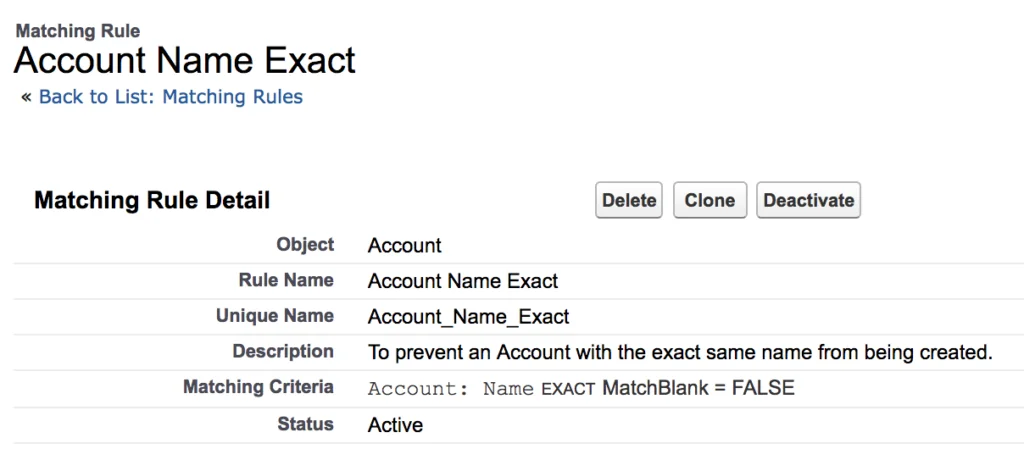
The matching rule is where the duplicate condition is defined. Keep the description field clear so another admin can understand why the rule exists.
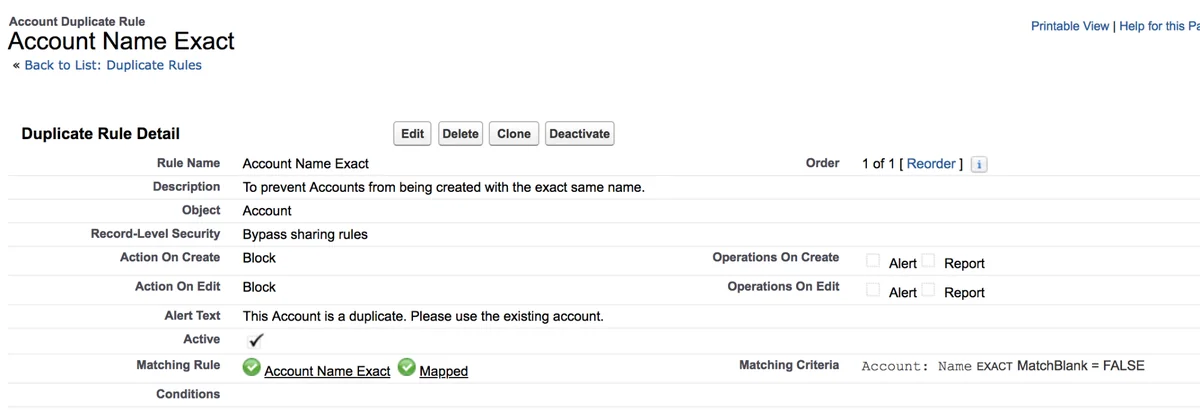
The duplicate rule is where the action is configured. Write alert text that tells the user the next step, such as open the existing Account, request access, or contact data stewardship.
Account fuzzy-name warning rule
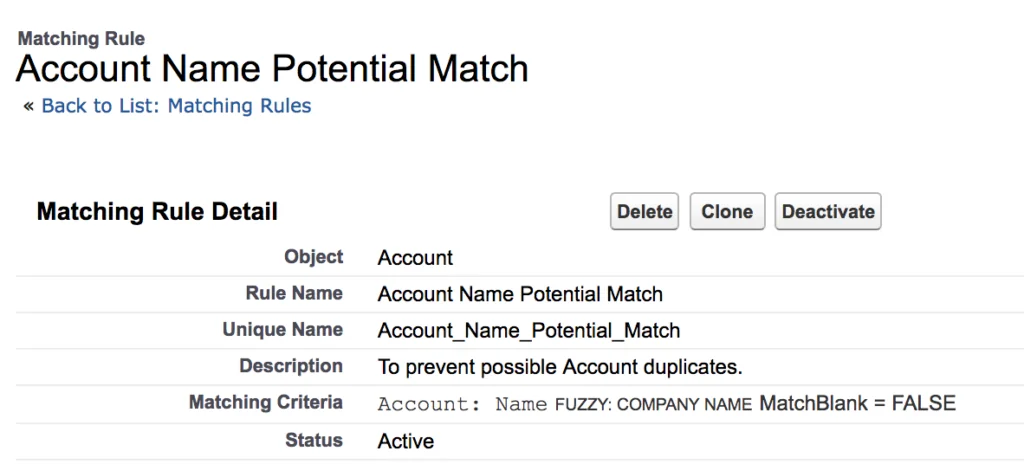
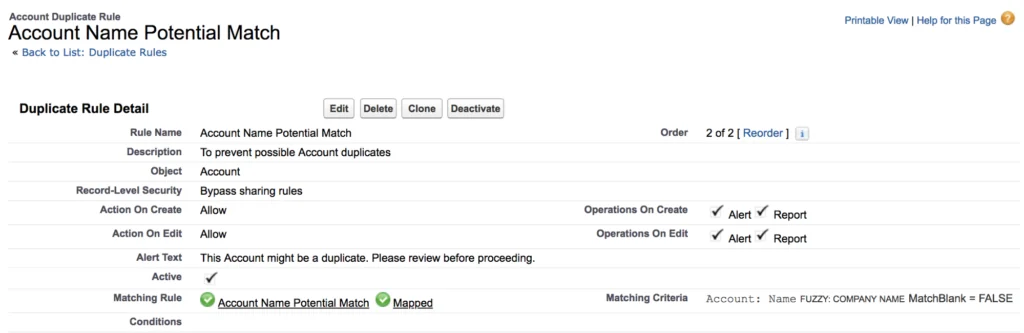
Fuzzy salesforce duplicate rules need more review time than exact rules. A fuzzy Account name match can catch abbreviations, punctuation differences, and spelling differences, but it can also find separate companies with similar names. Use Allow with Alert and Report before considering a block.
Lead and Contact email rules for people records
Person-level salesforce duplicate rules should be tested with common names, shared family emails, assistants using a manager’s email, and converted Leads. For most orgs, exact email is easier to explain and audit than fuzzy name matching. Use deduplication Salesforce planning to decide whether a Lead should be compared with Leads, Contacts, or both.
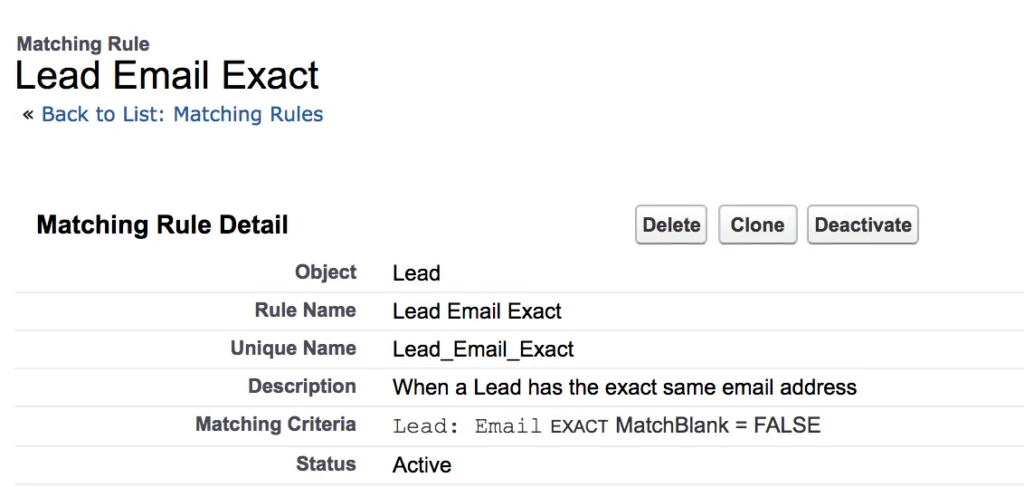
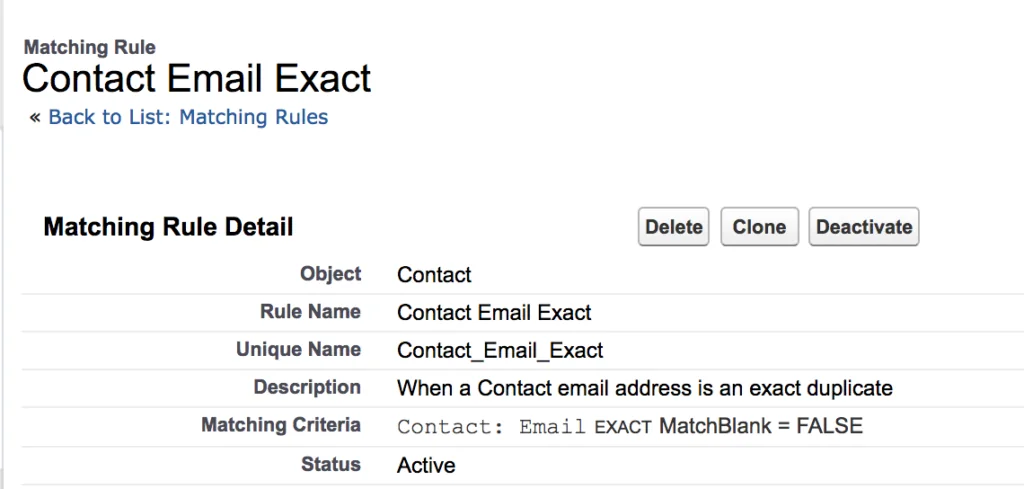
Keep Lead and Contact matching rules separate when you need different alert text. A user needs different guidance for “this person is already a Lead” versus “this person is already a Contact.”
Lead-to-Lead and Lead-to-Contact duplicate rules
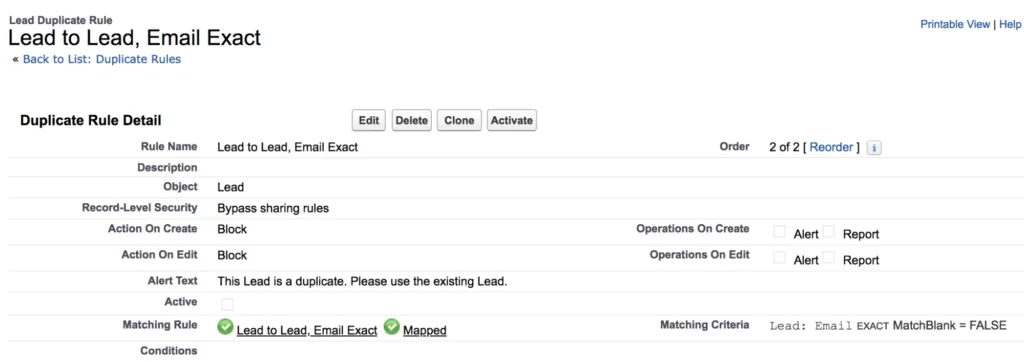
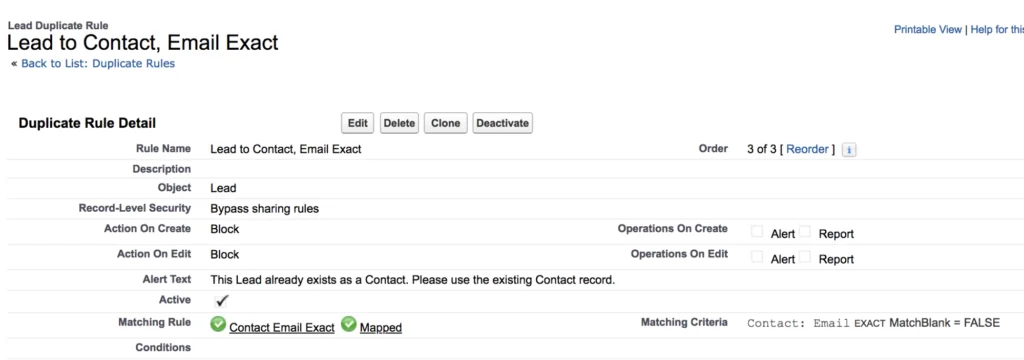
Lead-focused salesforce duplicate rules work best when the message tells users what to do next. If the duplicate is another Lead, the next action may be reassignment or update. If the duplicate is a Contact, the next action may be conversion review or account team follow-up.
Best practices for duplicate management in production orgs
duplicate management works best when treated as a release-managed data quality control. Production salesforce duplicate rules need owners, test cases, and post-release monitoring just like Flow or Apex changes.
| Scenario | Recommended action | Reason |
|---|---|---|
| Exact Lead email match | Block or alert | Email is usually high confidence, but shared inboxes may be valid exceptions. |
| Fuzzy Account name match | Allow with alert and report first | Similar company names often produce false positives. |
| ERP customer number | Use external ID or unique field design | Integrations need deterministic upsert behavior. |
| Private sharing model | Review enforce versus bypass sharing | Hidden matches may be detected without granting record access. |
| Large migration | Clean data before loading | Rules prevent some new duplicates but do not replace migration dedupe. |
For migration work, pair this setup with the Salesforce data migration checklist. For automation after a duplicate warning, review the Salesforce Flow guide for admins. For external systems creating records, use the Salesforce API integration guide. For Apex review, see Apex code best practices. For lead field cleanup, review Salesforce Lead Source data quality setup.
How developers should handle Salesforce Duplicate Rules in Apex
Developers should not recreate broad duplicate logic with SOQL unless Salesforce Duplicate Management cannot meet the requirement. Standard salesforce duplicate rules centralize the match definition so admins can tune it without editing code. Apex is useful when a Flow, LWC, or integration needs to preview matches or handle duplicate errors.
Salesforce provides Datacloud.FindDuplicates for rule-based duplicate searches and Database.DuplicateError for DML errors caused by duplicate rules. Save new classes against the org’s current API version, such as Summer ’26 API v67.0, unless release governance requires another version.
Preview duplicates before insert
public with sharing class DuplicatePreviewService { public class DuplicateCandidate { @AuraEnabled public Id recordId; @AuraEnabled public String objectApiName; @AuraEnabled public String name; @AuraEnabled public Double confidence; } @AuraEnabled(cacheable=false) public static List<DuplicateCandidate> previewAccountDuplicates(String accountName, String website) { if (String.isBlank(accountName)) { throw new AuraHandledException('Account name is required.'); } Account draftAccount = new Account(Name = accountName.trim(), Website = website); List<DuplicateCandidate> output = new List<DuplicateCandidate>(); List<Datacloud.FindDuplicatesResult> results = Datacloud.FindDuplicates.findDuplicates(new List<SObject>{ draftAccount }); for (Datacloud.FindDuplicatesResult result : results) { for (Datacloud.DuplicateResult duplicateResult : result.getDuplicateResults()) { for (Datacloud.MatchResult matchResult : duplicateResult.getMatchResults()) { for (Datacloud.MatchRecord matchRecord : matchResult.getMatchRecords()) { SObject matched = matchRecord.getRecord(); DuplicateCandidate row = new DuplicateCandidate(); row.recordId = (Id) matched.get('Id'); row.objectApiName = String.valueOf(matched.getSObjectType()); row.name = String.valueOf(matched.get('Name')); row.confidence = matchRecord.getMatchConfidence(); output.add(row); } } } } return output; } }Governor limit note: call Datacloud.FindDuplicates.findDuplicates with a list instead of calling it once per row in a loop. Also enforce CRUD and field-level security before exposing duplicate candidates in LWC or Flow screens.
Handle duplicate errors during bulk insert
public with sharing class LeadImportService { public static void insertLeads(List<Lead> leadsToInsert) { if (leadsToInsert == null || leadsToInsert.isEmpty()) { return; } Database.SaveResult[] results = Database.insert(leadsToInsert, false); for (Integer i = 0; i < results.size(); i++) { if (results[i].isSuccess()) { continue; } for (Database.Error error : results[i].getErrors()) { if (error instanceof Database.DuplicateError) { Database.DuplicateError duplicateError = (Database.DuplicateError) error; Integer matchCount = 0; for (Datacloud.MatchResult matchResult : duplicateError.getDuplicateResult().getMatchResults()) { matchCount += matchResult.getMatchRecords().size(); } System.debug(LoggingLevel.WARN, 'Duplicate Lead at input index ' + i + '. Match candidates returned: ' + matchCount); } else { System.debug(LoggingLevel.ERROR, 'Lead import failed at input index ' + i + ': ' + error.getMessage()); } } } } }This pattern uses partial success with Database.insert(records, false). Valid rows can save while duplicate rows return structured errors. In production, replace debug statements with a log object, Platform Event, or retry queue.
When to use DuplicateRuleHeader
Database.DMLOptions.DuplicateRuleHeader can affect duplicate rule behavior for Apex DML. Use it only for approved integration scenarios where saving a possible duplicate is intentional and logged. Do not use it as a hidden bypass for UI users. Test the exact behavior in a sandbox when a duplicate rule uses Block.
Database.DMLOptions options = new Database.DMLOptions(); options.DuplicateRuleHeader.allowSave = true; options.DuplicateRuleHeader.includeRecordDetails = true; options.DuplicateRuleHeader.runAsCurrentUser = true; Lead leadRecord = new Lead(LastName = 'Patel', Company = 'Example Manufacturing', Email = 'a.patel@example.com'); Database.SaveResult result = Database.insert(leadRecord, options); if (!result.isSuccess()) { for (Database.Error error : result.getErrors()) { System.debug(LoggingLevel.ERROR, error.getMessage()); } }How to report on duplicate records
Reporting closes the loop for salesforce duplicate rules. Salesforce stores duplicate findings in duplicate record sets and duplicate record items. The Developer Object Reference describes DuplicateRecordItem as a record identified as a duplicate and included in a DuplicateRecordSet. Admins can use custom report types, and developers can query these objects for stewardship dashboards.
SELECT Id, DuplicateRecordSetId, RecordId, CreatedDate FROM DuplicateRecordItem WHERE CreatedDate = LAST_N_DAYS:30 ORDER BY CreatedDate DESC LIMIT 200Do not merge from a report without checking ownership, related records, automations, and data retention rules. Merging Accounts can affect Contacts, Opportunities, Cases, activities, sharing, and integrations.
Common errors with Salesforce Duplicate Rules
Rules do not fire after activation
Confirm that both the matching rule and duplicate rule are active. A matching rule alone does not enforce anything. Also check object conditions, compared object, create/edit action, and blank-field behavior.
Users see hidden duplicates they cannot open
This usually comes from the duplicate rule’s record-level security choice. If the rule bypasses sharing, Salesforce can detect a match outside the user’s access. That does not grant access to the matched record. Give data stewards a report or queue process for these cases.
Imports still create duplicates
If imports bypass user screens, test how salesforce duplicate rules behave through the exact loader, middleware, or API path. Check whether the rule action allows save, whether API options are used, and whether the source values are normalized. For salesforce deduping during integrations, prefer external IDs and upsert when the source system has a stable key.
Rules block automation unexpectedly
Duplicate rules can affect records saved by automation and API processes. Test Screen Flows, record-triggered Flows, Apex, imports, middleware jobs, and web forms. If a process creates child records after a Lead or Account save, handle duplicate errors before downstream work runs.
Review salesforce duplicate rules after each major data migration, marketing automation change, and integration release. Also review salesforce duplicate rules when the business changes territory models, record types, or lead routing ownership.
Official Salesforce references used
- Salesforce Help: Duplicate Rules
- Salesforce Help: Matching Rules
- Salesforce Help: Things to Know About Duplicate Rules
- Trailhead: Resolve and Prevent Duplicate Data in Salesforce
- Apex Reference: Datacloud.FindDuplicates
- Apex Reference: Database.DuplicateError
- Object Reference: DuplicateRecordItem
- Salesforce Help: Find your Salesforce API version
- Salesforce Release Notes: API version 67.0
Frequently Asked Questions
What are salesforce duplicate rules used for?
salesforce duplicate rules are used to control what happens when Salesforce finds a possible duplicate during record creation, editing, or duplicate review. They use matching rules to identify candidate records, then apply actions such as alert, block, and report.
What is the difference between duplicate rules and matching rules Salesforce setup?
matching rules Salesforce setup defines how records are compared, such as exact email or fuzzy Account name. Duplicate rules use those matches to decide whether Salesforce should block the save, allow it with a warning, or create duplicate records for reporting.
Can salesforce duplicate rules work across Leads and Contacts?
Yes. A duplicate rule can compare a Lead with Leads or Contacts when configured that way. This is useful when your process treats Leads and Contacts as people records and you want to prevent a new Lead for someone who already exists as a Contact.
Is deduplication Salesforce cleanup the same as duplicate prevention?
No. deduplication Salesforce cleanup deals with records that already exist, while prevention stops or warns against new duplicates. A mature data quality process uses both.
Why are Salesforce duplicate rules not blocking records?
Check whether the duplicate rule is active, whether the matching rule is active, whether the create or edit action is set to Block, and whether the incoming record meets the rule conditions. Also check blank fields, formatting, sharing scope, and the exact create or edit path.
Can Apex bypass duplicate management?
Apex can use Database.DMLOptions.DuplicateRuleHeader for duplicate rule behavior, but it should not be used as a casual bypass. Use it only for approved integration scenarios, log the decision, and test the rule action in a sandbox.