Tableau at Salesforce now covers Tableau, Tableau Next, CRM Analytics, Data 360, and Agentforce working inside one analytics strategy. The key 2026 change is Tableau Next: a Salesforce-platform analytics option that uses Data 360 and governed semantics so users and agents can ask questions, inspect metrics, and act on insights.
Tableau At Salesforce: What changed?
Tableau at Salesforce used to mean connecting Tableau Cloud or Tableau Server to Salesforce CRM data. That model still matters, but Tableau Next adds a Salesforce-native path for analytics built around Data 360, Hyperforce, reusable semantic models, and Agentforce. Salesforce describes Tableau Next as a flexible, API-first analytics experience on the Salesforce platform: Salesforce Tableau Next.
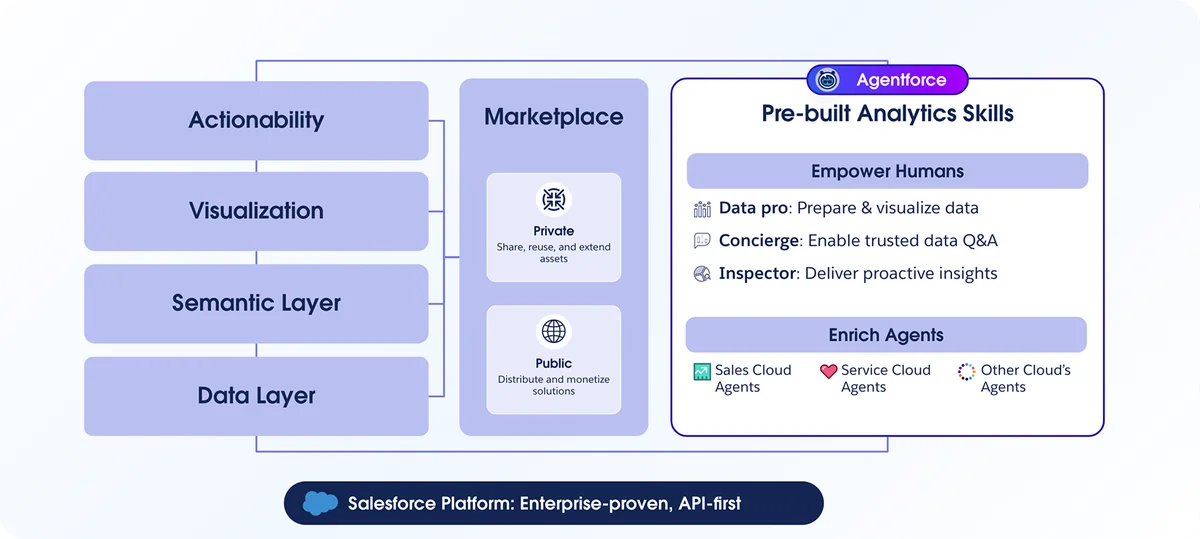
For enterprise teams, Tableau at Salesforce is an architecture decision, not only a dashboard decision. You must decide where CRM Analytics remains useful, where Tableau Cloud continues to serve BI teams, and where Tableau Next should use Data 360 for agent-assisted analysis.
| Product | Use it when | Design concern |
|---|---|---|
| Tableau Cloud | BI teams need Tableau dashboards, published data sources, and visual exploration. | Connector coverage, workbook governance, site administration. |
| CRM Analytics | Salesforce users need analytics embedded in CRM workflows. | Dataset design, permissions, dashboards in Lightning pages. |
| Tableau Next | Teams need Salesforce-platform analytics, Data 360 semantics, and Agentforce-assisted insights. | Data 360 readiness, semantic model quality, licensing, and release availability. |
How does Tableau at Salesforce work with Data 360?
Salesforce Help states that Tableau Next requires Data 360 and the Data 360 semantic layer. That means a Tableau at Salesforce project starts with data access, data modeling, semantic definitions, and security, not chart formatting. Use the official setup references before planning build work: Tableau Next Help and Set Up Data 360 for Tableau Next.
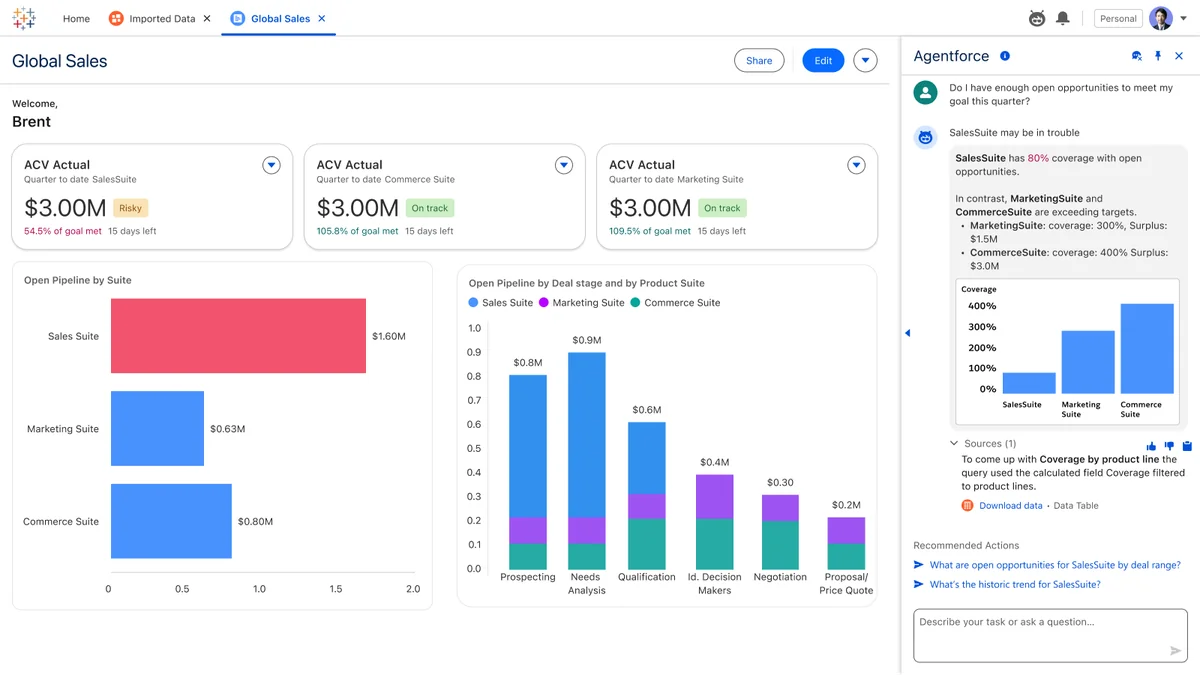
The working pattern is: connect or ingest source data into Data 360, create Data Model Objects, define semantic metrics, then expose those metrics through Tableau Next. Where enabled, Agentforce can use analytics skills such as Data Pro, Concierge, and Inspector. Confirm availability in your org and contract because agent and analytics capabilities can vary by edition, region, and release.
What should admins know about tableau next pricing?
Tableau next pricing should be reviewed before design sign-off. Salesforce’s public Tableau Next FAQ says Tableau Next can be sold standalone or through bundles such as Tableau+, Agentforce 1 Editions, and Marketing Intelligence. It also says tableau next pricing is role-based, while Data 360 storage and other costs can still apply.
Tableau next pricing checklist
- User roles: Count viewers, analysts, data stewards, admins, and builders separately.
- Data 360 costs: Review storage, ingestion, query patterns, and data actions with Salesforce.
- Agentforce scope: Separate dashboard viewing from agent-assisted analysis and action workflows.
- Existing contracts: Compare Tableau Cloud, Tableau Server, CRM Analytics, Tableau+, and Tableau Next terms.
- Support plan: Include Premier or Signature Success Plan costs if response-time commitments matter.
Do not publish a budget from an old Tableau price sheet. Use the Salesforce analytics pricing page as a public reference and request a quote for current tableau next pricing details: Salesforce Analytics Pricing.
How should Salesforce teams prepare data for Tableau Next?
The most common Tableau at Salesforce failure is weak data governance. Before building Tableau Next assets, validate source objects, field quality, ownership, sharing rules, field-level security, and metric definitions. A dashboard can hide these problems; a semantic layer will expose them.
SOQL checks before Data 360 modeling
These SOQL examples do not call a Tableau Next API. They help admins profile Salesforce CRM data before syncing or modeling it for Tableau at Salesforce analytics. Run them in Developer Console, Workbench, or Salesforce CLI. Do not place broad profiling queries inside triggers.
-- Recent Account changes before a Data 360 sync
SELECT Id, Name, OwnerId, Industry, LastModifiedDate
FROM Account
WHERE LastModifiedDate = LAST_N_DAYS:30
ORDER BY LastModifiedDate DESC
LIMIT 100

-- Account distribution by owner
SELECT OwnerId, COUNT(Id) accountCount
FROM Account
WHERE IsDeleted = false
GROUP BY OwnerId
LIMIT 2000

-- Opportunities with missing close dates
SELECT Id, Name, StageName, Amount, CloseDate
FROM Opportunity
WHERE CloseDate = null
LIMIT 100
Governor limit note: If developers run similar checks from Apex, SOQL governor limits apply. Salesforce allows 100 SOQL queries in one synchronous Apex transaction, so use grouped queries and selective filters instead of one query per record. Reference the official SOQL documentation for syntax and limits: SOQL and SOSL Reference.
How is Tableau Next different from Tableau Cloud and CRM Analytics?
| Question | Tableau Cloud | CRM Analytics | Tableau Next |
|---|---|---|---|
| Main use | Visual analytics and Tableau workbook authoring. | CRM-focused dashboards, predictions, and embedded analytics. | Salesforce-platform analytics with Data 360 semantics and Agentforce integration. |
| Primary owner | BI or analytics team. | Salesforce admin or CRM Analytics specialist. | Salesforce, data, BI, security, and AI governance teams together. |
| Migration risk | Workbook and connector dependencies. | Dataset, recipe, and embedded-dashboard dependencies. | Data 360 readiness, semantic model design, and tableau next pricing assumptions. |
For Tableau at Salesforce roadmaps, use coexistence first. Inventory dashboards, datasets, subscriptions, embedded Lightning pages, and scheduled exports. Mark each asset as retain, rebuild, retire, or replace before moving users.
Best practices for Tableau at Salesforce implementations
- Define metric contracts: For each metric, document the object, filters, fiscal-period logic, currency handling, and owner.
- Protect sensitive fields: Align object permissions, field-level security, record access, Data 360 permissions, and data spaces.
- Separate lifecycle stages: Use workspaces for exploration, certified assets, departmental work, and production analytics. Trailhead provides a Tableau Next learning module here: Tableau Next: Quick Look.
- Validate connectors: Tableau Next uses Data 360-supported connector patterns. Treat roadmap connectors as future scope until Salesforce confirms availability for your org.
- Review tableau next pricing during architecture: Pricing affects role design, Data 360 design, and Agentforce rollout scope.
Common errors with Tableau at Salesforce setup
| Error | Fix |
|---|---|
| Starting with dashboard mockups before semantic models. | Agree on Data 360 source objects, metric definitions, and owners first. |
| Assuming Tableau Cloud connectors automatically map to Tableau Next. | Create a connector matrix and confirm Data 360 support. |
| Ignoring tableau next pricing until procurement. | Review role-based licenses, Data 360 usage, bundles, and support plans early. |
| Exposing hidden CRM fields through analytics. | Review profiles, permission sets, field-level security, sharing, and data spaces. |
Related SalesforceTutorial resources: read Salesforce Data Cloud architecture, CRM Analytics setup and use cases, Agentforce in Salesforce, and Salesforce security model basics before finalizing a Tableau at Salesforce design.
Frequently Asked Questions
What does tableau at salesforce mean?
Tableau at Salesforce means using Salesforce analytics products such as Tableau, Tableau Next, CRM Analytics, Data 360, and Agentforce as one architecture. In 2026 projects, the term often points to Tableau Next because it is built on the Salesforce platform.
How does tableau next pricing work?
Tableau next pricing is role-based according to Salesforce’s public Tableau Next FAQ. Tableau Next can be sold standalone or through selected bundles, and Data 360 storage or other costs can still apply. Ask Salesforce for a quote based on users, data volume, region, and Agentforce scope.
Do I need Data 360 for Tableau Next?
Yes. Salesforce Help says Tableau Next requires Data 360 and the Data 360 semantic layer. Set up data access, Data Model Objects, permissions, and semantic definitions before building governed analytics.
Is Tableau Next replacing CRM Analytics?
Salesforce still positions CRM Analytics and Tableau Next as separate analytics products. Existing CRM Analytics apps should be reviewed by use case, not replaced automatically.
Should admins learn Tableau Next?
Admins should understand Tableau Next enough to discuss Data 360 setup, permissions, semantic models, and tableau next pricing. BI specialists may still own dashboard design, but Salesforce admins control much of the CRM data and access model.