Rockset was a cloud database designed to ingest continuously changing data, index each field, and run low-latency SQL queries without a traditional batch transformation pipeline. OpenAI acquired the company in June 2024, so this article explains the system as an architecture reference and shows how its design principles apply to Salesforce event-driven analytics, search, and retrieval-augmented generation.
The main lesson for Salesforce architects is not to place another database beside Salesforce without a clear purpose. A Rockset-style system is useful when applications need fresh data, flexible filtering, text or vector retrieval, and query latency that an operational CRM integration cannot provide by itself.
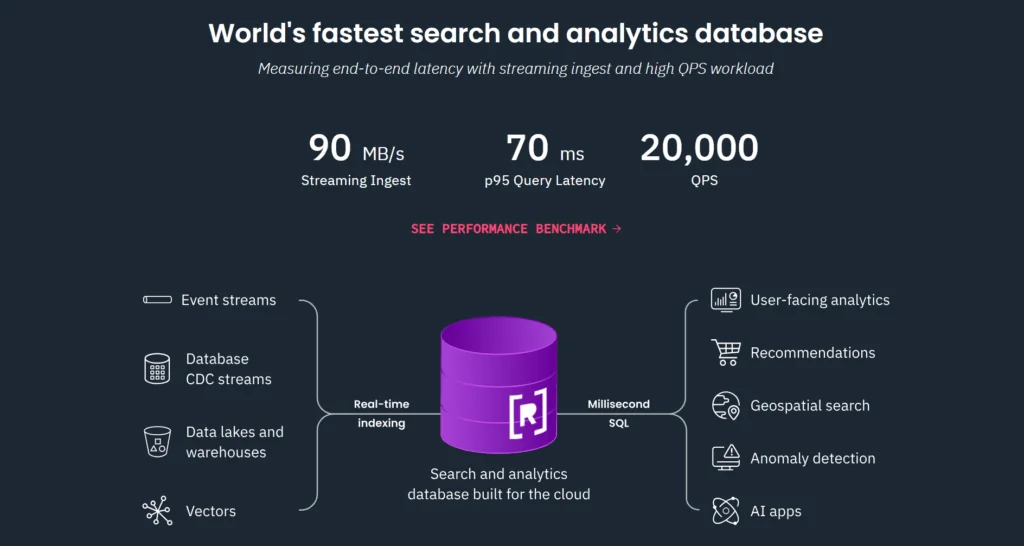
What Is Rockset?
Rockset was a cloud-native database for search and real-time analytics. It accepted structured and semi-structured records from operational databases, event streams, and object stores, then made those records queryable with SQL.
Unlike an operational transaction system, it focused on read-heavy application workloads such as customer-facing analytics, operational dashboards, search, personalization, and AI retrieval. Unlike a batch warehouse pipeline, it attempted to make newly ingested records queryable with little delay.
OpenAI announced its acquisition of Rockset on June 21, 2024. OpenAI stated that the technology supplied data indexing and querying capabilities for helping users and applications access real-time information. OpenAI has since described using Rockset internally for search and real-time analytics, including indexes updated from streaming changes.
Because ownership and product availability can change, teams evaluating a current platform should verify commercial availability and support directly with the vendor. The architecture remains useful for understanding how indexing databases serve fresh operational data.
How Does Rockset Architecture Work?
The core Rockset architecture can be understood as a pipeline with four responsibilities: ingest records, represent changing schemas, create multiple indexes, and isolate query compute from storage. These responsibilities reduce the amount of custom data engineering required between a source system and an application.
Rockset architecture ingestion layer
The ingestion layer receives records from data sources such as streams, databases, APIs, or files. Incoming records are treated as documents. A document can contain scalar values, arrays, nested objects, and fields that do not appear in every other document.
A production ingestion design must handle more than initial inserts. It also needs stable identifiers, updates, deletions, replay, duplicate delivery, ordering differences, and schema evolution. For Salesforce data, the Salesforce record ID normally provides the natural external document key.
Collections and document identity
A collection groups documents in a way that resembles a table, although documents can contain nested and varying fields. Each document requires a unique identifier. When a source emits another version of the same logical record, that identifier enables the ingestion process to replace or update the indexed representation rather than create an unrelated duplicate.
For example, an Opportunity document could use the Salesforce Opportunity.Id value as its document identifier. A change to StageName, Amount, or CloseDate would then update the existing analytics document.
Converged indexing
Rockset described its indexing model as a converged index. The design created index structures suited to different access patterns rather than requiring an administrator to predict one query path in advance.
| Index representation | Purpose | Example application query |
|---|---|---|
| Inverted index | Find documents containing a value or term | Find cases containing an error phrase |
| Column-oriented index | Scan and aggregate selected fields | Sum pipeline amount by region |
| Row-oriented representation | Retrieve complete matching documents | Return all fields for a selected account |
This approach matters when one application combines filters, text matching, aggregations, sorting, and record retrieval. A conventional database may require separate search and analytics systems for the same workload.
Distributed SQL query processing
Applications query indexed collections with SQL. The query service distributes work across available compute resources, performs filtering and aggregation close to the indexed data, and combines partial results.
A simplified query over replicated Salesforce Opportunity data could look like this:
SELECT
    region,
    COUNT(*) AS opportunity_count,
    SUM(amount) AS pipeline_amount
FROM salesforce_opportunities
WHERE is_closed = FALSE
  AND close_date >= CURRENT_DATE
GROUP BY region
ORDER BY pipeline_amount DESC;
The query assumes that the ingestion layer has already mapped Salesforce field names to the lowercase analytics field names shown in the example. Production implementations should document this mapping and preserve the original Salesforce record ID for traceability.
Compute and storage separation
Separating query compute from durable storage allows teams to assign different compute capacity to different workloads. A customer-facing API can use a compute allocation isolated from internal exploration, scheduled reporting, or data science queries.
Workload isolation prevents an analyst’s broad aggregation from consuming the resources needed by a latency-sensitive application. The trade-off is cost and operational complexity: every separate compute allocation needs sizing, monitoring, access control, and budget ownership.
How Is Rockset Different from a Data Warehouse?
Rockset and a cloud data warehouse can both run SQL, but they target different ingestion and serving patterns. The correct choice depends on freshness, query behavior, governance, and cost rather than the SQL interface alone.
| Requirement | Rockset-style indexing database | Batch-oriented warehouse |
|---|---|---|
| Data freshness | Designed for continuously arriving records | Often depends on scheduled ingestion and transformation |
| Schema handling | Accepts changing, nested documents | Usually benefits from defined analytical models |
| Primary workload | Application search and operational analytics | Business intelligence and historical analysis |
| Query pattern | Selective filters, search, aggregation, low-latency APIs | Broad scans, reporting, and complex analytical joins |
| Data preparation | Can query indexed source-shaped documents | Commonly uses ELT models and curated tables |
| Serving model | Often placed directly behind an application API | Often accessed through BI or data tools |
Many enterprise designs use both patterns. The warehouse remains the governed historical system for reporting, while an indexing database serves fresh subsets to applications. Duplicating all enterprise data into every platform creates cost and governance problems, so replication scope should follow specific query requirements.
How Can Rockset Architecture Apply to Salesforce Data?
A Salesforce integration can apply Rockset architecture principles by streaming record changes to an external indexing database and querying the indexed copy from a separate application. This pattern is appropriate for operational analytics and search; it does not replace Salesforce transaction processing, sharing, validation rules, or automation.
Reference architecture for Salesforce Change Data Capture
- Select the source objects. Enable Change Data Capture for objects whose changes are required by the downstream application.
- Subscribe through Pub/Sub API. A middleware subscriber receives change events over gRPC and HTTP/2 in Apache Avro format.
- Resolve event metadata. Decode the event schema and fields such as
changedFields,nulledFields, anddiffFieldswhere applicable. - Transform the event. Convert Salesforce API field names and values into a stable external document contract.
- Upsert by record ID. Use the Salesforce record ID as the external document key so replayed events remain idempotent.
- Query through an application service. Keep database credentials on the server and expose only approved query operations to browsers, mobile clients, or AI agents.
Salesforce recommends Pub/Sub API for new event-driven integrations that publish or subscribe to platform events and Change Data Capture events. See the Salesforce Pub/Sub API overview and the Change Data Capture developer guide.
Example Salesforce document model
{
  "_id": "006xx00000ABC123",
  "sourceObject": "Opportunity",
  "accountId": "001xx00000XYZ789",
  "name": "Northern Region Renewal",
  "stageName": "Proposal/Price Quote",
  "amount": 185000.00,
  "currencyIsoCode": "USD",
  "closeDate": "2026-09-30",
  "isClosed": false,
  "owner": {
    "id": "005xx0000012345",
    "name": "Asha Rao"
  },
  "systemModstamp": "2026-07-17T04:35:12.000Z"
}
This document is an external projection, not a replacement for the Opportunity record. Include only fields required for the downstream use case. Replicating every field increases exposure, indexing cost, and the work needed to respond to field deletion or retention requests.
Initial backfill and continuous changes
Change events begin at a point in time; they do not create a full historical copy by themselves. A typical implementation therefore has two coordinated paths:
- An initial backfill exports the required records with Salesforce Bulk API 2.0 or another supported data API.
- A Change Data Capture subscriber applies subsequent creates, updates, undeletes, and deletes.
Capture a synchronization boundary so records changed during the backfill are not missed. The consumer must also store replay information and recover before retained events expire. Do not assume that an event stream is a permanent archive.
For related platform concepts, see the SalesforceTutorial guides to Salesforce Change Data Capture, Salesforce Platform Events, and Salesforce REST API integrations.
How Does Rockset Support Search and RAG Workloads?
A retrieval-augmented generation system searches an external knowledge source before asking a language model to produce an answer. A Rockset-style database can support this retrieval layer because it can combine metadata filters, text conditions, vector similarity, and SQL logic over recently indexed records.
For example, an assistant answering a question about an Account could retrieve only documents that match the current tenant, user entitlement, business unit, record type, and freshness boundary. Retrieval should happen before model generation, and authorization must be enforced by the application rather than delegated to the prompt.
Hybrid retrieval example
SELECT
    document_id,
    title,
    body,
    updated_at,
    VECTOR_DISTANCE_COSINE(embedding, :query_embedding) AS distance
FROM knowledge_documents
WHERE tenant_id = :tenant_id
  AND business_unit IN (:allowed_business_units)
  AND status = 'Published'
ORDER BY distance ASC
LIMIT 10;
This example is conceptual because function names and parameter binding differ among vector-capable databases. The important controls are the tenant filter, entitlement filter, publication status, bounded result count, and server-side parameterization.
Do not send every retrieved Salesforce record to a language model. Remove fields that are not needed, apply data classification rules, and log which records contributed to the response. Salesforce architects should also review Salesforce data security controls before exporting CRM content.
What Security Controls Does a Salesforce Integration Need?
Replicating Salesforce records into an external index creates another data store with its own authorization and retention responsibilities. Salesforce sharing rules do not automatically follow the data into that system.
- Use a dedicated integration identity. Grant it only the object and field permissions required for replication.
- Apply field allowlists. Exclude credentials, secrets, health data, payment details, and fields outside the approved purpose.
- Enforce access at query time. Filter by tenant, user entitlement, region, or business unit before returning results.
- Protect credentials. Store database and Salesforce credentials in a secrets manager, not in Apex, JavaScript, source files, or mobile applications.
- Handle deletes. Process Salesforce delete events and implement downstream retention and erasure workflows.
- Record lineage. Preserve the Salesforce object type, record ID, synchronization timestamp, and ingestion result.
- Encrypt network traffic and stored data. Confirm the platform’s supported encryption, key-management, region, and backup controls during vendor review.
A Change Data Capture subscriber can receive events for records beyond a user’s normal record-level visibility. Salesforce documentation states that Change Data Capture ignores sharing settings when publishing changes. The integration account and downstream service must therefore be treated as privileged components. Review the official subscriber permission guidance.
What Are the Main Rockset Architecture Trade-Offs?
| Design decision | Benefit | Risk or cost |
|---|---|---|
| Index fields during ingestion | Supports several query patterns without manual indexes | Increases ingestion work and storage use |
| Accept source-shaped documents | Reduces delay before data becomes queryable | Can expose inconsistent field types and naming |
| Separate query compute | Provides workload isolation | Requires capacity and cost management |
| Replicate Salesforce data | Removes analytical load from CRM transactions | Creates synchronization, security, and deletion obligations |
| Serve queries through an API | Allows approved, reusable query contracts | Adds an application tier that must be monitored |
| Use fresh data for RAG | Reduces reliance on stale knowledge snapshots | Freshness does not guarantee accuracy or authorization |
Automatic indexing does not remove the need for data modeling. Teams still need stable field contracts, type handling, query limits, access policies, observability, and cost controls. It changes where that work occurs.
Best Practices for a Rockset-Style Salesforce Pipeline
- Start from application queries. List required filters, aggregations, freshness targets, and response-time objectives before selecting fields.
- Keep the replicated model narrow. Export only objects and fields used by approved queries.
- Make consumers idempotent. Reprocessing the same change event must not create duplicate documents or reverse a newer update.
- Plan for out-of-order delivery. Compare source timestamps or version metadata before overwriting an indexed document.
- Separate backfill from streaming. Use a bulk path for initial history and an event path for ongoing changes.
- Use dead-letter handling. Store failed events with the record ID, event identifier, error, and retry count.
- Validate schema changes. Monitor new Salesforce fields, type changes, renamed mappings, and unexpected nulls.
- Limit application queries. Apply timeouts, row limits, result-size limits, parameter validation, and per-client quotas.
- Test deletion behavior. Verify that deleted or restricted Salesforce records disappear from search results and AI retrieval.
- Measure end-to-end freshness. Track the interval from a Salesforce commit to the record becoming queryable downstream.
Common Errors with Real-Time Indexing Pipelines
Treating Salesforce events as full records
A change event may contain change metadata and selected field values rather than the complete current record representation expected by an application. Design the consumer around the documented event format. When necessary, maintain prior state downstream or perform a controlled API read.
Ignoring nulled and changed field metadata
Pub/Sub API delivers Change Data Capture events in raw Avro form. Fields such as changedFields, nulledFields, and diffFields require the decoding behavior described in Salesforce documentation. Printing these bitmap values and treating them as ordinary strings produces incorrect updates.
Using SOQL polling as the only change mechanism
Polling by SystemModstamp can support reconciliation, but frequent polling adds API consumption and still requires careful boundary handling. Use an event subscription for ongoing changes and a scheduled reconciliation job to identify missed or inconsistent records.
Copying Salesforce permissions into prompts
A prompt is not an authorization layer. Enforce object, record, field, tenant, and purpose restrictions before content is passed to a model or returned to a user.
Assuming low query latency means low end-to-end latency
The database query may be fast while ingestion is delayed by event backlog, transformation errors, network failures, or undersized consumers. Monitor every stage separately.
When Should Architects Use This Pattern?
Consider a Rockset-style indexing architecture when an external application needs fresh Salesforce data and must support filters, text search, aggregation, or AI retrieval at a scale unsuitable for repeated transactional API queries.
Do not introduce it for a small report that Salesforce Reports, CRM Analytics, a scheduled export, or a conventional warehouse already serves. Every replicated platform adds another authorization boundary, synchronization process, incident surface, and cost center.
A sound architecture decision documents the required freshness, query latency, concurrency, retained history, data residency, recovery objective, and maximum acceptable inconsistency. Without those requirements, a technology comparison is unlikely to produce a defensible result.
Frequently Asked Questions
What is Rockset used for?
Rockset was used to index continuously changing structured and semi-structured data for low-latency SQL, search, operational analytics, and AI retrieval workloads. OpenAI acquired Rockset in June 2024.
What is the main idea behind Rockset architecture?
Rockset architecture indexed incoming documents in multiple representations so applications could combine selective filters, search, aggregation, and document retrieval without creating a separate manual index for each query pattern.
Can Rockset query Salesforce data directly?
A Salesforce integration requires a supported ingestion path or middleware layer. A common reference design exports an initial dataset, subscribes to Salesforce Change Data Capture through Pub/Sub API, transforms each event, and upserts the resulting document into the external index.
Does Change Data Capture preserve Salesforce sharing rules?
No. Salesforce states that Change Data Capture ignores sharing settings and publishes changes for enabled objects. The subscriber and downstream query service must enforce their own record and field access controls.
Is Rockset the same as a vector database?
No. Rockset was a broader real-time analytics and search database. Vector retrieval could be part of a hybrid query, but the architecture also supported SQL filtering, text search, aggregations, joins, and document retrieval.
Should Salesforce remain the system of record?
Yes, for CRM transactions managed in Salesforce. An external index should be treated as a derived serving layer unless the business has explicitly assigned another authoritative system for a specific data domain.
Official Documentation
- OpenAI acquisition announcement for Rockset
- OpenAI discussion of internal Rockset usage
- Salesforce Pub/Sub API overview
- Salesforce Pub/Sub API developer guide
- Salesforce Change Data Capture introduction
- Pub/Sub API event deserialization considerations