Lead conversion in Salesforce changes a qualified Lead into an Account and Contact, with the option to create an Opportunity. Convert a Lead only after it meets criteria agreed by sales and marketing, because Salesforce retains the converted Lead as a read-only record linked to the resulting records.
This guide explains what conversion creates, how to decide when a Lead is ready, how custom field mapping works, how to enforce requirements, and how to automate conversion with Apex.
What does lead conversion create in Salesforce?
Standard Salesforce lead conversion creates new records or associates the Lead with existing records:
| Record | Conversion behavior | Implementation decision |
|---|---|---|
| Account | Creates an Account from the Lead company or uses an existing Account. | Define how users identify existing customer and prospect accounts. |
| Contact | Creates a Contact from the Lead name or uses an existing Contact. | Configure matching and duplicate rules before rollout. |
| Opportunity | Creates an Opportunity unless the user chooses not to create one. | Create one only when an active sales transaction belongs in the pipeline. |
| Converted Lead | Sets IsConverted and stores ConvertedAccountId, ConvertedContactId, and, when applicable, ConvertedOpportunityId. | Plan reporting and data correction procedures because standard conversion is not reversible. |
Salesforce documents this behavior in Converting Leads and the Lead object reference.
When should lead conversion happen?
Convert a Lead when it has enough verified information to enter the sales process represented by Accounts, Contacts, and Opportunities. There is no universal threshold. A transactional team might convert after a verified pricing request, while an enterprise team might require account fit, a confirmed business problem, an identified buyer role, and an agreed next meeting.
In enterprise orgs, useful conversion criteria share three characteristics: users can enter them without interpretation, automation can enforce them, and reports can measure them. Avoid criteria such as “good prospect” because different users will apply them differently.
Practical qualification fields
| Criterion | Example field | Purpose |
|---|---|---|
| Identity verified | Email, Phone, Company | Reduces unusable Account and Contact records. |
| Account fit confirmed | Target_Segment__c | Separates target prospects from inquiries that should remain in nurture. |
| Business need recorded | Business_Need__c | Gives the sales owner context for the next action. |
| Buyer role known | Buying_Role__c | Records whether the person can influence or approve a purchase. |
| Next action agreed | Next_Meeting_Date__c | Distinguishes active evaluation from general interest. |
| Opportunity required | Create_Opportunity__c | Prevents pipeline inflation when Account and Contact records are sufficient. |
Lead to opportunity qualification
A lead to opportunity transition should mark the start of a sales transaction, not merely a change in object type. The organization should be ready to assign an Opportunity owner and stage, record a defined next action, and include the deal in pipeline reporting.
If no active buying process exists, convert the Lead to an Account and Contact without creating an Opportunity. Creating Opportunities for every valid person can inflate pipeline totals and reduce the value of stage-conversion and win-rate reports.

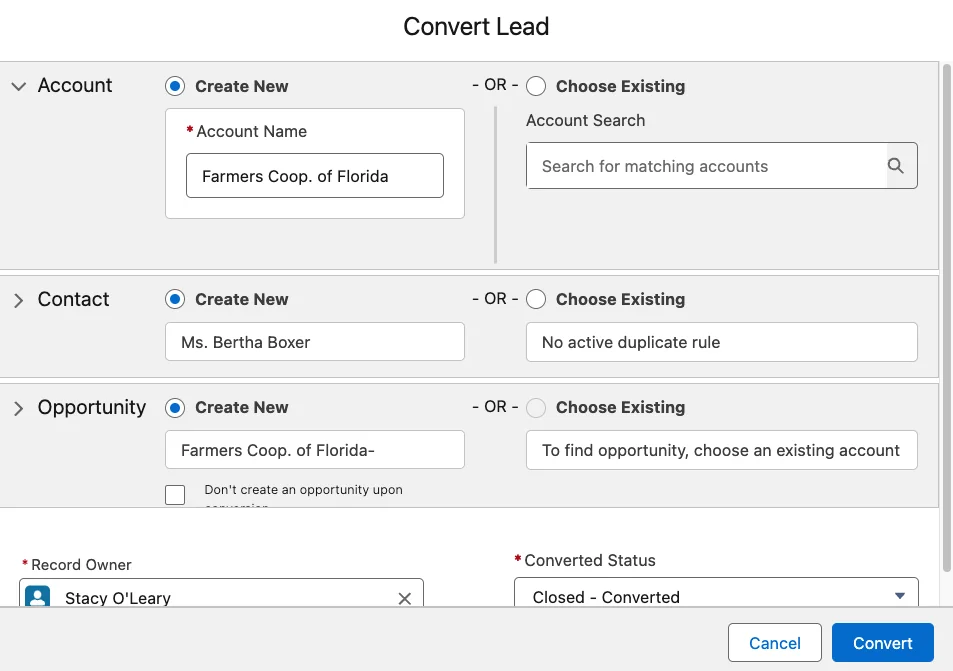
How to convert a Lead in Lightning Experience
- Open the Lead record.
- Confirm that qualification fields are complete.
- Review potential duplicate Accounts and Contacts.
- Click Convert.
- Select an existing Account or create an Account.
- Select an existing Contact or create a Contact.
- Choose whether to create an Opportunity.
- Select the converted Lead status.
- Click Convert and review the resulting records.
The available choices depend on permissions, record types, duplicate rules, Person Account configuration, and other org settings. Salesforce Trailhead demonstrates the standard process in Create and Convert Leads as Potential Customers.
Convert lead to contact Salesforce workflow
Users searching for how to convert lead to contact Salesforce should understand that a standard Contact requires an Account relationship. During conversion, Salesforce creates or selects an Account and then creates or selects the Contact under that Account. Creating an Opportunity remains optional.
Search for the existing Account and Contact before creating new records. Matching and duplicate rules should use fields that identify a person in your business, such as email plus company, rather than relying on a name alone.
How does Salesforce Lead field mapping work?
Standard Lead fields follow Salesforce’s standard mappings. Administrators can map custom Lead fields from Setup > Object Manager > Lead > Fields & Relationships > Map Lead Fields.
A custom Lead field can map to a compatible custom field on Account, Contact, or Opportunity. Target text fields must be at least as long as the source field. A custom lookup field can map only to a lookup field that points to the same object. Review Salesforce’s custom Lead field mapping guidelines before changing production mappings.
Salesforce lead opportunity field design
A Salesforce lead opportunity design should separate information about the company, person, and transaction:
- Map company attributes, such as segment or region, to Account.
- Map person attributes, such as buyer role or communication preference, to Contact.
- Map transaction attributes, such as requested product or estimated deal value, to Opportunity.
Do not copy every field to every target object. Duplicate data creates unclear ownership and inconsistent updates after conversion.
Lead opportunity Salesforce mapping example
| Lead field | Target | Target field | Reason |
|---|---|---|---|
| Buying_Role__c | Contact | Buying_Role__c | The role belongs to the person. |
| Target_Segment__c | Account | Target_Segment__c | The segment describes the company. |
| Estimated_Deal_Value__c | Opportunity | Amount | The value belongs to the sales transaction. |
| Requested_Product__c | Opportunity | Requested_Product__c | The requested product can differ across deals for one Account. |
This lead opportunity Salesforce model keeps fields on the records where users will maintain and report on them.
How to enforce lead conversion criteria
Use validation rules for non-negotiable requirements and Lightning record page components for user guidance. Page guidance explains what is missing, while a validation rule prevents conversion through the user interface, API, or automation when its condition evaluates to true.
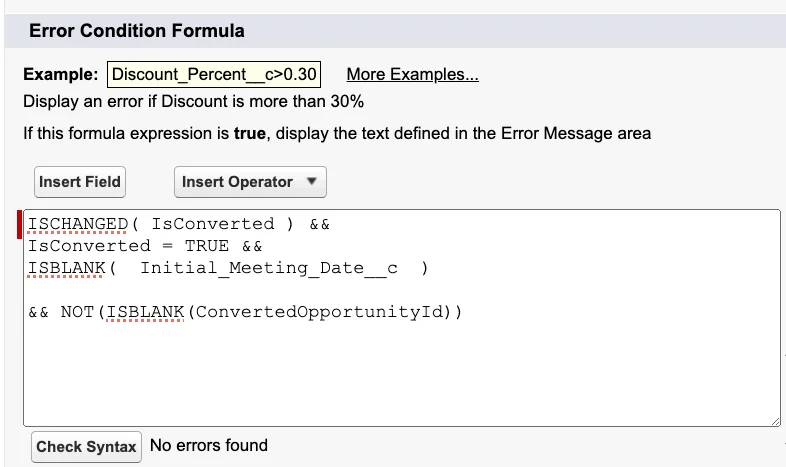
Validation rule for lead conversion
The following Lead validation rule blocks conversion until a qualification date is entered:
AND(
    ISCHANGED(IsConverted),
    IsConverted,
    ISBLANK(Qualification_Completed_Date__c)
)
Use an error message such as Enter Qualification Completed Date before converting this Lead. Place the error on the custom field when possible.
Important: Salesforce enforces validation rules during conversion only when validation and triggers for converted Leads are enabled. In Setup, open Lead Settings and enable Require Validation for Converted Leads when the setting is available. Salesforce explains this requirement in Validation rule not firing when converting Leads.
Lightning record page guidance
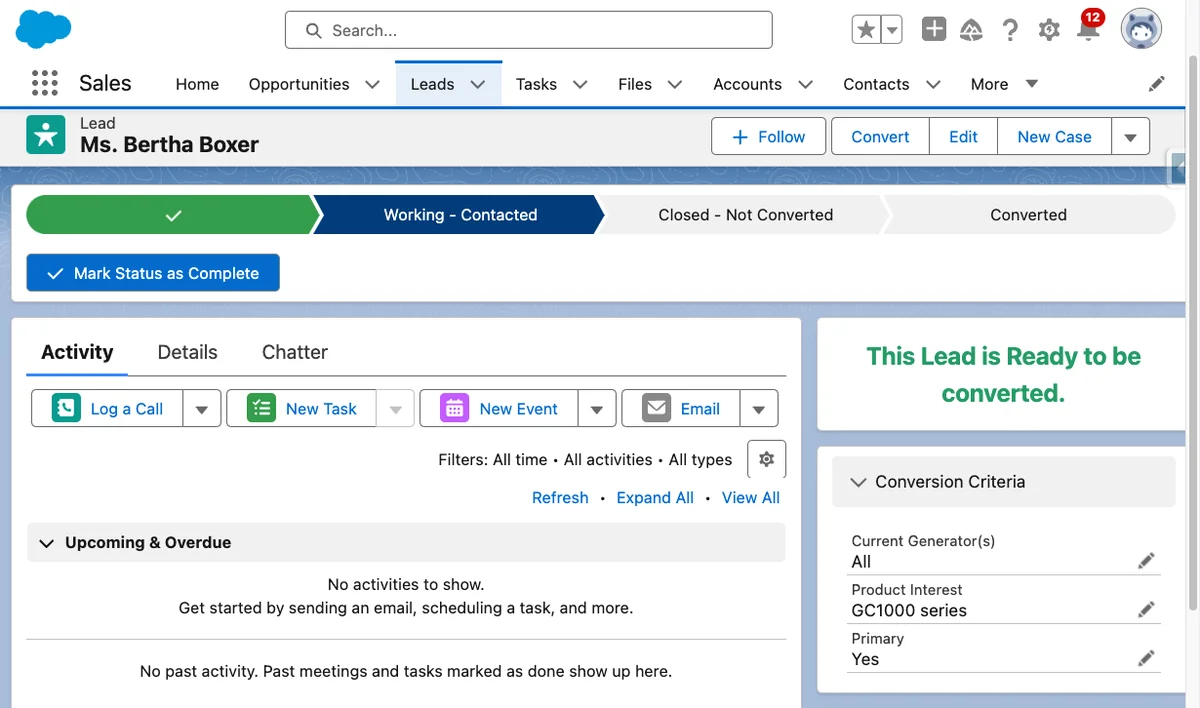
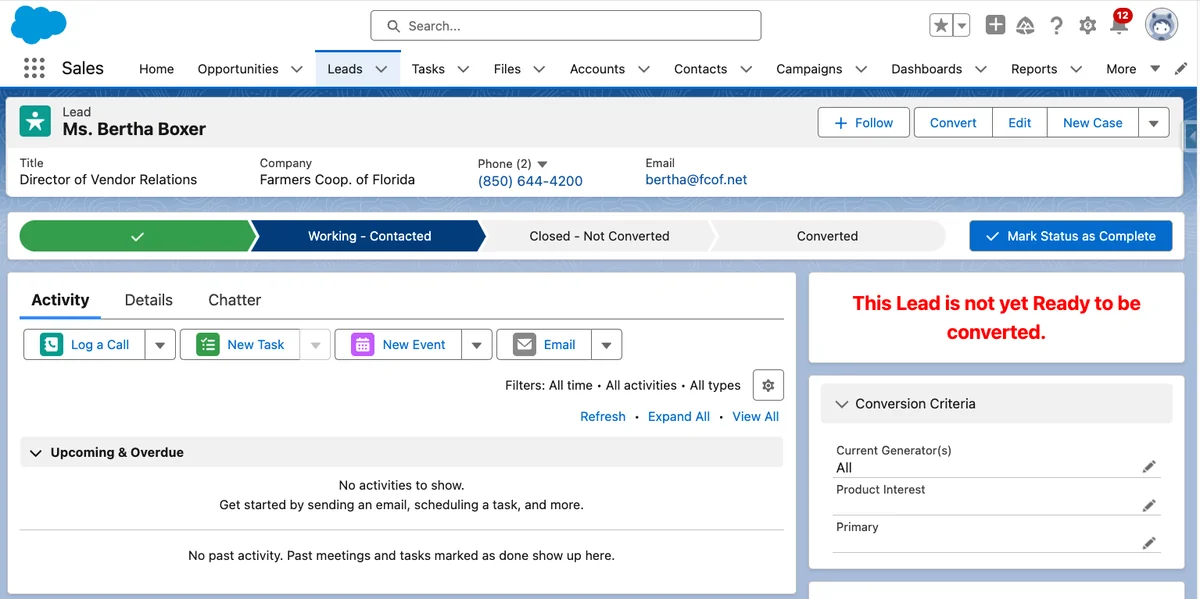
Create a qualification field section on the Lead Lightning record page. Add a Rich Text component with conditional visibility that shows an incomplete message while required fields are blank. Add a second component that appears when all readiness fields contain valid values.
This guidance does not replace validation. Users, integrations, and Apex do not depend on record-page visibility rules.
How to automate lead conversion with Apex
Use Apex when an integration or controlled process must convert Leads without the standard dialog. The Database.convertLead method accepts Database.LeadConvert requests and can create or select target records. It can also suppress Opportunity creation.
public with sharing class LeadConversionService {
    public static List<Database.LeadConvertResult> convertQualifiedLeads(
        Set<Id> leadIds,
        Boolean createOpportunities
    ) {
        if (leadIds == null || leadIds.isEmpty()) {
            return new List<Database.LeadConvertResult>();
        }

        LeadStatus convertedStatus = [
            SELECT MasterLabel
            FROM LeadStatus
            WHERE IsConverted = true
            ORDER BY SortOrder
            LIMIT 1
        ];

        List<Lead> leads = [
            SELECT Id, IsConverted, Qualification_Completed_Date__c
            FROM Lead
            WHERE Id IN :leadIds
            WITH USER_MODE
        ];

        List<Database.LeadConvert> requests =
            new List<Database.LeadConvert>();

        for (Lead leadRecord : leads) {
            if (leadRecord.IsConverted ||
                leadRecord.Qualification_Completed_Date__c == null) {
                continue;
            }

            Database.LeadConvert request = new Database.LeadConvert();
            request.setLeadId(leadRecord.Id);
            request.setConvertedStatus(convertedStatus.MasterLabel);
            request.setDoNotCreateOpportunity(!createOpportunities);
            requests.add(request);
        }

        if (requests.isEmpty()) {
            return new List<Database.LeadConvertResult>();
        }

        return Database.convertLead(requests, false);
    }
}
Governor limit note: The list overload reduces DML calls, but each conversion can run flows, triggers, validation rules, duplicate rules, and other automation on Lead, Account, Contact, and Opportunity. Test realistic batch sizes and monitor CPU time, SOQL queries, DML rows, and automation recursion.
Security note: Apex generally runs in system mode. The example uses with sharing and a user-mode query, but a production service must also verify that the caller is authorized to perform conversion and handle target-object access. Review the official LeadConvert Apex reference.
What are common lead conversion errors?
| Problem | Likely cause | Resolution |
|---|---|---|
| Lead validation does not run | Converted Lead validation is disabled. | Enable Require Validation for Converted Leads in Lead Settings. |
| Duplicate Account or Contact | Users create new records without reviewing matches. | Test matching and duplicate rules against conversion scenarios. |
| Required target field error | An Account, Contact, or Opportunity field has no mapped or default value. | Provide the value through mapping, defaults, or automation. |
| Insufficient access | The user cannot edit an existing Account, create a target record, or use the selected record type. | Review object permissions, record access, ownership, and record type assignments. |
| Apex conversion failure | Validation, duplicate rules, automation, or data caused a LeadConvertResult error. | Use partial processing, log result errors, and provide corrective messages. |
| Missing Opportunity data | Lead fields were not mapped or were mapped to the wrong object. | Review Map Lead Fields and the ownership of each data element. |
Best practices for lead conversion reporting
- Store milestone dates. Keep MQL Date, Qualification Completed Date, and Conversion Date so reports can measure elapsed time.
- Track why no Opportunity was created. Use values such as Nurture, Existing Customer Contact, Partner, or Support Inquiry.
- Keep conversion rate separate from win rate. Lead conversion measures movement into customer records or pipeline; Opportunity win rate measures Closed Won outcomes.
- Audit record ownership. Confirm who owns the Account, Contact, and Opportunity after assignment and automation run.
- Review criteria after a complete sales cycle. Compare conversion rate, pipeline creation, stage progression, win rate, and time to first action.
Lead conversion implementation checklist
- Agree on measurable qualification criteria.
- Decide when conversion should create an Opportunity.
- Create fields for criteria and milestone dates.
- Map custom Lead fields to the correct target objects.
- Configure duplicate and matching rules.
- Add Lightning record page guidance.
- Add validation rules for required criteria.
- Enable validation during conversion.
- Test new and existing Account and Contact paths.
- Test conversion with and without an Opportunity.
- Test flows, triggers, integrations, record types, and permissions.
- Create reports for conversion volume, timing, pipeline, and outcomes.
Related tutorials: Salesforce Leads, Salesforce Opportunity management, Salesforce validation rules, and Salesforce duplicate rules.
Frequently Asked Questions
Can Salesforce convert a Lead without an Opportunity?
Yes. Standard lead conversion can create or select the Account and Contact without creating an Opportunity. Use this path when the person should become a Contact but there is no active transaction to manage in the pipeline.
Can a converted Lead be changed back to an unconverted Lead?
No standard action reverses lead conversion. Salesforce retains the converted Lead and links it to the converted Account, Contact, and optional Opportunity. Correct unwanted target records through your data-governance process.
Why does my Lead validation rule not fire during conversion?
Check Lead Settings and enable Require Validation for Converted Leads when the setting is available. Salesforce enforces validation rules during conversion only when validation and triggers for converted Leads are enabled.
Should every qualified Lead create an Opportunity?
No. A lead to opportunity conversion is appropriate when an active sales transaction needs stages, ownership, forecasting, and follow-up. Convert to Account and Contact without an Opportunity when the person is valid but no deal exists.
How do custom Lead fields move during conversion?
Administrators map custom Lead fields to compatible custom fields on Account, Contact, or Opportunity through Map Lead Fields in Object Manager. Data types must be compatible, and target text fields must support the source length.