A Salesforce partner portal is an authenticated Experience Cloud site through which resellers, distributors, brokers, and other channel partners can work with selected Salesforce records and business processes. A well-designed portal gives each partner access to the leads, opportunities, accounts, content, support records, and reports required for their role without exposing unrelated CRM data.
The current Salesforce term is an Experience Cloud partner site. Administrators may still encounter the older terms SFDC partner community and partner portal Salesforce in requirements, documentation, integrations, and user conversations. These terms usually refer to the same general architecture: licensed external users accessing controlled CRM functions through an Experience Cloud site.
What Is a Salesforce Partner Portal?
A Salesforce partner portal is a private digital workspace built with Experience Cloud and connected to the same Salesforce data model used by internal teams. It can support partner onboarding, lead distribution, deal registration, opportunity collaboration, knowledge access, case management, training, content distribution, and channel reporting.
The portal does not create a separate CRM database. External users work with Salesforce objects according to their license, object permissions, field-level security, role, sharing rules, account relationships, and other record-sharing controls. This distinction matters because hiding a field or component in Experience Builder does not remove the user’s underlying data access.
Salesforce provides the Partner Central Experience Cloud template for partner sales workflows. Salesforce documents support for functions such as lead distribution, deal registration, partner onboarding, channel marketing, and pipeline reports in the Partner Central template documentation.
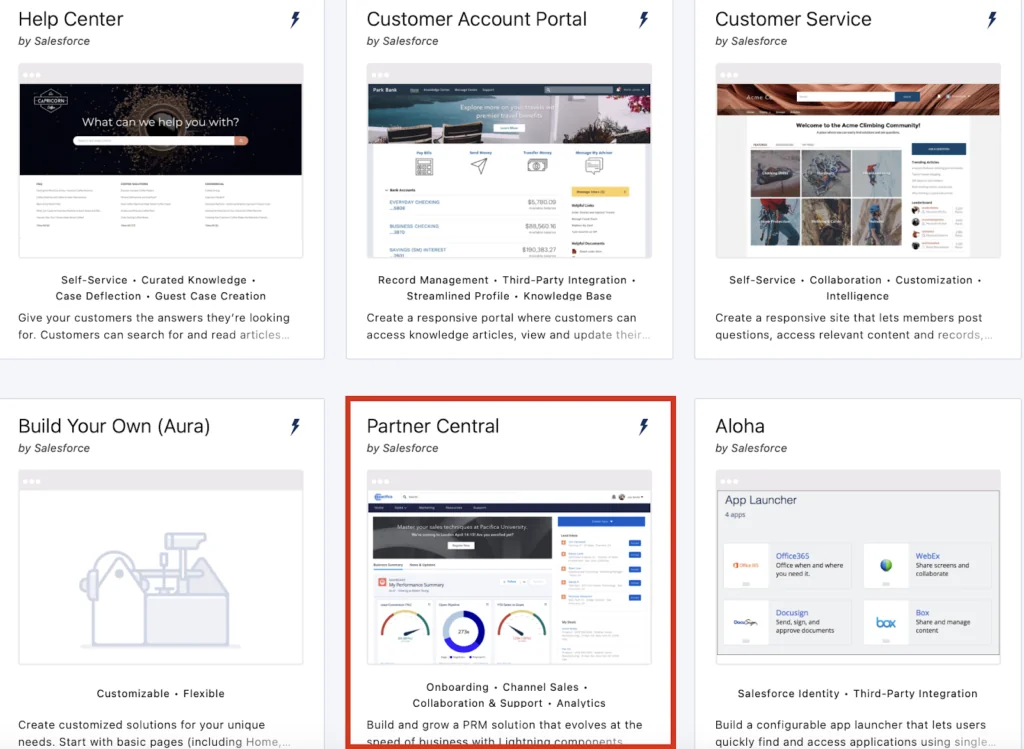
Common portal use cases
| Use case | Typical Salesforce records | Access consideration |
|---|---|---|
| Lead distribution | Lead, queue, assignment rule | Partners must receive only eligible leads and suitable field access. |
| Deal registration | Lead, Opportunity, custom registration object | Duplicate detection and approval rules should address channel conflict. |
| Pipeline collaboration | Opportunity, Account, Contact, Product | Opportunity access depends on the external-user license and sharing design. |
| Partner support | Case, Knowledge, Asset | Case visibility should normally follow the partner account or contact relationship. |
| Enablement | Knowledge, CMS content, files, learning records | Content visibility can vary by audience, permission, region, or partner tier. |
| Performance reporting | Reports, dashboards, scorecard records | Reports must respect external-user record access and folder permissions. |
How Does Salesforce Partner Portal Architecture Work?
The architecture has four layers: the Experience Cloud interface, partner identity, Salesforce authorization, and CRM processes. Treating these as separate layers helps prevent a common mistake: designing pages before deciding which records each type of partner may access.
Experience Cloud site
Experience Builder controls navigation, themes, page layouts, components, page variations, and audience assignments. Partner Central is often the starting template, but the final site can contain standard components, custom Lightning web components, flows, reports, CMS content, and links to other services.
Partner license and external identity
A partner user starts as a Contact related to a business Account. The account is enabled as a partner account, and the contact is enabled as an external user. The selected Experience Cloud license determines the capabilities available to that user. Confirm licensing with your Salesforce account team because product names, entitlements, and commercial terms can vary by contract and industry product.
Salesforce states that partner licenses support role-based external users and partner-oriented CRM access. Customer-focused licenses are not interchangeable with partner licenses; for example, some customer license types do not support sharing Leads, Opportunities, Campaigns, or Quotes with external users.
Authorization and record sharing
Data access is the intersection of several controls:
- License entitlement determines which platform functions can be granted.
- Permission sets and profiles grant object, field, Apex class, Flow, tab, and system permissions.
- Organization-wide defaults establish baseline record access.
- Partner roles and role hierarchy provide account-based hierarchy access where applicable.
- Sharing rules, manual sharing, teams, and Apex managed sharing can grant additional record access.
- Sharing sets and share groups apply to supported high-volume external-user models and should not be assumed to replace partner-role sharing.
For a broader explanation of Salesforce access controls, see the Salesforce security model tutorial.
SFDC Partner Community terminology
SFDC partner community is an older phrase that remains common in project specifications and search queries. Salesforce renamed Community Cloud to Experience Cloud, and administrators now create an Experience Cloud site rather than a legacy portal. When reviewing an older requirement, determine whether it refers to a current Experience Cloud implementation or to an unsupported legacy portal design.
How to Create a Salesforce Partner Portal
Complete the data-access design before adding custom pages. The following sequence reduces rework because it validates the license, partner account model, and sharing behavior before presentation-layer development begins.
1. Define the partner operating model
Document the partner types, user roles, countries, business units, sales processes, and records each group needs. A useful access matrix lists the object, permitted actions, record scope, sensitive fields, and approval requirements.
| Persona | Required actions | Example record scope |
|---|---|---|
| Partner sales representative | Accept leads, register deals, update opportunities | Records owned by or shared with that representative |
| Partner manager | Review team pipeline and approve submissions | Records visible through the partner-account role hierarchy |
| Distributor operations user | Review orders, assets, cases, or claims | Records related to the distributor account |
| Internal channel manager | Manage partners, redistribute leads, monitor pipeline | Partner records within the internal role and sharing model |
2. Enable Digital Experiences
- Open Setup.
- Search for Digital Experiences.
- Open Settings and enable Digital Experiences if it is not already enabled.
- Configure the domain used by Experience Cloud sites.
The domain choice affects public URLs and should be reviewed with identity, security, and DNS owners before production rollout.
3. Create the Partner Central site
- From Setup, open Digital Experiences > All Sites.
- Select New.
- Choose Partner Central when the required partner license and template are available.
- Enter the site name and URL path.
- Create the site and open its administration workspace.
Salesforce provides an official setup roadmap in Create a Partner Site with Partner Central.
4. Add members through permission sets
Add the external-user profiles or permission sets that should be able to log in. Permission-set-based membership generally gives administrators better control than placing unrelated responsibilities in a shared profile.
Do not treat site membership as data authorization. Membership permits entry to the site, while object permissions and sharing determine what the user can do after login.
5. Configure pages, navigation, and branding
Use Experience Builder to configure the home page, lead pages, opportunity pages, knowledge, support, dashboards, and navigation. Keep the first release focused on a small number of tested workflows.
6. Configure login and identity
Choose the required authentication method, such as Salesforce credentials or single sign-on through an identity provider. Review login discovery, self-registration, password policies, multifactor authentication requirements, session settings, logout behavior, and deactivation procedures.
Self-registration should not automatically grant broad partner access. Many enterprise implementations validate an invitation, account relationship, email domain, partner status, or approval record before activating a user.
How Are Partner Accounts, Roles, and Users Configured?
Each partner user is associated with a Contact, and that Contact belongs to an Account enabled for partner use. The Account owner has architectural significance because the external partner-role hierarchy rolls up to the account owner’s role.
Enable a partner account and user
- Create or locate the business Account that represents the partner organization.
- Use the account action to enable the account as a partner account.
- Create a Contact for the named individual.
- Enable the Contact as a partner user.
- Select the external-user license, profile, role, username, email, locale, and time zone.
- Assign the site’s membership permission set and business-function permission sets.
When the first partner user is enabled for an account, Salesforce creates a partner role hierarchy for that account. Salesforce documents the standard partner role levels as Partner User, Partner Manager, and Partner Executive, subject to the number of partner roles configured for the org. See Partner User Roles.
Control role growth
Partner roles add sharing calculations and should be planned before loading a large partner population. Do not assign every external person a managerial role. Use the lowest role that meets the record-visibility requirement, and confirm that the internal owner of each partner account sits in the intended role hierarchy.
Partner portal Salesforce user lifecycle
A partner portal Salesforce implementation needs a documented joiner, mover, and leaver process. At minimum, define who can request access, who approves it, how partner-account changes are handled, how inactive users are frozen or deactivated, and how records are reassigned when a partner relationship ends.
Salesforce Partner Portal Security and Record Sharing
Start with restrictive organization-wide defaults and grant only the access required for each process. External access should be tested from external-user sessions; an administrator’s view does not prove that partner sharing works correctly.
Use object and field permissions first
Grant object permissions with permission sets aligned to job functions. Remove fields that contain internal margin, legal notes, employee-only commentary, scoring inputs, or other data that partners should not see. Test create, read, edit, and delete separately because a process may require edit access to one object and read-only access to another.
Use partner roles and sharing rules for record scope
Partner roles can provide visibility within the partner account hierarchy. Criteria-based or owner-based sharing rules can grant additional records to external groups when the required access cannot be derived from ownership alone. Avoid rules that share all partner records with all external users unless that is a documented business requirement.
Do not confuse audience targeting with security
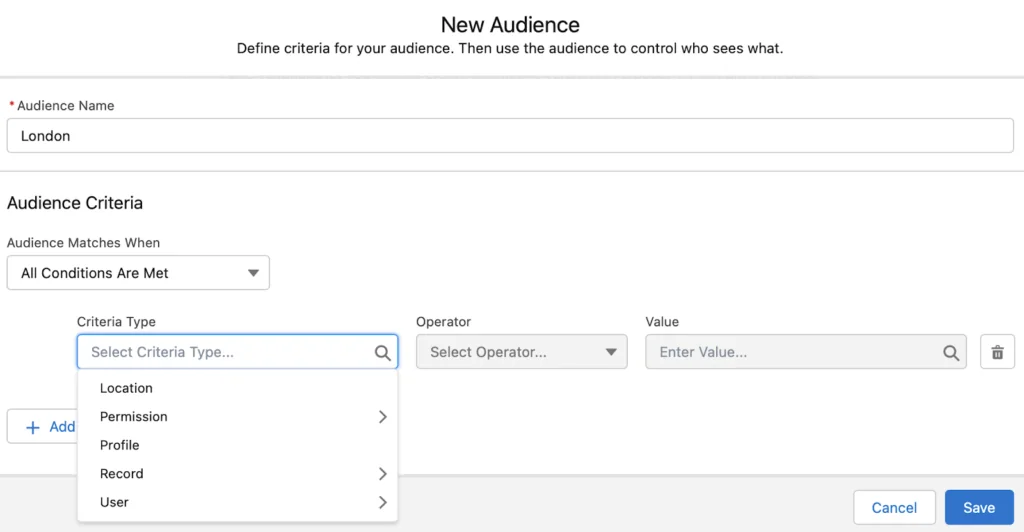
Experience Builder audiences can display different pages or components based on supported criteria. This improves relevance, but it is not a substitute for CRUD, field-level security, or record sharing. A hidden component does not prevent a user from reaching data through another page, API-enabled integration, report, Flow, or custom component when the underlying permissions allow it.
Review files, reports, and dashboards
- Check report-folder and dashboard-folder access.
- Confirm that report types expose only permitted objects and fields.
- Test dashboard running-user behavior and any dynamic-dashboard configuration.
- Review Files visibility and record associations.
- Prevent public links from bypassing the intended authenticated access model.
See the Salesforce reports guide and Salesforce dashboard tutorial when configuring analytics for partners.
How Do Lead Distribution and Deal Registration Work?
Lead distribution
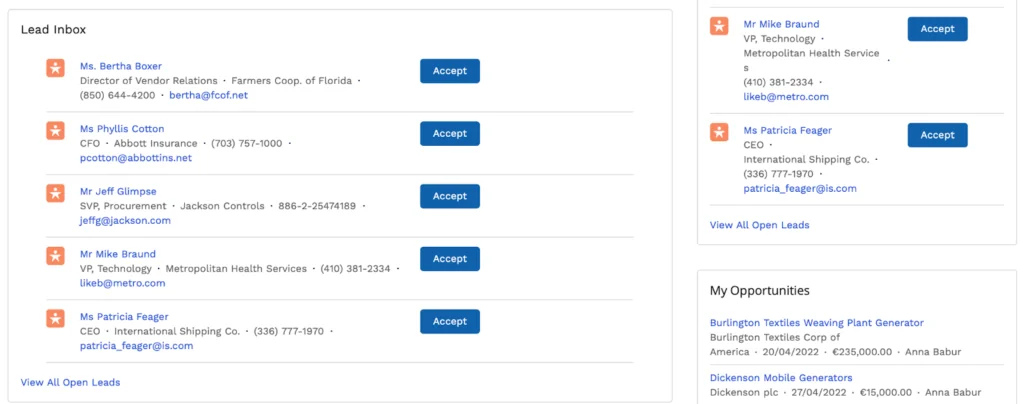
Salesforce supports direct assignment of a Lead to a partner user and queue-based distribution in which eligible partner users accept leads through the partner experience. Assignment rules can route records according to geography, product, partner tier, industry, or other maintained criteria.
Salesforce describes the Partner Central lead inbox and assignment-rule approach in Configure Lead Distribution in Partner Central.
A production design should define:
- How long a partner can hold an unworked lead.
- Whether accepting a lead changes ownership or another assignment field.
- Which statuses and fields a partner may update.
- How declined or expired leads return to a queue.
- How duplicate leads and existing customer relationships are handled.
- Which notifications are sent and from which verified organization-wide address.
Deal registration
Deal registration lets a partner submit a prospective sale for review before investing further effort. The implementation can use supported Partner Central functionality, Salesforce records, approval processes, Flow, duplicate rules, and custom objects where the business process requires extra stages.
Define an explicit status model, such as Submitted, Under Review, Approved, Rejected, Expired, and Converted. Document which conditions protect a deal, how long protection lasts, which records are checked for conflicts, and which internal role can override a decision.
Pipeline reporting and scorecards
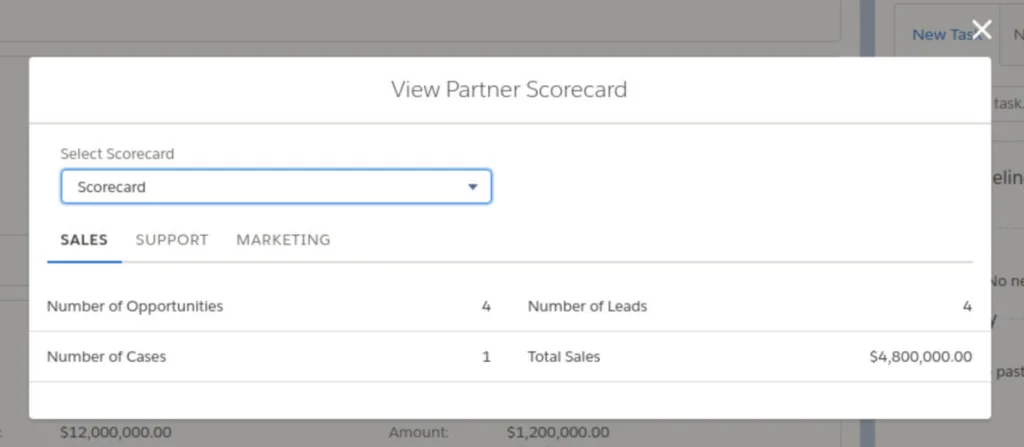
Partners normally need reports limited to their own accessible records, while internal channel managers need aggregated pipeline and activity measures. Do not calculate partner performance from editable partner-entered fields alone. Use controlled source fields, dated snapshots, or derived metrics where auditability matters.
How Should Custom Code Be Secured in a Partner Site?
Use standard components and Flow where they satisfy the requirement. Add Lightning web components or Apex only when the process needs behavior that declarative configuration cannot provide clearly.
Secure Apex used by Lightning web components
An Apex class should declare an explicit sharing mode and enforce object and field access. The following example returns only the current partner user’s open opportunities that the user’s sharing access permits. It uses bind variables, a row limit, and user-mode SOQL.
public with sharing class PartnerOpportunityController {
    @AuraEnabled(cacheable=true)
    public static List<Opportunity> getMyOpenOpportunities(Integer requestedLimit) {
        Integer safeLimit = requestedLimit == null
            ? 20
            : Math.max(1, Math.min(requestedLimit, 100));

        return [
            SELECT Id, Name, StageName, CloseDate, Amount, Account.Name
            FROM Opportunity
            WHERE IsClosed = FALSE
            ORDER BY CloseDate ASC NULLS LAST
            LIMIT :safeLimit
            WITH USER_MODE
        ];
    }
}
Governor-limit note: The method performs one SOQL query and limits the result set to 100 records. A real component should use pagination rather than increasing the limit to return an entire pipeline.
Security note: with sharing enforces record-sharing rules for the class, while WITH USER_MODE enforces user-mode data access for the query. Validate all create and update operations similarly, and do not rely on Lightning page visibility as authorization.
Avoid exposing internal fields through wrapper classes
Apex can accidentally disclose data by selecting internal fields and returning them in a custom wrapper. Query only fields required by the component. Review serialized values, error messages, debug logs, and exception handling so that IDs, query text, or internal process details are not shown to partner users.
Secure Flow and invocable actions
Review the execution context of each Flow, subflow, and Apex action. A system-context automation can update records that the initiating partner cannot edit directly. That behavior may be required, but it must be intentional, validated, and limited to approved fields and records.
For Apex fundamentals and test practices, see the Salesforce Apex tutorial.
How Do You Test and Deploy an SFDC Partner Community?
Test with representative external users
Create test users for each license, partner role, permission-set combination, region, and partner tier. Validate positive and negative scenarios. A user should see required records, but the test must also prove that the user cannot access unrelated partner accounts, internal-only fields, restricted reports, administrative pages, or records obtained by changing a URL.
Include security-focused Apex tests
Salesforce requires at least 75% aggregate Apex code coverage for production deployment, but coverage alone does not prove authorization. Tests should use System.runAs with representative external users, create records owned by different partner accounts, and assert both permitted and denied outcomes.
Deploy site metadata through a controlled pipeline
Experience Cloud configuration can include Network, CustomSite, ExperienceBundle, permission sets, Apex, Lightning components, Flows, objects, fields, and other dependencies. Salesforce documents ExperienceBundle as a text representation of Experience Builder settings, routes, pages, branding sets, themes, and variations.
Use the Metadata API or Salesforce CLI to retrieve and deploy the supported metadata. The exact metadata type depends on the site architecture. Enhanced LWR sites use DigitalExperienceBundle and related metadata, while other Experience Builder sites can use ExperienceBundle. See the official ExperienceBundle documentation.
# Retrieve a named ExperienceBundle from the source org.
sf project retrieve start \
  --metadata "ExperienceBundle:Partner_Central" \
  --target-org partner-sandbox

# Validate the project metadata against production without running a quick deploy.
sf project deploy validate \
  --source-dir force-app \
  --target-org production \
  --test-level RunLocalTests
Site activation, URL configuration, identity-provider settings, certificates, and some environment-specific values may require separate deployment or release steps. Maintain a release checklist rather than assuming every setting is contained in one metadata package.
Regression-test after seasonal releases
Run portal regression tests in a preview sandbox when available. Test login, navigation, page variations, lead acceptance, opportunity updates, file access, reports, flows, custom components, mobile layouts, email delivery, and logout. Review Salesforce release notes for changes affecting Experience Cloud, external users, identity, Flow, and Lightning components.
Salesforce Partner Portal Implementation Best Practices
Release one complete workflow first
Start with a process that provides measurable value, such as partner onboarding plus deal registration, or lead distribution plus opportunity updates. A smaller production scope is easier to secure and support than a portal containing many unfinished pages.
Measure process outcomes rather than login counts
Track whether the portal improves the intended process. Depending on the use case, measures can include lead acceptance time, deal review time, percentage of registrations requiring rework, active pipeline, onboarding completion, case resolution time, and monthly active partner organizations.
Separate partner tiers through permissions and data
Do not create page variations alone for benefits that require authorization. Use permission sets, custom permissions, entitlement records, sharing, or validated Apex and Flow logic to enforce tier-based functions. Audiences can then tailor the interface to the same entitlement model.
Maintain ownership and support procedures
Assign owners for partner data, access approvals, portal content, release management, incident response, and user support. In enterprise orgs, partner portals often fail operationally when the technical site remains active but no team owns expired content, inactive accounts, failed automations, or access recertification.
Review access on a schedule
Perform periodic reviews of active partner users, account status, permission-set assignments, roles, report folders, public groups, sharing rules, connected apps, login history, and high-risk permissions. Deactivate access promptly when the business relationship or employment relationship ends.
Frequently Asked Questions
Is Salesforce Partner Portal the same as Experience Cloud?
A Salesforce partner portal is a partner-facing use of Experience Cloud. Experience Cloud is the broader platform used to create authenticated or public digital experiences for customers, partners, employees, and other audiences.
What happened to Salesforce Partner Community?
Salesforce renamed Community Cloud to Experience Cloud. The phrase SFDC partner community is still used informally, but new implementations are normally described as Experience Cloud partner sites.
Which license is required for a partner portal in Salesforce?
A partner-oriented Experience Cloud license is generally required when external users need partner sales capabilities and role-based access to CRM records such as Leads and Opportunities. Confirm the exact license and entitlements with Salesforce because availability and commercial terms depend on the contract and Salesforce product.
Can partner users access Salesforce opportunities?
Yes, when their external-user license supports Opportunity access and administrators grant the required object, field, and record permissions. Page visibility by itself does not grant Opportunity access.
Can a Salesforce partner portal distribute leads automatically?
Yes. Administrators can use lead assignment rules, queues, direct ownership, and the Partner Central lead inbox pattern to distribute eligible leads. The design should also define acceptance, expiration, reassignment, notification, and duplicate-handling rules.
Does audience targeting secure partner records?
No. Audience targeting changes which pages or components are presented. Secure partner records with license entitlements, object permissions, field-level security, sharing settings, roles, sharing rules, and secure application logic.
Can Experience Cloud partner sites be deployed with Salesforce CLI?
Supported site metadata can be retrieved and deployed with Salesforce CLI and Metadata API. Include dependent metadata and determine whether the site’s architecture uses ExperienceBundle or DigitalExperienceBundle before building the deployment package.
Official Salesforce Resources