Quiop is a common search spelling for Quip, Salesforce’s collaborative document, spreadsheet, chat, and presentation product. Quip can place shared working documents beside Salesforce records and connect selected document content with CRM data, but Salesforce announced that all Quip products are being retired and subscriptions cannot be renewed after March 1, 2027.
This guide explains what users searching for quiop are usually looking for, the main Quip characteristics, supported business activities, Salesforce integration options, migration concerns, and how Quip compares with Google Docs. Existing customers should treat new Quip development as transition work rather than a long-term platform investment.
Retirement notice: Salesforce published the Quip retirement announcement in March 2026 and updated it in April 2026. Confirm contract, renewal, export, retention, and migration dates with your Salesforce account team because customer agreements and regional requirements can differ.
What Does Quiop Mean in Salesforce?
There is no separate Salesforce product named Quiop. In most Salesforce searches, quiop refers to Quip. Salesforce documentation describes Quip as a workspace for collaborative documents and spreadsheets, while Quip Advanced adds Salesforce-oriented capabilities such as embedded documents and live CRM data.
The distinction matters when searching Setup, AppExchange, Salesforce Help, or API documentation. Use the official spelling Quip for product configuration, support cases, permission reviews, and migration planning.
| Search term | What it usually refers to | Recommended action |
|---|---|---|
| quiop | A misspelling of Salesforce Quip | Search official documentation for Quip |
| sfdc quip | Quip integration with Salesforce records and data | Review Quip in Salesforce and licensing documentation |
| Quip Advanced | The Salesforce-integrated Quip offering | Verify current entitlement and retirement terms |
| Quip API | Admin, Automation, SCIM, and related developer interfaces | Inventory integrations before migration |
Which Quip Characteristics Matter to Salesforce Teams?
Quip characteristics for collaborative work
The main Quip characteristics are shared editing, document-level conversations, spreadsheets, presentations, access controls, version history, and Salesforce-aware components. Rather than storing discussion in one system and the working document in another, Quip keeps comments and edits near the content being reviewed.
- Documents: Teams can edit text, checklists, tables, and embedded content in a shared workspace.
- Spreadsheets: Users can calculate, validate, format, and reference tabular data.
- Comments and mentions: Discussion can be attached to a document or a selected section.
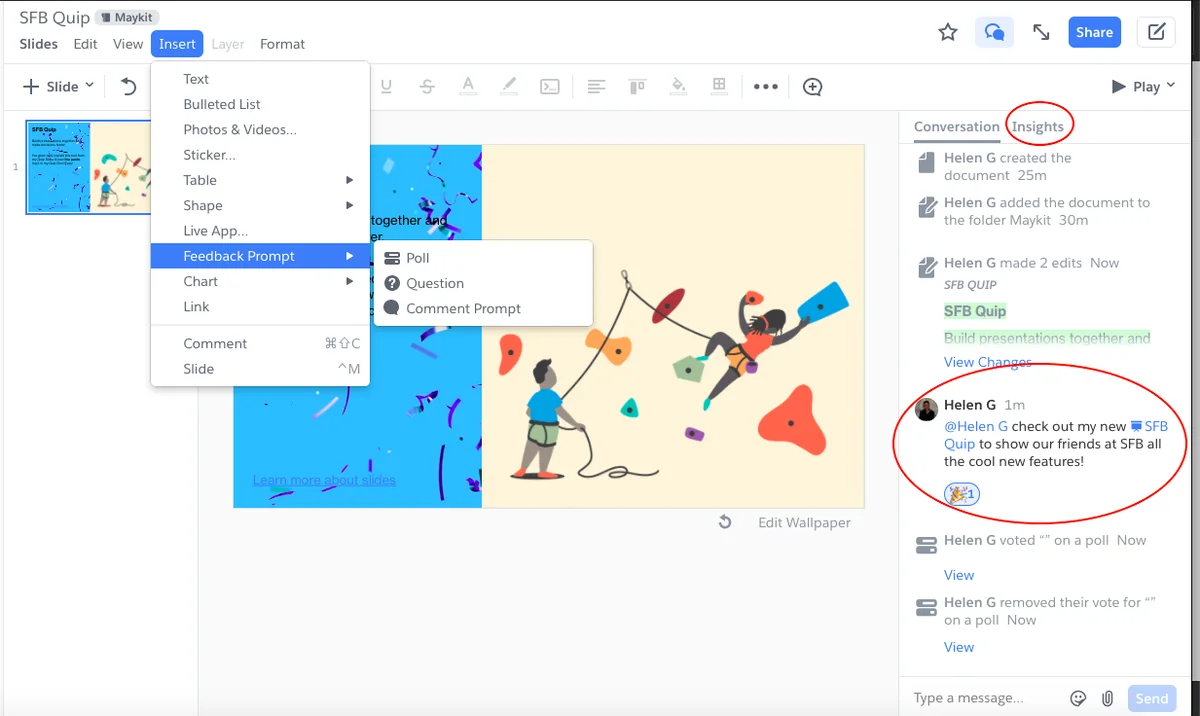
- Presentations: Teams can develop slide content and collect feedback in the same collaboration environment.
- Salesforce context: Supported Quip editions can display documents or selected Salesforce data within business processes.
- APIs: Quip provides administrative and automation interfaces for supported integrations.

One useful pattern is maintaining a reusable section in a source document and displaying that content in other working documents. Before adopting any feature shown in an older Quip implementation, verify that it remains available for your edition and has not entered retirement.
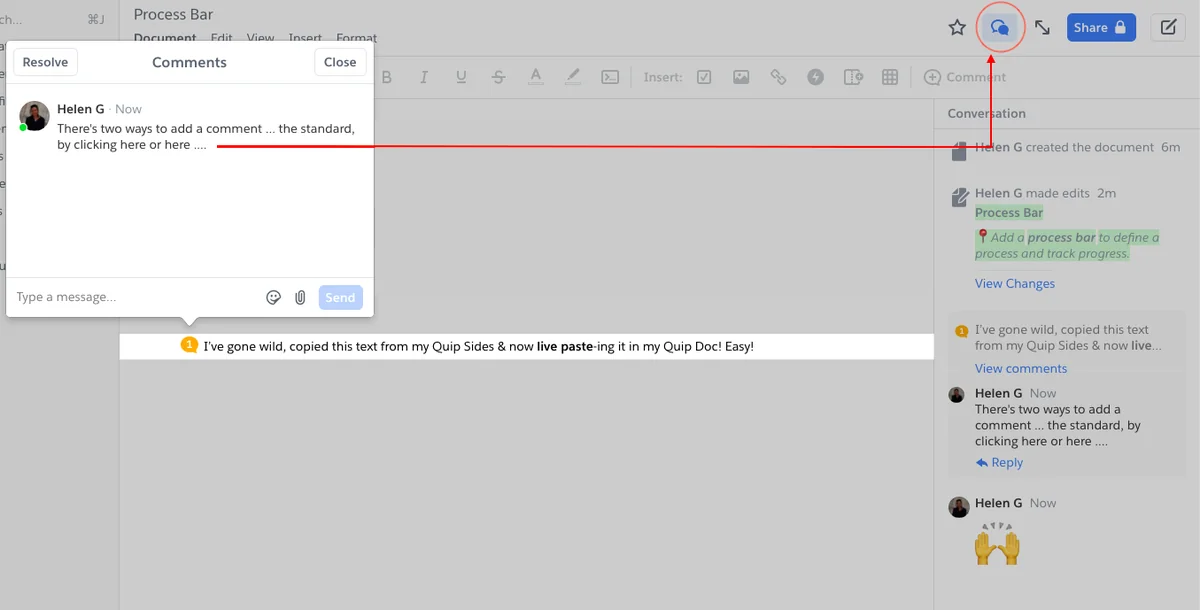
Document chat can reduce separate email threads, but it does not replace a records-retention policy. Administrators should determine whether conversations, document revisions, attachments, and exported copies must be retained outside Quip after the product retirement.
Which Quip Business Activities Work with Salesforce?
Quip business activities for sales and service teams
Common Quip business activities include account planning, opportunity close plans, meeting notes, qualification records, project trackers, case coordination, and management reviews. These activities work best when the document has a defined owner, a repeatable template, controlled access, and a clear relationship to Salesforce records.
| Business activity | Salesforce context | Governance question |
|---|---|---|
| Account plan | Account, contacts, opportunities, risks, and actions | Who owns the plan after account reassignment? |
| Mutual close plan | Opportunity milestones, stakeholders, and target dates | Can external collaborators see customer data? |
| Call notes | Activity history and related account or opportunity | Which information must also be written to Salesforce? |
| Pipeline review | Reports, list views, and opportunity updates | Which system is the source of truth? |
| Case collaboration | Case details, investigation notes, and action items | Could the document expose restricted case data? |
| Project tracker | Owners, dates, dependencies, and related records | How will open work migrate before retirement? |
In enterprise orgs, the most important design decision is not where users type notes. It is where the authoritative data belongs. Opportunity Amount, Stage, Close Date, Case Status, and other operational fields should remain governed in Salesforce when downstream automation, reporting, validation rules, or integrations depend on them.
Logging Salesforce activity from a Quip document
Some Quip configurations expose Salesforce actions from the document interface. For example, a user may open a Salesforce action menu while taking customer notes.

The exact fields depend on the action and org configuration. A call activity commonly needs a related record, subject, notes, and contact context. Administrators must still enforce appropriate object access, field permissions, validation rules, and sharing in Salesforce.
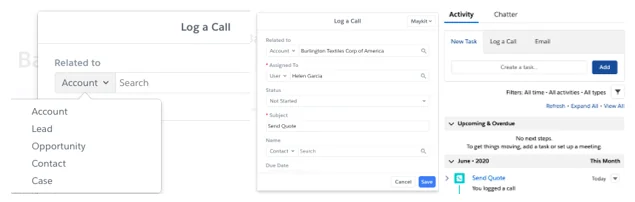
Do not assume that entering information in a Quip document creates or updates every required Salesforce record. Test each action with a least-privilege user and verify the resulting Task, Event, field update, or related record directly in Salesforce.
Using Salesforce reports in Quip
Quip Advanced supports Salesforce-oriented data features that can place CRM information in documents and spreadsheets. A report-based workflow can provide context for a pipeline review without requiring every participant to switch repeatedly between a document and a report page.

Report data has separate size constraints. Salesforce documents a 20,000-cell limit for Salesforce reports used with Quip, while a Quip spreadsheet has a 100,000-cell maximum. Large datasets should remain in reporting, analytics, Data Cloud, or an external data platform rather than being copied into a working document.
Using Salesforce list views and related records
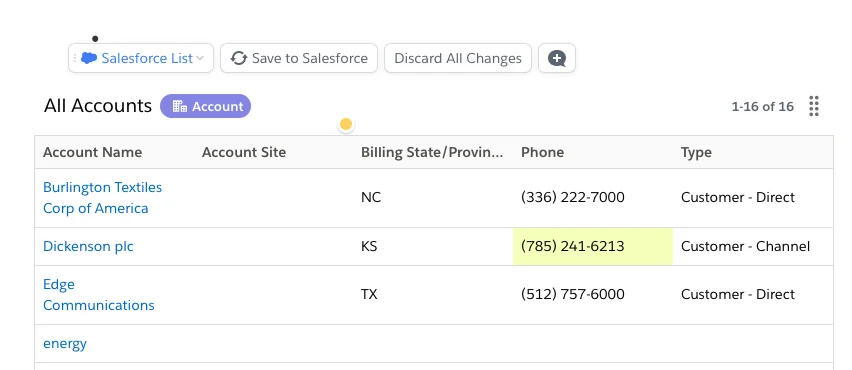
A list-oriented component can bring a selected Salesforce list view into a Quip workspace. Access should continue to follow the connected user’s Salesforce permissions, but administrators should test the actual behavior for each component and edition.
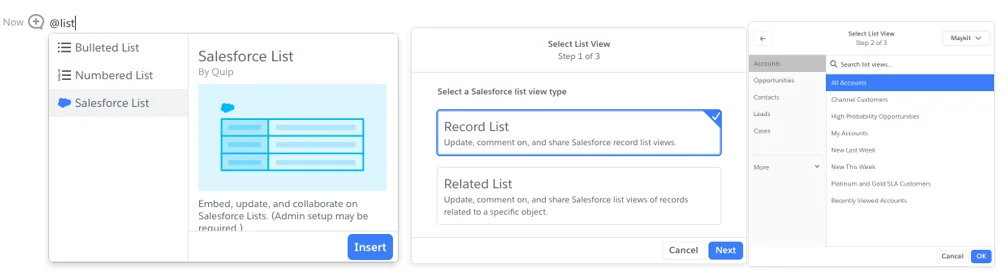
Where inline editing is supported, a user may change a displayed value and save it back to Salesforce. The save can still fail because of a validation rule, required field, record lock, duplicate rule, approval lock, insufficient access, or an automation error.
How Should Administrators Configure SFDC Quip?
SFDC Quip implementation checklist
An SFDC Quip implementation requires more than enabling a document component. Review licensing, identity, permissions, record access, template ownership, data handling, support responsibilities, and retirement dates.
- Confirm entitlement. Identify the Quip edition, contract dates, assigned licenses, and Salesforce products involved.
- Inventory current use. List documents, folders, templates, embedded components, integrations, API keys, bots, and scheduled processes.
- Map data ownership. Mark each field or document section as Salesforce-owned, Quip-owned, derived, or temporary.
- Test least-privilege access. Use representative sales, service, manager, and external-user personas.
- Document failure handling. Define what users should do when a Salesforce update, refresh, export, or API request fails.
- Plan migration. Select destinations for documents, spreadsheets, comments, attachments, links, templates, and audit evidence.
Embedding a Quip document on a Salesforce record
Salesforce provides a Quip Document Lightning component that can display a functional Quip document or spreadsheet on a Salesforce record page. The available configuration can depend on licensing and the component version.
- Confirm that the required Quip and Salesforce licenses are assigned.
- Open the target object record page in Lightning App Builder.
- Add the supported Quip document component to the required region.
- Configure whether the page uses a specific document, a template-driven document, or record-related behavior supported by your edition.
- Activate the page for the intended apps, profiles, and form factors.
- Test document creation, viewing, editing, sharing, and record reassignment.
Record-page visibility does not grant access to the document by itself. Test both Salesforce record access and Quip document access. A user can encounter a blank component or access error when one system permits access and the other does not.
What Are the Security Considerations for Quiop and Quip?
Security reviews for quiop searches should focus on the actual Quip tenant, Salesforce connection, document sharing, API credentials, and exported content. Salesforce object permissions do not automatically replace Quip document permissions, and Quip document access does not grant unrestricted Salesforce access.
Access and identity controls
- Use managed identity and single sign-on where included in the customer agreement.
- Review inactive users, guests, shared links, folder membership, and externally shared documents.
- Restrict administrative and API access to named owners.
- Test whether document ownership changes when a Salesforce user leaves or loses a license.
Salesforce CRUD, FLS, and sharing
Any Salesforce data operation initiated from Quip must be tested against the connected user’s access. Review object-level permissions, field-level security, organization-wide defaults, role hierarchy access, sharing rules, teams, territories, and manual sharing. Do not expose a field in a Quip template merely because an administrator can see it.
API key management
Quip supports API access through OAuth-compatible bearer tokens and administrative key management. Domain-level credentials can have broader access than a normal user, so store secrets in a managed secret system, rotate them, monitor their use, and remove unused keys.
# Authentication pattern only. Use the endpoint and scopes
# documented for the specific Quip API operation.
curl --request GET \
  --header "Authorization: Bearer ${QUIP_ACCESS_TOKEN}" \
  --header "Accept: application/json" \
  "${QUIP_API_ENDPOINT}"
Never place a Quip access token in Apex source code, an LWC JavaScript file, a public repository, or a browser-delivered configuration value. Existing API integrations should be included in the Quip retirement inventory.
What Limits and Common Errors Affect Quip?
| Issue | Likely cause | Recommended check |
|---|---|---|
| Document component shows an access error | Salesforce and Quip permissions do not align | Test both record access and document sharing |
| Inline edit does not save | Validation rule, FLS, record lock, or automation failure | Repeat the update directly in Salesforce and inspect errors |
| Report data is incomplete | Report filters, user access, or cell limits | Run the report as the same user and calculate total cells |
| Spreadsheet becomes slow | Large cell count, formulas, or embedded data | Remove unused cells and split the workbook |
| API request returns 401 or 403 | Expired token, missing scope, revoked key, or insufficient access | Review OAuth token, scopes, and API access assignment |
| Export omits expected context | Feature-specific content does not map cleanly to the target format | Test representative documents before bulk migration |
Salesforce states that each Quip spreadsheet has a hard maximum of 100,000 cells. Approaching that limit can cause performance or editing problems. Deleting unused rows, columns, and tabs can reduce the cell count; copying an oversized spreadsheet does not solve the underlying design problem.
Quip vs Google Docs: Which Fits Salesforce Work?
Quip vs Google Docs comparison
The Quip vs Google Docs decision should now include product lifecycle, not only editing features. Quip was designed around collaborative documents with Salesforce-specific capabilities, while Google Docs belongs to Google Workspace and follows a separate identity, administration, integration, and records-retention model.
| Area | Quip | Google Docs |
|---|---|---|
| Salesforce record embedding | Available through supported Quip Salesforce components and licensing | Usually requires links, custom integration, or third-party tooling |
| Live Salesforce data | Supported in specific Quip editions and components | Requires a separate connector or integration design |
| Document collaboration | Documents, spreadsheets, comments, chat, and presentations | Documents with Google Workspace comments and collaboration |
| Identity administration | Quip and connected Salesforce administration | Google Workspace administration |
| Long-term product status | All Quip products are scheduled for retirement; no renewals after March 1, 2027 | Not part of Salesforce’s Quip retirement announcement |
| Migration priority | High for existing customers | Depends on the organization’s Workspace strategy |
For a new implementation in 2026, Quip vs Google Docs is not a neutral greenfield comparison. A team considering Quip must account for the announced retirement and should evaluate the Salesforce, Slack, Microsoft 365, Google Workspace, and records-management tools already approved by its organization.
How Should Existing Quiop Customers Prepare for Retirement?
Existing customers searching for quiop should begin with discovery. Do not start by exporting random folders. First determine what exists, who owns it, which content is regulated, which documents contain live Salesforce data, and which automations depend on Quip APIs.
Recommended migration sequence
- Build an inventory. Include documents, spreadsheets, slides, folders, templates, comments, attachments, links, API applications, and embedded Salesforce components.
- Classify content. Identify active, duplicate, expired, regulated, customer-facing, and business-critical material.
- Select target systems. Map each use case to Salesforce records, Slack canvases or workflows, a document platform, a spreadsheet platform, or an archive.
- Export a pilot set. Test formatting, formulas, comments, attachments, links, dates, ownership, and permissions.
- Rebuild integrations. Replace Quip-specific APIs and Salesforce components with supported target-platform patterns.
- Validate with users. Confirm that sales, service, legal, compliance, and operations teams can complete the same business process.
- Freeze and cut over. Define a final editing date, perform the last export, redirect users, and retain audit evidence.
Salesforce Help documents Quip import and export options, but export testing remains necessary. A document containing live Salesforce elements, comments, formulas, embedded apps, or access-controlled content may not behave like a plain word-processing file after export.
Best Practices for Quip During the Transition Period
- Avoid new long-lived dependencies. Do not begin a multi-year Quip customization without an approved exit design.
- Keep Salesforce as the operational source. Store data needed by automation, reporting, and integrations in governed Salesforce fields and objects.
- Assign owners. Every template, API key, embedded component, and migration workstream needs a named owner.
- Reduce sensitive duplication. Avoid copying regulated data into documents when a Salesforce record reference is sufficient.
- Test exports early. Include large spreadsheets, comments, linked documents, formulas, images, and Salesforce data components.
- Track retirement information. Review the official Salesforce Quip retirement article and contract communications rather than relying on old implementation guides.
For related Salesforce configuration topics, review the Salesforce security model guide, Salesforce reports tutorial, Salesforce dashboard configuration, and Salesforce integration patterns.
Frequently Asked Questions
Is Quiop a Salesforce product?
No. Quiop is usually a misspelling of Quip, Salesforce’s collaborative document and spreadsheet product. Use the spelling Quip when searching Salesforce Setup, Help, contracts, or API documentation.
Is Salesforce Quip being discontinued?
Yes. Salesforce announced the retirement of all Quip products. According to the official retirement notice, Quip subscriptions cannot be renewed after March 1, 2027. Existing customers should confirm their contractual end date and migration obligations with Salesforce.
What are the main Quip characteristics?
The main Quip characteristics include collaborative documents, spreadsheets, presentations, comments, chat, sharing controls, version history, APIs, and Salesforce-connected components available with supported editions.
What Quip business activities can connect to Salesforce?
Quip business activities can include account plans, opportunity close plans, call notes, pipeline reviews, project trackers, and service collaboration. Salesforce should remain the source of truth for fields used by automation, reporting, validation, and integrations.
Does SFDC Quip respect Salesforce permissions?
Salesforce data operations initiated through SFDC Quip remain subject to the connected user’s Salesforce access and business rules. Administrators must also manage Quip document permissions because Salesforce record access and Quip document access are separate controls.
Which is better in 2026, Quip vs Google Docs?
The Quip vs Google Docs choice depends on integration, governance, identity, and migration requirements. However, Quip’s announced retirement means organizations should not evaluate it as a long-term greenfield platform without a documented transition plan.
How many cells can a Quip spreadsheet contain?
Salesforce documents a hard maximum of 100,000 cells for each Quip spreadsheet. Salesforce reports used with Quip have a separate 20,000-cell limit. Performance can decline before a spreadsheet reaches its hard maximum.
What should be included in a Quip migration inventory?
Include documents, spreadsheets, slides, folders, templates, comments, attachments, sharing rules, embedded Salesforce components, API keys, OAuth applications, bots, scheduled jobs, integrations, owners, retention requirements, and target systems.
Official Salesforce and Quip References