Lead assignment rules Salesforce evaluates incoming Lead records against ordered criteria and assigns the first match to a user or a lead queue. Use this feature when ownership can be determined from fields already populated at the moment the rule runs, such as country, state, product interest, company size, campaign source, or partner status.
A reliable design starts outside Setup. Confirm which systems create leads, which fields they provide, which owners can receive them, and where unmatched records must go. The rule itself is simple; the routing model, data quality, and test coverage determine whether the result works in production.
What are lead assignment rules Salesforce?
Lead assignment rules Salesforce consists of one active rule containing ordered rule entries. Each entry contains criteria and an assignment target. Salesforce checks entries in sequence and stops at the first match, so a narrow exception must appear before a broad territory rule that could also match the same record.
Assignment targets can be individual users or queues configured for leads. A queue is useful when several people share responsibility, when a territory has no named representative, or when the business needs a holding area for incomplete records.
| Routing need | Recommended target | Reason |
|---|---|---|
| Named territory owner | User | Ownership is known and stable. |
| Shared inbound team | Lead queue | Members can work from one backlog. |
| Incomplete routing data | Review queue | Prevents silent assignment to the wrong seller. |
| True round-robin distribution | Flow or Apex design | Standard assignment entries do not maintain rotation state. |
Salesforce documents assignment-rule management under Setup and requires View Setup and Configuration to view rules and Customize Application to create or change them. See the official assignment rule setup documentation.
How should you plan lead assignment?
Lead assignment discovery checklist
Before building a rule, collect sample leads from every creation channel: Web-to-Lead, API integrations, list imports, marketing automation, partner submissions, and manual entry. For each channel, record the values that exist before assignment runs. A rule cannot route on data that arrives later.
- Source: Which system creates or updates the Lead?
- Available fields: Are country, state, postal code, product, company size, and consent status populated consistently?
- Exclusions: Should employees, vendors, students, support requests, or duplicate submissions bypass sales?
- Ownership: Is the target a user, queue, channel team, or review team?
- Fallback: Who monitors leads that match no business-specific criteria?
- Service level: Which timestamp or status will prove that the assigned team responded?
In enterprise orgs, store routing inputs in normalized fields instead of parsing free text inside rule criteria. For example, populate a controlled Routing_Region__c value before assignment rather than relying on inconsistent state names entered by external forms.
Salesforce lead assignment rules decision table
A decision table exposes overlap before configuration begins. The following example is original and uses a precedence model that can be tested row by row.
| Priority | Condition | Target | Routing reason |
|---|---|---|---|
| 1 | Is_Sales_Eligible__c = false |
Lead Triage Queue | Not ready for direct sales ownership |
| 2 | Partner_Referral__c = true |
Channel Sales Queue | Partner-sourced lead |
| 3 | Country = Germany and Employee_Band__c = Enterprise |
DACH Enterprise User | Enterprise territory match |
| 4 | Country = Germany |
DACH Commercial Queue | General territory match |
| 5 | No additional criteria | Unmatched Leads Queue | Fallback for review |
The enterprise condition precedes the general Germany condition because both can be true. This ordering rule is the most important operational detail in salesforce lead assignment rules.
How to configure Salesforce lead assignment rules
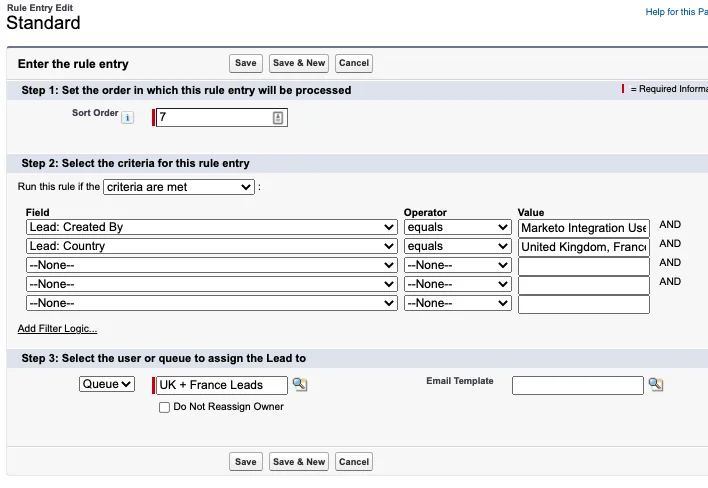
- From Setup, enter Lead Assignment Rules in Quick Find.
- Open Lead Assignment Rules and create a rule with a name that identifies the business process, such as
Global Inbound Lead Routing. - Save the rule, then open it and add rule entries in evaluation order.
- For each entry, define criteria using the fields available when assignment runs.
- Select a user or lead queue as the assignee.
- Configure an email template only when notification is required and has been approved for that routing path.
- Add a final catch-all entry that assigns unmatched records to a monitored queue.
- Test the inactive rule through a controlled path that can invoke a specified rule ID, or activate it during a planned test window.
- Activate the new rule after validation. Salesforce permits only one active lead assignment rule at a time.
Queues must support the Lead object and must have the intended members. Salesforce provides separate guidance for creating a lead distribution queue.
Lead assignment entry ordering
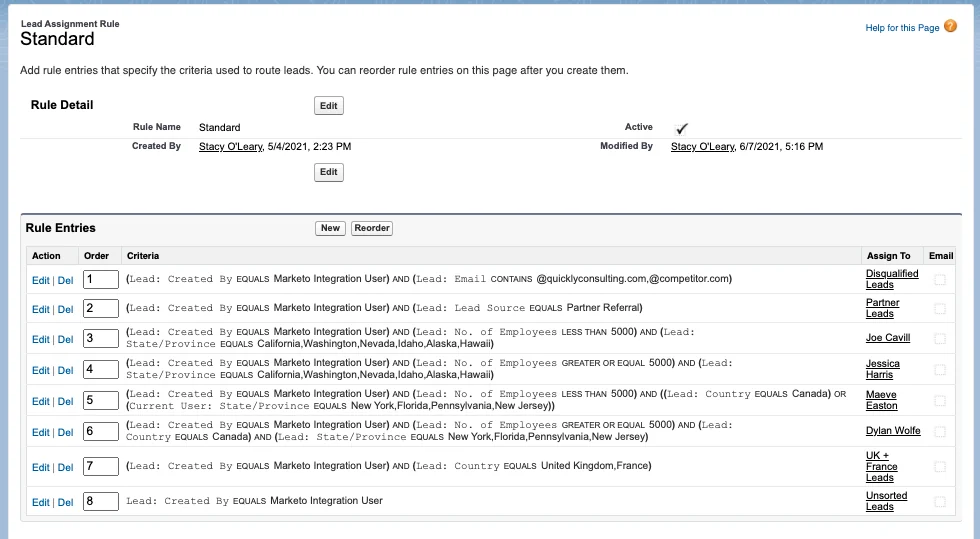
Order entries from exceptions to general cases:
- Compliance, suppression, and non-sales records
- Partner or channel ownership
- Named strategic accounts or account segments
- Product and geography combinations
- General geography rules
- Fallback queue
Do not place a broad rule such as Country = United States before a more specific rule such as Country = United States AND Product_Line__c = Fleet. The broad rule would consume both records.
How do different creation channels invoke lead assignment?
Creating a rule does not mean every integration path invokes it in the same way. Test each channel separately and document the result.
| Channel | How assignment is requested | Key check |
|---|---|---|
| Manual create or edit | User selects Assign using active assignment rules when the layout exposes the option | Page-layout checkbox behavior |
| Web-to-Lead | Uses lead assignment behavior configured for the submission path | Submitted fields exist before evaluation |
| REST API | Sforce-Auto-Assign header controls assignment behavior |
Use active rule or a specific rule ID as documented |
| SOAP API | AssignmentRuleHeader on create or update |
Header is included in the request |
| Apex | Database.DMLOptions.assignmentRuleHeader |
DML options are attached to the inserted or updated leads |
| Data Loader | Assignment rule ID in Data Loader settings | Correct rule ID for the target org |
The REST API developer guide describes the Assignment Rule header. The SOAP API guide documents AssignmentRuleHeader for Lead and Case operations.
Apex example for lead assignment
The following service inserts leads in one DML statement and requests the active lead assignment rule. It does not query inside a loop and is suitable for a bulk call. The code assumes callers have already enforced object and field permissions at the service boundary.
public with sharing class LeadRoutingService {
    public static Database.SaveResult[] insertAndAssign(List<Lead> leads) {
        if (leads == null || leads.isEmpty()) {
            return new List<Database.SaveResult>();
        }

        if (!Schema.sObjectType.Lead.isCreateable()) {
            throw new SecurityException('Current user cannot create Lead records.');
        }

        SObjectAccessDecision decision =
            Security.stripInaccessible(AccessType.CREATABLE, leads);

        List<Lead> safeLeads = (List<Lead>) decision.getRecords();

        Database.DMLOptions options = new Database.DMLOptions();
        options.assignmentRuleHeader.useDefaultRule = true;

        for (Lead leadRecord : safeLeads) {
            leadRecord.setOptions(options);
        }

        // One bulk DML operation. Partial success is allowed.
        return Database.insert(safeLeads, false);
    }
}
Governor-limit note: The method performs one DML statement regardless of list size, but the transaction still must remain within Salesforce DML row, CPU, and other governor limits. The caller should pass no more records than the transaction can safely process.
Security note: with sharing enforces record sharing, not CRUD or field-level security. The example checks Lead create access and uses Security.stripInaccessible before DML. Review the Apex security methods when adapting the pattern.
REST API example
To request the active assignment rule during a Lead create request, send the assignment header documented for REST API. Keep authentication and endpoint version aligned with the API version supported by your integration.
POST /services/data/vXX.X/sobjects/Lead HTTP/1.1
Authorization: Bearer ACCESS_TOKEN
Content-Type: application/json
Sforce-Auto-Assign: TRUE

{
  "LastName": "Patel",
  "Company": "Northwind Mobility",
  "Country": "India",
  "LeadSource": "Web",
  "Product_Interest__c": "Fleet"
}
Replace vXX.X with the API version pinned by your integration. Do not silently advance versions in production without regression testing.
Automotive industry lead routing assignments
Designing automotive industry lead routing assignments
Automotive industry lead routing assignments often require more than a state-to-owner mapping. The routing model may need dealership, sales territory, vehicle line, fleet versus retail intent, language, business hours, and service-level priority. Use assignment rules only for values that are deterministic at assignment time.
| Input | Example use | Failure handling |
|---|---|---|
| Dealer or branch code | Assign to the dealership queue | Unknown code goes to dealer operations review |
| Postal code | Map to a market or service area | Normalize before assignment |
| Vehicle interest | Route fleet, commercial, or retail inquiries | Use a general product queue when blank |
| Purchase timeframe | Separate immediate follow-up from nurture | Do not infer urgency from free text |
| Consent status | Control eligible outreach workflows | Route uncertain records to compliance review |
A production pattern is to calculate fields such as Routing_Market__c, Routing_Product__c, and Routing_Eligibility__c before invoking lead assignment. The assignment rule then operates on controlled values instead of repeating complex normalization logic across entries.
What are the limits of Salesforce lead assignment rules?
- First match wins: Later entries are not evaluated after a match.
- One active rule: Maintain one active lead assignment rule and use entries to represent routing branches.
- No native load balancing: Criteria-based assignment is not a concurrency-safe round-robin engine.
- Point-in-time data: The result depends on field values present when the rule is invoked.
- Reassignment is channel-dependent: Existing leads require an update path that explicitly requests assignment.
- Owner is not conversion: Assignment changes ownership; it does not convert a Lead to Account, Contact, or Opportunity.
Best practices for lead assignment in production
Keep a routing reason on the Lead
Standard ownership shows the result, but it may not explain the decision. Populate a controlled Routing_Reason__c value in upstream automation when auditability matters. For example: PARTNER_REFERRAL, DACH_ENTERPRISE, or UNMATCHED_DATA. This supports reports without asking administrators to infer which rule entry matched.
Use a monitored fallback queue
A blank final criterion can route every unmatched lead to a queue. Assign an operational owner for the queue, define a response target, and report on record age. A fallback queue without monitoring only moves the failure out of view.
Separate normalization from ownership
Normalize country, state, postal code, and product identifiers before invoking salesforce lead assignment rules. This makes routing entries shorter and reduces duplicate conditions. It also makes integration tests easier because each stage has one responsibility.
Deploy dependencies in the correct order
Queues, users, custom fields, and referenced email templates must exist in the target org before assignment-rule deployment. Salesforce notes that deployments can fail when referenced users, queues, or custom fields are missing. See the official assignment rule deployment troubleshooting.
How should you test lead assignment rules Salesforce?
Test lead assignment rules Salesforce with a matrix that proves each entry, each overlap, and the fallback. Run the matrix through every creation channel that matters because UI, API, Apex, and imports can invoke assignment differently.
- Create one positive test record for every rule entry.
- Create boundary cases for numeric ranges and date criteria.
- Create overlap cases that match two entries and confirm the earlier entry wins.
- Create null and unexpected-value cases.
- Confirm queue membership and owner access.
- Confirm notification behavior without sending duplicate messages.
- Confirm API and Data Loader headers or settings.
- Report on fallback volume after release.
For Apex automation, add tests that create the required assignment metadata in the org configuration used by the test environment, then assert the expected owner behavior. Avoid tests that depend on production user IDs, queue IDs, or assignment rule IDs.
Common errors with Salesforce lead assignment rules
| Symptom | Likely cause | Correction |
|---|---|---|
| Lead keeps its original owner | The creation path did not request assignment, or it explicitly set ownership | Review the UI checkbox, API header, Apex DML options, or integration mapping |
| Wrong territory receives the lead | A broad entry appears before a specific entry | Reorder entries and test overlap cases |
| No rule entry matches | Blank, delayed, or unnormalized routing fields | Populate controlled routing fields before assignment and add a fallback |
| Deployment fails | Referenced queue, user, field, or template is missing | Deploy dependencies first and remove hard-coded org references |
| Distribution is uneven | Criteria rules are being used as round robin | Implement a stateful, concurrency-safe Flow or Apex design |
| Manual edits reassign unexpectedly | The assignment checkbox is displayed and selected by default | Review the Lead Assignment Checkbox settings on the page layout |
Related tutorials: Salesforce lead management, Salesforce queues, Salesforce Flow automation, and Salesforce security model.
Frequently Asked Questions
Why are Salesforce lead assignment rules not firing?
Confirm that the intended rule is active, the record creation or update path requests assignment, the lead satisfies the first matching rule entry, and the target user or queue is valid. Manual lead entry may also require the Assign using active assignment rules option, depending on the page layout.
Can Salesforce lead assignment rules assign leads to queues?
Yes. A rule entry can assign a matching lead to a user or to a queue that supports the Lead object. Queue membership and access should be configured before the rule is activated or deployed.
Do lead assignment rules run again when a lead is edited?
They do not reevaluate every edit automatically in the same way as record-triggered automation. The update channel must explicitly request assignment, such as the user selecting the assignment checkbox, an API call sending the assignment rule header, Data Loader using an assignment rule ID, or Apex setting Database.DMLOptions.
Can a lead assignment rule provide round-robin routing?
A standard lead assignment rule evaluates field criteria and assigns the first matching entry; it does not maintain a balanced rotating sequence by itself. Use Flow or Apex with a concurrency-safe design when true round-robin distribution is required.
How should automotive industry lead routing assignments be designed?
Route first by disqualifying conditions and consent requirements, then by dealership or market, vehicle interest, geography, and service-level tier. Send incomplete records to a monitored queue and keep a routing reason field for reporting and audit support.