Einstein for Service is Salesforce’s set of predictive and generative AI capabilities for customer support. It can classify cases, suggest Knowledge articles, draft or recommend replies, summarize work, and expose service trends. Each capability has separate data, license, permission, and channel requirements.
Salesforce has changed several product names over time. You may still see Service Cloud Einstein in older setup pages, documentation, contracts, and search results, while newer material uses Einstein for Service, Agentforce for Service, or AI solutions for Service. Treat the feature’s current Setup page and the official supported-editions matrix as the source of truth for your org.
What is Einstein for Service?
Einstein for Service applies Salesforce AI to service records and conversations. Some features use predictive models trained from closed cases or past transcripts. Others use generative AI grounded in Salesforce Knowledge, conversation context, or an Agentforce Data Library. Service Intelligence uses Data Cloud and CRM Analytics to present operational metrics.
| Capability | Primary input | Agent or manager outcome | Main setup risk |
|---|---|---|---|
| Einstein Case Classification | Historical closed cases | Recommended or automated Case field values | Poor labels or inconsistent field use |
| Einstein Case Wrap-Up | Closed cases and supported conversation data | Suggested final Case values | Training data does not match the current process |
| Einstein Article Recommendations | Case-to-article relationships and Knowledge | Relevant articles on a Case | Weak Knowledge governance |
| Einstein Reply Recommendations | Closed chat or messaging transcripts | Approved predictive replies during conversations | Duplicate, outdated, or noncompliant replies |
| Service Replies | Conversation or Case context plus grounding content | Generated drafts for chat, messaging, or email | Missing grounding and human-review controls |
| Service Intelligence | Service data mapped into Data Cloud | Contact-center dashboards and embedded metrics | Data-stream, mapping, and access gaps |
How should you plan an Einstein for Service rollout?
Start with one measurable service problem, not a list of AI features. In enterprise orgs, a narrow rollout gives the team enough time to clean data, verify permissions, compare recommendations with actual agent decisions, and define a rollback path.
- Choose an outcome. Examples include reducing manual case categorization, improving Knowledge reuse, or lowering reply-drafting time.
- Identify the decision point. Decide whether AI should recommend, autofill, draft, or route. Recommendation-only modes are safer for early validation.
- Audit source data. Confirm that fields, closure reasons, articles, and transcript data represent the process you want the model to learn.
- Check entitlements. Edition, add-on, channel, Data Cloud, and consumption terms can vary. Verify them in your org and order form.
- Define success and guardrails. Track acceptance rate, override rate, misclassification rate, escalation rate, and handling-time changes.
- Deploy to a controlled group. Use a permission set and a pilot console app instead of enabling access for every agent.
How does Einstein Case Classification work?
Einstein case prediction and field recommendations
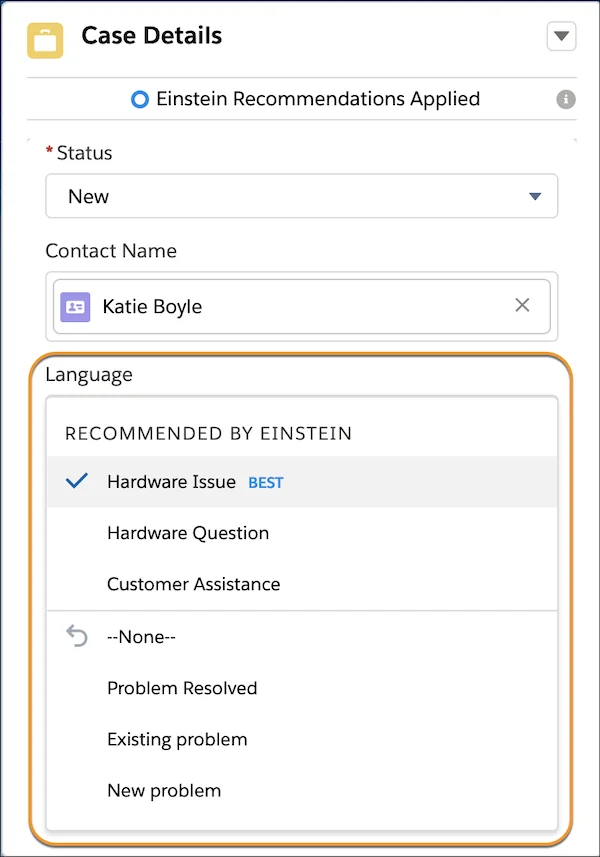
An Einstein case classification model learns from historical closed Cases and predicts values for selected Case fields. Salesforce supports recommendation and automation patterns, so an agent can review a suggestion or a flow can apply a recommendation when the confidence and process rules justify it.
Salesforce documents that a model can use selected String, Picklist, and Lookup inputs, subject to current model limits. Build separate segments when business units, products, languages, or support processes use materially different labels. One global model often performs poorly when the same value means different things across teams.
Service Cloud Einstein case classification setup
- Standardize the Case fields you want to predict, including picklist values and required-field behavior.
- Remove obsolete categories or map them to current categories before training.
- Open Setup, search for Einstein Case Classification, and create a model or segment supported by your licenses.
- Select input fields that are populated early enough to help the prediction.
- Select target fields whose historical values are reliable.
- Build and activate the model, then expose recommendations in the Lightning Service Console.
- Monitor agent acceptance and overrides before enabling automation.
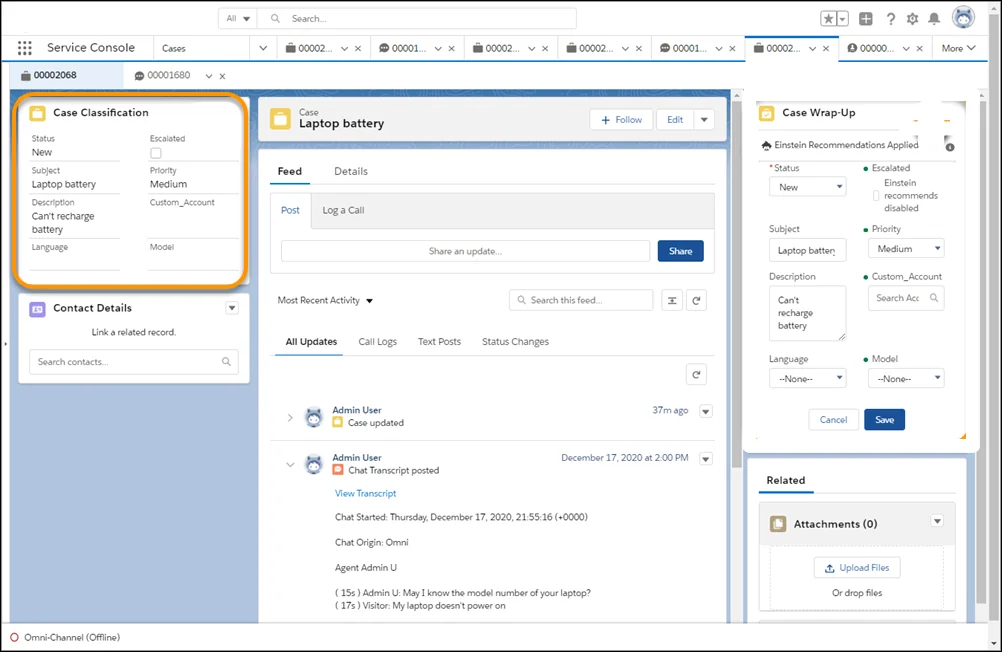
The official Einstein Classification overview explains that Case Classification and Case Wrap-Up recommend or select values from patterns in similar closed cases. For runtime behavior, see the Service Console agent experience.
Using Case Classification from Flow
Salesforce provides the ApplyCaseClassificationRecommendations Flow action. It accepts a Case ID and returns a Case record variable with recommendations applied. The action requires an active model and supported automation settings. Salesforce also documents restrictions, including internal-user execution for this Flow pattern.
Record-Triggered Flow: Case After Save

Entry conditions:
- Status = "New"
- Origin Is Null = False
- AI_Triage_Complete__c = False

Elements:
1. Action: ApplyCaseClassificationRecommendations
   Case ID = {!$Record.Id}

2. Decision: Prediction returned?
   Check the returned Case fields needed by routing.

3. Update Records:
   - Copy approved predicted values
   - Set AI_Triage_Complete__c = True

4. Optional routing:
   Invoke a subflow that assigns the Case to a queue.

Guardrail:
Do not update the Case repeatedly without a recursion flag.
Keep routing logic separate from the prediction call. This makes it easier to test model output, adjust queue rules, and disable automation without rebuilding the model.
SOQL checks before model training
Use aggregate queries to find sparse or inconsistent labels before building an Einstein for Service model. Run these in Developer Console, Workbench, or an approved data-quality process.
SELECT Type, COUNT(Id)
FROM Case
WHERE IsClosed = TRUE
  AND ClosedDate = LAST_N_DAYS:365
GROUP BY Type
ORDER BY COUNT(Id) DESC
SELECT COUNT(Id)
FROM Case
WHERE IsClosed = TRUE
AND ClosedDate = LAST_N_DAYS:365
AND (Type = NULL OR Reason = NULL)These are single SOQL queries, but Apex implementations must still respect the per-transaction SOQL, row, CPU, and heap governor limits. Do not place model-readiness queries inside record loops.
What is Einstein Case Wrap-Up?
Einstein Case Wrap-Up suggests final Case field values near the end of supported service interactions. It is useful when agents must set fields such as reason, resolution category, or disposition after a conversation. The feature should not replace required agent judgment where the final value drives compliance, refunds, entitlements, or reporting controls.
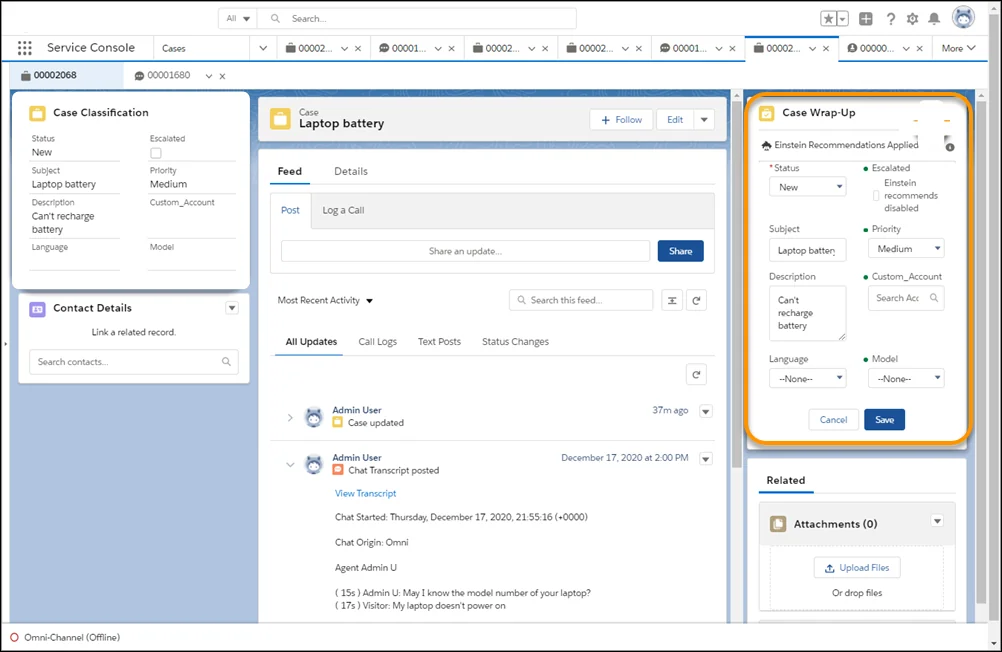
Review wrap-up accuracy by field. A model can perform well on a broad category and poorly on a detailed subreason. Track overrides separately so that low-quality fields do not hide behind an average acceptance rate.
How do case routing and Omni-Channel fit together?
Classification predicts Case attributes; routing decides where work should go. After a predicted value is saved, use supported assignment, Flow, queue, or Omni-Channel routing logic. Do not assume the model understands agent capacity, presence, priority, or skills unless those decisions are explicitly implemented in the routing layer.
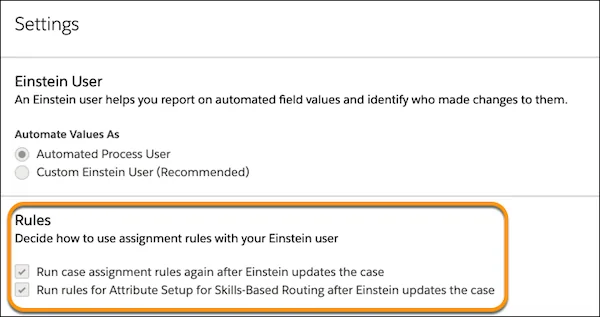
A production design commonly separates the process into three stages:
- Classify: Predict product, reason, language, or severity.
- Validate: Apply confidence, entitlement, customer tier, and exception rules.
- Route: Assign the Case or work item through the selected routing mechanism.
This separation prevents a prediction error from becoming an uncontrolled assignment. It also gives administrators a clear place to add deterministic rules for regulated or high-value cases.
How do Einstein Article Recommendations help agents?
Einstein Article Recommendations suggests Salesforce Knowledge articles that are relevant to a Case. The predictive experience learns from how articles were associated with similar cases. Results depend on article quality, publication state, language, visibility, and historical article usage.
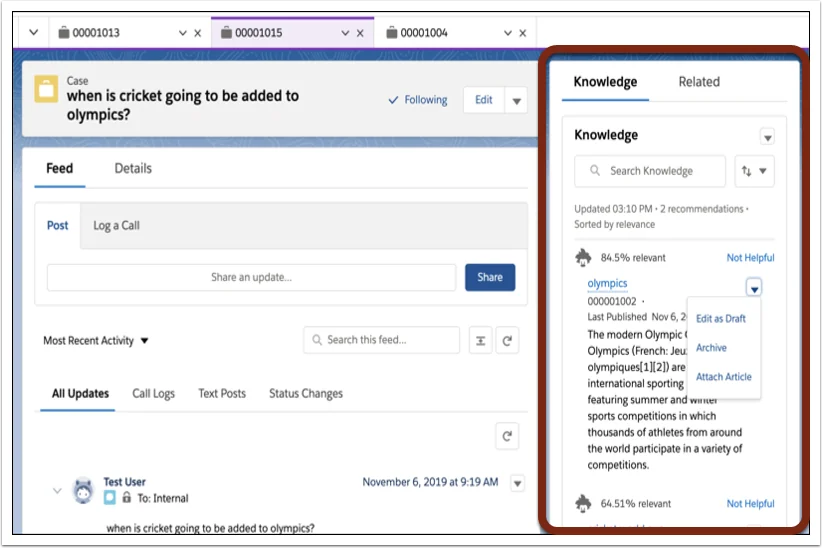
Before enabling recommendations, remove duplicate articles, define ownership, review data categories, and archive content that should no longer guide agents. Salesforce explains the matching behavior in How Einstein Article Recommendations Work.
How do reply features differ?
Einstein Reply Recommendations
Einstein Reply Recommendations is the predictive reply experience. It identifies common replies from historical chat or messaging transcripts, lets administrators review and publish approved responses, and suggests them to agents during supported conversations. Agents can insert and edit a reply before sending it.
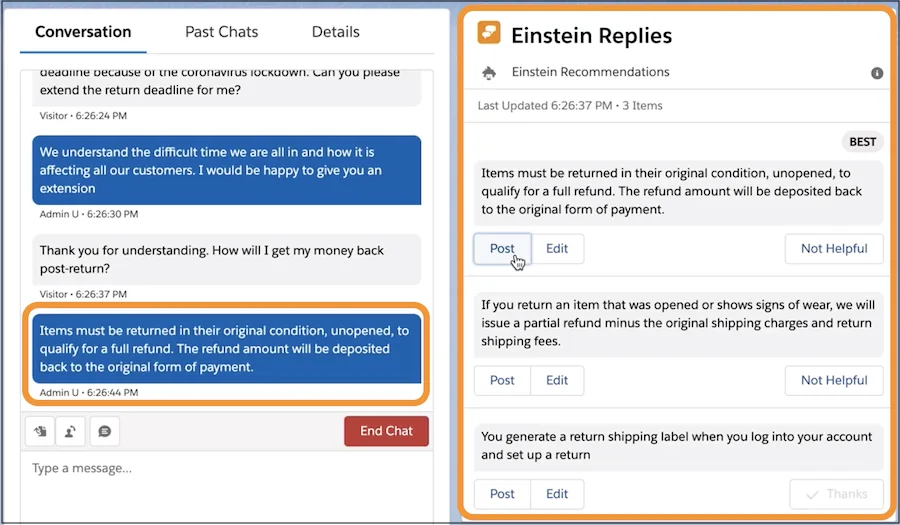
Enablement starts from Setup by searching for Reply Recommendations. Confirm supported channels, languages, data requirements, and licenses in the current official instructions. Salesforce’s enablement guide and setup guide list the current prerequisites.
Service Replies with generative AI
Service Replies generates a draft from conversation or Case context and approved grounding sources. Salesforce supports service-reply experiences for chat, messaging, and email, subject to current product and channel requirements. For email, Salesforce can use relevant Knowledge articles to ground a draft.
The distinction matters during governance:
| Question | Einstein Reply Recommendations | Service Replies |
|---|---|---|
| How is text produced? | Selected from approved predictive replies | Generated at runtime |
| Main source | Past closed transcripts | Conversation or Case context plus grounding |
| Primary admin control | Review and publish reply candidates | Configure grounding, access, and review policy |
| Agent responsibility | Confirm the suggested reply fits | Review generated facts, tone, and promised actions |
Do not auto-send generated text for processes where a wrong statement can create a contractual, financial, privacy, or safety issue. Keep a human-review step and log the source records needed for audit.
What is Service Intelligence Salesforce functionality?
Service Intelligence Salesforce architecture
Service Intelligence Salesforce functionality brings service data into Data Cloud and presents contact-center metrics through CRM Analytics dashboards and components. Salesforce states that Service Intelligence includes Data Cloud, CRM Analytics, and Einstein Conversation Mining.
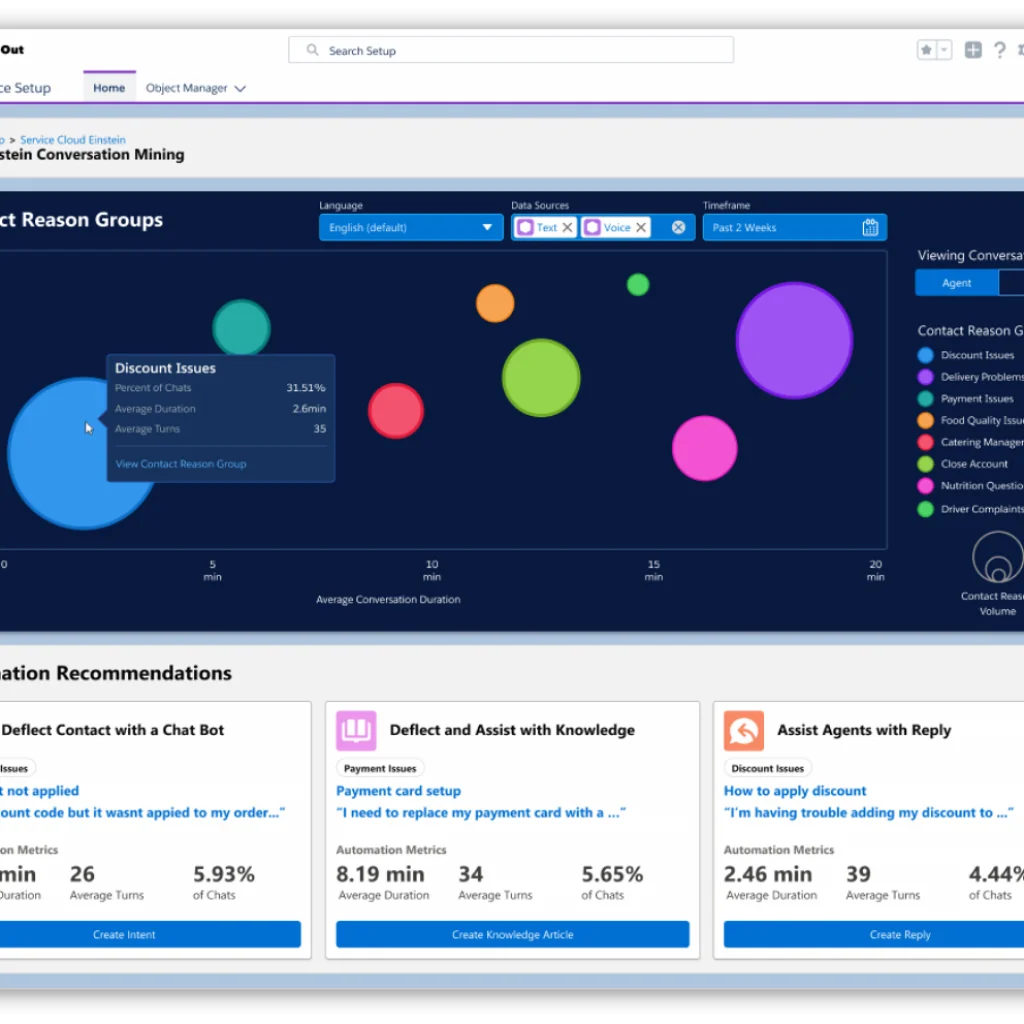
The setup is more than installing a dashboard. Review Data Cloud provisioning, CRM connector access, data kits, data streams, Data Model Object mappings, refresh timing, and user permissions. The official Service Intelligence setup page walks through prerequisites and installation, while the considerations page describes the installed data bundles.
Metrics to validate before executive use
- Confirm the definition of average time to close, first-contact resolution, escalation, and backlog.
- Reconcile dashboard totals with source reports for the same date range and timezone.
- Document exclusions for spam, merged cases, test records, bots, and reopened cases.
- Verify row-level visibility and Data Cloud access before embedding metrics on Lightning pages.
- Set an owner for mapping failures and delayed refreshes.
What security controls does Einstein for Service require?
AI does not remove the need for Salesforce access control. Test the effective user, integration user, service agent, supervisor, and administrator separately.
- CRUD and field-level security: Agents must have access to every field displayed or updated. Flow and Apex execution context can change how enforcement behaves.
- Record access: Organization-wide defaults, role hierarchy, sharing rules, teams, queues, and territories can affect visible source records.
- Knowledge visibility: Article channels, data categories, publication status, language, and user permissions affect grounding and recommendations.
- Permission sets: Grant feature permissions through scoped permission sets rather than broad profile changes.
- Generated content review: Require agents to verify customer names, dates, amounts, policies, and next steps before sending.
- Data governance: Do not train or ground on records that violate retention, consent, residency, or internal data-classification rules.
Best practices for Service Cloud Einstein data quality
Use stable labels
A target field should represent one business concept. Do not reuse the same picklist value for different outcomes across teams. When definitions change, document the effective date and decide whether old records need remapping.
Exclude process noise
Test cases, migrations, default values, mass closures, and bot-generated records can distort an Einstein for Service model. Apply supported segment filters and clean the source data instead of expecting the model to infer which records are unreliable.
Measure model output by segment
Compare accuracy and acceptance by language, channel, product, region, and case type. A global average can hide a failure affecting a smaller support group.
Keep agents in the feedback loop
Ask agents why they rejected a prediction or reply. Use a controlled reason list such as incorrect category, missing context, outdated content, wrong language, or compliance concern. That feedback is more useful than an acceptance percentage alone.
Common Einstein for Service errors and fixes
| Symptom | Likely cause | Practical check |
|---|---|---|
| Model build remains unavailable | License, org type, permissions, or data requirements are not met | Confirm provisioning, supported org, feature permission, and training records |
| Predictions favor one value | Class imbalance or default-field behavior | Count historical records by target value and inspect automation that sets defaults |
| Agents do not see recommendations | Console component, permission, model activation, or record-criteria issue | Test with a pilot user and a qualifying Case in the intended app |
| Reply suggestions are outdated | Old transcripts or published reply set | Retire obsolete candidates and rebuild or republish under current guidance |
| Service Intelligence totals differ from reports | Date, filter, refresh, mapping, or metric-definition mismatch | Reconcile one metric with a fixed population and timestamp |
| Generated response cites the wrong policy | Weak or conflicting grounding | Review Knowledge versions, visibility, source priority, and agent-verification steps |
How should you test Einstein for Service?
- Create a representative test set that the model did not use for training.
- Record expected field values, acceptable alternatives, and unacceptable outcomes.
- Test normal, ambiguous, multilingual, incomplete, and high-risk cases.
- Verify permissions with real pilot personas, not only System Administrator.
- Measure recommendation quality before and after agents edit records.
- Test Flow recursion, assignment conflicts, duplicate updates, and queue fallback.
- Define a kill switch: deactivate the model, disable the Flow, remove the component, or withdraw the permission set.
For Apex-based extensions around service processes, Salesforce requires at least 75% overall Apex code coverage for production deployment. Coverage alone is not enough; tests should assert bulk behavior, sharing expectations, CRUD and FLS handling, and exception paths. See the Apex testing documentation.
When should you use Einstein for Service?
Use Einstein for Service when the support process has enough consistent historical data, a clear agent decision to assist, and a measurable outcome. Delay automation when field definitions are changing, Knowledge is unmanaged, transcript retention is incomplete, or teams cannot review incorrect recommendations.
A practical sequence is classification recommendations, Knowledge recommendations, controlled reply assistance, and then selective automation. Add Service Intelligence when Data Cloud mappings and metric definitions are owned by both service operations and data teams.
Frequently Asked Questions
Is Service Cloud Einstein the same as Einstein for Service?
Service Cloud Einstein is an older name that still appears in some contracts and pages. Salesforce now uses Einstein for Service, Agentforce for Service, and AI solutions for Service across related licensing and documentation, so verify the current feature matrix for your org.
What data does Einstein Case Classification use?
Einstein Case Classification learns from supported historical closed Cases and the input and target fields selected for the model. Data quality, segment filters, field population, and consistent labels directly affect prediction quality.
Can Einstein Reply Recommendations send messages automatically?
Einstein Reply Recommendations presents relevant approved replies for an agent to insert during supported chat or messaging sessions. Any automation beyond the documented agent experience needs separate design, security review, and testing.
Does Service Intelligence require Data Cloud?
Yes. Salesforce documents Service Intelligence as a solution that combines Data Cloud, CRM Analytics, and Einstein Conversation Mining. Setup includes Data Cloud prerequisites, data kits, streams, mappings, and access controls.
Should Einstein case predictions update fields automatically?
Start with recommendations when the cost of an incorrect value is meaningful. Enable automation only after measuring accuracy by segment and adding deterministic validation, exception handling, monitoring, and a rollback path.
Official Salesforce learning resources
- Make Agentforce Service Smarter on Trailhead
- AI Solutions for Service: Quick Look
- Service Replies and Reply Recommendations
Related Salesforce tutorials
Continue with Salesforce Service Cloud configuration, Salesforce Knowledge setup, Omni-Channel routing in Salesforce, and Salesforce Flow automation.