SFDC training is a structured way to learn how Salesforce data, automation, security, Apex, Lightning Web Components, integrations, testing, and deployment work together. A useful program does more than teach syntax: it trains you to choose declarative tools first, write secure bulk-safe code when configuration is not enough, and deliver changes through a repeatable development lifecycle.
What Should SFDC Training Cover?
A complete learning plan should connect platform configuration with programmatic development. Salesforce developers often work beside administrators, architects, release managers, and integration teams, so code cannot be learned in isolation.
| Learning area | What to practise | Evidence of competence |
|---|---|---|
| Platform data model | Standard and custom objects, relationships, record types, formula fields, validation rules | A working schema with documented ownership and access rules |
| Declarative automation | Record-triggered flows, screen flows, approvals, scheduled paths, fault handling | A flow that handles bulk record updates and logs failures |
| Apex | Classes, collections, triggers, SOQL, DML, exceptions, asynchronous processing | Bulk-safe code with focused tests and no queries or DML inside loops |
| Lightning Web Components | HTML templates, JavaScript, component composition, wire adapters, imperative Apex | An accessible component with loading, empty, success, and error states |
| Security | Org-wide defaults, roles, sharing rules, permission sets, CRUD, FLS, user-mode database operations | A design that prevents unauthorized record and field access |
| Integration | REST APIs, callouts, Named Credentials, events, retry and idempotency patterns | A callout service with mocks, timeout handling, and an operational support plan |
| DevOps | Salesforce CLI, source format, scratch orgs or sandboxes, Git-based delivery, validation deployments | A versioned change that passes automated tests before deployment |
Start with the Salesforce data model tutorial and Salesforce Flow training. Developers need to understand objects, relationships, automation, and transaction behavior before they add Apex.
How to sequence the learning plan
- Learn the platform: Build objects, fields, validation rules, layouts, permission sets, and flows in a practice org.
- Learn query and transaction basics: Use SOQL, relationship queries, aggregate queries, DML, and savepoint concepts.
- Write Apex: Start with service classes, then triggers, asynchronous work, integrations, and testing.
- Build user interfaces: Create Lightning Web Components that use Lightning Data Service where possible and Apex only when required.
- Add delivery discipline: Use Salesforce CLI, source control, code review, automated checks, and deployment validation.
- Measure readiness: Complete scenario-based projects and compare your gaps with the current Platform Developer certification guide.

How to Choose an SFDC Developer Course
An SFDC developer course should be judged by its exercises, review process, and coverage of platform constraints. A course that only demonstrates small snippets may leave learners unprepared for bulk updates, permission failures, deployment errors, and production data volumes.
SFDC developer course evaluation checklist
- Uses a current Salesforce CLI workflow and Salesforce DX source format.
- Explains when Flow, validation rules, formulas, or standard APIs are preferable to custom code.
- Teaches one-trigger-per-object or an equivalent trigger-handler structure without presenting the pattern as a substitute for sound transaction design.
- Includes CRUD, field-level security, record sharing, and user-mode database operations in coding exercises.
- Tests positive, negative, bulk, permission, and asynchronous cases.
- Covers deployment dependencies, destructive changes, validation, rollback planning, and post-deployment checks.
- Uses realistic record volumes and verifies query selectivity rather than relying only on small sandbox samples.
Salesforce development training formats
| Format | Best use | Risk to manage |
|---|---|---|
| Trailhead modules and projects | Learning platform concepts in short units | Badges alone do not prove that you can design or review production code |
| Instructor-led training | Scheduled learning, demonstrations, and live questions | Confirm that labs use current tooling and include independent work |
| Self-directed project work | Building design judgment and debugging skill | Without review, insecure or inefficient patterns can become habits |
| Mentored code review | Improving architecture, tests, naming, and maintainability | Feedback must explain trade-offs rather than replace the learner’s work |
| Certification preparation | Finding gaps against a published exam outline | Memorizing questions does not replace implementation experience |
Salesforce provides a current developer career path, a Platform Developer certification study trail, and a certification page for the Salesforce Certified Platform Developer credential. Always check the live exam guide before planning study time because exam outlines can change.
Which Technical Skills Belong in Salesforce Development Training?
Learn declarative design before Apex
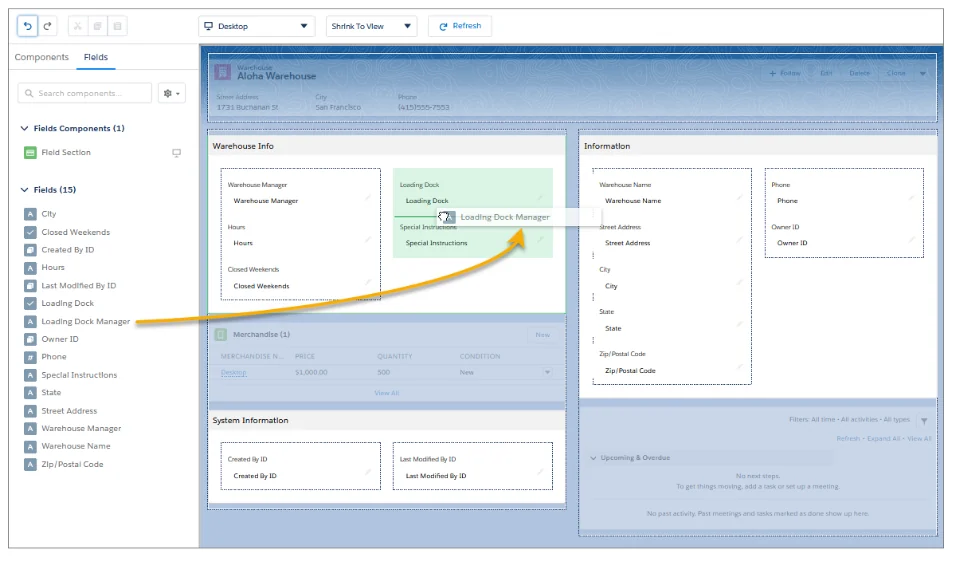
Before writing code, check whether the requirement can be met with standard objects, validation rules, formulas, Flow, approval processes, Dynamic Forms, or platform APIs. This is not a rule that code is always worse. It is a design step that compares maintainability, transaction limits, testability, user experience, and support ownership.
For example, use a record-triggered flow for a straightforward field update with clear entry conditions. Consider Apex when the transaction needs complex collection processing, reusable domain logic, callouts, or behavior that is difficult to express and test in Flow. Review the Salesforce order of execution before mixing flows, triggers, workflow actions in older orgs, and managed-package automation.
Write bulk-safe Apex
Apex runs on a multitenant platform with per-transaction limits. A synchronous transaction normally allows up to 100 SOQL queries and 150 DML statements, while other limits also apply to rows, CPU time, heap, callouts, and asynchronous executions. Confirm the current values in the official Apex governor limits documentation.
The following example queries all target Accounts once, calculates values in memory, and performs one update. It also uses a user-mode query so object, field, and record access are enforced for the current user.
public with sharing class AccountHealthService {
    public static void markAccountsForReview(Set<Id> accountIds) {
        if (accountIds == null || accountIds.isEmpty()) {
            return;
        }

        List<Account> accounts = [
            SELECT Id, AnnualRevenue, NumberOfEmployees, Review_Required__c
            FROM Account
            WHERE Id IN :accountIds
            WITH USER_MODE
        ];

        List<Account> updates = new List<Account>();

        for (Account accountRecord : accounts) {
            Boolean needsReview =
                accountRecord.AnnualRevenue == null ||
                accountRecord.NumberOfEmployees == null;

            if (accountRecord.Review_Required__c != needsReview) {
                updates.add(new Account(
                    Id = accountRecord.Id,
                    Review_Required__c = needsReview
                ));
            }
        }

        if (!updates.isEmpty()) {
            Database.update(updates, false, AccessLevel.USER_MODE);
        }
    }
}
Governor-limit note: the method uses one SOQL query and one DML operation for the whole input set. It does not assume that a trigger receives one record. In production, inspect the returned Database.SaveResult values when partial success matters, and decide whether failures should be surfaced, logged, retried, or rolled back.
Security note: with sharing enforces record-sharing rules but does not by itself enforce every object and field permission. Salesforce documents user-mode database operations and Security.stripInaccessible() as ways to enforce access in Apex. See user-mode database operations and Security.stripInaccessible().
Build Lightning Web Components with clear data boundaries
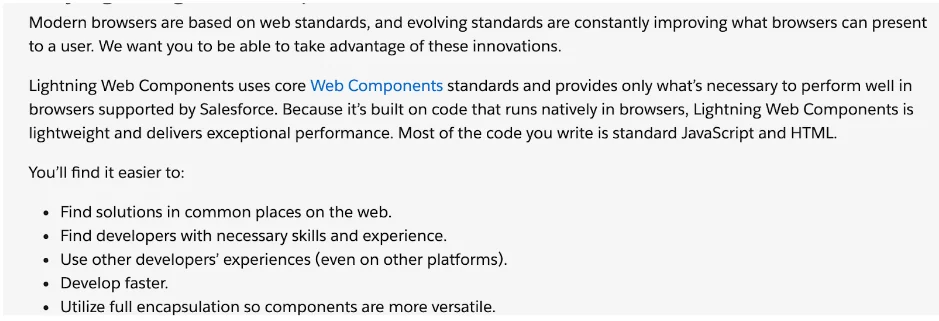
Lightning Web Components use HTML, JavaScript, CSS, and Salesforce services. Prefer base components and Lightning Data Service for standard record operations. Use Apex when the component needs a transaction or query that the UI APIs do not provide cleanly.
import { LightningElement, api, wire } from 'lwc';
import getOpenCases from '@salesforce/apex/CaseSummaryController.getOpenCases';

export default class AccountOpenCases extends LightningElement {
    @api recordId;
    cases = [];
    error;

    @wire(getOpenCases, { accountId: '$recordId' })
    wiredCases({ data, error }) {
        if (data) {
            this.cases = data;
            this.error = undefined;
        } else if (error) {
            this.cases = [];
            this.error = error;
        }
    }

    get hasCases() {
        return this.cases.length > 0;
    }
}
public with sharing class CaseSummaryController {
@AuraEnabled(cacheable=true)
public static List<Case> getOpenCases(Id accountId) {
if (accountId == null) {
return new List<Case>();
}
return [
SELECT Id, CaseNumber, Subject, Status
FROM Case
WHERE AccountId = :accountId
AND IsClosed = false
ORDER BY CreatedDate DESC
LIMIT 50
WITH USER_MODE
];
}
}The controller limits returned rows, supports client-side caching, and enforces user access. The component still needs HTML for loading, empty, error, and populated states. Salesforce’s Lightning Web Components guide describes component structure, composition, lifecycle hooks, accessibility, and access to Salesforce resources.
Design for large data volumes
Code that works with 50 test records can fail when a production object contains millions of rows. Training should include selective filters, query plans, indexed fields, pagination, asynchronous processing, data skew, ownership skew, and integration batch sizes.
- Use Batch Apex for data sets that must be processed in chunks and can tolerate asynchronous completion.
- Use Queueable Apex for chainable background jobs, complex parameters, and monitored work that fits the queueable model.
- Use scheduled Apex to start time-based work, but place substantial processing in a batch or queueable class where appropriate.
- Use Bulk API 2.0 for large external data loads; Salesforce notes that operations above 2,000 records are good candidates.
- Measure query selectivity in representative data before deployment.

Apply Salesforce security in every layer
A developer must distinguish between authentication, object permissions, field-level security, record access, and execution mode. Org-wide defaults establish the baseline for record access. Roles, sharing rules, teams, territories, manual sharing, and Apex managed sharing can extend access. Permission sets and permission set groups grant object, field, app, and system permissions.
For custom Apex and LWC solutions, decide where access is enforced and how the UI responds when a user lacks permission. Do not expose a field merely because a query executed in system context. Do not rely on hiding a component as the only protection; the server-side operation must enforce access too.
Test behavior, not only code coverage
Salesforce requires at least 75% Apex code coverage for deployment or packaging, with additional trigger requirements, but percentage alone does not establish correctness. Tests should create their own records, use Test.startTest() and Test.stopTest() around the operation under test, assert outcomes, and cover bulk and failure paths.
A useful test set includes:
- one record and up to the expected trigger batch size;
- null, boundary, and invalid values;
- users with different permissions and sharing access;
- partial DML failures where
allOrNoneis false; - Queueable, Batch, scheduled, platform-event, and callout behavior when used;
- idempotency when an integration retries the same request.
How Do You Become a Salesforce Developer?
To become a Salesforce developer, build platform knowledge first, then demonstrate that you can deliver a secure change from requirement through deployment. Certification can organize study, but a portfolio project and code-review history show how you apply the concepts.
Become a Salesforce developer with a project-based plan
- Create a practice org: Use a Trailhead Playground, Developer Edition org, or an approved project environment.
- Model a business process: Define objects, relationships, ownership, validation, and reporting needs.
- Automate with Flow: Add entry criteria, fault paths, and tests for the declarative part.
- Add one Apex transaction: Build a bulk-safe service with user-mode data access and a test class.
- Add one LWC: Present or edit data with clear loading and error states.
- Add one integration: Use a Named Credential, callout mock, retry policy, and idempotency key.
- Package the delivery: Store metadata in source control, document dependencies, validate deployment, and record post-deployment checks.
- Review against the certification outline: Use the current official Platform Developer guide to identify missing domains.
A portfolio should explain the requirement, data model, security decisions, automation choice, limits considered, tests, and deployment method. Screenshots alone do not show whether the implementation handles bulk transactions or access controls.
Use certification as a gap analysis
The current Platform Developer certification material groups preparation around developer fundamentals, automation and logic, user interface, and testing, debugging, and deployment. Treat those domains as a checklist, then verify the current weights and policies on Trailhead before registering. Do not rely on copied question banks; they do not teach design judgment and may violate exam rules.
What Are Salesforce Training Best Practices?
Salesforce training best practices for production readiness
- Train with representative data volumes. Include bulk imports, ownership concentration, long-running automation, and concurrent integration traffic.
- Review security with every exercise. State the expected object, field, and record access before writing the query or DML operation.
- Use source-driven development. Keep metadata, code, tests, permission changes, and deployment notes together.
- Require assertions. A passing test without meaningful assertions can miss broken behavior.
- Practise failure handling. Include validation failures, lock contention, callout timeouts, duplicate messages, and partial DML results.
- Separate concepts from release details. Teach durable architecture principles, then verify release-specific syntax and capabilities in current documentation.
- Run code reviews. Review naming, bulkification, security, transaction boundaries, query selectivity, error handling, and maintainability.
- Document why code was selected. Record why Flow, standard APIs, or configuration could not meet the requirement safely.
A 12-week Salesforce development training schedule
| Weeks | Focus | Deliverable |
|---|---|---|
| 1-2 | Data model, security, formulas, validation, reports | Configured application with permission sets |
| 3-4 | Flow, order of execution, transaction boundaries | Bulk-tested automation with fault handling |
| 5-6 | Apex, collections, SOQL, DML, trigger architecture | Service and trigger with bulk tests |
| 7-8 | LWC, Lightning Data Service, Apex controllers | Accessible component with error states |
| 9-10 | Async Apex, integrations, Named Credentials, mocks | Callout integration with retry design |
| 11 | CLI, source control, deployment, debugging | Validated deployment package |
| 12 | Architecture review and certification gap analysis | Reviewed portfolio project and study backlog |
Common Errors During SFDC Training
| Error | Why it causes problems | Better practice |
|---|---|---|
| Querying or updating inside a loop | Consumes limits in proportion to record count | Collect IDs, query once, modify a list, and perform one DML operation |
Using with sharing as the complete security solution |
Sharing and CRUD/FLS are separate concerns | Use sharing declarations plus user-mode operations or documented permission enforcement |
| Testing only a single record | Hides bulk and recursion defects | Test realistic batches and interaction with other automation |
| Hard-coding IDs or endpoints | Breaks across orgs and environments | Use metadata, settings, Named Credentials, and queried references |
| Learning deprecated tools as the default path | Creates migration work and outdated design habits | Use current Flow, LWC, Salesforce CLI, and supported APIs |
| Deploying without permission changes | Code may work for administrators and fail for users | Include permission sets and test with representative users |
Frequently Asked Questions
What is included in SFDC training?
SFDC training should include platform configuration, data modeling, security, Flow, Apex, SOQL, Lightning Web Components, testing, integrations, Salesforce CLI, deployment, and production support. The exact sequence depends on whether the learner is targeting administration, development, or architecture work.
How long does it take to become a Salesforce developer?
There is no fixed duration. A learner with programming and database experience may progress faster, while someone new to both Salesforce and software development needs more time. Readiness should be measured by the ability to design, secure, test, review, and deploy a project rather than by weeks completed.
Do I need to learn Salesforce administration before Apex?
You should understand the data model, permissions, sharing, validation, Flow, reports, and transaction behavior before relying on Apex. You do not need every administrator certification, but you must know what the platform can do without code and how configuration interacts with custom logic.
Is an SFDC developer course enough for Platform Developer certification?
An SFDC developer course can provide structure, but certification preparation should also use the current official exam guide, Trailhead study material, hands-on projects, and practice explaining design decisions. Confirm exam domains and policies on the live Salesforce certification pages before registering.
Which language should I learn for Salesforce development?
Learn Apex for server-side logic and JavaScript for Lightning Web Components. You also need SOQL for data queries, HTML and CSS for component interfaces, and enough API knowledge to work with JSON, HTTP, authentication, and integration errors.
Official Salesforce Resources