Salesforce customization in the cloud using Force.com gives developers two primary approaches: declarative customization through point-and-click configuration and programmatic customization using code. Understanding when to use each approach is essential for building scalable, maintainable Salesforce applications.
What is Salesforce Customization in the Cloud?
Force.com enables customization in the cloud through a multi-tenant architecture that supports both configuration and coding approaches. This flexibility allows administrators and developers to extend Salesforce functionality without managing infrastructure or deployment complexity.
Customization in the cloud can be accomplished through two primary methods:
- Declarative Customization – Point-and-click configuration
- Programmatic Customization – Code-based development
Declarative Customization in Salesforce
Declarative customization uses Salesforce’s built-in configuration tools to modify functionality without writing code. This approach leverages Setup menus, page layouts, workflows, and process builders.
Key Benefits of Declarative Customization
- Point-and-click development in the browser interface
- Requires understanding of Force.com concepts without coding knowledge
- Faster implementation and deployment cycles
- Automatic upgrades with Salesforce releases
- Built-in governor limit compliance
- Easier maintenance and troubleshooting
Declarative customization equals simplicity plus speed, making it ideal for standard business requirements and rapid prototyping.
Common Declarative Tools
- Custom Objects and Fields – Define data models
- Page Layouts – Control field visibility and organization
- Validation Rules – Enforce data quality
- Workflow Rules – Automate standard processes
- Process Builder – Visual process automation
- Flow Builder – Complex business logic without code
Programmatic Customization in Salesforce
Programmatic customization uses Apex code, Lightning Web Components, and APIs to extend Salesforce beyond standard functionality. This approach requires coding skills but provides unlimited flexibility.
Key Benefits of Programmatic Customization
- Custom business logic implementation with Apex
- Advanced user interface development with Lightning Web Components
- Integration capabilities with external systems via REST/SOAP APIs
- Complex data processing and batch operations
- Custom governor limit handling and optimization
- Extends beyond declarative Salesforce capabilities
Programmatic customization equals control plus flexibility, essential for complex enterprise requirements and unique business processes.
Common Programmatic Tools
- Apex Classes and Triggers – Server-side business logic
- Lightning Web Components (LWC) – Modern UI framework
- Visualforce Pages – Custom page development
- REST/SOAP APIs – Integration and data exchange
- Custom Metadata Types – Configurable code behavior
Application Building Blocks in Salesforce
Salesforce application development follows a three-layer architecture that supports both declarative and programmatic customization approaches.
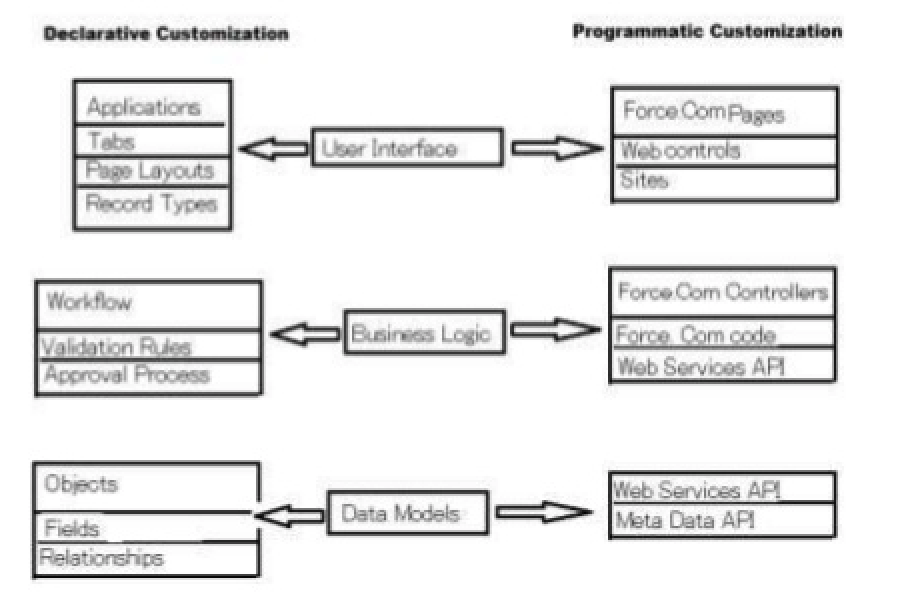
Three Core Application Layers
- User Interface Layer – How users interact with data and processes
- Business Logic Layer – Rules, validations, and automated processes
- Data Model Layer – Objects, fields, and relationships
Each layer can be customized declaratively or programmatically depending on complexity requirements and organizational capabilities.
Declarative vs Programmatic Customization Comparison
| Declarative Customization | Programmatic Customization |
|---|---|
|
|
Deployment and Change Management
Moving customizations between Salesforce organizations requires proper deployment connections and change set authorization.
Change Set Deployment Requirements
When deploying customizations using change sets, administrators may encounter the error: “This organization isn’t authorized to upload change sets to other organizations. For authorization, contact the deployment connections administrators on the organizations where you want to upload changes.”
To resolve this deployment connection error:
- Navigate to Setup → Deploy → Deployment Connections
- Request authorization from target organization administrators
- Establish bidirectional deployment connections
- Verify connection status before creating change sets
Apex Job Deployment Considerations
For deployments containing Apex jobs or scheduled classes, you may need to bypass deployment restrictions. You can bypass this error by allowing deployments with Apex jobs in the deployment settings page in Setup.
To configure Apex job deployment settings:
- Go to Setup → Deploy → Deployment Settings
- Enable “Allow deployments of components when corresponding Apex jobs are pending or in progress”
- Consider scheduling downtime for critical Apex jobs during deployment
Data Management and API Integration
Data Loader Requirements for Custom Objects
When an administrator is planning to use Data Loader to mass import new records to a custom object from a new API, the administrator will need to:
- API Access – Enable API access for the user account
- Object Permissions – Grant Create, Read, Edit permissions on the custom object
- Field-Level Security – Configure field accessibility for target fields
- Data Loader Configuration – Map CSV columns to Salesforce fields
- Bulk API Settings – Configure batch size and timeout settings
- Error Handling – Set up success and error file locations
API Integration Best Practices
Force.com provides multiple API options for data integration:
- REST API – Modern web service integration
- SOAP API – Enterprise-grade integration with WSDL
- Bulk API – Large data volume processing
- Streaming API – Real-time data synchronization
Access Control and Security
Access Specifiers in Apex
Examples of access specifiers are the keywords that control class and method visibility in Apex code:
- public – Accessible from anywhere in the application
- private – Accessible only within the same class
- protected – Accessible within the class and its subclasses
- global – Accessible across namespaces and managed packages
Proper access specifier usage ensures security and maintainability in programmatic customizations.
Force.com in Cloud Computing Context
Force.com represents Platform-as-a-Service (PaaS) in cloud computing, providing:
- Multi-tenant Architecture – Shared infrastructure with data isolation
- Automatic Scaling – Handles traffic spikes without configuration
- Built-in Security – Enterprise-grade security controls
- Continuous Updates – Three major releases per year
- Global Availability – Multiple data centers worldwide
Choosing the Right Customization Approach
Select declarative customization when:
- Standard Salesforce functionality meets requirements
- Rapid development and deployment are priorities
- Limited technical resources are available
- Automatic upgrade compatibility is essential
Choose programmatic customization when:
- Complex business logic exceeds declarative capabilities
- Custom integrations with external systems are required
- Advanced data processing or calculations are needed
- Unique user interface requirements exist
Frequently Asked Questions
What is the difference between Force.com and Salesforce?
Force.com is the underlying Platform-as-a-Service (PaaS) that powers Salesforce applications. Salesforce refers to the complete CRM application suite built on the Force.com platform. Force.com provides the development tools, database, and infrastructure, while Salesforce delivers the business applications.
How do I fix the change set authorization error?
The error “This organization isn’t authorized to upload change sets to other organizations” occurs when deployment connections aren’t established. Contact the deployment connections administrator in your target organization to authorize the connection. Both organizations must establish bidirectional deployment connections in Setup → Deploy → Deployment Connections.
What permissions does Data Loader need for custom objects?
Data Loader requires API Enabled permission on the user profile, plus Create/Read/Edit object permissions for the target custom object. You also need field-level security access to all fields being imported. For bulk operations, consider using Bulk API settings to optimize performance.
When should I use programmatic vs declarative customization?
Use declarative customization for standard business processes, data validation, and workflow automation. Choose programmatic customization when you need complex calculations, external system integrations, custom user interfaces, or functionality that exceeds declarative tool capabilities.
How do I bypass Apex job deployment errors?
Navigate to Setup → Deploy → Deployment Settings and enable “Allow deployments of components when corresponding Apex jobs are pending or in progress.” This bypasses the restriction, but consider scheduling deployments during maintenance windows to avoid conflicts with running jobs.