The force:source:delete command in Salesforce DX CLI enables developers to remove metadata components from both local projects and Salesforce orgs. This command provides a streamlined approach to cleaning up unwanted Apex classes, triggers, Lightning components, and other metadata without manual intervention through the Salesforce UI.
Understanding how to properly use force:source:delete is essential for maintaining clean development environments and managing metadata lifecycle in Salesforce projects. This command works with source-tracked orgs and can handle both individual components and bulk deletions.
What is Force:Source:Delete?
Force:source:delete is a Salesforce CLI command that removes metadata components from your local SFDX project and optionally from connected Salesforce orgs. The command operates on source-format metadata and integrates with Salesforce DX source tracking to maintain synchronization between local and remote environments.
The command syntax follows this pattern:
sfdx force:source:delete -m <metadata> [flags]Key capabilities include:
- Deleting individual metadata components by name
- Bulk deletion using metadata type patterns
- Local-only deletion without org deployment
- Automatic source tracking updates
- Validation before permanent removal
Force:Source:Delete Syntax and Parameters
The force:source:delete command accepts several parameters to control deletion behavior:
| Parameter | Description | Required | Example |
|---|---|---|---|
| -m, –metadata | Metadata component to delete | Yes | ApexClass:MyClass |
| -p, –sourcepath | Path to source files to delete | Alternative | force-app/main/default/classes |
| –noprompt | Skip confirmation prompt | No | –noprompt |
| –forceoverwrite | Ignore conflicts and proceed | No | –forceoverwrite |
| -u, –targetusername | Target org username | No | user@example.com |
| –json | Return results in JSON format | No | –json |
Metadata Type Specifications
When using the -m flag, specify metadata in the format MetadataType:ComponentName:
# Delete single Apex class
sfdx force:source:delete -m ApexClass:AccountController

# Delete multiple components
sfdx force:source:delete -m ApexClass:AccountController,ApexClass:ContactController

# Delete Lightning Web Component
sfdx force:source:delete -m LightningComponentBundle:myComponent
Common Use Cases for Force:Source:Delete
Removing Obsolete Apex Classes
When refactoring code or cleaning up legacy implementations, force:source:delete helps remove outdated Apex classes:
# Remove deprecated utility class
sfdx force:source:delete -m ApexClass:DeprecatedUtils

# Remove test class after code restructure
sfdx force:source:delete -m ApexClass:OldControllerTest
Cleaning Up Lightning Components
Delete unused Lightning Web Components or Aura components:
# Remove LWC bundle
sfdx force:source:delete -m LightningComponentBundle:unusedComponent

# Remove Aura component
sfdx force:source:delete -m AuraDefinitionBundle:legacyComponent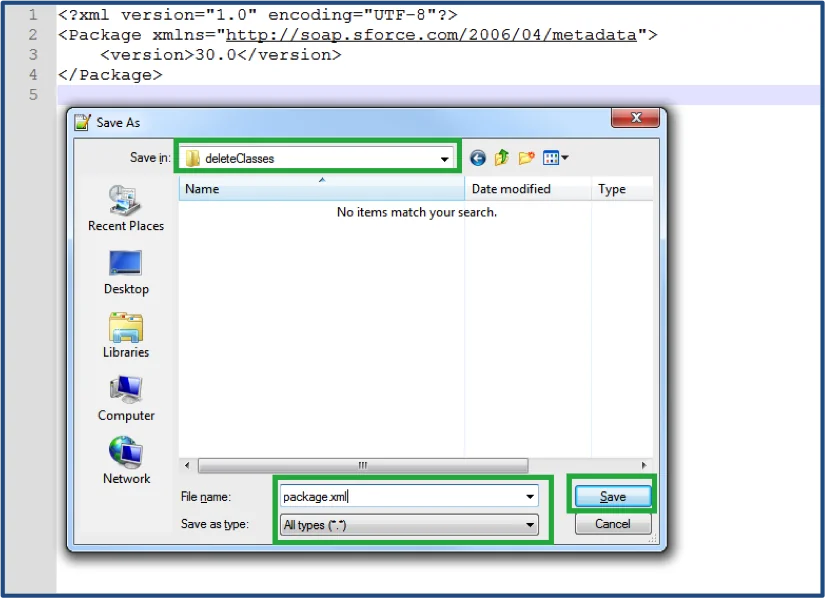
Bulk Metadata Cleanup
For larger cleanup operations, use source path targeting:
# Delete entire folder of components
sfdx force:source:delete -p force-app/main/default/classes/deprecated

# Remove specific file types
sfdx force:source:delete -p force-app/main/default/triggers/legacy
Best Practices for Force:Source:Delete Operations
Pre-Deletion Validation
Always validate dependencies before deletion to avoid deployment failures:
- Check component references using VS Code’s “Find All References” feature
- Review test class coverage to ensure no test methods reference deleted components
- Validate custom metadata relationships that might depend on the component
- Confirm permission set assignments don’t reference deleted Apex classes
Source Control Integration
Coordinate force:source:delete with version control workflows:
# Create feature branch for cleanup
git checkout -b cleanup/remove-deprecated-classes

# Execute deletion
sfdx force:source:delete -m ApexClass:DeprecatedClass

# Commit changes
git add .
git commit -m "Remove deprecated Apex classes"

# Push to remote
git push origin cleanup/remove-deprecated-classes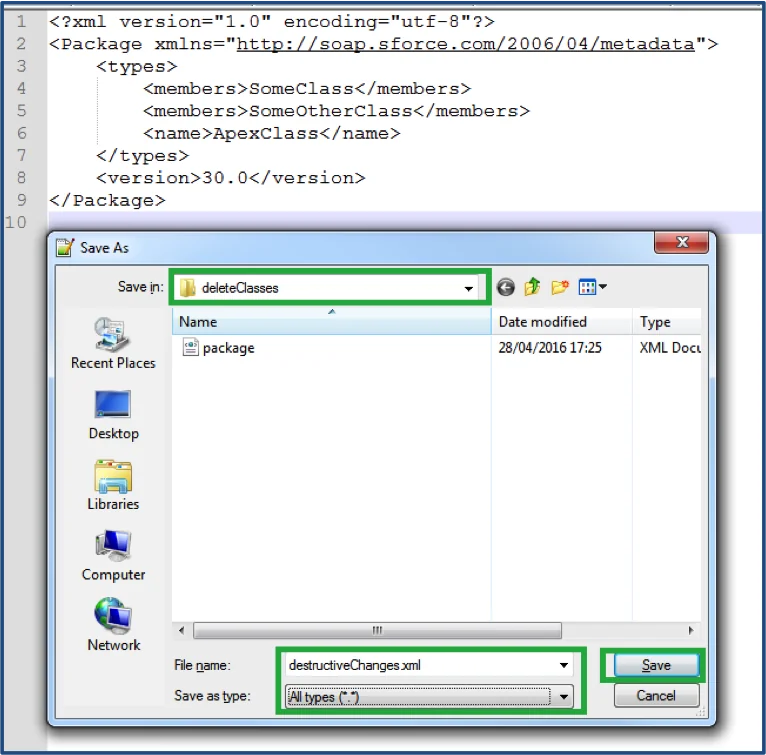
Environment-Specific Considerations
Different org types require different approaches:
- Scratch Orgs: Full deletion freedom with easy recreation
- Sandboxes: Coordinate with team members and test thoroughly
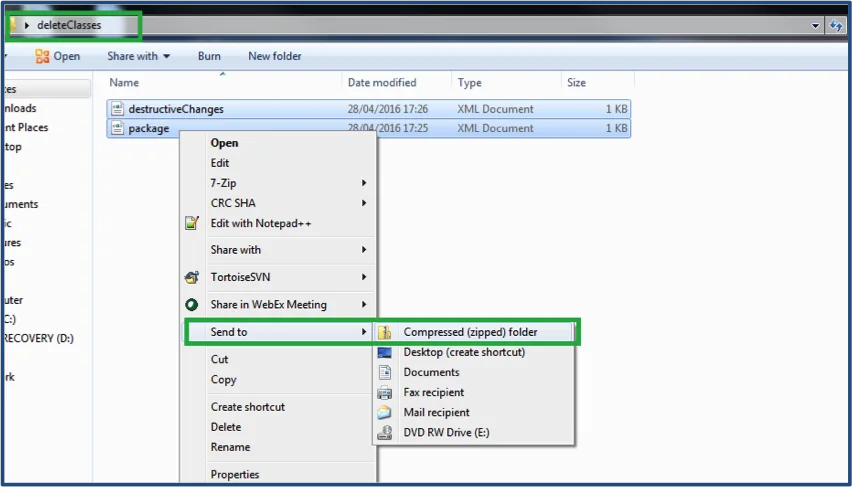
- Production: Use destructive changes in deployment packages rather than direct deletion
Troubleshooting Force:Source:Delete Issues
Dependency Conflicts
When deletion fails due to dependencies, the error message indicates which components reference the target:
ERROR: Cannot delete ApexClass:AccountController
Reason: Referenced by: ApexClass:AccountService (line 45)
Resolution steps:
- Remove or update referencing components first
- Use
--forceoverwriteflag only if certain about impact - Consider deprecation comments instead of immediate deletion
Source Tracking Conflicts
Source tracking conflicts can prevent deletion. Check status first:
# Check source status
sfdx force:source:status

# Resolve conflicts before deletion
sfdx force:source:pull --forceoverwrite

# Then proceed with deletion
sfdx force:source:delete -m ApexClass:ConflictedClass
Permission Issues
Insufficient permissions in target org can block deletion:
- Ensure user has “Modify All Data” or “Customize Application” permissions
- Verify API access is enabled for the user
- Check if the org has deployment restrictions
Advanced Force:Source:Delete Techniques
Conditional Deletion Scripts
Create scripts for complex deletion scenarios:
#!/bin/bash
# Script to delete components based on conditions

echo "Checking for deprecated classes..."
find force-app -name "*Deprecated*.cls" -type f | while read file; do
    classname=$(basename "$file" .cls)
    echo "Deleting $classname"
    sfdx force:source:delete -m ApexClass:$classname --noprompt
done
Metadata API Integration
For production environments, integrate with destructive changes:
# Generate destructive changes package
echo '<?xml version="1.0" encoding="UTF-8"?>
<Package xmlns="http://soap.sforce.com/2006/04/metadata">
    <types>
        <members>DeprecatedClass</members>
        <name>ApexClass</name>
    </types>
    <version>60.0</version>
</Package>' > destructiveChanges.xml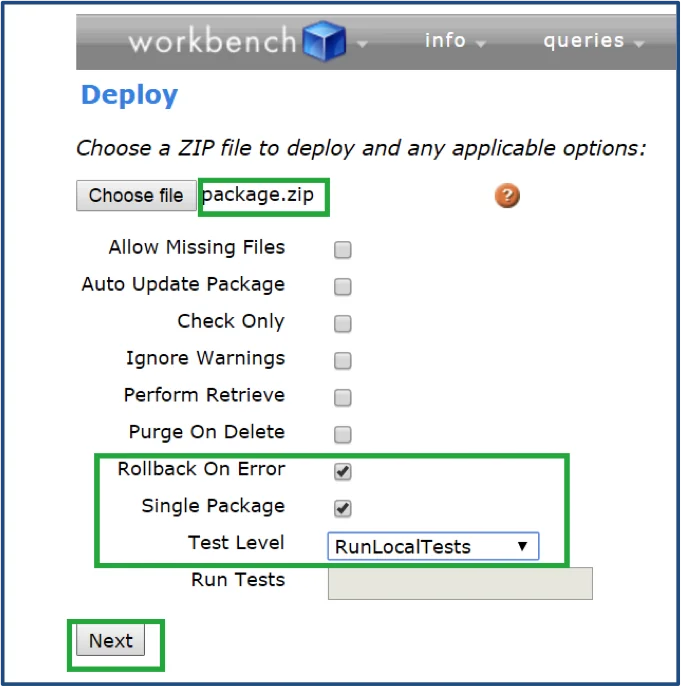
Automated Cleanup Workflows
Integrate deletion into CI/CD pipelines:
# GitHub Actions example
name: Cleanup Deprecated Components
on:
  schedule:
    - cron: '0 2 * * 0'  # Weekly cleanup

jobs:
  cleanup:
    runs-on: ubuntu-latest
    steps:
      - uses: actions/checkout@v3
      - name: Setup SFDX
        uses: sfdx-actions/setup-sfdx@v1
      - name: Delete deprecated components
        run: |
          sfdx force:source:delete -m ApexClass:DeprecatedUtils --noprompt
          sfdx force:source:push
Security and Governance Considerations
Change Management
Implement proper change management for metadata deletion:
- Document deletion rationale in commit messages and change requests
- Maintain deletion logs for audit purposes
- Coordinate with stakeholders before removing shared components
- Test in lower environments before production deployment
Backup Strategies
Always maintain backups before bulk deletions:
# Create backup branch
git checkout -b backup/pre-cleanup-$(date +%Y%m%d)
git push origin backup/pre-cleanup-$(date +%Y%m%d)

# Return to main branch for cleanup
git checkout main
Performance Optimization
Batch Operations
For large-scale deletions, batch operations improve performance:
# Delete multiple classes in single command
sfdx force:source:delete -m ApexClass:Class1,ApexClass:Class2,ApexClass:Class3

# Use wildcards for pattern matching (where supported)
sfdx force:source:delete -p force-app/main/default/classes/Test*
Parallel Processing
Leverage parallel processing for independent deletions:
#!/bin/bash
# Parallel deletion script
classes=("Class1" "Class2" "Class3" "Class4")

for class in "${classes[@]}"; do
    sfdx force:source:delete -m ApexClass:$class --noprompt &
done

wait  # Wait for all background processes to complete
Frequently Asked Questions
Can force:source:delete remove metadata from production orgs?
No, force:source:delete works only with source-tracked orgs like scratch orgs and some sandboxes. For production orgs, use destructive changes in deployment packages through the Metadata API or tools like Workbench.
What happens if I delete a component that other metadata references?
The command will fail with a dependency error listing the referencing components. You must remove or update the references first, or use the –forceoverwrite flag if you’re certain about the impact.
How do I recover accidentally deleted metadata with force:source:delete?
If you have version control, restore from your Git repository. For source-tracked orgs, you can retrieve from the org using force:source:pull if the metadata still exists there. Always maintain backups before bulk deletions.
Can I delete custom objects using force:source:delete?
Yes, you can delete custom objects using the syntax: sfdx force:source:delete -m CustomObject:MyObject__c. However, ensure all related metadata (fields, relationships, Apex references) are handled first to avoid dependency conflicts.
Does force:source:delete work with managed package components?
No, you cannot delete managed package components using force:source:delete. These components are protected and can only be removed by uninstalling the package or through package upgrades that remove specific components.