When AWS experiences outages, the ripple effects impact millions of users across platforms like Salesforce, Slack, Asana, and countless other cloud services. Understanding how to quickly determine if AWS is down and what steps to take during an outage is critical for maintaining business operations and troubleshooting connectivity issues.
AWS operates multiple regions globally, with US-East-1 (Northern Virginia) being the most critical region that hosts many core services. When this region experiences problems, the impact extends far beyond direct AWS customers to affect integrated platforms and third-party applications.
How to Check if AWS is Down
The fastest way to determine AWS status is through multiple verification channels. Start with the official AWS Service Health Dashboard at status.aws.amazon.com, which provides real-time updates on service availability across all regions. This dashboard shows current operational status and historical incident reports.
For broader impact assessment, monitor third-party outage tracking services like Downdetector.com, which aggregates user reports and provides visual maps of affected regions. Social media platforms, particularly Twitter, often provide immediate user reports before official acknowledgments.
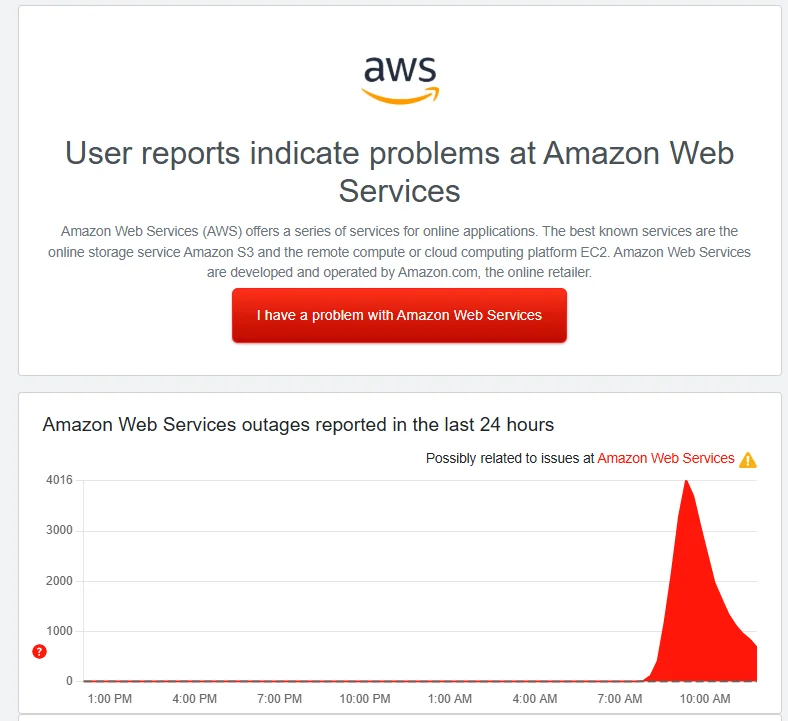
Enterprise monitoring tools like Pingdom, StatusPage, and custom CloudWatch dashboards can provide automated alerts when AWS services become unavailable. These tools are essential for organizations that depend heavily on AWS infrastructure.
Common AWS Outage Patterns and Root Causes
AWS outages typically follow predictable patterns. DNS resolution issues frequently cause widespread disruption, as seen in recent incidents where DynamoDB API endpoints became unreachable. These DNS problems cascade through dependent services, creating a domino effect across the AWS ecosystem.
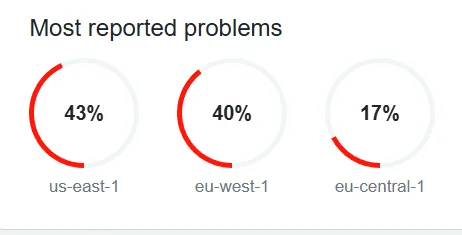
Infrastructure failures in US-East-1 region have historically caused the most significant disruptions. This region hosts critical services including IAM, DynamoDB Global Tables, and many third-party integrations. When US-East-1 experiences problems, global services that rely on this region also fail.
Network connectivity issues, power outages at data centers, and software deployment errors represent other common failure modes. AWS typically provides detailed post-incident reports explaining root causes and remediation steps taken.
Slack AWS Outage Impact and Response
Slack, owned by Salesforce, relies heavily on AWS infrastructure for its global operations. During AWS outages, Slack users commonly experience message delivery delays, file upload failures, and workspace connectivity issues. The slack aws outage pattern typically manifests as intermittent service availability rather than complete blackouts.
When Slack experiences AWS-related disruptions, users should check status.slack.com for official updates. The platform usually provides estimated recovery times and workaround suggestions. Mobile apps may continue functioning while desktop clients fail, or vice versa, depending on which AWS services are affected.
For Salesforce administrators managing Slack integrations, AWS outages can disrupt automated workflows, bot responses, and third-party app connections. Monitor both AWS and Slack status pages simultaneously during suspected outages.
Asana Outage Monitoring and Down Detector Tools
Asana outage events often correlate with AWS infrastructure problems, particularly when affecting the US-East-1 region. Users typically report inability to load projects, sync failures across devices, and API timeout errors during these incidents.
The down detector asana monitoring approach involves checking multiple sources: Asana’s official status page at status.asana.com, Downdetector user reports, and AWS service health dashboards. Cross-referencing these sources helps distinguish between Asana-specific issues and broader AWS infrastructure problems.
For teams using Asana integrations with Salesforce or other business tools, AWS outages can break automated task creation, project updates, and reporting workflows. Establish backup communication channels and manual processes for critical operations during extended outages.
AWS Outage July 30 2025: Case Study Analysis
The aws outage july 30 2025 incident provides valuable lessons for outage response planning. This event began with DNS resolution failures affecting DynamoDB endpoints in US-East-1, cascading to impact multiple dependent services including Slack, Asana, and Docker.
The timeline revealed critical response patterns: initial detection occurred around midnight PDT, with AWS acknowledging “increased error rates and latencies” within 11 minutes. Full resolution took approximately 4 hours, with partial recovery beginning after 2.5 hours.
Key takeaways from this incident include the importance of DNS caching strategies, multi-region deployment architectures, and automated failover mechanisms. Organizations experienced varying impact levels based on their AWS dependency patterns and geographic distribution.
Salesforce-Specific AWS Outage Considerations
Salesforce operates its own infrastructure but integrates with AWS for specific services and customer solutions. When AWS experiences outages, Salesforce users may encounter issues with:
- Einstein Analytics data processing delays
- Heroku application connectivity problems
- Third-party AppExchange applications that depend on AWS
- Custom integrations using AWS Lambda or API Gateway
- Data synchronization with AWS-hosted external systems
Monitor trust.salesforce.com alongside AWS status pages during suspected outages. Salesforce typically provides specific guidance for AWS-related service disruptions affecting their platform.
Outage Response Best Practices
Develop a structured response plan for AWS outages that includes immediate assessment, stakeholder communication, and recovery procedures. Start by identifying which business processes depend on AWS services, either directly or through third-party applications.
Establish monitoring dashboards that aggregate status from AWS, Salesforce, Slack, and other critical services. Automated alerting helps reduce detection time and enables faster response initiation.
Create communication templates for different outage scenarios. Include estimated impact duration, affected services, and available workarounds. Regular testing of backup systems and manual processes ensures readiness during actual incidents.
Document lessons learned from each outage experience. Track metrics like detection time, resolution duration, and business impact to improve future response capabilities.
Multi-Region Architecture and Failover Strategies
Organizations can reduce AWS outage impact through multi-region deployment strategies. Distribute critical workloads across multiple AWS regions, with automated failover mechanisms that activate when primary regions become unavailable.
Implement health checks and circuit breaker patterns in applications that depend on AWS services. These patterns prevent cascading failures and enable graceful degradation during partial outages.
Consider hybrid cloud approaches that combine AWS with other cloud providers or on-premises infrastructure. This strategy provides additional resilience against single-provider outages but requires careful architecture planning and increased operational complexity.
Frequently Asked Questions
How do I know if AWS is down right now?
Check the official AWS Service Health Dashboard at status.aws.amazon.com for real-time service status. Cross-reference with Downdetector.com for user-reported issues and monitor social media for immediate reports. If multiple AWS-dependent services like Slack or Asana are experiencing problems simultaneously, this typically indicates an AWS infrastructure issue.
Why does a Slack AWS outage affect so many other services?
Slack runs on AWS infrastructure, so when AWS experiences outages, Slack’s service availability is directly impacted. Additionally, many other popular services also depend on AWS, creating a cascading effect where multiple platforms experience issues simultaneously during major AWS outages, particularly in the US-East-1 region.
What should I do during an Asana outage caused by AWS problems?
First, confirm the outage using down detector asana reports and check both status.asana.com and status.aws.amazon.com. Switch to backup project management tools or manual tracking methods for critical tasks. Avoid making significant changes once service returns until full synchronization is confirmed, as data conflicts may occur.
How long do AWS outages typically last?
AWS outage duration varies significantly based on the root cause and affected services. Minor regional issues may resolve within 30-60 minutes, while major infrastructure problems like the AWS outage July 30 2025 can last 3-6 hours. DNS-related issues often take 2-4 hours to fully resolve due to caching propagation delays.
Can I prevent AWS outages from affecting my Salesforce org?
While you cannot prevent AWS outages, you can minimize their impact on Salesforce operations. Avoid scheduling critical data loads or integrations during known AWS maintenance windows. Use Salesforce’s native tools instead of AWS-dependent third-party applications where possible. Implement retry logic and error handling in custom integrations that connect to AWS services.