Lead to cash is the end-to-end business process that starts when a prospective buyer enters the pipeline and ends when the seller receives and applies payment. In Salesforce, the process usually spans Leads, Accounts, Contacts, Opportunities, Quotes, Contracts, Orders, Assets, Invoices, Payments, and post-sale service records, with the exact object model depending on the products and licenses in the org.
The process is broader than quote to cash. Quote to cash begins after a sales opportunity is ready for configuration and pricing; lead to cash also includes demand capture, qualification, lead conversion, opportunity management, and the handoff to quoting. A reliable design gives each stage an owner, an entry criterion, an exit criterion, and a system of record.
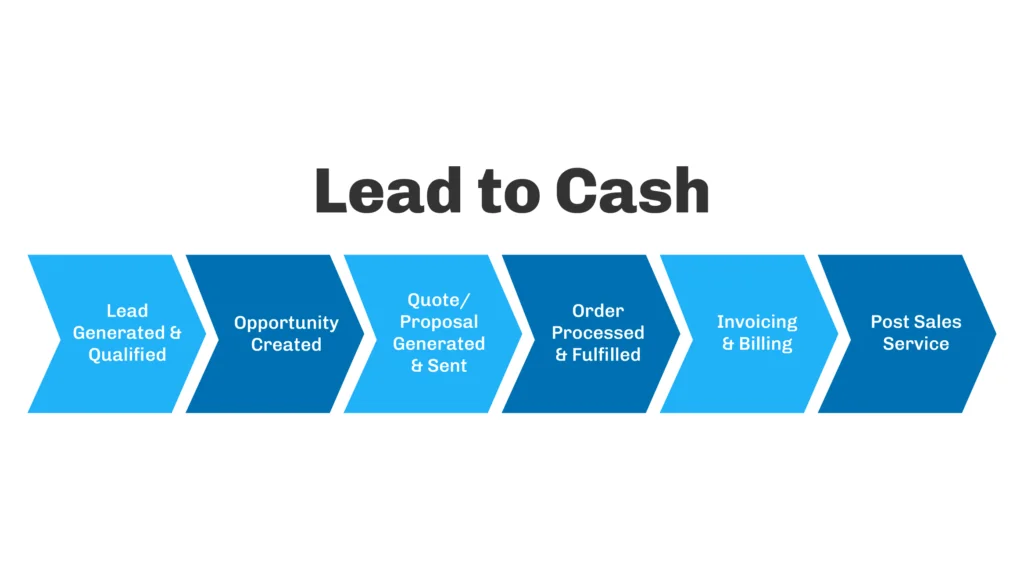
What Is Lead to Cash in Salesforce?
Lead to cash is an operating model, not a single Salesforce feature. Sales Cloud can manage leads, accounts, contacts, opportunities, products, standard quotes, contracts, and orders. More complex pricing, subscriptions, amendments, billing, or payment use cases can require Salesforce CPQ and Billing managed packages or the newer Agentforce Revenue Management capabilities licensed for the org.
Salesforce now uses Agentforce Revenue Management as the current name for the product family previously documented as Revenue Cloud. Some setup pages and documentation can still display the older Revenue Cloud name. Architects should identify which product generation is installed before designing objects, automation, or migration paths.
| Scope | Starts | Ends | Typical Salesforce records |
|---|---|---|---|
| Lead to cash | Lead or prospect capture | Payment application and service handoff | Lead, Account, Contact, Opportunity, Quote, Contract, Order, Invoice, Payment, Case or project record |
| Opportunity to order | Qualified opportunity | Accepted order | Opportunity, Opportunity Product, Quote, Quote Line, Order, Order Product |
| Quote to cash | Product configuration and pricing | Invoice payment | Quote, quote lines, approvals, Contract, Order, Invoice, Payment |
Why Lead to Cash Business Processes Break
Lead to cash failures usually occur at boundaries between teams or systems. Marketing may define a qualified lead differently from sales. Sales may close an opportunity without the billing address, purchase-order requirement, tax data, or product detail needed by finance. Operations may receive a free-text order instead of structured line items. Finance may create invoices in an ERP without returning status and payment data to Salesforce.
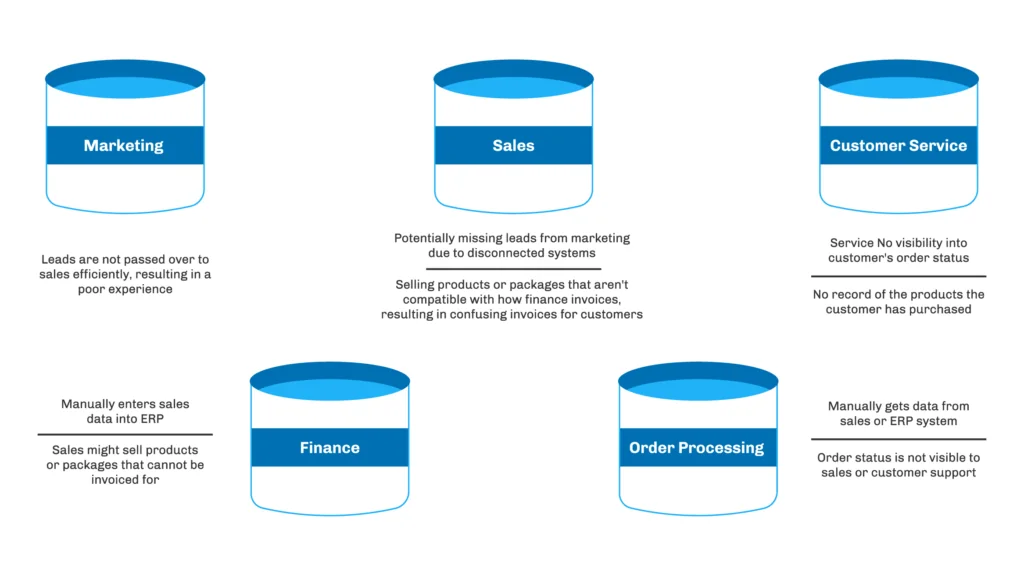
These lead to cash gaps create duplicate entry, approval delays, incorrect prices, rejected invoices, and poor reporting. A single platform does not remove the problem by itself. The implementation must define authoritative fields, integration ownership, error handling, and reconciliation.
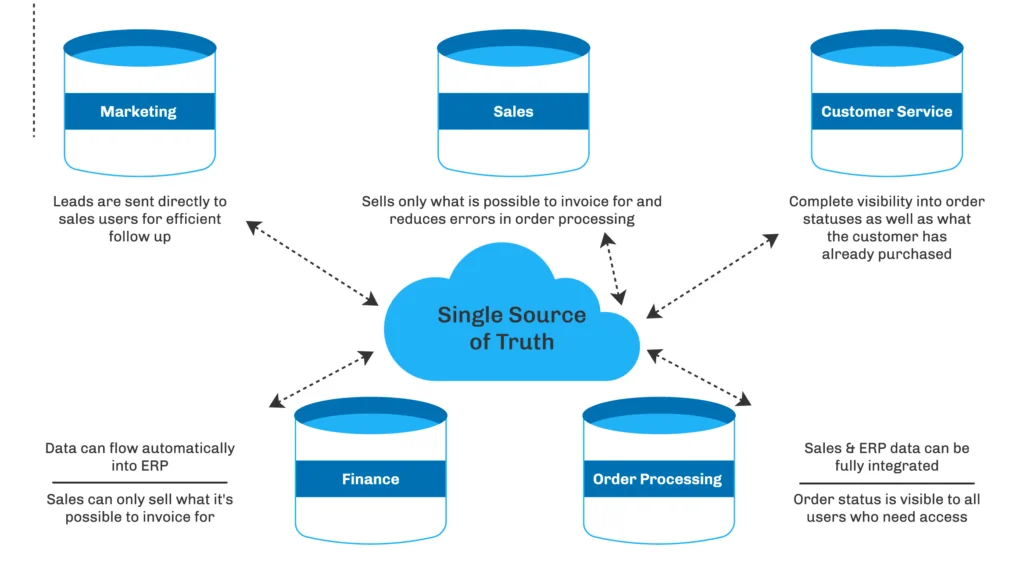
Lead to cash business processes and stage controls
| Stage | Business owner | Entry condition | Exit evidence |
|---|---|---|---|
| Capture | Marketing or business development | Prospect identity and consent are available | Lead source, campaign, owner, and status recorded |
| Qualify | Sales development | Initial fit or intent exists | Qualification fields completed; next action assigned |
| Convert and pursue | Account executive | Qualified sales motion | Account and Contact linked; Opportunity created when required |
| Configure and price | Sales and deal desk | Products, quantities, term, and commercial model known | Approved quote with valid dates and totals |
| Contract | Legal and sales operations | Commercial terms approved | Executed agreement and obligation data stored |
| Order and fulfill | Operations | Booking criteria met | Accepted order, provisioning status, assets or entitlements |
| Bill and collect | Finance | Invoice trigger or billing schedule reached | Invoice posted, payment applied, balance reconciled |
| Serve and renew | Customer success or service | Customer is active | Onboarding, cases, usage, renewal, and expansion tracked |
How Does the Lead to Cash Process Flow Work?
1. Capture lead source and campaign context
For lead to cash reporting, create a clear acquisition model before adding automation. Standard Lead Source can support high-level reporting, while Campaign and Campaign Member records provide campaign-level attribution. Avoid overwriting the original source when the prospect engages again. Many enterprise orgs store an immutable original source plus current or most-recent source fields.
Inbound forms should validate required values, protect against spam, and route records through assignment rules or Flow. Outbound teams should avoid creating several Leads for the same person. Use matching and duplicate rules to warn or block according to the business tolerance for false positives.
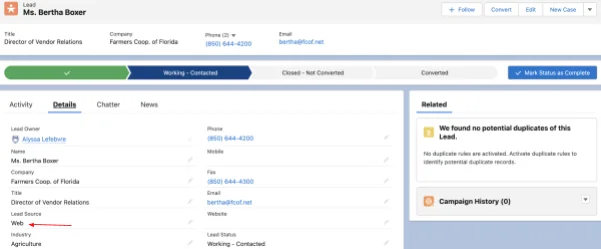
2. Qualify without turning methodology into clutter
In lead to cash design, qualification fields should answer operational questions: Is there a defined problem? Is the buyer in the target segment? Is there a decision process? Is a next step scheduled? Frameworks such as BANT or MEDDICC can inform the design, but the data model should contain fields that sales managers will inspect and report on.
Use Path for guidance, validation rules for hard requirements, and record-triggered flows for derived values or routing. Do not make every qualification field required at record creation. Apply requirements when the user advances to the relevant status, otherwise users enter placeholder values to get past the save.
3. Convert the qualified Lead
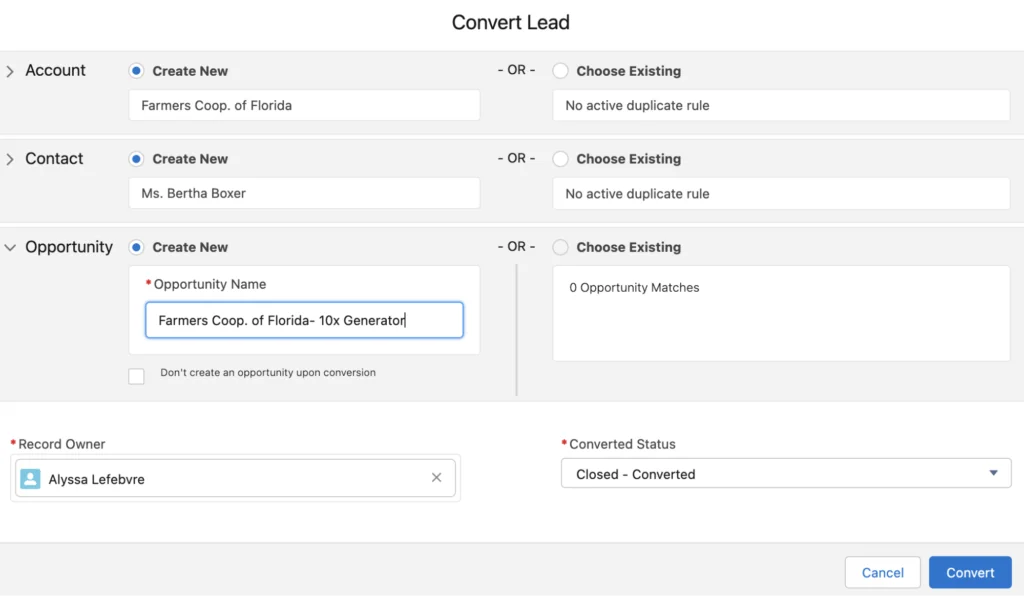
In a lead to cash model, Salesforce lead conversion creates or relates an Account and Contact and can create an Opportunity. Custom Lead fields can be mapped to compatible custom fields on Account, Contact, and Opportunity. Define mappings before loading or converting leads so that qualification data is not stranded on the converted Lead.
For person-account orgs, test conversion behavior by record type and business unit. Also decide when an Opportunity should not be created, such as service enquiries, partner registrations, or early-stage nurtures. Converted Leads remain useful for historical reporting, but the active selling process moves to the Account, Contact, and Opportunity.
4. Manage Opportunity stages and required data
Lead to cash Opportunity stages should represent buyer and seller milestones, not internal activity labels. Each stage needs a probability policy, required fields, expected evidence, and a defined next step. Keep the stage model stable enough for trend reporting.
Before Closed Won, collect the data required downstream: legal customer name, bill-to and ship-to details, currency, payment terms, tax treatment, purchase-order requirement, products, quantities, service dates, and approved exceptions. A validation rule is appropriate for a small set of deterministic requirements. Use Flow or Apex when checks span child records or require reusable logic.
5. Configure products and calculate prices
A lead to cash implementation with simple sales motions can use Products, Price Books, Opportunity Products, and standard Quotes. Complex bundles, product compatibility, tiered pricing, subscription terms, ramp deals, amendments, or renewals usually require a CPQ or revenue management product.
Keep lead to cash pricing logic in one authoritative engine. Do not reproduce the same discount calculation in spreadsheets, Apex, an integration layer, and an ERP. Store the pricing inputs, applied rules, approval evidence, and final outputs so that a later amendment or audit can explain the amount.
Quote to cash process flow
- Create a quote from the opportunity and select the correct price book, currency, account, and effective dates.
- Add and configure products, quantities, subscription terms, and service dates.
- Calculate list, contracted, partner, discretionary, and net prices according to the pricing engine.
- Route exceptions for approval based on discount, margin, payment terms, or nonstandard clauses.
- Generate the customer-facing quote or proposal from an approved template.
- Capture acceptance and contract terms.
- Create an order from the accepted commercial record.
- Fulfill products or services and create assets, subscriptions, or entitlements where the product model requires them.
- Generate invoices from orders, billing schedules, usage, milestones, or other contracted triggers.
- Apply payments, manage credits or refunds, and return financial status to Salesforce.
Most effective quote-to-cash process in CPQ industry implementations
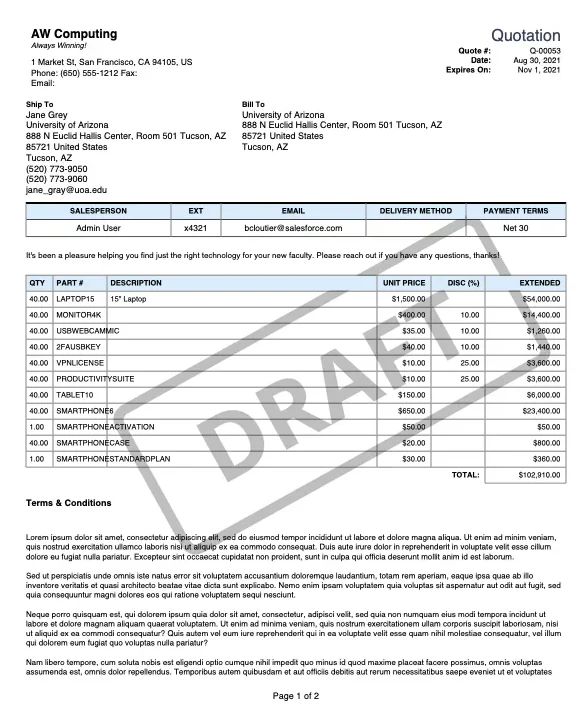
The most effective quote-to-cash process in CPQ industry implementations uses one product catalog, one pricing authority, versioned commercial records, and controlled handoffs. It also separates the customer-facing document from the structured transaction data. A PDF communicates terms to the buyer; quote lines, order products, billing schedules, and contract records drive automation and reporting.
In enterprise orgs, the quote should not become an editable dead end after acceptance. Preserve the accepted version, then process later changes through amendment, cancellation, renewal, or replacement transactions. This makes recurring revenue and audit reporting more reliable than directly editing active subscriptions or order lines.
6. Contract and manage obligations
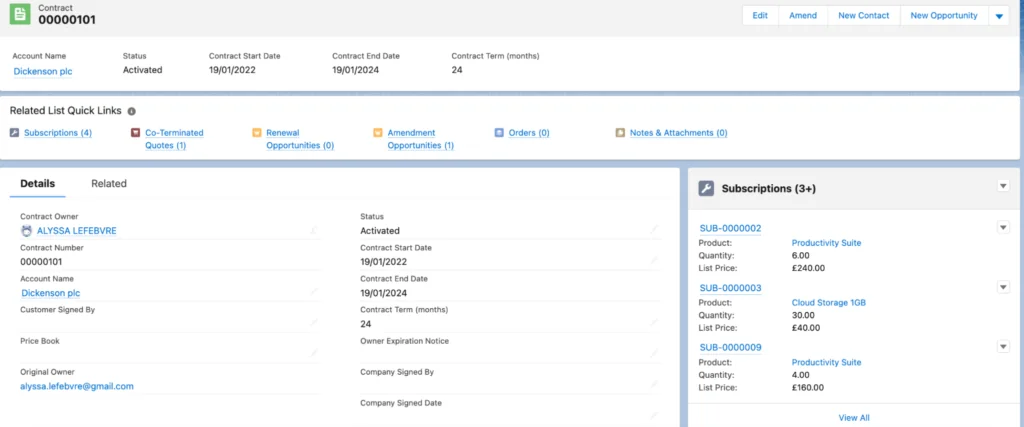
In lead to cash operations, a contract records the agreement, but successful contract management also requires structured dates, renewal terms, notice periods, usage commitments, service levels, and billing obligations. Store fields that drive work; do not rely only on an attached document.
Salesforce CPQ can create contracts for qualifying subscription products when an Opportunity or Order is contracted, depending on the configured process. In CPQ order-based contracting, orders are generated from a primary quote, and Salesforce documents restrictions that apply after order creation. Test the full quote, order, contract, amendment, and renewal lifecycle in a sandbox before production use.
7. Create, activate, and fulfill orders
In lead to cash operations, an order is the operational commitment to deliver products or services. Define the booking rule explicitly. Some companies book when the agreement is signed; others require a customer purchase order, credit approval, or completed provisioning data.
Use Order Products as structured fulfillment instructions. Integrations should use an external identifier and an idempotency strategy so that a retry does not create a second order in the ERP. Return statuses such as accepted, held, partially fulfilled, fulfilled, cancelled, and failed to Salesforce with timestamps and error details.
8. Invoice, collect, and reconcile
Lead to cash billing may occur in Salesforce Billing, Agentforce Revenue Management Billing, or an external finance platform. Salesforce Billing documentation describes a CPQ-to-Billing model in which Billing uses the order for invoicing, payment, and revenue processes. Agentforce Revenue Management Billing supports invoice generation and payment capabilities under its own licensing and setup model.
Do not mark the process complete when an invoice is created. Track invoice posting, delivery, due date, disputed amount, payment status, credit notes, write-offs, and the balance returned by the financial system. Reconcile transaction counts and amounts between Salesforce and the accounting platform on a schedule.
How to Design Lead-to-Cash Automation
Lead-to-cash automation with Flow
For lead to cash automation, use record-triggered Flow for routing, field derivation, notifications, child-record creation, and asynchronous calls where the transaction permits it. Prefer before-save flow for updates to the triggering record because it avoids a separate DML operation. Use after-save flow when related records, emails, platform events, or actions are required.
Build automation around state transitions rather than every edit. For example, run the booking handoff when an Opportunity first becomes Closed Won and all prerequisites pass. Add an idempotency field such as Booking_Request_Id__c or ERP_Order_Id__c so a resumed or retried flow does not submit the same transaction twice.
Apex example: validate Closed Won handoff data
The following invocable Apex action can be called from Flow. It is bulkified, performs one SOQL query, returns one result per input, and uses WITH USER_MODE to enforce sharing, CRUD, and field-level access for the queried fields. Save the class at API version 57.0 or later for user-mode SOQL support.
public with sharing class LeadToCashOpportunityValidator {
    public class Request {
        @InvocableVariable(required=true)
        public Id opportunityId;
    }

    public class Result {
        @InvocableVariable
        public Id opportunityId;

        @InvocableVariable
        public Boolean isReady;

        @InvocableVariable
        public String message;
    }

    @InvocableMethod(
        label='Validate Lead-to-Cash Handoff'
        description='Checks required Opportunity data before downstream booking.'
    )
    public static List<Result> validate(List<Request> requests) {
        Set<Id> opportunityIds = new Set<Id>();
        for (Request requestItem : requests) {
            if (requestItem != null && requestItem.opportunityId != null) {
                opportunityIds.add(requestItem.opportunityId);
            }
        }

        Map<Id, Opportunity> opportunitiesById =
            new Map<Id, Opportunity>([
                SELECT Id, StageName, CloseDate, Amount, AccountId,
                       Pricebook2Id, HasOpportunityLineItem
                FROM Opportunity
                WHERE Id IN :opportunityIds
                WITH USER_MODE
            ]);

        List<Result> results = new List<Result>();
        for (Request requestItem : requests) {
            Result output = new Result();
            output.opportunityId =
                requestItem == null ? null : requestItem.opportunityId;

            Opportunity opp = opportunitiesById.get(output.opportunityId);
            List<String> missing = new List<String>();

            if (opp == null) {
                missing.add('Opportunity is unavailable or inaccessible');
            } else {
                if (opp.StageName != 'Closed Won') {
                    missing.add('Stage must be Closed Won');
                }
                if (opp.AccountId == null) {
                    missing.add('Account');
                }
                if (opp.CloseDate == null) {
                    missing.add('Close Date');
                }
                if (opp.Pricebook2Id == null) {
                    missing.add('Price Book');
                }
                if (!opp.HasOpportunityLineItem) {
                    missing.add('Opportunity Products');
                }
            }

            output.isReady = missing.isEmpty();
            output.message = output.isReady
                ? 'Ready for booking'
                : String.join(missing, '; ');
            results.add(output);
        }
        return results;
    }
}
Governor limit note: the method queries all requested Opportunities in one statement and performs no DML in a loop. A production implementation should add tests for empty input, inaccessible records, mixed valid and invalid records, and the maximum collection size expected from Flow. Field names for billing or legal requirements will be org-specific.
When to use asynchronous processing
For lead to cash integrations, use Queueable Apex, platform events, or an integration platform when downstream work involves callouts, long-running orchestration, or retry handling. Keep the user transaction small. Record a request status such as Pending, Submitted, Succeeded, or Failed, and expose a replay or support path for failed requests.
A future method is suitable only for limited legacy scenarios. Queueable Apex supports job chaining and non-primitive member variables, which makes it a better default for most new Apex-based asynchronous work. Batch Apex is appropriate for large reconciliation or backfill jobs, not for each interactive opportunity update.
What Data Model Supports the Process?
| Business concept | Common Salesforce record | Design warning |
|---|---|---|
| Prospect | Lead, or Account and Contact in a leadless model | Choose one operating model per business motion and define duplicate handling. |
| Deal | Opportunity and Opportunity Products | Do not treat Amount as a substitute for line-level product data. |
| Offer | Quote and Quote Lines | Preserve approved and accepted versions. |
| Agreement | Contract plus structured terms | An attachment alone cannot drive renewal or billing automation. |
| Delivery instruction | Order and Order Products | Use idempotent integration keys and status synchronization. |
| Customer entitlement | Asset, Subscription, Entitlement, or industry-specific record | Select the record that matches ownership, access, and renewal needs. |
| Receivable | Invoice and invoice lines, native or integrated | Separate invoice creation from posting and payment application. |
| Cash | Payment, allocation, or ERP status | Reconcile amount, currency, date, and external transaction ID. |
How to Secure Lead to Cash Data
Lead to cash security starts with organization-wide defaults, role hierarchy, territories where used, sharing rules, teams, and manual or Apex sharing. Then grant object and field access through permission sets and permission set groups. Profiles should provide the minimum baseline, while permission sets add job-specific access.
- Restrict cost, margin, discount, bank, tax, and payment fields to the users who need them.
- Separate quote approval from quote creation when policy requires independent review.
- Use field history or an audit design for price, term, stage, contract, and payment-status changes.
- Enforce CRUD and field-level security in Apex.
with sharingenforces record sharing but does not by itself enforce object or field permissions. - Review integration users separately. Give each integration only the objects, fields, and API operations it requires.
Lead to Cash Metrics That Reveal Process Problems
| Metric | Calculation or interpretation | Common diagnostic use |
|---|---|---|
| Lead response time | First meaningful sales action minus lead created time | Routing and staffing |
| Lead conversion rate | Converted qualified leads divided by qualified leads | Qualification quality and source performance |
| Stage conversion | Records entering a later stage divided by records entering the prior stage | Pipeline leakage |
| Quote cycle time | Quote accepted time minus first quote created time | Pricing and approval delay |
| Approval exception rate | Quotes requiring exception approval divided by submitted quotes | Price-book or policy fit |
| Booking failure rate | Failed downstream order requests divided by booking requests | Data and integration defects |
| Invoice rejection rate | Rejected or disputed invoices divided by issued invoices | Billing address, PO, tax, and contract errors |
| Days sales outstanding | Receivables divided by credit sales multiplied by period days | Collection performance; usually sourced from finance |
| Revenue leakage | Contracted value not billed or collected | Missed usage, milestones, renewals, or credits |
For lead to cash analytics, measure stage timestamps rather than relying only on current status. A current-stage report cannot explain how long a record spent in earlier stages. Use field history, custom milestone records, CRM Analytics, or replicated warehouse data based on reporting scale and retention needs.
Common Errors in Lead-to-Cash Automation
- Closing without products: Amount is populated, but no Opportunity Products exist for order creation.
- Duplicate downstream orders: Flow or middleware retries without an idempotency key.
- Currency mismatch: Quote, order, and ERP records use different currency assumptions or dated exchange rates.
- Editable accepted quotes: Users change line items after approval without creating a new version.
- Hidden integration failures: An outbound call fails, but Salesforce still shows the opportunity as booked.
- Overloaded validation: Dozens of requirements fire too early and cause users to enter false data.
- Missing security enforcement: Apex runs in system context and exposes or changes fields the initiating user cannot access.
- No reconciliation: Teams compare only individual records and never verify aggregate transaction counts and values.
Implementation Plan for Salesforce Admins and Architects
- Map the current lead to cash process. Record systems, owners, handoffs, documents, wait states, and failure paths.
- Define the target transaction model. Decide what Lead, Opportunity, Quote, Contract, Order, Asset, Invoice, and Payment mean in this business.
- Choose the pricing and billing authority. Document whether Salesforce, CPQ, Agentforce Revenue Management, or an ERP owns each calculation.
- Set stage gates. Specify required data, approvals, and evidence for each transition.
- Design security. Confirm record visibility, object access, field access, segregation of duties, and integration-user permissions.
- Automate one boundary at a time. Start with a measurable handoff such as qualified lead conversion or Closed Won to order.
- Add observability. Store request IDs, statuses, timestamps, response messages, and support ownership.
- Test lead to cash scenarios end to end. Include new sale, discount approval, partial order, cancellation, amendment, renewal, failed invoice, refund, and duplicate retry.
- Reconcile after go-live. Compare record counts and monetary totals across Salesforce and finance systems.
For related implementation details, see the SalesforceTutorial guides to Salesforce lead management, Salesforce Opportunity management, Salesforce reports, and Salesforce Flow automation.
Official Salesforce References
- Salesforce Help: Converting Leads
- Salesforce Help: Guidelines for Salesforce CPQ Orders
- Salesforce Help: Salesforce Billing Overview
- Salesforce Help: Agentforce Revenue Management
- Apex Developer Guide: User Mode Database Operations
- Trailhead: Lead to Cash with Salesforce CPQ and Billing
Frequently Asked Questions
What is the difference between lead to cash and quote to cash?
Lead to cash starts with prospect capture and qualification, while quote to cash starts when the seller configures and prices an offer. Both continue through contracting, ordering, invoicing, and payment, but lead to cash includes the earlier marketing and opportunity stages.
Can Salesforce automate the complete lead to cash process?
Salesforce can automate much of the process, but the complete scope depends on licensing and connected systems. Sales Cloud covers core sales records; Salesforce CPQ and Billing or Agentforce Revenue Management can add pricing, subscription, order, billing, and payment functions. Many companies still integrate an ERP, tax service, payment gateway, or provisioning platform.
Which Salesforce object should start the quote to cash process flow?
The Opportunity normally provides the commercial context, and a Quote becomes the transaction used for product configuration and pricing. In Salesforce CPQ, order creation follows the primary quote rules documented for CPQ. The exact starting point must match the installed product and the organization’s booking policy.
How do you prevent duplicate orders in lead-to-cash automation?
Assign a unique booking request or external transaction ID before submitting the order, enforce uniqueness where possible, and make the receiving integration idempotent. A retry should return the existing order result rather than create another order.
What data should be required before an Opportunity is Closed Won?
Require only data needed to book and fulfill the sale: customer legal entity, billing and shipping details, currency, products, quantities, dates, payment terms, tax inputs, purchase-order requirements, and approved exceptions. Requirements vary by business, so validate them at the stage where they become necessary.