MuleSoft is an Integration Platform as a Service (iPaaS) that connects applications, data, and devices across cloud and on-premise environments. Acquired by Salesforce in 2018 for $6.5 billion, MuleSoft enables organizations to build a connected ecosystem where data flows seamlessly between systems, eliminating data silos and enabling real-time business insights.
This comprehensive guide covers MuleSoft fundamentals, its integration with Salesforce, key platform components, and practical implementation strategies for administrators and developers.
What Is MuleSoft
MuleSoft provides a unified integration platform that addresses the challenge of connecting disparate systems in modern enterprise environments. The platform operates on the principle of API-led connectivity, where reusable APIs serve as building blocks for complex integrations.
Key characteristics of MuleSoft include:
- API-First Architecture: Every integration exposes reusable APIs that can be consumed by other systems
- Hybrid Deployment: Supports cloud, on-premise, and hybrid deployment models
- Visual Development: Drag-and-drop interface for building integrations without extensive coding
- Pre-built Connectors: Extensive library of connectors for popular enterprise systems
- Runtime Engine: Mule 4 runtime provides high-performance message processing
Salesforce and MuleSoft Integration Benefits
The combination of Salesforce and MuleSoft creates a powerful ecosystem for customer data management and business process automation. Organizations leverage this integration to achieve several key objectives:
Unified Customer Data Platform
MuleSoft enables Salesforce to become the single source of truth for customer data by connecting CRM records with data from ERP systems, marketing automation platforms, and external databases. This unified view improves sales effectiveness and customer service quality.
Real-Time Data Synchronization
Instead of batch data loads that create delays and inconsistencies, MuleSoft facilitates real-time data synchronization between Salesforce and external systems. Changes in one system immediately reflect across all connected applications.
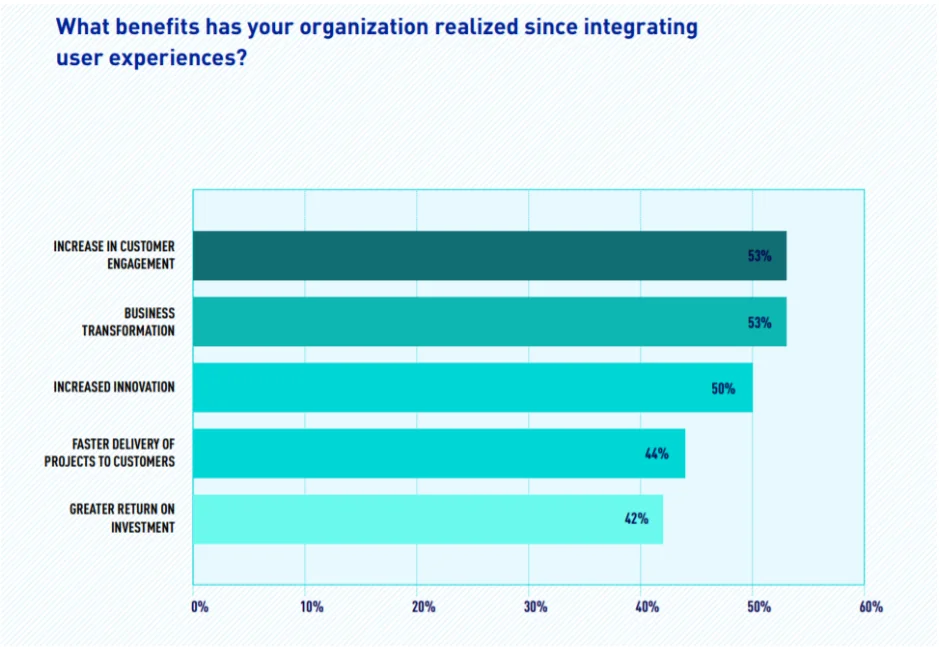
Reduced Integration Costs
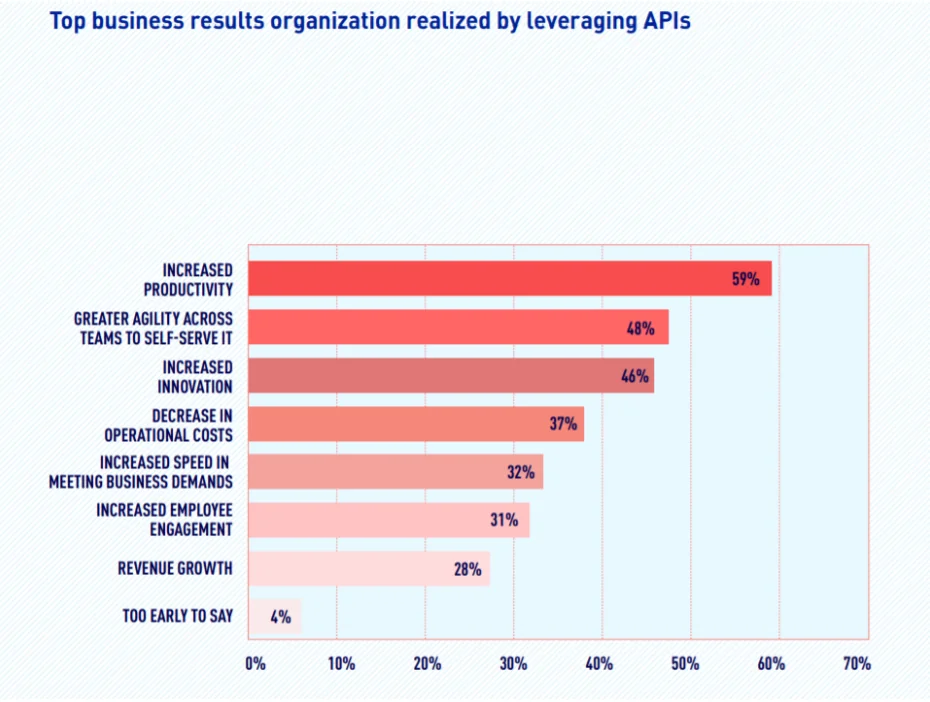
Traditional point-to-point integrations require custom development for each connection, creating maintenance overhead and technical debt. MuleSoft’s reusable API approach reduces integration costs by up to 50% compared to custom solutions.
Enhanced Business Agility
With MuleSoft Composer, Salesforce administrators can create integrations using declarative tools without waiting for developer resources. This self-service capability accelerates time-to-market for new business processes.
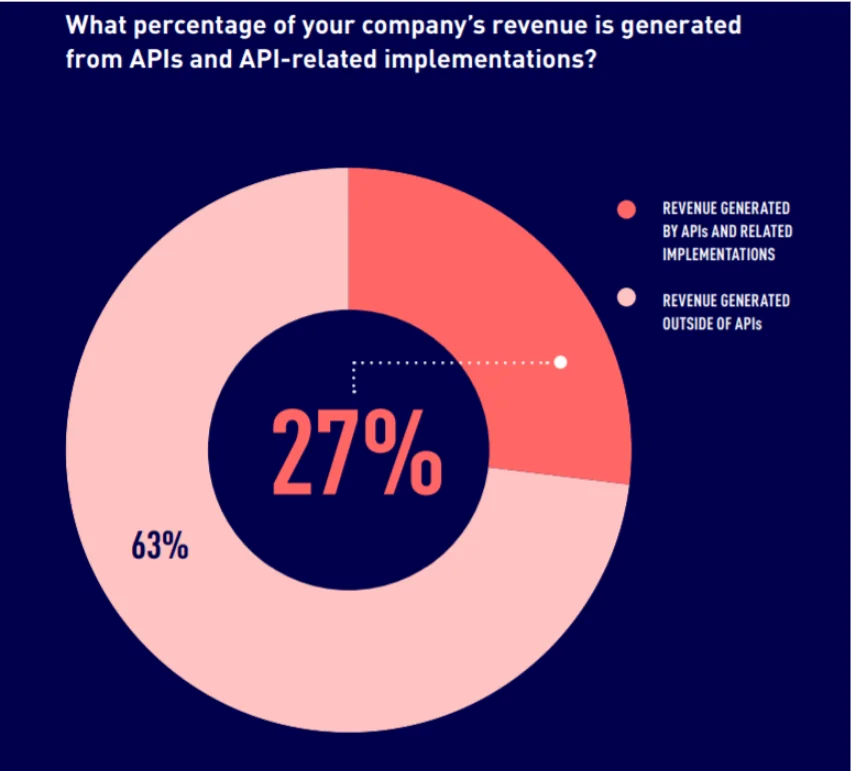
MuleSoft Anypoint Platform Components
The Anypoint Platform serves as MuleSoft’s comprehensive integration solution, providing tools for API design, development, deployment, and management.
Design Center
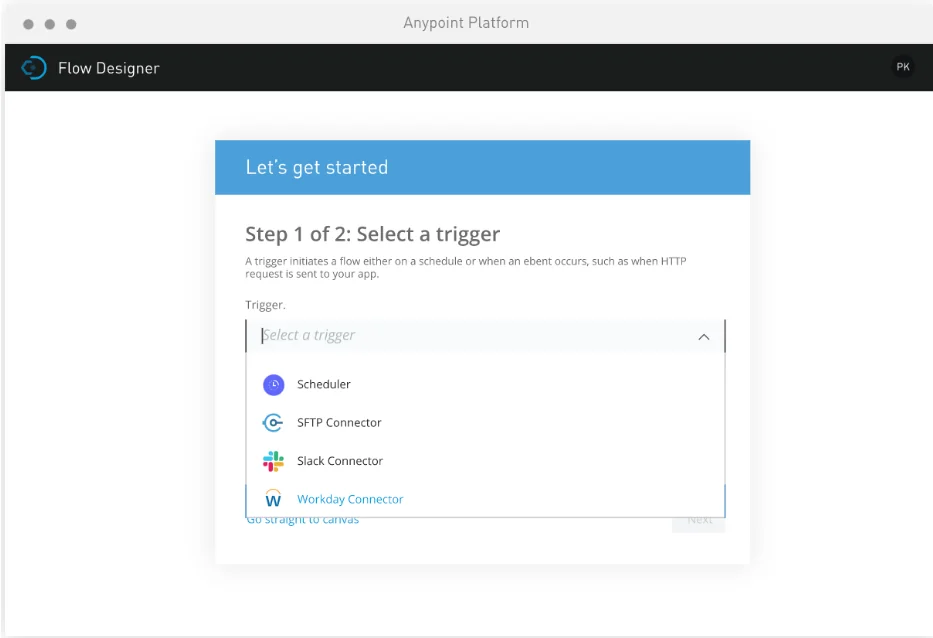
Design Center provides a web-based environment for creating APIs and integration flows. The visual interface displays integration logic graphically, making it easier to understand data transformation and routing logic.
Key features include:
- RAML-based API specification editor
- Flow Designer for visual integration development
- Built-in testing and simulation capabilities
- Collaborative development with version control
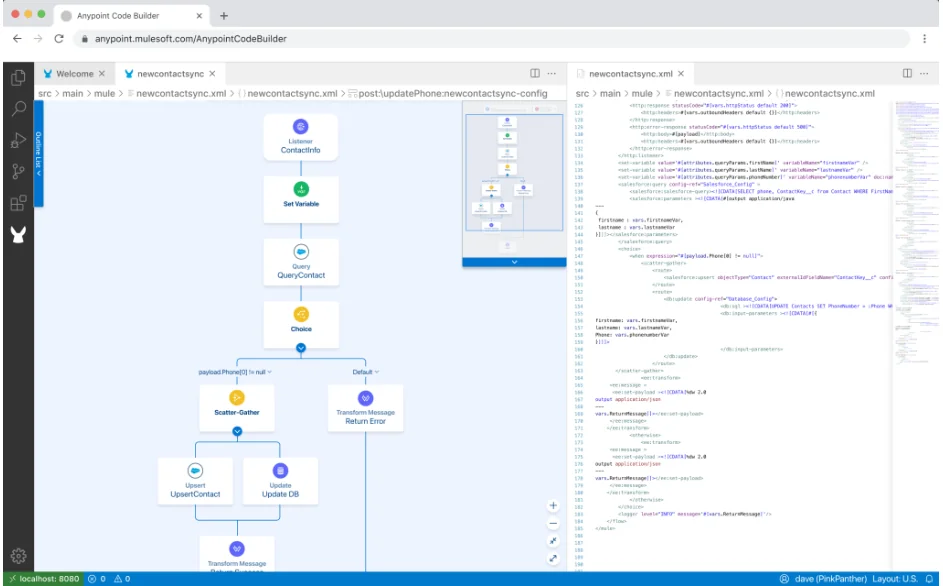
Anypoint Code Builder
Anypoint Code Builder represents MuleSoft’s next-generation integrated development environment (IDE) for APIs and integrations. Built on Visual Studio Code, it provides familiar tooling for developers while adding MuleSoft-specific capabilities.
Core capabilities include:
- IntelliSense for DataWeave and Mule configuration
- Integrated debugging and testing tools
- Built-in recommendations for best practices
- Direct deployment to Anypoint Platform
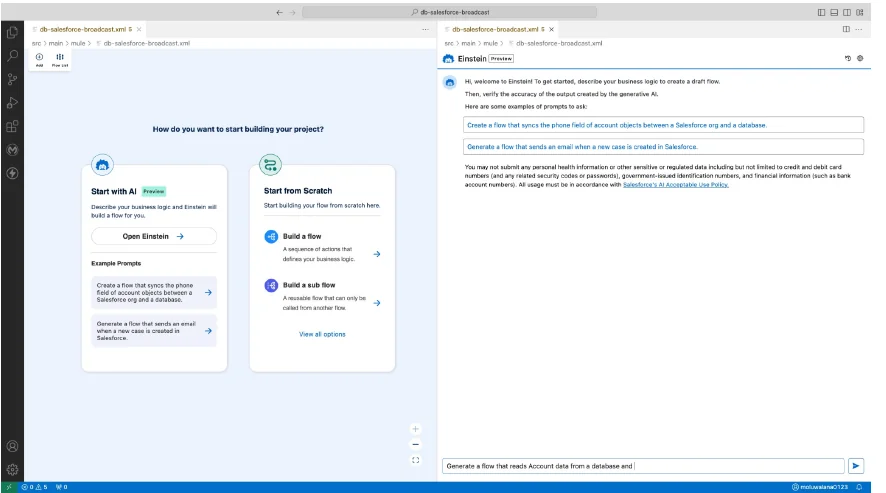
Einstein for Anypoint Code Builder
Einstein AI integration enables natural language generation of integration flows and code snippets. Developers can describe integration requirements in plain English and receive generated Mule configuration and DataWeave transformations.
Example prompt: “Create a flow that syncs account phone numbers between Salesforce and a MySQL database”
Universal API Management
Universal API Management addresses the challenge of governing APIs across different gateways and platforms. It provides centralized security, monitoring, and lifecycle management for all organizational APIs.
Components include:
- Anypoint Flex Gateway: Lightweight, high-performance API gateway
- API Governance: Automated compliance checking against security and design standards
- Analytics and Monitoring: Real-time API performance and usage metrics
- Developer Portal: Self-service API discovery and documentation
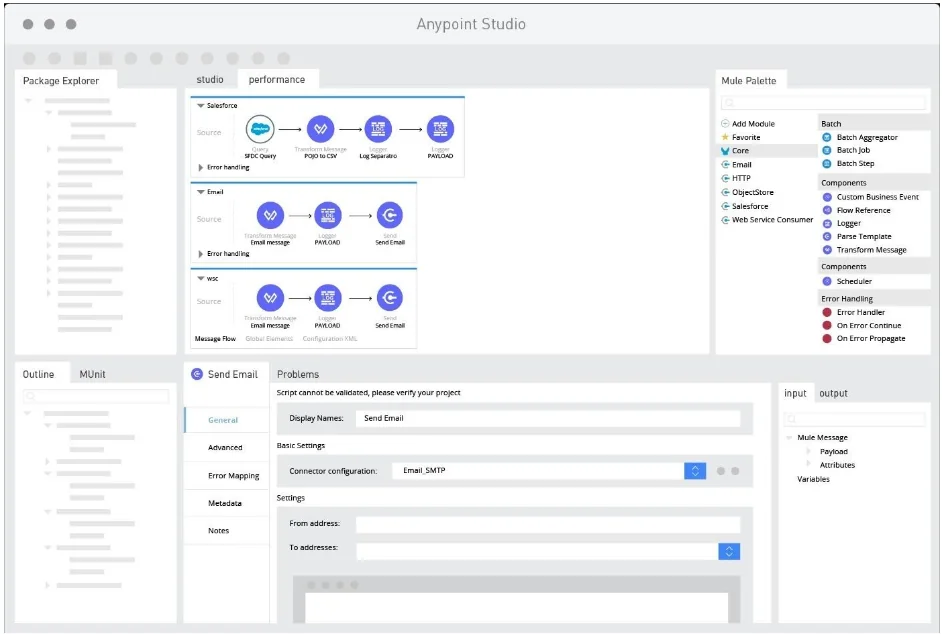
Mule Integration Platform Architecture
The Mule 4 runtime engine provides the foundation for all MuleSoft integrations. Understanding its architecture is essential for designing scalable, maintainable integration solutions.
Mule 4 Runtime Improvements
Mule 4 represents a significant architectural evolution from previous versions:
- Simplified Event Model: Unified message structure reduces complexity
- Enhanced Error Handling: Typed error handling with better debugging information
- Streaming Support: Handle large payloads without memory constraints
- Improved Performance: 50% faster message processing compared to Mule 3
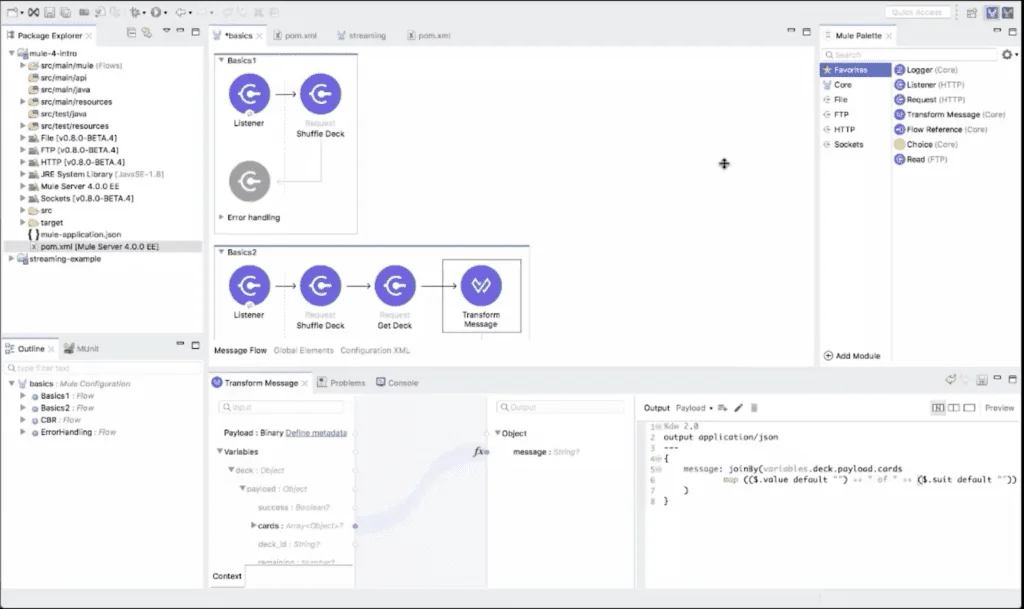
DataWeave Transformation Language
DataWeave serves as MuleSoft’s primary data transformation language, replacing the Mule Expression Language (MEL) from earlier versions. It provides powerful capabilities for transforming data between different formats and structures.
DataWeave features:
- Functional programming paradigm with immutable data structures
- Support for JSON, XML, CSV, and custom formats
- Built-in functions for common data operations
- Type system with compile-time validation
Example DataWeave transformation:
%dw 2.0
output application/json
---
{
  customer: {
    id: payload.accountId,
    name: payload.accountName,
    contacts: payload.contacts map (contact) -> {
      email: contact.emailAddress,
      phone: contact.phoneNumber
    }
  }
}
Connector Ecosystem
MuleSoft provides over 300 pre-built connectors for popular enterprise systems, including:
| Category | Examples | Use Cases |
|---|---|---|
| CRM Systems | Salesforce, Microsoft Dynamics, HubSpot | Customer data synchronization |
| ERP Systems | SAP, Oracle, NetSuite | Financial and operational data integration |
| Databases | Oracle, SQL Server, MySQL, MongoDB | Data persistence and retrieval |
| Cloud Services | AWS, Azure, Google Cloud | Cloud-native application integration |
| Messaging | JMS, RabbitMQ, Apache Kafka | Event-driven architecture |
MuleSoft Composer for Salesforce Administrators
MuleSoft Composer brings integration capabilities directly into the Salesforce platform, enabling administrators to create integrations using familiar declarative tools.
Key Capabilities
- Point-and-Click Interface: Similar to Salesforce Flow builder
- Pre-built Templates: Common integration patterns for popular systems
- Real-time Monitoring: Integration health and performance metrics
- Error Handling: Built-in retry logic and failure notifications
Supported Systems
MuleSoft Composer includes connectors for:
- NetSuite ERP
- SAP SuccessFactors
- Workday HCM
- ServiceNow
- Tableau
- Amazon S3
Implementation Best Practices
When implementing MuleSoft Composer integrations:
- Start with Data Mapping: Define field mappings before building flows
- Handle Null Values: Account for missing data in source systems
- Implement Error Handling: Configure retry policies and failure notifications
- Monitor Performance: Set up alerts for integration failures or performance degradation
- Test Thoroughly: Validate integrations in sandbox before production deployment
Enterprise Integration Patterns
MuleSoft supports common enterprise integration patterns that address specific business requirements:
API-Led Connectivity
This three-layer approach organizes APIs by their purpose:
- System APIs: Direct connections to source systems
- Process APIs: Business logic and data orchestration
- Experience APIs: Consumer-specific data and functionality
Event-Driven Architecture
MuleSoft enables event-driven integrations using:
- Change Data Capture from Salesforce
- Database triggers and polling
- Message queue integration
- Webhook endpoints
Batch Processing
For large data volumes, MuleSoft provides batch processing capabilities:
- Configurable batch sizes
- Parallel processing
- Error handling and recovery
- Progress monitoring
Security and Governance
Enterprise MuleSoft implementations require robust security and governance frameworks:
Security Features
- OAuth 2.0 and SAML: Standard authentication protocols
- API Policies: Rate limiting, IP whitelisting, and access control
- Encryption: Data encryption in transit and at rest
- Audit Logging: Comprehensive access and activity logs
Governance Practices
- API Design Standards: Consistent naming and structure conventions
- Version Management: Backward compatibility and deprecation policies
- Testing Requirements: Unit, integration, and performance testing
- Documentation Standards: API specifications and usage examples
Performance Optimization
Optimizing MuleSoft integrations requires attention to several key areas:
DataWeave Optimization
- Use streaming for large datasets
- Minimize memory usage with lazy evaluation
- Optimize selector expressions
- Cache frequently accessed data
Connector Configuration
- Configure appropriate connection pooling
- Set optimal timeout values
- Use bulk operations when available
- Implement circuit breaker patterns
Runtime Tuning
- Allocate sufficient memory for worker processes
- Configure thread pools for concurrent processing
- Monitor garbage collection performance
- Use clustering for high availability
Frequently Asked Questions
What is MuleSoft and how does it work?
MuleSoft is an Integration Platform as a Service (iPaaS) that connects applications, data, and devices across cloud and on-premise environments. It works by creating reusable APIs that serve as building blocks for integrations, using a visual development environment and pre-built connectors to reduce development time and complexity.
How do Salesforce and MuleSoft work together?
Salesforce and MuleSoft integration enables real-time data synchronization between Salesforce CRM and external systems like ERP, marketing automation, and databases. MuleSoft Composer provides a declarative interface within Salesforce for administrators to create integrations without coding, while the Anypoint Platform offers advanced integration capabilities for developers.
What is the difference between MuleSoft and traditional integration approaches?
Traditional integrations typically use point-to-point connections that create maintenance overhead and technical debt. MuleSoft uses API-led connectivity where reusable APIs serve multiple integration needs, reducing costs by up to 50% and enabling faster development through pre-built connectors and visual development tools.
Can Salesforce administrators use MuleSoft without coding experience?
Yes, MuleSoft Composer provides a point-and-click interface similar to Salesforce Flow builder, enabling administrators to create integrations using declarative tools. It includes pre-built templates for common integration patterns and systems like NetSuite, Workday, and ServiceNow.
What are the main components of the MuleSoft Anypoint Platform?
The Anypoint Platform includes Design Center for visual integration development, Anypoint Code Builder as an IDE for developers, Universal API Management for governance and security, Runtime Manager for deployment and monitoring, and Anypoint Exchange for sharing reusable assets and connectors.
How does MuleSoft handle large data volumes and performance?
MuleSoft Mule 4 runtime supports streaming for handling large payloads without memory constraints, provides batch processing capabilities with configurable batch sizes and parallel processing, and offers performance optimization through connection pooling, caching, and circuit breaker patterns.