Pardot Salesforce integration connects Marketing Cloud Account Engagement, formerly called Pardot, with Salesforce CRM. The connector synchronizes prospect data, sales record changes, campaign membership, opportunity context, and marketing engagement so sales and marketing teams can work from related records without maintaining separate data copies manually.
The current product name is Marketing Cloud Account Engagement, but administrators, implementation teams, API clients, and search documentation still use the Pardot name. This guide uses both terms where doing so makes configuration paths and legacy references easier to understand.
What Is Pardot Salesforce?
Pardot Salesforce refers to the combination of Salesforce CRM and Marketing Cloud Account Engagement. Account Engagement stores prospects, marketing lists, forms, email activity, scoring data, and automation rules. Salesforce stores leads, contacts, accounts, opportunities, campaigns, users, tasks, and other CRM records.
The Salesforce connector links these systems. A marketer can qualify a prospect in Account Engagement, assign that prospect, and allow the connector to create or update the related Salesforce lead or contact. A sales representative can then update qualification fields or advance an opportunity, and selected CRM data can become available for segmentation and automation in Account Engagement.
This is not a simple database replication service. Sync behavior depends on connector settings, field mappings, record ownership, user permissions, assignment state, object relationships, and which system is configured to win when both sides change the same field.
How Does Pardot and Salesforce Integration Work?
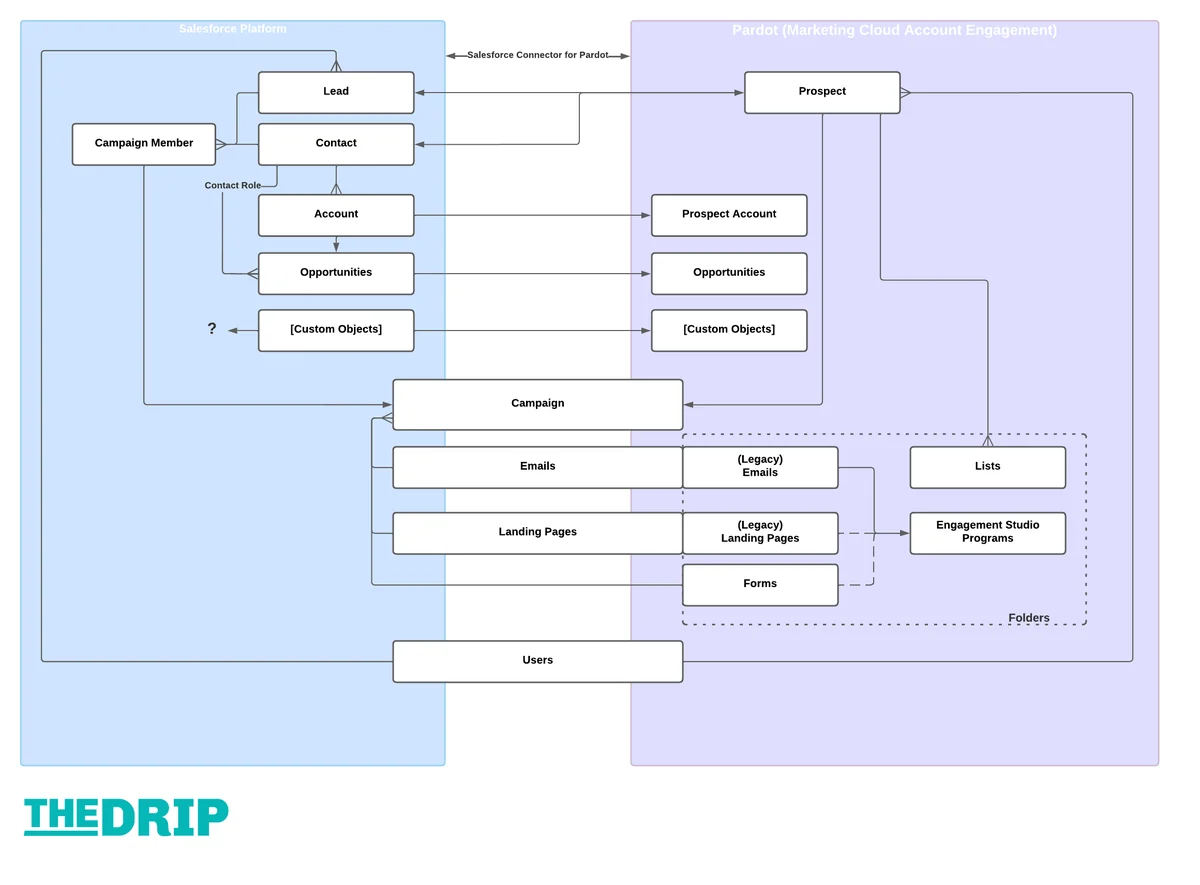
The pardot and salesforce integration uses the Salesforce connector configured for an Account Engagement business unit. Salesforce documents the connector as the supported method for synchronizing prospect and opportunity information between Account Engagement and Salesforce.
In a normal implementation, the connector performs work in these stages:
- A visitor becomes a known prospect by submitting a form, being imported, or being created through an integration.
- Account Engagement evaluates automation, scoring, grading, assignment, and completion actions.
- An assigned prospect becomes eligible to synchronize with Salesforce.
- The connector matches or creates the corresponding lead, contact, or person account according to the business unit configuration.
- Mapped field values synchronize according to the selected conflict behavior.
- Salesforce campaign, opportunity, account, and user context becomes available where the connector supports it.
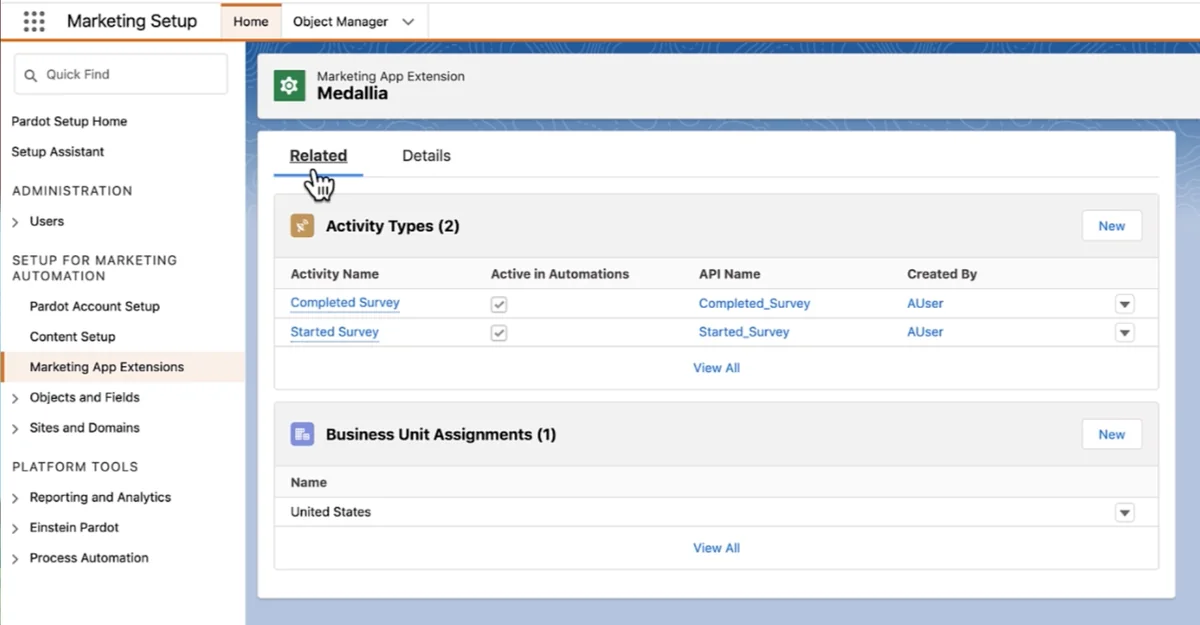
- Engagement data can appear in Salesforce through Engagement History components, related lists, and campaign metrics.
Pardot and Salesforce integration prerequisites
Before configuring the connector, confirm the following:
- The Salesforce edition and Account Engagement edition support the features you plan to enable.
- The Account Engagement business unit exists and is mapped to the correct Salesforce org.
- Salesforce users who administer the connection have the required setup and Account Engagement permissions.
- The connector user or integration identity can access every object and field selected for synchronization.
- Lead, contact, campaign, and opportunity ownership rules are documented.
- Duplicate management rules have been tested with records created by the connector.
- Field mappings use compatible data types and valid picklist values.
Salesforce recommends using Salesforce User Sync for user administration. Account Engagement access also uses Salesforce single sign-on, so inactive Salesforce users and changed permissions can affect access to the marketing application.
Recommended implementation sequence
- Document the desired lead lifecycle and determine when prospects should be assigned.
- Inventory standard and custom fields on prospects, leads, contacts, accounts, and opportunities.
- Define the authoritative system for every synchronized field.
- Configure users, roles, permission sets, and field-level security.
- Configure the Salesforce connector and business unit settings.
- Map fields and resolve incompatible picklist values.
- Test new prospects, existing leads, contacts with matching email addresses, and lead conversion.
- Enable Connected Campaigns only after reviewing existing campaign records and record types.
- Add Engagement History components and related lists to Lightning record pages.
- Monitor the connector sync queue and resolve errors before enabling production automation.
For a broader explanation of CRM record design, see Salesforce data model concepts and Salesforce security model configuration.
Which Salesforce Objects Synchronize with Account Engagement?
Synchronization is not identical for every object. Some records are created or updated in both systems, while other Salesforce records are exposed to Account Engagement only for segmentation, reporting, ownership, or automation context.
| Salesforce record | Typical connector behavior | Implementation notes |
|---|---|---|
| Lead | Prospect and lead data can synchronize in both directions. | An assigned prospect that has no matching CRM record can create a lead, subject to connector settings and duplicate rules. |
| Contact | Prospect and contact data can synchronize in both directions. | When a lead converts, the prospect relationship normally follows the resulting contact. |
| Person Account | Supported in configured person-account environments. | Test matching, account fields, and automation separately because the Salesforce record combines account and contact behavior. |
| Account | Account information is made available from Salesforce. | Account data can support segmentation, but marketers should not treat the prospect account as an independently editable Salesforce account. |
| Opportunity | Opportunity context flows from Salesforce. | Opportunity Contact Roles establish which contacts participate in an opportunity. |
| Campaign | Connected Campaigns align Salesforce campaigns with Account Engagement campaigns. | Eligible campaign record types and date settings determine which campaigns can connect. |
| Campaign Member | Prospects can be added to Salesforce campaigns and member statuses can be updated. | The requested status must exist for the selected campaign. |
| Task | Account Engagement automation can create Salesforce tasks in supported contexts. | After creation, task ownership and lifecycle are managed in Salesforce. |
| User | Salesforce User Sync provisions and updates Account Engagement users. | Map Salesforce profiles or permission-based access to appropriate Account Engagement roles. |
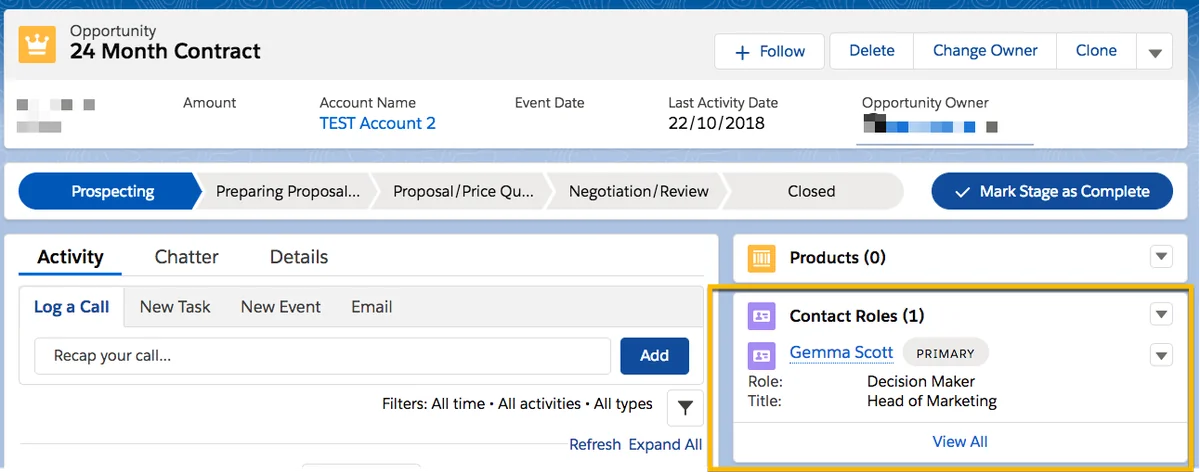
Why Opportunity Contact Roles matter
An opportunity belongs to an account, but marketing engagement belongs to an individual prospect. Salesforce needs an Opportunity Contact Role to identify which contact is involved in a specific deal. Without that relationship, Account Engagement cannot safely assume that every contact under the account participates in every opportunity.
In enterprise orgs, this distinction prevents incorrect nurture segmentation. For example, an account may have separate renewal, expansion, and implementation opportunities involving different contacts. Filtering only by account would place unrelated people into the same marketing program.
Field conflict behavior
Administrators can configure how synchronized fields behave when Salesforce and Account Engagement contain different values. The available choice depends on the field and connector configuration, but the design decision normally follows one of these patterns:
- Salesforce is authoritative: Use this for sales-controlled fields such as qualification status, territory, contract state, or account classification.
- Account Engagement is authoritative: Use this for marketing-collected values when marketing must retain the most recent submitted preference.
- Most recently updated value wins: Use cautiously. Two automations can repeatedly overwrite each other when both systems update the field.
Avoid assigning authority field by field without a data governance rule. A spreadsheet that lists the business owner, source system, allowed values, null behavior, and overwrite policy for each mapped field is easier to review than relying on connector screens alone.
How Do Connected Campaigns Work in Pardot Salesforce?
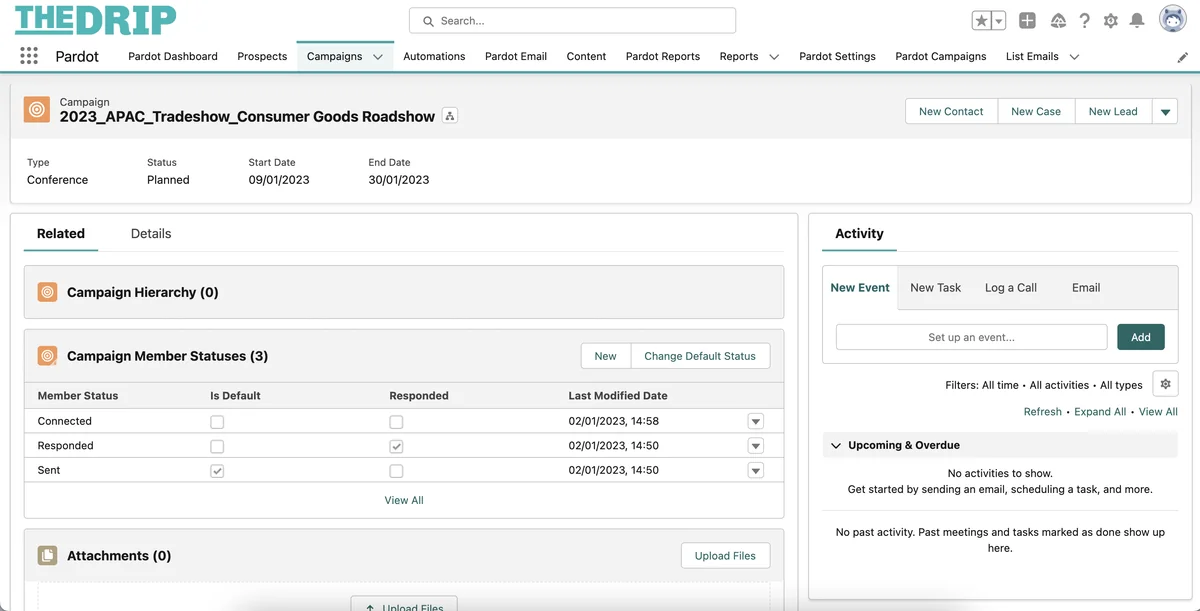
Connected Campaigns align Account Engagement campaign activity with Salesforce Campaign records. Once configured, marketers work with eligible Salesforce campaigns instead of maintaining an unrelated campaign structure in each system.
Salesforce states that Connected Campaigns support cross-product features such as Engagement History and campaign influence. The exact components available depend on licenses, edition, permissions, page configuration, and enabled Account Engagement features.
Connected Campaign setup
- Review existing Account Engagement and Salesforce campaigns for duplicate names, inconsistent hierarchy, and conflicting ownership.
- Open Account Engagement Settings in the Lightning app.
- Open the Salesforce connector configuration.
- Select the Campaigns settings.
- Enable Connected Campaigns and Engagement History.
- Select the Salesforce campaign record types that can be connected.
- Configure any available campaign creation date restrictions.
- Save the settings and validate the eligible campaigns.
Do not enable the feature in production without a campaign migration plan. Salesforce publishes a recommended order of operations for organizations that already have campaigns in both products.
Engagement History and campaign metrics
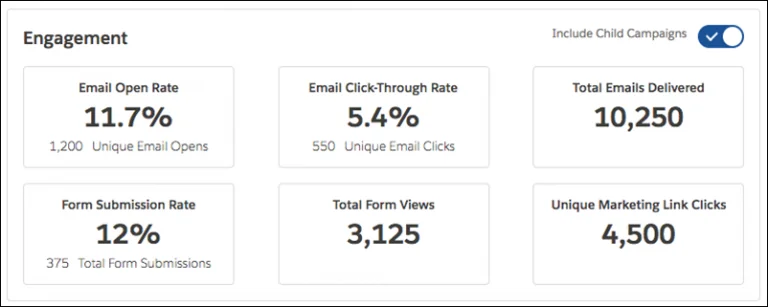
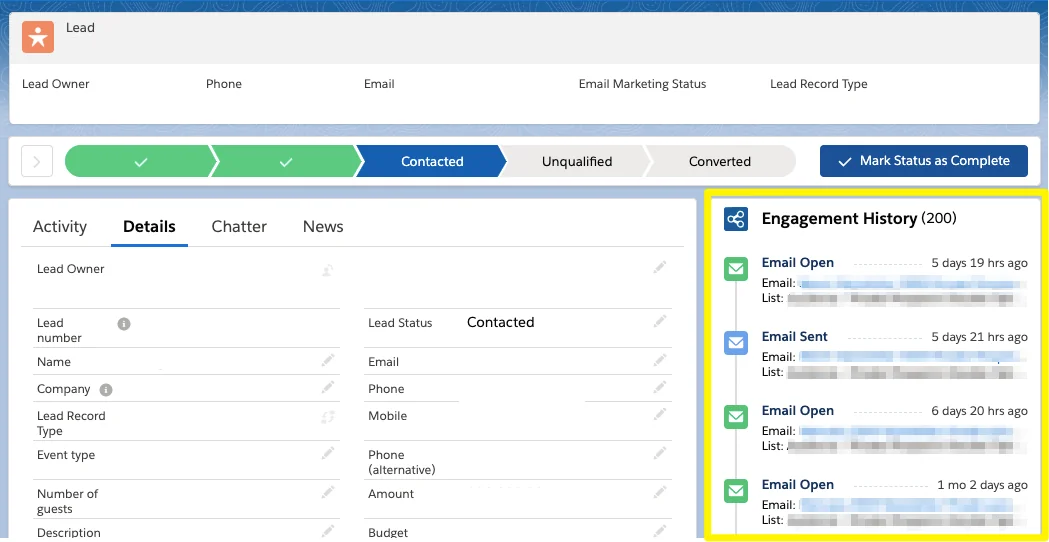
Engagement History is a group of Lightning components, fields, and related lists that exposes prospect engagement on Salesforce records. Administrators can add the relevant components to supported lead, contact, account, opportunity, and campaign pages according to the feature configuration.
Campaign metrics can help users review activity generated by related Account Engagement assets. Page layout and Lightning App Builder configuration still matter: enabling Connected Campaigns alone does not automatically place every component on every record page.
Campaign Member status considerations
Adding a prospect to a Salesforce campaign creates or updates a Campaign Member record for the corresponding lead, contact, or person account. Completion actions and automation rules can set a member status only when that status is valid for the target campaign.
Use status values that describe meaningful stages, such as Sent, Responded, Registered, Attended, or Downloaded. Avoid allowing each campaign owner to invent unrelated status names if reporting must compare campaigns across regions or business units.
For related configuration, read Salesforce Campaign management and Salesforce reports and report types.
How Does Salesforce User Sync Work?
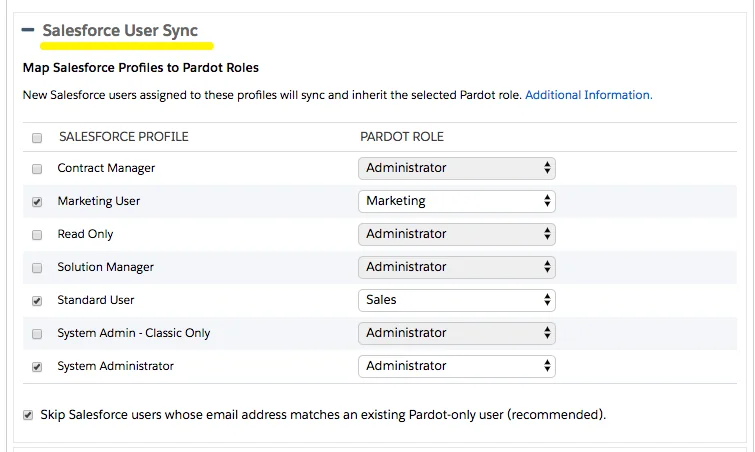
Salesforce User Sync uses Salesforce users as the source for Account Engagement user administration. Salesforce recommends this approach because Account Engagement authentication uses Salesforce single sign-on and centralized user management reduces duplicate administration.
During setup, map eligible Salesforce users to suitable Account Engagement roles and business units. A user may be active in Salesforce but still lack the permissions required to open the Account Engagement Lightning app, access a business unit, edit prospects, or manage connector settings.
User Sync deployment checklist
- Use permission sets or permission set groups instead of expanding profile permissions without review.
- Separate marketing administrator, marketing user, and sales visibility requirements.
- Confirm each user is assigned to the correct Account Engagement business unit.
- Test deactivation and role changes in a sandbox or test environment.
- Review API integrations that depend on a named user before deactivating that identity.
- Do not use a personal administrator account as a permanent integration identity.
How Do You Configure Pardot WordPress Integration?
A pardot wordpress implementation usually uses one or more of these methods: an embedded Account Engagement form, an Account Engagement form handler connected to an existing WordPress form, tracking code, or the Salesforce-supported WordPress plug-in where it remains appropriate for the site architecture.
Pardot WordPress option 1: embed a hosted form
Use an embedded form when Account Engagement should control the form fields, completion actions, validation, and thank-you behavior. Publish the form, obtain the supported embed markup, and place it in a WordPress Custom HTML block or template.
<div class="account-engagement-form">
  <iframe
    src="https://go.example.com/l/123456/2026-07-01/abc123"
    width="100%"
    height="620"
    frameborder="0"
    title="Request a product consultation">
  </iframe>
</div>
Replace the example source with the exact embed URL generated for your form. Do not copy a form URL between business units without verifying the tracker domain and campaign association.
Pardot WordPress option 2: use a form handler
Use a form handler when WordPress must retain control of the form design or when an existing form plug-in posts data to Account Engagement. Salesforce describes form handlers as the supported option for connecting external or custom forms to Account Engagement.
<form method="post" action="https://go.example.com/l/123456/2026-07-01/handler-code">
  <label for="email">Business email</label>
  <input id="email" name="email" type="email" required />

  <label for="first_name">First name</label>
  <input id="first_name" name="first_name" type="text" />

  <input type="hidden" name="source" value="WordPress consultation page" />
  <button type="submit">Submit</button>
</form>
The external field names must match the form handler mapping. Add bot protection, server-side validation, consent controls, and error handling. Salesforce specifically recommends bot protection for forms that use form handlers.
Pardot WordPress option 3: use the WordPress plug-in
Salesforce Help documents a Pardot WordPress plug-in setup that requires a Salesforce connected app and its consumer key and secret. Before selecting the plug-in, verify that it is compatible with the current WordPress version, your security policy, multisite configuration, caching layer, and consent-management design.
Do not place a connected app secret in a public repository or expose it in browser-delivered JavaScript. Store WordPress secrets using protected server configuration and restrict administrator access to the plug-in settings.
Tracking and consent on WordPress
Account Engagement tracking can use browser cookies to associate page activity with visitors and prospects. Implement tracking only after reviewing consent requirements, cookie categorization, regional privacy rules, and the site privacy notice.
Salesforce documentation advises adding campaign tracking code to selected pages where the activity has business value rather than automatically placing every campaign-specific script on every page. Coordinate the implementation with your consent platform so marketing cookies do not load before the required consent is recorded.
How Does the Pardot API Work?
The pardot api is now documented as the Account Engagement API. Version 5 provides REST resources for supported objects and assets. Some objects or operations that are not available in version 5 may still require an older documented API version, so check the object reference before designing an integration.
Account Engagement API version numbers are separate from Salesforce platform API versions such as v65.0. Do not describe Account Engagement API v5 as Salesforce API v5.
Pardot API authentication requirements
A version 5 request normally requires:
- A Salesforce OAuth access token.
- An
Authorization: Bearerheader. - A
Pardot-Business-Unit-Idheader identifying the Account Engagement business unit. - The correct version 5 endpoint and supported query parameters.
curl --request GET \
  --url 'https://pi.pardot.com/api/v5/objects/prospects?fields=id,email,firstName,lastName&limit=20' \
  --header 'Authorization: Bearer YOUR_SALESFORCE_ACCESS_TOKEN' \
  --header 'Pardot-Business-Unit-Id: 0UvXXXXXXXXXXXXXXX'
Use a named credential, external credential, secret manager, or equivalent managed authentication mechanism. Never hardcode an access token or client secret in Apex, JavaScript, a WordPress theme, or a source repository.
Pardot API prospect query example
The following Node.js example queries a small page of prospects. It checks the HTTP status and avoids logging the access token.
const endpoint = new URL(
  'https://pi.pardot.com/api/v5/objects/prospects'
);

endpoint.searchParams.set('fields', 'id,email,firstName,lastName,updatedAt');
endpoint.searchParams.set('limit', '20');

async function queryProspects({ accessToken, businessUnitId }) {
  const response = await fetch(endpoint, {
    method: 'GET',
    headers: {
      Authorization: `Bearer ${accessToken}`,
      'Pardot-Business-Unit-Id': businessUnitId,
      Accept: 'application/json'
    }
  });

  if (!response.ok) {
    const errorBody = await response.text();
    throw new Error(`Account Engagement API error ${response.status}: ${errorBody}`);
  }

  return response.json();
}
Production clients should also implement token refresh, timeout handling, retry rules for transient responses, pagination, request correlation IDs, and logs that exclude prospect data unless the data is required for support.
Use the Import API for bulk changes
Salesforce provides an Account Engagement Import API for bulk prospect upserts and list membership changes. It is better suited to high-volume asynchronous imports than issuing one API request for every prospect.
Before submitting an import:
- Normalize email addresses and external identifiers.
- Confirm the chosen matching behavior.
- Split files according to documented limits.
- Poll the import status instead of assuming immediate completion.
- Download and retain failure details for reconciliation.
- Prevent the same source batch from being submitted twice.
Pardot API security boundaries
The API identity can perform only the operations allowed by its Salesforce and Account Engagement access. Treat the integration user as a service identity with the minimum permissions needed. Rotate credentials, monitor authentication failures, and separate production credentials from sandbox or test credentials.
For Apex integration patterns, see Salesforce REST API integration.
How Does Account Engagement Support the Revenue Lifecycle?
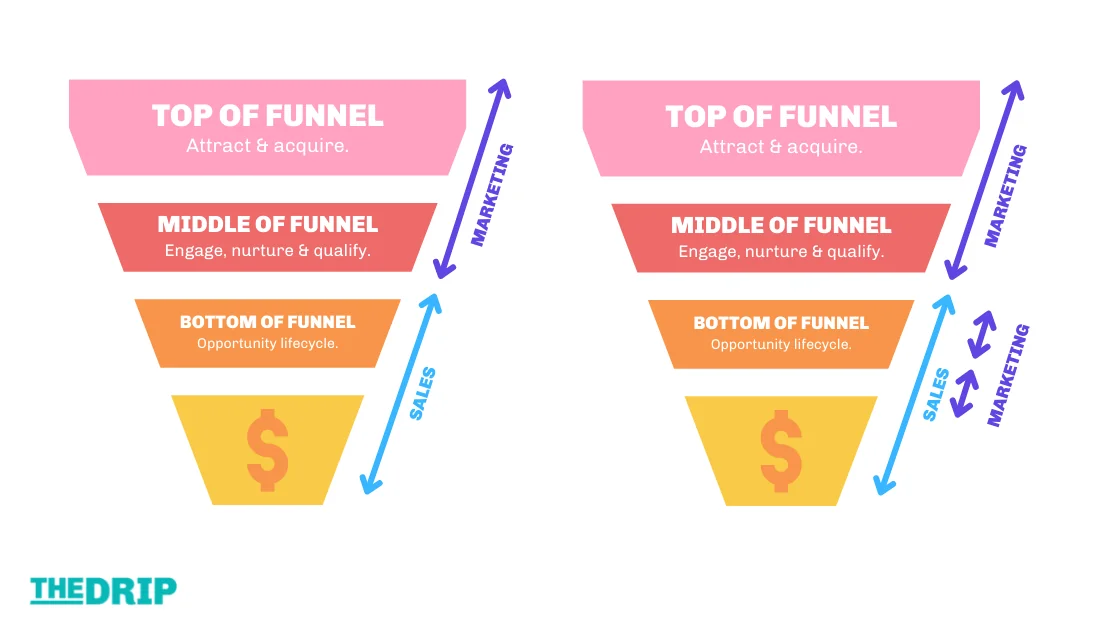
Account Engagement is often introduced as a lead-generation tool, but its Salesforce data relationships also support marketing activity after initial qualification. Opportunity stages, campaign membership, contact roles, account attributes, and engagement signals can be used to create audiences for re-engagement, onboarding, renewal, or expansion programs.
Do not automate solely from an opportunity stage without checking the business process. Enterprise orgs often have different sales processes, stage names, record types, currencies, and renewal models. Build segmentation rules against documented lifecycle criteria rather than assuming that one stage has the same meaning across all business units.
Pardot Salesforce Security and Data Governance Practices
Apply least privilege
Grant connector and marketing users only the object, field, business unit, campaign, and asset permissions they require. Field mappings do not bypass Salesforce field-level security or connector-user access requirements.
Protect personal data
Map only fields that marketing needs. Avoid copying sensitive CRM data into prospect fields simply because the connector permits a mapping. Document the lawful purpose, retention period, consent source, deletion process, and downstream integrations for each category of personal data.
Plan duplicate management
Account Engagement and Salesforce matching behavior must be tested alongside Salesforce duplicate and matching rules. A connector-created lead can fail if an active duplicate rule blocks the insert. Multiple prospects with the same email address also require explicit testing because configuration and business-unit behavior can change the expected match.
Prevent automation loops
A loop occurs when Salesforce automation updates a mapped field, Account Engagement changes it again, and Salesforce automation responds to the second update. Use source markers, entry criteria, prior-value checks, and authoritative-field rules to stop repeated changes.
Use a deployment runbook
A production runbook should contain:
- Connector owner and backup owner.
- Business unit ID and connected Salesforce org.
- Mapped field inventory.
- Campaign record types enabled for connection.
- User Sync rules.
- Test cases and expected records.
- Rollback actions.
- Sync-error monitoring procedure.
- Credential rotation procedure.
Common Pardot and Salesforce Integration Errors
| Symptom | Likely cause | What to check |
|---|---|---|
| Prospect does not create a Salesforce lead | The prospect is unassigned, the connector is paused, duplicate rules block creation, or required CRM fields are missing. | Prospect assignment, connector queue, duplicate-rule logs, required fields, and connector permissions. |
| Field value keeps changing | Conflicting automation or an unsuitable sync behavior. | Field authority, Flow entry criteria, completion actions, automation rules, and update timestamps. |
| Opportunity is not available for segmentation | The contact is not related through an Opportunity Contact Role or the connector lacks access. | Contact role, opportunity visibility, connector permissions, and sync status. |
| Campaign does not appear in Account Engagement | The campaign record type or creation date is outside Connected Campaign settings. | Enabled record types, date restrictions, Connected Campaign status, and campaign permissions. |
| Campaign Member status update fails | The status is not configured for that campaign. | Campaign Member Status values and completion-action configuration. |
| WordPress submissions do not create prospects | Incorrect form-handler URL, mismatched field names, blocked browser request, validation failure, or bot controls. | POST payload, endpoint, external field names, response body, caching, consent rules, and security plug-ins. |
| Pardot API returns 401 | Expired or invalid Salesforce OAuth token. | Token refresh, connected app policy, user status, OAuth scopes, and instance configuration. |
| Pardot API returns 403 | Missing business unit access or insufficient permissions. | Pardot-Business-Unit-Id, assigned business unit, user role, and object access. |
| User cannot open Account Engagement | User Sync, license, permission set, SSO, or business-unit assignment is incomplete. | Salesforce user status, permission assignments, app visibility, and business-unit access. |
Frequently Asked Questions
Is Pardot now called Marketing Cloud Account Engagement?
Yes. Salesforce renamed Pardot to Marketing Cloud Account Engagement. The Pardot name still appears in older documentation, API hostnames, integration discussions, and common search terms such as Pardot Salesforce.
Does Pardot Salesforce integration synchronize every record?
No. The connector synchronizes supported objects and fields according to assignment, field mappings, permissions, connector settings, and object relationships. Accounts, opportunities, campaigns, and users do not all use the same synchronization direction or create-and-update behavior.
Why is an Account Engagement prospect not syncing to Salesforce?
Check whether the prospect is assigned, whether the connector is active, and whether duplicate rules, required fields, invalid picklist values, or connector-user permissions are blocking the CRM record. The connector sync queue usually provides the error that should be resolved first.
Can Pardot WordPress forms use an existing form plugin?
Yes. A Pardot WordPress implementation can connect an existing external form through an Account Engagement form handler. Map every submitted field, add bot protection and server-side validation, and test consent, redirects, duplicate submissions, and error responses.
What authentication does the Pardot API use?
The Pardot API, now the Account Engagement API, uses Salesforce OAuth access tokens. Version 5 requests also include the Account Engagement business unit ID in the Pardot-Business-Unit-Id header.
Should I use individual API calls or the Account Engagement Import API?
Use standard Pardot API resources for interactive reads and smaller record operations. Use the Import API for asynchronous bulk prospect upserts or list-membership changes, then poll the job and reconcile failed rows.
Official Salesforce References