Salesforce account creation with bidirectional SAP integration enables organizations to maintain consistent customer data across CRM and ERP systems. This integration synchronizes account information between Salesforce’s customer relationship management platform and SAP’s enterprise resource planning system, ensuring data consistency and operational efficiency.
This guide covers the technical implementation, configuration steps, and best practices for establishing bidirectional account synchronization between Salesforce and SAP systems.
What is Bidirectional Integration?
Bidirectional integration establishes a two-way data flow between Salesforce and SAP systems. When you create a Salesforce account, the system automatically creates corresponding records in SAP. Similarly, account updates in SAP reflect in Salesforce, maintaining data consistency across both platforms.
- Data stewards validate account information before committing changes to the system of record
- Users can create and maintain accounts directly in Salesforce
- Integration middleware handles real-time synchronization between Salesforce and SAP
- Automated workflows maintain consistency of customer information across all systems
- Multiple teams access current and consistent customer data
- Data governance standards ensure accuracy and reliability
- Authorization workflows control account data modifications
Benefits of Bidirectional Account Integration
- Data Consistency: Synchronizes account data between Salesforce and SAP, eliminating discrepancies and reducing manual errors
- Operational Efficiency: Removes duplicate data entry tasks, allowing teams to focus on strategic activities
- Real-time Access: Provides sales, service, and finance teams with current account information for better decision-making
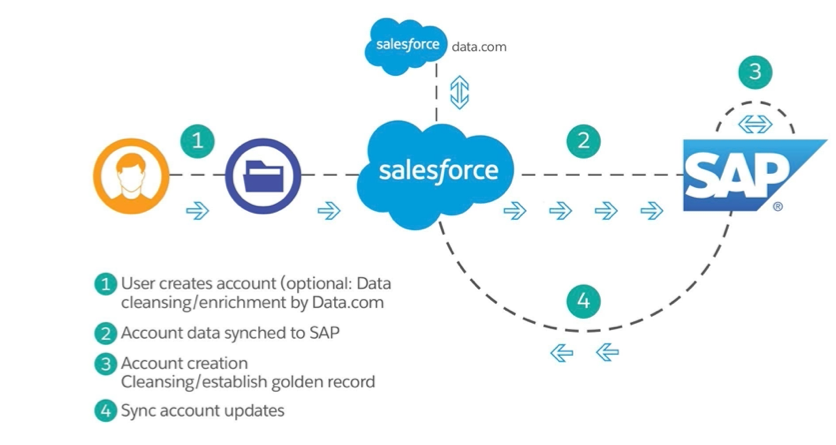
How to Create Salesforce Account with SAP Integration
Creating a Salesforce account that synchronizes with SAP requires proper integration configuration and data mapping. The process involves setting up middleware, configuring API endpoints, and establishing data transformation rules.
1. Define Integration Requirements
Identify the account fields that require synchronization between Salesforce and SAP. Common fields include:
- Account Name (maps to SAP Customer Master)
- Billing Address (synchronizes with SAP Address Management)
- Industry Classification (aligns with SAP Industry Codes)
- Payment Terms (connects to SAP Credit Management)
- Tax Information (integrates with SAP Tax Configuration)
2. Configure Integration Tools
Select appropriate integration middleware for your Salesforce and SAP connection:
- Salesforce APIs: REST API v60.0+ for real-time account creation and updates
- SAP APIs: SAP S/4HANA Cloud API or SAP ECC BAPI for customer master data
- Middleware Platforms: MuleSoft Anypoint Platform, SAP Cloud Platform Integration, or Dell Boomi
3. Data Mapping and Transformation
Map Salesforce account fields to corresponding SAP customer master fields. Handle data format differences between systems:
| Salesforce Field | SAP Field | Transformation Required |
|---|---|---|
| Account.Name | KNA1-NAME1 | Truncate to 35 characters |
| Account.BillingStreet | ADRC-STREET | Split address lines |
| Account.Industry | KNA1-BRSCH | Map to SAP industry codes |
4. Error Handling and Monitoring
Implement error handling mechanisms for failed synchronization attempts:
- Retry logic for temporary connection failures
- Dead letter queues for persistent errors
- Monitoring dashboards for integration health
- Alert notifications for critical failures
5. Security and Compliance
Ensure secure data exchange between Salesforce and SAP systems:
- OAuth 2.0 authentication for Salesforce API access
- SAP Principal Propagation for user context
- Field-level encryption for sensitive data
- Audit trails for data modification tracking
Step-by-Step Implementation Guide
Step 1: Assess Current System Configuration
Review your Salesforce org setup and SAP system configuration. Document existing account record types, custom fields, and validation rules that affect account creation.
Step 2: Choose Integration Pattern
Select between real-time integration (immediate synchronization) or batch processing (scheduled updates). Real-time integration works best for sales-critical data, while batch processing suits non-urgent account updates.
Step 3: Develop Integration Logic
Create integration flows using your chosen middleware platform. Configure triggers for account creation, updates, and deletion in both Salesforce and SAP systems.
Step 4: Test Integration Scenarios
Test various scenarios including successful account creation, duplicate detection, field validation failures, and system unavailability. Verify data integrity across both systems.
Step 5: Deploy and Monitor
Deploy the integration to production with proper monitoring. Track synchronization success rates, error patterns, and performance metrics.
Real-World Implementation Example
A manufacturing company uses Salesforce for sales operations and SAP for order management and billing. When sales representatives create new customer accounts in Salesforce, the integration automatically provisions corresponding customer master records in SAP.
Example Workflow
- Account Creation in Salesforce: Sales rep creates a new account with required fields (Name, Industry, Billing Address)
- Data Validation: Salesforce validation rules check for required fields and data format compliance
- Integration Trigger: Account creation triggers the integration flow via Process Builder or Flow
- SAP Customer Creation: Middleware transforms Salesforce data and creates customer master in SAP
- Confirmation: SAP returns customer number, which updates the Salesforce account record
Bidirectional Updates
When finance teams update customer payment terms in SAP, the integration synchronizes these changes back to Salesforce, ensuring sales teams have current credit and payment information.
Best Practices for Salesforce and SAP Integration
- Start with Pilot Implementation: Test integration with a subset of accounts to identify issues before full deployment
- Document Field Mappings: Maintain detailed documentation of field mappings, transformation rules, and business logic
- Implement Data Governance: Establish clear ownership and approval processes for account data changes
- Monitor Performance: Track integration performance metrics and optimize for throughput and reliability
- Plan for Scalability: Design integration architecture to handle growing data volumes and transaction rates
Common Integration Challenges
Data Quality Issues
Inconsistent data formats between Salesforce and SAP can cause synchronization failures. Implement data validation and cleansing rules to maintain quality.
Duplicate Account Prevention
Configure duplicate detection rules in both systems to prevent creating multiple records for the same customer. Use external IDs for reliable matching.
Performance Optimization
Large data volumes can impact integration performance. Implement bulk processing patterns and optimize API calls to stay within governor limits.
Frequently Asked Questions
What is account in Salesforce?
An account in Salesforce represents a company, organization, or individual that your business has a relationship with. Accounts store customer information including contact details, industry classification, and relationship history. In B2B scenarios, accounts typically represent companies, while B2C implementations may use Person Accounts for individual consumers.
How to create Salesforce account with SAP integration?
To create a Salesforce account with SAP integration, configure bidirectional data synchronization using middleware platforms like MuleSoft or SAP CPI. Set up field mappings between Salesforce Account object and SAP Customer Master, implement data transformation rules, and establish real-time or batch synchronization triggers.
Can you create account in Salesforce automatically from SAP?
Yes, you can automatically create Salesforce accounts from SAP customer master data using integration middleware. Configure SAP change documents or IDocs to trigger account creation in Salesforce when new customers are added to SAP. This requires proper field mapping and data transformation logic.
What are the requirements for Salesforce SAP account integration?
Requirements include: Salesforce API access (REST/SOAP), SAP system connectivity (RFC, OData, or APIs), integration middleware platform, field mapping documentation, error handling mechanisms, security authentication setup, and data governance policies for account management.
Conclusion
Implementing Salesforce account creation with bidirectional SAP integration streamlines customer data management across your organization. This integration eliminates manual data entry, reduces errors, and ensures all teams work with consistent, current account information.
Success depends on proper planning, robust error handling, and ongoing monitoring. Start with a pilot implementation, document your configuration thoroughly, and establish clear data governance processes to maximize the benefits of your Salesforce and SAP integration.