Salesforce AppExchange is the world’s largest enterprise cloud marketplace, offering over 7,000 pre-built solutions to extend your Salesforce org’s functionality. Whether you need automation tools, industry-specific apps, or data integrations, the AppExchange provides tested solutions that can be deployed in minutes rather than months of custom development.
This guide covers everything you need to know about navigating, evaluating, and implementing AppExchange solutions in your Salesforce environment.
What is Salesforce AppExchange?
The Salesforce AppExchange launched in 2006 as the first business application marketplace. It serves as a centralized platform where Salesforce partners, independent software vendors (ISVs), and Salesforce Labs publish applications, components, and integrations that work natively with Salesforce orgs.
The marketplace operates on a freemium model, with approximately 40% of solutions available at no cost. Paid solutions typically use subscription pricing based on user count or feature tiers.

Types of AppExchange Solutions
The AppExchange hosts five distinct categories of solutions, each serving different implementation needs:
Apps
Complete applications that install directly into your org with minimal configuration. These range from CRM extensions to industry-specific tools. Apps include both free Salesforce Labs solutions and commercial third-party products.
Lightning Components
Reusable UI components that work with Lightning App Builder. These components can be dragged and dropped onto Lightning pages without coding, enabling custom page layouts and functionality.
Bolt Solutions
Industry-specific templates that provide pre-configured business processes, page layouts, and workflows. Bolt solutions accelerate deployment for sectors like healthcare, financial services, and manufacturing.
Lightning Data
Third-party data services that enrich your Salesforce records with external information like company demographics, technographics, and contact details. These services typically require ongoing subscriptions.
Flow Solutions
Pre-built Flow templates and connectors that automate business processes or integrate with external systems. These solutions leverage Salesforce Flow Builder for visual workflow creation.
Evaluating AppExchange Apps
Before installing any appexchange app, conduct thorough evaluation to ensure it meets your requirements and security standards.
Security Review Process
All AppExchange solutions undergo Salesforce’s security review, which includes:
- Code vulnerability scanning
- Data handling compliance verification
- API usage pattern analysis
- Permission model validation
Solutions that pass receive a security review badge, indicating they meet Salesforce’s security standards.
User Reviews and Ratings
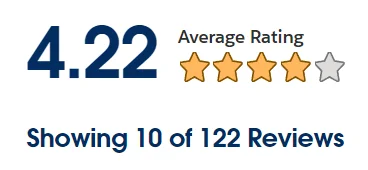
The AppExchange includes a community-driven rating system where users can leave detailed reviews and star ratings. When evaluating solutions, consider:
- Overall rating trends over time
- Review content quality and specificity
- Response rate from the publisher to user feedback
- Reviews from organizations similar to yours
Technical Compatibility
Verify that solutions support your Salesforce edition and any specific features you require:
- Salesforce edition compatibility (Professional, Enterprise, Unlimited)
- Lightning Experience vs. Classic support
- Mobile app compatibility
- API version requirements
- Custom object and field dependencies
Installation and Configuration Best Practices
Follow these practices to ensure smooth AppExchange solution deployment:
Sandbox Testing
Always install and test solutions in a sandbox environment before production deployment. This allows you to:
- Validate functionality without affecting live data
- Test integration with existing customizations
- Train users on new features
- Identify potential conflicts or performance issues
Permission Management
Review and configure permissions carefully during installation:
- Grant minimum necessary permissions to user profiles
- Use permission sets for granular access control
- Document permission changes for audit purposes
- Test functionality with different user permission levels
Data Migration Considerations
Some solutions require data migration or initial setup:
- Back up existing data before installation
- Map existing fields to new solution requirements
- Plan for data validation and cleanup
- Test with a subset of records first
Popular SFDC Marketplace Categories
The AppExchange organizes solutions into key business categories to help users find relevant tools:
Sales and CRM
Solutions that enhance lead management, opportunity tracking, and sales process automation. Popular apps include territory management tools, sales analytics dashboards, and lead scoring systems.
Service and Support
Customer service applications including knowledge management systems, case routing tools, and customer portal solutions. These apps often integrate with external communication channels.
Marketing Automation
Email marketing platforms, campaign management tools, and lead nurturing solutions that integrate with Salesforce campaigns and lead objects.
Analytics and Reporting
Advanced reporting tools, data visualization solutions, and business intelligence platforms that extend Salesforce’s native analytics capabilities.
Integration and Data Management
ETL tools, API connectors, and data synchronization solutions that connect Salesforce with external systems like ERP, accounting, and marketing platforms.
Essential Free Apps for New Users
These free solutions provide immediate value for most Salesforce orgs:
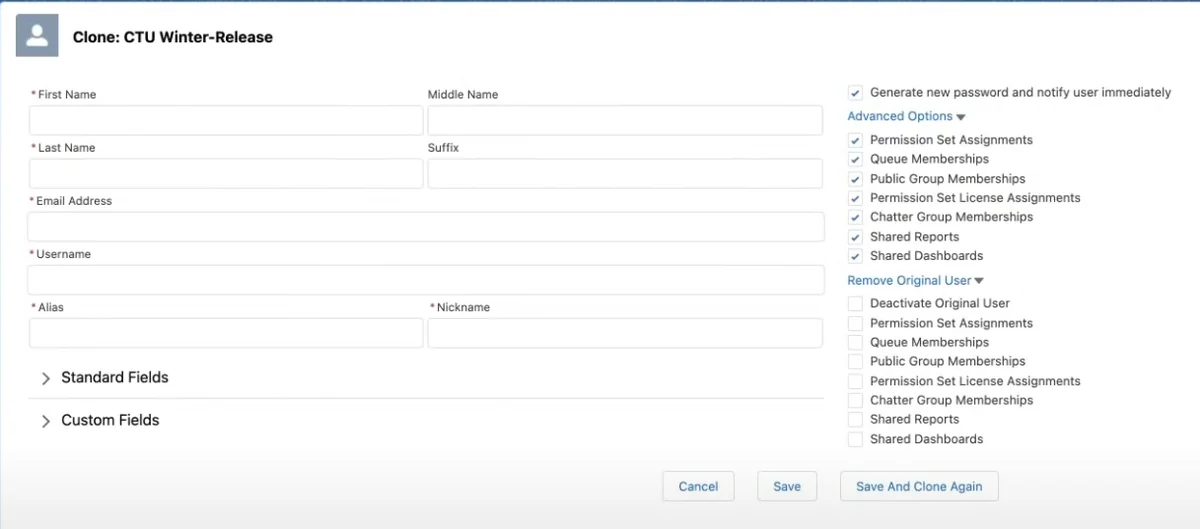
Clone This User
Streamlines user provisioning by copying permission sets, group memberships, and shared resources from an existing user template. Essential for organizations with frequent new hires.
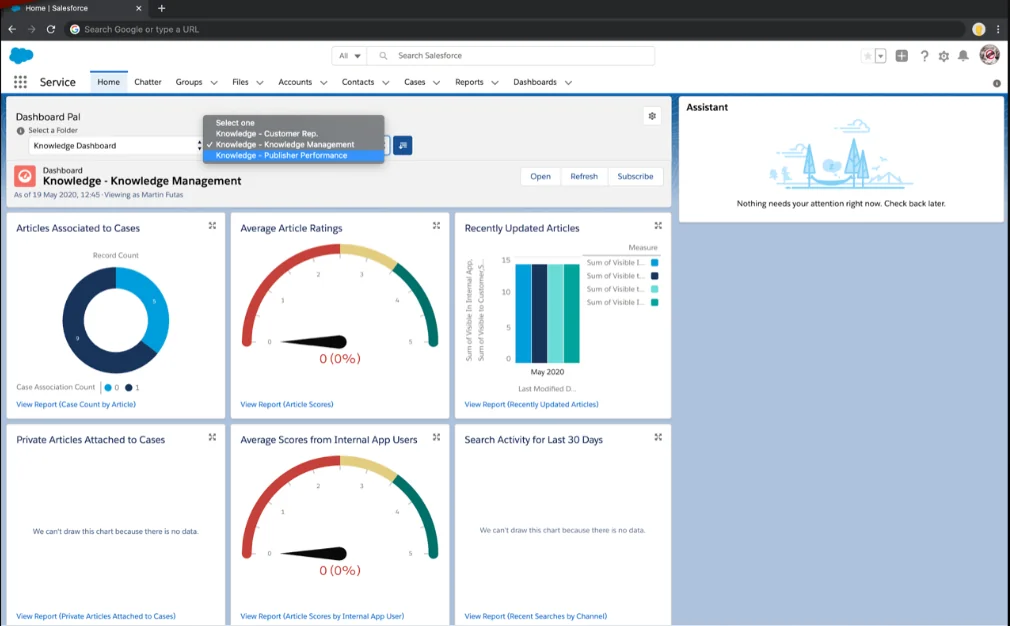
Dashboard Pal
Replaces the default homepage dashboard with a user-selectable dashboard from available folders. Reduces clicks and improves user productivity for dashboard-heavy workflows.

Time Warp
Creates interactive timeline visualizations of related records on any object. Shows tasks, events, cases, and opportunities in chronological order with hover details.
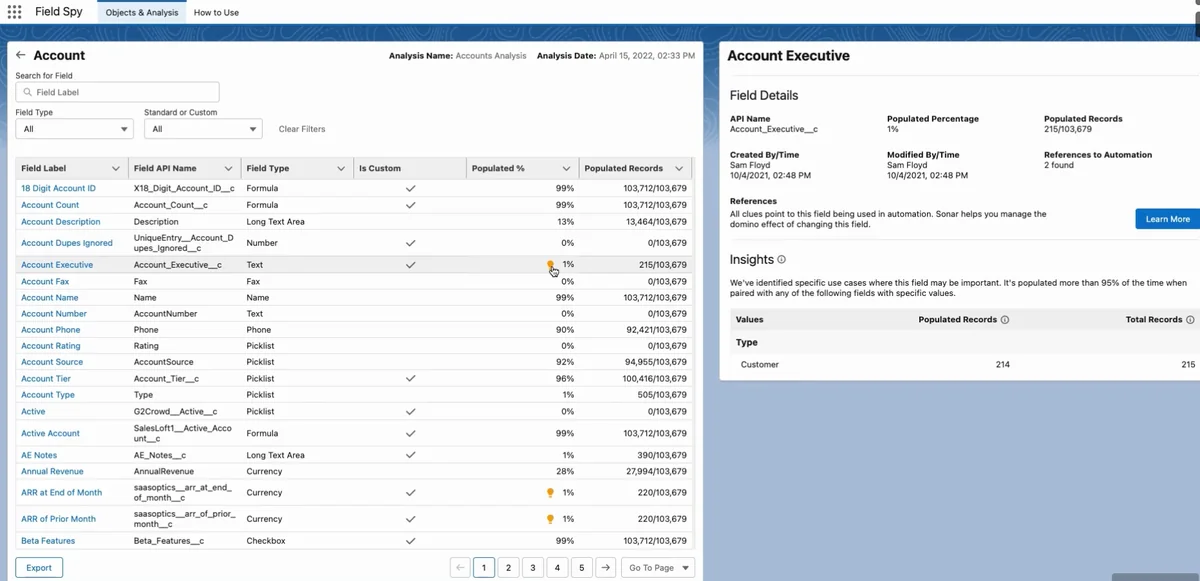
FieldSpy
Provides detailed field usage analytics including population percentages, field counts, and impact analysis. Critical for org cleanup and field limit management in large organizations.
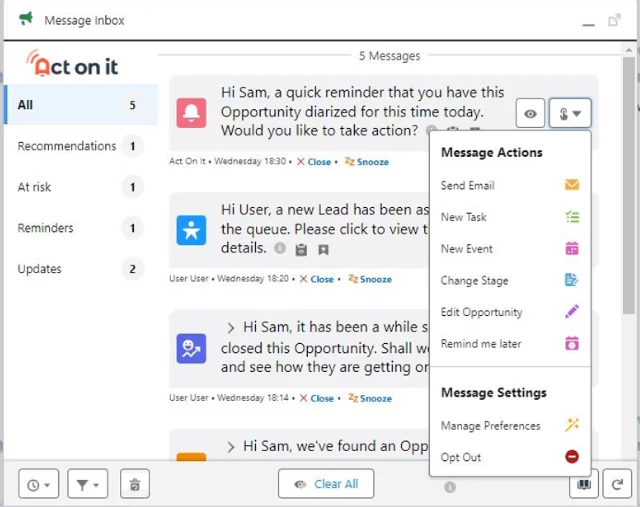
Rollup Helper
Enables rollup calculations without master-detail relationships or custom code. Supports complex aggregations across any object relationships with real-time updates.
Salesforce Marketplace Apps for Enterprise
Large organizations often require more sophisticated solutions with enterprise-grade features:
Territory Management Solutions
Advanced territory assignment tools that handle complex geographic, product, and account-based territory rules. These solutions often include territory performance analytics and automated reassignment workflows.
CPQ (Configure, Price, Quote) Extensions
Solutions that extend Salesforce CPQ with industry-specific pricing models, approval workflows, and integration with external pricing systems.
Data Quality and Enrichment
Enterprise data management tools that provide real-time data validation, duplicate detection, and contact enrichment from third-party data sources.
Managing AppExchange Solutions
Ongoing management ensures solutions continue to provide value and remain secure:
Version Updates
Publishers regularly release updates that include:
- New features and functionality
- Security patches and bug fixes
- Salesforce platform compatibility updates
- Performance improvements
Enable automatic updates for critical security patches, but test major version updates in sandbox environments first.
License Management
Track license usage and costs across your AppExchange portfolio:
- Monitor user adoption rates for paid solutions
- Review license utilization quarterly
- Negotiate volume discounts for high-usage apps
- Remove unused licenses to optimize costs
Performance Monitoring
Monitor solution performance impact on your org:
- Track page load times for Lightning components
- Monitor API usage against governor limits
- Review error logs for solution-related issues
- Measure user satisfaction through surveys
Security and Compliance Considerations
AppExchange solutions must meet your organization’s security and compliance requirements:
Data Access Permissions
Review what data each solution can access:
- Object-level permissions (read, create, edit, delete)
- Field-level security requirements
- Record-level access through sharing rules
- External system integration permissions
Compliance Requirements
Ensure solutions meet industry compliance standards:
- GDPR compliance for EU data processing
- HIPAA compliance for healthcare organizations
- SOX compliance for financial reporting
- Industry-specific regulatory requirements
Audit Trail Maintenance
Maintain audit trails for AppExchange solution usage:
- Installation and configuration changes
- User access and permission modifications
- Data export and integration activities
- Solution update and maintenance activities
Frequently Asked Questions
How much do Salesforce AppExchange apps cost?
Approximately 40% of AppExchange solutions are completely free. Paid solutions typically use subscription pricing ranging from $5-50 per user per month, depending on functionality and features. Enterprise solutions can cost $100+ per user monthly for comprehensive platforms.
Can I install AppExchange apps in a sandbox first?
Yes, and this is strongly recommended. Install and test all AppExchange solutions in a sandbox environment before production deployment. This allows you to validate functionality, test integrations, and train users without affecting live data.
What happens if I uninstall an AppExchange app?
Uninstalling removes the app’s functionality and components, but data created by the app typically remains in your org. Custom fields, objects, and records created by the solution may need manual cleanup. Always backup data before uninstalling and review the app’s uninstall documentation.
How do I know if an AppExchange solution is secure?
Look for the Salesforce security review badge, which indicates the solution has passed Salesforce’s security assessment. Review the app’s permissions carefully during installation, check user reviews for security concerns, and test in a sandbox environment first.
Can AppExchange apps access my Salesforce data?
Apps can only access data you explicitly grant permission to during installation. Review object and field permissions carefully, use the principle of least privilege, and configure sharing rules appropriately. Most apps clearly document what data they need and why.
Do AppExchange solutions work with Salesforce Mobile?
Lightning components and modern apps generally work with Salesforce Mobile, but compatibility varies by solution. Check the app’s documentation for mobile support details. Classic-only solutions may have limited or no mobile functionality.