Salesforce CPQ is the managed-package configure, price, quote solution used to build product configurations, calculate prices, and generate quotes from Salesforce records. It matters when standard Products, Price Books, Opportunity Products, and Quotes cannot handle bundles, subscriptions, discount rules, approvals, renewals, or guided selling without custom work.
As of 2026, treat Salesforce CPQ as a managed package with its own SBQQ__ objects and calculator behavior. Salesforce Help notes that the managed package continues to be available for existing customers, but new implementation planning should also evaluate Revenue Cloud because Salesforce states that the managed package no longer receives new feature development. See the official Salesforce CPQ getting started documentation before choosing the product path.
What is Salesforce CPQ?
Salesforce CPQ stands for configure, price, quote. In a production org, that means the sales user selects products, configures required and optional components, applies approved pricing logic, and creates a quote that can move toward contract, order, billing, or renewal processes.
The key difference is control. Standard Salesforce quoting can store products and prices, but Salesforce CPQ can enforce product compatibility, subscription terms, contracted prices, block pricing, discount schedules, quote templates, and approval handoffs. Trailhead’s Salesforce CPQ Basics module also frames the product around quote creation, product selection, pricing, PDF quote generation, contracts, and renewals.
| Requirement | Standard Sales Cloud quoting | Salesforce CPQ fit |
|---|---|---|
| Sell one-off products with fixed prices | Usually enough | May be more setup than needed |
| Sell bundles with required and optional items | Needs custom design | Use bundle features, product options, and product rules |
| Apply volume, block, partner, or contracted pricing | Limited without automation | Use CPQ pricing methods, discount schedules, and price rules |
| Guide reps through product selection | Usually built with custom screens or Flow | Use guided selling CPQ and quote processes |
| Support subscriptions, amendments, and renewals | Often requires custom objects | Use CPQ subscription and renewal behavior with tested business rules |
How does CPQ in Salesforce change the quoting process?
CPQ in Salesforce changes quoting by moving decision logic into governed configuration records instead of leaving every choice to the sales rep. The quote line editor becomes the working area where users add products, configure bundles, calculate totals, and prepare output documents.
Exploring CPQ from opportunity to signed quote
When you are exploring CPQ, map the user journey before touching configuration. A common enterprise path starts from an Opportunity, creates a primary CPQ Quote, adds Quote Lines, calculates pricing, routes approvals, generates a document, and then creates downstream Contract or Order records based on the org design.
- Opportunity context: Account, currency, price book, sales process, and selling entity should be correct before quoting starts.
- Quote creation: CPQ stores quote-level values such as term, start date, primary flag, price book, and customer-facing totals on SBQQ__Quote__c.
- Product selection: The rep searches products, answers guided selling questions, or configures a bundle.
- Calculation: The Advanced Quote Calculator evaluates quantities, dates, pricing, discounts, and rules in a defined sequence.
- Document and handoff: The final quote can feed approvals, contract creation, order creation, billing, or an integration.
In enterprise orgs, do not start by replicating an old spreadsheet. Start by identifying product families, commercial approval rules, amendment scenarios, currencies, tax handoffs, and how finance expects the quote to become an order or invoice.
CPQ in Salesforce vs products, price books, and quote line items
CPQ in Salesforce still uses core platform concepts such as Product2, Pricebook2, and PricebookEntry. The managed package adds CPQ-specific records for quoting behavior. This is why admins who know products and price books can learn the tool faster, but they still need to understand SBQQ__ objects, package settings, and the calculator.
Use the SalesforceTutorial guides on Salesforce products and price books, Salesforce opportunities, and Salesforce security model as supporting references when planning the data model and permissions.
Salesforce CPQ object model for admins and architects
The salesforce cpq object model is the part most new CPQ admins underestimate. Many settings are data records with relationships to other CPQ records. That affects deployment, data migration, testing, and troubleshooting.
Salesforce CPQ object model: quote records
| Object | Purpose | Implementation note |
|---|---|---|
| SBQQ__Quote__c | Stores the CPQ quote header | Usually connected to Opportunity through SBQQ__Opportunity2__c |
| SBQQ__QuoteLine__c | Stores product, quantity, price, discount, and calculated line values | Avoid manual pricing edits unless the field is meant for user input |
| Product2 | Stores the item or service being sold | Shared with standard Salesforce product catalog behavior |
| Pricebook2 and PricebookEntry | Store list prices by price book and currency | Check multi-currency and active price book entries before product selection testing |
Salesforce CPQ object model: bundles, rules, and pricing data
| Object | Used for | Common mistake |
|---|---|---|
| SBQQ__ProductFeature__c | Groups options inside a bundle | Creating features without a clear option selection method |
| SBQQ__ProductOption__c | Connects optional or required child products to a bundle | Forgetting quantity, required, or configured SKU behavior |
| SBQQ__ProductRule__c | Validates, alerts, filters, or selects products | Using one broad rule instead of smaller rules with clear evaluation order |
| SBQQ__PriceRule__c | Updates quote or quote line fields during calculation | Changing a field at the wrong calculator event |
| SBQQ__DiscountSchedule__c | Defines tiered discount behavior | Mixing volume logic with manual discount exceptions |
Developer teams should also understand the CPQ API models. Salesforce documents QuoteModel as the representation of SBQQ__Quote__c with line items and groups, and ProductModel as the product data model containing options, features, configuration attributes, and constraints. The CPQ API documentation states that the managed-package CPQ API is available from Salesforce CPQ Summer ’16, while the CPQ API Models page is available from Salesforce CPQ Spring ’17.
How guided selling CPQ works
Guided selling CPQ is used when reps should answer questions instead of browsing a large catalog. Salesforce Help describes guided selling as a prompt that appears during quote line editing or product addition, and the setup starts with a Quote Process and Process Inputs.
Guided selling CPQ design steps
Build guided selling CPQ as a decision tree, not as a search page with more fields. Keep the first version narrow enough to test. A quote process should ask questions that produce a measurable product selection outcome.
- Create a Quote Process record for the selling motion.
- Add Process Inputs for questions such as region, product family, service tier, user count, compliance need, or contract term.
- Add conditions only where the next question depends on an earlier answer.
- Use product rules or search filters to narrow which products appear after the user answers.
- Test the flow with sales users who know the product catalog and with admins who can inspect the resulting quote lines.
Guided selling CPQ works best when the catalog has repeatable decision patterns. It performs poorly when every deal requires a custom engineering review, because the question set becomes too broad and hard to maintain.
Pricing rules and quote calculation in Salesforce CPQ
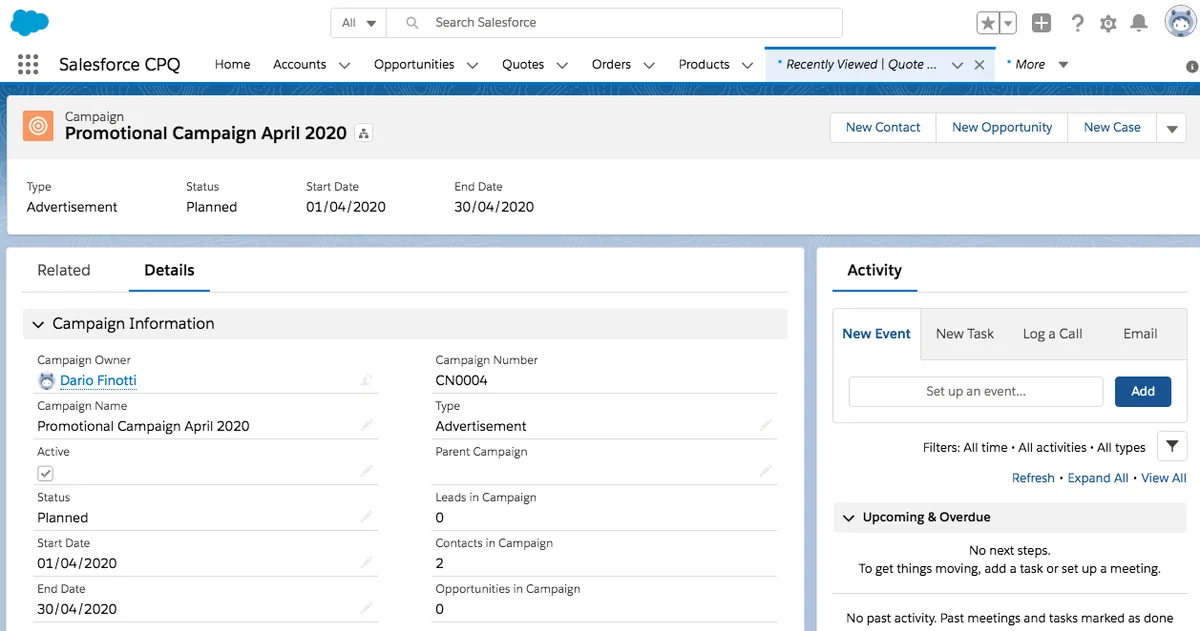
Salesforce CPQ pricing is not a single formula. The Advanced Quote Calculator evaluates quote and quote line data through a sequence of calculation stages. That sequence matters because product rules, price rules, discount schedules, special price logic, and manual discounts can affect the same line.
Salesforce Help documents the CPQ quote calculation sequence and price rules. Read those pages before designing calculation logic that writes to quote line fields.
Common pricing patterns
| Pricing pattern | Where it usually belongs | Design check |
|---|---|---|
| Volume discount | Discount schedule | Confirm whether tiers use quantity, term, or another dimension |
| Customer-specific price | Contracted price or price rule, depending on requirement | Define precedence when account, partner, and promotion prices overlap |
| Bundle dependency | Product rule or option constraint | Test required, excluded, and default-selected options |
| Approval threshold | Approval rule or advanced approval design | Use calculated discount fields instead of user-entered values where possible |
| Promotional campaign | Price rule with lookup data or campaign-driven custom design | Set start and end dates and define what happens to in-flight quotes |
In enterprise orgs, document the pricing owner for each field. Sales operations may own discount ranges, finance may own list price, legal may own quote terms, and architecture owns the sequence that makes those records work together.
Developer notes for Salesforce CPQ APIs and Apex
Developers should avoid treating Salesforce CPQ as a normal custom-object app. The package has calculator services, managed triggers, quote APIs, and UI behavior that must be tested with CPQ data. Salesforce’s CPQ API guide includes read, add products, calculate, validate, and save operations for QuoteModel-based flows.
Use API-backed flows when an integration must create or recalculate quotes. The Calculate Quote API documentation says it calculates CPQ quote prices and is available in Salesforce CPQ Summer ’16 and later. It also notes that Calculate Quote API performance is similar to asynchronous calculations and is not recommended for processes that need instant calculation.
Secure Apex example for reading CPQ quote summaries
The following Apex class reads the primary CPQ quote for an opportunity and returns a small DTO for an LWC or integration helper. It uses one SOQL query, a selective parent filter, a LIMIT, and WITH USER_MODE so object and field permissions are enforced. This example reads calculated values; it does not recalculate pricing.
public with sharing class CpqQuoteSummaryService {
    public class QuoteSummary {
        @AuraEnabled public Id quoteId { get; set; }
        @AuraEnabled public String quoteName { get; set; }
        @AuraEnabled public Decimal netAmount { get; set; }
        @AuraEnabled public Integer lineCount { get; set; }
    }

    @AuraEnabled(cacheable=true)
    public static List<QuoteSummary> getPrimaryQuoteSummary(Id opportunityId) {
        if (opportunityId == null) {
            return new List<QuoteSummary>();
        }

        List<SBQQ__Quote__c> quotes = [
            SELECT Id, Name, SBQQ__NetAmount__c,
                (SELECT Id FROM SBQQ__LineItems__r LIMIT 200)
            FROM SBQQ__Quote__c
            WHERE SBQQ__Opportunity2__c = :opportunityId
            AND SBQQ__Primary__c = true
            WITH USER_MODE
            LIMIT 10
        ];

        List<QuoteSummary> results = new List<QuoteSummary>();
        for (SBQQ__Quote__c quoteRecord : quotes) {
            QuoteSummary row = new QuoteSummary();
            row.quoteId = quoteRecord.Id;
            row.quoteName = quoteRecord.Name;
            row.netAmount = quoteRecord.SBQQ__NetAmount__c;
            row.lineCount = quoteRecord.SBQQ__LineItems__r == null
                ? 0
                : quoteRecord.SBQQ__LineItems__r.size();
            results.add(row);
        }
        return results;
    }
}
Governor limit note: this pattern keeps the query outside loops and limits child records. Salesforce documents that synchronous Apex has a 100 SOQL query limit, and Trailhead states that Apex deployments require at least 75% overall code coverage with passing tests. Do not use code coverage as the only test goal; test bundle, discount, currency, and permission behavior.
Security note: Salesforce’s LWC security guidance recommends Lightning Data Service where possible and WITH USER_MODE or Security.stripInaccessible() for Apex that handles records. For CPQ, that matters because quote totals, discount fields, and contract fields are often restricted by profile, permission set, or permission set group.
External configurator API version notes
When extending configuration outside the standard configurator, check the official External Configurator Parameters documentation. It identifies SBQQ__Quote__c as the quote object in the payload and Product2 as the product record. It also states that nested bundle optionConfigurations are available in API version 56.0 and later, and dynamic option productId is available in API version 57.0 and later.
Best practices for Salesforce CPQ deployments
Salesforce CPQ deployments need a different release plan because rules, product options, features, templates, and lookup data are often records. A change set or metadata deployment alone may not move the full configuration safely.
Deployment checklist for exploring CPQ changes
- Use a CPQ configuration inventory: Track products, features, options, rules, price rules, summary variables, templates, and lookup data by functional area.
- Assign stable external IDs: Use external IDs or controlled naming for migration scripts where records must be matched across orgs.
- Promote in dependency order: Move catalog base data before rules that reference that catalog data.
- Run calculator regression tests: Test a small set of quotes that represent common, edge, and exception pricing scenarios.
- Check permissions: Validate CRUD, FLS, page layouts, permission sets, and package permissions with actual sales personas.
- Freeze active pricing changes during release: Coordinate sales operations changes so production records do not drift during deployment.
For custom development around salesforce cpq, include Apex tests, API-level tests, and quote calculation regression tests. See SalesforceTutorial’s Apex trigger best practices and Salesforce Flow automation guide when choosing between declarative automation and Apex.
Managed trigger control warning
Salesforce documents a CPQ and Billing TriggerControl API for disabling managed package triggers within the current transaction. Use it only for narrow maintenance logic, test it in a full sandbox, and restore triggers in a finally block. It does not disable your custom triggers, validation rules, workflow rules, or other platform automation.
public with sharing class CpqMaintenanceService {
    public static void updateCustomQuoteFields(List<SBQQ__Quote__c> quotesToUpdate) {
        if (quotesToUpdate == null || quotesToUpdate.isEmpty()) {
            return;
        }

        Boolean cpqTriggersWereEnabled = SBQQ.TriggerControl.isEnabled();
        if (cpqTriggersWereEnabled) {
            SBQQ.TriggerControl.disable();
        }

        try {
            update quotesToUpdate;
        } finally {
            if (cpqTriggersWereEnabled && !SBQQ.TriggerControl.isEnabled()) {
                SBQQ.TriggerControl.enable();
            }
        }
    }
}
Do not use trigger control to bypass pricing, approvals, or validation for normal user transactions. Use it only when Salesforce documentation and your test evidence support the maintenance scenario.
Common errors with Salesforce CPQ implementations
- Building rules before catalog cleanup: Bad product data creates rule exceptions that look like calculator problems.
- Using price rules for every exception: Some requirements belong in product setup, discount schedules, contracted prices, or approvals.
- Ignoring renewals and amendments: A quote design that works for new sales can fail when a customer changes quantity, term, or bundle options mid-contract.
- Missing calculator regression tests: Manual testing of one quote does not prove the design works across currencies, quantities, product families, and contract terms.
- Weak permission design: Users may see fields they should not edit or lose access to fields the calculator or document template expects.
- Assuming Revenue Cloud and Salesforce CPQ are interchangeable: Confirm product scope, migration path, package behavior, and feature availability before committing to architecture.
How to start learning Salesforce CPQ
A practical learning path starts with standard Sales Cloud product data, then moves into CPQ quote records, bundles, product rules, price rules, guided selling CPQ, approvals, renewals, and API-based testing. The official Salesforce CPQ Basics Trailhead module is a useful starting point, and experienced admins should pair it with sandbox exercises using real catalog patterns.
For architects, the first design workshop should answer five questions: What are we selling, who can discount it, how does pricing get approved, what record becomes the source of truth after signature, and how will changes deploy safely? Those answers decide whether the org needs a simple Sales Cloud quote process, the managed Salesforce CPQ package, Revenue Cloud capabilities, or an integration-heavy architecture.
Frequently Asked Questions
Is Salesforce CPQ the same as Revenue Cloud?
No. Salesforce CPQ usually refers to the managed package with SBQQ__ objects, while current Revenue Cloud documentation covers newer revenue lifecycle capabilities. Salesforce Help states that the Salesforce CPQ managed package remains available for existing customers but does not receive new feature development, so architects should confirm the product direction before starting a new implementation.
What objects should I learn first in the Salesforce CPQ object model?
Start with SBQQ__Quote__c, SBQQ__QuoteLine__c, Product2, Pricebook2, PricebookEntry, SBQQ__ProductOption__c, SBQQ__ProductFeature__c, SBQQ__ProductRule__c, and SBQQ__PriceRule__c. These records explain most quote creation, bundle selection, and price calculation behavior.
When should I use guided selling CPQ instead of search filters?
Use guided selling CPQ when reps need a question-led path that narrows products based on answers. Use search filters when reps already know what they want and only need a shorter product list in the quote line editor.
Can Apex update Salesforce CPQ quote lines directly?
Apex can update CPQ records, but direct updates can bypass expected calculator behavior if the design is wrong. For pricing-sensitive changes, use supported CPQ APIs or force recalculation through the quote process, and always test with realistic bundles, discounts, and renewals.
Why are Salesforce CPQ deployments difficult?
Salesforce CPQ deployments are difficult because many CPQ settings are data records, not only metadata. Product rules, price rules, options, features, lookup data, and template records depend on IDs and relationships that differ across sandboxes and production.