Spiff is Salesforce’s incentive compensation management (ICM) platform that automates commission calculations and provides real-time earnings visibility for sales teams. Acquired in late 2023 and integrated into Sales Cloud, Spiff replaces manual spreadsheet-based commission tracking with automated, scalable compensation management.
This platform addresses the complex commission structures found in enterprise sales organizations, where compensation may vary by product type, deal size, customer segment, and performance accelerators. Spiff calculates these multi-variable compensation plans automatically and displays potential earnings directly within Salesforce opportunities.
What Is Salesforce Spiff
Salesforce Spiff is an add-on ICM solution available to Sales Cloud customers starting from the Spring ’24 release. The platform consists of two primary components:
- Commission Plan Builder: Low-code interface for designing and managing incentive compensation structures
- Real-Time Earnings Dashboard: Live commission calculations visible to sales representatives within opportunity records
The platform integrates natively with Sales Cloud data, pulling from opportunities, products, and custom objects to calculate commissions based on predefined rules and thresholds.
Core Spiff Platform Components
| Component | Function | User Access |
|---|---|---|
| Plan Designer | Create commission structures with rules, tiers, and accelerators | Sales Operations, Admins |
| Calculation Engine | Process commission amounts based on opportunity data | System Automated |
| Earnings Dashboard | Display real-time commission projections | Sales Representatives |
| Reporting Suite | Track performance against quotas and targets | Sales Managers, Reps |
Spiff Salesforce Integration Architecture
Spiff operates as a managed package within Salesforce, accessing standard and custom objects through the platform’s security model. The integration leverages:
- Opportunity Object: Source data for deal values, stages, and close dates
- Product Objects: Commission rates and product-specific incentives
- User Records: Territory assignments and quota allocations
- Custom Objects: Organization-specific commission rules and overrides
Data Flow and Processing
Commission calculations trigger on opportunity stage changes, specifically when deals move to “Closed Won” status. The system processes:
- Opportunity amount and product mix validation
- Territory and rep assignment verification
- Commission plan rule application
- Accelerator and bonus calculation
- Real-time dashboard updates
Processing occurs asynchronously to avoid governor limit issues with large data volumes.
Commission Plan Configuration
The Spiff software provides a visual plan builder that supports complex commission structures without custom code development. Plan types include:
Standard Commission Plans
- Flat Rate: Fixed percentage across all deals
- Tiered: Increasing rates based on quota attainment
- Product-Based: Different rates by product family or SKU
- Deal Size: Variable rates based on opportunity amount
Advanced Plan Features
- Accelerators: Bonus percentages for exceeding quota thresholds
- Decelerators: Reduced rates for underperformance
- Team Bonuses: Shared incentives for collaborative achievements
- SPIFs: Special Performance Incentive Funds for targeted products or periods
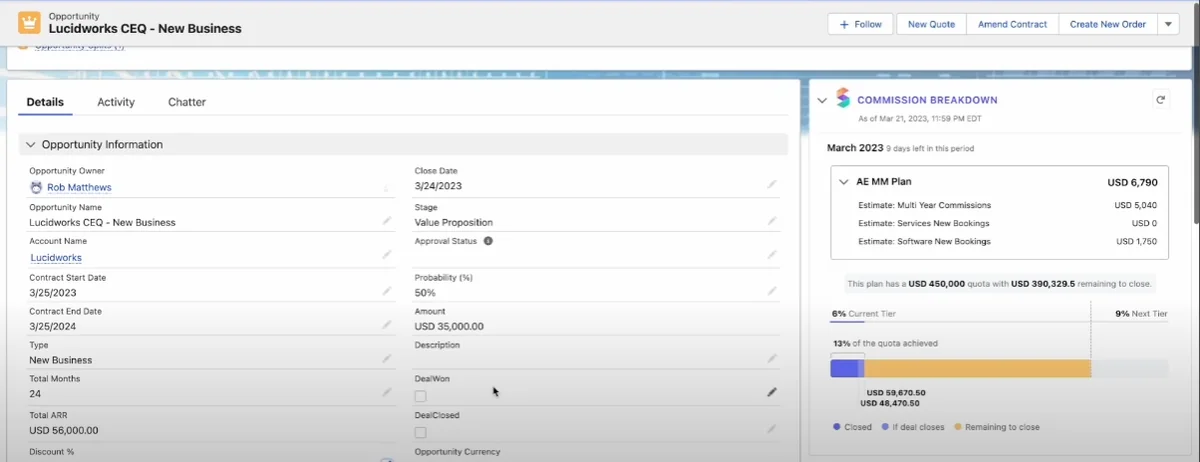
Real-Time Commission Visibility
Sales representatives access commission projections directly within opportunity records through embedded Spiff components. This visibility includes:
- Current commission amount based on opportunity value
- Breakdown by product line or commission plan
- Impact of different close dates on earnings
- Quota attainment progress and accelerator thresholds
The real-time calculation updates automatically as representatives modify opportunity amounts, products, or close dates, enabling informed decision-making during the sales process.
Mobile Access and Dashboards
Spiff includes native mobile applications that sync with Salesforce data, providing field sales teams with commission visibility outside the office. Mobile features include:
- Commission dashboard with current period earnings
- Quota progress tracking
- Deal pipeline impact analysis
- Historical commission statements
Implementation Considerations
Deploying Spiff requires careful planning around data integration, security, and user adoption. Key implementation factors include:
Data Requirements
- Clean Opportunity Data: Accurate amounts, stages, and close dates
- Product Catalog: Complete product records with commission rates
- Territory Management: Proper rep-to-territory assignments
- Historical Data: Previous commission periods for baseline calculations
Security and Permissions
Spiff respects Salesforce’s sharing model and field-level security. Configure permissions to ensure:
- Sales reps see only their own commission data
- Managers access team-level reporting
- Operations teams can modify plan configurations
- Finance teams have read-only access to all calculations
Performance and Governor Limits
Large-scale commission calculations can impact Salesforce governor limits. Best practices include:
- Batch Processing: Use asynchronous processing for bulk calculations
- Selective Triggers: Limit calculation triggers to meaningful stage changes
- Data Archival: Archive historical commission data to reduce query volumes
- Index Optimization: Create custom indexes on frequently queried commission fields
API Considerations
Spiff utilizes Salesforce APIs for data access and calculations. Monitor API usage to avoid limits:
- Daily API call limits based on Salesforce edition
- Bulk API usage for large data processing
- Streaming API for real-time updates
Integration with Sales Cloud Features
Spiff leverages existing Sales Cloud functionality to provide comprehensive commission management:
Opportunity Management
- Commission calculations appear on opportunity page layouts
- Split commissions support for team selling scenarios
- Multi-currency support for global sales organizations
Forecasting Integration
- Commission projections included in sales forecasts
- Quota vs. commission tracking for performance analysis
- Pipeline impact analysis for earnings predictions
Reports and Dashboards
- Pre-built commission reports and dashboard templates
- Custom report types for detailed commission analysis
- Einstein Analytics integration for advanced commission insights
Common Implementation Challenges
Organizations implementing Spiff often encounter specific challenges that require careful planning:
Data Quality Issues
- Incomplete Opportunity Records: Missing product details or incorrect amounts
- Territory Conflicts: Overlapping territories causing double commission calculations
- Historical Data Migration: Importing previous commission periods accurately
Complex Commission Plans
- Multi-Variable Calculations: Plans with multiple accelerators and conditions
- Team-Based Incentives: Shared commissions across multiple representatives
- Custom Business Rules: Organization-specific commission logic requiring customization
Best Practices for Spiff Deployment
Successful Spiff implementations follow established patterns for configuration and user adoption:
Pre-Implementation Planning
- Commission Plan Audit: Document existing commission structures and rules
- Data Cleanup: Ensure opportunity and product data accuracy
- User Training Plan: Develop training materials for different user roles
- Testing Strategy: Create test scenarios covering all commission plan variations
Configuration Best Practices
- Start Simple: Implement basic commission plans first, then add complexity
- Version Control: Maintain documentation of plan changes and effective dates
- Exception Handling: Build processes for manual commission adjustments
- Audit Trail: Enable tracking of all commission calculations and modifications
Frequently Asked Questions
What is Salesforce Spiff and how does it differ from other ICM solutions?
Salesforce Spiff is a native incentive compensation management platform that integrates directly with Sales Cloud data. Unlike third-party ICM solutions, Spiff operates within Salesforce’s security model and provides real-time commission visibility on opportunity records without data synchronization delays.
Can Spiff handle complex commission plans with multiple accelerators?
Yes, the Spiff platform supports multi-tiered commission plans with accelerators, decelerators, team bonuses, and product-specific incentives. The visual plan builder allows configuration of complex rules without custom development, though very specific business logic may require additional customization.
How does Spiff software integrate with existing Salesforce customizations?
Spiff respects Salesforce’s standard security model, including sharing rules, field-level security, and custom objects. The platform can incorporate data from custom fields and objects into commission calculations, though integration complexity depends on the extent of existing customizations.
What are the governor limit considerations when implementing Spiff?
Large-scale commission calculations can impact SOQL query limits and CPU time limits. Spiff uses asynchronous processing for bulk calculations and provides configuration options to optimize performance. Organizations with high transaction volumes should plan for additional API capacity and consider data archival strategies.
Can sales reps see commission calculations in real-time on mobile devices?
Yes, Spiff includes mobile applications that sync with Salesforce data to provide real-time commission visibility. Sales representatives can view current earnings, quota progress, and the impact of potential deals on their compensation while working remotely or in the field.