Tableau dashboard examples help Salesforce teams decide which dashboard pattern fits a real operating problem before they build anything. Use Tableau dashboard examples as reusable decision patterns, not as templates to copy without validation. A good dashboard is not a chart gallery; it answers a question, shows the next action, and respects the data, security, and refresh rules behind the metric.
This guide shows practical Tableau dashboard examples for sales, service, marketing, operations, finance, and nonprofit teams that work inside or alongside Salesforce. The goal is to help you compare Tableau dashboard examples before you spend time on data modeling, embedding, or automation. It also explains when to use Tableau, CRM Analytics, Tableau Pulse, Tableau Next components, or standard Salesforce reports so Admins, Developers, and Architects can make the right design call.
Tableau Dashboard Examples for Salesforce Teams
Start with the business decision, not the visual type. Tableau dashboard examples are useful only when the decision and action path are clear. In enterprise orgs, the most useful Tableau dashboard examples usually combine Salesforce data with another source such as ERP bookings, support telephony, product usage, finance actuals, or warehouse inventory. That cross-system view is the reason many teams choose Tableau instead of a standard Lightning dashboard.
| Dashboard pattern | Typical Salesforce data | External data often added | Decision it supports | Action path |
|---|---|---|---|---|
| Sales forecast dashboard | Opportunity, ForecastingItem, Account, User | ERP actuals, quota files, product margin | Which deals need manager attention this week? | Open opportunity, create task, adjust close plan |
| Service backlog dashboard | Case, Entitlement, Milestone, Work Order | Contact center, warranty, field service capacity | Where are SLA risks building? | Escalate case, reassign queue, update priority |
| Account health dashboard | Account, Opportunity, Case, Contact, Contract | Product telemetry, billing, NPS, usage | Which accounts are growing, stalled, or at risk? | Launch renewal play, create success plan |
| Campaign performance dashboard | Campaign, CampaignMember, Lead, Opportunity | Ad spend, web analytics, email engagement | Which campaigns create qualified pipeline? | Add members, pause spend, route leads |
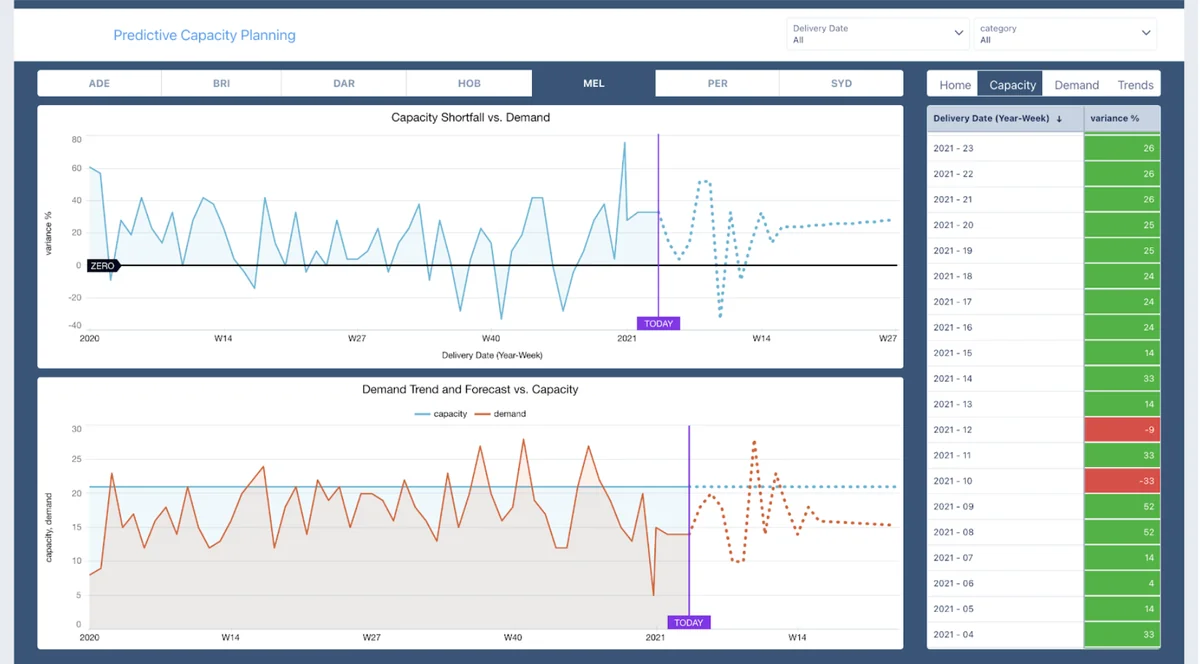
| Operations capacity dashboard | Orders, custom objects, tasks, locations | Inventory, logistics, workforce planning | Where will demand exceed capacity? | Adjust territory, route work, trigger Flow |
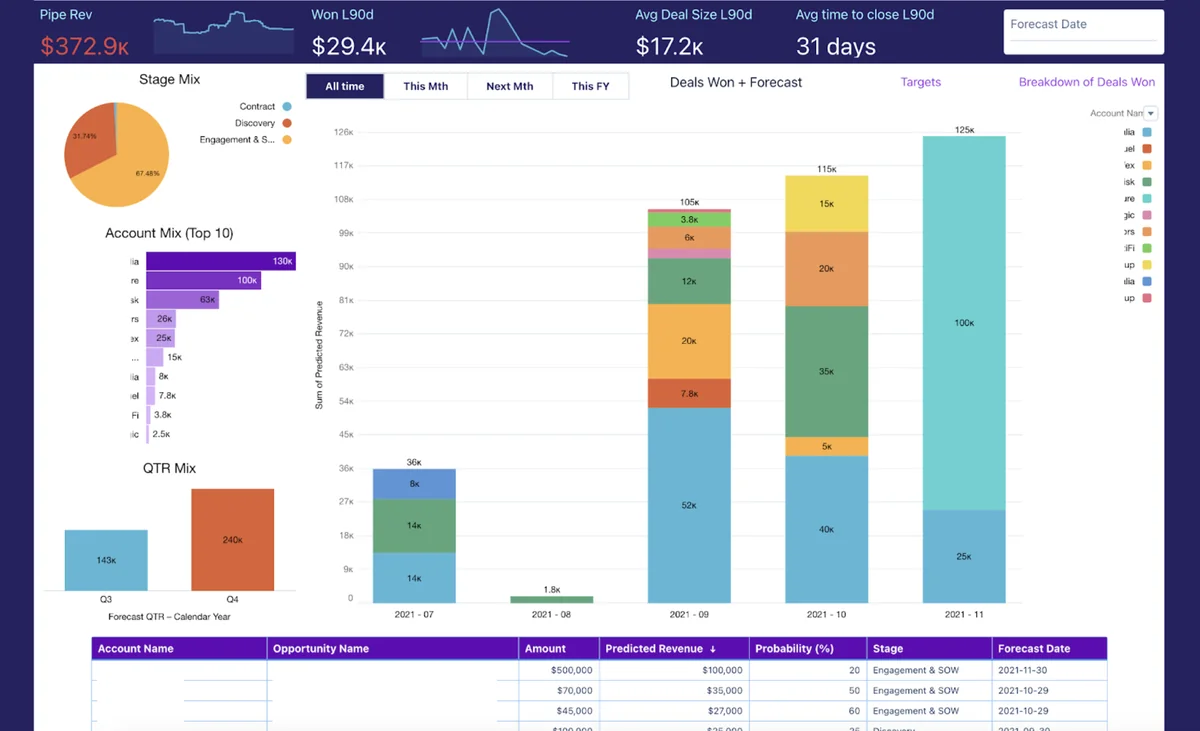
Sales forecast dashboard for pipeline inspection
Among Tableau dashboard examples, this pattern is the one sales leaders ask for most because it joins forecast discussion with record-level follow-up.
A sales forecast dashboard should separate three numbers that are often mixed together: closed revenue, open weighted pipeline, and committed forecast. In Salesforce, this usually starts with Opportunity data, but the dashboard becomes more useful when it also shows targets, booked revenue, renewals, and product margin.
Use this pattern when executives ask why the forecast changed, not only what the forecast is. The dashboard should let sales leaders filter by region, segment, manager, product family, close month, and stage. A detail table below the summary helps managers move from the aggregate view to the exact opportunity records that need review.
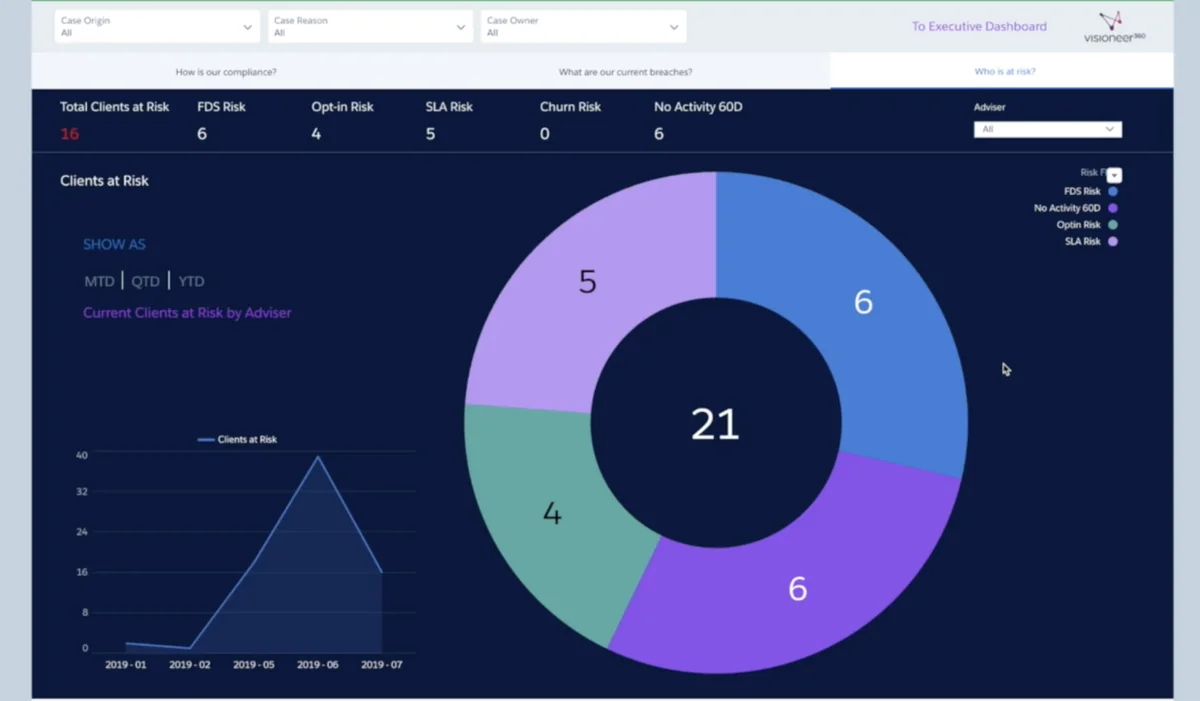
Service operations dashboard for SLA and compliance risk
This is one of the Tableau dashboard examples that should be reviewed with service operations, compliance, and Salesforce platform owners before release.
Service dashboards need time-based logic. A simple case count does not show whether customers are close to an entitlement breach, whether a queue has aged work, or whether a product issue is creating repeated contacts. For service teams, sample Tableau visualizations often include aging buckets, milestone status, reopen rate, first response time, and backlog by skill or queue.
For regulated service teams, keep auditability in the design. Define how the metric is calculated, which date field controls the clock, what counts as an exception, and who can see client-level rows. A dashboard that exposes sensitive case data without a row-level security model creates a governance issue even if the chart is technically correct.
Account health dashboard for customer success and renewals
Use this pattern when Tableau dashboard examples need to combine Salesforce account data with product usage, billing, and support history.
An account health dashboard should not rely on one score unless the score is explainable. In Salesforce projects, the health model usually combines open renewal amount, support trend, product usage, unpaid invoices, executive engagement, and recent activity. The best version tells a customer success manager why an account changed status and which record to update next.
Use separate views for portfolio review and record-level coaching. Portfolio review needs totals, segments, cohorts, and trends. Record-level coaching needs account names, owner, renewal date, risk reason, and recommended next step. This is where example Tableau dashboards can reduce meeting time because the team does not need to export several Salesforce reports before each renewal review.
How to Choose Tableau Dashboard Examples Before Build
The safest way to evaluate Tableau dashboard examples is to score each candidate against the same build checklist.
Choosing from Tableau dashboard examples is an architecture step, not a design preference. The dashboard pattern should match the grain of the data, the refresh requirement, the security model, and the action that follows the insight. If these items are unclear, pause the build and document them first.
Example tableau dashboards for sales, service, and operations
These example tableau dashboards work best when each page has one accountable business owner and one expected action.
Example Tableau dashboards for Salesforce should answer one primary question per page. Sales dashboards ask which opportunities affect forecast. Service dashboards ask which customers or cases need attention. Operations dashboards ask where capacity, inventory, or staffing will miss demand. Mixing these questions in one workbook usually makes filtering and row-level security harder.
| Question to ask | Design choice | Salesforce implementation note |
|---|---|---|
| Does the user need to update a Salesforce record? | Embed near the object page or include record links. | Use Lightning record pages or a Flow action path. |
| Does the user need data outside Salesforce? | Use Tableau data modeling or a governed warehouse source. | Document data ownership and refresh timing. |
| Does the metric change during the day? | Choose live connection, extract schedule, or event-driven refresh. | Do not imply real-time status if the extract refreshes nightly. |
| Does access differ by role, region, or account team? | Plan row-level security before publishing. | Test as real users, not only as System Administrator. |
| Will the dashboard be embedded in Salesforce? | Confirm component support and authentication path. | Use Lightning App Builder for supported Tableau and CRM Analytics components. |
Sample tableau visualizations that work well with Salesforce data
Use sample Tableau visualizations to test whether Tableau dashboard examples are readable before you connect them to production automation.
Sample Tableau visualizations should match how Salesforce users inspect records. A bar chart works for queue comparisons. A line chart works for case volume or pipeline trend. A scatter plot works for account health because it can compare revenue, risk, and usage in one view. A map works only when geography changes the decision, such as territory coverage or field service routes.
In production, avoid visualizations that hide the record path. Users must know which Account, Case, Opportunity, Campaign, or custom object record supports the number. For embedded Salesforce pages, include either a filtered detail table, a record URL, or a workflow button that sends selected data to Salesforce Flow.
Tableau sample reports for validation before publishing
Build tableau sample reports as a control layer for Tableau dashboard examples that will be used in executive or board reporting.
Tableau sample reports are useful before a workbook becomes an executive dashboard. Build a validation report that compares source counts, distinct record IDs, fiscal period logic, and currency conversion rules. In Salesforce implementations, this prevents disputes between a Tableau dashboard, a Salesforce report, and an exported spreadsheet.
For example, a pipeline dashboard should include a hidden or admin-only validation sheet that shows Opportunity count by stage, sum of Amount by currency, converted amount, close period, and last extract time. This report helps the Salesforce Admin and data owner confirm that the dashboard uses the same rules as the sales operating cadence.
Tableau Reference Customers Case Studies: What to Learn
Read tableau reference customers case studies as a source of implementation questions, then convert those questions into your own Tableau dashboard examples.
Tableau reference customers case studies are useful when you read them for architecture patterns rather than copying the dashboard layout. Official Tableau customer stories show recurring themes: governed data sources, clear ownership, embedded access, role-based dashboards, and action paths. Those themes matter more than any single chart type.
Use public customer stories as design prompts, then validate the idea against your own org model. Tableau dashboard examples from another company should be treated as reference patterns, not requirements. Salesforce data models vary by industry, especially when Person Accounts, Financial Services Cloud, Health Cloud, Education Cloud, or custom revenue objects are involved. A dashboard that works in one org can break in another if the relationship model, security model, or fiscal calendar differs.
| Case study pattern | What to copy | What not to copy |
|---|---|---|
| Sales performance | Metric definitions, manager drill paths, quota comparison | Territory labels, private data, exact formula assumptions |
| Finance and cost control | Reconciliation checks, period filters, source ownership | Company-specific chart design without validating the finance process |
| Healthcare or service quality | Outcome measures, access controls, trend analysis | Protected data fields or unapproved clinical/compliance assumptions |
| Public sector oversight | Governance status, issue tracking, risk indicators | Agency-specific workflow names or unmanaged offline metrics |
Salesforce professionals can review official Tableau customer stories from the Tableau site, but the implementation blueprint should come from your own requirements. Document source systems, refresh frequency, data stewardship, row-level security, and where users will act on the insight.
How to Embed Tableau Dashboard Examples in Salesforce
Embedded Tableau dashboard examples should be treated as Salesforce page design, not just analytics publishing.
Many Tableau dashboard examples become more useful when users see them on the Salesforce page where they already work. Tableau Help documents the Tableau View Lightning Web Component for embedding Tableau views from Tableau Cloud or Tableau Server into Lightning pages, and Salesforce Developer Docs document CRM Analytics dashboard Lightning Web Components for CRM Analytics dashboards.
Use the product boundary correctly. Tableau dashboards, Tableau Pulse metrics, Tableau Next dashboards, CRM Analytics dashboards, and standard Salesforce dashboards are related, but they are not the same component model. Salesforce Developer Docs state that CRM Analytics dashboard Lightning Web Components are available from Spring ’24, which aligns with API v60.0, while the Aura component remains supported for implementations that need its broader method support.
- Use Tableau View LWC when the asset is a Tableau view from Tableau Cloud or Tableau Server and users need it on a Lightning App, Home, or Record page.
- Use Tableau Pulse LWC when users need metric insights from Tableau Pulse. Tableau documentation notes that token-based seamless authentication is required for Tableau Pulse LWC.
- Use CRM Analytics Dashboard LWC when the asset is a CRM Analytics dashboard and you want it in Lightning Experience or Experience Cloud.
- Use standard Salesforce dashboards when the data is already in Salesforce, the question is simple, and the user does not need advanced visual exploration or external data.
Official setup references: Configure a Tableau View Lightning Web Component, Configure Tableau Lightning Web Components and SSO, and CRM Analytics Dashboard Components Developer Guide.
Embedding checklist for Admins and Architects
Use this checklist for Tableau dashboard examples that users will access from Lightning pages.
- Confirm whether the asset is Tableau, Tableau Pulse, Tableau Next, CRM Analytics, or a standard Salesforce dashboard.
- Confirm the target page type: App page, Home page, Record page, or Experience Cloud page.
- Add the Tableau site URL as a Trusted URL when the Tableau LWC setup requires it.
- Choose the authentication model. For Tableau View LWC, check whether SAML or token-based seamless authentication fits your Tableau Cloud or Tableau Server setup. For Tableau Pulse LWC, follow the token authentication requirement in Tableau Help.
- Define field mapping for record-page filtering. Tableau documentation notes that context and advanced filtering apply on Lightning record pages, not Home or App pages.
- Test with users who have different Salesforce permission sets and Tableau permissions.
- Publish after validating refresh time, security, mobile behavior, and page load time.
CRM Analytics dashboard LWC example
This code pattern is relevant when Tableau dashboard examples are compared with CRM Analytics dashboards during solution design.
The following sample shows a small wrapper component for a CRM Analytics dashboard. Use it only for CRM Analytics assets, not Tableau views. The component name and required attribute follow the Salesforce Developer Docs for CRM Analytics dashboard Lightning Web Components.
<!-- force-app/main/default/lwc/accountHealthAnalytics/accountHealthAnalytics.html -->
<template>
    <lightning-card title="Account Health Analytics">
        <wave-wave-dashboard-lwc
            developer-name={dashboardDeveloperName}
            height="640"
            show-sharing="false">
        </wave-wave-dashboard-lwc>
    </lightning-card>
</template>
// force-app/main/default/lwc/accountHealthAnalytics/accountHealthAnalytics.js
import { LightningElement, api } from 'lwc';
export default class AccountHealthAnalytics extends LightningElement {
@api dashboardDeveloperName = 'Account_Health_Executive_View';
}<!-- force-app/main/default/lwc/accountHealthAnalytics/accountHealthAnalytics.js-meta.xml -->
<?xml version="1.0" encoding="UTF-8"?>
<LightningComponentBundle xmlns="http://soap.sforce.com/2006/04/metadata">
<apiVersion>60.0</apiVersion>
<isExposed>true</isExposed>
<targets>
<target>lightning__RecordPage</target>
<target>lightning__AppPage</target>
<target>lightning__HomePage</target>
</targets>
</LightningComponentBundle>Governor limit note: this LWC does not run SOQL or DML. The limits to test are page load performance, dashboard query behavior, CRM Analytics permissions, and whether the dashboard developer name changes between sandbox and production.
Best Practices for Designing Tableau Dashboard Examples
Before publishing Tableau dashboard examples, ask the metric owner to sign off on definitions, filters, access, and action paths.
The best Tableau dashboard examples share one trait: the dashboard owner can explain every metric. If a user cannot define the numerator, denominator, date filter, and data source, the dashboard will create arguments instead of decisions.
Define the metric contract
Metric contracts make Tableau dashboard examples easier to support after release because Admins can trace each number back to a field and filter.
For every KPI, document the field, object, filter, owner, refresh time, and exception rule. For example, “open pipeline” may mean Opportunity records where IsClosed is false, Amount is not null, CloseDate is in the current fiscal quarter, and StageName is not in an excluded stage. If finance uses a different definition, show both labels clearly or fix the definition before publishing.
Design for security before design for layout
Security reviews are required for Tableau dashboard examples that expose customer, employee, financial, healthcare, or regulated service data.
Salesforce sharing rules, roles, territories, permission sets, and field-level security do not automatically become a Tableau security model in every architecture. If Tableau uses extracts, a warehouse, or a published data source, security must be designed and tested in that layer too. For record-page embedding, confirm whether filters use Salesforce record IDs, owner IDs, account IDs, or another stable key.
Keep the visual layer close to the action
The strongest Tableau dashboard examples reduce handoffs between analytics, Salesforce records, and automation.
A dashboard should end with a workflow. For sales, that may be an opportunity review. For service, it may be a case escalation. For marketing, it may be campaign member follow-up. For nonprofit teams, it may be campaign allocation. Place the dashboard where the user can act, or give the user a direct record link or Flow action.
How to Turn Tableau Insight into Salesforce Action
For Salesforce users, Tableau dashboard examples should point to a next step such as a task, case escalation, campaign update, or opportunity review.
Dashboards lose value when users must copy values from Tableau into Salesforce by hand. Tableau External Actions can send selected dashboard data to an autolaunched Salesforce Flow. Tableau Help states that External Actions workflows are compatible with autolaunched flows and that authors should coordinate with Salesforce admins because Flow security, limits, and permissions matter.
Use Flow for declarative actions such as task creation, case escalation, Slack notification, or campaign member update. Use Invocable Apex only when Flow needs logic that is easier to test in code, such as custom validation, deduplication, or bulk task creation.
public with sharing class TableauDashboardActionService {
    public class Request {
        @InvocableVariable(required=true)
        public Id ownerId;

        @InvocableVariable(required=true)
        public Id relatedRecordId;

        @InvocableVariable(required=true)
        public String actionReason;
    }

    @InvocableMethod(
        label='Create Dashboard Follow Up Task'
        description='Creates follow-up tasks from selected Tableau dashboard rows passed through Flow.'
    )
    public static void createTasks(List<Request> requests) {
        if (requests == null || requests.isEmpty()) {
            return;
        }

        if (!Schema.sObjectType.Task.isCreateable()) {
            throw new IllegalArgumentException('Current user cannot create Task records.');
        }

        List<Task> tasksToCreate = new List<Task>();

        for (Request req : requests) {
            if (req == null || req.ownerId == null || req.relatedRecordId == null) {
                continue;
            }

            String reason = String.isBlank(req.actionReason)
                ? 'Dashboard review'
                : req.actionReason.left(120);

            tasksToCreate.add(new Task(
                OwnerId = req.ownerId,
                WhatId = req.relatedRecordId,
                Subject = 'Follow up from Tableau dashboard',
                Description = 'Reason: ' + reason,
                ActivityDate = Date.today().addDays(2),
                Status = 'Not Started',
                Priority = 'Normal'
            ));
        }

        if (tasksToCreate.isEmpty()) {
            return;
        }

        SObjectAccessDecision accessDecision =
            Security.stripInaccessible(AccessType.CREATABLE, tasksToCreate);

        insert (List<Task>) accessDecision.getRecords();
    }
}
This Apex is bulkified because it builds one list and performs one DML statement. Add a test class that covers empty input, missing IDs, multiple requests, and the expected Task field values. Salesforce requires at least 75% Apex test coverage for deployment, but production teams should test the business paths, not only the coverage percentage.
Common Errors with Tableau Dashboard Examples in Salesforce
Most Tableau dashboard examples fail for operational reasons: unclear definitions, weak security testing, wrong authentication, or missing ownership.
| Error | Cause | Fix |
|---|---|---|
| The embedded Tableau view shows a sign-in prompt. | SSO or token-based authentication is not configured for the selected component. | Review Tableau LWC authentication settings and test as a non-admin user. |
| The record page filter does not work. | The Tableau field name does not match the data source field or the Salesforce field mapping is wrong. | Use the source field name, confirm the record ID field, and test on a Lightning record page. |
| Dashboard totals do not match Salesforce reports. | Different filters, fiscal periods, currency conversion, or extract timing. | Create tableau sample reports for validation and reconcile counts before release. |
| Users see too much data. | Tableau permissions or data-source security do not match Salesforce access rules. | Design row-level security and test with real profiles, permission sets, and Tableau groups. |
| Page load is slow. | Too many embedded views, large extracts, inefficient filters, or heavy workbook calculations. | Reduce worksheets, pre-aggregate where possible, and avoid placing several dashboards on one Lightning page. |
| External Action runs the wrong automation. | Flow input variables or selected marks are not validated. | Use an autolaunched Flow with clear inputs, validation, error handling, and least-privilege run access. |
Use the same review process whenever you add new Tableau dashboard examples to a Salesforce release plan.
Related SalesforceTutorial Resources
- Salesforce reports and dashboards in Lightning Experience
- Salesforce CRM Analytics implementation guide
- Salesforce Flow automation examples
- Salesforce API integration patterns
- Salesforce data migration and data quality checklist
Frequently Asked Questions
What are the best Tableau dashboard examples for Salesforce teams?
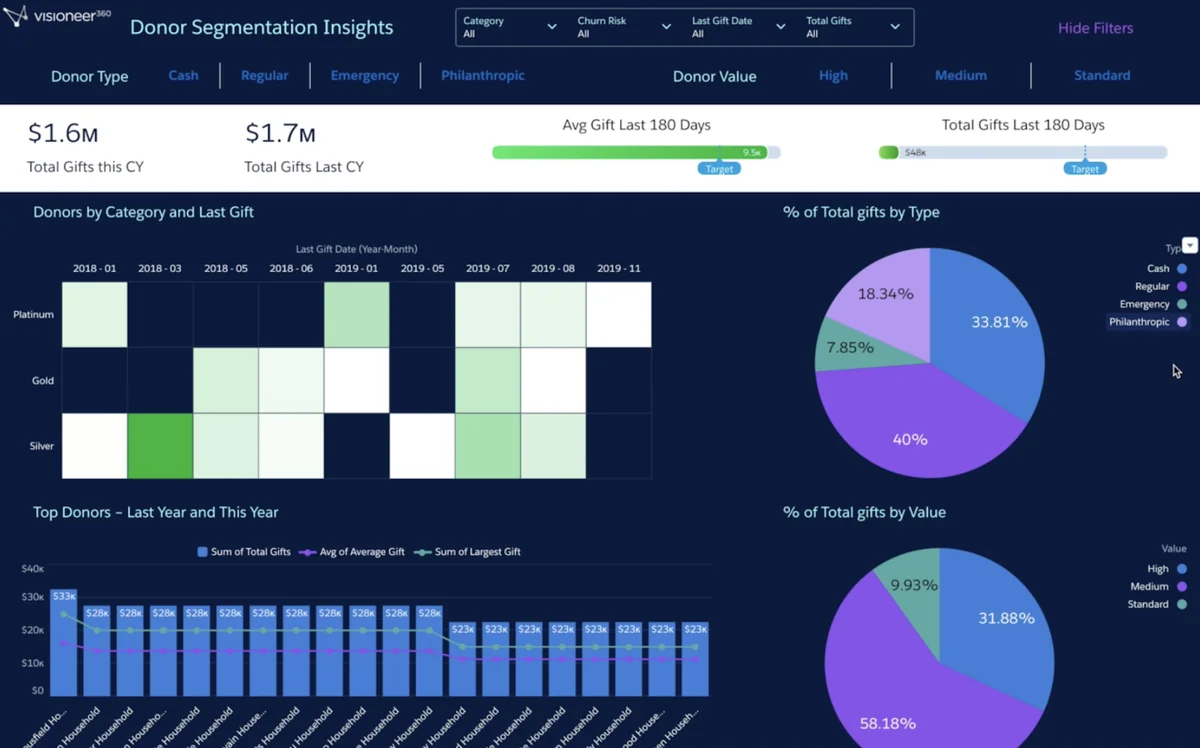
The best Tableau dashboard examples for Salesforce teams usually connect a business question to a Salesforce action. Sales forecast, service backlog, account health, campaign performance, claims, capacity planning, and donor segmentation dashboards work well because users can review the metric and then update an opportunity, case, account, campaign, or task.
How are Tableau dashboards different from Salesforce reports?
Salesforce reports work well for operational lists and standard CRM summaries inside one org. Tableau dashboards are better when the analysis needs richer visual exploration, non-Salesforce data, governed data models, cross-system comparisons, or embedded analytics across Salesforce pages.
Can I embed Tableau dashboards in Salesforce Lightning pages?
Yes. Salesforce users can embed Tableau views with the Tableau View Lightning Web Component and CRM Analytics dashboards with the CRM Analytics dashboard component. Tableau Pulse metrics and Tableau Next dashboard components have their own setup paths, so confirm the product, licensing, authentication, and page type before you design the page.
What should be included in Tableau sample reports before building a dashboard?
Tableau sample reports should define the metric owner, data source, refresh frequency, filter rules, row-level security requirement, and action path. In Salesforce projects, also document the target object, lookup fields, record page context, and whether users need to write back through Flow or a standard Salesforce record page.
Do Tableau dashboards respect Salesforce sharing rules?
Not automatically in every design. If Tableau reads Salesforce data through an extract, published data source, or external warehouse, you must design security in Tableau and the data layer. If you embed a Tableau view in Salesforce, authentication and user mapping decide what the user can see. Test with real user profiles and permission sets before go-live.