The SOQL IN operator and relationship queries are essential tools for retrieving related records from multiple Salesforce objects in a single query. This guide covers both the IN operator syntax and relationship patterns that every Salesforce developer needs to master.
What is the SOQL IN Operator?
The SOQL IN operator filters records by matching field values against a list of specified values or a subquery result. It’s more efficient than multiple OR conditions when filtering on multiple values.
Basic IN Operator Syntax
// Basic IN with literal values
SELECT Id, Name FROM Account WHERE Industry IN ('Technology', 'Healthcare', 'Finance')

// IN with subquery
SELECT Id, Name FROM Account WHERE Id IN (
    SELECT AccountId FROM Contact WHERE CreatedDate = LAST_N_DAYS:30
)
SOQL IN vs OR Operator
The IN operator in SOQL is more readable and efficient than multiple OR conditions:
| Using IN Operator | Using OR Operator |
|---|---|
WHERE Industry IN ('Tech', 'Finance') |
WHERE Industry = 'Tech' OR Industry = 'Finance' |
| More concise and readable | Verbose for multiple values |
| Better query plan optimization | Less efficient for many values |
SOQL Relationship Query Patterns
SOQL relationships between objects allow you to query records from one or more objects in a single statement. There are three main relationship patterns:
- Parent-to-Child relationships (1:n)
- Child-to-Parent relationships (n:1)
- Many-to-one relationships with filtering
Parent-to-Child Relationship Queries
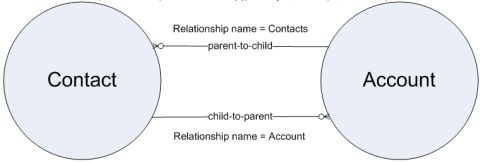
When querying from parent to child, use a subquery within the main SELECT statement. For standard objects, the relationship name equals the plural of the child object name.
// Standard objects: Account to Contacts
SELECT Name, (SELECT LastName FROM Contacts) FROM Account

// With IN operator filtering
SELECT Name, (SELECT LastName FROM Contacts WHERE CreatedDate IN (LAST_N_DAYS:30)) FROM Account
WHERE Industry IN ('Technology', 'Healthcare')
1Child-to-Parent Relationship Queries
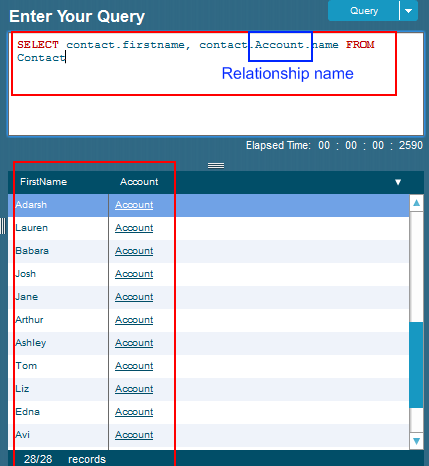
Child-to-parent queries use dot notation to access parent object fields. No subquery is needed.
// Basic child-to-parent
SELECT FirstName, Account.Name FROM Contact

// With IN operator on parent field
SELECT FirstName, Account.Name FROM Contact
WHERE Account.Industry IN ('Technology', 'Finance')

// Using IN with related record IDs
SELECT FirstName, Account.Name FROM Contact
WHERE AccountId IN (
    SELECT Id FROM Account WHERE AnnualRevenue > 1000000
)
Custom Object Relationships with IN Operator
Custom objects follow similar patterns but use the __r suffix for relationships:
Parent-to-Child with Custom Objects
// Custom objects: Mother__c to Daughter__c
SELECT LastName__c, (
    SELECT FirstName__c FROM Daughters__r
    WHERE Age__c IN (5, 6, 7)
) FROM Mother__c
Child-to-Parent with Custom Objects
// Query daughters with mother information
SELECT Id, FirstName__c, Mother__r.LastName__c
FROM Daughter__c
WHERE Mother__r.City__c IN ('New York', 'Los Angeles', 'Chicago')
SOQL INCLUDES Operator for Multi-Select Picklists
The SOQL INCLUDES operator works specifically with multi-select picklist fields, different from the IN operator:
// INCLUDES for multi-select picklist
SELECT Id, Name FROM Account
WHERE Industry_Categories__c INCLUDES ('Technology', 'Software')

// EXCLUDES (opposite of INCLUDES)
SELECT Id, Name FROM Account
WHERE Industry_Categories__c EXCLUDES ('Government')
INCLUDES vs IN Operator
| INCLUDES | IN |
|---|---|
| Multi-select picklist fields only | Any field type |
| Matches any selected values | Exact value matching |
| Cannot use with subqueries | Supports subqueries |
Advanced IN Operator Patterns
Semi-Join Pattern
// Find Accounts that have Contacts created in last 30 days
SELECT Id, Name FROM Account
WHERE Id IN (
    SELECT AccountId FROM Contact
    WHERE CreatedDate = LAST_N_DAYS:30
)
Anti-Join Pattern
// Find Accounts without any Contacts
SELECT Id, Name FROM Account
WHERE Id NOT IN (
    SELECT AccountId FROM Contact
    WHERE AccountId != null
)
Complex Relationship Filtering
// Accounts with Opportunities in specific stages
SELECT Name, (
    SELECT Name, StageName FROM Opportunities
    WHERE StageName IN ('Prospecting', 'Qualification', 'Closed Won')
) FROM Account
WHERE Id IN (
    SELECT AccountId FROM Opportunity
    WHERE StageName IN ('Prospecting', 'Qualification')
)
Governor Limits and Best Practices
Query Limits
- Subquery limit: Maximum 2,000 child records returned per parent
- Relationship depth: Maximum 5 levels of parent-to-child relationships
- IN operator values: Maximum 4,000 literal values in IN clause
- Query timeout: 120 seconds for synchronous queries
Performance Optimization
// Good: Use selective filters with IN
SELECT Id, Name FROM Account
WHERE Industry IN ('Technology', 'Healthcare')
AND CreatedDate = LAST_N_DAYS:30
LIMIT 1000

// Avoid: Non-selective IN with large result sets
// SELECT Id, Name FROM Account WHERE Id IN (SELECT AccountId FROM Contact)
// Better: Add selective filters to subquery
Common Errors and Troubleshooting
Invalid Relationship Names
// Wrong: Using object API name instead of relationship name
// SELECT Name FROM Contact WHERE Account.Name = 'Test'

// Correct: Use proper relationship reference
SELECT Name FROM Contact WHERE Account.Name = 'Test'
Subquery Limit Exceeded
// Add LIMIT to subqueries to avoid governor limits
SELECT Name, (
    SELECT LastName FROM Contacts
    ORDER BY CreatedDate DESC
    LIMIT 200
) FROM Account
Frequently Asked Questions
What is the difference between SOQL IN operator and INCLUDES?
The IN operator works with any field type and matches exact values from a list or subquery. INCLUDES is specifically for multi-select picklist fields and matches any of the selected values within the picklist. IN supports subqueries while INCLUDES does not.
How many values can I use with the SOQL IN operator?
You can use up to 4,000 literal values in a single IN clause. For larger datasets, use subqueries or break the query into multiple batches. Subqueries with IN have no specific value limit but are subject to query timeout limits.
Can I use IN operator with relationship queries in SOQL?
Yes, you can combine IN operator with relationship queries. Use IN in the main query, subqueries, or to filter on related object fields. For example: SELECT Name FROM Contact WHERE Account.Industry IN ('Tech', 'Finance')
What’s the maximum number of child records in a SOQL relationship query?
Each parent-to-child subquery can return a maximum of 2,000 child records. If you need more records, use separate queries or implement pagination with OFFSET and LIMIT.
How do I query custom object relationships with IN operator?
For custom objects, use the __r suffix for relationships. Parent-to-child: SELECT Name__c, (SELECT Field__c FROM Children__r WHERE Status__c IN ('Active', 'Pending')) FROM Parent__c. Child-to-parent: SELECT Name__c FROM Child__c WHERE Parent__r.Type__c IN ('Type1', 'Type2')
Can I use OR operator instead of IN in SOQL?
Yes, but IN operator is more efficient and readable for multiple value comparisons. WHERE Status IN ('New', 'Open', 'Pending') is better than WHERE Status = 'New' OR Status = 'Open' OR Status = 'Pending'