A Visualforce standard controller provides automatic data access and manipulation capabilities for Salesforce standard objects without requiring custom Apex code. In our previous Salesforce Tutorial we learned about different visualforce controllers. This Salesforce developer Training Tutorial covers Visualforce standard controller implementation with single records and multiple records, including practical examples and best practices.
Standard controllers automatically handle CRUD operations, field-level security, and sharing rules for standard objects in Salesforce. They eliminate the need for custom Apex controllers in many common scenarios while maintaining security and governor limit compliance.
What is a Visualforce Standard Controller?
A Visualforce standard controller is a built-in controller that provides automatic data binding and manipulation for Salesforce standard objects like Account, Contact, Opportunity, and custom objects. The platform generates these controllers automatically, handling common operations like create, read, update, and delete (CRUD) without custom code.
Standard controllers respect field-level security, sharing rules, and object permissions defined in your org. They also handle governor limits automatically and provide standard navigation actions like save, cancel, edit, and delete.
Key Features of Standard Controllers
- Automatic CRUD operations – No Apex code required for basic data operations
- Security enforcement – Respects profiles, permission sets, and sharing rules
- Governor limit compliance – Built-in optimization for platform limits
- Standard navigation – Provides common page actions and redirects
- Field-level security – Honors FLS settings automatically
Standard Controller Working with Single Records
When working with a single record, the standard controller provides access to all fields and standard actions for that specific record. You can create Visualforce pages in two ways:
Method 1: Direct URL Access
Navigate directly to your Visualforce page by appending the page name to your Salesforce domain: https://[your-domain].salesforce.com/apex/mydemopage

Method 2: Edit Mode with Record ID
To open a Visualforce page in edit mode for a specific record, append the record ID as a parameter: https://[your-domain].salesforce.com/apex/mydemopage?id=0069000000AbCdE

Standard Controller Actions and Methods
Standard controllers provide built-in actions for common operations. These actions handle navigation, data manipulation, and user interface updates automatically.
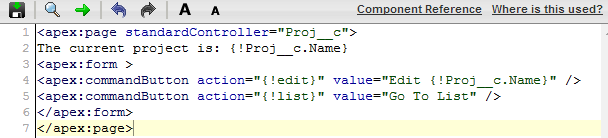
Data Access Actions
- {!object} – Access the current record object (e.g., {!Account} for Account records)
- {!id} – Retrieve the current record’s 15 or 18-digit Salesforce ID
- {!object.field} – Access specific field values (e.g., {!Account.Name})
Navigation Actions
- {!cancel} – Cancel current operation and return to previous page
- {!edit} – Navigate to edit mode for the current record
- {!view} – Navigate to view mode for the current record
Data Manipulation Actions
- {!save} – Save current record and navigate to view mode
- {!quickSave} – Save current record without navigation
- {!delete} – Delete current record with confirmation
Example: Single Record Standard Controller
<apex:page standardController="Account">
  <apex:form>
    <apex:pageBlock title="Account Details">
      <apex:pageBlockButtons>
        <apex:commandButton value="Save" action="{!save}"/>
        <apex:commandButton value="Cancel" action="{!cancel}"/>
      </apex:pageBlockButtons>

      <apex:pageBlockSection>
        <apex:inputField value="{!Account.Name}"/>
        <apex:inputField value="{!Account.Industry}"/>
        <apex:inputField value="{!Account.Phone}"/>
        <apex:inputField value="{!Account.Website}"/>
      </apex:pageBlockSection>
    </apex:pageBlock>
  </apex:form>
</apex:page>
Standard Controller Working with Multiple Records
For operations involving multiple records, Salesforce provides Standard Set Controllers. These controllers handle collections of records with built-in pagination, filtering, and bulk operations.
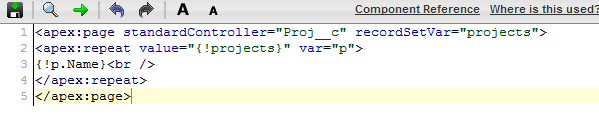
Standard Set Controllers use the recordSetVar attribute to define a collection variable that represents multiple records. This enables list views, pagination, and bulk operations while maintaining security and performance standards.
Standard Set Controller Features
- Automatic pagination – Handles large record sets efficiently
- List view integration – Works with existing list views and filters
- Bulk operations – Supports mass update and delete operations
- Governor limit compliance – Respects query and DML limits automatically
Example: Multiple Records Standard Set Controller
<apex:page standardController="Account" recordSetVar="accounts">
  <apex:form>
    <apex:pageBlock title="Account List">
      <apex:pageBlockTable value="{!accounts}" var="acc">
        <apex:column value="{!acc.Name}"/>
        <apex:column value="{!acc.Industry}"/>
        <apex:column value="{!acc.Phone}"/>
        <apex:column value="{!acc.CreatedDate}"/>
      </apex:pageBlockTable>

      <apex:panelGrid columns="4">
        <apex:commandButton value="First" action="{!first}"
                          disabled="{!NOT(hasPrevious)}"/>
        <apex:commandButton value="Previous" action="{!previous}"
                          disabled="{!NOT(hasPrevious)}"/>
        <apex:commandButton value="Next" action="{!next}"
                          disabled="{!NOT(hasNext)}"/>
        <apex:commandButton value="Last" action="{!last}"
                          disabled="{!NOT(hasNext)}"/>
      </apex:panelGrid>
    </apex:pageBlock>
  </apex:form>
</apex:page>
Standard Objects Integration
Visualforce standard controllers work seamlessly with all Salesforce standard objects, including Account, Contact, Lead, Opportunity, Case, and custom objects. Each standard object provides specific fields and relationships that the controller can access automatically.
Common Standard Objects for Visualforce
| Standard Object | Common Use Cases | Key Fields |
|---|---|---|
| Account | Customer management, company profiles | Name, Industry, Phone, Website |
| Contact | Individual person records, relationships | FirstName, LastName, Email, Phone |
| Opportunity | Sales pipeline, deal tracking | Name, Amount, CloseDate, StageName |
| Case | Customer service, issue tracking | Subject, Status, Priority, Origin |
| Lead | Prospect management, qualification | FirstName, LastName, Company, Status |
Best Practices for Visualforce Standard Controllers
Security Considerations
- Field-Level Security – Always use
<apex:inputField>instead of<apex:inputText>to respect FLS - Object Permissions – Standard controllers automatically check CRUD permissions
- Sharing Rules – Controllers respect organization-wide defaults and sharing rules
Performance Optimization
- Use Standard Set Controllers – For multiple records, always use
recordSetVarfor pagination - Limit Record Sets – Configure appropriate page sizes (default is 20 records)
- Selective Queries – Use list views to pre-filter records when possible
Governor Limit Considerations
- SOQL Queries – Standard controllers count against your org’s query limits
- View State – Large record sets can impact view state size (135KB limit)
- DML Operations – Bulk operations still count against DML limits (150 per transaction)
Common Visualforce Tags with Standard Controllers
Visualforce provides specific tags optimized for use with standard controllers. These tags automatically handle data binding, validation, and security.
Essential Visualforce Page Tags
- <apex:inputField> – Renders appropriate input control based on field type
- <apex:outputField> – Displays field values with proper formatting
- <apex:pageBlockTable> – Creates tables for record collections
- <apex:commandButton> – Executes standard controller actions
- <apex:pageMessages> – Displays system messages and errors
Advanced Visualforce Tags
- <apex:relatedList> – Displays related records automatically
- <apex:detail> – Shows complete record detail page
- <apex:listViews> – Provides list view selection interface
- <apex:enhancedList> – Enhanced list view with inline editing
Migration from Classic to Lightning Experience
When migrating Visualforce pages using standard controllers from Classic to Lightning Experience, consider these factors:
- Styling Updates – Lightning Design System (SLDS) provides modern styling
- Mobile Responsiveness – Ensure pages work on mobile devices
- Lightning Components – Consider migrating to Lightning Web Components for new development
- Performance – Lightning Experience may have different performance characteristics
Note: As of Winter ’26, Visualforce continues to be supported in Lightning Experience, but new development should consider Lightning Web Components for better performance and user experience.
Frequently Asked Questions
What are standard objects in Salesforce?
Standard objects in Salesforce are pre-built database tables provided by the platform, including Account, Contact, Lead, Opportunity, Case, and others. These objects come with predefined fields, relationships, and functionality that support common business processes without custom development.
How do Visualforce standard controllers work with standard objects?
Visualforce standard controllers automatically provide CRUD operations, field-level security, and navigation actions for standard objects. You specify the object using the standardController attribute (e.g., standardController=”Account”), and the controller handles data access, validation, and security automatically.
What Visualforce tags work best with standard controllers?
Key Visualforce page tags for standard controllers include <apex:inputField> for data entry, <apex:outputField> for display, <apex:pageBlockTable> for record lists, and <apex:commandButton> for actions. These tags automatically handle field types, validation, and security.
Can I use standard controllers with custom objects?
Yes, standard controllers work with custom objects the same way they work with standard objects. Use the API name of your custom object (e.g., standardController=”MyCustomObject__c”) and the controller will provide the same CRUD operations and security enforcement.
What’s the difference between standard controller and standard set controller?
A standard controller works with a single record, while a standard set controller (using recordSetVar attribute) works with multiple records. Standard set controllers provide pagination, bulk operations, and list view integration for handling collections of records efficiently.
Do standard controllers respect field-level security?
Yes, standard controllers automatically enforce field-level security, object permissions, and sharing rules. Users can only access fields and records they have permission to view or edit based on their profile, permission sets, and sharing configuration.