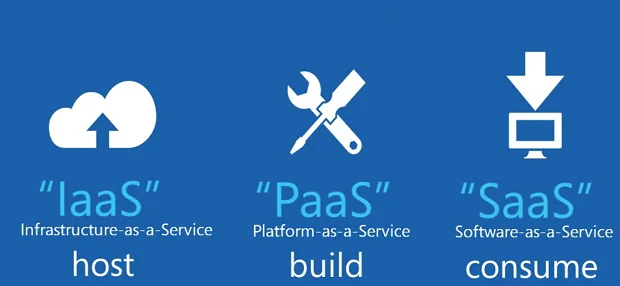
Understanding the difference between salesforce.com and force.com is crucial for anyone working with Salesforce platforms. Salesforce.com represents the complete Software-as-a-Service (SaaS) solution with pre-built applications, while force.com provides the underlying Platform-as-a-Service (PaaS) infrastructure for custom development. This distinction affects licensing, development approaches, and deployment strategies across enterprise implementations.
What is Salesforce.com?
Salesforce.com operates as a comprehensive SaaS solution delivering ready-to-use business applications. The platform includes Sales Cloud, Service Cloud, Marketing Cloud, and Commerce Cloud as packaged solutions requiring minimal configuration to deploy.
Key characteristics of salesforce.com include:
- Pre-configured standard objects (Account, Contact, Lead, Opportunity)
- Built-in business processes and workflows
- Standard reports and dashboards
- User interface components ready for immediate use
- Integrated security model with profiles and permission sets
Organizations purchasing salesforce.com licenses receive immediate access to core CRM functionality. Users can create leads, manage accounts, track opportunities, and generate reports without custom development work.
What is Force.com?
Force.com functions as the underlying PaaS infrastructure powering all Salesforce applications. This platform provides development tools, database services, and runtime environment for building custom applications.
Force.com capabilities include:
- Custom object creation and management
- Apex programming language for server-side logic
- Lightning Web Components (LWC) for user interface development
- Process Builder and Flow for declarative automation
- REST and SOAP API access for integrations
- Multi-tenant architecture with governor limits
Developers use force.com to extend salesforce.com functionality or build entirely custom applications. The platform enforces governor limits to maintain performance across shared infrastructure.
Salesforce.com Built on Force.com Platform
The relationship between these platforms creates a layered architecture. Salesforce.com applications run on force.com infrastructure, combining pre-built functionality with customization capabilities.
This architecture enables several deployment patterns:
| Deployment Pattern | Use Case | Technical Approach |
|---|---|---|
| Standard Implementation | Out-of-box CRM functionality | Configure standard objects and processes |
| Extended Implementation | Custom fields and workflows | Combine standard objects with custom development |
| Custom Application | Industry-specific solutions | Build entirely on force.com platform |
Licensing and Cost Implications
Understanding licensing differences affects project budgets and technical decisions. Salesforce.com licenses include both the application layer and underlying platform access.
Salesforce.com licensing provides:
- Access to standard CRM applications
- Platform customization capabilities
- API calls and storage allocations
- Support for custom objects and fields
Force.com-only licensing offers:
- Platform development tools without standard applications
- Custom object creation and management
- Apex and Lightning development capabilities
- Lower per-user costs for custom applications
Development Considerations
Technical teams must understand platform constraints when building solutions. Governor limits apply differently depending on the deployment approach.
Standard salesforce.com development follows these patterns:
// Apex trigger on standard Account object
trigger AccountTrigger on Account (before insert, before update) {
    for (Account acc : Trigger.new) {
        if (acc.Type == null) {
            acc.Type = 'Prospect';
        }
    }
}
Custom force.com development requires additional considerations:
// Custom object with namespace considerations
public class CustomObjectHandler {
    public static void processRecords(List<Custom_Object__c> records) {
        // Bulk processing to respect governor limits
        List<Custom_Object__c> recordsToUpdate = new List<Custom_Object__c>();

        for (Custom_Object__c record : records) {
            if (record.Status__c == 'New') {
                record.Status__c = 'Processing';
                recordsToUpdate.add(record);
            }
        }

        if (!recordsToUpdate.isEmpty()) {
            update recordsToUpdate;
        }
    }
}
AppExchange and Third-Party Applications
The AppExchange marketplace demonstrates force.com platform capabilities. Independent software vendors (ISVs) build applications using force.com tools and distribute them as managed packages.
AppExchange applications leverage:
- Custom objects and fields for data storage
- Apex classes for business logic implementation
- Lightning components for user interface
- Permission sets for security configuration
Organizations can install these applications alongside standard salesforce.com functionality, extending platform capabilities without custom development.
Integration Architecture
Both platforms support integration patterns, but implementation approaches differ based on the underlying architecture.
Salesforce.com integrations typically use:
- Standard REST API endpoints for Account, Contact, Lead objects
- Pre-built connectors for common business applications
- Salesforce Connect for external data sources
Force.com integrations require:
- Custom API development using Apex REST services
- External ID fields for data synchronization
- Custom metadata types for configuration management
Security Model Differences
Security implementation varies between standard and custom applications. Salesforce.com includes pre-configured security settings, while force.com requires explicit security design.
Standard salesforce.com security includes:
- Profile-based access to standard objects
- Field-level security for sensitive data
- Sharing rules for record-level access
Force.com security requires:
- Custom permission sets for application access
- Apex sharing for programmatic record access
- Custom settings for application configuration
Performance and Scalability
Governor limits affect both platforms but apply differently based on usage patterns. Understanding these limits prevents runtime exceptions and ensures scalable solutions.
Key governor limits include:
| Resource | Daily Limit | Per-Transaction Limit |
|---|---|---|
| API Calls | 15,000 per user | N/A |
| SOQL Queries | N/A | 100 synchronous, 200 asynchronous |
| DML Statements | N/A | 150 |
| CPU Time | N/A | 10,000ms synchronous, 60,000ms asynchronous |
Migration and Deployment Strategies
Organizations often start with salesforce.com and expand into custom force.com development. This evolution requires careful planning to maintain data integrity and user experience.
Common migration patterns include:
- Phase 1: Implement standard salesforce.com functionality
- Phase 2: Add custom fields and workflows using force.com
- Phase 3: Develop custom applications for specialized requirements
Deployment tools support both platforms:
- Change sets for configuration and custom development
- Salesforce CLI for source-driven development
- Third-party tools for complex deployment scenarios
Frequently Asked Questions
What is force com platform used for?
Force.com serves as the underlying Platform-as-a-Service (PaaS) infrastructure for building custom applications on Salesforce. It provides development tools including Apex programming language, Lightning Web Components, custom objects, workflows, and APIs. Organizations use force.com to create industry-specific applications, extend standard Salesforce functionality, or build entirely custom business solutions that leverage Salesforce’s multi-tenant architecture.
Can you use force.com without salesforce.com?
Yes, you can purchase force.com licenses independently without standard salesforce.com applications. Force.com-only licensing provides access to the platform development tools, custom objects, Apex code, and Lightning components, but excludes pre-built CRM applications like Sales Cloud or Service Cloud. This approach works well for organizations building custom applications that don’t require standard CRM functionality.
How do governor limits apply differently between salesforce.com and force.com?
Governor limits apply to both platforms but affect usage patterns differently. Salesforce.com applications benefit from optimized standard functionality that efficiently uses platform resources. Custom force.com development requires careful attention to bulkification patterns, efficient SOQL queries, and asynchronous processing to avoid hitting limits. Force.com applications must implement proper exception handling and resource management since they lack the built-in optimizations of standard applications.
What happens to customizations when upgrading salesforce.com?
Salesforce.com upgrades occur automatically three times per year (Spring, Summer, Winter releases) and generally preserve customizations built on the force.com platform. Custom objects, fields, Apex code, and Lightning components continue functioning after upgrades. However, deprecated features may require updates, and new functionality might conflict with existing customizations. Organizations should test customizations in sandbox environments before each release to ensure compatibility.