Digital Engagement in Salesforce Service Cloud
Digital engagement in Salesforce is the Service Cloud capability for handling customer conversations across channels such as web, in-app messaging, SMS, WhatsApp, Facebook Messenger, Apple Messages for Business, and LINE from the Salesforce console. It connects Salesforce Messaging, Omni-Channel routing, bots, Flow, and the Messaging data model so agents can answer customers without switching systems.
Use this guide to decide whether Digital Engagement fits your service model, plan licensing, configure channels, route work to agents, and report on messaging activity. The guidance is current as of June 2026 and links to official Salesforce documentation for release-specific behavior.
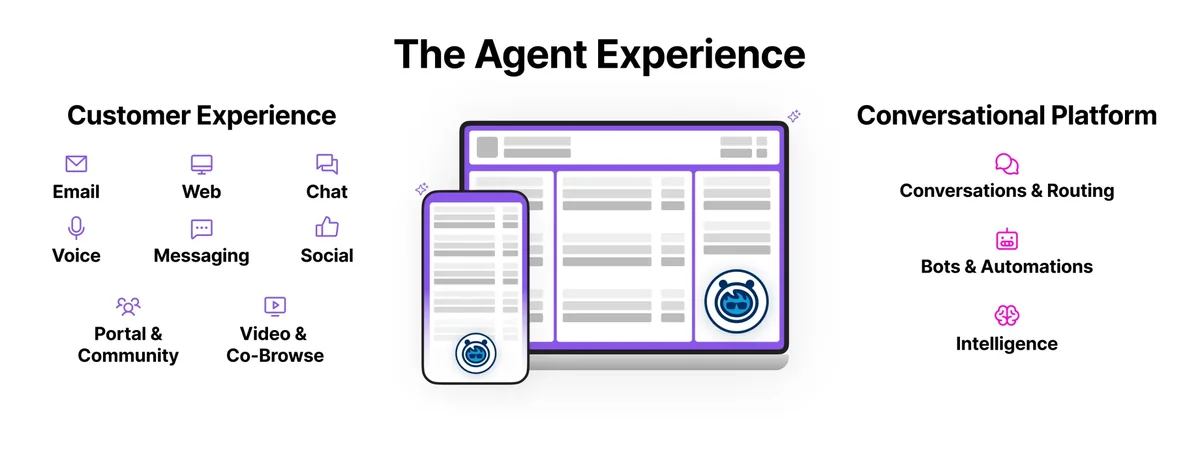
What Is Digital Engagement in Salesforce?
What is Salesforce Digital Engagement?
Salesforce Digital Engagement is a Service Cloud add-on and entitlement area for digital customer service channels. It is not a separate case management system. It works with the service console, Omni-Channel, queues, routing flows, permission sets, and channel-specific setup so customer messages can become work that agents or bots handle in Salesforce.
In enterprise orgs, Digital Engagement should come after the core service process is clear. You should already know how cases are created, how agents are assigned, what queues and skills exist, what business hours apply, and which records agents need to see. If the case process is unclear, adding more channels usually increases routing mistakes.
The product area now overlaps with terms such as Salesforce Messaging, Enhanced Messaging, Enhanced Chat, Messaging for In-App and Web, and channel-specific messaging. Salesforce has changed some labels over time, so verify names in Setup and the release notes before documenting a production rollout.
How Digital Engagement Works with Omni-Channel Routing
A typical Digital Engagement flow starts when a customer sends a message from a supported channel. Salesforce identifies the channel, creates or resumes a messaging session, links the end user where possible, and routes the work item using Omni-Channel. Agents receive the item in the Omni-Channel widget and work from the Service Cloud console.
Omni-Channel decides where the work goes. You can route messages to a queue, a routing flow, or a qualified rep based on capacity, priority, skills, and availability. Salesforce Trailhead explains Messaging routing as part of the service work distribution model.
Salesforce Trailhead: learn about Messaging routing
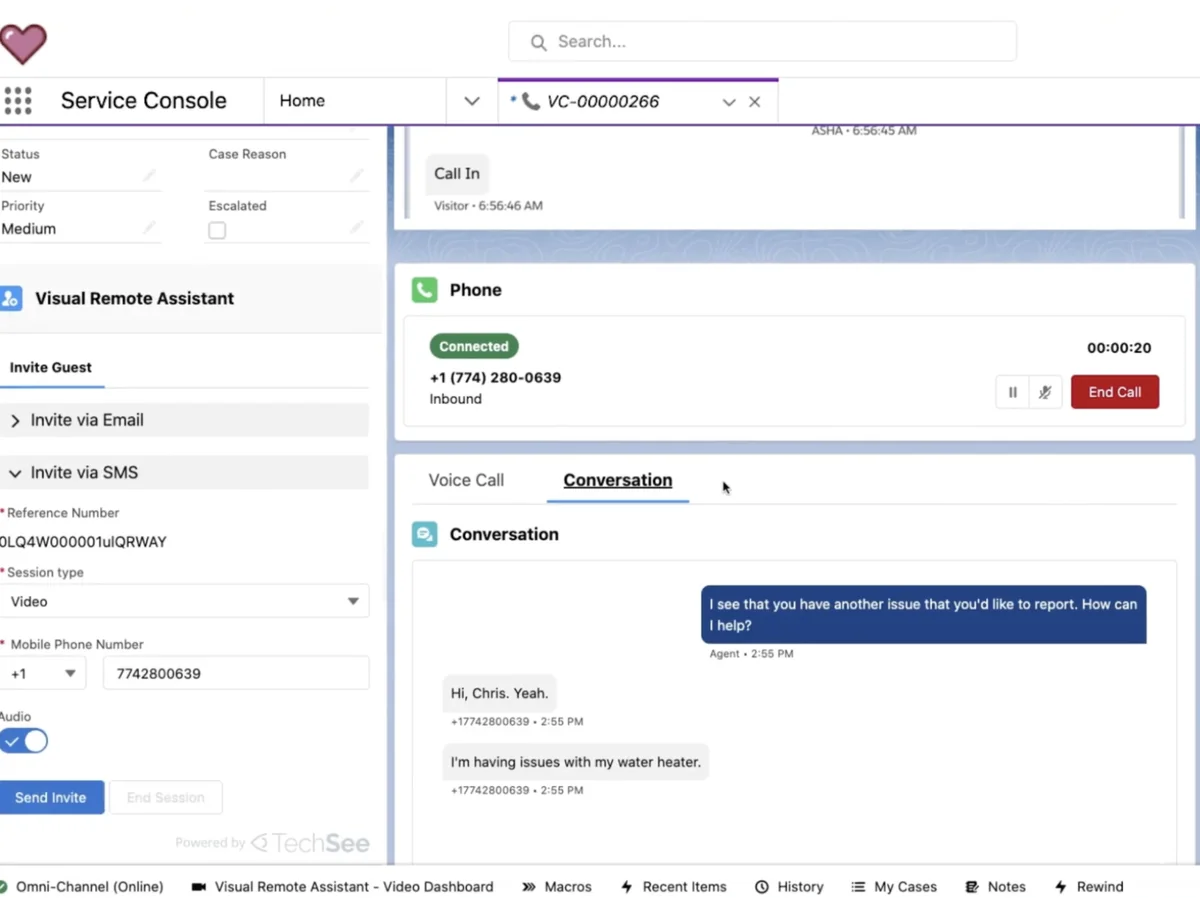
Messaging session lifecycle
A messaging session represents the service conversation. The conversation can remain asynchronous for channels such as SMS or WhatsApp, while web and in-app messaging often need tighter availability design. The exact lifecycle depends on the channel, routing configuration, consent settings, bot handoff, and whether the session is ended or marked inactive.
For reports and automation, treat the messaging session as the operational record. For full message content and events, review the Messaging object model because some Messaging data is stored on platform and some is stored off platform for scale.
Salesforce Developer Docs: Messaging object model
Digital Engagement Channels and Salesforce Messaging
Salesforce Messaging channel types
Salesforce Messaging supports customer entry points such as Enhanced Web Chat, Enhanced In-App Chat, SMS, WhatsApp, Facebook Messenger, Apple Messages for Business, LINE, and other supported messaging paths depending on edition and setup. Available options can vary by org, region, entitlement, and release.
Salesforce Help: Enhanced Chat and Messaging glossary
| Channel | Best fit | Implementation note |
|---|---|---|
| Enhanced Web Chat | Public website support from a browser | Use an embedded deployment and verify website security settings before launch. |
| Enhanced In-App Chat | Mobile app support where the customer is already in the app | Coordinate with the mobile team because release cycles affect deployment. |
| SMS | Short text support and notifications tied to a phone number | Plan opt-in, opt-out, country rules, message credits, and business-hour expectations. |
| Regions where WhatsApp is a standard support channel | Review WhatsApp templates, consent, and Meta channel requirements before rollout. | |
| Facebook Messenger | Support from a managed Facebook page | Confirm page ownership and admin access before creating the channel. |
| Apple Messages for Business | Apple ecosystem service journeys | Follow Apple policies on live support, unsolicited messages, and deleted conversations. |
| LINE | Markets where LINE is a primary customer channel | Confirm entitlement and regional availability in your Salesforce org. |
Digital-first team messaging design
Digital-first team messaging is an operating model, not a single Salesforce feature. The design goal is simple: every customer message should have a clear owner, routing rule, fallback path, service-level target, and record history. In Salesforce, that means you configure queues, presence statuses, routing flows, bot handoff rules, and reporting before you invite customers to use the channel.
For example, a billing support team can route authenticated in-app messages to a Billing queue, send password-reset questions to a bot, and escalate refund disputes to senior agents using skills-based routing. That works better than sending every channel to one shared queue and asking agents to sort out priority manually.
Legacy Chat status in 2026
Salesforce retired Legacy Chat and Live Agent on February 14, 2026. For new work, plan around Enhanced Chat and Salesforce Messaging rather than building new Live Agent or Embedded Chat implementations. If an older org still has chat artifacts, document a migration path and test customer-facing entry points before removing anything.
Salesforce Help: Chat and Live Agent retirement
Digital Engagement Pricing Salesforce Teams Should Check
Digital engagement pricing Salesforce: license and usage costs
As of June 2026, Salesforce’s digital channels pricing page lists Digital Engagement at USD 75 per user per month as an add-on to eligible Service Cloud editions. The same pricing page states that Service Cloud Unlimited Edition includes Messaging for In-App and Web and 25 Einstein Bot conversations per user per month. Confirm the quote with your Salesforce account team because contracts, editions, regions, message credits, and channel usage can change the total cost.
Salesforce pricing: Digital Engagement and digital channels
| Cost item | What to verify | Why it matters |
|---|---|---|
| User licenses | Which agents, supervisors, and admins need Digital Engagement or Messaging permissions | Per-user licensing can grow when contractors, overflow teams, or regional queues are added. |
| Service Cloud edition | Whether the edition includes some messaging capabilities or requires an add-on | Edition differences affect both budget and feature availability. |
| Message credits | SMS, WhatsApp, and channel-specific usage terms | High-volume outbound notifications can cost more than agent licenses. |
| Bot conversations | Included bot conversations and any additional bot subscription | Containment design changes both support load and bot consumption. |
| Implementation work | Routing flows, test scripts, consent copy, dashboards, and training | Channel rollout fails when licensing is approved but operating design is skipped. |
How to Set Up Digital Engagement Safely
Do not start setup by creating channels. Start with service design, then add the channel. In production projects, this avoids orphan sessions, incorrect queues, and agents who can accept work but cannot resolve it.
- Confirm entitlements. Check Service Cloud edition, Digital Engagement licenses, Messaging permission set licenses, and required channel subscriptions.
- Prepare Omni-Channel. Enable Omni-Channel, create service channels, configure presence statuses, set capacity, and define queues or routing flows.
- Create the messaging channel. In Setup, use Messaging Settings to create the channel type, such as Enhanced Web Chat, Enhanced In-App Chat, WhatsApp, SMS, or Facebook Messenger.
- Configure the deployment. For web or in-app channels, create the embedded deployment and coordinate snippet, domain, or mobile SDK work with the web or mobile team.
- Assign access. Give agents the correct permission sets and app access. Test with a user who has only the intended permissions, not a System Administrator profile.
- Add automation. Add pre-chat fields, routing flows, bots, auto-responses, case creation, and escalation logic only after the basic session works.
- Test the channel end to end. Validate new sessions, inactive sessions, after-hours behavior, opt-out behavior, bot handoff, file sharing, and reporting.
- Release in phases. Start with one channel, one queue, and a limited agent group before scaling to multiple regions or brands.
Salesforce Help: prepare an org for Enhanced Chat
Pre-launch checklist for admins and architects
| Area | Question to answer before launch |
|---|---|
| Routing | Which queue, skill, or flow receives each channel and language? |
| Availability | What does the customer see after hours or when all agents are at capacity? |
| Identity | How do you match the end user to Contact, Person Account, Case, or external customer records? |
| Security | Which agents can view related records, attachments, transcripts, and messaging sessions? |
| Compliance | Where do opt-in, opt-out, privacy notice, retention, and deletion requirements apply? |
| Reporting | Which metrics will supervisors use: volume, response time, abandoned sessions, bot containment, or case deflection? |
Consent, Opt-In, and Compliance Settings
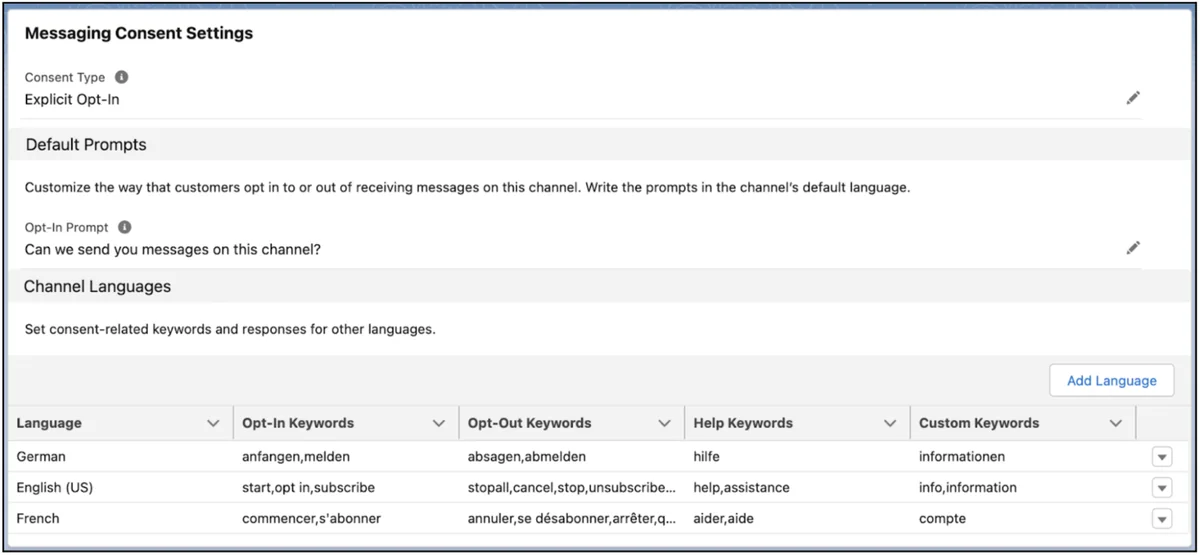
Messaging consent is channel-specific. Some channels imply consent when the customer starts the conversation, while SMS programs often require explicit opt-in and clear opt-out keywords. Salesforce lets you configure consent keywords, opt-in prompts, and automated responses for supported messaging channels.
Salesforce Help: customize the Messaging opt-in and opt-out experience
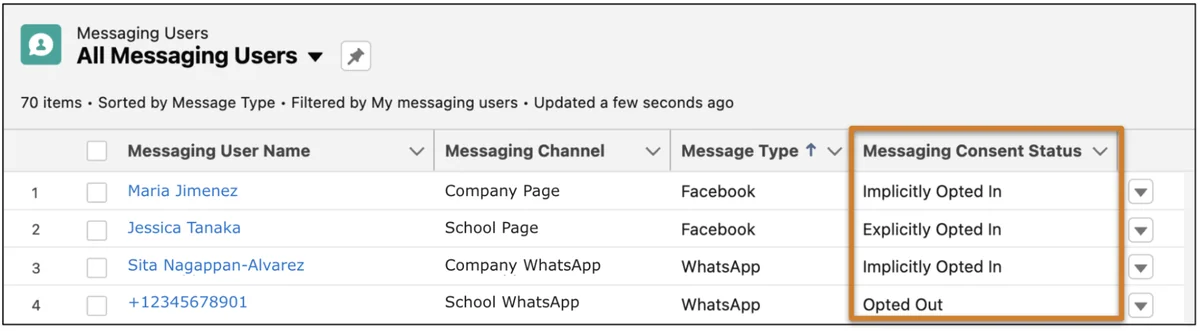
Consent design decisions
- Inbound support: Decide whether a customer-initiated message is enough to allow a support reply.
- Outbound notifications: Use stricter consent when agents or automation initiate the message.
- Opt-out language: Use short words that customers understand, such as STOP, and test the response.
- Multiple languages: Configure localized prompts where the same phone number or channel serves more than one region.
- Auditability: Keep evidence of consent changes where legal, compliance, or industry policies require it.
Automation, Bots, and Flow in Digital Engagement
Digital Engagement becomes useful when routing and automation reduce manual triage. Salesforce Flow can create or update records, route sessions, call invocable actions, and branch based on customer input. Bots can answer common questions, collect context, and hand the customer to an agent with the session history.
Salesforce Help states that each active Digital Engagement user receives 25 Einstein Bots conversations per month, with additional bot subscriptions available. Confirm bot entitlements in your contract before routing high-volume channels through a bot.
Salesforce Help: Einstein Bots requirements
Where Flow fits
Use Flow for deterministic decisions that the business can explain: language routing, product family routing, VIP customer routing, after-hours case creation, and escalation. Keep the routing flow small enough that admins can debug it. If the flow includes many decisions, split the design into subflows and document fallback outcomes.
Where bots fit
Use bots for repeatable questions and structured data collection. Do not use a bot to hide the agent queue when customers need human support. A good bot path collects information the agent would otherwise ask for: order number, product, issue type, language, and urgency. That context should appear on the session, case, or related record before handoff.
Reporting and Data Model for Salesforce Messaging
The core object for many reports is MessagingSession, which represents a session on a Messaging channel and is available in API version 47.0 and later. Related objects include MessagingChannel and MessagingEndUser. For message-level events, review the Messaging object model because not every conversation entry behaves like a standard Salesforce record.
Salesforce Developer Docs: MessagingSession object reference
SOQL example for recent messaging sessions
This SOQL query is safe for a report prototype because it limits rows, filters by date, and avoids querying message bodies. Run it in a sandbox first and add fields only after checking field-level security and object access for the user profile or permission set.
SELECT Id, Name, Status, CreatedDate, LastModifiedDate, OwnerId, MessagingChannelId, MessagingEndUserId FROM MessagingSession WHERE CreatedDate = LAST_N_DAYS:7 ORDER BY CreatedDate DESC LIMIT 50Apex example for an LWC dashboard tile
The following Apex class returns recent MessagingSession rows for a Lightning Web Component dashboard tile. It uses a fixed date filter, caps the limit, performs one SOQL query, and avoids SOQL inside loops. The class compiles only in orgs where MessagingSession is available. For production deployment, add a test class and keep overall Apex coverage at or above the Salesforce 75% minimum.
public with sharing class MessagingSessionDashboardService { public class SessionRow { @AuraEnabled public Id sessionId; @AuraEnabled public String sessionName; @AuraEnabled public String status; @AuraEnabled public Datetime createdDate; @AuraEnabled public Id ownerId; } @AuraEnabled(cacheable=true) public static List<SessionRow> getRecentSessions(Integer requestedLimit) { Integer limitSize = requestedLimit == null ? 25 : requestedLimit; if (limitSize < 1 || limitSize > 100) { limitSize = 25; } List<MessagingSession> sessions = [SELECT Id, Name, Status, CreatedDate, OwnerId FROM MessagingSession WHERE CreatedDate = LAST_N_DAYS:7 WITH USER_MODE ORDER BY CreatedDate DESC LIMIT :limitSize]; List<SessionRow> rows = new List<SessionRow>(); for (MessagingSession sessionRecord : sessions) { SessionRow row = new SessionRow(); row.sessionId = sessionRecord.Id; row.sessionName = sessionRecord.Name; row.status = String.valueOf(sessionRecord.Status); row.createdDate = sessionRecord.CreatedDate; row.ownerId = sessionRecord.OwnerId; rows.add(row); } return rows; } }Governor limit note: keep dashboard queries selective. Avoid loading all sessions for a month into Apex if a standard report, CRM Analytics dataset, or aggregate SOQL query can answer the question. For high-volume contact centers, design reporting around time windows, indexed filters where available, and scheduled extracts.
Channel Menu for Customer Entry Points
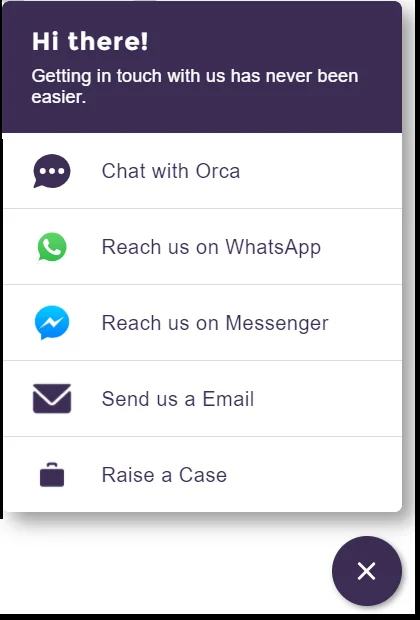
A channel menu lets a website or Experience Cloud site show several contact options in one place, such as Enhanced Web Chat, WhatsApp, SMS, Apple Messages for Business, a phone number, or a web URL. This is useful when one customer segment prefers web messaging but another needs WhatsApp or phone support.
Salesforce Help: add a channel menu to your site
Best Practices for Digital Engagement Implementation
Start with one high-value channel
Choose the channel where customer demand and business ownership are clear. A common rollout pattern is to launch Enhanced Web Chat for authenticated service, then add WhatsApp or SMS after consent, templates, and message credits are approved.
Design routing before automation
Automation should support the routing model, not replace it. Define queues, skills, capacity, and escalation paths first. Then use Flow and bots to collect fields and route the session to the correct owner.
Separate service messages from marketing messages
Digital Engagement is service-oriented. If the team wants bulk campaigns, marketing journeys, or promotional SMS, verify whether the requirement belongs in Marketing Cloud, Data Cloud activation, or another approved tool. Mixing service support and promotional messaging can create consent and reporting issues.
Test inactive and after-hours behavior
Messaging channels do not all behave like phone calls. A customer can reply later, reopen a conversation, or send a message while agents are offline. Test what happens when the assigned agent is unavailable, the queue is closed, the bot fails, or the customer opts out.
Protect customer data
Agents should see only the records they need. Use profiles, permission sets, sharing rules, field-level security, and record access tests. If messages can contain payment data, health details, identity documents, or other regulated information, align retention, masking, file sharing, and deletion processes before launch.
Common Errors with Digital Engagement
| Problem | Likely cause | Fix |
|---|---|---|
| Agent cannot accept a message | Missing permission set, presence status, capacity, or queue membership | Check user license, permission set assignment, Omni-Channel status, and queue membership with a non-admin test user. |
| Customer can start a session but no agent receives it | Routing configuration does not map the Messaging Session work item to an available queue or flow | Review the service channel, routing configuration, queue, and routing flow debug logs. |
| Bot cannot hand off correctly | Missing handoff path, incomplete routing fields, or no online agents in the target queue | Add a fallback queue and test handoff with agents online, offline, and at capacity. |
| Outbound SMS or WhatsApp fails | Consent, template, phone format, message credit, or channel activation issue | Validate opt-in status, template approval, phone number format, and channel activation checklist. |
| Reports do not match agent experience | Report filters count sessions, while managers expect individual messages, cases, or bot turns | Define metrics before building dashboards and document whether each chart counts sessions, messages, cases, or bot conversations. |
Related Salesforce Tutorials
- Salesforce Service Cloud setup and features
- Salesforce Omni-Channel routing configuration
- Salesforce Flow automation for service processes
- Apex programming examples for Salesforce developers
- Salesforce Einstein Bots setup for service teams
Official Salesforce References
- Salesforce Digital Engagement pricing
- Supported editions for Messaging
- Messaging consent settings
- MessagingSession object reference
- Trailhead: Expand Service Cloud with Digital Engagement
Frequently Asked Questions
What is Salesforce Digital Engagement?
Salesforce Digital Engagement is a Service Cloud capability for supporting customers through digital channels such as web messaging, in-app messaging, SMS, WhatsApp, Facebook Messenger, Apple Messages for Business, and LINE. It works with Salesforce Messaging and Omni-Channel so conversations can be routed to agents, bots, or queues.
How much does Salesforce Digital Engagement cost?
Salesforce’s public digital channels pricing page lists Digital Engagement at USD 75 per user per month as of June 2026. Digital engagement pricing Salesforce teams receive in a quote can vary because edition, contract terms, region, message credits, and bot usage can change the final cost.
What is the difference between Digital Engagement, Salesforce Messaging, and Omni-Channel?
Digital Engagement is the licensing and product area for digital service channels. Salesforce Messaging provides the channel and session experience for customer messages. Omni-Channel routes the resulting work to agents, queues, or routing flows based on availability and routing rules.
Is Salesforce Chat still supported in 2026?
No. Salesforce retired Legacy Chat and Live Agent on February 14, 2026. New implementations should use Enhanced Chat and Salesforce Messaging instead of starting new Legacy Chat work.
Which Salesforce object stores messaging sessions?
The MessagingSession object represents a session on a Messaging channel and is available in API version 47.0 and later. Use it for session-level reporting, but review the Messaging object model before assuming message-level content is stored like a normal Salesforce object.
Do customers have to opt in before receiving messages?
It depends on the channel and use case. A customer-initiated support message can be treated differently from outbound SMS or WhatsApp notifications. Configure opt-in prompts, opt-out keywords, and automated responses for each Digital Engagement channel with legal and compliance review.
Can Digital Engagement use bots before routing to agents?
Yes. Bots can greet customers, collect context, answer repeat questions, and hand off the session to an agent. Keep bot paths short, route unresolved requests to a live queue, and monitor bot conversations because included entitlements and additional subscriptions affect cost.
What is digital-first team messaging in Salesforce service design?
Digital-first team messaging means the support team treats messaging channels as primary service work, not side conversations. In Salesforce, that requires clear ownership, Omni-Channel routing, agent capacity, consent handling, and reports that show whether customer messages are being resolved.