Einstein Activity Capture Setup and Reporting Guide
Einstein activity capture connects Salesforce with Microsoft or Google email and calendar accounts so eligible emails, events, and contacts can appear against the right CRM records. For admins, the design question is not only whether to capture activity. You must decide whether to sync email as Salesforce activity, how matching should work, and what data must be excluded for privacy.
This guide explains setup, reporting, Flow matching, storage, einstein email insights, and security checks for production Salesforce orgs. It is written for Salesforce admins, developers, and architects who need accurate activity data without creating storage or compliance problems.
What is Einstein Activity Capture?
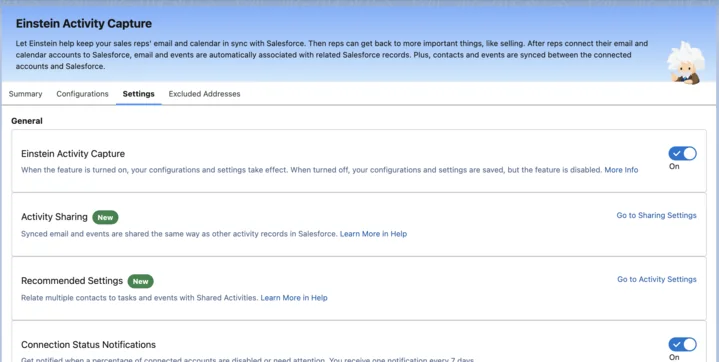
Einstein Activity Capture is a Salesforce feature that connects a user’s Microsoft or Google account with Salesforce and links eligible emails, calendar events, and contact data to records such as Leads, Contacts, Accounts, and Opportunities. Salesforce documents the feature as a way to sync Microsoft or Google activity with Salesforce records based on configuration, licensing, exclusions, and user access.
In enterprise orgs, the value is record context. A sales manager can open an Opportunity and see whether a meeting happened. A renewal team can see whether a customer replied. A support leader can confirm whether an escalation conversation exists before calling the account owner.
Do not enable einstein activity capture only because it is available. Decide which users are in scope, which domains are excluded, whether email content should be visible, and whether captured email should become Salesforce activity data for reporting and automation.
| Design decision | Why it matters |
|---|---|
| Connected provider | Determines whether Salesforce connects to Microsoft or Google email and calendar services. |
| User scope | Prevents unnecessary capture for teams that do not need CRM activity visibility. |
| Excluded addresses | Blocks internal domains, sensitive aliases, and regulated mailboxes from capture. |
| Sync Email as Salesforce Activity | Controls whether captured email becomes standard Salesforce record data. |
| Record matching | Controls which Leads, Contacts, Accounts, and Opportunities receive the activity. |
Related SalesforceTutorial references: Salesforce activities and task object basics, Salesforce EmailMessage object examples, and Salesforce Flow record matching patterns.
How does Einstein Activity Capture sync email and events?
Einstein Activity Capture reads eligible activity from connected mailboxes and calendars, then relates that activity to Salesforce records. The exact data model depends on configuration. Older captured-email behavior can differ from newer record-based email sync, so admins must confirm the active setup before building reports, APIs, or automations.
How to sync email as salesforce activity
When sync email as salesforce activity is enabled, Salesforce documents that captured email data is stored as Salesforce records, including EmailMessage and Task records, and is associated with related users, contacts, and leads. This change matters because standard records can be used in reports, APIs, record access controls, retention jobs, and analytics pipelines.
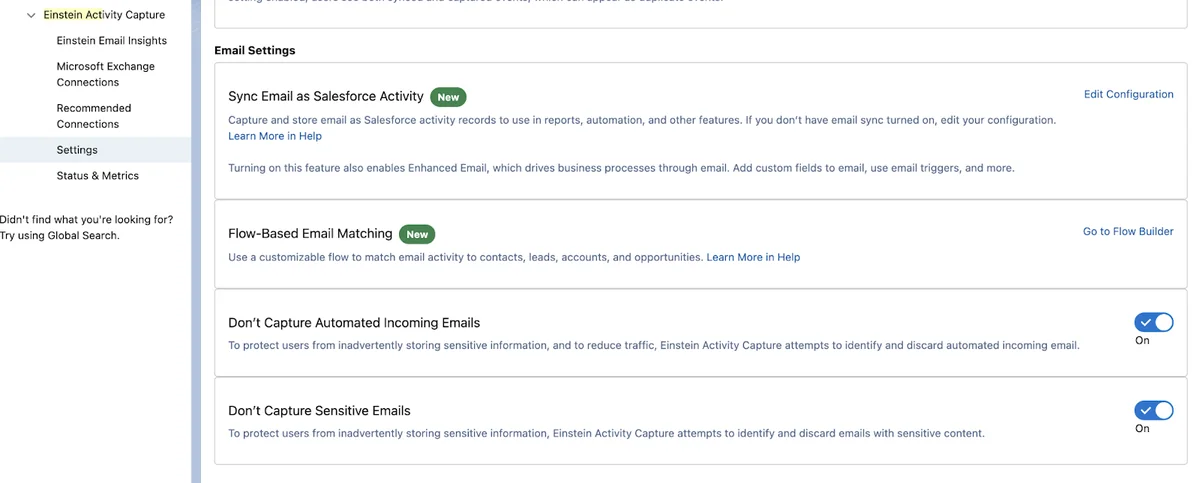
The Flow actions used for email matching are documented by Salesforce for Summer ’25, API version 64.0. If you package or deploy matching logic, confirm the target org release and API version before moving changes to production.
Email einstein terminology in Salesforce
The phrase email einstein is often used loosely, but implementation teams should use exact feature names. Einstein Activity Capture captures or syncs activity. Einstein Email Insights shows email-derived sales signals. Salesforce Inbox, Sales Engagement, and Sales Cloud Einstein can affect licensing and the user experience. Mixing these names creates wrong permission assignments and incomplete test plans.
Events and contacts are not the same as email
Calendar event sync has its own matching and duplicate behavior. Contact sync also has separate rules and data-quality impact. Test events, contacts, and email separately, especially in orgs with duplicate Contacts, Person Accounts, partner users, private events, or internal-only meetings.
How to set up Einstein Activity Capture
Start with a pilot. Use a sandbox, a small user group, real test mailboxes, and a written exclusion list. A large production rollout without privacy and storage review creates cleanup work later.
Prerequisites for admins
- Confirm Salesforce edition, user licenses, and required permission sets.
- Confirm whether the org uses Microsoft 365 or Google Workspace.
- Choose the authentication model, such as user-level connection or an admin-managed approach where supported.
- Prepare excluded domains and addresses before users connect mailboxes.
- Decide whether to enable sync email as salesforce activity during the first rollout or after the pilot.
- Prepare Lightning record pages, Activity Timeline filters, report folders, and data retention rules.
Admin configuration path

- From Setup, search for Einstein Activity Capture.
- Connect the email and calendar service following Salesforce Help.
- Create a configuration for the pilot group.
- Select which data types are captured or synced: emails, events, contacts, or the approved subset.
- Add users or profiles to the configuration.
- Assign the required Einstein Activity Capture permission set. Configuration membership alone is not enough.
- Add excluded addresses and domains.
- Enable sync email as salesforce activity only after reporting, security, and storage behavior are approved.
- Ask users to connect their email and calendar accounts if the selected authentication model requires it.
User connection and privacy settings
Users may need to connect their mailbox from personal settings. Train them on what is captured, what is excluded, and how privacy options work. Users should not learn about privacy controls only after sensitive content appears on a customer record.

For acceptance testing, verify these scenarios: an email to a matched Contact appears on the correct record, an internal-domain email is excluded, a customer event appears as expected, a header-only email hides body text, and a report user sees only records allowed by sharing and field-level security.
How do Einstein Email Insights work?

Einstein Email Insights is related to activity capture but it is not the same feature. After admins enable it, Salesforce can display email-derived sales context on records and activity timelines. Salesforce also supports custom insights based on keywords, with official documentation stating that an org can have up to 10 active custom insights.
Einstein email insights for activity timeline signals
Use einstein email insights when a seller needs a clear signal, not another raw email. A renewal team might track cancellation wording. A sales team might track procurement or budget approval language. A partner team might track reseller intent. Keep custom keywords narrow. Broad keywords create false positives and train users to ignore the insight panel.
| Insight pattern | Good use | Risk |
|---|---|---|
| Follow-up commitment | Detect language that indicates a promised next step. | Generic phrases create noise. |
| Contract or procurement | Surface legal review, purchase order, or security questionnaire language. | Sensitive content may require field and record access review. |
| Customer risk | Highlight cancellation, delay, or escalation language. | An insight without an owner does not create accountability. |
How to customize Einstein Activity Capture record matching
Record matching decides where captured email appears. In a simple org, default matching may be enough. In an enterprise org with partner accounts, duplicate contacts, person accounts, shared mailboxes, or regional account ownership, matching logic needs testing.
Flow matching for sync email as salesforce activity
For sync email as salesforce activity, Salesforce documents Flow-based email matching. The matching process reviews email addresses such as From, To, and CC, then relates activity to users, contacts, leads, accounts, opportunities, or other records according to the matching logic. Treat matching as production logic, not a cosmetic setting.
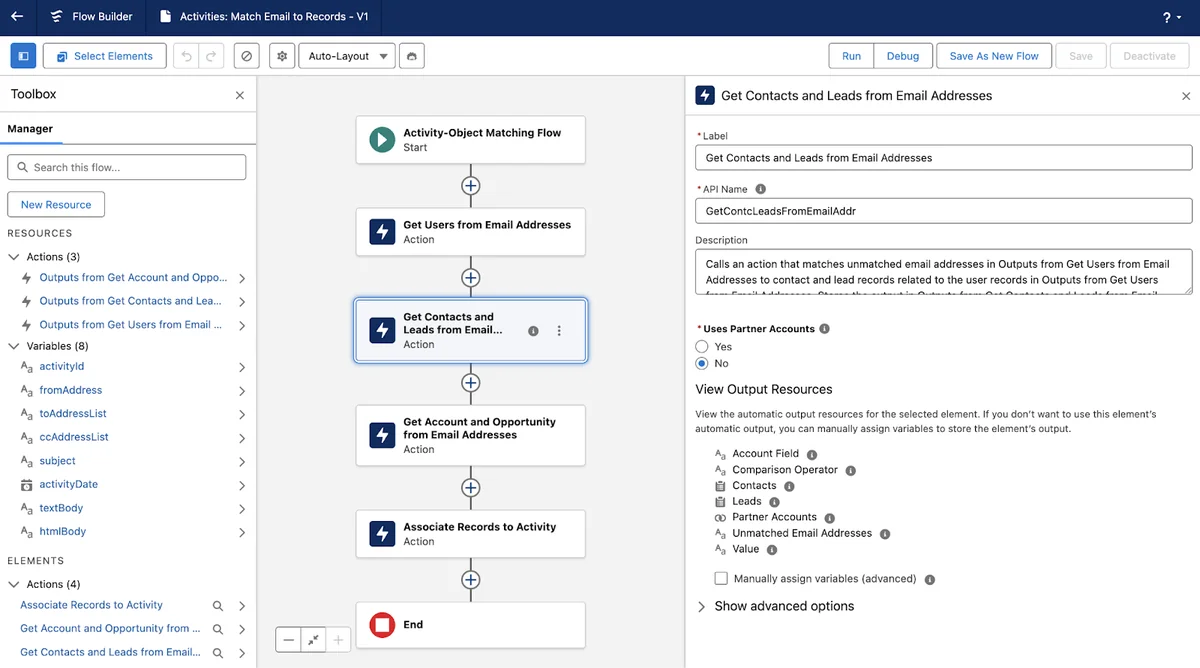
A useful matching rule is specific: relate a customer email to the open renewal Opportunity only when the Contact is active and the Opportunity is in a renewal stage. A weak rule is vague: match emails better. Write the rule in plain language before changing Flow.
| Scenario | Expected result |
|---|---|
| One Contact, one open Opportunity | Email relates to the Contact, Account, and approved Opportunity. |
| Duplicate Contacts with same email | Flow follows your duplicate-handling rule or avoids an unsafe match. |
| Internal alias | Email is excluded or not related based on exclusion settings. |
| Partner-managed account | Email relates only when partner criteria pass. |
| No matching Lead or Contact | Email remains unmatched or enters a data-quality review process. |
How to report on captured email activity
Reporting is where many einstein activity capture projects succeed or fail. With sync email as salesforce activity, captured email can be available through standard records such as EmailMessage and Task. That makes reports, SOQL, API extraction, and dashboards more practical than older captured-email behavior that did not create normal Salesforce database records.
Report design options
| Need | Approach | Check |
|---|---|---|
| Sales activity by account | Use activity report types and filter by email activity. | Confirm captured emails are included. |
| Email volume by team | Use EmailMessage or activity data where available. | Define whether owner means sender, record owner, or activity owner. |
| Insight follow-up | Use insight reporting where available or create a process-owned task. | Insights alone do not assign work. |
| Storage monitoring | Track EmailMessage and Task growth by month. | Retention must be approved by compliance. |
SOQL examples for EmailMessage reporting
Run these examples in a sandbox first and compare fields with the official EmailMessage and Task object references. Keep filters selective to avoid governor and query performance issues.
SELECT Id, Subject, FromAddress, ToAddress, MessageDate, ActivityId, RelatedToId FROM EmailMessage WHERE RelatedToId = '001000000000000AAA' ORDER BY MessageDate DESC LIMIT 100SELECT CALENDAR_YEAR(MessageDate) calendarYear, CALENDAR_MONTH(MessageDate) calendarMonth, COUNT(Id) emailCount FROM EmailMessage WHERE MessageDate = THIS_YEAR GROUP BY CALENDAR_YEAR(MessageDate), CALENDAR_MONTH(MessageDate) ORDER BY CALENDAR_YEAR(MessageDate), CALENDAR_MONTH(MessageDate)Production-safe Apex read example
This Apex example reads recent EmailMessage rows for a Lightning component. It does not insert or update captured email. It validates input, limits rows, uses with sharing, and strips inaccessible fields before returning data. Add a test class before deployment; Salesforce requires at least 75% Apex test coverage for production deployments.
public with sharing class EacEmailActivityReporter { public class EmailActivityRow { @AuraEnabled public Id emailMessageId; @AuraEnabled public String subject; @AuraEnabled public String fromAddress; @AuraEnabled public String toAddress; @AuraEnabled public Datetime messageDate; @AuraEnabled public Id activityId; public EmailActivityRow(EmailMessage message) { emailMessageId = message.Id; subject = message.Subject; fromAddress = message.FromAddress; toAddress = message.ToAddress; messageDate = message.MessageDate; activityId = message.ActivityId; } } @AuraEnabled(cacheable=true) public static List<EmailActivityRow> recentEmails(Id relatedRecordId, Integer limitSize) { if (relatedRecordId == null) { throw new AuraHandledException('A related record Id is required.'); } Integer rowsToReturn = (limitSize == null || limitSize < 1 || limitSize > 200) ? 50 : limitSize; List<EmailMessage> messages = [SELECT Id, Subject, FromAddress, ToAddress, MessageDate, ActivityId, RelatedToId FROM EmailMessage WHERE RelatedToId = :relatedRecordId ORDER BY MessageDate DESC LIMIT :rowsToReturn]; SObjectAccessDecision decision = Security.stripInaccessible(AccessType.READABLE, messages); List<EmailActivityRow> rows = new List<EmailActivityRow>(); for (SObject recordValue : decision.getRecords()) { rows.add(new EmailActivityRow((EmailMessage) recordValue)); } return rows; } }Security, storage, and Salesforce documentation checks
Security review for einstein activity capture should happen before rollout. Email can contain pricing, legal positions, HR content, credentials, personal data, and regulated information. Capture only what the business needs.
Salesforce einstein activity capture email event data aws security documentation
Teams search for salesforce einstein activity capture email event data aws security documentation because they need to know where captured data lives. The answer depends on feature mode and data type. Salesforce documents data storage and usage for captured activity data, including Salesforce AWS infrastructure in some activity capture contexts, and it documents that Sync Email as Salesforce Activity stores captured email as Salesforce records. Use the official storage and Sync Email as Salesforce Activity pages as the source of truth for security review.
For a production approval, attach official Salesforce documentation links, list enabled settings, list excluded domains, and state who can read EmailMessage, Task, Event, and insight data. Do not approve a design from screenshots alone.
Header-only email capture and privacy
Header-only capture is useful when the business needs evidence that communication happened but should not store subject and body text. It reduces exposure, but it does not replace a data classification policy or retention policy.
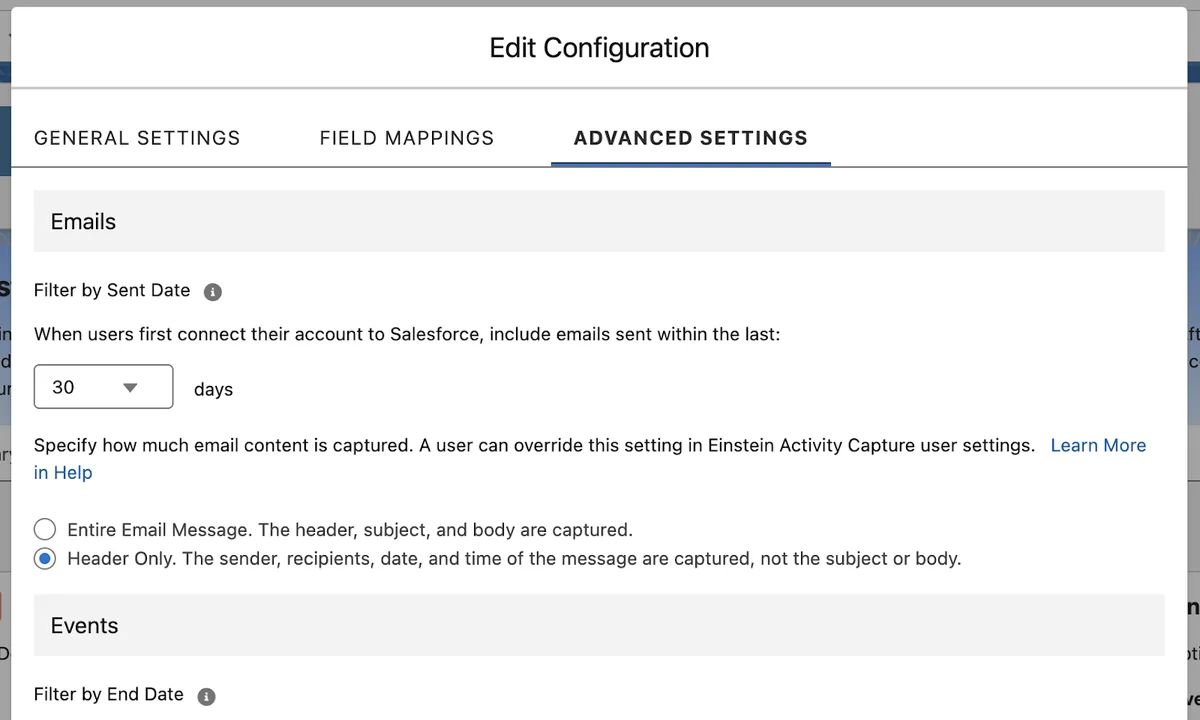
Security checklist
- Add internal domains and sensitive aliases to excluded addresses before enabling users.
- Assign only the required permission sets.
- Validate sharing and field-level security on Accounts, Contacts, Leads, Opportunities, Tasks, Events, and EmailMessage.
- Review Apex, Flow, reports, and API integrations that read captured email data.
- Define retention before storage grows.
- Test private emails, header-only capture, duplicate contacts, partner records, and excluded domains in a sandbox.
Common errors with Einstein Activity Capture
Emails do not appear on the record
- The sender or recipient is excluded.
- The user is not assigned the required permission set.
- The user is not included in the active configuration.
- The mailbox connection expired or was not completed.
- No Lead, Contact, Account, or Opportunity matched the email participants.
- The report expects record-based sync, but the org is not using that mode.
Reports show fewer emails than the timeline
Confirm whether the org uses sync email as salesforce activity. Also review report type design, field-level security, sharing, date filters, and activity subtype filters.
Captured email creates storage pressure
Record-based sync improves reporting and API access, but it creates lifecycle work. Track EmailMessage and Task growth monthly, and apply retention rules only after compliance approval.
Frequently Asked Questions
What does Einstein Activity Capture do in Salesforce?
Einstein Activity Capture connects a user’s Microsoft or Google account to Salesforce and brings eligible emails, events, and contacts into the CRM experience based on the admin configuration. With Sync Email as Salesforce Activity, captured email data can be stored as Salesforce activity records for reporting, automation, and standard record access behavior.
Does Einstein Activity Capture create EmailMessage records?
Yes, when Sync Email as Salesforce Activity is enabled, Einstein Activity Capture stores captured email data as Salesforce records, including EmailMessage and associated activity data. Older configurations can behave differently, so admins should confirm the active configuration before building reports or integrations.
Where is Einstein Activity Capture email and event data stored?
Storage depends on the Einstein Activity Capture mode and the type of data. Salesforce documentation explains data storage and retention for captured activity data, including cases where activity data uses Salesforce AWS infrastructure and cases where Sync Email as Salesforce Activity stores email as Salesforce records.
Can I customize how captured emails match to Salesforce records?
Yes. For Sync Email as Salesforce Activity, Salesforce provides Flow-based email matching so admins can review and extend how emails relate to users, contacts, leads, accounts, opportunities, and other records. Test matching changes in a sandbox before using them in production.
How do I report on Einstein Activity Capture emails?
For configurations using Sync Email as Salesforce Activity, use standard activity reports, custom report types based on EmailMessage, and related activity objects where they fit the business question. For older Activity 360-style reporting, review current Salesforce reporting considerations.
Is Einstein Email Insights the same as Einstein Activity Capture?
No. Einstein Activity Capture handles email, event, and contact capture or sync. Einstein Email Insights analyzes email content to show sales context such as standard or custom insights when the feature is enabled and licensed for the user.