Customer 360 is the Salesforce approach for giving teams a shared customer view across CRM apps, Data 360, integration, automation, analytics, and activation. In practice, it means a service agent, seller, marketer, commerce team, and AI agent can work from governed customer data instead of disconnected records in separate systems.
Salesforce documentation now uses the name Data 360 for the product many teams knew as Data Cloud. During the transition, some screens, package names, or older implementation notes may still use Data Cloud terminology, so confirm names against the current Salesforce Help and Developer documentation before you write runbooks.
For architects, customer 360 is not one checkbox in Setup. It is an operating model: choose source systems, map data to a common model, resolve identities, secure access, expose the profile where users work, and monitor data quality. Salesforce describes Customer 360 as the connected portfolio of apps for sales, service, marketing, commerce, IT, industries, partners, and more; Data 360 is often the data layer used when an enterprise needs profile unification across many sources.
What is customer 360?
Customer 360 is a customer-data and application architecture where each department can understand the same customer from its own workflow. Sales needs opportunities, quotes, account hierarchy, and buying committee context. Service needs cases, entitlements, assets, contact preferences, and prior escalations. Marketing needs consent, segmentation, engagement, and activation status. Commerce needs carts, orders, returns, and product behavior.
The value comes from linking these views without forcing every system to become the system of record for every field. In enterprise orgs, a clean design usually separates source ownership from consumption:
| Layer | What it owns | Salesforce example | Design risk |
|---|---|---|---|
| Operational CRM | Records used by sellers and service teams | Account, Contact, Lead, Case, Opportunity, Asset | Duplicate contacts and account hierarchy gaps |
| Data unification | Profiles, identity rules, calculated insights, consent, source links | Data 360 data streams, data model objects, identity resolution | Weak matching rules or unmanaged data spaces |
| Integration | Movement between Salesforce, ERP, billing, product, and web systems | MuleSoft, REST APIs, Bulk APIs, change events, external services | Point-to-point sync without ownership rules |
| Activation | Actions based on unified profiles or segments | Data actions, Marketing Cloud, Service Cloud, Flow, Agentforce grounding | Sending actions before consent and data quality checks |
Salesforce’s current Data 360 documentation describes an architecture for ingesting, processing, unifying, and activating customer data. That wording matters because customer 360 should produce usable action, not only a dashboard. See the official Data 360 architecture guide at Salesforce Developers: Data 360 Architecture.
How customer 360 works in Salesforce
A working customer 360 design normally follows six steps. Skip one step and the profile becomes either incomplete, insecure, or hard to trust.
- Define customer identity. Decide whether the main customer is an individual, household, business account, subscriber, member, patient, student, or partner.
- Choose systems of record. Assign field ownership. For example, billing status may belong to ERP, while service entitlement may belong to Service Cloud.
- Ingest data. Bring data into Salesforce CRM, Data 360, or an integration layer using supported connectors and APIs.
- Map to a common data model. Standardize names, contact points, engagement events, orders, and consent before matching.
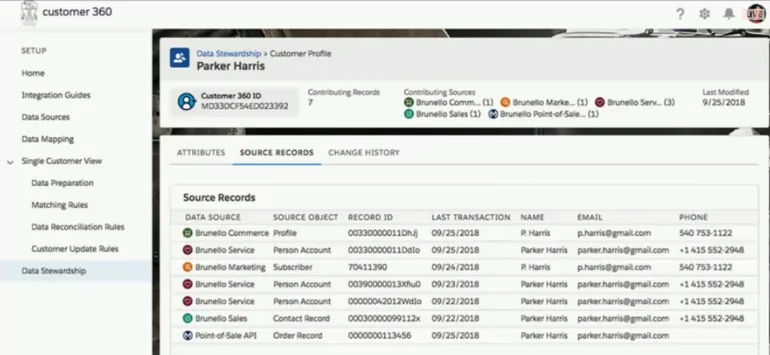
- Resolve identity. Use deterministic and rules-based matching to create unified profiles where appropriate.
- Expose and activate. Show the customer view in CRM, analytics, service consoles, flows, segments, or APIs.
Data 360 data streams are the connections and related data ingested into Data 360. Data spaces are logical partitions that help organize data for profile unification, insights, and marketing. In a multi-brand or multi-region org, data spaces can prevent teams from mixing profiles that must remain separated by business unit, geography, or consent policy.
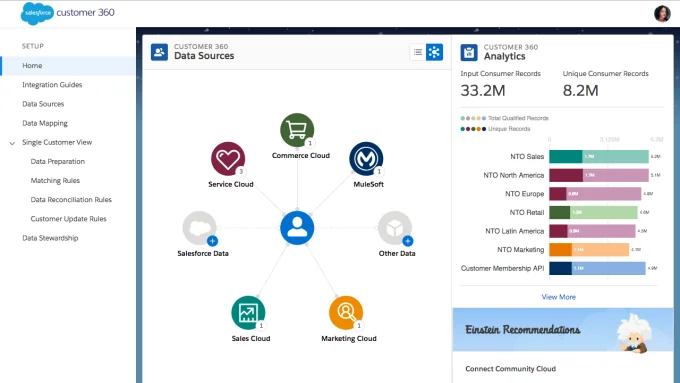
The image above fits the admin side of the design. Before users see the profile, someone must decide which source records can match, which fields win, which records stay separate, and which metrics prove that the rules are working.
What does salesforce c360 mean in an org?
The phrase salesforce c360 is often used as shorthand for the combined Salesforce architecture behind a unified customer view. In a small org, salesforce c360 may be a well-modeled Account and Contact structure with Service Cloud, flows, reports, and duplicate rules. In an enterprise org, salesforce c360 usually includes Data 360, identity resolution, integration middleware, consent management, analytics, and multiple clouds.
Do not treat the C360 program as a replacement for data governance. It gives you a framework, but your team still owns data definitions, stewardship, access rules, retention, and exception handling.
How the salesforce customer 360 platform fits Data 360
The salesforce customer 360 platform is the broader platform of Salesforce applications and shared services. Data 360 supports that platform when the organization needs data ingestion, common modeling, unified profiles, calculated insights, segmentation, and activation. Salesforce documentation states that Data 360 identity resolution generates unified profiles from source profile data stored in Data 360. Use the official Help topic at Salesforce Help: About Identity Resolution when you configure matching rules.
A practical rule: keep operational transactions in the system built to handle them, and bring the customer signals into Data 360 when users need a connected view. Do not copy every field into every cloud just because the field exists.
Customer 360 salesforce example for a service org
A customer 360 salesforce design for service might combine CRM contacts, orders from commerce, assets from an installed-base system, contract status from ERP, recent marketing journeys, and product telemetry. The service console can show a summary, while deeper history remains queryable through Data 360 or analytics.
For example, a service agent receives a case from a customer whose subscription renewal failed. Without customer 360, the agent opens CRM, billing, commerce, and marketing systems separately. With a governed customer 360 salesforce pattern, the case page can show account health, open invoices, active assets, recent web sessions, consent status, and the next best routing action without exposing fields the agent is not allowed to see.
Salesforce Customer 360 Platform architecture checklist
Use this checklist before you build. It prevents the common mistake of starting with a profile page before the data model is ready.
1. Define the canonical customer record
Start with a written definition. A B2B company might define the customer as Account plus related Contacts. A B2C company might define the customer as Individual with related contact points. A healthcare or public sector implementation may have more strict identity, consent, and retention requirements. The Salesforce Customer 360 Data Model on Trailhead explains how Data 360 standardizes data sources into data model objects; use it to align business terms before mapping fields.
2. Classify source systems
List each source and mark it as system of record, system of engagement, reference source, or derived source. In production projects, this table becomes part of the integration contract.
| Source | Typical data | Owner question | Customer 360 decision |
|---|---|---|---|
| Sales Cloud | Accounts, contacts, opportunities, activities | Who can create and merge contacts? | Use CRM as operational source for sales records. |
| Service Cloud | Cases, entitlements, assets, knowledge usage | Which case fields can marketing see? | Expose only useful support signals. |
| Commerce or order system | Orders, carts, returns, product events | Which order status is authoritative? | Bring summary and event history into the profile. |
| ERP or billing | Invoices, credit status, contract billing terms | Which fields are sensitive? | Use least-privilege access and avoid uncontrolled replication. |
| Marketing systems | Consent, engagement, campaign membership, journeys | Which consent record wins? | Keep consent traceable and auditable. |
3. Map fields before matching identities
Identity resolution fails when email, phone, address, name, and account fields are inconsistent or not normalized. Map source fields to standard Data 360 objects where possible. Use custom fields only when the business concept does not fit a standard object or field.
4. Design identity rules conservatively
A good identity rule balances false matches and missed matches. Matching only on email can break when families share email addresses or employees reuse shared inboxes. Matching on name and postal address can fail when addresses change. For regulated environments, review match confidence and manual review paths before activating downstream journeys.
5. Secure the view, not only the source
Customer 360 often combines data from systems with different access models. A user who can see a Contact in Sales Cloud should not automatically see billing risk, health details, or all marketing behavior. Use profiles, permission sets, permission set groups, sharing, data space permissions, and field-level security. In Apex, use user mode database operations or explicit CRUD/FLS checks for CRM data surfaced in custom components.
How to query customer 360 data safely
Data 360 supports SQL through Query API and Connect REST endpoints. Salesforce’s Data 360 SQL syntax guide recommends quoted identifiers because Data 360 table and column API names commonly include uppercase characters and suffixes. The exact object names in your org depend on your mapped data model, so confirm names in Data Explorer, Query Editor, or metadata before you deploy code.
The following Data 360 SQL pattern retrieves recent engagement events for unified individuals. Replace object and field API names with the names in your org.
SELECT
  "ssot__Individual__dlm"."ssot__Id__c" AS "UnifiedIndividualId",
  "ssot__Individual__dlm"."ssot__FirstName__c" AS "FirstName",
  "ssot__Individual__dlm"."ssot__LastName__c" AS "LastName",
  COUNT("ssot__EmailEngagement__dlm"."ssot__Id__c") AS "EmailEvents"
FROM "ssot__Individual__dlm"
LEFT JOIN "ssot__EmailEngagement__dlm"
  ON "ssot__EmailEngagement__dlm"."ssot__IndividualId__c" =
     "ssot__Individual__dlm"."ssot__Id__c"
WHERE "ssot__EmailEngagement__dlm"."ssot__EngagementDateTime__c" >= TIMESTAMP '2026-01-01 00:00:00'
GROUP BY
  "ssot__Individual__dlm"."ssot__Id__c",
  "ssot__Individual__dlm"."ssot__FirstName__c",
  "ssot__Individual__dlm"."ssot__LastName__c"
ORDER BY "EmailEvents" DESC
LIMIT 100;
Governor-limit warning: do not use a synchronous Apex request to pull a large profile history into a Lightning page. Query only the fields needed for the user action, paginate long results, and move heavy retrieval to asynchronous processing or analytics. The Data 360 Query API documentation describes asynchronous execution and pagination for larger result sets.
Apex pattern for CRM-side customer 360 components
Many customer 360 screens combine Data 360 insights with normal Salesforce CRM records. For CRM records, keep Apex bulk-safe and permission-aware. This Apex class returns recent contacts for an account and uses WITH USER_MODE so object permissions, field-level security, sharing, and restriction rules are enforced for the running user in supported API versions. Compile the class with the current org API version and test the behavior with users who have different access.
public with sharing class Customer360ContactService {
    @AuraEnabled(cacheable=true)
    public static List<Contact> getRecentContacts(Id accountId) {
        if (accountId == null) {
            return new List<Contact>();
        }

        return [
            SELECT Id, Name, Email, Phone, AccountId, LastModifiedDate
            FROM Contact
            WHERE AccountId = :accountId
            WITH USER_MODE
            ORDER BY LastModifiedDate DESC
            LIMIT 50
        ];
    }
}
If you query Data 360 data from Apex, check the current Salesforce Developers: Data 360 in Apex documentation. Salesforce documents support for SOQL queries against Data 360 data model objects using Database.QueryLocator or Apex for loops in API version 61.0 and later. Keep classes on a tested API version and review behavior after each seasonal upgrade.
Use this pattern for small CRM-side widgets, not for unbounded exports. For write operations, use user mode DML or service-layer checks. Test classes still need to create their own data, assign realistic permissions where needed, and meet Salesforce’s minimum 75% org-wide Apex coverage requirement before deployment.
Best practices for customer 360 implementation
Start with one journey, not every field
Pick a journey with a measurable problem: reduce service handle time, prevent duplicate outreach, show renewal risk, or personalize account outreach. Build the customer 360 view for that journey first. This keeps the team from spending months modeling fields that no user action requires.
Use a data contract for every source
A data contract should include field definitions, source ownership, refresh frequency, allowed values, retention rules, error handling, and privacy classification. It should also state whether Salesforce receives full records, deltas, event streams, or calculated summaries.
Separate matching from survivorship
Matching decides whether two source profiles represent the same customer. Survivorship decides which field value becomes preferred when sources disagree. Do not combine these decisions in a single spreadsheet. A customer can match across systems while still retaining source-specific values for audit or business reasons.
Make consent part of the profile
A unified profile should not mean every team can contact every person. Store consent and preference data where it can be enforced by marketing, service, and automation. When activation publishes a segment to another platform, verify that consent and suppression rules travel with the audience or are enforced at the target.
Design for Agentforce and AI grounding
AI agents need grounded, permission-aware, current data. A customer 360 profile can support Agentforce use cases only when the data has clear definitions, access controls, and freshness rules. Avoid feeding duplicate or untrusted fields into prompts, recommendations, or automated actions.
Common errors with customer 360 projects
| Error | Why it happens | How to fix it |
|---|---|---|
| Duplicate unified profiles | Identity rules are too narrow or source fields are dirty. | Normalize contact points, review ruleset processing results, and tune matching in stages. |
| Incorrect merged profile | Rules are too broad, such as shared email or weak name matching. | Add stronger identifiers and manual review for high-risk matches. |
| Users do not trust the profile | Field ownership and refresh timing are unclear. | Show source labels, last updated times, and steward-owned definitions. |
| Slow Lightning page | The component loads too much data synchronously. | Use summary fields, cacheable Apex for CRM records, pagination, and async processing for large queries. |
| Security review findings | Apex or LWC exposes fields without CRUD/FLS enforcement. | Use user mode database operations, explicit sharing declarations, and negative permission tests. |
| Marketing activation errors | Segments were published without consent or suppression checks. | Make consent part of segment criteria and validate the target’s enforcement model. |
When customer 360 is not enough by itself
A unified customer architecture does not remove the need for master data management, data quality operations, integration monitoring, or security reviews. It also does not make every Salesforce cloud share the same data model automatically. Some orgs still need MuleSoft for orchestration, an ERP master for financial data, a warehouse for regulatory reporting, or Tableau for analytics that exceed the CRM use case.
Use Salesforce data migration planning when source quality is the main blocker. Use a Salesforce API integration pattern when data movement is the main blocker. Use Salesforce Flow automation only after the data fields and access rules are stable. For support use cases, align the design with your Service Cloud implementation. For audit-heavy orgs, add Salesforce Event Monitoring to your governance plan.
Customer 360 deployment checklist
- Business scope: Name the journey, user persona, and decision the view must support.
- Data model: Map source fields to CRM objects, Data 360 objects, or integration payloads.
- Identity: Document matching keys, confidence rules, exclusions, and manual review steps.
- Security: Validate OWD, sharing, permission sets, field-level security, data spaces, and data classification.
- Performance: Set limits for page load size, query rows, cache strategy, and async processing.
- Testing: Test duplicate records, missing contact points, partial consent, restricted users, high-volume accounts, and API failures.
- Operations: Monitor ingestion failures, identity resolution results, activation status, and user feedback.
In production, the best implementations are not the ones with the most fields. They are the ones where users know what the profile means, which source owns each value, and which action they should take next.
Frequently Asked Questions
What is customer 360 in Salesforce?
Customer 360 in Salesforce is a connected customer view across Salesforce apps, data, integration, analytics, and activation. It can be simple, such as Sales Cloud and Service Cloud sharing clean Account and Contact data, or complex, such as Data 360 unifying customer profiles from CRM, commerce, billing, web, and marketing sources.
Is salesforce c360 the same as Data 360?
No. Salesforce c360 is a common shorthand for the broader Customer 360 architecture. Data 360 is the Salesforce data layer used for ingestion, modeling, identity resolution, insights, and activation when a unified profile needs data from multiple systems.
What is included in the salesforce customer 360 platform?
The salesforce customer 360 platform includes Salesforce CRM applications, platform services, automation, analytics, integration, AI, and data services. The exact products depend on the org. A Sales Cloud-only company can still build a useful customer view, while an enterprise may add Service Cloud, Marketing Cloud, Commerce Cloud, MuleSoft, Tableau, Agentforce, and Data 360.
How does customer 360 salesforce help service teams?
A customer 360 salesforce design helps service teams by showing relevant context on the case or contact page, such as recent orders, entitlement status, open opportunities, previous escalations, assets, and communication preferences. The design must still enforce sharing, field-level security, and consent rules.
Do I need MuleSoft for customer 360?
You do not always need MuleSoft for customer 360. Small orgs may use native Salesforce connectors, Flow, external services, or standard APIs. MuleSoft becomes useful when the architecture needs API-led integration, transformation, orchestration, reuse across systems, or enterprise monitoring.
What is the biggest risk in a customer 360 project?
The biggest risk is trusting a unified profile without clear source ownership, identity rules, and access control. A profile that merges the wrong people or exposes restricted fields can create operational and compliance problems. Start with data contracts, conservative matching rules, and permission testing.
Official Salesforce references