Flow to you is not an official Salesforce product name. In this guide, flow to you means the Salesforce Flow changes that affect your org, users, deployments, and support process in Summer ’26. The main areas to review are Decision date operators, Send Email template references, Screen Flow Data Tables, Agentforce beta features, scheduled flow batching, validation, and fault-path maintenance.
What does flow to you mean in Salesforce Flow?
Salesforce documents the product as Salesforce Flow and Flow Builder. The phrase flow to you is best treated as a practical release-review lens: what changed, what needs testing, and what should not move to production without regression evidence. Salesforce Summer ’26 uses API Version 67.0, so admins and developers should test critical automations in a preview or upgraded sandbox before activating new flow versions. See the official Salesforce Summer ’26 Release Notes and Build Flows with Flow Builder on Trailhead.
In enterprise orgs, a flow to you review should answer four questions: which users run the flow, which records the flow reads or updates, which metadata must deploy with it, and how the support team will troubleshoot failures after activation.
Flow to you checklist for Summer ’26 Flow changes
| Flow area | What changed | Where to test it |
|---|---|---|
| Decision logic | Date-focused operators reduce formula-only routing for simple date checks. | Renewals, SLA reminders, anniversary logic, and due-date paths. |
| Send Email action | Action Version 3.0.1 or later can preserve email template references across environments. | Sandbox-to-production deployments that include Lightning email templates. |
| Screen Flow Data Table | Lookup columns can show related record names and open related records. | Service console screens, intake flows, and guided selling flows. |
| Agentforce for Flow | Salesforce labels Agentforce for Flow and natural-language screen flow updates as Beta in Summer ’26 materials. | Sandbox-only flow authoring and assisted maintenance. |
| Scheduled flows | Batching gives builders more control over heavy scheduled processing. | Nightly updates, renewals, cleanup jobs, and high-volume record scans. |
| Canvas maintenance | Validation cards and collapsible fault paths improve builder review. | Large flows with multiple paths and shared error handling. |
Use this flow to you checklist during release readiness. It separates runtime behavior from builder convenience, which helps architects decide what needs formal testing.
How to use date Decision logic in a flow to you review

A flow to you review should look for old date formulas that now have clearer Decision operators. For example, a renewal flow can route an Opportunity when CloseDate is today or this month, instead of using multiple formula resources. Review the official Flow condition operators documentation before replacing existing logic.
Decisionlogic com and Salesforce Decision elements are different things
The phrase decisionlogic com is not a Salesforce Flow feature, metadata type, or Salesforce namespace. If your org calls an external decisioning system such as decisionlogic com, keep that call in a named action or subflow. Native branching in Salesforce should use a Decision element, documented operators, and clear outcome names.
Decision: Renewal Date Window
Outcome: Due Today
Resource: {!$Record.CloseDate}
Operator: Is Today

Outcome: Due This Month
Resource: {!$Record.CloseDate}
Operator: Is This Month

Default Outcome: No Date Action
Test Date and DateTime fields separately. A Date field stores a calendar date. A DateTime value also includes time and time zone conversion, so a rule that works for one user near midnight might not behave the same for another user in a different region.
How to keep Send Email templates stable in a flow to you deployment
A flow to you deployment check must include Send Email actions. Earlier flow designs often broke after deployment because the email template record ID was different in sandbox and production. In Summer ’26, Salesforce documents a persistent template-reference path when the Send Email action uses the required action version. Review the official Send Email action reference before changing production automation.

- Create or deploy the Lightning email template before the flow depends on it.
- Open the Send Email action in Flow Builder.
- Verify Action Version 3.0.1 or later where the new persistent-reference behavior is required.
- Select the template through the supported picker or reference, not by pasting a sandbox ID.
- Deploy the flow and template metadata together.
- Run the target-org test as the same user profile or permission set group that will run the automation.
Email actions still depend on deliverability, org-wide email addresses, recipient values, merge fields, and user access. Do not activate a flow only because deployment succeeds.
How to show related records in a flow to you Screen Flow
A flow to you screen review should include Data Table lookup columns. Summer ’26 allows lookup columns in Screen Flow Data Tables to show related record names and open related records, which reduces the need for formula URL workarounds that expose raw Salesforce IDs.
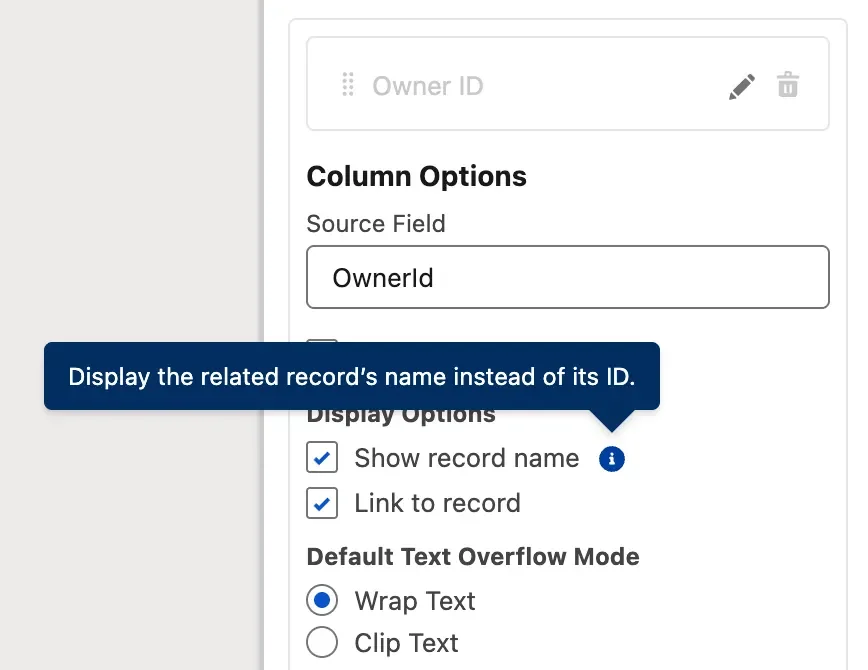
Tableau control visibility using value vs Flow component visibility
The query tableau control visibility using value usually describes a Tableau dashboard pattern, not a Salesforce Flow feature. In a Screen Flow, visibility comes from component visibility rules, variables, and screen component configuration. If Tableau content and Flow appear on the same Lightning page, document which layer controls each visible element.
- Store the user choice in a Boolean variable such as
varShowRelatedContacts. - Build the Data Table from a collection that already respects user access.
- Enable related record name and link behavior where available.
- Show the table only when
varShowRelatedContacts = true. - Test with a user who lacks access to one related record.
Flow screens do not grant record access by themselves. Verify OWD, sharing rules, permission sets, object permissions, and field-level security before exposing lookup links.
How to set flow runtime in a flow to you release plan
A flow to you release plan should include runtime version review. Summer ’26 ships API Version 67.0, but that does not mean every active flow should be saved again on release weekend. Save a new version only when the flow needs a new feature or a tested fix.
Set flow API version before using new elements
The phrase set flow is useful when it means set the flow version deliberately. In Setup, open the flow, review properties, save a new inactive version, debug the path, and activate only after approval. Source-driven teams should also review the official Flow Metadata API documentation.
<?xml version='1.0' encoding='UTF-8'?>
<Package xmlns='http://soap.sforce.com/2006/04/metadata'>
  <types>
    <members>Renewal_Date_Window</members>
    <name>Flow</name>
  </types>
  <version>67.0</version>
</Package>
A metadata version does not prove the automation is safe. A set flow review must still test start conditions, branches, record access, invocable actions, and fault paths. Related resources: Salesforce Flow examples for admins, Salesforce API version guide, and Salesforce release notes checklist.
How data moves through flow interviews in a flow to you review
A flow to you runtime review follows the path through flow interviews. A flow that passes debug with one record can fail when a data load updates hundreds of records or when a scheduled flow processes a large result set.
Through flow paths, collections, and scheduled batches
Use a through flow trace to follow Start, Get Records, Decision, Assignment, Update Records, subflow, action, and fault path. Keep DML outside loops where possible. For scheduled flows, use smaller batch sizes when each interview performs several queries, updates, or invocable actions. A smaller batch can reduce limit pressure, but it can also increase total run time.
Scheduled Flow Review
Start: Account
Frequency: Daily
Batch Size: 50
Path: Get Records - Decision - Assignment - Update Records - Fault Subflow
Do not place Create Records, Update Records, or Delete Records inside a loop unless a senior reviewer has confirmed there is no collection-based alternative.
How Agentforce features fit into a flow to you review
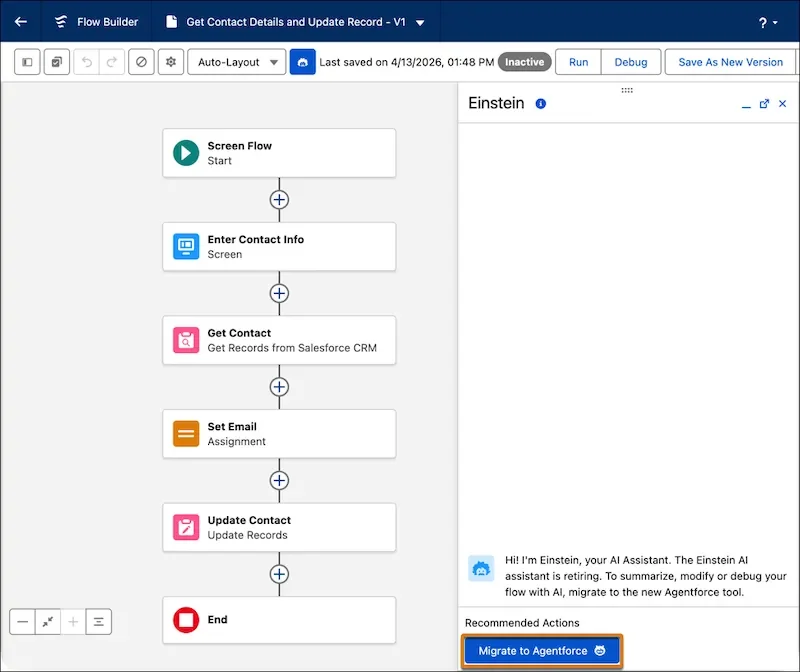
A flow to you AI review should be conservative. Salesforce lists Agentforce for Flow as Beta and natural-language screen flow updates as Beta in Summer ’26 materials. Treat these as authoring assistance, not as a replacement for solution design.
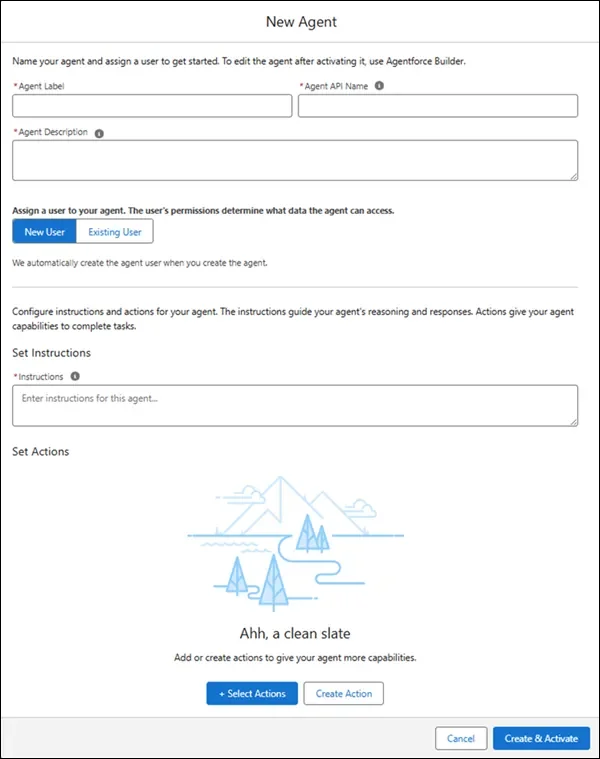
Use Agentforce-assisted edits in a sandbox first. Ask for a small change, inspect the canvas, run debug tests, and compare the metadata diff in source control. Regulated processes, payment actions, entitlement routing, and integrations need the same approval path as manual changes.
How to design Screen Flow choices in a flow to you build
A flow to you screen-design review should check whether each input is easy to scan and valid for mobile users. The Radio Button Group component works when the user must choose one short option. Use a picklist or choice lookup when the list is long or dynamic.

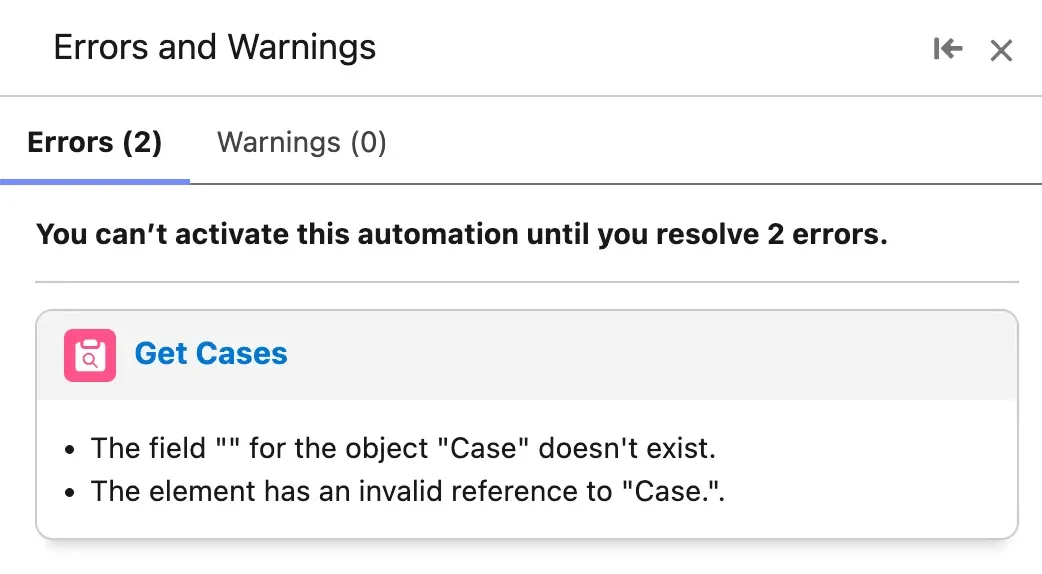
Validation belongs in the design, not at the end. Use required fields, input validation formulas, clear help text, and named outcomes. The redesigned validation panel can help builders find errors and warnings, but it does not prove that the flow meets the business requirement.
Best practices for fault handling in a flow to you design
A flow to you support review must include fault paths. Collapsible fault paths make the canvas easier to read, especially when several elements route to the same error-handling subflow. The feature changes the builder view only; it does not change transaction behavior or rollback rules.

- Create a shared autolaunched subflow named
Log Flow Error. - Pass flow name, element name, record ID, running user ID, and fault message.
- Show a plain user message in Screen Flows.
- Do not expose stack traces, tokens, or integration secrets.
- Alert admins through a queue, report subscription, or observability tool.
For flows that call Apex, review bulkified Apex patterns. Salesforce still requires at least 75% Apex code coverage for deployment, but production readiness should include assertions, negative tests, and user-mode security checks.
Common errors with flow to you release testing
| Error | Cause | Fix |
|---|---|---|
| Email template fails after deployment | The flow used an environment-specific reference or missing target metadata. | Use the supported Send Email action version, deploy template metadata, and test in the target org. |
| Data Table shows records users should not open | The source collection was not filtered for the running user. | Review sharing, CRUD, FLS, and collection filters. |
| Scheduled flow hits limits | Each interview performs too much work. | Reduce batch size, move DML outside loops, or move complex work to Batch Apex. |
| Beta Agentforce edit changes more than expected | The prompt was broad or element names were unclear. | Use smaller prompts and review the metadata diff. |
Implementation checklist for admins and architects
- Inventory active Screen, Record-Triggered, Scheduled, Autolaunched, and Platform Event-Triggered flows.
- Mark flows that use Send Email, Data Tables, scheduled starts, Apex actions, or integrations.
- Clone high-risk flows into inactive versions in a Summer ’26 sandbox.
- Test new Decision operators with Date and DateTime data.
- Deploy email templates and flows together.
- Run screen flows as users with different permission sets.
- Add structured fault logging for business-critical automations.
- Document how the flow to you change affects the active Flow version.
For related design work, read Salesforce Dynamic Forms visibility patterns and Agentforce Salesforce implementation notes.
Frequently Asked Questions
Is flow to you an official Salesforce feature?
No. flow to you is not an official Salesforce feature name. Use flow to you as a search phrase for practical Salesforce Flow updates, but use official Salesforce terms such as Salesforce Flow, Flow Builder, and Screen Flow in documentation.
How do I set flow API version in Salesforce?
For a flow to you deployment, save a new flow version, review runtime behavior, debug the flow, and activate only after testing. Source-driven teams should align deployment metadata with API Version 67.0 for Summer ’26 when using Summer ’26 functionality.
Can I use decisionlogic com rules inside Salesforce Flow?
You can call an external service from Flow if it is exposed through a supported integration pattern, but decisionlogic com is not the same as a native Salesforce Decision element. Keep external calls in named actions or subflows and handle faults.
Does tableau control visibility using value work in Screen Flow?
No. tableau control visibility using value is a Tableau dashboard pattern. In Screen Flow, use component visibility rules, variables, and screen component configuration.
What should I test before moving a flow through flow deployment?
In a flow to you release test, test start conditions, Decision outcomes, record access, FLS, Send Email actions, subflows, invocable Apex, integrations, and fault paths. For through flow deployment, also test target-org metadata.
Are Agentforce updates for Flow generally available in Summer ’26?
Check the exact Salesforce release note before enabling the feature. Salesforce labels Agentforce for Flow and natural-language screen flow updates as Beta in Summer ’26 materials, so test them in sandboxes first.