Salesforce State/Province Picklist US Canada List
The salesforce state/province picklist us canada list is the set of standardized United States and Canada address values used by Salesforce State and Country/Territory Picklists. Use it when Accounts, Contacts, Leads, Orders, Quotes, or custom address fields must store consistent country and state/province values instead of free text.
For a US and Canada implementation, treat United States and Canada as country records with dependent state/province values. In enterprise orgs, this matters for lead conversion, territory assignment, tax logic, shipping integrations, duplicate rules, Data Cloud identity matching, and report grouping.
Salesforce State/Province Picklist US Canada List
State and Country/Territory Picklists are configured from Setup and apply to Salesforce address fields. Salesforce documentation states that the feature lets users select states, countries, and territories from predefined values instead of typing address text manually. Salesforce also provides standard countries and territories, with state/province values for countries that include subdivisions such as the United States and Canada.
Use the table below as a working implementation list for the United States and Canada. It covers the common US state values, District of Columbia, and Canadian provinces and territories that admins most often need for sales, service, billing, and marketing data. Before loading records, confirm the active, visible, code, and integration value settings in your org because admins can change labels and integration values.
| Country | Country code | State / province / territory label | State / province code |
|---|---|---|---|
| United States | US |
Alabama | AL |
| United States | US |
Alaska | AK |
| United States | US |
Arizona | AZ |
| United States | US |
Arkansas | AR |
| United States | US |
California | CA |
| United States | US |
Colorado | CO |
| United States | US |
Connecticut | CT |
| United States | US |
Delaware | DE |
| United States | US |
District of Columbia | DC |
| United States | US |
Florida | FL |
| United States | US |
Georgia | GA |
| United States | US |
Hawaii | HI |
| United States | US |
Idaho | ID |
| United States | US |
Illinois | IL |
| United States | US |
Indiana | IN |
| United States | US |
Iowa | IA |
| United States | US |
Kansas | KS |
| United States | US |
Kentucky | KY |
| United States | US |
Louisiana | LA |
| United States | US |
Maine | ME |
| United States | US |
Maryland | MD |
| United States | US |
Massachusetts | MA |
| United States | US |
Michigan | MI |
| United States | US |
Minnesota | MN |
| United States | US |
Mississippi | MS |
| United States | US |
Missouri | MO |
| United States | US |
Montana | MT |
| United States | US |
Nebraska | NE |
| United States | US |
Nevada | NV |
| United States | US |
New Hampshire | NH |
| United States | US |
New Jersey | NJ |
| United States | US |
New Mexico | NM |
| United States | US |
New York | NY |
| United States | US |
North Carolina | NC |
| United States | US |
North Dakota | ND |
| United States | US |
Ohio | OH |
| United States | US |
Oklahoma | OK |
| United States | US |
Oregon | OR |
| United States | US |
Pennsylvania | PA |
| United States | US |
Rhode Island | RI |
| United States | US |
South Carolina | SC |
| United States | US |
South Dakota | SD |
| United States | US |
Tennessee | TN |
| United States | US |
Texas | TX |
| United States | US |
Utah | UT |
| United States | US |
Vermont | VT |
| United States | US |
Virginia | VA |
| United States | US |
Washington | WA |
| United States | US |
West Virginia | WV |
| United States | US |
Wisconsin | WI |
| United States | US |
Wyoming | WY |
| Canada | CA |
Alberta | AB |
| Canada | CA |
British Columbia | BC |
| Canada | CA |
Manitoba | MB |
| Canada | CA |
New Brunswick | NB |
| Canada | CA |
Newfoundland and Labrador | NL |
| Canada | CA |
Northwest Territories | NT |
| Canada | CA |
Nova Scotia | NS |
| Canada | CA |
Nunavut | NU |
| Canada | CA |
Ontario | ON |
| Canada | CA |
Prince Edward Island | PE |
| Canada | CA |
Quebec | QC |
| Canada | CA |
Saskatchewan | SK |
| Canada | CA |
Yukon | YT |
Salesforce standard country picklist value for united states
The salesforce standard country picklist value for united states is normally stored as a country named United States with country code US. The default integration value is usually United States, but your org can customize integration values for state and country/territory picklists. For API work, check the code fields, such as BillingCountryCode, ShippingCountryCode, MailingCountryCode, and CountryCode on Lead.
For Canada, the standard country code is CA, with province and territory codes such as ON for Ontario, QC for Quebec, and BC for British Columbia. A correct load file should pair the country code and state/province code, not mix a US state with Canada or a Canadian province with the United States.
How State and Country/Territory Picklists work in Salesforce
State and Country/Territory Picklists change address entry from open text to controlled values. The Country/Territory value controls which State/Province values appear. If the country is US, Salesforce should show United States state values. If the country is CA, Salesforce should show Canada province and territory values.
Salesforce stores several pieces of metadata for each configured value, including whether it is active, whether it is visible to users, its display name, its code, and its integration value. Integration values matter because imports, middleware, and Apex can write values that differ from the label a user sees.
| Setting | What it controls | Implementation note |
|---|---|---|
| Active | Whether the value can be used by the platform and integrations. | Do not deactivate a value until you know existing data and integrations no longer need it. |
| Visible | Whether users can choose the value in the UI. | A value can be active for imports but hidden from manual user selection. |
| Name | The display label users see. | Changing a label can affect training materials and reports, even when code remains stable. |
| Code | The short code used by code fields such as BillingCountryCode. |
Use codes in integrations when possible because they are less ambiguous than labels. |
| Integration Value | The text value accepted by text-based address fields and integrations. | Keep old integration values when enabling the feature for an org with existing middleware. |
Why US and Canada values break lead conversion and integrations
Lead conversion and data loads fail when Salesforce cannot map a source value to a valid target picklist value. A common example is a Lead with Country = USA or State = Calif. when the configured target value expects United States and California, or code fields expect US and CA.
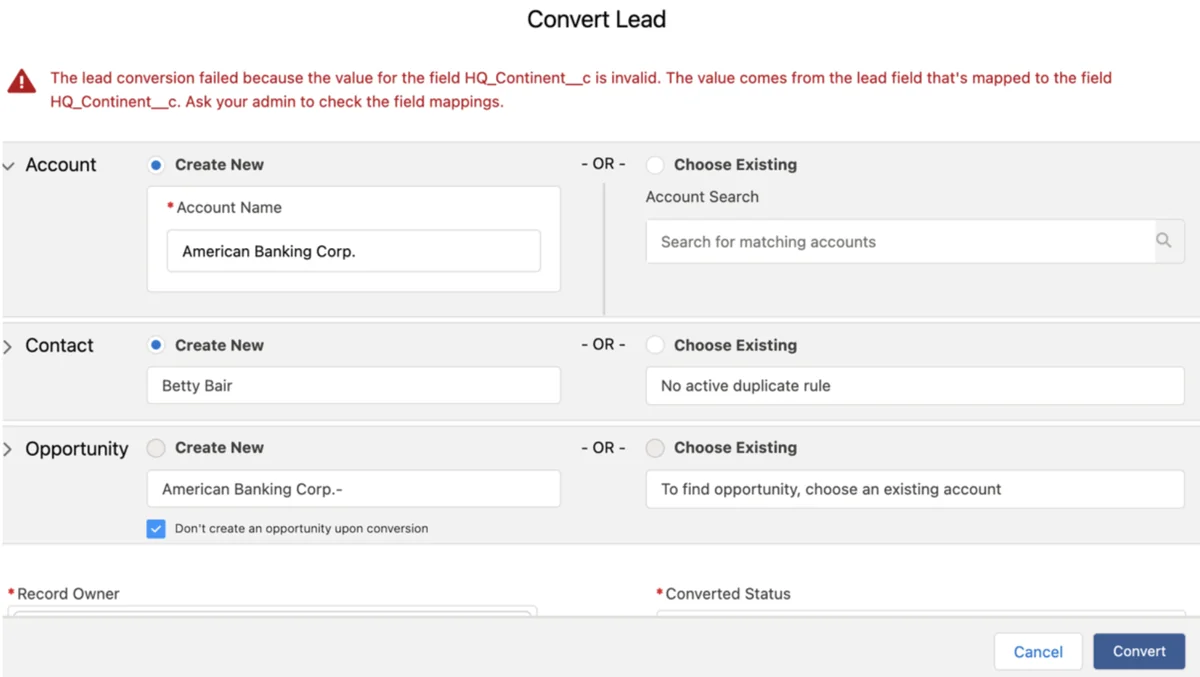
Do not assume that two fields have the same allowed values because their labels look similar. Before enabling address picklists or mapping Lead fields to Account, Contact, or Opportunity fields, compare the value set used by each field and test records that contain every expected US and Canada value.
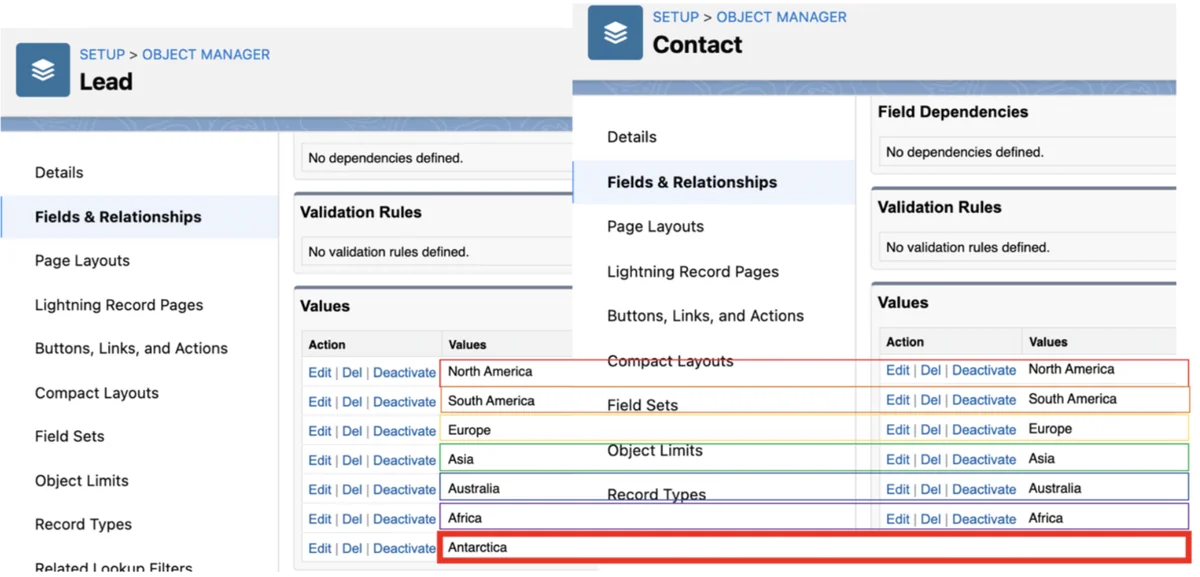
How to enable State and Country/Territory Picklists for US and Canada
Do this work in a full or partial sandbox first. The setting affects standard address fields, user experience, imports, automation, and integrations. For production orgs with years of address data, the setup is less about clicking Enable and more about cleanup, mapping, and regression testing.
- Inventory address fields. Review Account Billing and Shipping Address, Contact Mailing and Other Address, Lead Address, Contract, Order, Quote, User, and any custom address fields.
- Export current values. Group existing records by country and state values. This shows typos, abbreviations, blanks, and invalid pairings.
- Decide active and visible countries. For a US and Canada rollout, many orgs keep
USandCAvisible while leaving other active values based on integration needs. - Review state/province values. Confirm each US state and each Canadian province or territory that users need.
- Map old values to standard values. Map
USA,U.S., andUnited States of Americato United States only when the data owner approves it. - Update integrations. Tell middleware, web forms, ERP, CPQ, and marketing automation whether to send codes or configured integration values.
- Run conversion in sandbox. Scan, convert identified data, and test create, edit, import, lead conversion, duplicate rules, flows, validation rules, and reports.
- Deploy the configuration plan. Use documented setup steps and, where appropriate, Metadata API for state and country/territory picklist configuration changes.
SOQL checks before enabling address picklists
Run grouped queries before cleanup. These queries do not change data and stay within governor limits when executed as aggregate queries from Developer Console, Workbench, Salesforce CLI, or an integration job.
-- Account billing country and state patterns
SELECT BillingCountry, BillingState, COUNT(Id) records
FROM Account
WHERE BillingCountry != null OR BillingState != null
GROUP BY BillingCountry, BillingState
ORDER BY COUNT(Id) DESC

-- Lead country and state patterns
SELECT Country, State, COUNT(Id) records
FROM Lead
WHERE Country != null OR State != null
GROUP BY Country, State
ORDER BY COUNT(Id) DESC

-- Contact mailing country and state patterns
SELECT MailingCountry, MailingState, COUNT(Id) records
FROM Contact
WHERE MailingCountry != null OR MailingState != null
GROUP BY MailingCountry, MailingState
ORDER BY COUNT(Id) DESC
SOQL checks after enabling address picklists
After enablement, use code fields for filters when your org exposes them. This avoids label changes breaking reports, Apex, and integration logic.
SELECT Id, Name, BillingCountryCode, BillingStateCode
FROM Account
WHERE BillingCountryCode = 'US'
AND BillingStateCode IN ('CA', 'NY', 'TX')

SELECT Id, Name, CountryCode, StateCode
FROM Lead
WHERE CountryCode = 'CA'
AND StateCode IN ('ON', 'QC', 'BC')
Global Picklist Salesforce: when to use global value sets
global picklist salesforce usually means a reusable Global Value Set for custom picklist fields. Use it when the same business values must exist on more than one custom field, such as Region, Customer Segment, Partner Tier, Product Interest, or Implementation Phase. Salesforce Help describes global picklist value sets as shared values for custom picklist fields, and Trailhead notes that global value sets keep repeated picklists consistent.
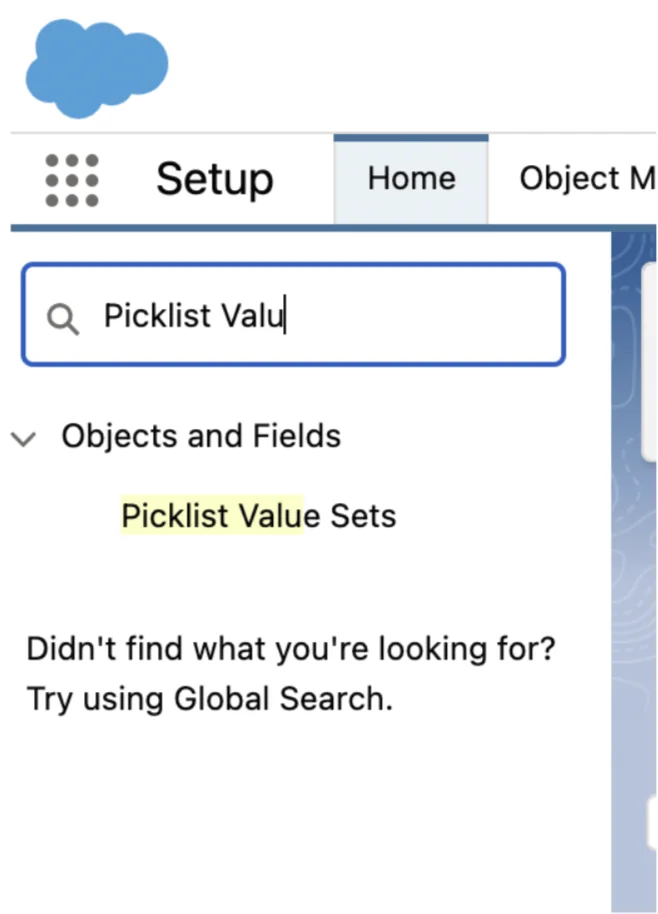
State and Country/Territory Picklists are different. They are managed from the address picklist setup area and are not a custom Global Value Set that you create for a field such as Region__c. Keep these two designs separate in architecture reviews.
Salesforce global picklist for custom fields
A salesforce global picklist is the right design when values belong to the business, not to one object. For example, a company may need Region__c on Lead, Account, Opportunity, Case, and a custom onboarding object. A Global Value Set lets admins manage those values once.
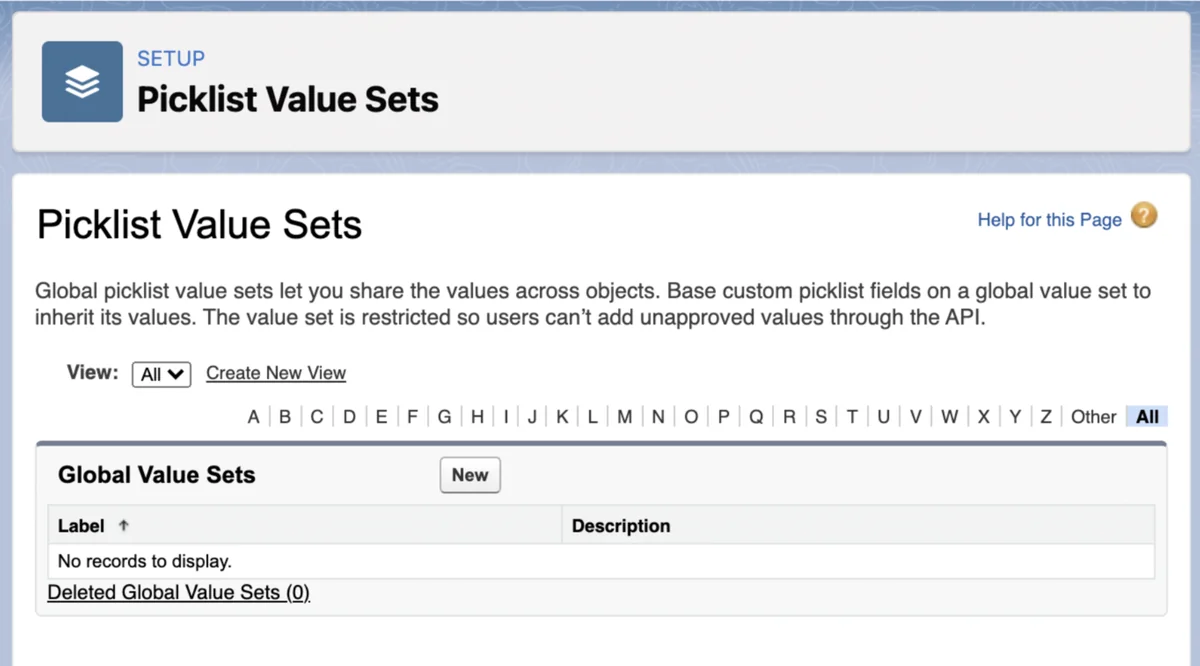
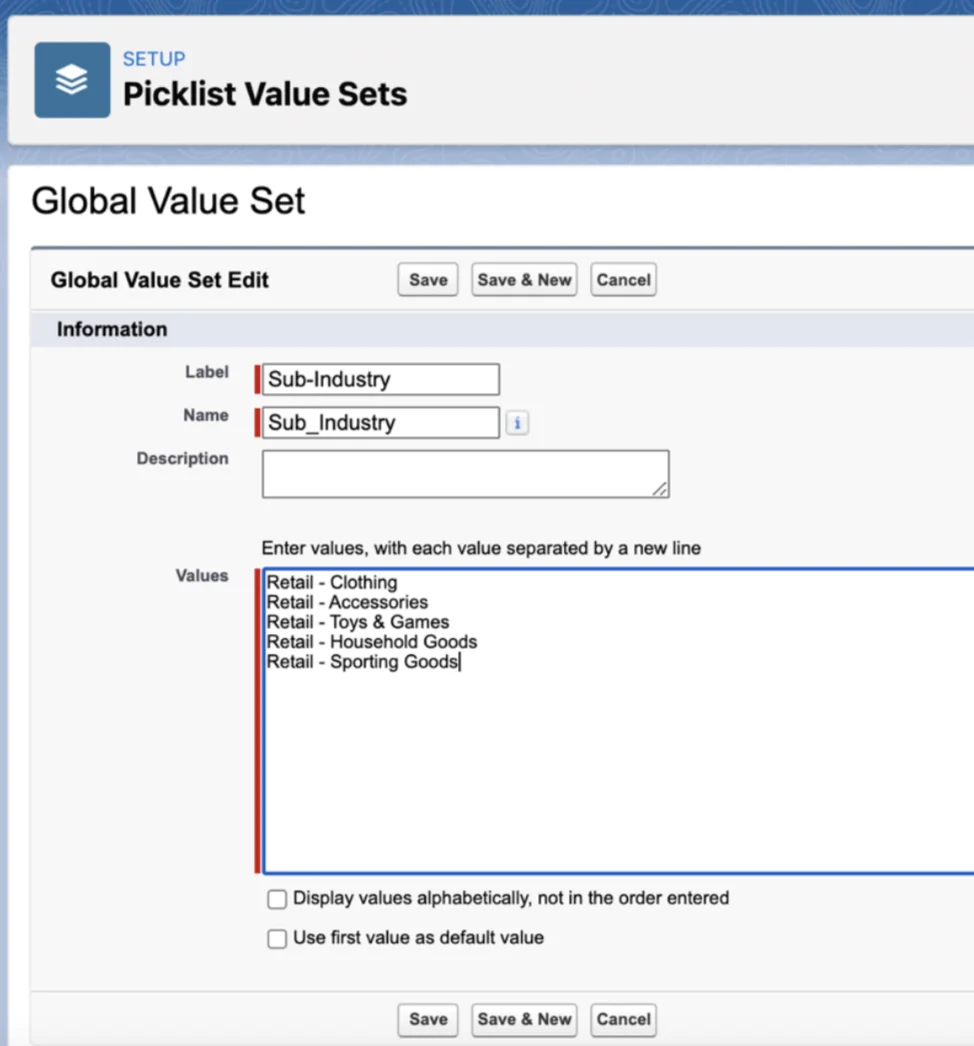
Do not create separate local picklists with the same values unless the value sets are allowed to diverge. In production, separate local picklists often drift over time: one field gets North America, another gets NA, and reports become harder to trust.
How to attach a global value set to a custom picklist
Create the Global Value Set first when you know multiple custom fields will share the same values. Then create each custom picklist field and choose the option to use values from that value set. This keeps the values controlled from one setup location.
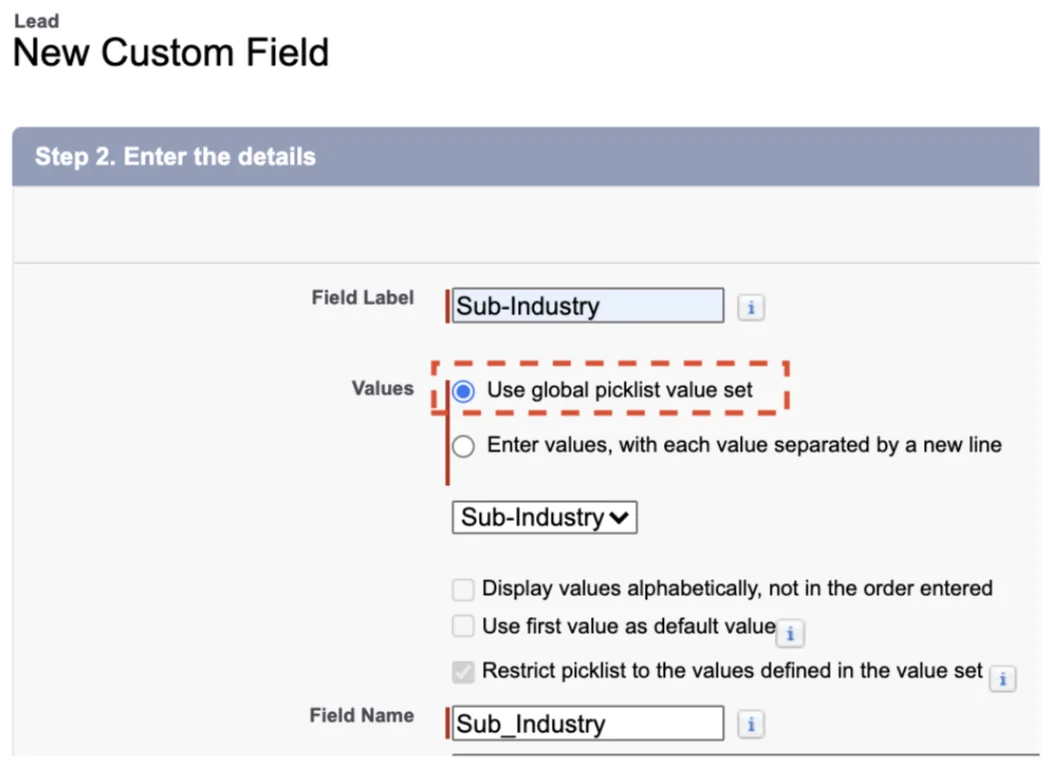
How to promote an existing picklist to a global value set
If one existing custom picklist already contains the approved values, test the Promote to Global Value Set path in a sandbox. Salesforce supports promotion for a suitable existing custom picklist, but you still need a migration plan for other fields, reports, automations, page layouts, validation rules, flows, and integrations that reference old fields.
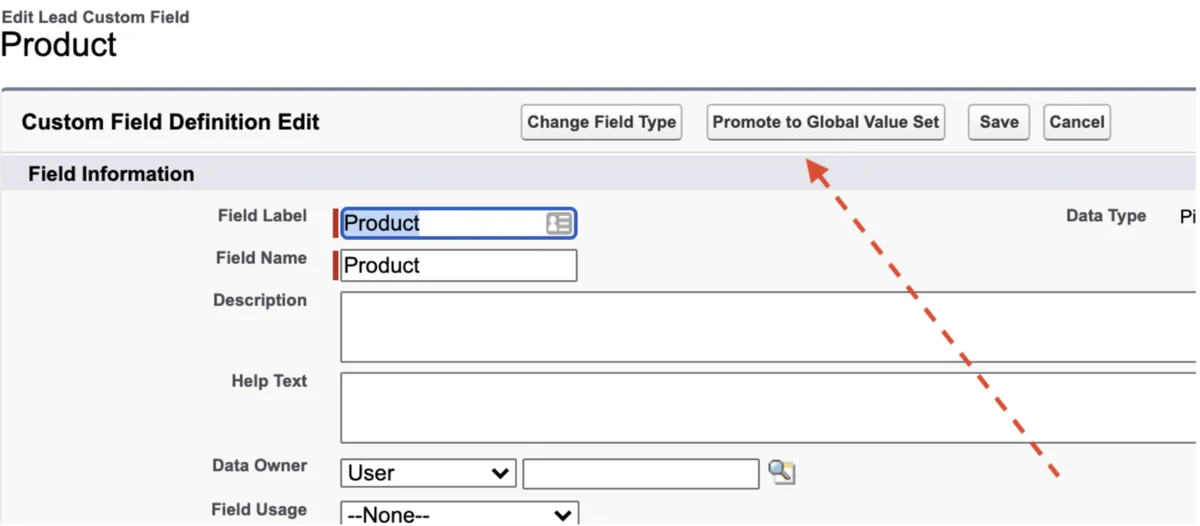
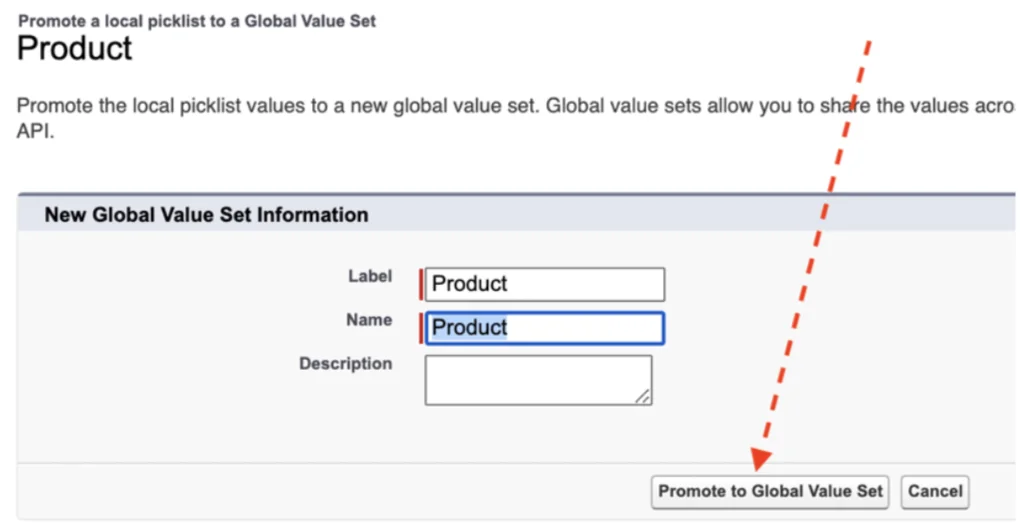
Best practices for US and Canada address picklists
The safest implementation pattern is to treat address values as reference data. That means one owner, one change process, one sandbox test plan, and one integration contract. In enterprise orgs, state and country changes can break more than the Account page layout.
- Prefer code fields for system logic. Use
BillingCountryCode = 'US'instead of testing a translated or renamed label. - Keep labels user-friendly. Users should see full names such as California and Ontario unless your org has a documented reason to show abbreviations.
- Do not hide values used by integrations. A value can be hidden from users but still active for API use. Confirm this before hiding records for a business unit.
- Map old web forms. Web-to-Lead, Experience Cloud forms, Account Engagement, Marketing Cloud, ERP, and tax tools must send values Salesforce accepts.
- Test lead conversion. Convert Leads with US, Canada, blank, and invalid historical values before production enablement.
- Document default country behavior. If your org sets a default country, tell users how it affects new records and imports.
- Keep translations separate from integration values. Translation changes should not become API breaking changes.
Developer patterns for State and Country picklists
Developers should avoid hard-coding long state/province lists into Apex, LWC, or middleware unless the integration contract requires a static mapping. Salesforce already stores the configured picklist metadata, and admins can change visibility or integration values.
Apex example to read configured country codes
The Apex class below reads picklist values dynamically. It does not run SOQL, so it avoids query row and SOQL statement governor limits. The method checks whether the field exists in the org because code fields depend on address picklist configuration and object support.
public with sharing class AddressPicklistService {
    public class PicklistOption {
        @AuraEnabled public String label;
        @AuraEnabled public String value;

        public PicklistOption(String label, String value) {
            this.label = label;
            this.value = value;
        }
    }

    @AuraEnabled(cacheable=true)
    public static List<PicklistOption> getAccountBillingCountries() {
        return getPicklistOptions(Account.SObjectType, 'BillingCountryCode');
    }

    @AuraEnabled(cacheable=true)
    public static List<PicklistOption> getAccountBillingStates() {
        return getPicklistOptions(Account.SObjectType, 'BillingStateCode');
    }

    private static List<PicklistOption> getPicklistOptions(
        Schema.SObjectType objectType,
        String fieldApiName
    ) {
        Map<String, Schema.SObjectField> fields =
            objectType.getDescribe().fields.getMap();

        if (!fields.containsKey(fieldApiName)) {
            throw new AuraHandledException(
                'Field is not available in this org: ' + fieldApiName
            );
        }

        List<PicklistOption> options = new List<PicklistOption>();
        for (Schema.PicklistEntry entry :
            fields.get(fieldApiName).getDescribe().getPicklistValues()
        ) {
            if (entry.isActive()) {
                options.add(new PicklistOption(entry.getLabel(), entry.getValue()));
            }
        }
        return options;
    }
}
Validation rule example for US address quality
Use validation rules only after you confirm how blank addresses should behave. The example below requires a state when an Account billing country is the United States.
AND(
  BillingCountryCode = "US",
  ISBLANK(BillingStateCode)
)
For Canada, use BillingCountryCode = "CA" and require BillingStateCode. Do not combine this rule with imports until the integration team has tested the exact country and state codes it will send.
Common errors with Salesforce State and Country/Territory Picklists
| Error pattern | Likely cause | Fix |
|---|---|---|
FIELD_INTEGRITY_EXCEPTION on State/Province |
The state value is not valid for the selected country. | Send a matching pair such as US + CA or CA + ON. |
| Lead conversion fails | Lead value does not exist or map correctly on the target address field. | Clean Lead address values and test conversion mappings in sandbox. |
| Reports split United States into several rows | Historical text values remain or reports use the wrong field. | Normalize records and use country code fields where available. |
| Integration succeeds for US but fails for Canada | The integration sends province names or abbreviations inconsistently. | Choose one contract: code fields or exact integration values. |
| Users cannot choose a value they expect | The value is inactive, not visible, or controlled by a different country. | Review Active and Visible settings in State and Country/Territory Picklists. |
Migration checklist for production orgs
Use this checklist before enabling the salesforce state/province picklist us canada list in production. The list is short because each item should result in evidence: a report, export file, test script, or deployment note.
- Export current Account, Contact, Lead, Contract, Order, Quote, and User address values.
- Identify all records where US, United States, USA, U.S., Canada, CA, Canadian province names, or two-letter codes are mixed.
- Confirm the approved salesforce standard country picklist value for united states with the data governance owner.
- Confirm Canada province and territory values with operations, tax, finance, or fulfillment teams.
- Update validation rules, flows, Apex, formulas, duplicate rules, assignment rules, and external mappings to use code fields where practical.
- Run lead conversion, quote creation, order creation, billing export, and service case creation tests.
- Train users on the changed UI behavior: choose Country/Territory first, then State/Province.
- Schedule a post-release report to catch rejected imports, unmapped values, and blank state/province values.
Official Salesforce references
Use the official documentation while designing and validating the configuration:
- Salesforce Help: Let Users Select States, Countries, and Territories from Picklists
- Salesforce Help: Create a Global Picklist Value Set
- Salesforce Developer Docs: AddressSettings Metadata API
Related SalesforceTutorial resources
For deeper implementation work, read Salesforce standard country names list, Salesforce data migration planning, Salesforce API integration patterns, Apex code best practices, and Salesforce Flow automation design.
Frequently Asked Questions
What is the Salesforce state/province picklist US Canada list?
It is the configured set of United States state values and Canada province or territory values used by Salesforce State and Country/Territory Picklists. In a standard configuration, United States uses country code US and Canada uses country code CA, while each state or province has its own code such as CA for California and ON for Ontario. Admins can change visibility, activation, labels, and integration values in Setup, so always confirm the values in the target org before loading data.
Is a global picklist Salesforce value set the same as State and Country/Territory Picklists?
No. A global picklist Salesforce value set is a reusable value set for custom picklist fields. State and Country/Territory Picklists are Salesforce-managed address picklists used by standard address fields and custom address fields. They behave like picklists for users, but admins manage them from the State and Country/Territory Picklists setup page rather than from the normal Global Value Sets page.
What is the Salesforce standard country picklist value for United States?
The Salesforce standard country picklist value for United States is normally Name: United States, Code: US, and default Integration Value: United States. The code is what developers usually use in CountryCode fields such as BillingCountryCode. The integration value can be customized, so check Setup before mapping an external system.
Should integrations send state names or state codes after enabling address picklists?
Prefer the code fields when the integration can support them, such as BillingCountryCode and BillingStateCode on Account. For United States, send BillingCountryCode = US and a matching state code such as CA, NY, or TX. If an integration writes to the text field instead, it must send the configured integration value exactly, or Salesforce can reject the record with a field integrity error.
Can I use a Salesforce global picklist for custom region fields?
Yes. Use a Salesforce global picklist value set when multiple custom fields need the same values, such as Region, Market, Product Family, or Customer Tier. Do not use a custom global value set to replace standard address country and state fields. For address fields, use State and Country/Territory Picklists.