Mailchimp salesforce integration connects Salesforce lead, contact, campaign, and reporting data with Mailchimp audience and email engagement data. The goal is simple: marketing sends the right message, while sales can see subscription status, campaign activity, and response signals without leaving Salesforce.
A good mailchimp salesforce integration is not only a sync job. A failed mailchimp salesforce integration usually fails because ownership and permissions were unclear, not because the connector could not move data. It needs clear ownership rules, field mapping, consent handling, duplicate controls, security permissions, and a support plan for failed records. This guide shows how to plan, configure, and validate the integration using Salesforce-native practices.
Mailchimp Salesforce Integration
mailchimp salesforce integration can be implemented in three common ways: an AppExchange managed package, an integration platform such as MuleSoft or another iPaaS, or a custom API pattern using Salesforce callouts and Mailchimp APIs. The right option depends on the data volume, consent process, reporting needs, and how much control your team needs over errors and retries.
For most Salesforce teams, the first design decision is direction. Some orgs only push Salesforce campaign members into Mailchimp. Others also import Mailchimp activity back to Salesforce so sales users can see opens, clicks, bounces, and subscription changes. In enterprise orgs, the second pattern usually needs data retention rules, record ownership rules, and reporting governance before the sync is enabled. Write these rules in the mailchimp salesforce integration design document before anyone maps fields. That document becomes the support reference when a salesforce and mailchimp integration job creates, skips, or updates a record.
| Integration option | Best fit | Salesforce considerations |
|---|---|---|
| Managed package | Teams that want Salesforce pages, packaged objects, scheduled sync, and admin setup screens. | Review package permissions, object model, field-level security, record page components, and support process. |
| Middleware or iPaaS | Companies that already centralize integrations and need monitoring, transformations, and reusable APIs. | Use connected apps, least-privilege integration users, Bulk API where needed, and mapped error handling. |
| Custom Apex callout | Focused use cases such as pushing selected campaign members or writing a controlled subscription update. | Use Named Credentials, Queueable Apex, callout limits, retry logging, tests with HttpCalloutMock, and CRUD/FLS checks. |
How Salesforce and Mailchimp Integration Should Be Planned
salesforce and mailchimp integration should begin with a data contract. Decide which system owns each field, which records are eligible for email, and what happens when a subscriber unsubscribes or changes an email address. Salesforce can store customer context, but Mailchimp often owns email campaign execution and subscriber preferences. Do not let two systems update the same field without a conflict rule. A mailchimp salesforce integration with no field owner list will fail during the first duplicate cleanup or unsubscribe dispute. A reviewed salesforce and mailchimp integration map also helps admins explain why a value changed.
Salesforce and Mailchimp integration data ownership checklist
- Email address: decide whether Salesforce, Mailchimp, or a form platform is the source of truth.
- Consent and opt-out fields: map unsubscribe state to Salesforce fields such as HasOptedOutOfEmail where appropriate.
- Audience membership: choose whether Salesforce Campaigns, reports, list views, or segmentation rules define membership.
- Lead and Contact matching: define whether matching uses standard Email, a custom email field, or external IDs.
- Duplicates: review Salesforce Matching Rules and Duplicate Rules before allowing automatic Lead or Contact creation.
- Reporting: decide whether email engagement belongs on custom objects, Campaign Members, tasks, or a package data model.
What Data Should Sync Between Mailchimp and Salesforce?
A safe mailchimp salesforce integration starts with fewer fields and expands after validation. Sync identity fields, eligibility fields, segmentation fields, and activity fields only when the business has a reason to use them. More fields create more conflict rules, permissions, and reporting maintenance. In a mailchimp salesforce integration, every outbound field should have a business owner, and every inbound field should have a report or record-page use case.
| Data type | Common Salesforce location | Implementation note |
|---|---|---|
| Subscriber identity | Lead, Contact, or Person Account contact record | Email alone may not be enough in orgs with duplicate records or shared inboxes. |
| Audience or list membership | Campaign Member, custom object, or packaged membership object | Use Campaign Members when sales and marketing need campaign context in Salesforce reports. |
| Marketing attributes | Lead or Contact fields, related custom object, or package fields | Field-level security must match who can view segmentation data. |
| Email engagement | Campaign Member status, activity timeline, or custom engagement object | Store only the detail that users will act on; do not create noise on record pages. |
| Unsubscribe and bounce data | Lead, Contact, or related preference object | Make the update direction explicit because consent handling can have legal impact. |
Best Email Marketing Integration With Salesforce: Selection Criteria
The best email marketing integration with salesforce is the one that fits your org’s process, not the one with the longest feature list. Compare the integration against your consent rules, data residency needs, marketing operations skill set, and reporting model. A package that works well for a newsletter team may not fit a company with regional consent rules, multiple business units, and custom lead routing. For one org, the best email marketing integration with salesforce may be a managed package; for another, the best email marketing integration with salesforce may be middleware because error handling and transformations matter more than setup speed.
Best email marketing integration with Salesforce evaluation table
| Question | Why it matters | What to verify |
|---|---|---|
| Can admins control object and field permissions? | Email behavior can reveal customer interest and consent state. | Review permission sets, field-level security, sharing model, and record page visibility filters. |
| Can the sync be monitored? | Silent failures create stale audiences and incorrect follow-up. | Look for run history, error details, retry controls, and alerting. |
| Can it map to Campaigns and Campaign Members? | Salesforce reports often depend on campaign membership and status. | Confirm whether Mailchimp activity is stored on standard or custom objects. |
| Can marketing manage segments without admin access? | Admins should not become the bottleneck for routine audience changes. | Use permission sets and page layouts so marketers can manage allowed records only. |
| Can it handle duplicate and merge scenarios? | Email marketing data loses value when duplicates split engagement history. | Test duplicate rules, lead conversion, contact merge, and changed email addresses. |
Use a simple scoring sheet before procurement. The best email marketing integration with salesforce should support your consent model, not bypass it. The best email marketing integration with salesforce should expose enough error detail for admins to fix failed records. The best email marketing integration with salesforce should let marketers build approved segments without broad object access. The best email marketing integration with salesforce should produce Salesforce reports that managers can trust.
How to Configure Mailchimp Salesforce Integration
The exact setup screens depend on the integration product, but the Salesforce admin work is consistent. Use a sandbox first. Install the package or configure middleware credentials, assign a small pilot group, map a limited set of fields, run a controlled sync, and then check every object that changed. Do not move mailchimp salesforce integration to production until the pilot proves record matching, permission access, unsubscribe behavior, and reporting output. A production mailchimp salesforce integration checklist should include a rollback plan, runbook, integration user review, and report validation.
Step 1: Prepare Salesforce security
Create a permission set for marketing integration users. Grant access only to the objects and fields the process needs. Salesforce field-level security controls whether users can view or edit fields on an object, so do not assume that a page layout alone protects email preference fields. For a custom API approach, use Named Credentials and External Credentials so secrets are not stored in Apex code. This security setup is part of salesforce and mailchimp integration, not an optional task after go-live.
Step 2: Connect the systems

For a managed package, connect from the package settings page and choose the import frequency only after confirming what each job does. For a custom integration, define the authentication in Salesforce Setup using External Credentials and Named Credentials, then reference the named credential in Apex as a callout endpoint. Salesforce documentation states that a named credential stores the callout endpoint and authentication settings in one definition.
Step 3: Map records and fields
Map standard identity fields first: FirstName, LastName, Email, LeadSource, AccountId where needed, and HasOptedOutOfEmail. Add segmentation fields only after the pilot works. In a salesforce and mailchimp integration, avoid mapping free-text marketing notes into fields sales users edit daily, because the next sync can overwrite useful context. The mailchimp salesforce integration field map should include sync direction, overwrite behavior, default values, and the permission set that can edit each field.
Step 4: Test a small audience
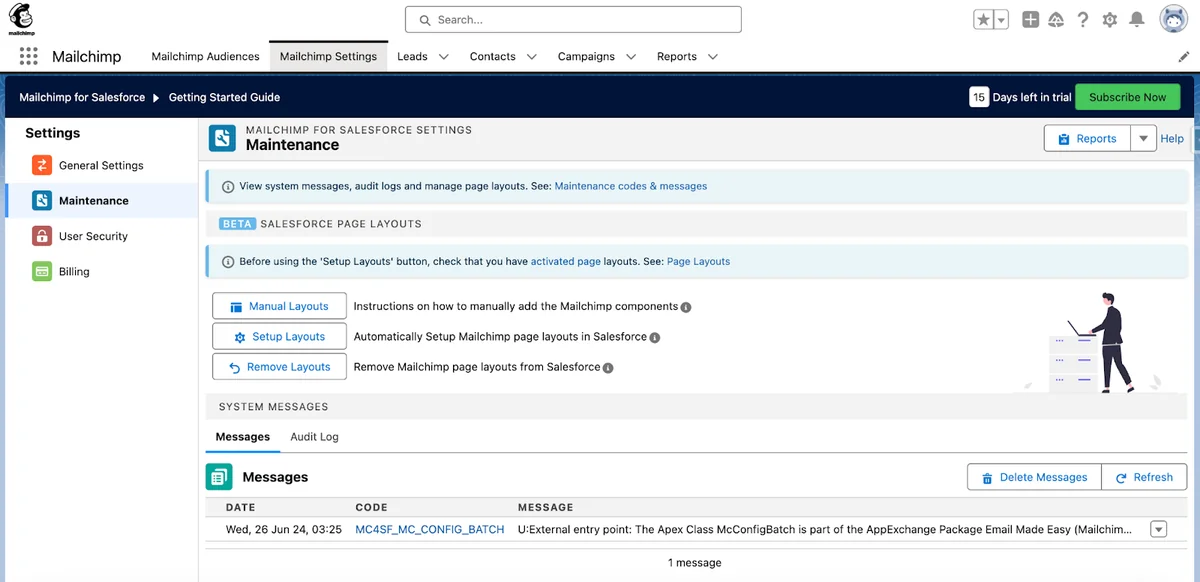
Create a test Salesforce Campaign, add fewer than 20 Lead or Contact records, and sync only that set. Confirm subscription status, field values, duplicate behavior, bounce handling, and unsubscribe direction. Then run Salesforce reports to verify that the data model can answer the business questions.
Audience, Member, and Campaign Mapping
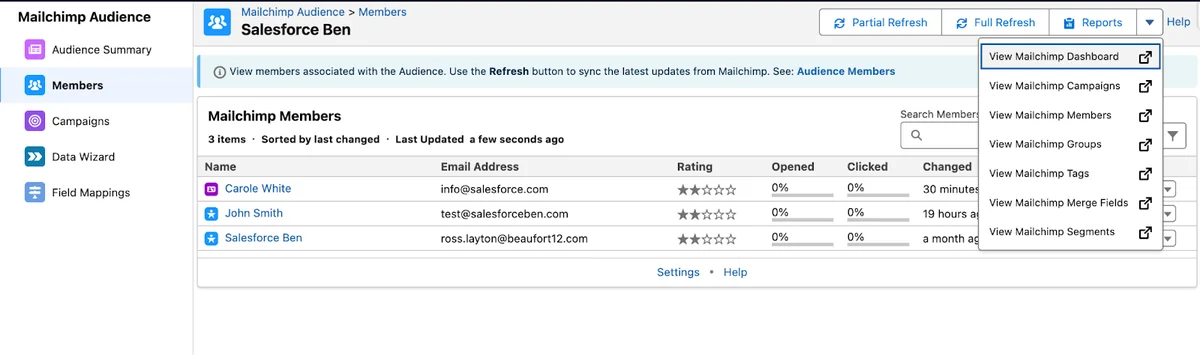
A strong mailchimp salesforce integration separates audience selection from email engagement storage. Audience selection answers “who should receive this?” Engagement storage answers “what happened after the send?” Do not force both questions into the same field. This separation keeps mailchimp salesforce integration reports readable and makes sync failures easier to diagnose.
Salesforce Campaign Members are often useful because they connect a Lead or Contact to a Campaign and store a member status. Salesforce Help also documents Campaign Member management, including adding and updating Lead and Contact members. If the package stores Mailchimp campaigns in custom objects, document how those objects relate to Salesforce Campaigns so reporting users know which report type to choose. This documentation keeps salesforce and mailchimp integration reporting consistent when teams add new audiences.
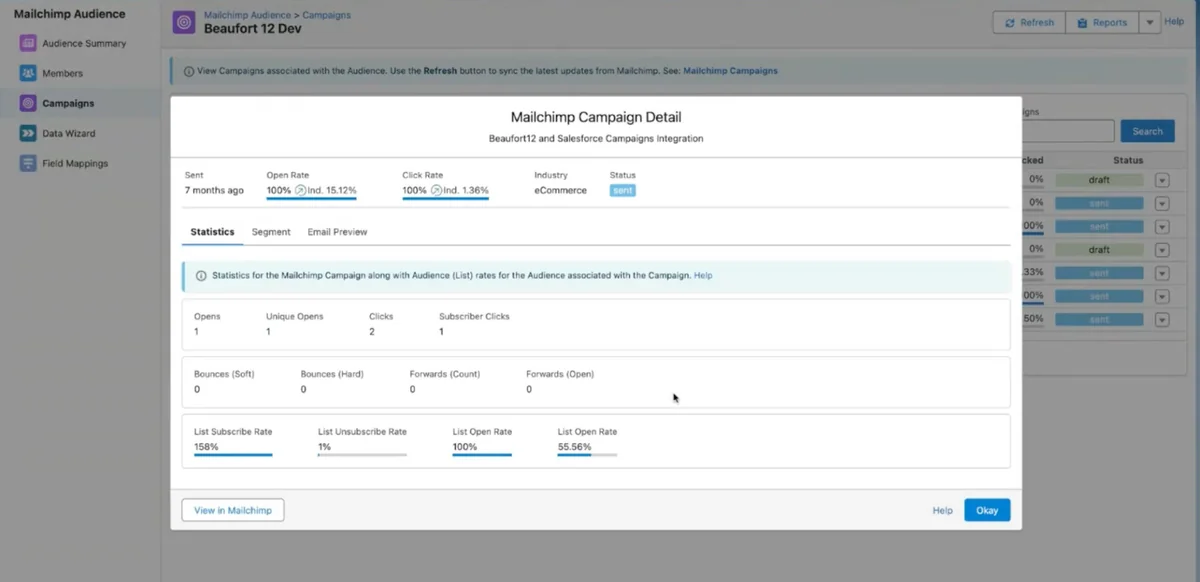
Recommended mapping pattern
- Salesforce Campaign: use for a business initiative, event invite, newsletter group, or nurture program.
- Campaign Member: use for Lead or Contact inclusion and status tracking.
- Mailchimp audience: use for subscriber list management in Mailchimp.
- Mailchimp tag or group: use for segmentation where Mailchimp handles the send logic.
- Engagement object or activity: use for opens, clicks, bounces, unsubscribes, and sent email references if the integration stores them.
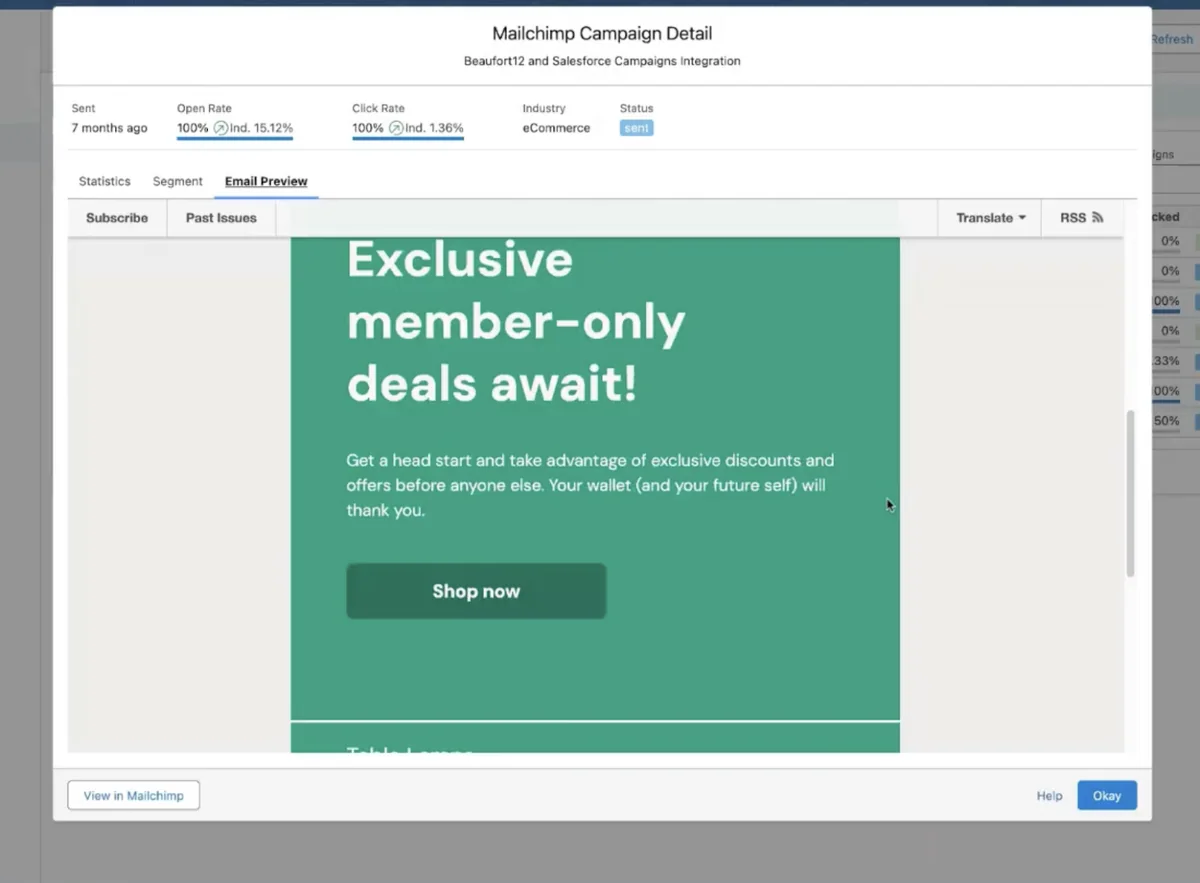
Reporting for Mailchimp Salesforce Integration
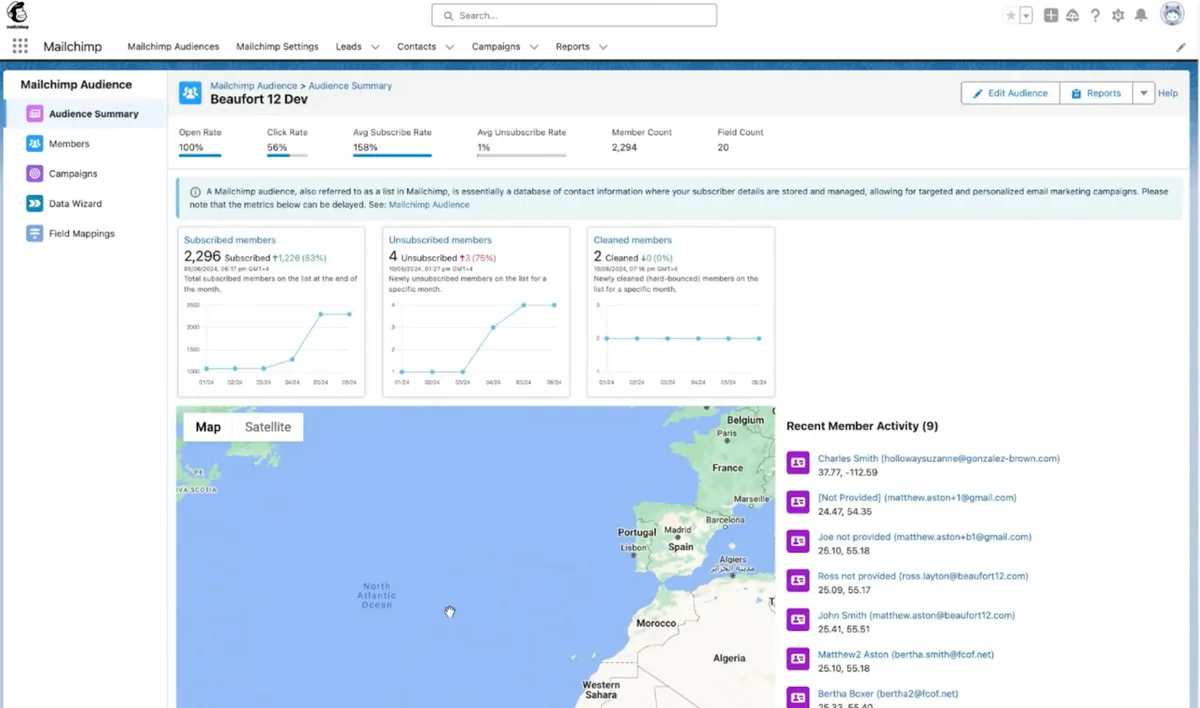
Reporting should answer sales and marketing questions without requiring users to understand the sync internals. For mailchimp salesforce integration, build reports around Campaign, Campaign Member, Lead, Contact, and any package objects created by the connector. Use dashboard filters for audience, campaign date, member status, sales owner, region, and product interest. The best email marketing integration with salesforce should make these reports possible without spreadsheet exports.
Do not put every Mailchimp event on the Salesforce activity timeline unless sales users need that level of detail. In enterprise orgs, a related engagement component or report often works better than dozens of timeline entries. Salesforce reports and dashboards can surface trends, but dashboard limits and report type design still apply, so test performance with realistic data volume. For salesforce and mailchimp integration, create one admin dashboard for sync health and one business dashboard for campaign results.
Custom Apex Pattern for Salesforce and Mailchimp Integration
Use custom Apex only when a packaged or middleware option does not fit the requirement. The sample below shows a Salesforce-safe pattern for pushing Campaign Members to an external marketing audience endpoint through a Named Credential. It is not a full Mailchimp API client. Confirm the Mailchimp endpoint, payload, and rate limits in Mailchimp documentation before using a direct API design. For mailchimp salesforce integration, custom code should be the exception when package configuration or middleware cannot meet the requirement. If custom code becomes part of mailchimp salesforce integration, document limits, retry behavior, and support ownership.
This class uses Queueable Apex so the callout runs asynchronously. It queries records once, avoids SOQL and DML inside loops, skips opted-out records, and sends a batched payload. Configure the Named Credential as Marketing_Audience_API in Setup, and set the Apex class API version to your org’s current release, preferably API v60.0 or later.
public with sharing class MarketingAudiencePublisher implements Queueable, Database.AllowsCallouts {
    private final Set<Id> campaignMemberIds;

    public MarketingAudiencePublisher(Set<Id> campaignMemberIds) {
        this.campaignMemberIds = campaignMemberIds == null
            ? new Set<Id>()
            : new Set<Id>(campaignMemberIds);
    }

    public void execute(QueueableContext context) {
        if (campaignMemberIds.isEmpty()) {
            return;
        }

        List<CampaignMember> members = [
            SELECT Id,
                   Lead.Email,
                   Lead.HasOptedOutOfEmail,
                   Contact.Email,
                   Contact.HasOptedOutOfEmail
            FROM CampaignMember
            WHERE Id IN :campaignMemberIds
            WITH SECURITY_ENFORCED
            LIMIT 90
        ];

        List<Map<String, Object>> subscribers = new List<Map<String, Object>>();

        for (CampaignMember memberRecord : members) {
            String emailAddress;
            Boolean optedOut = false;

            if (memberRecord.Contact != null) {
                emailAddress = memberRecord.Contact.Email;
                optedOut = memberRecord.Contact.HasOptedOutOfEmail;
            } else if (memberRecord.Lead != null) {
                emailAddress = memberRecord.Lead.Email;
                optedOut = memberRecord.Lead.HasOptedOutOfEmail;
            }

            if (String.isBlank(emailAddress) || optedOut == true) {
                continue;
            }

            subscribers.add(new Map<String, Object>{
                'salesforceCampaignMemberId' => memberRecord.Id,
                'email' => emailAddress.trim().toLowerCase()
            });
        }

        if (subscribers.isEmpty()) {
            return;
        }

        HttpRequest request = new HttpRequest();
        request.setEndpoint('callout:Marketing_Audience_API/audience-members');
        request.setMethod('POST');
        request.setHeader('Content-Type', 'application/json');
        request.setTimeout(120000);
        request.setBody(JSON.serialize(new Map<String, Object>{
            'subscribers' => subscribers
        }));

        HttpResponse response = new Http().send(request);
        Integer statusCode = response.getStatusCode();

        if (statusCode < 200 || statusCode > 299) {
            throw new MarketingAudiencePublishException(
                'Marketing audience publish failed. HTTP status: ' + statusCode
            );
        }
    }

    public class MarketingAudiencePublishException extends Exception {}
}
Governor limit note: a single Apex transaction can make a limited number of callouts, and synchronous automation has stricter user-experience impact. Keep the payload small, use async processing, and add retry logging for production. The sample uses LIMIT 90 to keep the example below common callout and payload thresholds, but a production process should chunk work with Batch Apex, Platform Events, or middleware.
Test class with HttpCalloutMock
Salesforce requires callout tests to use mocks; review the official Apex testing best practices before deploying custom integration code. The test below creates its own Campaign, Lead, and Campaign Member, then verifies that the queueable can execute without a real HTTP request.
@IsTest
private class MarketingAudiencePublisherTest {
    private class AudienceMock implements HttpCalloutMock {
        public HttpResponse respond(HttpRequest request) {
            System.assertEquals('POST', request.getMethod());
            System.assert(request.getBody().contains('subscriber@example.com'));

            HttpResponse response = new HttpResponse();
            response.setStatusCode(200);
            response.setBody('{"accepted":true}');
            return response;
        }
    }

    @IsTest
    static void publishesEligibleCampaignMember() {
        Campaign campaignRecord = new Campaign(
            Name = 'Newsletter Test',
            IsActive = true
        );
        insert campaignRecord;

        Lead leadRecord = new Lead(
            LastName = 'Subscriber',
            Company = 'Example',
            Email = 'subscriber@example.com'
        );
        insert leadRecord;

        CampaignMember memberRecord = new CampaignMember(
            CampaignId = campaignRecord.Id,
            LeadId = leadRecord.Id
        );
        insert memberRecord;

        Test.setMock(HttpCalloutMock.class, new AudienceMock());

        Test.startTest();
        System.enqueueJob(new MarketingAudiencePublisher(new Set<Id>{ memberRecord.Id }));
        Test.stopTest();
    }
}
Data Wizard and Segmentation Controls
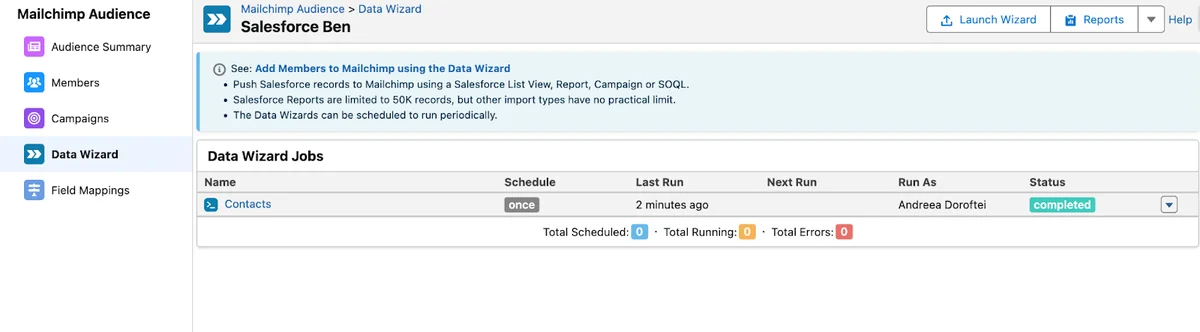
Many managed packages provide a wizard-style tool for choosing records from reports, list views, campaigns, or filters. Treat that tool as a governed segmentation layer. A marketer should be able to choose a campaign audience, but the admin should still control which objects, fields, and saved reports are available for sync. A salesforce and mailchimp integration wizard should not become a shortcut around reporting security or consent rules. For recurring salesforce and mailchimp integration jobs, require an owner and a review date.

Segmentation rules to document
- Which reports or list views can be used as sources.
- Which fields can leave Salesforce and enter Mailchimp.
- Whether inactive leads, converted leads, portal users, or bounced contacts are excluded.
- Who can create recurring sync jobs.
- Who approves new merge fields or audience attributes.
Security, Compliance, and Admin Controls
A mailchimp salesforce integration moves personal data, so treat it as a data access project. Use least privilege, permission sets, field-level security, and page visibility rules. If a component shows email engagement on Lead or Contact pages, confirm whether sales users should see it. If the integration can create Leads or Contacts, test assignment rules, duplicate rules, validation rules, and required fields. The best email marketing integration with salesforce should support these controls instead of requiring broad admin access.
For custom callouts, do not store API keys in custom settings, custom metadata, labels, or Apex. Use Named Credentials and External Credentials. For package-based setup, review connected app permissions, package object permissions, and any integration user profile or permission set group. If your org uses Shield Platform Encryption, verify whether encrypted fields can be used in matching, reporting, and external sync logic before choosing them as match keys.
Common Errors With Mailchimp Salesforce Integration
The same issues appear in many mailchimp salesforce integration projects. Most are design problems, not tool problems. Review this list before each mailchimp salesforce integration release, especially when a new audience source or field mapping is added.
- Email address changes: decide whether a changed email creates a new subscriber, updates an existing subscriber, or requires review.
- Two-way overwrite: avoid letting both systems update the same field unless conflict rules are written down.
- Unsubscribe mismatch: never assume a marketing unsubscribe means the same thing as every Salesforce opt-out field in every region.
- Duplicate Leads and Contacts: use Matching Rules, Duplicate Rules, and lead conversion checks before automatic record creation.
- Too much timeline activity: store engagement at the right level so sales users see useful signals instead of noise.
- No failure owner: assign a queue or user who reviews sync errors after each scheduled run.
Best Practices for Production Rollout
Roll out mailchimp salesforce integration in phases. Start with read-only visibility if possible, then add controlled audience sync, then add activity writeback, and only then consider automatic Lead or Contact creation. This reduces the risk of creating bad records or exposing fields to the wrong users. A phased mailchimp salesforce integration rollout also gives marketing time to confirm that segments match campaign expectations.
- Create a sandbox proof of concept with sample Leads, Contacts, Campaigns, and unsubscribe cases.
- Document the field map, owner of each field, sync direction, and overwrite rule.
- Assign permission sets to a pilot group instead of changing broad profiles.
- Run the first sync with a small Salesforce Campaign.
- Review reports, duplicate records, failed records, and record page visibility.
- Schedule recurring sync only after the pilot produces expected results.
- Add a dashboard for sync health, audience growth, unsubscribe changes, and campaign engagement.
The final mailchimp salesforce integration review should compare field maps, permission sets, reports, and sync logs against the signed design. Do not approve mailchimp salesforce integration changes by screenshot alone. After go-live, review mailchimp salesforce integration errors weekly until the process stabilizes. A healthy salesforce and mailchimp integration should have fewer manual exports over time, and the best email marketing integration with Salesforce should make that reduction measurable.
Related SalesforceTutorial resources can help with the Salesforce side of the project: Salesforce API integration basics, Connected App setup in Salesforce, Salesforce Flow automation patterns, Salesforce dashboard reporting, and Lead Source field governance.
Frequently Asked Questions
What is mailchimp salesforce integration?
mailchimp salesforce integration is the process of connecting Salesforce records such as Leads, Contacts, Campaigns, and Campaign Members with Mailchimp audiences, subscriber fields, and email engagement data. It can be built with a managed package, middleware, or custom API callouts. The right mailchimp salesforce integration design also defines consent, matching, sync direction, and error ownership. Review mailchimp salesforce integration requirements with marketing, sales operations, and the Salesforce admin before choosing a connector.
Is Salesforce and Mailchimp integration two-way?
salesforce and mailchimp integration can be one-way or two-way depending on the tool and configuration. One-way sync might push Salesforce Campaign Members to Mailchimp. Two-way sync can also bring activity, subscription, and bounce data back into Salesforce. Use two-way sync only after defining field ownership and overwrite rules. A two-way salesforce and mailchimp integration should also include a failure queue or report.
What is the best email marketing integration with Salesforce?
The best email marketing integration with Salesforce depends on your data model, consent rules, reporting needs, and admin capacity. For a small team, a managed package may be enough. For a company with multiple systems and complex governance, middleware may provide better monitoring and transformation control. Treat the best email marketing integration with Salesforce as a governance decision, not only a marketing tool choice. The best email marketing integration with Salesforce also makes support easier by showing which records failed and why. The best email marketing integration with Salesforce should also keep permission design clear enough for an audit.
Should Mailchimp activity be stored on Salesforce Campaign Members?
Store Mailchimp activity on Campaign Members only when the sales and marketing teams need campaign-level reporting in Salesforce. If you need event-level history such as every open and click, a related custom object or package object may be cleaner than overloading Campaign Member fields.
Can Apex be used for Mailchimp Salesforce integration?
Yes, Apex can be used for selected mailchimp salesforce integration use cases, but it should run asynchronously, use Named Credentials, avoid SOQL and DML inside loops, and include tests with HttpCalloutMock. For large-volume sync, consider middleware or Batch Apex with retry logging. Custom mailchimp salesforce integration code should have an owner, logs, and a rollback plan. Apex is rarely the best email marketing integration with Salesforce for high-volume two-way sync unless the team also builds monitoring and retry controls.