Pardot pricing is now published under Salesforce Marketing Cloud Account Engagement. As of July 6, 2026, Salesforce lists Growth+ at $1,250, Plus+ at $2,750, Advanced+ at $4,400, and Premium+ at $15,000 USD per org per month, billed annually. The quoted amount can change when you add contacts, analytics, SMS or WhatsApp credits, Success Plans, implementation work, or contract-specific terms.
This pardot pricing guide explains how to read the public pricing page, what changes the pardot cost, and which technical limits matter before you sign an Account Engagement contract. Salesforce can change public prices and packaging, so use the official Marketing Cloud Account Engagement pricing page as the final source when you prepare a quote.
Pardot Pricing in 2026
A current pardot pricing review starts with the current product name. The old Pardot name still appears in search queries, API domains, and older admin conversations, but the product name in Salesforce documentation is Marketing Cloud Account Engagement. For budget planning, treat pardot pricing as Account Engagement edition pricing plus required add-ons. A useful pardot pricing comparison always includes limits, add-ons, and implementation work.
| Edition | Public USD list price | Included contact block | Best fit in a real org |
|---|---|---|---|
| Growth+ | $1,250 per org/month, billed annually | 10,000 contacts | Small B2B marketing team that needs email, forms, landing pages, lead scoring, and basic automation. |
| Plus+ | $2,750 per org/month, billed annually | 10,000 contacts | Teams that need stronger reporting, Account Engagement+ access, more automation capacity, and B2B Marketing Analytics. |
| Advanced+ | $4,400 per org/month, billed annually | 10,000 contacts | Enterprise orgs that need business units, higher API limits, dedicated IP, developer sandboxes, and more governance. |
| Premium+ | $15,000 per org/month, billed annually | 75,000 contacts | Large programs with multiple brands, higher contact volume, advanced analytics needs, and included Premier Success. |
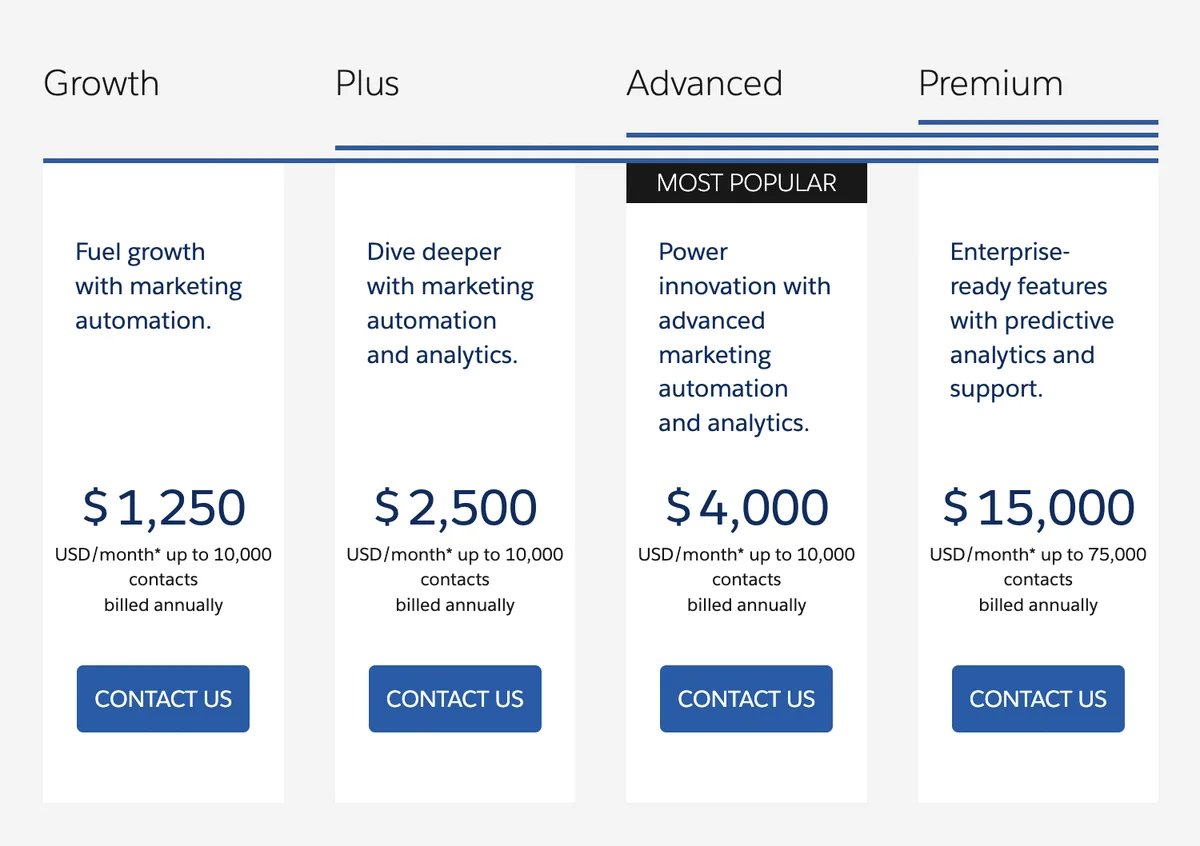
Important: This pardot pricing snapshot is not a contract. Salesforce states that monthly products on this pricing page require an annual contract and that the page is informational. Do not build a procurement case only from the public page. Ask your Salesforce account team to confirm currency, tax, regional terms, add-on SKUs, renewal uplift, and whether your contract uses any legacy Pardot line items.
What is included in each Account Engagement edition?
The edition decision is not only a price decision. A pardot pricing review should begin with the limits that can block implementation. In enterprise orgs, the edition usually depends on data volume, reporting, integration traffic, sender reputation, and whether marketing teams must be separated by brand or geography.
| Capability or limit | Growth+ | Plus+ | Advanced+ | Premium+ |
|---|---|---|---|---|
| Contact blocks included | 10,000 | 10,000 | 10,000 | 75,000 |
| API calls per day | 25,000 | 50,000 | 100,000 | 100,000 |
| File hosting | 100 MB | 500 MB | 10 GB | 10 GB |
| Business units | Not included | Not included | 2 included | 5 included |
| Developer sandboxes for Account Engagement | Not listed | Add-on | 2 included | 5 included |
| B2B Marketing Analytics | Not listed | 5 licenses | 5 licenses | 5 licenses |
| B2B Marketing Analytics Plus | Not listed | Add-on | Add-on | 5 licenses |
Pardot cost drivers that change the quote
The public table gives you the base subscription, but pardot cost can increase for several reasons. Common pardot pricing drivers include additional contact blocks, B2B Marketing Analytics Plus, Sales Emails and Alerts, SMS credits, WhatsApp credits, dedicated IP requirements, implementation services, and a paid Success Plan.
Salesforce currently lists additional contacts at $100 USD per 10,000 contacts per month, B2B Marketing Analytics Plus at $3,000 USD per user per month, Sales Emails and Alerts at $50 USD per user per month, and SMS or WhatsApp credits starting at $10 USD per 1,000 credits. These numbers matter because a team with a small user group but a large database can spend more on contact capacity than on admin seats.
How much does Pardot cost after add-ons?
The practical answer to how much does Pardot cost is: base edition plus the features your architecture requires. For example, a Plus+ subscription with 60,000 contacts would need five extra 10,000-contact blocks beyond the included 10,000. Using the public add-on price, that contact expansion alone adds $500 USD per month before tax, services, credits, or renewal terms.
| Planning scenario | Likely pricing pressure | Architecture note |
|---|---|---|
| Large lead database with low engagement | Additional contact blocks | Clean unmailable and inactive records before buying more capacity. |
| Webinar, event, product usage, and partner integrations | API call limits and external activities | Estimate daily request volume and retry behavior before selecting an edition. |
| Separate brands, regions, or consent rules | Advanced+ or Premium+ for business units | Business units are often cheaper than building fragile segregation with lists and naming rules. |
| High email volume with deliverability ownership | Dedicated IP and IP warming effort | Budget for DNS, monitoring, and sender reputation management, not only the SKU. |
| Executive campaign reporting | B2B Marketing Analytics or B2B Marketing Analytics Plus | Confirm who needs licenses and whether standard dashboards are enough. |
Pardot Account Engagement naming and Account Engagement+
Pardot Account Engagement is not a separate product from Marketing Cloud Account Engagement. It is the same product family described with the older Pardot name and the newer Salesforce name. In 2026, Salesforce also lists Account Engagement+ capabilities that provide access to Marketing Cloud Next through permission set licenses and consumption-based credits for some features.
For procurement, separate these three items: the Account Engagement edition, Account Engagement+ access, and usage credits. That separation helps admins explain why pardot pricing can look simple on the public page but more detailed in the final quote.
How to choose the right Pardot edition
Start with the technical constraints, not with the cheapest row in the table. Pardot pricing only helps when it maps to those constraints. A lower edition can become the wrong purchase when your team later discovers that it needs business units, API capacity, custom object data, or advanced reporting.
1. Count contacts before comparing editions
Account Engagement editions include a defined contact block. Salesforce Help explains that database limits are based on usage and that administrators can check usage and limits inside Account Engagement. Before you compare pardot pricing, export or report on your real Lead and Contact database, then separate people you can market to from people you should suppress.
The following Apex class gives admins a CRM-side estimate of Leads and Contacts that have an email address and have not opted out. It does not replace the Account Engagement mailable prospect count because hard bounces, sync state, duplicate matching, and Account Engagement-specific flags can change the final number.
public with sharing class MarketingAudienceEstimator {
    public class CountResult {
        @AuraEnabled public String source;
        @AuraEnabled public Integer records;

        public CountResult(String source, Integer records) {
            this.source = source;
            this.records = records;
        }
    }

    // Set this class to a current API version. WITH USER_MODE enforces user access
    // for the SOQL read instead of exposing a system-mode count to any caller.
    @AuraEnabled(cacheable=true)
    public static List<CountResult> countOptedInCrmPeople() {
        List<CountResult> results = new List<CountResult>();

        Integer leadCount = [
            SELECT COUNT()
            FROM Lead
            WHERE IsConverted = false
            AND Email != null
            AND HasOptedOutOfEmail = false
            WITH USER_MODE
        ];

        Integer contactCount = [
            SELECT COUNT()
            FROM Contact
            WHERE Email != null
            AND HasOptedOutOfEmail = false
            WITH USER_MODE
        ];

        results.add(new CountResult('Lead', leadCount));
        results.add(new CountResult('Contact', contactCount));
        return results;
    }
}
@IsTest
private class MarketingAudienceEstimatorTest {
@IsTest
static void countOptedInCrmPeopleReturnsLeadAndContactRows() {
Account acct = new Account(Name = 'Estimator Test Account');
insert acct;
insert new Contact(
LastName = 'Buyer',
AccountId = acct.Id,
Email = 'buyer@example.com',
HasOptedOutOfEmail = false
);
insert new Lead(
LastName = 'Prospect',
Company = 'Estimator Test Company',
Email = 'prospect@example.com',
HasOptedOutOfEmail = false
);
Test.startTest();
List<MarketingAudienceEstimator.CountResult> results =
MarketingAudienceEstimator.countOptedInCrmPeople();
Test.stopTest();
System.assertEquals(2, results.size(), 'Expected one Lead row and one Contact row.');
}
}This code is bulk-safe because it uses two aggregate queries and no row-by-row SOQL. If you expose it through LWC, add UI-level permission checks and do not use it as the legal source for consent or subscription status.
2. Decide whether business units are required
Business units separate Account Engagement data and configuration areas. They become important when different teams need their own prospects, assets, connectors, and compliance boundaries. In a single-brand org, business units may add administration overhead. In a multi-brand or multi-region org, they can reduce operational risk.
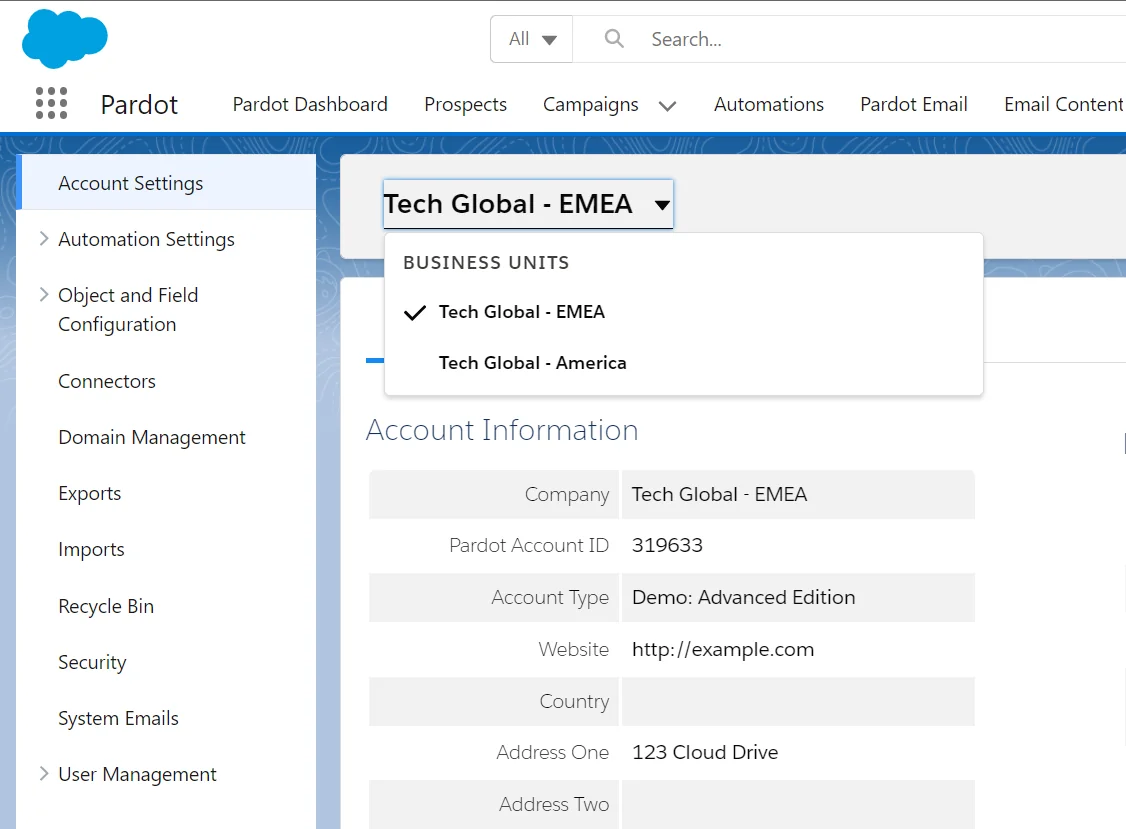
For pardot pricing purposes, Advanced+ includes 2 business units and Premium+ includes 5 business units on the public pricing page. If business units are mandatory, build your pardot cost model around Advanced+ or Premium+ first, then compare the difference against the cost of operating separate marketing processes manually.
3. Check reporting needs before buying analytics add-ons
Salesforce lists Engagement History dashboards and B2B Marketing Analytics capabilities by edition. Engagement History gives sales and marketing teams campaign activity context on Salesforce records, while B2B Marketing Analytics supports deeper analysis for marketing operations and leadership reporting.
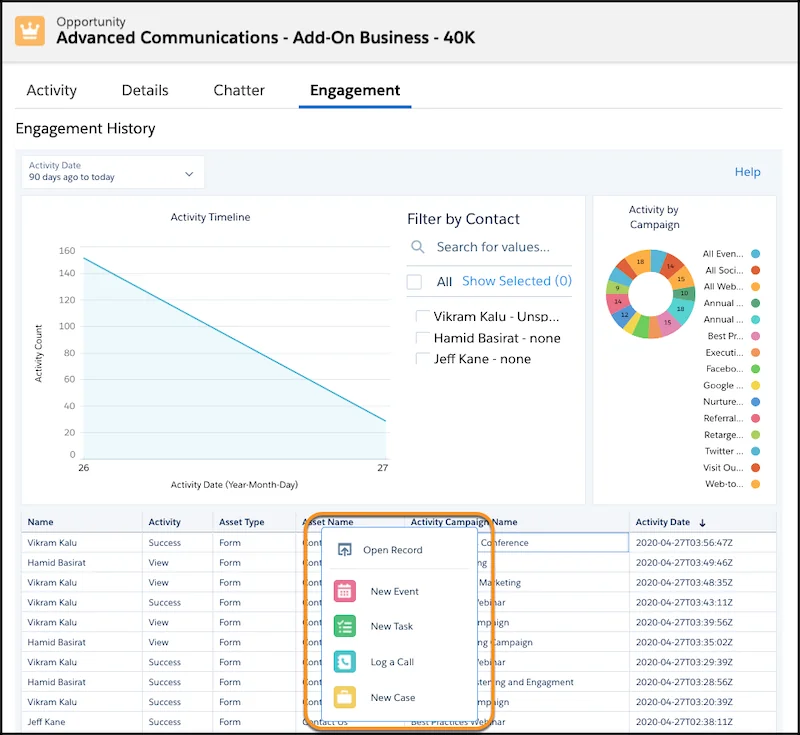
Do not treat analytics as a minor pardot pricing line item because a dashboard sounds useful. First define the decisions the dashboard must support: campaign attribution, pipeline influence, asset performance, email engagement, or executive trend reporting. Then confirm whether standard Engagement History views, B2B Marketing Analytics, or B2B Marketing Analytics Plus is the right fit.
4. Review custom object and segmentation requirements
Account Engagement can use Salesforce object data for segmentation and automation when configured correctly. Salesforce Help states that Account Engagement custom objects sync from Salesforce custom objects and that the object must exist in Salesforce first. If you need to segment by membership, product ownership, renewal date, event attendance, or installed asset data, confirm custom object availability during procurement.
For a Plus+ buyer, custom object integration may be an add-on depending on the quote. For Advanced+ and Premium+ buyers, confirm the included entitlement and object limits with Salesforce because packaging can change. This is one of the most common places where pardot pricing and solution design meet.
5. Plan API usage, pi.pardot domains, and integration limits
The Account Engagement API is part of many B2B marketing architectures. Salesforce Developer documentation says Version 5 is the latest and preferred Account Engagement API version. It also states that production and training environments generally use pi.pardot, while demo and sandbox environments generally use pi.demo.pardot.com. Always confirm the correct domain from Salesforce Setup because the installed package namespace tells you which endpoint family applies.
The API has edition-based daily request limits and a concurrent request limit. Salesforce Developer documentation lists 25,000 daily requests for Growth, 50,000 for Plus, and 100,000 for Advanced and Premium, with up to five concurrent API requests. If your integration sends event data, enrichment updates, or export jobs, include API volume in the pardot cost decision and the wider pardot pricing review.
curl --request GET \
  --url "https://pi.pardot.com/api/v5/objects/prospects?limit=200" \
  --header "Authorization: Bearer $ACCESS_TOKEN" \
  --header "Pardot-Business-Unit-Id: 0UvXXXXXXXXXXXXXXX"
Never place the OAuth token or business unit ID in browser-side JavaScript. Use a server-side integration user, store secrets in a secure vault, and read the official Account Engagement API authentication documentation before you build the connector. For Salesforce-side integration patterns, see our Salesforce API integration guide and Connected App setup guide.
How to estimate your Pardot cost before requesting a quote
Use a pardot pricing worksheet before you ask Salesforce for commercial terms. The goal is not to predict the exact negotiated pardot pricing amount. The goal is to avoid buying an edition that cannot support the design.
- Count marketable people. Start with Leads, Contacts, and Person Accounts. Remove obvious suppression segments before deciding whether you need additional contact blocks.
- Map use cases to features. List forms, landing pages, email templates, Engagement Studio programs, scoring categories, business units, analytics, and custom object needs.
- Estimate integration calls. Count expected daily API reads, writes, export jobs, retries, and external activities. Add a buffer for campaign peaks.
- Validate user access. Account Engagement Lightning app access requires the right Salesforce or Identity license and permissions. Budget for the users who need to build, approve, report, or monitor campaigns.
- Include implementation work. DNS, tracker domains, email authentication, consent fields, connected campaigns, user sync, and testing all affect total cost.
- Confirm add-ons in writing. Ask your Salesforce account team to state which features are included, which are add-ons, and which are usage-credit based.
Sample worksheet for how much does Pardot cost
| Question | Example answer | Pricing impact |
|---|---|---|
| How many contacts must be mailable in 12 months? | 48,000 | Base 10,000 plus 4 extra contact blocks |
| How many brands need separate assets and prospect data? | 3 brands | Advanced+ or Premium+ may be required for business units |
| How many external systems send activity data? | Webinar, event, product app | API and external activity limits must be checked |
| Who needs analytics? | Marketing ops and 4 executives | B2B Marketing Analytics license count or Plus add-on may matter |
| Will SMS or WhatsApp be part of journeys? | Yes, for renewal reminders | Consumption credits and setup requirements apply |
Common errors with Pardot pricing decisions
Most pardot pricing mistakes happen because teams buy against one visible requirement and ignore the constraints that appear during implementation.
- Buying Growth+ without checking limits. Growth+ can work for focused teams, but it may not fit if you need more forms, landing pages, analytics, or integration capacity.
- Ignoring data hygiene. Additional contact blocks are useful when the database is clean. They are wasteful when inactive and unmailable records inflate the count.
- Forgetting Salesforce user access. Account Engagement access depends on Salesforce-side user setup, permission sets, and the Lightning app requirements.
- Underestimating implementation. Tracker domains, email authentication, consent fields, connected campaigns, and user sync need design and testing.
- Using pi.pardot from the wrong environment. A sandbox or demo environment may use pi.demo.pardot.com. A hard-coded production endpoint can break deployment and testing.
- Treating API limits as an afterthought. Retry loops, nightly exports, and event streams can consume daily requests faster than a small marketing team expects.
Keep the final pardot pricing decision tied to a requirement matrix, not to a single feature request from marketing or sales.
Official Salesforce references for Account Engagement
Use official documentation when you validate pardot pricing, user access, and API design. Start with the Salesforce Account Engagement pricing page, then check the Account Engagement API overview, API quick start, Lightning app access requirements, and database limit guidance.
For related SalesforceTutorial reading, review Pardot login and Account Engagement access, B2B Marketing Analytics setup, Salesforce Marketing Cloud certification paths.
Frequently Asked Questions
How much does Pardot cost in 2026?
Salesforce lists Pardot pricing under Marketing Cloud Account Engagement. As of July 6, 2026, public USD pardot pricing figures are Growth+ at $1,250, Plus+ at $2,750, Advanced+ at $4,400, and Premium+ at $15,000 per org per month, billed annually. Add-ons, credits, services, taxes, and contract terms can change the final quote, so validate pardot pricing with Salesforce before purchase.
Is Pardot pricing per user or per org?
Pardot pricing is listed per org per month for the Account Engagement edition. User-related costs can still appear when you need Salesforce users, Identity users, analytics users, Sales Emails and Alerts, or paid Success Plans.
What is the difference between Pardot and Marketing Cloud Account Engagement?
Pardot is the former product name. Marketing Cloud Account Engagement is the current Salesforce product name. Many admins still say Pardot Account Engagement or search for pardot account engagement because older URLs, API domains, and training materials used the Pardot name.
What is pi.pardot used for?
pi.pardot is the Account Engagement API domain generally used for production and training environments. Salesforce Developer documentation says demo and sandbox environments generally use pi.demo.pardot.com. Check Salesforce Setup before hard-coding endpoints.
Which Pardot edition includes business units?
On the current Salesforce pricing page, Advanced+ includes 2 business units and Premium+ includes 5 business units. If business units are required for brands, regions, or consent separation, this requirement often decides the edition before other pardot cost items are reviewed.
Can API usage affect pardot cost?
Yes. API usage can affect pardot cost when your integrations require a higher edition or additional architecture work. Account Engagement API daily limits are 25,000 for Growth, 50,000 for Plus, and 100,000 for Advanced and Premium, with a five-concurrent-request limit in Salesforce Developer documentation.