Salesforce maps help admins and sales operations teams plot CRM records on a map, plan routes, view nearby accounts, and act on location data without exporting records to a separate mapping tool. Use the product when geography affects assignment, territory coverage, field visits, prospecting, or account planning; use the Apex Map class when developers need key-value lookup logic inside code.
Salesforce Maps: what it is and when to use it
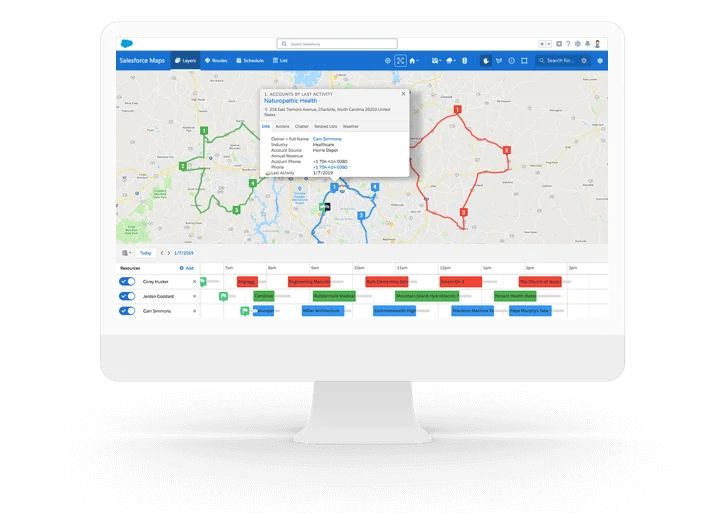
Salesforce Maps is a Salesforce product for location-based work in Sales Cloud and related field teams. It can show records as markers, group data into layers, support route planning, and help teams make decisions from address, territory, and visit data. Salesforce describes the product as a way to sell to and serve customers better, optimize schedules and routes for in-person and virtual visits, and find new business in mapped data. See the official Salesforce Maps Help documentation for product scope.
In enterprise orgs, Salesforce Maps usually belongs to one of four operating models:
- Field sales planning: account executives plan in-person visits, add nearby prospects, and reduce travel gaps.
- Service dispatch support: service teams view customer locations and field resource routes alongside CRM data.
- Sales operations and territory design: sales leaders model coverage by location, account potential, workload, and rep capacity.
- Campaign and customer segmentation: marketing and revenue teams filter accounts or leads by proximity, region, industry, score, or campaign membership.
Do not treat the product as a replacement for clean data. Salesforce Maps depends on usable addresses, geocoding, sharing access, and correct base object configuration. If the Account, Lead, Contact, or custom object address is incomplete, the marker can fail, plot at the wrong place, or require manual correction.
How to set up Salesforce Maps in an org
A clean setup starts with licensing, permission design, data preparation, and a pilot group. Salesforce Help states that users need the Salesforce Maps permission set license before the matching permission set assignment. Start with a small role group, confirm they can see the expected records through sharing, then expand to more teams.
Setup prerequisites for admins
| Setup area | What to verify | Why it matters |
|---|---|---|
| License and permission set license | Assign the correct Salesforce Maps permission set license, then assign the related permission set. | A user can have a Sales Cloud license and still be unable to open Maps features without the Maps entitlement. |
| Record access | Check OWD, role hierarchy, sharing rules, teams, territories, and restriction rules where used. | Maps does not override Salesforce record visibility. A marker only helps if the user can access the record. |
| Address fields | Standardize street, city, state, postal code, and country values before rollout. | Geocoding quality depends on address quality. Bad addresses create missing or misplaced markers. |
| Base objects | Select Account, Lead, Contact, Opportunity, Work Order, or custom objects with usable location data. | The layer design should match the user task, not every object in the org. |
| Mobile use | Test marker counts, route steps, and check-in behavior on the mobile app. | Mobile performance and network conditions change how reps experience mapped records. |
Recommended implementation sequence
- Define the business question. Examples: Which accounts are near this rep route? Which leads should be assigned by postal code?
- Select base objects. Begin with one object and one persona. Account planning and lead routing often need different layers.
- Clean the source address data. Add validation rules, duplicate rules, and required-country guidance where the business can support it.
- Create marker layers and filters. Keep the first version small: active customers, open opportunities, or leads created in the last 90 days.
- Validate sharing. Log in as pilot users or use delegated testing to confirm each team sees only the records they should see.
- Train on actions, not buttons. Teach reps how to add a record to a route, add selected records to a campaign, or update visit notes after a meeting.
How to build a map in SFDC with layers and filters
The phrase map in sfdc can mean two different things. Admins usually mean a visual map inside Salesforce. Developers usually mean the Apex Map collection. For the visual use case, start with a marker layer. Salesforce Help describes marker layers as the way to decide which customer data appears on the map and how those records are shown. See Create Marker Layers in Salesforce Help.
Map in sfdc: create a marker layer without overloading users
A marker layer should answer one operational question. A layer named All Accounts is usually too broad. A better layer might be Open Opportunities over 50K, Customers with renewals this quarter, or Leads not contacted in 7 days. Each layer should have a clear owner and a filter rule that a sales manager can explain.
Use this pattern when creating a first production-ready layer:
- Base object: choose the object users work from, such as Account for territory review or Lead for prospecting.
- Location source: use a standard address or a related address model that Maps can geocode.
- Filters: include only records that belong on the layer. Avoid plotting closed, inactive, archived, or low-quality records unless the use case needs them.
- Marker style: use color or icon differences sparingly. Too many visual rules make the layer harder to read.
- Actions: expose actions that match the workflow, such as add to campaign, add to route, update owner, or open record.
For data-heavy orgs, test with real record volumes. Salesforce Help notes a default mobile marker limit of 1,000 markers for performance, and admins can use visible-area behavior or adjust settings with care. Treat higher limits as a performance decision, not only a configuration preference.
Data layers, shape layers, and boundaries
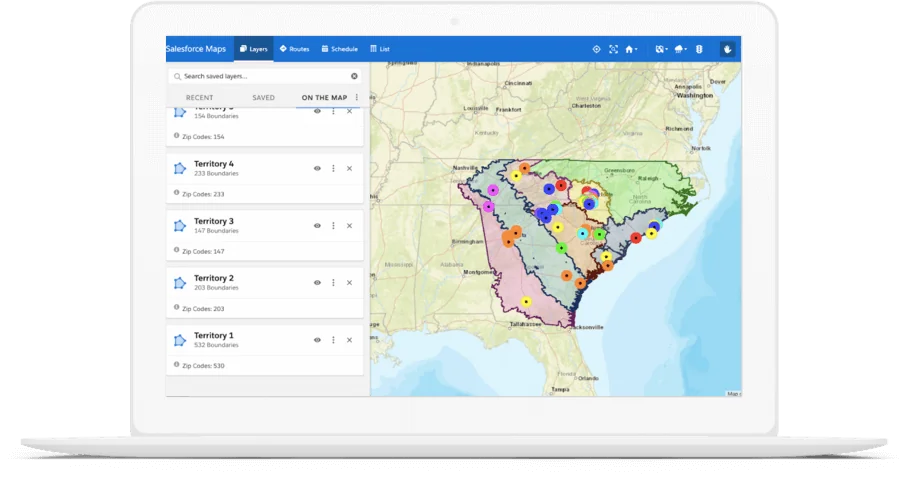
Data layers and boundaries let users ask questions that a list view cannot answer well. A sales operations team may draw a boundary around a trade show venue and find nearby prospects. A service team may filter customers within a drive-time window. A regional manager may compare account count, pipeline, and renewal exposure inside a proposed territory.
| Layer type | Best use | Admin warning |
|---|---|---|
| Marker layer | Plot records such as Accounts, Leads, Contacts, or custom objects. | Keep filters tight so the map remains readable and fast. |
| Shape or boundary | Select records inside a drawn area, distance, or travel-time zone. | Document how the boundary is used before allowing mass updates. |
| Thematic or aggregate view | Summarize metrics such as account count, open pipeline, or case volume by area. | Confirm the field type supports the calculation users expect. |
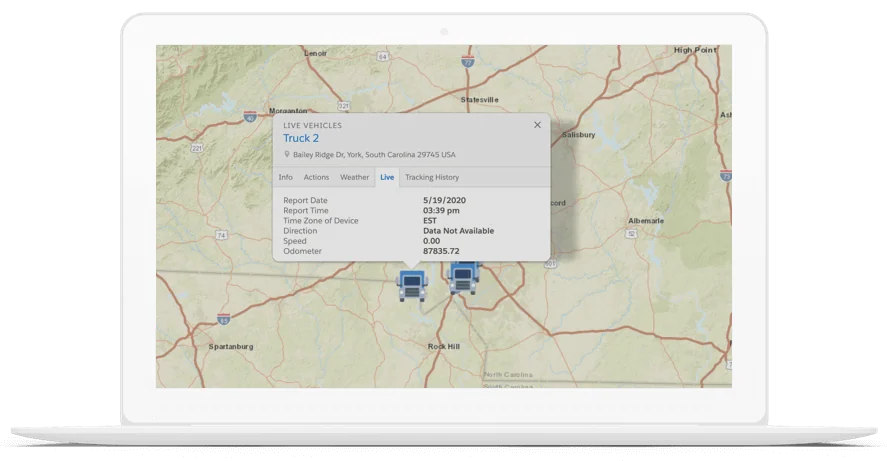
| Live layer | Show current or near-current field activity where live tracking is licensed and configured. | Review privacy, consent, mobile policy, and HR requirements before enabling tracking. |
How Salesforce Maps supports routes and field execution
Salesforce Maps can help teams plan stops, build routes, and work from the mobile app. Salesforce Maps Advanced adds deeper scheduling optimization for sales and service teams, including longer route-planning horizons and route logic for more complex field constraints. The official Salesforce Maps Advanced documentation explains visit planning and route optimization concepts.
Route design should follow policy, not just shortest distance. In production implementations, teams usually define rules for start location, end location, working hours, visit duration, maximum drive time, appointment windows, and whether a route can include prospects and customers together. If these rules are not agreed before rollout, reps can receive technically valid routes that are not acceptable for the business.
Mobile workflows need their own test plan. Confirm that a rep can open the map, view the correct layer, navigate to the next stop, complete a visit, and update the CRM record. Do not approve the rollout only from a desktop admin session.
How Salesforce Maps helps territory planning
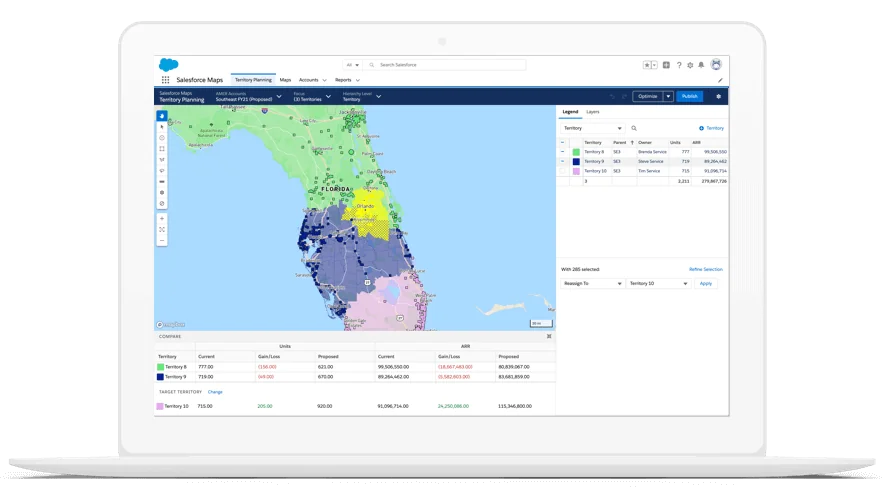
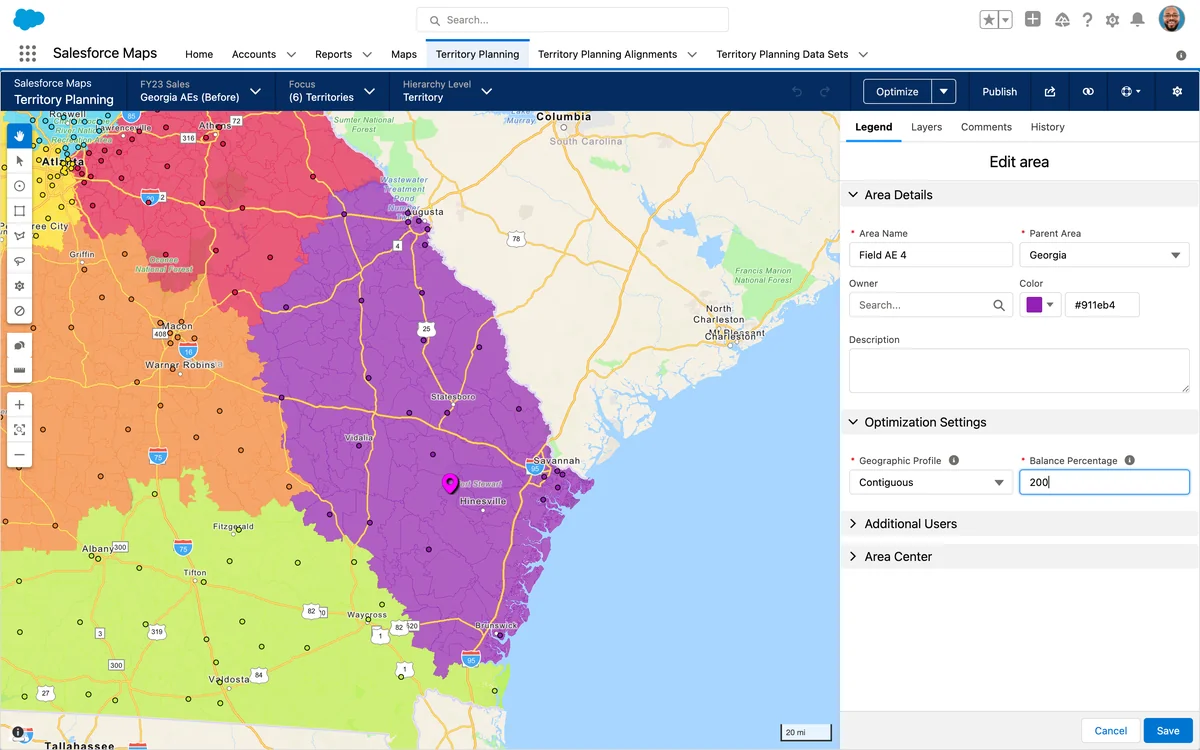
Territory work is where Salesforce Maps becomes more than a screen with pins. Sales planning teams can model coverage using account location, sales capacity, market potential, existing ownership, vertical expertise, and travel burden. The result should be a territory model that a manager can inspect, challenge, and publish with controlled change management.
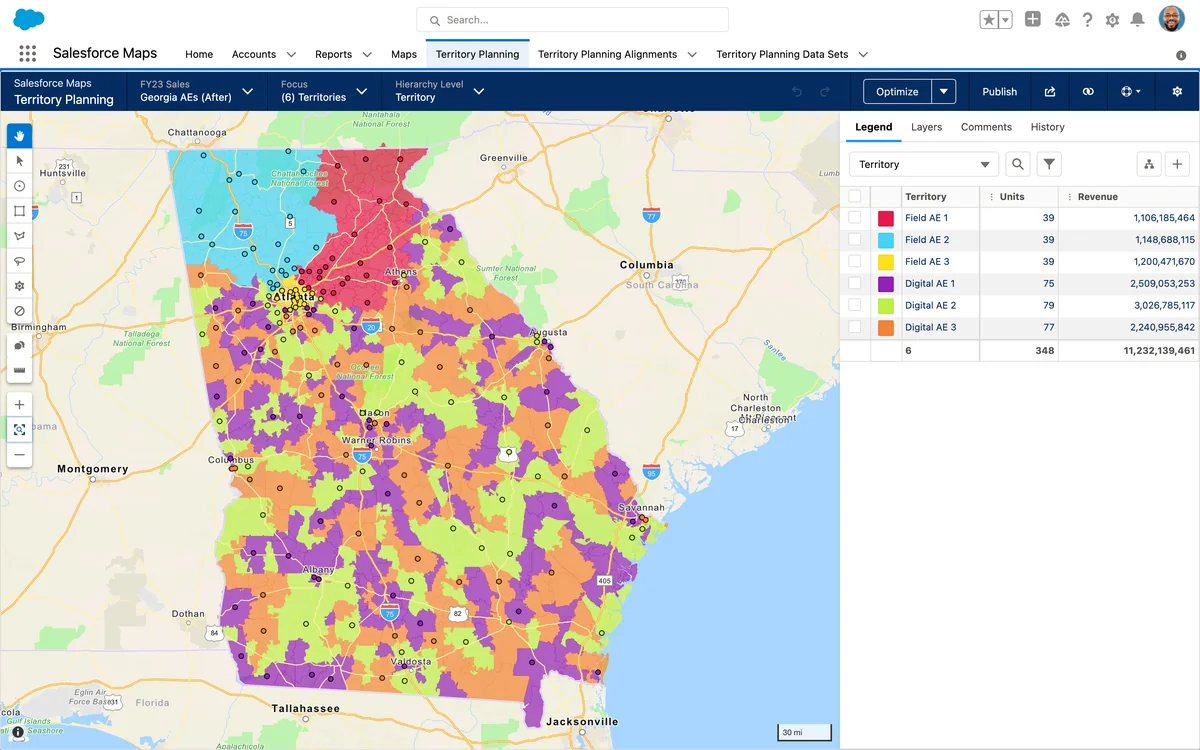
Territory planning should not depend on geography alone. Two territories with the same number of accounts can have different workload if one contains enterprise customers, long travel distances, or higher renewal risk. In mature orgs, sales operations teams combine mapped data with pipeline, annual contract value, segment, product mix, and rep capacity before assigning coverage.
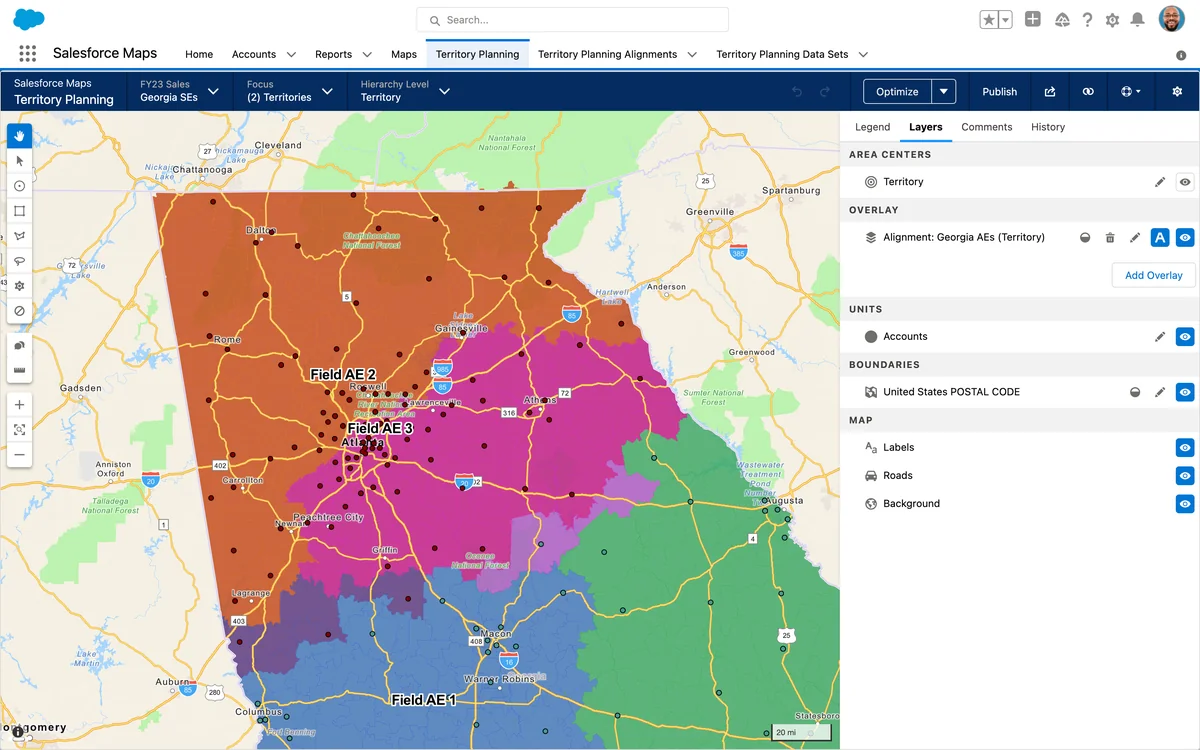
Before publishing territory changes, decide how the model will affect ownership, account teams, forecasting, quotas, routing, and open opportunities. If Enterprise Territory Management is active, verify how the Maps planning output aligns with territory records, assignment rules, and forecast hierarchies. Do not let a visual plan bypass the controls that govern revenue reporting.
Salesforce buyer relationship map and customer planning
Salesforce buyer relationship map: not the same as location mapping
The salesforce buyer relationship map is a Sales Cloud relationship-selling feature for visualizing contacts across accounts and opportunities. It is not the same product as Salesforce Maps. Use it when the problem is stakeholder coverage, buying roles, influence, champions, detractors, and deal risk. Salesforce Help says Buyer Relationship Map helps users visualize contacts across company levels and identify stakeholders on accounts and opportunities. See Buyer Relationship Map and Set Up Buyer Relationship Map.
A revenue team can use Salesforce Maps and the salesforce buyer relationship map together, but they answer different questions. Salesforce Maps answers Where are these customers, routes, or territories? The salesforce buyer relationship map answers Who matters in this account or deal? For a strategic account review, show both: geographic footprint for sites and relationship coverage for stakeholders.
Salesforce customer journey mapping with location data
Salesforce customer journey mapping: where Maps fits
Salesforce customer journey mapping is broader than Salesforce Maps. Journey mapping documents the steps, goals, systems, emotions, and friction points a customer experiences. Salesforce Maps contributes when location changes that journey. For example, a patient network, field service visit, retail store catchment, campus visit, partner territory, or distributor route can all affect the customer path.
Salesforce Experience Cloud documentation describes customer journeys as a way to understand how customers use products and services and what they want to accomplish at each stage. Use Salesforce Maps as one source of geographic context inside that larger journey design. Do not replace journey discovery with pins on a map; combine interviews, service data, case trends, marketing engagement, and mapped service coverage.
- Does distance from a branch, dealer, clinic, or service center affect conversion or retention?
- Do case response times vary by region or technician coverage?
- Are campaigns reaching customers who can access the promoted location?
- Does territory ownership match the way the customer buys, renews, or receives service?
Map class Salesforce: Apex Map collection for developers
Map class salesforce: when the search query means Apex
The query map class salesforce usually refers to the Apex Map class, not the Salesforce Maps product. In Apex, a map is a collection of key-value pairs where each key maps to one value. Developers use maps to avoid repeated SOQL queries, group child records by parent Id, match integration payloads to existing records, and bulkify trigger logic. Salesforce Developer Docs define maps in the Apex collections documentation and list methods such as put, get, containsKey, keySet, and values in the Map Class reference.
The following example groups Account Ids by Billing State. It accepts a set of Account Ids, performs one SOQL query, and uses a Map<String, List<Id>> to organize the result. Use API version 67.0 or later where possible, and set database access mode explicitly so code remains clear across API versions.
public with sharing class AccountStateMapService {
    public static Map<String, List<Id>> buildAccountIdsByState(Set<Id> accountIds) {
        Map<String, List<Id>> idsByState = new Map<String, List<Id>>();

        if (accountIds == null || accountIds.isEmpty()) {
            return idsByState;
        }

        for (Account acct : [
            SELECT Id, BillingState
            FROM Account
            WHERE Id IN :accountIds
            WITH USER_MODE
        ]) {
            if (String.isBlank(acct.BillingState)) {
                continue;
            }

            if (!idsByState.containsKey(acct.BillingState)) {
                idsByState.put(acct.BillingState, new List<Id>());
            }

            idsByState.get(acct.BillingState).add(acct.Id);
        }

        return idsByState;
    }
}
This pattern is governor-limit aware because it keeps the SOQL query outside loops and uses in-memory lookup after the query. It also respects record sharing through the with sharing declaration and object and field permissions through WITH USER_MODE. Salesforce Developer documentation notes that Apex behavior differs by API version: in API version 66.0 and earlier, Apex generally runs in system mode unless you enforce access; in API version 67.0 and later, database operations run in user mode by default unless system mode is explicitly requested. See Secure Apex Classes.
@IsTest
private class AccountStateMapServiceTest {
    @IsTest
    static void groupsAccountsByBillingState() {
        List<Account> accounts = new List<Account>{
            new Account(Name = 'Map Test Account A', BillingState = 'CA'),
            new Account(Name = 'Map Test Account B', BillingState = 'CA'),
            new Account(Name = 'Map Test Account C', BillingState = 'NY')
        };
        insert accounts;

        Set<Id> accountIds = new Map<Id, Account>(accounts).keySet();

        Test.startTest();
        Map<String, List<Id>> result = AccountStateMapService.buildAccountIdsByState(accountIds);
        Test.stopTest();

        System.assertEquals(2, result.get('CA').size(), 'CA should contain two accounts.');
        System.assertEquals(1, result.get('NY').size(), 'NY should contain one account.');
    }
}
Salesforce requires at least 75% Apex code coverage to deploy Apex to production, but coverage alone is not enough. Test the empty input path, records without a state, security behavior for restricted users, and expected grouping for bulk input. For trigger work, keep maps scoped to the transaction and avoid storing large maps in static variables longer than needed.
Best practices for Salesforce Maps security and performance
Security design for Salesforce Maps starts with normal Salesforce access controls. Profiles and permission sets grant feature access. Permission set licenses grant product entitlements. OWD, role hierarchy, sharing rules, teams, territories, manual sharing, restriction rules, and Apex sharing decide which records users can see. Field-level security controls whether fields used in list columns, popups, filters, or actions should be visible.
Performance design starts with fewer, clearer layers. A map that plots every Account in a national org is often less useful than three filtered layers that separate customers, prospects, and renewals. Use visible-area loading, marker clustering, strict filters, and pilot testing before raising marker thresholds.
| Common error | Likely cause | Practical fix |
|---|---|---|
| Users cannot open Maps | Missing permission set license or permission set. | Assign the Salesforce Maps PSL first, then the permission set. Confirm the user has the correct app access. |
| Markers are missing | Bad address, geocoding issue, filter mismatch, sharing restriction, or mobile marker limit. | Test the record address, layer filter, user access, and visible-area behavior. |
| Route looks inefficient | Missing visit duration, work-hour, start location, or appointment-window rule. | Document route policy and configure the route plan around business constraints. |
| Mass action updates too many records | Boundary selection or layer filter is too broad. | Restrict available actions, add confirmation training, and test with a cloned sandbox dataset. |
| Apex map logic hits limits | SOQL or DML inside loops, or maps built from unbounded queries. | Query once, store results in an Apex Map, process collections, and use Batch Apex for larger jobs. |
Salesforce Maps pricing and edition checks
Salesforce pricing changes, so do not copy old numbers into a proposal without checking the official page. As of the current Salesforce pricing page reviewed for this article, Salesforce lists Salesforce Maps as a paid per-user add-on and compares standard Maps with Salesforce Maps Advanced. Review the official Salesforce Maps pricing page before quoting cost, contract terms, included features, or trial availability.
For a purchase decision, ask three questions before choosing an edition:
- Do users only need visualization and route support, or do they need more advanced schedule optimization?
- Will the rollout include mobile users, sales operations planners, partner users, or service teams?
- Which features are included in the contracted SKU, and which require another Sales Performance Management product or add-on?
Related SalesforceTutorial resources
Continue with Salesforce Territory Management setup if your Maps project affects account assignment, Service Cloud implementation basics if routes support service work, Salesforce Flow automation patterns if mapped actions trigger record updates, and Apex code best practices if you are researching the Apex Map class.
Frequently Asked Questions
What is Salesforce Maps used for?
Salesforce Maps is used to plot Salesforce records on maps, plan routes, view nearby accounts or leads, support territory design, and take actions on selected records. It helps when location affects sales, service, marketing, or operations decisions.
How do I create a map in SFDC?
To create a map in SFDC with Salesforce Maps, assign the user license and permission set, choose a base object such as Account or Lead, confirm address quality, create a marker layer, add filters, and test record visibility with a pilot user. Do not skip sharing validation because Maps respects Salesforce record access.
Is Salesforce buyer relationship map part of Salesforce Maps?
No. The salesforce buyer relationship map is a Sales Cloud feature for visualizing account and opportunity contacts, stakeholders, and buying influence. Salesforce Maps is the location intelligence product for geographic records, routes, layers, and territories.
How does Salesforce customer journey mapping relate to Maps?
Salesforce customer journey mapping is a broader design activity that documents customer stages, needs, channels, and friction. Salesforce Maps supports that work when geography changes the journey, such as branch access, service coverage, route availability, or regional campaign reach.
What is the difference between Salesforce Maps and map class Salesforce?
Salesforce Maps is a product for location visualization and route planning. The map class Salesforce developers search for is the Apex Map collection, which stores key-value pairs in code. They share the word map but solve different problems.
Why are markers missing in Salesforce Maps?
Markers can be missing because of bad or incomplete addresses, failed geocoding, layer filters, record sharing, field visibility, or mobile marker limits. Start by opening the source record, checking its address, testing the marker layer as the affected user, and reducing the layer to a small known dataset.
Can developers customize Salesforce Maps with Apex?
Developers can use documented Salesforce Maps developer features where available, but most admins should start with declarative layer, permission, and route configuration. Apex is often used around the Maps process for data preparation, assignment logic, validation, integration, and bulk-safe record updates.