So wait until the opportunity ids to late is a malformed search phrase, but the likely intent is clear: do not wait until a deal is stalled or near its close date before fixing the Salesforce process around it. A sound Salesforce opportunity model defines stages, required evidence, participants, products, forecasting behavior, access, and automation before users begin moving live deals through the pipeline.
This article explains how to design that model for Lightning Experience. It focuses on configuration choices that affect reporting, forecast reliability, data quality, security, and automation in production orgs.
What Does “So Wait Until the Opportunity IDs to Late” Mean?
The phrase so wait until the opportunity ids to late is not a Salesforce feature name. It appears to describe a common implementation problem: opportunity governance is postponed until pipeline data has already become inconsistent.
By that point, admins often face several connected issues:
- Stage values do not match the actual sales process.
- Close dates remain unchanged after the expected decision date.
- Probability and forecast categories do not reflect forecasting policy.
- Users advance deals without a next step, contact role, or product detail.
- Reports compare records that follow different definitions.
- Flows and integrations depend on stage labels that were never governed.
The solution is not a single validation rule. It is an opportunity-management design that connects process definitions, data controls, security, automation, and reporting.
How Should You Design Salesforce Opportunity Stages?
The standard StageName field identifies the current point in the sales cycle. Each stage is associated with a probability, forecast category, and open, won, or lost stage type. These values affect pipeline reporting and forecasting, so stage design should begin with business definitions rather than labels copied from another org.
Sales opportunity stages and types explained
| Design element | What it controls | Implementation question |
|---|---|---|
| Stage name | The user-facing sales milestone | What evidence proves that the deal reached this point? |
| Probability | The standard likelihood percentage associated with the stage | Does the percentage represent an agreed forecasting convention? |
| Forecast category | How the deal is classified for collaborative forecasting | Should the stage map to Pipeline, Best Case, Commit, Closed, or Omitted? |
| Stage type | Whether the stage is open, won, or lost | Does the stage represent active work or a final outcome? |
| Sales process | The subset of stages available to a record type | Do different deal motions require different stage sequences? |
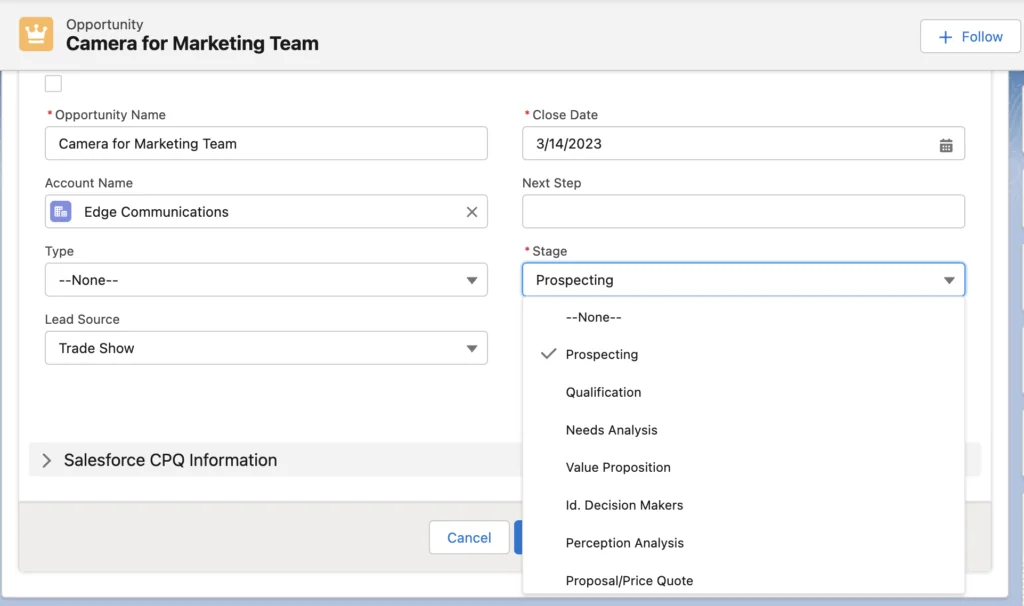
Use a stage only when users can identify a measurable entry condition. A label such as “Negotiation” is not enough by itself. Its definition might require a submitted commercial proposal, an identified approver, and a documented decision date.
Opportunities Salesforce record types and sales processes
For opportunities Salesforce implementations with more than one sales motion, use record types and sales processes when users require different stage values or picklist options. Examples include new business, renewals, channel sales, and professional services.
Do not create a record type only because one team wants a different page layout. Record types also affect picklist availability and increase testing, reporting, and automation complexity. Confirm that the underlying business process differs before adding one.
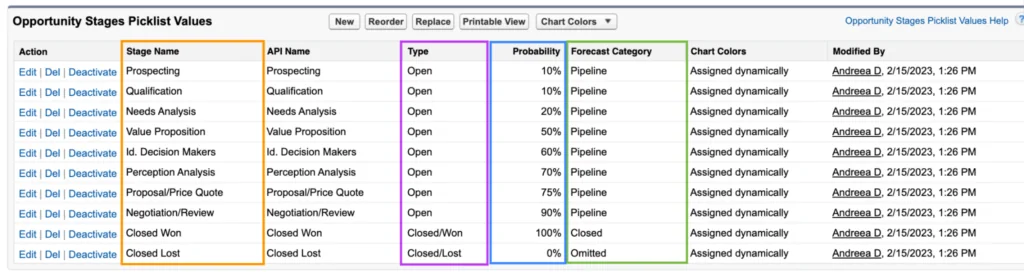
Before changing a production stage, inventory every dependency: validation rules, flows, Apex, reports, list views, forecast settings, formulas, integrations, and external data mappings. Referencing a stage by its text value creates a dependency that must be updated when the value changes.
How Does Salesforce Path Improve Opportunity Management?
Path gives users a visual representation of a picklist-driven process in Lightning Experience. For an opportunity, admins commonly configure Path around StageName, then expose up to five key fields and stage-specific guidance.
Salesforce opportunity Path setup
- Go to Setup → User Interface → Path Settings.
- Enable Path if it is not already enabled.
- Create a path and select the object, record type, and picklist field.
- Choose up to five key fields for each step.
- Add guidance that states the exit criteria, required evidence, and next action.
- Activate the path.
- Add the Path component to the Lightning record page if it is not already present.
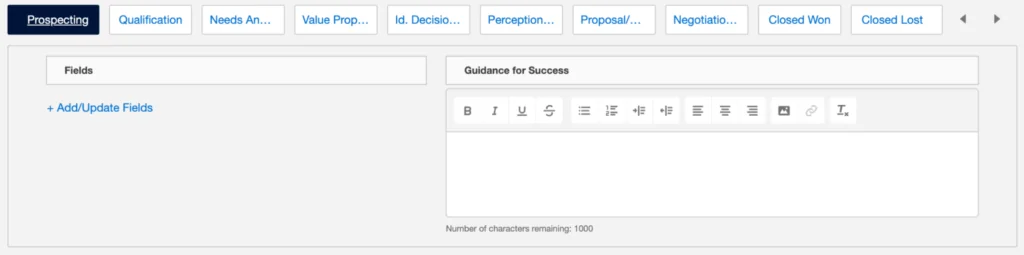
Guidance should be operational. At a proposal stage, state which approval must be complete, which commercial fields must be populated, and what document must be attached or linked. Avoid generic coaching text that cannot be tested.
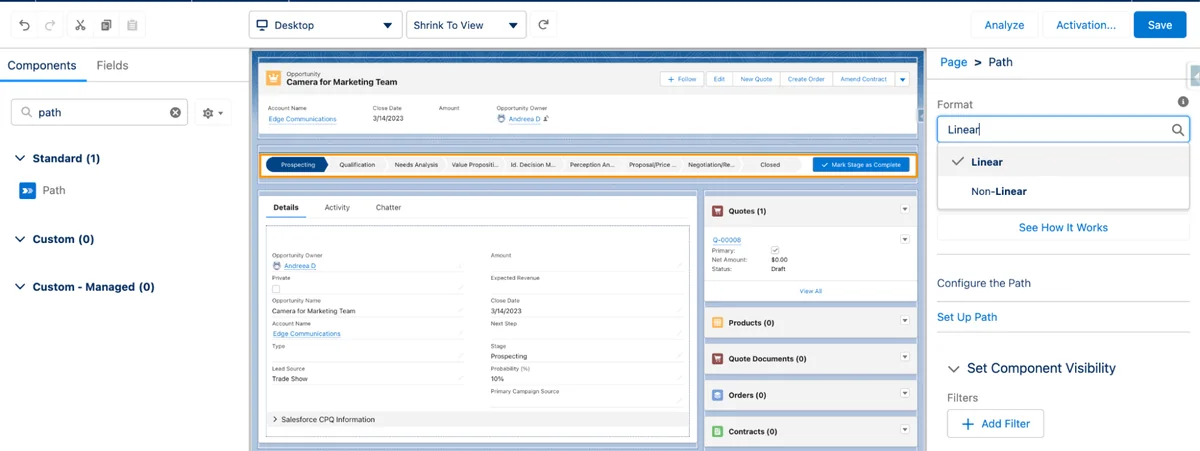
Path does not enforce data quality. It presents fields and instructions, while validation rules, required fields, Flow, Apex, and approval processes enforce behavior.
What Validation Rules Improve SFDC Opportunity Management?
In SFDC opportunity management, validation rules should prevent materially incomplete transitions without blocking unrelated edits. A useful pattern is to validate a stage change and the fields required for the destination stage.
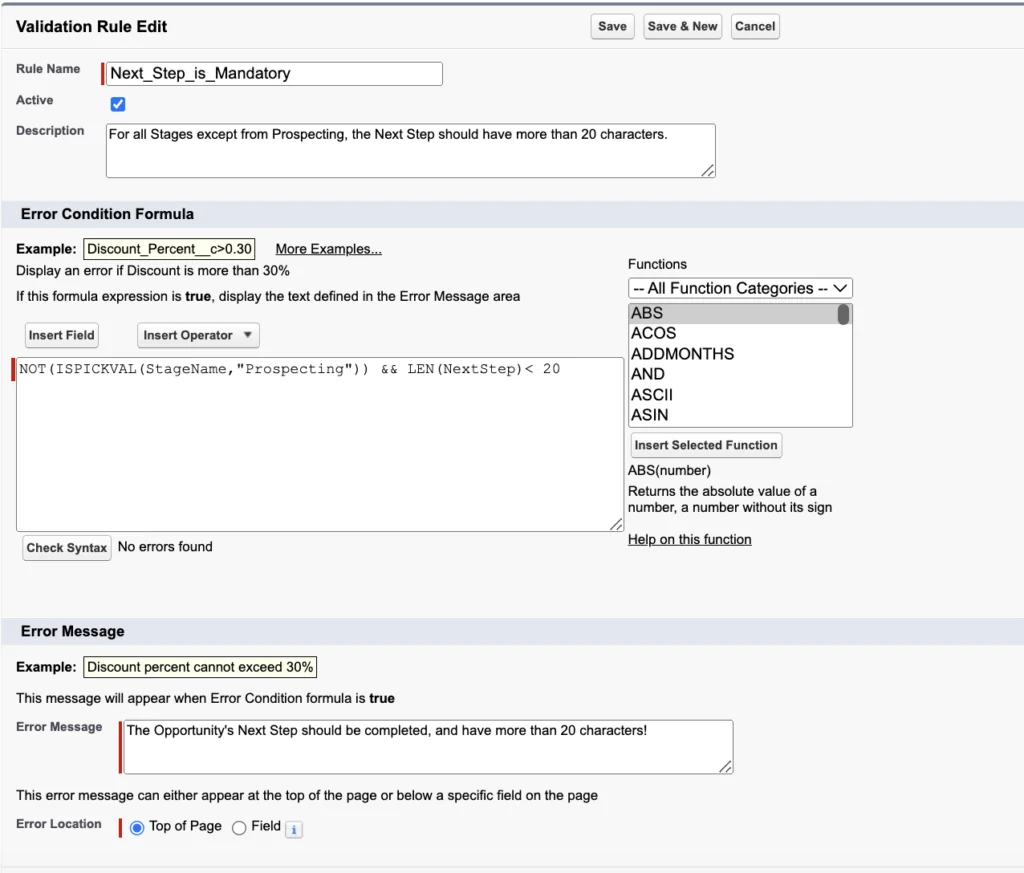
Require a meaningful next step when the stage advances
AND(
  ISCHANGED(StageName),
  NOT(ISPICKVAL(StageName, "Closed Won")),
  NOT(ISPICKVAL(StageName, "Closed Lost")),
  LEN(TRIM(NextStep)) < 20
)
This formula blocks a stage change when the next step is shorter than 20 characters, except for closed stages. The character threshold is an example business rule, not a Salesforce platform requirement.
Require a current or future close date for open deals
AND(
  NOT(IsClosed),
  CloseDate < TODAY()
)
This rule prevents an open opportunity from being saved with a close date in the past. It can improve pipeline hygiene, but it can also block integrations or scheduled updates. Exempt an integration user only when the integration has an agreed remediation process.
Require a loss reason for Closed Lost
AND(
  ISPICKVAL(StageName, "Closed Lost"),
  ISBLANK(TEXT(Loss_Reason__c))
)
Use a controlled picklist for grouped reporting and a separate text field for supporting context. Do not rely on free text alone when leadership expects loss-reason trends.
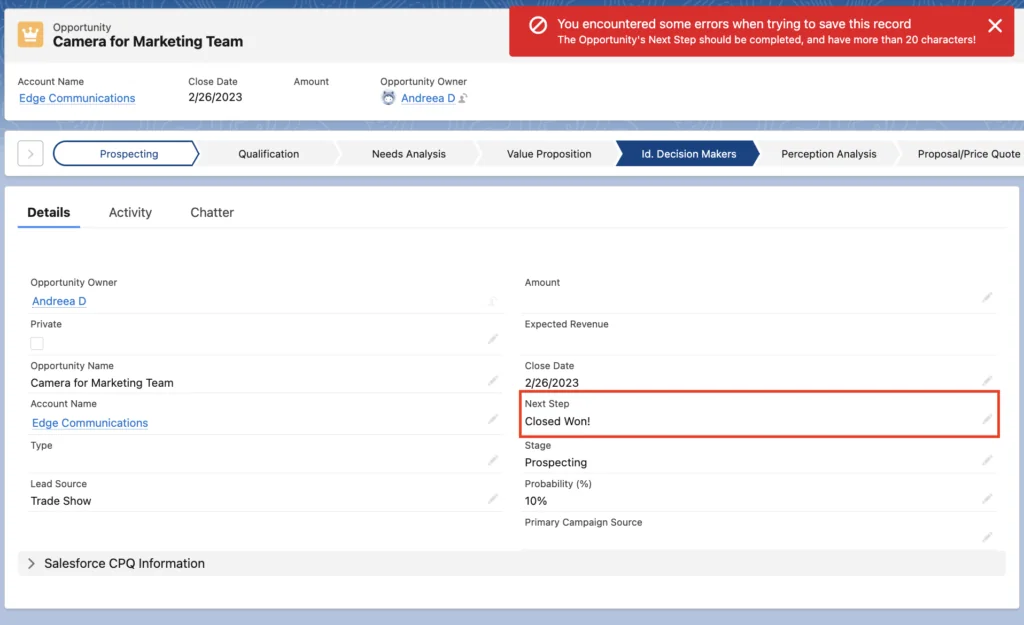
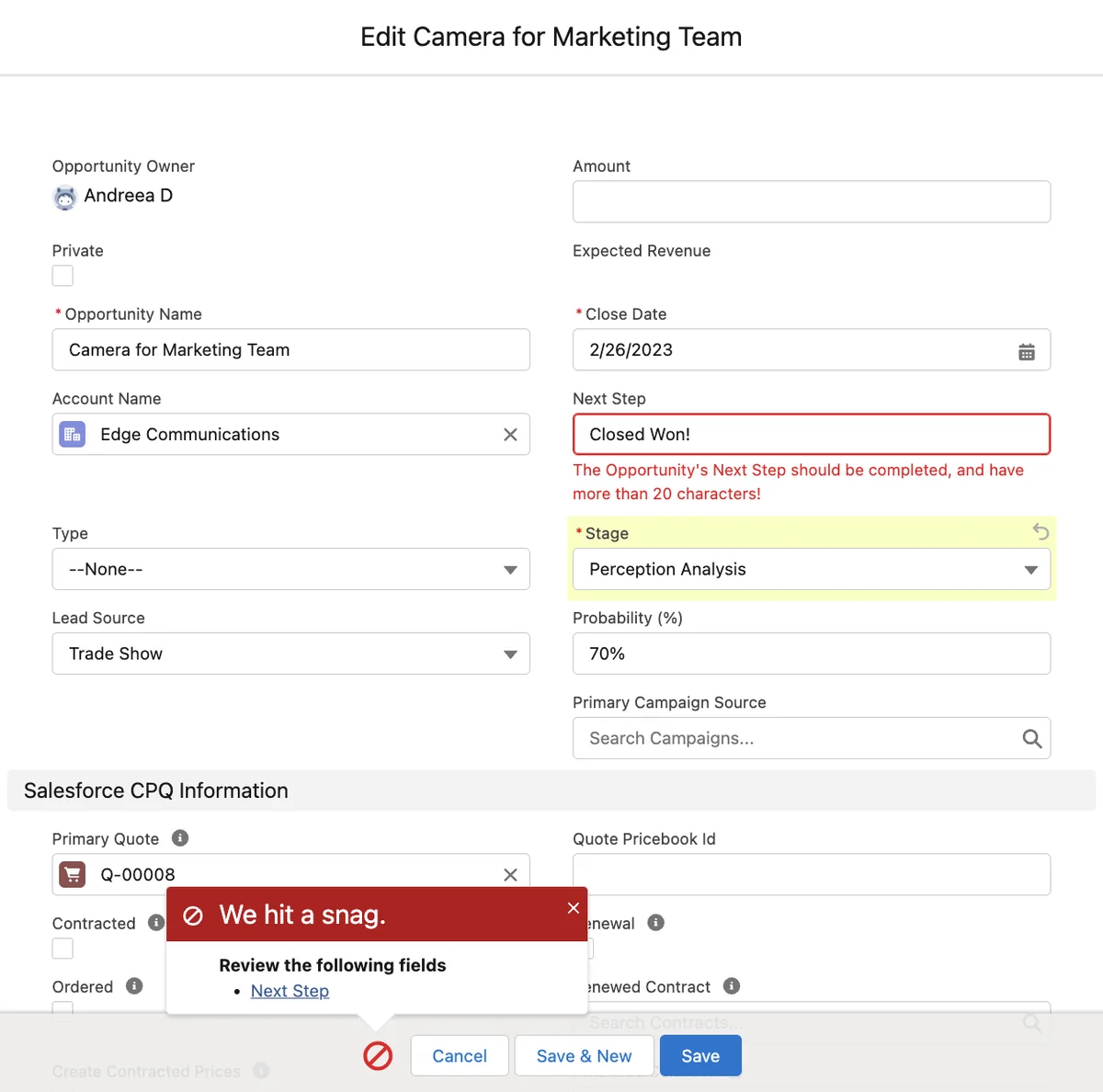
Write error messages that identify the missing field and the required action. Place the error on the field when possible. Test every rule through the Lightning UI, Data Loader, APIs, lead conversion, Flow, Apex, and managed packages that update opportunities.
How Should Opportunity Teams and Access Be Configured?
Opportunity Teams identify colleagues who contribute to a deal and can grant team-level access to the opportunity. Each member has a team role and an access level. This model is useful when organization-wide defaults restrict access and cross-functional users need access to selected deals.
SFDC opportunity management access model
Opportunity Teams do not replace the broader sharing model. Evaluate access in this order:
- Opportunity organization-wide default.
- Role hierarchy behavior.
- Sharing rules and territories, where applicable.
- Manual sharing and Opportunity Teams.
- View All, Modify All, and system permissions.
Use default opportunity teams for sellers who repeatedly work with the same colleagues. Define roles such as Account Executive, Sales Engineer, Legal Reviewer, and Executive Sponsor so reports show each person’s responsibility.
If revenue credit must be allocated, evaluate Opportunity Splits separately. Splits have their own enablement, reporting, and governance requirements.
How Do Opportunity Contact Roles Support Deal Governance?
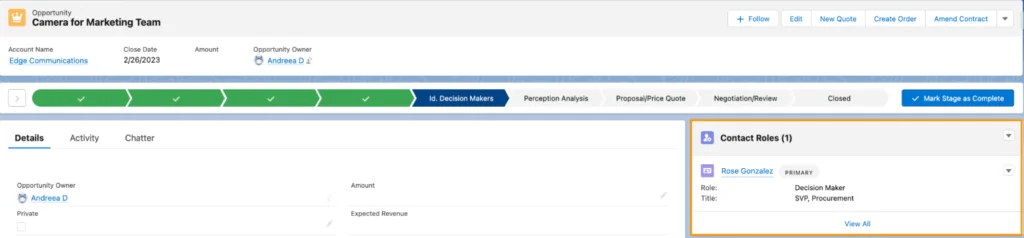
Opportunity Contact Roles record the people involved in a deal and the role each person plays, such as decision maker, evaluator, business user, or executive sponsor. One contact role can be marked as primary.
Salesforce opportunity contact role design
Use contact roles when a deal depends on several stakeholders. A single Contact lookup on Opportunity cannot represent multiple participants or the role each person plays.
Standard Opportunity validation formulas cannot directly count child Opportunity Contact Role records. Common enforcement patterns include:
- A record-triggered Flow that maintains a contact-role count or primary-contact indicator on Opportunity.
- An exception report for late-stage opportunities without required contact roles.
- A scheduled Flow that flags incomplete records for review.
- Apex when declarative automation cannot meet the transaction or scale requirement.
Do not assume that adding an Opportunity Contact Role grants a user access to the deal. Stakeholder tracking and record sharing are separate concerns.
How Do Products, Price Books, and Quotes Affect Opportunity Amount?
Products describe what the organization sells. Price books provide prices for products, and Pricebook Entry records connect products to price books. Adding a product to an opportunity creates an Opportunity Product record, named OpportunityLineItem in the API.
| Record | Purpose | Key relationship |
|---|---|---|
| Product2 | Product catalog item | Referenced by price book entries |
| Pricebook2 | Collection of product prices | Selected for an opportunity |
| PricebookEntry | A product price within a price book | Connects Product2 and Pricebook2 |
| OpportunityLineItem | Product, quantity, sales price, and total for a deal | Child of Opportunity |
| Quote and QuoteLineItem | Commercial proposal and its line items | A quote can be synced with an opportunity |
Once opportunity products are present, Salesforce calculates the standard Opportunity Amount from the line items. Decide early whether sellers will enter one estimated amount or construct the amount from products. Mixing both approaches without governance creates disputes about which value reports should use.
Price book access must also be configured. A user can have access to an opportunity but still be unable to add products from a price book they cannot access.
How Should Flow Automate Salesforce Opportunities?
Use Flow for new declarative automation. Workflow Rules and Process Builder are legacy automation technologies and should not be selected for new implementations.
Handle stale close dates without hiding pipeline problems
A schedule-triggered Flow can find open opportunities with past close dates and create review tasks, update an exception field, or route records to a queue. Automatically moving every date forward can conceal poor pipeline maintenance, so choose the outcome intentionally.
For record-triggered opportunity flows:
- Use entry criteria that compare current and prior values.
- Prefer a before-save Flow for same-record field updates.
- Use an after-save Flow for related records, notifications, and actions that require a committed record.
- Prevent repeated execution with precise entry conditions.
- Test bulk transactions with at least 200 records.
Apex bulkification example for opportunity governance
Use Apex when Flow or standard configuration cannot meet the requirement. The following service queries opportunities once and inserts follow-up tasks in one DML operation.
public with sharing class OpportunityFollowUpService {
    public static void createTasksForStaleDeals(Set<Id> opportunityIds) {
        if (opportunityIds == null || opportunityIds.isEmpty()) {
            return;
        }

        List<Task> tasksToInsert = new List<Task>();

        for (Opportunity opp : [
            SELECT Id, OwnerId, CloseDate, IsClosed
            FROM Opportunity
            WHERE Id IN :opportunityIds
            WITH USER_MODE
        ]) {
            if (!opp.IsClosed && opp.CloseDate < Date.today()) {
                tasksToInsert.add(new Task(
                    WhatId = opp.Id,
                    OwnerId = opp.OwnerId,
                    Subject = 'Review stale opportunity close date',
                    Status = 'Not Started',
                    Priority = 'Normal',
                    ActivityDate = Date.today().addDays(1)
                ));
            }
        }

        if (!tasksToInsert.isEmpty()) {
            insert as user tasksToInsert;
        }
    }
}
Governor-limit note: The method keeps SOQL and DML outside loops, but it still runs within Apex limits for queries, DML statements, rows, CPU time, and heap. The caller should pass a bulk set of Opportunity IDs rather than invoking the method once per record.
Security note: with sharing enforces record sharing. User-mode SOQL and DML enforce object and field permissions for the running user. Confirm that the class API version and execution context support the syntax before deployment.
What Reports Should Opportunity Management Include?
A production opportunity model needs reports for business outcomes and data exceptions. At minimum, consider reports for:
- Open pipeline by owner, stage, close month, and forecast category.
- Open opportunities with a close date in the past.
- Deals with no next step.
- Late-stage deals without a primary contact role.
- Deals without products or quotes when those records are required.
- Stage aging and stage-conversion analysis.
- Closed-lost reasons by segment, product, or territory.
Document whether each report uses standard Amount, opportunity line-item totals, converted currency, or another revenue field. Dashboard consumers should not have to infer which monetary definition is being displayed.
Best Practices for Opportunities Salesforce Implementations
- Define stage entry and exit criteria. A label alone is not a process definition.
- Separate process variations intentionally. Use record types and sales processes only when stage or picklist behavior differs.
- Inventory dependencies before changing stages. Check Flow, Apex, formulas, reports, integrations, and forecasts.
- Validate the destination stage. Require the evidence needed for the stage a record is entering.
- Test integrations and bulk updates. Opportunity controls affect APIs, imports, lead conversion, and managed packages.
- Respect sharing and CRUD/FLS. Access to a record does not grant access to every field, price book, or related record.
- Use reports for nonblocking controls. Not every data-quality concern should prevent a save.
- Review adoption after deployment. Measure stalled deals, skipped stages, close-date changes, and validation failures.
Common Errors with a Salesforce Opportunity Model
| Error | Why it causes problems | Better approach |
|---|---|---|
| Using the same stages for every deal type | Users select values that do not match their process | Evaluate separate sales processes and record types |
| Requiring too many fields at creation | Users enter guesses only to save the record | Require evidence as the deal advances |
| Changing stage labels without dependency analysis | Flows, formulas, reports, and integrations can fail | Inventory references before deployment |
| Using Flow and Apex for the same rule | Order-of-execution behavior becomes difficult to diagnose | Assign one automation owner to each responsibility |
| Assuming contact roles grant access | Stakeholder tracking and sharing are separate models | Configure contact roles and sharing independently |
| Automatically moving stale close dates | Poor pipeline data is postponed rather than corrected | Create review tasks or exception reports |
Frequently Asked Questions
What is a Salesforce opportunity?
A Salesforce opportunity is a standard record used to track a potential or active deal, including its account, stage, close date, amount, owner, participants, products, and forecast information.
Can different opportunity record types use different stages?
Yes. Create sales processes containing the required stage values, then assign those processes through Opportunity record types. Test Path, automation, reports, and integrations for every record type.
Does Salesforce Path enforce required fields?
No. Path highlights fields and provides guidance. Validation rules, required-field settings, Flow, Apex, and approval processes enforce data-entry and process controls.
Do opportunity contact roles give users access to the deal?
No. Opportunity Contact Roles identify customer stakeholders. User access is controlled through organization-wide defaults, role hierarchy, sharing rules, territories, Opportunity Teams, manual sharing, and permissions.
Should Flow automatically move an opportunity close date?
Only when the business has an explicit policy for doing so. In many orgs, creating a review task or exception report is safer because silently moving dates can conceal stale pipeline data.
Official Salesforce References
- Salesforce Help: Opportunities
- Salesforce Help: Guide Users with Path
- Salesforce Help: Opportunity Contact Roles
Related SalesforceTutorial Resources
- Salesforce opportunity stages and sales processes
- Salesforce validation rules with formula examples
- Salesforce record types and business processes
- Salesforce Flow automation
- Salesforce opportunity reports