Salesforce data validation address fields means controlling how street, city, state or province, postal code, and country values are entered and saved. Native Salesforce tools can enforce completeness, format, and standardized country or state values, but they do not by themselves confirm that a physical address is deliverable.
A sound design separates three concerns: standardization, business validation, and postal verification. State and Country/Territory Picklists standardize values. Validation rules reject combinations that violate business policy. An external verification service is required when the business must confirm that an address exists in postal reference data.
What are Salesforce data validation address fields?
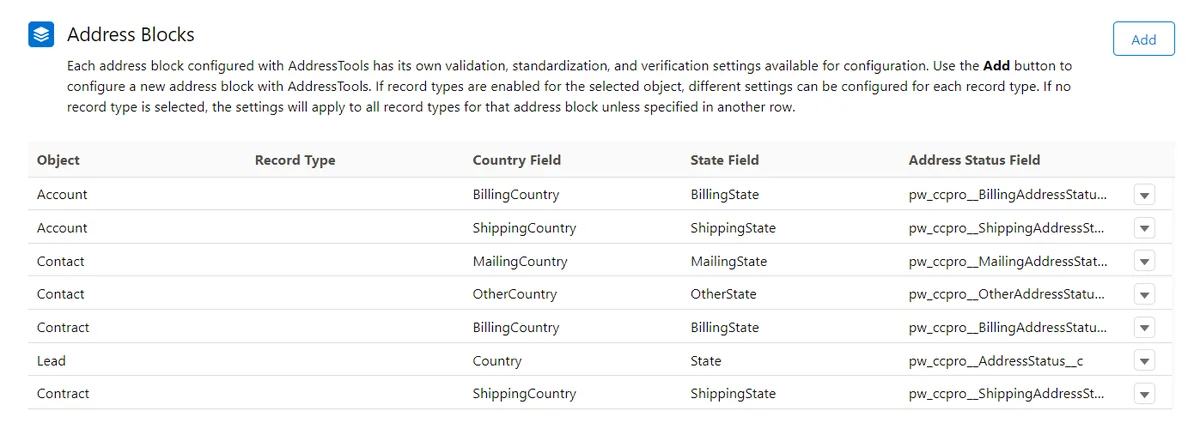
Standard address fields are compound fields. For example, an Account Billing Address appears as one address in the user interface, but its components include BillingStreet, BillingCity, BillingState, BillingPostalCode, and BillingCountry. When State and Country/Territory Picklists are enabled, code fields such as BillingStateCode and BillingCountryCode are also available.
This distinction matters because Salesforce data validation address fields should normally target component fields rather than the compound field. A rule that checks only the compound address can miss the difference between a partially entered address and a complete address.
| Requirement | Salesforce feature | What it enforces | Limitation |
|---|---|---|---|
| Consistent country and state values | State and Country/Territory Picklists | Allowed labels, integration values, and codes | Does not verify the street or postal code |
| Required components | Validation rules or Flow | Street, city, postal code, state, or country requirements | Does not confirm that the values are genuine |
| Postal-code syntax | Validation rules with REGEX |
Country-specific string patterns | Does not confirm that a code belongs to the entered city |
| Deliverability | External verification service | Matching against provider reference data | Depends on provider data and coverage |
Salesforce documents the component structure in the Address Compound Fields Object Reference. Confirm the component API names for the object before building validation rules, Flow formulas, Apex, or integrations.
How should Salesforce data validation address fields be designed?
Start with the business event that requires a usable address. A Lead may need only country and state for assignment. A shipping Account may require street, city, postal code, and country before an order is released. A Contact may remain incomplete until a lifecycle status changes.
In enterprise orgs, validate at a named process boundary instead of making every address component universally required. This reduces blocked integrations, incomplete lead capture, and false validation failures.
Map each address source before writing rules
List every source that writes the fields: Lightning record pages, Screen Flows, Web-to-Lead, Experience Cloud, middleware, Data Loader, Apex, and managed packages. Salesforce data validation address fields apply to most record-save paths, so an integration that sends free-text country names can fail after picklists or stricter rules are enabled.
Use component API names
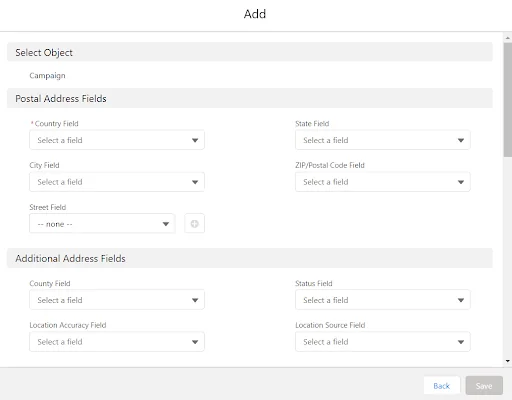
Write formulas against API names. For Account Billing Address, use the Billing... component fields. For Contact Mailing Address, use Mailing.... For a custom compound Address field, confirm the generated component names in Object Manager or object describe metadata.
Use a controlled bypass
Some migration or integration jobs need an exception. Do not bypass validation with profile names or hard-coded user IDs. Create a custom permission, reference it with $Permission, and grant it through a permission set only to approved users.
How to enable Salesforce address validation with picklists
Salesforce address validation begins with consistent country and state values. From Setup, search for State and Country/Territory Picklists. Configure active and visible countries, review integration values and codes, convert existing data, test integrations, and then enable the picklists for address fields.
Salesforce documents the process in Configure State and Country Picklists and Enable and Disable State and Country/Territory Picklists.
- Export distinct country and state values from production data.
- Map legacy names and abbreviations to Salesforce integration values.
- Check API payloads, middleware transformations, and import templates.
- Convert existing address values before enabling the picklists.
- Test lead conversion, automation, duplicate rules, and integrations.
- Enable the picklists during a controlled deployment window.
After activation, favor code fields in integration logic. For example, BillingCountryCode = "US" is less dependent on the displayed country label than comparing BillingCountry with text. Salesforce synchronizes labels, codes, and integration values according to its documented field-syncing behavior.
Salesforce address validation and Spring ’26 codes
Salesforce Spring ’26 release notes describe updated state codes for Canada and Japan in orgs configured with standard address picklists in Spring ’26 and later. Treat state codes as integration data and regression-test transformations that store or compare them outside Salesforce.
How to create validation rules for address fields
A validation rule returns TRUE when a record is invalid. Salesforce blocks the save and displays the configured error message. The official Trailhead validation rules unit explains the evaluation model and setup process.
Require a complete billing address at a process boundary
This Account rule requires the main billing components when a custom status indicates that the account is ready for invoicing. It includes a custom-permission bypass.
AND(
    NOT($Permission.Bypass_Address_Validation),
    ISPICKVAL(Customer_Status__c, "Ready for Invoicing"),
    OR(
        ISBLANK(BillingStreet),
        ISBLANK(BillingCity),
        ISBLANK(BillingPostalCode),
        ISBLANK(BillingCountry)
    )
)
Use an error message that names the missing requirement: Enter street, city, postal code, and country before setting the customer to Ready for Invoicing.
Validate a United States ZIP code
The following formula accepts five digits or ZIP+4. Use the country code when State and Country/Territory Picklists are enabled.
AND(
    NOT(ISBLANK(BillingPostalCode)),
    BillingCountryCode = "US",
    NOT(
        REGEX(
            BillingPostalCode,
            "^[0-9]{5}(-[0-9]{4})?$"
        )
    )
)
This checks syntax only. It does not prove that the ZIP code belongs to the entered city or street.
Require state for selected countries
Not every country uses a state or province in the same way. Restrict the requirement to countries included in your business policy.
AND(
    NOT($Permission.Bypass_Address_Validation),
    OR(
        BillingCountryCode = "US",
        BillingCountryCode = "CA",
        BillingCountryCode = "AU"
    ),
    ISBLANK(BillingStateCode)
)
Confirm that the selected countries have states or provinces configured in the org. A rule that requires BillingStateCode for every country can reject valid international addresses.
Reject a partially completed address
This pattern allows an entirely blank Shipping Address but rejects a record when only some required components are populated.
AND(
    OR(
        NOT(ISBLANK(ShippingStreet)),
        NOT(ISBLANK(ShippingCity)),
        NOT(ISBLANK(ShippingPostalCode)),
        NOT(ISBLANK(ShippingCountry))
    ),
    OR(
        ISBLANK(ShippingStreet),
        ISBLANK(ShippingCity),
        ISBLANK(ShippingPostalCode),
        ISBLANK(ShippingCountry)
    )
)
How to validate addresses in Salesforce Screen Flows
To validate addresses in Salesforce during a guided process, use the Flow Address screen component for collection and a Decision element or formula for business checks. When State and Country/Territory Picklists are enabled, Salesforce instructs Flow builders to use the state or province code output when updating records.
- Add the Address component to a Screen element.
- Store street, city, postal code, country, and code outputs.
- Add a Decision element for country-specific requirements.
- Return the user to a corrective screen when a component is missing.
- Update the record with component values and codes.
- Allow object validation rules to provide final server-side enforcement.
Flow validation improves the user experience, but it should not replace object validation when records can also be written through APIs, imports, Apex, or other automation.
Validate addresses in Salesforce with a postal service
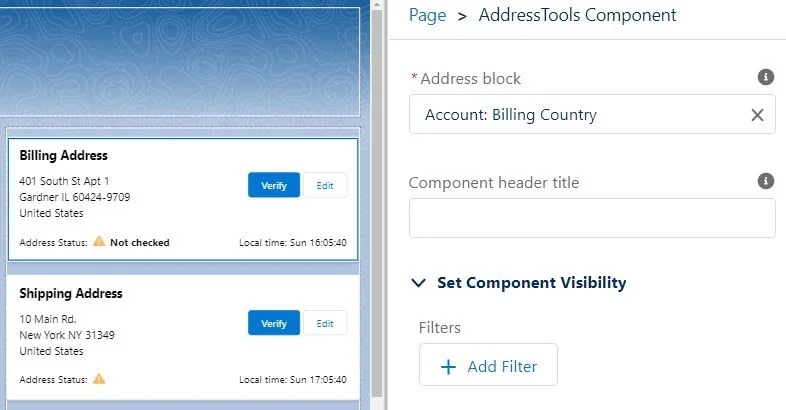
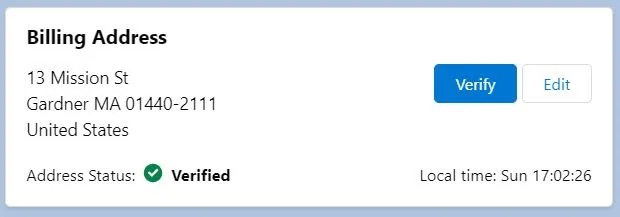
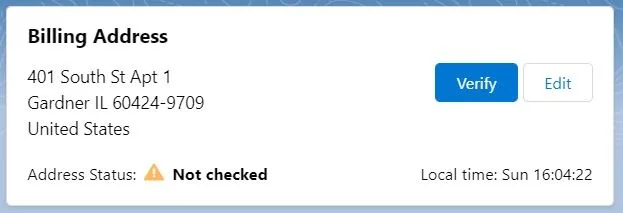
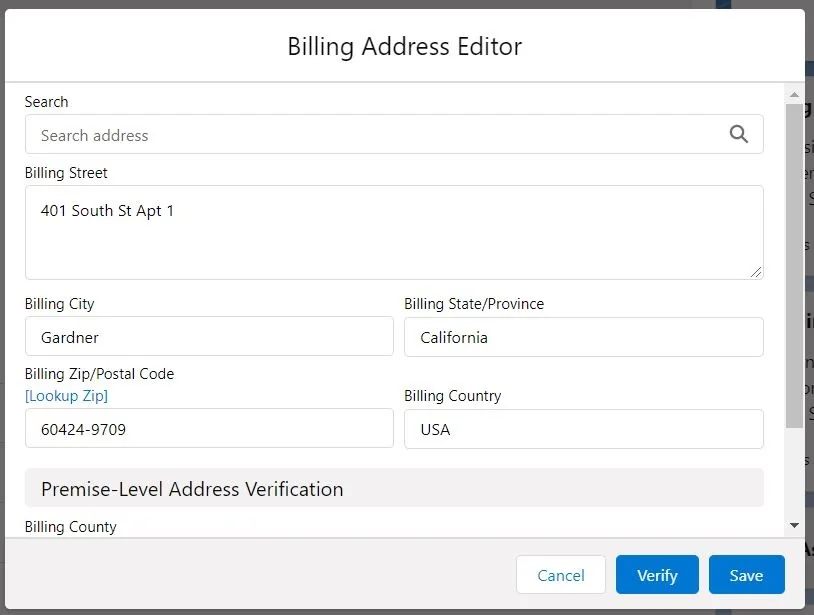
For deliverability checks, call an external address service through a supported integration pattern, such as an invocable Apex action, an HTTP Callout action where suitable, or middleware. Store the result separately from the address. Common fields include verification status, verification timestamp, provider response code, and a reviewed-override flag.
Do not silently overwrite the user-entered address. Preserve the original or require confirmation before applying a normalized address returned by the provider.
Address validation Salesforce integrations must handle
Address validation Salesforce projects often fail at integration boundaries rather than on record pages. APIs and import tools write address component fields. When picklists are enabled, payloads must use codes or integration values that match the org configuration.
REST API payload for an Account billing address
{
  "BillingStreet": "100 Market Street",
  "BillingCity": "San Francisco",
  "BillingStateCode": "CA",
  "BillingPostalCode": "94105",
  "BillingCountryCode": "US"
}
Validation rules still execute for API updates. The integration user also needs object permission, field-level security, and any custom permission required by the validation design.
Apex bulk-update example
public with sharing class AccountAddressService {
    public static List<Database.SaveResult> updateBillingAddresses(
        Map<Id, AddressInput> inputsByAccountId
    ) {
        if (inputsByAccountId == null || inputsByAccountId.isEmpty()) {
            return new List<Database.SaveResult>();
        }

        List<Account> updates = new List<Account>();

        for (Id accountId : inputsByAccountId.keySet()) {
            AddressInput input = inputsByAccountId.get(accountId);
            if (input == null) {
                continue;
            }

            updates.add(new Account(
                Id = accountId,
                BillingStreet = input.street,
                BillingCity = input.city,
                BillingStateCode = input.stateCode,
                BillingPostalCode = input.postalCode,
                BillingCountryCode = input.countryCode
            ));
        }

        SObjectAccessDecision accessDecision =
            Security.stripInaccessible(AccessType.UPDATABLE, updates);

        return Database.update(accessDecision.getRecords(), false);
    }

    public class AddressInput {
        @AuraEnabled public String street;
        @AuraEnabled public String city;
        @AuraEnabled public String stateCode;
        @AuraEnabled public String postalCode;
        @AuraEnabled public String countryCode;
    }
}
The method performs one DML operation for the collection, uses Security.stripInaccessible for field access, and returns partial-save results. The caller must inspect each result and handle validation errors. Salesforce data validation address fields can reject individual records without rolling back the complete collection because allOrNone is set to false.
How should custom address fields be validated?
Salesforce supports custom compound Address fields after the feature is enabled and State and Country/Territory Picklists are configured. Salesforce documents reporting, search, import, and field-allocation considerations. Each component counts toward the org’s custom-field allocation, so review the Custom Address Fields Developer Guide before creating many custom addresses.
For Salesforce data validation address fields on a custom Address field, inspect the generated component API names and use those names in formulas, Flow, Apex, and integrations. Test reports because compound fields and component fields are not interchangeable in every reporting context.
Common errors with Salesforce data validation address fields
| Error | Cause | Correction |
|---|---|---|
| A rule checks only the compound address | The requirement applies to individual components | Check street, city, postal code, state, and country separately |
| Imports fail after picklists are enabled | Source values do not match integration values or codes | Transform values before loading and use code fields where appropriate |
| Valid international addresses are rejected | A US-specific rule is applied globally | Branch logic by country and avoid universal state or ZIP assumptions |
| Users cannot edit records containing old invalid addresses | A new rule evaluates during unrelated updates | Use lifecycle conditions, change detection, staged cleanup, or a governed bypass |
| Flow succeeds but API updates contain incomplete data | Validation exists only on the Flow screen | Keep final enforcement in an object validation rule or server-side logic |
| Verification status becomes stale | An address component changed after verification | Reset the status whenever a component changes |
Best practices for Salesforce data validation address fields
- Define valid for each process. Lead routing, invoicing, shipping, tax calculation, and service dispatch can require different components.
- Enable picklists before adding text-heavy rules. Standard country and state values simplify formulas and integration mappings.
- Validate only formats your business can maintain. International postal formats vary and can change.
- Keep verification separate. A syntactically valid address is not necessarily deliverable.
- Reset verification after changes. Use Flow or Apex to mark an address unverified when any component changes.
- Use custom permissions for exceptions. Avoid profile-name checks and permanent bypass checkboxes.
- Test every save path. Include the UI, Flow, API, Data Loader, Apex, lead conversion, and managed-package automation.
- Write actionable errors. Name the missing component and state when the requirement applies.
For related configuration guidance, see Salesforce validation rules, Salesforce custom fields, Salesforce Flow, and Salesforce Data Loader.
Frequently Asked Questions
Can a Salesforce validation rule confirm that a postal address exists?
No. A validation rule can enforce required components, formats, and relationships between fields, but it cannot prove that a street address is deliverable. Use an external postal verification service when you need verification against postal reference data.
Should I enable State and Country/Territory Picklists before writing address rules?
Usually, yes. Picklists standardize country and state values and expose code fields such as BillingCountryCode and BillingStateCode. Convert existing text values and test integrations before enabling them in production.
Why does ISBLANK(BillingAddress) not validate every address component?
BillingAddress is a compound field. Validate component fields separately, such as BillingStreet, BillingCity, BillingPostalCode, and BillingCountry, so the rule matches the exact completeness requirement.
How do I validate different postal-code formats by country?
Branch the validation rule by country or country code, and apply a country-specific REGEX expression only when that country is selected. Limit the rule to formats your business can define and test reliably.
Do validation rules run for API imports and integrations?
Yes. Validation rules generally apply to records created or updated through the UI, API, Data Loader, Flow, and Apex. Integrations must send compliant values unless the rule contains an intentional custom-permission bypass.