Financialforce is the legacy name many Salesforce teams still use when they mean Certinia, the ERP and professional services application family built on the Salesforce platform. In practical terms, a Salesforce admin should treat financialforce as a Salesforce-native managed application stack: it uses Salesforce login, permissions, reporting patterns, automation tools, and packaged objects, but the finance and PSA process rules come from Certinia.
What is financialforce in 2026?
FinancialForce was rebranded to Certinia in 2023, but the old product name still appears in search queries, legacy documentation, admin notes, and project plans. When someone asks about financialforce today, they usually mean one of three areas: Certinia ERP and Financial Management, Professional Services Cloud, or related customer success and planning applications.
Certinia describes its applications as built on the Salesforce platform. That matters for implementation because users work from the Salesforce UI, admins assign Salesforce permissions and permission sets, and architects design access around the same org security model that controls Accounts, Opportunities, Cases, custom objects, reports, and automation.
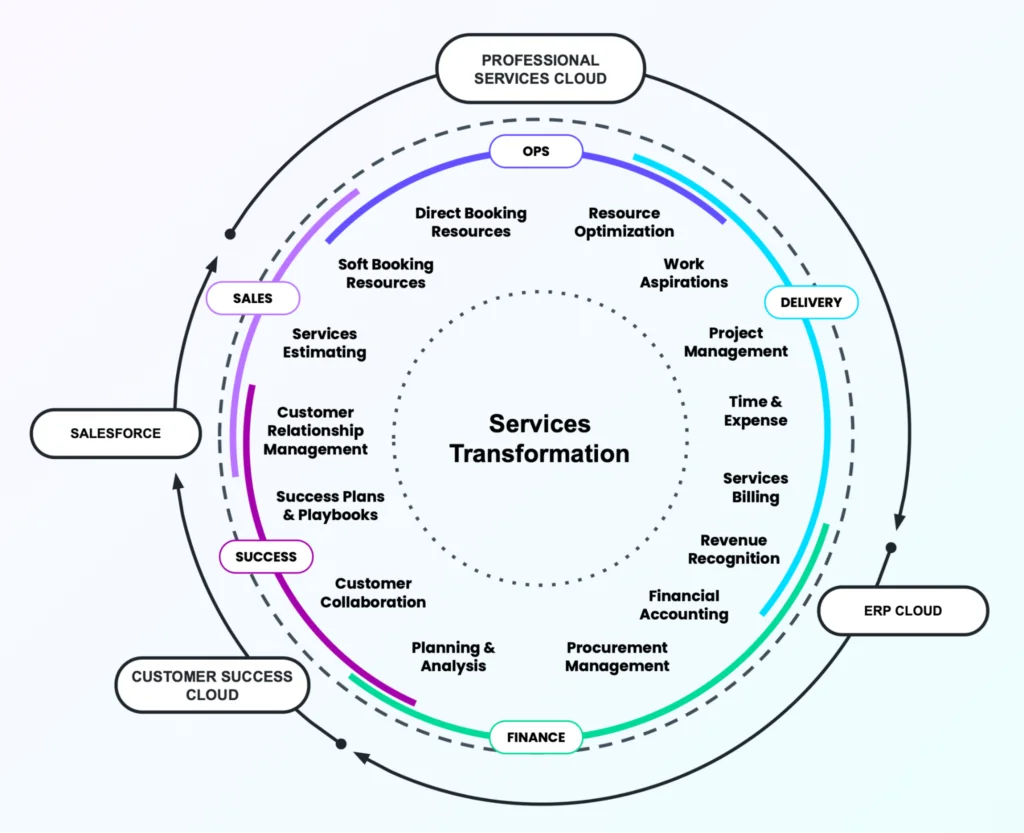
How do financialforce and Salesforce fit together?
The safest way to explain financialforce and salesforce is this: Salesforce provides the platform layer, while Certinia provides packaged business applications for finance, services, billing, and related operating processes. The applications run in the same org, but you still need a design for ownership, field access, automation, reporting, and integration.
Certinia erp architecture on Salesforce
certinia erp is not the same thing as an external ERP that syncs to Salesforce through middleware. In a Salesforce-native model, the application stores data in standard and managed-package custom objects inside the org. The package vendor controls parts of the managed metadata, while your team controls configuration, custom metadata, Flow, reports, permission sets, and any custom extension objects you add.
Salesforce Help documents the normal pattern for installing and managing managed packages, including installed package details, package licenses, and uninstall considerations. Use those screens during discovery to confirm which Certinia packages, versions, and licenses are present before you estimate work.
Financialforce and salesforce data model boundaries
The main design mistake is assuming financialforce and salesforce share every object in a simple one-to-one way. They share the same org and can reference the same customer records, but packaged financial objects, transaction objects, project objects, and configuration objects have their own rules. Before writing Flow or Apex, inspect the object model, namespace prefixes, field permissions, validation rules, and vendor documentation.
In discovery, document how certinia erp records relate to CRM objects so the financialforce and salesforce ownership model is clear before build starts.
| Area | Salesforce responsibility | Certinia responsibility | Implementation check |
|---|---|---|---|
| User access | Users, profiles, permission sets, permission set groups, roles, sharing | Packaged permission sets and application privileges | Map job roles to least-privilege access before UAT |
| Customer record | Account, Contact, Opportunity, related CRM activity | Finance, billing, project, and services references to customer data | Decide which team owns customer master data corrections |
| Automation | Flow, approval processes, Apex, platform events, scheduled jobs | Packaged automation and posting logic | Avoid custom automation that conflicts with vendor posting or period-close rules |
| Reporting | Reports, dashboards, report types, CRM Analytics if licensed | Packaged report folders and packaged datasets where available | Clone packaged reports before editing so you can compare after upgrades |
When should a Salesforce org use Certinia ERP?
Use certinia erp when finance and services teams need to work from Salesforce data without moving every transaction to a separate ERP user experience. In enterprise orgs, this often appears where sales, delivery, billing, revenue, and customer success teams need a shared view of customer commitments.
Certinia erp use cases for services teams
Common candidates include professional services firms, subscription businesses with project delivery, managed services teams, and organizations that need project financials close to CRM data. The value comes from reducing handoffs between Opportunity, project, billing, and finance processes. The risk comes from weak data governance: if Account hierarchy, product catalog, tax setup, currency setup, and close-date hygiene are poor, the ERP layer inherits that problem.
Financialforce and salesforce compared with external ERP integration
A native package is not automatically better than a connected ERP. The decision depends on process fit, accounting requirements, scale, country-specific compliance, integration needs, and user adoption. The financialforce and salesforce model is strongest when the same users need CRM and services data in one workspace. An external ERP may still be better when a company already has mature manufacturing, inventory, procurement, or statutory accounting processes outside Salesforce.
How to implement financialforce without breaking Salesforce governance
A financialforce rollout should start with a Salesforce architecture review, not with screen configuration. Treat it like any managed-package implementation that touches revenue, billing, security, and integration. Install and test in a sandbox first, review the installed package metadata, and document every automation that reads or writes packaged objects.
- Confirm package scope. In Setup, review Installed Packages, package versions, managed licenses, and publisher details. Salesforce Help explains how installed package details are reviewed from Setup.
- Map business roles to permission sets. Prefer permission sets and permission set groups for access design. Certinia documentation also points admins toward permission sets for application access.
- Review object-level, field-level, and record-level security. Use the Salesforce layered security model: org access, object permissions, field permissions, record access, and sharing.
- Define master data ownership. Decide who owns Accounts, Contacts, Products, price books, tax attributes, legal entities, companies, currencies, and project templates.
- Freeze critical changes during close testing. Finance applications need controlled UAT. Do not change validation rules, flows, or sharing defaults during period-close testing unless the test plan includes retesting.
- Plan releases around package upgrades. Managed package upgrades can add objects, fields, permissions, and automation. Test custom Flow, Apex, reports, and integrations after every upgrade.
How to integrate financialforce data with Apex
Do not write Apex directly against Certinia packaged objects until you have checked the installed package documentation, object names, namespace prefixes, and vendor-supported APIs. The safer pattern is to create a custom staging object or integration service that receives approved CRM events, then lets a controlled integration layer create finance records.
The following example uses a custom object named ERP_Invoice_Request__c. It is not a Certinia object. It shows the Salesforce-side pattern: bulk SOQL, one DML operation, and user-mode enforcement for CRUD and field-level security. It compiles only after you create the custom object and fields shown in the code.
public with sharing class ErpInvoiceRequestService {
    @AuraEnabled
    public static List<Id> createRequestsFromClosedOpportunities(List<Id> opportunityIds) {
        if (opportunityIds == null || opportunityIds.isEmpty()) {
            return new List<Id>();
        }

        List<Opportunity> opportunities = [
            SELECT Id, Name, AccountId, Amount, CloseDate, StageName
            FROM Opportunity
            WHERE Id IN :opportunityIds
            AND IsClosed = true
            WITH USER_MODE
        ];

        List<ERP_Invoice_Request__c> requests = new List<ERP_Invoice_Request__c>();

        for (Opportunity opp : opportunities) {
            if (opp.AccountId == null || opp.Amount == null || opp.Amount <= 0) {
                continue;
            }

            requests.add(new ERP_Invoice_Request__c(
                Source_Opportunity__c = opp.Id,
                Account__c = opp.AccountId,
                Requested_Amount__c = opp.Amount,
                Requested_Date__c = Date.today(),
                Status__c = 'Pending'
            ));
        }

        if (requests.isEmpty()) {
            return new List<Id>();
        }

        Database.SaveResult[] saveResults =
            Database.insert(requests, false, AccessLevel.USER_MODE);

        List<Id> createdIds = new List<Id>();
        for (Database.SaveResult result : saveResults) {
            if (result.isSuccess()) {
                createdIds.add(result.getId());
            }
        }
        return createdIds;
    }
}
This pattern avoids SOQL inside loops, handles partial DML success, and lets Salesforce enforce user permissions. For server-side jobs that must run under integration-user access, document why system-mode access is required and add explicit checks with Security.stripInaccessible or user-mode queries where possible. Salesforce Developer documentation recommends user-mode operations for enforcing object and field permissions in Apex.
For high-volume handoffs, do not call external systems from triggers. Use Queueable Apex, Batch Apex, Change Data Capture, Platform Events, or middleware. Change Data Capture is useful when another platform must subscribe to Salesforce record changes without polling. Always test event volume, replay behavior, and subscriber limits before production cutover.
How to report on financialforce and Salesforce data
The reporting approach depends on how much packaged data you expose to each audience. Finance users may need transaction-level reports, project managers may need margin and utilization views, and executives may need combined pipeline, backlog, billing, and revenue dashboards. Start with packaged report folders, then create custom report types only after the object relationships are clear.
For admins who are new to report design, review Salesforce reports and dashboards before building executive dashboards. If your org also uses Revenue Cloud, compare handoff points with Salesforce Revenue Cloud configuration. For data lake or harmonized analytics scenarios, review Salesforce Data Cloud architecture. For quoting dependencies, connect this design with Salesforce CPQ product and price rules.
Best practices for financialforce admins and developers
- Keep finance automation separate from sales automation. A closed Opportunity should not automatically create accounting records unless the finance approval path is clear.
- Use a named integration user. Do not connect middleware through a personal admin account. Assign the minimum permission sets required.
- Store mappings in custom metadata. Company, region, product, tax, and billing mappings change. Custom metadata keeps them deployable and reviewable.
- Test with real security. Run UAT as finance users, project managers, sales users, and integration users. System Administrator testing misses permission failures.
- Watch managed package upgrades. Re-run regression tests after each package upgrade and Salesforce seasonal release.
- Meet Apex deployment rules. Salesforce requires at least 75 percent Apex code coverage for deployment, and all tests must pass. Coverage is not a substitute for meaningful assertions.
Common errors with financialforce projects
| Error | Why it happens | How to prevent it |
|---|---|---|
| Users can see CRM records but not finance records | Object permissions, field permissions, packaged permission sets, or sharing rules are incomplete | Create role-based permission set groups and test with non-admin users |
| Flow updates fail after a package upgrade | A managed field, validation rule, or packaged process changed behavior | Keep a regression suite for flows that touch packaged objects |
| Reports do not match finance totals | Report filters ignore company, currency, period, posting status, or adjustment records | Validate every finance dashboard against the system-of-record report used by finance |
| Integration creates duplicate requests | The design lacks idempotency keys or source transaction tracking | Store source record IDs and external references, then upsert instead of blind insert |
Official documentation to review before production
Before a production rollout, read the Salesforce Help page for managing installed packages, the Salesforce Developer Guide section on setting an access mode for database operations, and Trailhead’s Data Security module. For product-specific package objects and permission sets, use Certinia developer resources and the relevant Certinia help pages for your installed release.
Frequently Asked Questions
Is financialforce the same as Certinia?
Yes, in most current Salesforce conversations, financialforce refers to Certinia. The company rebranded, and Certinia documentation notes that package names and labels were updated to align with the new brand. Older org notes, resumes, and search queries may still use the FinancialForce name.
What is certinia erp used for in Salesforce?
certinia erp is used for finance and business operations processes that need to work near Salesforce customer data. Typical areas include financial management, billing-related processes, revenue operations, project financials, and services business reporting. The exact scope depends on which Certinia packages your org has licensed and installed.
How are financialforce and Salesforce connected?
financialforce and salesforce are connected through the Salesforce platform. Certinia applications are installed as Salesforce managed packages, so admins manage many parts of access, reporting, automation, and user experience through Salesforce Setup. Product-specific configuration still comes from Certinia documentation and package setup guides.
Can I customize financialforce objects with Flow or Apex?
You can extend a Salesforce org with Flow and Apex, but you should not customize packaged finance behavior blindly. Check the installed package documentation, namespace, supported extension points, validation rules, and upgrade guidance first. For critical finance records, use a staging pattern or vendor-supported API instead of writing directly to managed objects.
Does certinia erp replace Salesforce Revenue Cloud?
No. certinia erp and Salesforce Revenue Cloud solve different parts of the revenue process. Revenue Cloud is usually closer to quoting, pricing, contracts, and revenue lifecycle automation, while Certinia focuses on ERP, financial management, and services operations. Some orgs use both, but they need a clear handoff design.
What should admins check before installing financialforce in production?
Admins should verify sandbox testing, package versions, license assignments, permission sets, object access, field access, sharing rules, integration users, data migration plans, and rollback steps. They should also confirm that Salesforce seasonal release testing and Certinia package upgrade testing are part of the release calendar.