GDPR considerations Salesforce teams must address extend beyond adding an opt-out checkbox. A workable design must control why personal data is collected, which teams can access it, how consent is proved, how long data is retained, and how access, correction, portability, restriction, and erasure requests are completed across every connected system.
Salesforce provides data privacy records, consent-management objects, field classification, security controls, and optional privacy products. These features support a compliance program, but they do not make an organization compliant by themselves. Salesforce states that customers remain responsible for determining which legal and operational controls apply to their processing activities.
Legal review required: This article explains Salesforce architecture and administration patterns. It is not legal advice. Confirm lawful basis, retention periods, exemptions, and response procedures with your privacy or legal team.
What GDPR considerations should Salesforce teams document?
Start with a processing inventory rather than a list of Salesforce features. For each use of personal data, document the data subject, business purpose, lawful basis, source, recipients, storage locations, retention rule, responsible owner, and procedure for handling individual rights.
| Design area | Question to answer | Salesforce implementation evidence |
|---|---|---|
| Purpose | Why is the data processed? | Data Use Purpose, processing-purpose record, or governed custom metadata |
| Lawful basis | Which lawful basis applies to this purpose? | Versioned assessment record with approval and review date |
| Consent | What did the person agree to, when, and through which notice? | Consent record, authorization form version, capture timestamp, channel, and source |
| Access | Which users and integrations need each field? | Permission sets, field-level security, sharing rules, integration-user permissions |
| Retention | When should data be deleted, anonymized, or reviewed? | Retention policy, scheduled job, archive process, exception status |
| Individual rights | How are requests identified, verified, fulfilled, and recorded? | Privacy request case, task checklist, export package, completion log |
| Third parties | Where else is the data replicated? | Integration register, connected-app inventory, downstream deletion workflow |
In enterprise orgs, this inventory usually exposes a key problem: the same Contact may be processed for several purposes under different rules. A single field such as HasOptedOutOfEmail cannot express permission by brand, purpose, channel, jurisdiction, notice version, and effective period.
GDPR considerations Salesforce data models must support
The Salesforce Platform includes the Individual standard object for data privacy and protection preferences. Salesforce describes it as a record of a customer’s privacy preferences, and it can be associated with person records such as Leads, Contacts, and Person Accounts after Data Protection and Privacy is enabled.
The Individual object is useful for broad privacy flags, but a complete design may also require the Salesforce consent data model or governed custom objects. The correct option depends on product licenses, marketing platforms, brands, jurisdictions, and the granularity of the organization’s processing purposes.
Use the Individual object for person-level privacy settings
Individual records can store global preferences such as restrictions on tracking or profiling. They should not be treated as a complete legal-basis register unless the organization’s requirements genuinely fit the available fields.
- In Setup, search for Data Protection and Privacy.
- Enable data protection details for records.
- Add the Individual relationship and relevant privacy fields to Lead, Contact, and Person Account layouts where required.
- Grant access through permission sets rather than broad profile permissions.
- Define who may create or change privacy preferences and how those changes are audited.
See the official Individual object reference and Salesforce Help guidance for storing customer data privacy preferences.
Model purpose, channel, brand, and contact point separately
A scalable consent model separates the person from the reason for processing and the method of communication. This avoids adding fields such as Pet_Email_Consent__c, Pet_SMS_Consent__c, and Motor_Email_Consent__c for every new product and channel.
A normalized model can represent:
- Individual or party: the person whose preference is recorded.
- Data use purpose: the defined reason for using personal data.
- Contact point: the email address, telephone number, or other address to which a preference applies.
- Channel: email, SMS, telephone, direct mail, or another governed communication method.
- Brand or business unit: the organization or brand relying on the preference.
- Consent status: granted, refused, withdrawn, pending, or another approved state.
- Capture evidence: notice version, collection source, timestamp, actor, and transaction identifier.
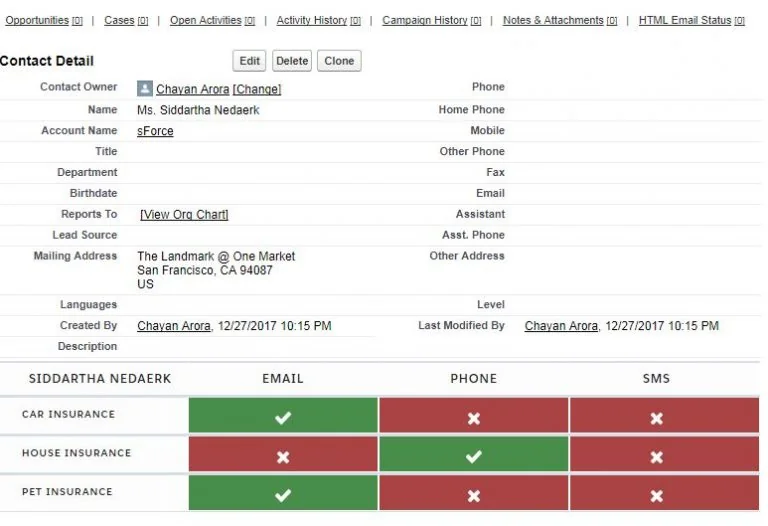
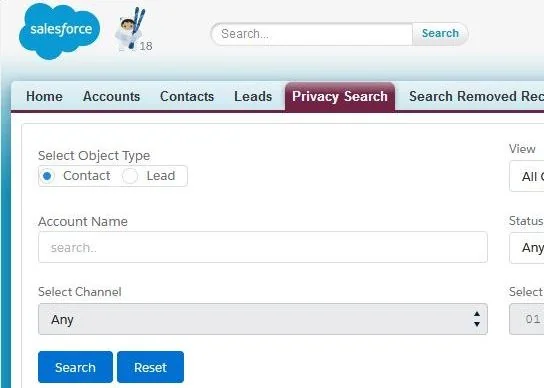
Salesforce documents the relationships among privacy consent, contact points, and related entities in its Privacy Overview Data Model. Review the object availability and licensing in the target org before basing an implementation on a product-specific consent model.
How should lawful basis be stored in Salesforce?
The GDPR recognizes several lawful bases for processing, including consent, contract, legal obligation, vital interests, public task, and legitimate interests. The legal team must decide which basis applies. An administrator should not default every record to consent or infer a lawful basis from pipeline stage, customer type, or email activity.
Store the decision at the level where it can be defended. A single Lawful_Basis__c field on Contact is usually too broad because one person can have multiple processing relationships.
| Recommended field | Purpose |
|---|---|
Individual__c |
Identifies the person associated with the processing decision |
Data_Use_Purpose__c |
Identifies the specific processing purpose |
Lawful_Basis__c |
Stores the approved lawful-basis category |
Effective_From__c |
Records when the decision became effective |
Review_On__c |
Schedules reassessment where policy requires it |
Assessment_Reference__c |
Links to an approved legitimate-interest assessment, contract, notice, or case |
Status__c |
Distinguishes active, withdrawn, expired, superseded, and rejected records |
Source_System__c |
Identifies where the decision or consent was captured |
Do not overwrite historical evidence when a basis changes. Close the prior record and create a new version. This preserves the state that existed when a campaign, service action, or integration used the data.
How should Salesforce capture and prove consent?
Consent evidence should answer more than whether a checkbox is selected. The organization may need to show the wording presented, the purpose covered, the affirmative action taken, the capture source, the date and time, the relevant brand, and whether consent was later withdrawn.
Minimum consent evidence
- Identity or stable person key
- Purpose and channel
- Authorization or privacy-notice version
- Consent status and effective timestamp
- Collection source, such as preference center, call center, form, API, or import
- Actor or system that captured the event
- Withdrawal timestamp and source, when applicable
- External transaction ID for reconciliation and idempotency
Use immutable event records where proof matters. A current-state field can speed segmentation, but it should be derived from or reconciled with the consent history rather than replacing that history.
How can Apex enforce consent without creating governor-limit problems?
Consent checks should run in bulk and should not issue SOQL inside loops. Centralize the logic in a service class so Flow actions, Apex services, and integration handlers apply the same rule. The following example checks active custom consent records for a set of Contacts.
public with sharing class ConsentEligibilityService {
    public class ConsentResult {
        @AuraEnabled public Id contactId;
        @AuraEnabled public Boolean allowed;
        @AuraEnabled public String reason;

        public ConsentResult(Id contactId, Boolean allowed, String reason) {
            this.contactId = contactId;
            this.allowed = allowed;
            this.reason = reason;
        }
    }

    public static Map<Id, ConsentResult> evaluateEmailMarketing(
        Set<Id> contactIds,
        Id purposeId,
        Date evaluationDate
    ) {
        Map<Id, ConsentResult> results = new Map<Id, ConsentResult>();
        if (contactIds == null || contactIds.isEmpty() || purposeId == null) {
            return results;
        }

        Date effectiveDate = evaluationDate == null ? Date.today() : evaluationDate;

        for (Id contactId : contactIds) {
            results.put(
                contactId,
                new ConsentResult(contactId, false, 'No active consent record')
            );
        }

        if (!Schema.sObjectType.Consent_Decision__c.isAccessible()) {
            throw new SecurityException('Consent records are not accessible.');
        }

        List<Consent_Decision__c> decisions = [
            SELECT Contact__c, Status__c, Effective_From__c, Effective_To__c
            FROM Consent_Decision__c
            WHERE Contact__c IN :contactIds
              AND Data_Use_Purpose__c = :purposeId
              AND Channel__c = 'Email'
              AND Status__c = 'Granted'
              AND Effective_From__c <= :effectiveDate
              AND (Effective_To__c = NULL OR Effective_To__c >= :effectiveDate)
            WITH SECURITY_ENFORCED
        ];

        for (Consent_Decision__c decision : decisions) {
            results.put(
                decision.Contact__c,
                new ConsentResult(decision.Contact__c, true, 'Active email consent')
            );
        }

        return results;
    }
}
Governor-limit note: The method performs one SOQL query regardless of the number of Contact IDs supplied. Callers should pass record sets, not invoke the method once per Contact. The custom object and field names are examples and must be replaced with the org’s approved consent model.
Security note: with sharing enforces record sharing, while WITH SECURITY_ENFORCED checks queried object and field access. Create, update, and delete operations require separate CRUD and field-level security enforcement. Integration users should receive only the permissions required for the specific flow.
How should privacy preferences control campaigns and integrations?
Do not rely on users to remember privacy rules while creating campaign lists. Eligibility should be calculated before records reach an activation system and checked again at the final send or call boundary.
- Resolve duplicate identities and determine the authoritative person record.
- Identify the communication purpose, brand, channel, jurisdiction, and evaluation time.
- Apply global suppression rules, including deceased, do-not-contact, or other approved restrictions.
- Evaluate the purpose-specific lawful basis or consent status.
- Check contact-point validity and channel-level suppression.
- Exclude records with unresolved privacy requests or legal holds where policy requires exclusion.
- Write an auditable decision result with the rule version and processing timestamp.
Account Engagement, Marketing Cloud Engagement, Data Cloud or Data 360, external email platforms, and custom integrations may keep separate preference data. Define which system owns each preference and how conflicts are resolved. A nightly synchronization is not sufficient when a person expects a withdrawal to affect an imminent communication.
What Salesforce security controls support GDPR?
GDPR security work should follow least privilege and data minimization. Salesforce access controls protect data only when they are configured for every user, integration, report, export, API client, and managed package.
Apply layered access controls
- Set organization-wide defaults to the most restrictive level that supports the sharing design.
- Use permission sets and permission-set groups for object and field access.
- Use sharing rules, teams, territories, restriction rules, or Apex managed sharing only where the business model requires them.
- Review View All Data, Modify All Data, object-level View All, and object-level Modify All permissions.
- Separate human administrator accounts from integration users.
- Restrict report exports and API access to roles that need them.
- Review connected apps, OAuth scopes, refresh tokens, named credentials, and external credentials.
Classify personal and sensitive fields
Salesforce field metadata supports data owner, field usage, data sensitivity, and compliance categorization. Classification helps administrators identify fields that need tighter access, masking in sandboxes, retention rules, or review before export. It does not automatically secure a field.
Review Salesforce Help for field-level data classification.
Protect non-production environments
Full and partial sandboxes can contain personal data. Limit who can create or access sandboxes, mask or anonymize fields according to policy, avoid copying unnecessary objects, and define deletion procedures for obsolete environments and exported test files.
How should Salesforce handle data subject requests?
Create a controlled privacy-request process rather than handling requests through untracked email messages. The process should verify identity, determine scope, coordinate connected systems, record exemptions, obtain approvals, and preserve completion evidence without retaining unnecessary personal data.
| Request type | Salesforce workflow consideration |
|---|---|
| Access | Collect relevant records, files, activities, consent history, and approved data from connected systems |
| Rectification | Correct authoritative records and propagate approved changes downstream |
| Erasure | Evaluate legal holds and exemptions, then delete or anonymize eligible data across all stores |
| Restriction | Prevent specified processing while retaining only data permitted by policy |
| Portability | Generate the approved machine-readable package and record delivery |
| Objection or withdrawal | Update the relevant purpose and channel, then propagate suppression without delay |
Deletion is not the same as complete erasure
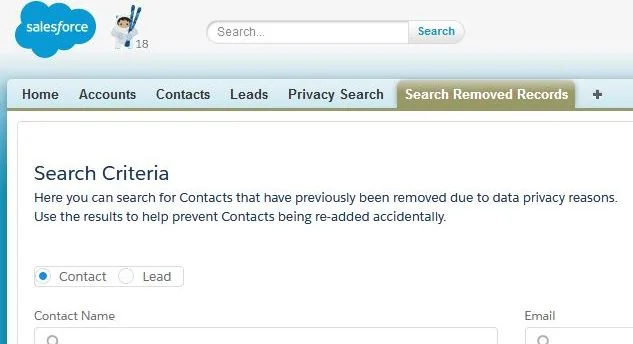
Deleting a Contact does not automatically remove every related copy. Personal data may remain in Cases, Tasks, EmailMessage records, files, attachments, field history, custom objects, external warehouses, marketing platforms, integration logs, backups, or exported spreadsheets.
Create a data map and an erasure runbook for each system. Where deletion is not permitted because of a legal obligation or approved retention requirement, restrict processing and document the reason. Avoid storing the original personal values in a deletion log; use a request identifier, irreversible reference, timestamps, affected systems, and outcome codes.
How should retention and minimization work in Salesforce?
Retention must be based on purpose and policy, not merely record age. A customer record may contain fields with different retention requirements, and some records may be subject to legal holds or contractual obligations.
Build retention rules around record state
- Define a policy owner and approved retention period for each data category.
- Record the event that starts the retention clock, such as contract termination or case closure.
- Separate active retention from legal-hold exceptions.
- Use scheduled automation to identify candidates, but require review for high-risk deletions.
- Delete or anonymize downstream copies through idempotent integration operations.
- Record outcome evidence without recreating the deleted personal data.
Avoid collecting fields only because they may become useful later. Remove unused custom fields, legacy form mappings, hidden integration attributes, and duplicated free-text fields that contain uncontrolled personal information.
What should be logged for a GDPR audit?
An audit record should show which rule was applied, not just the final value. For consent and processing decisions, record the source event, effective time, purpose, channel, notice version, decision status, rule version, and actor.
Logging must also follow minimization. Debug logs, middleware payloads, failed-message queues, API monitoring, and support tickets can expose personal data outside the main Salesforce record. Mask or omit sensitive values unless the operational need is documented.
Common GDPR errors in Salesforce implementations
- Using one opt-out field for every purpose: This cannot represent separate brands, purposes, channels, or contact points.
- Treating consent as the only lawful basis: The lawful basis must be selected by qualified legal or privacy stakeholders for each processing activity.
- Overwriting consent history: A current checkbox does not prove what notice or purpose applied at an earlier date.
- Deleting only the Contact: Related Salesforce records and downstream copies may still contain personal data.
- Giving every integration broad permissions: System-to-system access must follow least privilege.
- Ignoring free-text fields and files: Notes, descriptions, attachments, and emails often contain personal data outside structured fields.
- Using production data in sandboxes without controls: Non-production copies need access, masking, and lifecycle policies.
- Running privacy logic after activation: Eligibility should be checked before segmentation and again before communication.
- Assuming Salesforce provides legal compliance: Salesforce supplies platform capabilities; the customer defines and operates the compliance program.
GDPR considerations Salesforce implementation checklist
- Inventory personal data across Salesforce objects, files, logs, analytics, sandboxes, and connected systems.
- Document each processing purpose, lawful basis, owner, recipient, and retention rule.
- Enable and configure Individual records where they fit the requirement.
- Select a consent model that supports purpose, channel, brand, contact point, notice version, and history.
- Classify personal and sensitive fields.
- Review OWD, permission sets, sharing, exports, API access, and connected apps.
- Create an identity-resolution and duplicate-management process.
- Implement real-time or event-driven preference propagation where delayed withdrawal creates risk.
- Create privacy-request workflows for access, rectification, restriction, portability, objection, and erasure.
- Test deletion and suppression in every downstream system.
- Protect sandboxes, logs, backups, and exported files.
- Run periodic evidence reviews with security, legal, privacy, marketing, service, and integration owners.

Related SalesforceTutorial resources include Salesforce security model configuration, Salesforce permission sets, Salesforce sharing rules, and Salesforce Data Loader security and data management.
Frequently Asked Questions
Does Salesforce make an organization GDPR compliant?
No. Salesforce provides privacy, consent, security, classification, and request-management capabilities, but the customer must determine lawful processing, configure the platform, manage connected systems, train users, and operate the compliance program.
What is the Salesforce Individual object used for?
The Individual object stores person-level data privacy and protection preferences. It can be related to Leads, Contacts, and Person Accounts after Data Protection and Privacy is enabled. More granular purpose, brand, channel, or contact-point consent may require additional consent objects or a governed custom model.
Can Salesforce store proof of GDPR consent?
Yes, when the data model records the person, purpose, channel, status, notice or authorization version, capture source, timestamp, actor, and withdrawal history. A single opt-in checkbox normally does not provide enough evidence for granular consent.
Does deleting a Salesforce Contact satisfy the right to erasure?
Not necessarily. Related records, files, activities, email records, history, integrations, marketing systems, data platforms, logs, and exports may still contain personal data. The organization must evaluate the request, applicable exemptions, and every system in the approved erasure scope.
Should GDPR consent be stored on the Contact record?
A Contact field can hold a simple current-state flag, but it is usually insufficient for consent that varies by purpose, channel, brand, contact point, notice version, and effective period. Use a related, versioned consent model when those distinctions matter.
How often should Salesforce privacy permissions be reviewed?
Use the review frequency defined by the organization’s risk and access-governance policy, and also review permissions after role changes, new integrations, acquisitions, major releases, security incidents, and changes to processing purposes.