A person account stores an individual customer on the Account object while Salesforce also maintains a related Contact record behind the scenes. Use it when the person, not a company, is the primary customer record, such as a patient, student, member, donor, subscriber, or consumer buyer.
This guide explains the data model, setup checks, lead conversion behavior, Apex patterns, Experience Cloud access, and the trade-offs to review before enabling the feature in production.
What is a Person Account in Salesforce?
This account model is used for an individual instead of an organization. Salesforce combines selected Account fields and Contact fields on one Account page, but the platform still creates one Account record and one related Contact record. Salesforce documents the feature in the official Person Accounts Help page.
In enterprise orgs, this matters because a person can participate in standard Account relationships, ownership, sharing, opportunities, cases, campaigns, and automation, while still carrying contact details such as email, phone, mailing address, and salutation. The user experience is simpler for B2C teams because they open one Account record instead of creating a dummy company account for every consumer.
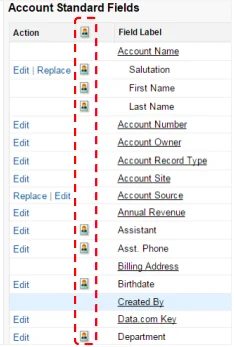
Do not treat it as a custom object. It is not. The Account object gains person-account-specific behavior, fields, layouts, compact layouts, list views, and record types. The Contact record exists, but users usually work from the Account page. In API and Apex work, you use Account fields such as IsPersonAccount, PersonContactId, PersonEmail, and other Person* fields.
Salesforce individual account vs business account
The phrase salesforce individual account usually means this B2C Account model. A business account represents a company. A person account represents one person. You can use both models in the same org if your business sells to companies and individuals.
| Requirement | Business Account | Individual customer account |
|---|---|---|
| Represents | A company, institution, household, branch, or partner | One individual customer or client |
| Primary object users open | Account, then related Contacts | Account record with person fields on the same page |
| Underlying records | One Account plus zero or more Contact records | One Account plus one related Contact record |
| Common use cases | B2B sales, partner management, account-based service | B2C sales, healthcare, education, memberships, financial clients |
| Hierarchy fields | Can use parent account hierarchy | Does not behave like a company hierarchy record |
Use a business account when the buying relationship belongs to a company. Use a salesforce individual account model when the individual is the legal or operational customer. For example, a student applying to a training program, a retail shopper buying directly, or a patient receiving care maps better to the individual model than to a business account with a fake company name.
Person Accounts Salesforce data model
The term person accounts salesforce often causes confusion because the UI looks like one record while the database model uses two standard records. The person account is the visible Account record. The related Contact record stores the contact side. Salesforce exposes the contact ID through PersonContactId on Account, as described in the SOAP API guidance for Person Account record types.
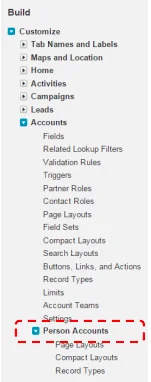
Key Account fields for person accounts salesforce implementations
| Field | Where you use it | Implementation note |
|---|---|---|
IsPersonAccount |
SOQL filters, validation rules, flows, list views | True when the Account record uses a person account record type. |
PersonContactId |
Integrations, sharing, Experience Cloud user creation, contact-based lookups | Stores the related Contact ID for the individual Account record. |
PersonEmail |
Email, dedupe, Experience Cloud identity flows | Represents the Contact Email value on the Account record. |
PersonMobilePhone |
Service, messaging, mobile contact details | Represents the Contact Mobile Phone value on the Account record. |
CustomField__pc |
LWC forms and SOQL for custom Contact fields used on individual Account records | Custom Contact fields appear on Account with the __pc suffix for the individual-account model. |
For Lightning Web Components, Salesforce documentation for lightning-record-form and related base components states that person account fields are accessed through the Account object. Standard Contact fields use Account field names such as PersonMobilePhone. Custom Contact fields used by a person account use the __pc suffix.
Storage, reporting, and automation behavior
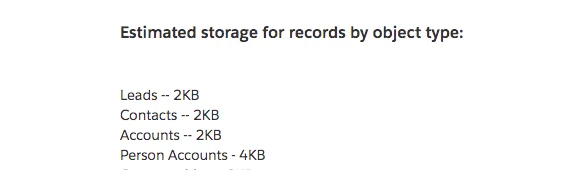
Salesforce Help notes that a person account counts against both Account and Contact storage because each customer contains one Account and one Contact. That is not a small detail for B2C orgs with millions of customers. Model the storage impact before migration and include archived activities, cases, files, and duplicate records in the estimate.
Automation also needs review. Account-triggered flows, Apex triggers, duplicate rules, assignment logic, and validation rules can run because the visible record is an Account. Contact-side behavior can also matter because the related Contact exists. A production design should test create, update, merge, delete, lead conversion, data import, and API upsert paths before rollout.
How to enable and configure a person account
Salesforce allows admins to enable person account support from Setup in supported orgs. Review the official Enable Person Accounts steps before changing production. After the feature is enabled, Salesforce states that it cannot be disabled. Treat this as a data-model decision, not a page-layout change.
Setup prerequisites to check first
- Confirm the business model. Decide whether individuals, companies, or both are first-class customers.
- Create a business Account record type. Keep a record type for company accounts before turning on the individual-account model.
- Review organization-wide defaults. Salesforce requires supported Account and Contact sharing settings before enabling the feature. Common readiness checks include Contacts set to Controlled by Parent, or private sharing for both Accounts and Contacts.
- Inventory automation. Review Account and Contact flows, triggers, validation rules, duplicate rules, matching rules, and integrations.
- Test in a sandbox. Use a full or partial-copy sandbox when record volume, sharing, or integrations are complex.
- Prepare layouts and permissions. Add only the fields each profile or permission set needs. Do not expose sensitive personal fields by default.
Configuration checklist after enablement
- Create list views that separate business accounts from person account records using
IsPersonAccount. - Use page layouts or Dynamic Forms to show person fields only on individual customer record pages.
- Update compact layouts so mobile users see name, phone, email, and status fields that match the process.
- Review duplicate rules for email, phone, external ID, and any government-issued or membership identifiers your org is allowed to store.
- Update reports and dashboards that assume every Account is a company.
- Train users not to create standalone Contacts when the business process requires a salesforce individual account.
In enterprise orgs, I usually create a regression pack for Account save, Contact save, lead conversion, opportunity creation, case creation, portal login, API upsert, and data import. That pack catches most B2C account defects before users find them.
How lead conversion works with a person account
Lead conversion can create either a business account and contact, or a person account. Salesforce Help for lead conversion considerations explains that admins can remove the Company field from lead layouts used for conversion to person accounts. When Company is blank in a person-account-enabled org, conversion can create a person account. When Company has a value, the conversion follows the business account path.
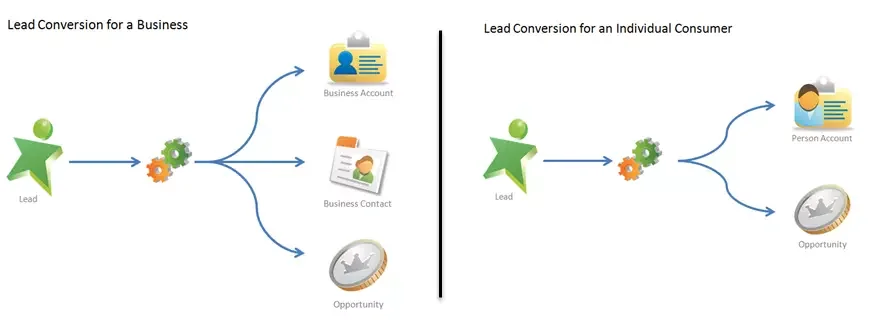
Lead conversion design rules
- Do not use placeholder company names such as Unknown, Individual, or N/A just to pass validation. Those values create data quality and reporting problems.
- Use separate lead record types or guided screens when sales teams handle both B2B and B2C leads.
- Map lead fields to Account person fields carefully. A Contact custom field may appear as an Account
__pcfield for the individual Account view. - Check duplicate rules before conversion so duplicate individuals are caught before account creation.
- Test assignment rules, marketing attribution fields, campaign history, and opportunity creation for both conversion paths.
A common pattern is to make Company required only on B2B lead layouts and remove it from B2C lead layouts. That keeps the UI aligned with the data model instead of forcing users to invent a company for a consumer.
How to show person account record page to external user
The query how to show person account record page to external user usually refers to an Experience Cloud issue: the internal user can open the record, but the customer or partner user cannot. The fix is rarely a single page setting. The external user needs object permission, field access, record access, site page access, and a navigation path that points to the Account record.
How to show person account record page to external user in Experience Cloud
- Confirm the external user model. Salesforce says Experience Cloud users must be associated with a Salesforce record, either an individual Account record or a contact connected to a business account. Review Experience Cloud site user considerations.
- Give Account object access. Assign a profile or permission set with Read access to Account. Add Edit only if the site must allow updates.
- Grant field-level security. Person fields such as
PersonEmail,PersonMobilePhone, and contact-derived__pcfields still need FLS. - Open record access through sharing. Configure external organization-wide defaults, sharing sets, sharing rules, account relationships, or Apex managed sharing based on the license and data model. Start with the official external sharing defaults documentation.
- Add the record detail page to the site. In Experience Builder, use a record detail page for Account, or add a Lightning component that receives the Account record ID.
- Test as the external user. Use an actual test user with the same license, profile, permission sets, and account relationship as production users.
For a customer who should see only their own individual Account record, do not solve access by making Account public. Use the narrowest sharing model that gives the authenticated external user access to their own record. Also remember that guest users should not receive broad access to personal data.
LWC navigation example for an external record link
The following Lightning Web Component navigates to an Account record page. It does not grant access. Sharing and permissions must already allow the external user to read the Account record.
import { LightningElement, api } from 'lwc';
import { NavigationMixin } from 'lightning/navigation';

export default class PersonAccountRecordLink extends NavigationMixin(LightningElement) {
    @api recordId;

    openPersonAccount() {
        if (!this.recordId) {
            return;
        }

        this[NavigationMixin.Navigate]({
            type: 'standard__recordPage',
            attributes: {
                recordId: this.recordId,
                objectApiName: 'Account',
                actionName: 'view'
            }
        });
    }
}
<template>
<lightning-button
label="View My Account"
onclick={openPersonAccount}>
</lightning-button>
</template>If the external user sees an insufficient privileges error, check access in this order: site membership, Account object Read permission, Account tab or page visibility, FLS for person fields, sharing access to the Account record, and whether the component receives an Account ID instead of the related Contact ID.
Apex, SOQL, and LWC patterns for person account records
Apex should treat a person account as an Account record and use IsPersonAccount to avoid mixing company logic with individual logic. Bulkify every operation. Do not query the related Contact inside a loop. Do not assume PersonContactId is populated until the insert succeeds.
SOQL query for individual customer search
public with sharing class PersonAccountSearchController {
    @AuraEnabled(cacheable=true)
    public static List<Account> findPersonAccounts(String emailDomain) {
        if (String.isBlank(emailDomain) || emailDomain.length() < 3) {
            return new List<Account>();
        }

        String pattern = '%' + String.escapeSingleQuotes(emailDomain.trim()) + '%';

        return [
            SELECT Id, Name, PersonEmail, PersonMobilePhone, PersonContactId
            FROM Account
            WHERE IsPersonAccount = true
            AND PersonEmail LIKE :pattern
            WITH SECURITY_ENFORCED
            ORDER BY LastModifiedDate DESC
            LIMIT 50
        ];
    }
}
Governor limit note: this method performs one selective query with a limit. In high-volume orgs, add a normalized email domain field or external ID strategy if users search by partial email at scale. The WITH SECURITY_ENFORCED clause causes Salesforce to enforce field and object permissions for queried fields; handle the exception in the calling layer if a user lacks access.
Create a person account in Apex
This Apex example finds an active person account record type, strips fields the running user cannot create, inserts the account once, and returns the Account ID. It is written for an org where the feature is already enabled.
public with sharing class PersonAccountCreator {
    @AuraEnabled
    public static Id createPersonAccount(String firstName, String lastName, String email) {
        if (String.isBlank(lastName)) {
            throw new AuraHandledException('Last name is required.');
        }

        RecordType personRt = [
            SELECT Id
            FROM RecordType
            WHERE SObjectType = 'Account'
            AND IsPersonType = true
            AND IsActive = true
            LIMIT 1
        ];

        Account draft = new Account(
            RecordTypeId = personRt.Id,
            FirstName = firstName,
            LastName = lastName,
            PersonEmail = email
        );

        SObjectAccessDecision accessDecision = Security.stripInaccessible(
            AccessType.CREATABLE,
            new List<Account> { draft }
        );

        Account creatableAccount = (Account) accessDecision.getRecords()[0];
        Database.SaveResult result = Database.insert(creatableAccount, false);

        if (!result.isSuccess()) {
            Database.Error err = result.getErrors()[0];
            throw new AuraHandledException(err.getMessage());
        }

        return result.getId();
    }
}
Security note: this code uses with sharing and Security.stripInaccessible. If the method runs for Experience Cloud users, also confirm that the profile or permission set permits Account creation and the specific individual record type.
LWC form fields for an individual Account record
Use object-api-name="Account" for the form. Standard contact fields appear as Account person fields. Custom Contact fields used by the individual-account model use the __pc suffix in markup, as Salesforce documents for Lightning base record form components.
<template>
    <lightning-record-view-form
        record-id={recordId}
        object-api-name="Account">

        <lightning-output-field field-name="Name"></lightning-output-field>
        <lightning-output-field field-name="PersonEmail"></lightning-output-field>
        <lightning-output-field field-name="PersonMobilePhone"></lightning-output-field>
        <lightning-output-field field-name="Loyalty_Number__pc"></lightning-output-field>

    </lightning-record-view-form>
</template>
Replace Loyalty_Number__pc with a real custom Contact field that exists in your org. If the field is an Account custom field, use the normal Custom_Field__c name instead.
Best practices for person account architecture
Use a person account when the individual is the customer
A person account fits a process where the record itself represents the customer. Good examples include direct-to-consumer commerce, education applicants, healthcare patients, retail loyalty members, insurance policyholders, donors, and individual financial clients. A business account fits better when the account plan, contract, buying committee, and support relationship belong to an organization.
Do not enable the feature only to fix bad Contact data
If the org has duplicate contacts, weak matching rules, poor lead conversion design, or missing data governance, the feature will not fix those problems. Clean the source data first. Create dedupe rules. Define ownership. Decide which systems can create or update customer records. Then choose the account model.
Separate B2B and B2C automation paths
Use IsPersonAccount in flows, validation rules, Apex, and reports when business logic differs. For example, a validation rule that requires Industry may make sense for a company, but not for a student or patient. A tax ID field may belong on a business account, while date of birth may belong on a person account only when the business process and compliance rules require it.
Plan integrations around Account ID and Contact ID
Some external systems expect a customer account ID. Others expect a contact ID. With this model, both exist. Decide which ID becomes the master key for each integration and document it. For marketing, identity, portal, or contact-center integrations, the PersonContactId can be required. For sales, service, commerce, and finance integrations, the Account ID may be the better stable reference.
Protect personal data by default
Because the record stores information about an individual, apply least-privilege access. Use permission sets, FLS, sharing rules, restriction rules where appropriate, consent fields, and data retention policies. Do not expose personal fields on Experience Cloud pages until you have confirmed legal, security, and business requirements.
Common errors with person accounts salesforce projects
| Error | Cause | Fix |
|---|---|---|
| Users cannot create a person account | The profile or permission set lacks access to the individual record type | Assign the record type and verify Account Create permission. |
| External user cannot view the record page | Object permission, FLS, site page access, or record sharing is missing | Test with the external user and check each access layer in order. |
| Lead converts to a business account instead | The Company field is populated or the conversion process uses the wrong record type path | Use separate B2C lead layouts and validate lead conversion mapping. |
| Apex trigger creates wrong related records | The trigger assumes every Account is a company | Add IsPersonAccount branching and bulk tests for both record types. |
| LWC field does not render | The component uses Contact field syntax instead of Account person field syntax | Use Person* fields or __pc fields on the Account form. |
Implementation checklist before production
- Confirm that the individual-account model is the right model for individual customers.
- Document which processes create business accounts and which create a salesforce individual account.
- Validate setup readiness in a sandbox.
- Review storage growth because Account and Contact storage both apply.
- Update lead conversion, import templates, duplicate rules, and integration mappings.
- Refactor Account and Contact automation that assumes a B2B model.
- Test Experience Cloud user creation and the steps for how to show person account record page to external user.
- Prepare rollback procedures for data migration batches, even though the feature itself cannot be disabled.
Related Salesforce tutorials
- Salesforce lead conversion setup and mapping
- Salesforce Account object fields and relationships
- Salesforce sharing rules and organization-wide defaults
- Salesforce Experience Cloud security and record access
- Apex code best practices for bulk and secure data access
Frequently Asked Questions
What is a person account in Salesforce?
A person account is an Account record type that represents an individual customer. Salesforce shows Account and Contact information on one Account page while maintaining a related Contact record behind the scenes.
Can the feature be disabled after it is enabled?
No. Salesforce documentation states that after the feature is enabled, it cannot be disabled. Test the model in a sandbox and review sharing, storage, automation, and integration impact before enabling it in production.
Is a salesforce individual account the same as this model?
In most Salesforce discussions, salesforce individual account refers to this B2C Account model. It means the individual person is the Account record, not a Contact under a company account.
How do I query individual Account records in Apex?
Query the Account object and filter with IsPersonAccount = true. Include only the fields you need, apply a LIMIT, and enforce sharing and field access with with sharing, WITH SECURITY_ENFORCED, or Security.stripInaccessible depending on the operation.
How to show person account record page to external user?
Give the external user Account object access, field-level security for the person fields, record-level access through Experience Cloud sharing, and a site record page that points to the Account record ID. If the page still fails, test with the exact external user and check site membership, permission sets, sharing, and whether the component is using Account ID instead of Contact ID.
Does the model use Account storage or Contact storage?
It uses both. Salesforce stores one Account and one Contact for each individual customer record, so high-volume B2C orgs must include both sides in storage planning.