Experience Cloud Guide for Salesforce Sites
Experience Cloud is the Salesforce platform for building authenticated sites where customers, partners, suppliers, members, and other external users work with selected CRM data. The hard part is not the page builder; it is choosing the right license, sharing model, and security pattern before users log in.
This guide explains Experience Cloud from an implementation point of view. It covers Salesforce Experience Cloud licenses, Customer Community Plus, Salesforce community license terminology, setup steps, sharing, Apex security, and deployment checks that admins and developers need before a production launch.
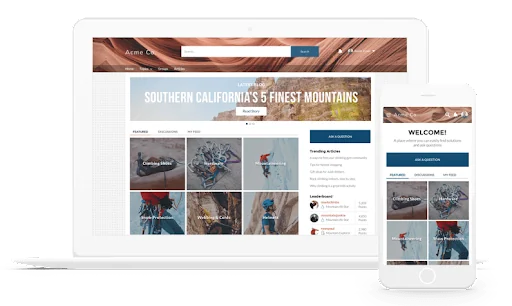
What is Experience Cloud in Salesforce?
Experience Cloud lets teams create Salesforce-powered websites and portals using Experience Builder, site templates, standard objects, custom objects, Lightning Web Components, flows, CMS content, and the Salesforce security model. An external user signs in to a site, sees pages built for that audience, and works with records that their license and sharing configuration allow.
In enterprise orgs, the same implementation often includes several site patterns: a customer self-service site for Cases and Knowledge, a partner site for Opportunities and Leads, and a supplier site for order status. The UI can look separate from the internal Salesforce app, but the data model, automation, integrations, and audit trail remain in the Salesforce org.
Use Experience Cloud when external users need repeat access to Salesforce data. Do not use it as a shortcut to give employees cheaper access to internal Salesforce apps. Salesforce treats internal and external user licenses differently; external users access the sites where they are members, not the internal Lightning Experience app.
Admins who own an external site should understand profiles, permission sets, sharing, identity, domains, and release management. Salesforce’s official Experience Cloud Consultant credential page is a useful checklist for the areas a consultant is expected to know.
How do Salesforce Experience Cloud licenses work?
Salesforce Experience Cloud licenses define which external users can log in, which standard objects are generally available, whether role-based sharing can be used, and which collaboration features are supported. The exact entitlements can vary by edition, add-on, industry package, and contract, so confirm the final license matrix in Salesforce Help for Experience Cloud user licenses and your order form before you design profiles or permission sets.
The common license families include Customer Community, Customer Community Plus, Partner Community, External Apps, External Identity, and Channel Account. Older teams still search for Salesforce community license names because Community Cloud was the former product name. In current implementation work, use the Experience Cloud terminology that appears in Setup and official documentation.
For SEO and stakeholder clarity, treat Salesforce Experience Cloud licenses as the umbrella term and treat each named license as a design option. The phrase Salesforce community license can still appear in procurement notes, but the implementation decision should be based on the current Experience Cloud license name.
Salesforce Experience Cloud licenses by use case
| License family | Typical use | Sharing pattern | Design warning |
|---|---|---|---|
| Customer Community | High-volume customer self-service, case visibility, knowledge access, order status, membership portals | Sharing sets and share groups for users tied to Accounts or Contacts | Avoid this license when users need role hierarchy behavior or account team style visibility. |
| Customer Community Plus | Customer teams that need delegated access, reports, dashboards, or more record visibility than a basic self-service model | Roles, sharing rules, and super user access where supported | Model role count and account structure before you migrate high-volume users. |
| Partner Community | Partner relationship management, channel sales, opportunity collaboration, lead distribution, reseller operations | Partner roles, sharing rules, account ownership, and Opportunity access | Partner users must be tied to partner-enabled business accounts. |
| External Apps | Custom external applications built on Salesforce data and automation | Depends on the app design and license entitlement | Validate object limits, API access, and packaged app requirements before estimating cost. |
| External Identity | Authentication, registration, identity, and login flows for external audiences | Identity-first; data access depends on configuration and related entitlements | Do not assume it replaces a data access license for Cases, Opportunities, or custom objects. |
| Channel Account | Channel partner scenarios where access is associated with an account-level commercial model | Contract-specific channel model | Pricing and allocation details are usually handled through Salesforce account teams; Salesforce Experience Cloud licenses in this area are contract-specific. |
Customer Community Plus license: when role-based sharing matters
Customer Community Plus is often the first license to evaluate when customer users belong to account teams and need visibility beyond their own Contact record. A customer community plus user can support patterns such as customer managers seeing related records for their organization, delegated external administration, or report access where the license and site configuration allow it.
The trade-off with Customer Community Plus is design complexity. Customer Community Plus users can participate in role-based sharing, so your external role hierarchy can grow quickly when thousands of accounts are enabled. Before you choose Customer Community Plus, test expected account volume, parent-child accounts, report requirements, and super user access in a full sandbox.
Salesforce community license vs Experience Cloud license
Salesforce community license is a search phrase many admins still use, but the current product family is Experience Cloud. When someone asks for a Salesforce community license, confirm whether they mean Customer Community, Customer Community Plus, Partner Community, External Apps, External Identity, or a legacy portal license.
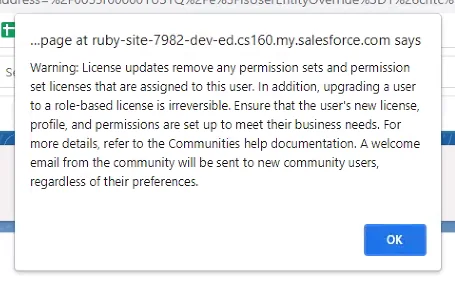
This distinction matters because changing from one external license family to another is not always a simple profile edit. Salesforce documents supported upgrade paths and migration considerations for Experience Cloud users. In production projects, capture the user’s current license, profile, permission set groups, public group membership, role assignment, and owned records before any license migration.
Company community license Salesforce searches: what this usually means
The phrase company community license Salesforce is not a standard license label in current Salesforce Setup. It usually means one of two things: a company wants external customers from the same account to see shared records, or a partner company needs several employees to collaborate in a portal.
If the users are customers from the same company, start with Customer Community and a sharing set if the data model maps cleanly from User.ContactId to Contact.AccountId. If the company needs managers, delegated access, account-level reporting, or cross-record collaboration, compare Customer Community Plus against Partner Community. If the phrase company community license Salesforce appears in a stakeholder request, translate it into a use case, not a SKU.
Login-based vs member-based license planning
Some Salesforce Experience Cloud licenses are sold as named member access, login-based access, or a combination depending on the contract. A named member model fits users who sign in often. A login model can fit large audiences who sign in a few times per year. The right choice depends on expected monthly logins, seasonality, and negotiated pricing; do not use a generic rule without your actual commercial terms. Salesforce Experience Cloud licenses should be estimated with real login data where possible.
For implementation planning, ask for three numbers before finalizing the license model: total eligible users, expected active users per month, and peak daily login volume. Then map those numbers to authentication, support processes, and automation limits. A portal that works for 500 named users may behave differently when a seasonal campaign activates 100,000 occasional users.
How to set up Experience Cloud safely
The safest Experience Cloud setup sequence is to design access first, build the site second, and publish last. Teams that start with page layout often discover late that the chosen Salesforce community license cannot support the sharing model they promised to the business. Review Salesforce Experience Cloud licenses before design sign-off.
- Define the external audience. Separate customers, partners, suppliers, members, unauthenticated visitors, and internal admins. Each group needs a license and access pattern.
- Confirm objects and record ownership. List every standard object, custom object, field, file, report, flow, and integration that the site touches.
- Choose the license family. Compare the license options against the object list and sharing model. Confirm the final license terms with official Salesforce documentation and the contract.
- Enable Digital Experiences. In Setup, enable Digital Experiences, define the domain, and create the first site from All Sites. Choose the domain carefully because URLs, identity settings, and integrations depend on it.
- Create permission sets before pages. Keep profiles minimal. Put object, field, Apex class, flow, and tab permissions into permission sets or permission set groups where the license supports them.
- Configure sharing. Set external organization-wide defaults, sharing sets, sharing rules, account roles, or super user access based on the license.
- Add members to the site. Use profiles and permission sets to decide which users can access the site.
- Build and test pages. Use Experience Builder, LWC, standard components, CMS content, and flows only after the security model is testable.
- Run external-user testing. Test with real external profiles, not System Administrator. Validate record access, navigation, files, search, reports, emails, and password reset flows.
- Publish and monitor. Publish only after a rollback plan exists for metadata, login settings, and DNS or custom domain changes.
Salesforce provides official setup steps for enabling Digital Experiences and creating sites. Keep that documentation open during the build: Enable Digital Experiences and Create an Experience Cloud Site.
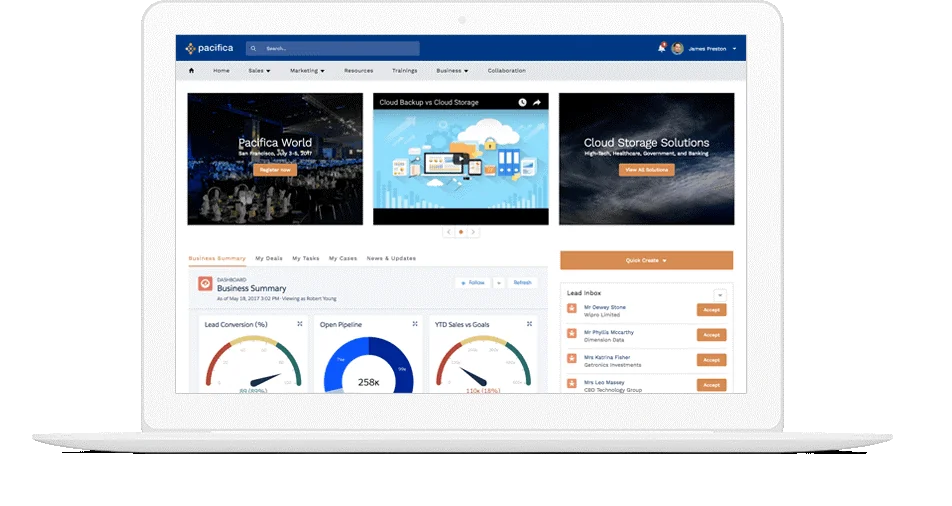
How does Experience Cloud sharing work?
Experience Cloud sharing starts with the same Salesforce concepts that internal users depend on: object permissions, field-level security, organization-wide defaults, roles, sharing rules, teams, manual sharing, Apex sharing, and record ownership. External users add extra considerations because license type controls which sharing tools are available.
Sharing sets for Customer Community users
Sharing sets are the main sharing tool for high-volume Customer Community users. A sharing set grants access by matching fields on the external user’s Contact or Account to fields on records such as Cases or custom objects. A common pattern is: the user is linked to a Contact, the Contact is linked to an Account, and the sharing set grants access to records where the record’s Account matches the Contact’s Account.
Sharing sets work well when the access rule is simple and account-based. They become harder to maintain when users need exceptions, manager visibility, cross-account access, or reporting over many accounts. That is where a Plus or Partner license may be a better fit. Salesforce documents the setup in Create a Sharing Set for Experience Cloud Site Users.
Advanced sharing for Customer Community Plus and partners
The Plus and Partner license families can support more advanced sharing models, including roles and sharing rules where the license allows them. Use this pattern when external users need structured visibility across teams. For example, a partner sales manager may need Opportunities owned by several partner users, while a customer support manager may need Cases logged by users from the same account.
Salesforce also supports super user access for users with Partner Community or Plus licenses in supported sites. Use it with care. Super user access can broaden record visibility, so document the business reason and test it with accounts that contain sensitive records.
External organization-wide defaults
External organization-wide defaults let you set a different default access level for external users. In many implementations, internal users have broader defaults while external users start from Private or restricted access. Do not depend on page visibility alone. If an external user can call an Apex method, API endpoint, report, or record page, the record-level and field-level model must still block data they should not see.
Guest user access
Unauthenticated guest users have a separate site guest user profile and should receive the least access possible. Avoid exposing record lists, files, or custom Apex that returns data without a clear public-use requirement. For public pages, keep the data model separate when possible, and avoid mixing public guest access with authenticated customer data on the same page.
How should developers secure Experience Cloud code?
Developers must assume that any client-side input from an Experience Cloud page can be changed by the user. LWC and Aura components improve the interface, but they do not replace Apex sharing, object permissions, field-level security, validation rules, or server-side checks.
Apex example for portal case access
The following Apex method returns open Cases for an Account only when the running external user has access. It uses inherited sharing and WITH USER_MODE so the query respects user-mode access checks. Keep the query selective and return only the fields the page needs.
public inherited sharing class PortalCaseController {
    @AuraEnabled(cacheable=true)
    public static List<Case> getOpenCasesForAccount(Id accountId) {
        if (accountId == null) {
            return new List<Case>();
        }

        return [
            SELECT Id, CaseNumber, Subject, Status, Priority, CreatedDate
            FROM Case
            WHERE AccountId = :accountId
            AND IsClosed = false
            WITH USER_MODE
            ORDER BY CreatedDate DESC
            LIMIT 50
        ];
    }
}
This code is intentionally small. In production, add structured error handling, log security failures without exposing private details, and write tests for users with and without access. Do not remove WITH USER_MODE to make a portal page work; fix the license, permission set, sharing set, or sharing rule instead. Salesforce documents user-mode database operations in the Apex Developer Guide: Set an Access Mode for Database Operations.
LWC metadata for Experience Builder
To place a Lightning Web Component in Experience Builder, expose it with the correct metadata targets. Use lightningCommunity__Page for a drag-and-drop component and lightningCommunity__Default when admins need editable design-time properties.
<?xml version="1.0" encoding="UTF-8"?>
<LightningComponentBundle xmlns="http://soap.sforce.com/2006/04/metadata">
    <apiVersion>67.0</apiVersion>
    <isExposed>true</isExposed>
    <masterLabel>Portal Case List</masterLabel>
    <targets>
        <target>lightningCommunity__Page</target>
        <target>lightningCommunity__Default</target>
    </targets>
    <targetConfigs>
        <targetConfig targets="lightningCommunity__Default">
            <property name="heading" type="String" label="Heading" default="Open Cases" />
            <property name="maxRows" type="Integer" label="Maximum Rows" default="10" min="1" max="50" />
        </targetConfig>
    </targetConfigs>
</LightningComponentBundle>
Keep the component API version aligned with the org release you deploy to. The example uses API v67.0 for a Summer ’26-ready project. If your production org has not moved to that API version, set the component to the highest version supported by the target org and retest before deployment. Salesforce release notes track LWC API version changes at Get the Latest LWC Changes with LWC API Version 67.0.
Governor limits in external-user code
Experience Cloud code runs inside Salesforce governor limits. A portal page with many components can trigger multiple Apex calls, flow interviews, record queries, and file checks in one user interaction. Keep Apex methods bulk-safe even when an LWC appears to call them one record at a time. Avoid SOQL inside loops, cap result sets, use cacheable methods for read-only data, and move heavy operations to Queueable or Batch Apex when users do not need an immediate response.
How do you deploy Experience Cloud metadata?
Experience Builder site changes can be retrieved and deployed as metadata, but the site is not a single file. ExperienceBundle represents pages, branding sets, themes, routes, and related site configuration as text-based metadata. Network and CustomSite metadata may also be part of the deployment, and dependent components such as Apex classes, Lightning Web Components, custom objects, fields, permission sets, and flows must be included.
A typical Salesforce DX retrieval command looks like this:
sf project retrieve start --metadata ExperienceBundle --target-org MySandboxA deployment to another org can start with:
sf project deploy start --metadata ExperienceBundle --target-org UATThese commands are only a starting point. In enterprise orgs, deploy Experience Cloud metadata with a tested release plan. Confirm dependencies, named credentials, custom metadata, permission sets, audience rules, CMS content, domain settings, and post-deployment publish steps. Salesforce describes ExperienceBundle in the Metadata API Developer Guide: ExperienceBundle Metadata.
Best practices for Salesforce Experience Cloud licenses and access
- Start with a license decision record. Store the user groups, chosen license, rejected licenses, object needs, and sharing assumptions. This prevents a later Salesforce community license discussion from restarting the design.
- Keep profiles small. Use profiles for baseline login and required settings. Put object and field access in permission sets or permission set groups where supported.
- Build a test account model. Include parent accounts, child accounts, partner accounts, inactive contacts, duplicate contacts, and users with more than one business relationship.
- Separate customer and partner sites when access differs. A single site can serve multiple audiences, but separate sites are easier to secure when customers and partners use different objects and navigation.
- Use sandbox testing before buying more licenses. Test whether Customer Community, customer community plus, or Partner Community supports the required data access before committing to a long contract change.
- Document license migrations. Export user assignments, permission sets, roles, groups, queues, and owned records before moving users between Salesforce Experience Cloud licenses.
- Audit guest access after every release. Guest user permissions can become risky when new objects, flows, files, or Apex classes are added.
- Monitor login patterns. Compare actual logins with member and login-based assumptions. This helps renewal planning and avoids designing around the wrong usage model.
Common errors with Experience Cloud implementations
| Error | Why it happens | How to fix it |
|---|---|---|
| Choosing pages before licenses | The team designs a portal that needs objects or sharing features the selected license does not support. | Map objects and sharing first, then choose the license, then build pages. |
| Testing as System Administrator | Admins can see data that external users cannot see. | Create test users for each external license group and run user acceptance tests with those users. |
| Using Apex without user-mode checks | Apex can run in system context unless the developer enforces sharing and CRUD/FLS. | Use with sharing or inherited sharing, WITH USER_MODE, and Security.stripInaccessible() where appropriate. |
| Overusing Customer Community Plus | The team chooses customer community plus for every user because it solves one complex edge case. | Segment users. Use Customer Community for simple account-based access and Customer Community Plus only where the role or reporting requirement exists. |
| Ignoring external role volume | Partner and Plus role models can grow with enabled accounts. | Load-test account volume and role hierarchy assumptions before production migration. |
| Treating company community license Salesforce as a real SKU | Stakeholders describe the business need using a search phrase instead of a product name. | Translate the phrase into users, objects, sharing, login frequency, and support process before discussing licenses. |
Related SalesforceTutorial resources
Continue with Salesforce products and clouds explained if you need the product-level context, Lightning Web Components in Salesforce for portal component development, Salesforce Data Cloud for customer profile architecture, Salesforce Health Cloud for industry portal patterns, and Salesforce Admin certification for the security fundamentals behind external access.
Frequently Asked Questions
What is Experience Cloud used for in Salesforce?
Experience Cloud is used to build Salesforce-powered sites for external audiences such as customers, partners, suppliers, members, and contractors. Users can log in, view selected records, create cases, read knowledge articles, collaborate on partner sales processes, or work with custom objects based on their license and sharing configuration.
Which Salesforce Experience Cloud licenses should I compare first?
Start with Customer Community for high-volume self-service, Customer Community Plus when customer users need roles or broader sharing, and Partner Community when partners need sales objects such as Leads or Opportunities. Review External Apps and External Identity for custom app and identity scenarios. Confirm the final Salesforce Experience Cloud licenses in official Salesforce documentation and your contract.
Is Customer Community Plus the same as Partner Community?
No. Customer Community Plus is usually evaluated for customer teams that need more sharing, reporting, or delegated access than Customer Community. Partner Community is for partner relationship management scenarios and can support partner sales processes. The right choice depends on objects, sharing, account structure, and contract terms.
What does Salesforce community license mean today?
Salesforce community license is an older or informal phrase for external user licenses now associated with Experience Cloud. Ask the requester whether they mean Customer Community, Customer Community Plus, Partner Community, External Apps, External Identity, Channel Account, or a legacy portal license.
Can internal employees use an Experience Cloud license?
Do not assume that an external license can be used for internal employees. Salesforce separates internal and external license types, and external users access the Experience Cloud sites where they are members rather than the internal Lightning Experience app. For employee access, validate the correct internal license with Salesforce documentation and your agreement.
What is the best sharing model for Customer Community users?
For many Customer Community users, sharing sets are the best starting point because they map the user’s Contact or Account to related records. If users need role hierarchy behavior, reporting across accounts, manager access, or complex exceptions, compare Customer Community Plus or Partner Community instead.