Platform event trap refers to the common architectural pitfalls and performance bottlenecks that occur when implementing Salesforce Platform Events incorrectly. Understanding these traps helps developers avoid governor limit violations, message delivery failures, and system performance degradation in event-driven architectures.
Platform Events enable real-time data exchange within Salesforce and between Salesforce and external systems using a publish-subscribe model. However, improper implementation can lead to what experts call a “platform event trap” – scenarios where events consume excessive resources, fail to deliver reliably, or create cascading system failures.
Understanding Platform Events in Salesforce
Platform events in Salesforce operate on an event bus architecture that processes messages in chronological order. The system consists of three core components:
- Event Publishers: Applications or processes that create and publish events to the event bus
- Event Bus: The message queue that stores and delivers events in first-in-first-out order
- Event Subscribers: Consumers that listen for specific events and execute business logic when events arrive
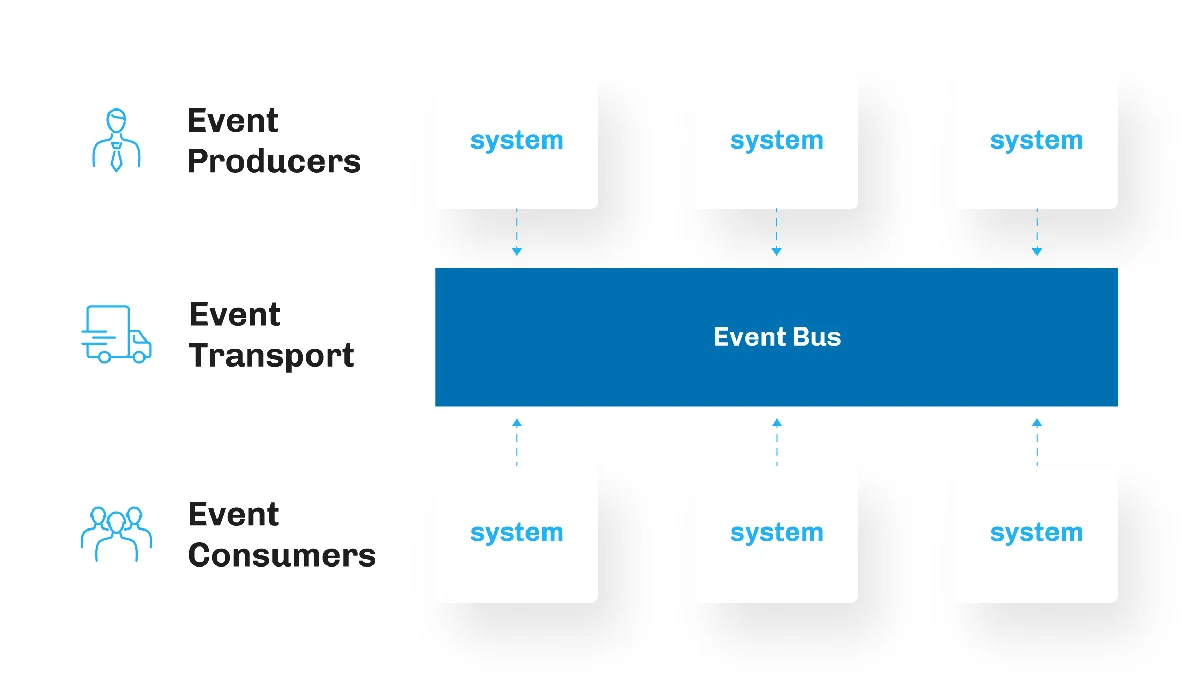
The event bus operates as a durable message queue with built-in retry mechanisms. Events remain available for 72 hours (3 days) for high-volume events and 24 hours for standard events, allowing subscribers to process messages even after temporary outages.
Event Consumer Types
Salesforce supports multiple event consumer patterns:
- Apex Triggers: Execute synchronously when events are published
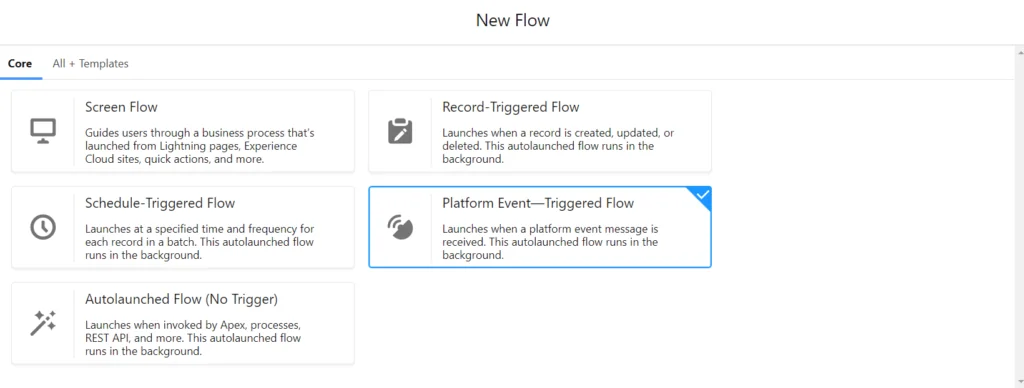
- Flow Processes: Declarative automation triggered by platform events
- Lightning Web Components: Real-time UI updates using empApi
- External Systems: CometD clients subscribing via Streaming API
Common Platform Event Trap Scenarios
The platform event trap manifests in several ways that can compromise system performance and reliability:
Governor Limit Violations
Platform events are subject to Salesforce governor limits that vary by license type:
| License Type | Daily Event Limit | Hourly Event Limit | CometD Clients |
|---|---|---|---|
| Developer Edition | 10,000 | 1,000 | 20 |
| Enterprise Edition | 250,000 | 25,000 | 1,000 |
| Unlimited Edition | 500,000 | 50,000 | 2,000 |
Exceeding these limits triggers the platform event trap, causing event publishing failures and system degradation.
Event Replay Buffer Overflow
The event bus maintains a replay buffer with limited capacity. High-volume publishing can overflow this buffer, causing message loss and subscriber disconnections.
Salesforce Platform Events Limits and Constraints
Understanding salesforce platform events limits prevents falling into the platform event trap:
Message Size Limitations
- Maximum event size: 1 MB per event message
- Field limitations: 100 custom fields per platform event
- Text field size: 255 characters for short text, 131,072 for long text
- Relationship fields: Not supported in platform events
Publishing Rate Limits
Platform events enforce rate limiting to prevent system overload:
- Burst capacity: Up to 5,000 events per second for short bursts
- Sustained rate: Maximum 1,000 events per second over extended periods
- Batch publishing: Recommended for high-volume scenarios using Database.SaveResult
Cloud Platform Events Implementation Patterns
Cloud platform events require specific implementation patterns to avoid the platform event trap:
Bulkified Event Publishing
Always publish events in bulk to optimize performance and avoid governor limits:
public class OrderEventPublisher {
    public static void publishOrderEvents(List<Order> orders) {
        List<Order_Event__e> events = new List<Order_Event__e>();

        for (Order order : orders) {
            events.add(new Order_Event__e(
                Order_Id__c = order.Id,
                Order_Status__c = order.Status,
                Customer_Id__c = order.AccountId
            ));
        }

        // Bulk publish to avoid governor limits
        List<Database.SaveResult> results = EventBus.publish(events);

        // Handle publishing failures
        for (Database.SaveResult result : results) {
            if (!result.isSuccess()) {
                System.debug('Event publishing failed: ' + result.getErrors());
            }
        }
    }
}
Error Handling and Retry Logic
Implement robust error handling to prevent the platform event trap:
public class EventSubscriberHandler {
    @future
    public static void handleEventFailure(String eventData, String errorMessage) {
        // Log failure for monitoring
        System.debug('Event processing failed: ' + errorMessage);

        // Implement dead letter queue pattern
        Failed_Event__c failedEvent = new Failed_Event__c(
            Event_Data__c = eventData,
            Error_Message__c = errorMessage,
            Retry_Count__c = 0
        );

        insert failedEvent;
    }
}
Real-World Platform Event Trap Example
Consider an order management system that falls into the platform event trap:
The Problem Scenario
A retail company implements platform events to notify external systems when orders are created. Initially, the system works well with low order volumes:

During peak sales periods, order volume increases dramatically, triggering multiple platform event trap conditions:
- Event publishing exceeds hourly limits
- External subscribers cannot process events fast enough
- Replay buffer overflows, causing message loss
- Cascading failures affect dependent systems
The Solution Architecture
Implementing proper event-driven architecture prevents the platform event trap:
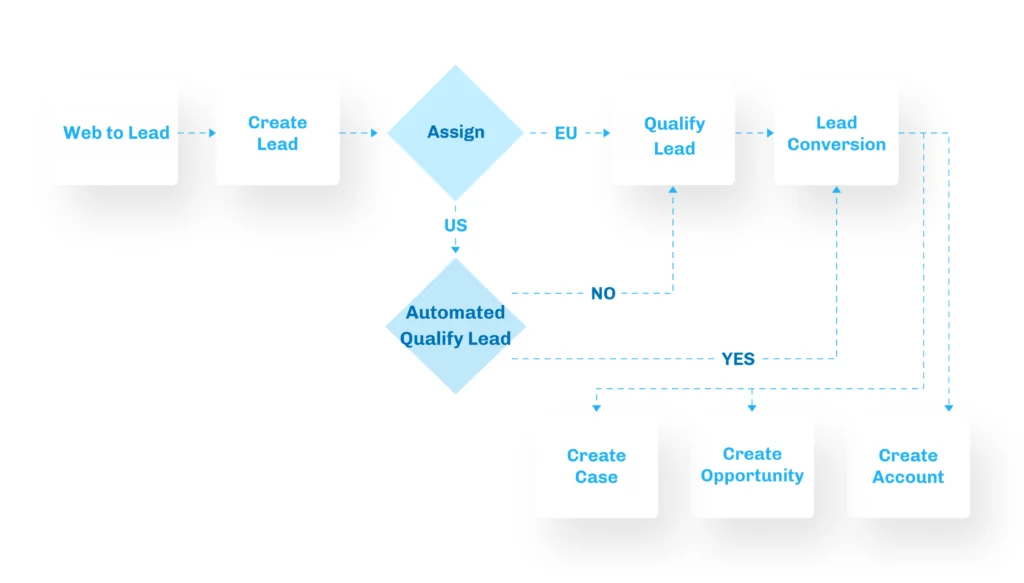
Key improvements include:
- Event batching: Aggregate multiple order changes into single events
- Circuit breaker pattern: Temporarily disable publishing when limits are approached
- Asynchronous processing: Use queueable Apex for non-critical event handling
- Monitoring and alerting: Track event volumes and failure rates
Best Practices to Avoid Platform Event Trap
Design Patterns
- Event sourcing: Store events as the source of truth for system state
- CQRS (Command Query Responsibility Segregation): Separate read and write operations
- Saga pattern: Manage distributed transactions across multiple systems
Performance Optimization
- Event filtering: Use selective subscriptions to reduce processing overhead
- Payload optimization: Include only necessary data in event messages
- Compression: Compress large payloads before publishing
Monitoring and Observability
Implement comprehensive monitoring to detect platform event trap conditions early:
public class EventMonitor {
    public static void checkEventLimits() {
        // Query platform event usage
        List<AggregateResult> eventCounts = [
            SELECT COUNT(Id) eventCount, HOUR_IN_DAY(CreatedDate) hour
            FROM Order_Event__e
            WHERE CreatedDate = TODAY
            GROUP BY HOUR_IN_DAY(CreatedDate)
        ];

        for (AggregateResult result : eventCounts) {
            Integer count = (Integer) result.get('eventCount');
            Integer hour = (Integer) result.get('hour');

            // Alert if approaching limits
            if (count > 20000) { // 80% of Enterprise hourly limit
                sendLimitAlert(hour, count);
            }
        }
    }

    private static void sendLimitAlert(Integer hour, Integer count) {
        // Implementation for alerting mechanism
    }
}
Platform Event Configuration in Setup
Navigate to Setup → Integrations → Platform Events to configure event definitions. Platform events use the ‘__e’ suffix to distinguish them from standard objects (‘__c’ for custom objects).
Required Fields
- Label: Human-readable name for the event
- Plural Label: Plural form used in the UI
- Object Name: API name ending with ‘__e’
- Description: Documentation for the event purpose
Publishing and Subscribing
Platform events support both declarative and programmatic approaches:
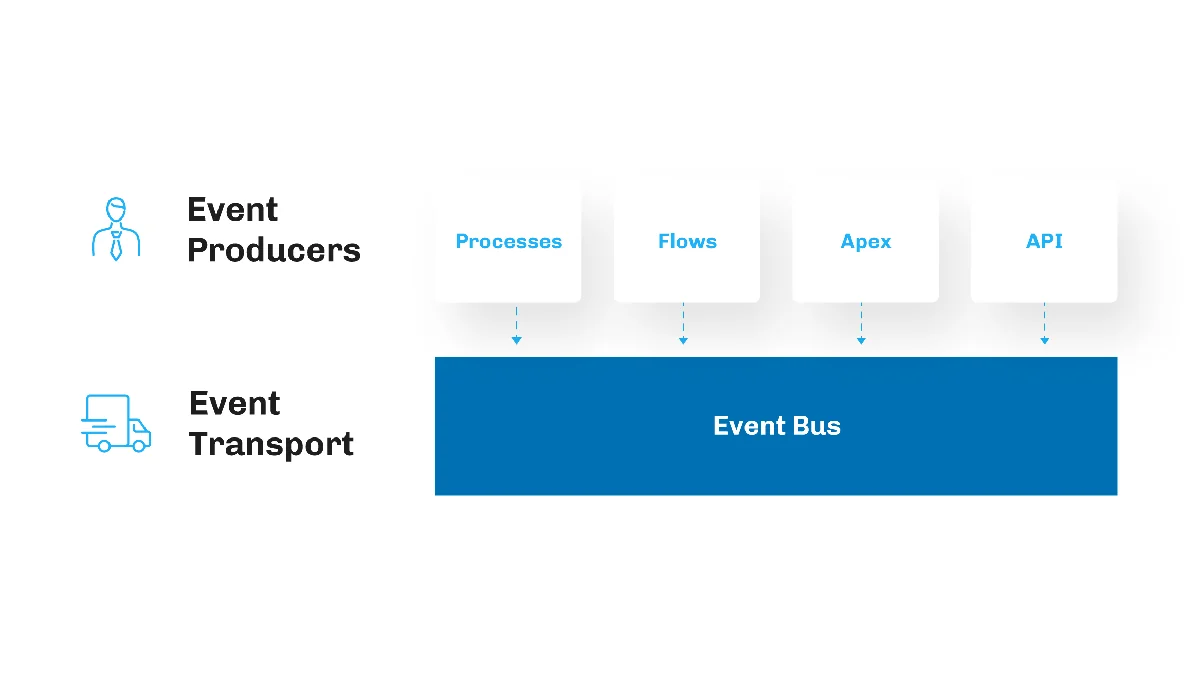
- Declarative publishing: Flow Builder and Process Builder
- Programmatic publishing: Apex EventBus.publish() method
- Declarative subscribing: Platform Event-Triggered Flow
- Programmatic subscribing: Apex triggers on platform events
Frequently Asked Questions
What causes a platform event trap in Salesforce?
A platform event trap occurs when implementations exceed governor limits, create message delivery failures, or cause performance bottlenecks. Common causes include publishing too many events per hour, inadequate error handling, replay buffer overflow, and poorly designed event schemas that consume excessive resources.
How do I avoid exceeding platform events limits?
Monitor your daily and hourly event publishing rates against your org’s limits. Implement bulkified publishing patterns, use event batching for high-volume scenarios, and set up alerts when approaching 80% of your limits. Consider using platform events only for critical real-time notifications rather than all data changes.
Can platform events be updated after publishing?
No, platform events are immutable once published to the event bus. This is a key difference from standard Salesforce objects. If you need to correct event data, you must publish a new corrective event rather than modifying the original event.
What happens when the event replay buffer overflows?
When the replay buffer overflows, older events are discarded and subscribers may miss messages. This creates a platform event trap where data synchronization fails. Implement proper subscriber scaling, use durable subscriptions where possible, and monitor replay lag to prevent buffer overflow.
How do I handle platform event publishing failures?
Always check Database.SaveResult when using EventBus.publish(). Implement a dead letter queue pattern to store failed events, use exponential backoff for retries, and log failures for monitoring. Consider using queueable Apex for non-critical event publishing to handle temporary failures gracefully.