Quip Salesforce now means two things for admins: the existing Quip collaboration product inside the Salesforce portfolio, and the retirement work required before subscriptions stop being renewable after March 1, 2027. Salesforce says Quip content is not moved automatically, so every org that still uses Quip needs an inventory, an export path, and a replacement plan before its subscription term ends.
This guide explains the current status of salesforce quip, what changed in official quip news, how to map quip sfdc use cases to Slack and Salesforce features, and how developers can use supported Quip APIs for export and audit work.
Quip Salesforce retirement: what changed in 2026
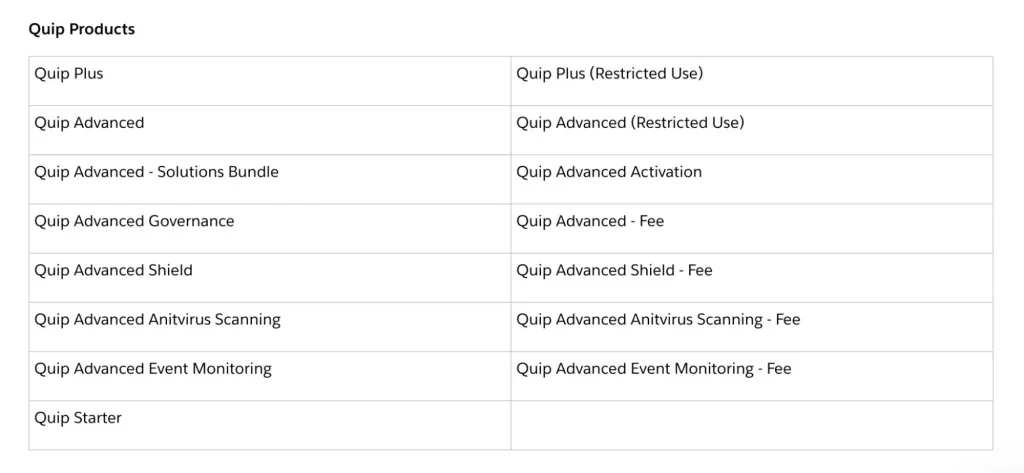
Salesforce Help now lists Quip as a retiring product. The retirement page states that all Quip products are being retired and that subscriptions cannot be renewed after March 1, 2027. Existing customers can continue to use Quip until their current subscription term ends, but renewal planning should assume that the product is not a long-term destination for new collaboration workflows.
The important point is not only the March 1, 2027 renewal cutoff. Your practical deadline is the date your own subscription expires. After that date, the site enters staged shutdown behavior. Because the timeline is tied to the subscription, two companies can have different working deadlines even though the public retirement date is the same.
For official status, keep the Salesforce Help retirement article in your change-management record: Salesforce Help: Quip Retirement. Review it again before sending customer-facing or executive communications because Salesforce can update retirement guidance.
What was Salesforce Quip used for?
Before planning a migration, identify what people actually used Quip for. In enterprise orgs, Quip often became a mix of document workspace, spreadsheet, account-planning template, deal room, service case workspace, and meeting-note system. A poor migration treats every thread as the same document type. A better migration groups content by business purpose and risk.
Salesforce Quip document patterns to inventory
Look for these patterns in your salesforce quip estate:
- Account plans and opportunity close plans: often owned by Sales, tied to Accounts or Opportunities, and used during pipeline reviews.
- Case swarming pages: often linked to Service Cloud work, Slack channels, or escalation routines.
- Embedded spreadsheets: useful in Quip, but harder to map to a plain document surface without changing behavior.
- External collaboration documents: customer, partner, or vendor access needs a permission review before export.
- Automation-created documents: Flow, Process Builder, API jobs, or custom integrations may still create or update Quip content.
Quip news admins should track
The key quip news for 2026 is the retirement path, but admins should also check related Quip platform changes. The Quip developer site states that new Live Apps can no longer be created as of March 5, 2025. That matters because teams sometimes discover a custom Live App only when users report that a migrated document lost functionality.
For Salesforce-side automation, also review the Quip Flow core actions documentation: Salesforce Help: Quip Flow Core Actions. If an old Flow creates Quip documents, update the process owner and plan a replacement. You can use our Salesforce Flow automation guide for the broader Flow review.
Quip Salesforce timeline and shutdown phases
The quip salesforce retirement process has two dates to manage: the public renewal cutoff and your subscription end date. Put both dates in the migration plan. Do not wait for read-only mode, because many teams need to clean permissions, rename content, resolve owners, or test exports while the source system is still active.
| Phase | Timing | What admins should do |
|---|---|---|
| Active subscription | Until your contract term ends | Inventory documents, test exports, choose destinations, and freeze new Quip build work. |
| Renewal cutoff | Subscriptions not renewable after March 1, 2027 | Confirm commercial dates with the account team and legal/procurement owners. |
| Read-only | 90 days after subscription expiration | Users can view content but should not rely on Quip as an active workspace. |
| Blocked logins | 30 days after the read-only phase | Users can no longer log in. Treat this as loss of operational access. |
| Data deletion | Approximately 30 days after blocked logins | Salesforce begins the deletion process. Retention and legal hold decisions must already be complete. |
If your company has regulated retention requirements, do not rely on manual user exports. Ask Legal, Compliance, Records Management, and Security which content must be retained, which content should be deleted, and which destination is approved. A quip sfdc migration touches both collaboration content and CRM-adjacent context, so ownership is usually shared across multiple teams.
How to plan a Quip Salesforce migration
A useful quip salesforce migration starts with classification, not tooling. Tooling comes after you know which content matters, where it belongs, and which security model replaces the old Quip sharing model.
Quip SFDC inventory checklist
For a quip sfdc inventory, capture at least these fields for each thread:
- Thread ID or secret path.
- Title, owner, last modified date, and business team.
- Document type: document, spreadsheet, chat, slide, or document with embedded spreadsheet.
- Related Salesforce object or record, if users treat the content as part of account, opportunity, or case work.
- Sharing scope: private, folder-based, group-based, external invite, or public link.
- Compliance flag: legal hold, regulated customer data, financial data, or security-sensitive content.
- Destination: Slack canvas, Salesforce record data, file archive, knowledge base, document repository, or delete.
SFDC Quip replacement mapping
The right sfdc quip replacement depends on the use case. A close-plan template is not the same as a retained contract-supporting document. Use this mapping as a starting point, then adjust for your org’s security, licenses, and adoption model.
| Current Quip use case | Likely replacement | Migration note |
|---|---|---|
| Account plan notes | Slack canvas or Salesforce record-based plan | Move long-lived account fields into Salesforce. Use canvas for team narrative and discussion context. |
| Opportunity close plan | Salesforce Opportunity fields, Slack canvas, or Agentforce Sales workflow | Separate structured sales data from free-form notes before migration. |
| Case swarming workspace | Slack channel, Slack canvas, and Service Cloud case record | Keep the case record as the system of record. Use Slack for collaboration around the case. |
| Spreadsheet-heavy planning | Approved spreadsheet platform, Salesforce object model, or analytics tool | Test formulas, embedded sheets, and charts. Do not assume document conversion keeps behavior. |
| Policy or knowledge content | Knowledge, CMS, or enterprise document repository | Preserve owner, approval state, and version history where retention rules require it. |
For Slack-based replacements, review Salesforce Help: Get Started with Slack in Salesforce and the Trailhead project Connect Your Agentforce Org with Slack. For internal implementation details, see our Salesforce Slack integration setup and Agentforce Salesforce guide.
How to export Quip Salesforce content with APIs
The Quip Automation API and Admin API are the main developer references for export and audit work. The Automation API is REST-based, uses OAuth 2, returns JSON for most API responses, and treats documents and messages as threads. The docs also explain that the V2 thread endpoint can return basic thread details, while the HTML endpoint returns a thread body in HTML format.
Run bulk export work from an external worker or integration platform, not from a synchronous Salesforce transaction. Apex callouts, CPU time, transaction limits, and retry handling make Salesforce a poor place to run a large document extraction loop. Use Salesforce records to track migration status if needed, but let a server process perform the Quip API calls.
API access and security prerequisites
Before building export scripts, read the official API docs: Quip Automation API documentation, Quip Admin API documentation, and Quip OpenAPI files. The Admin API docs state that access requires an admin user and that the admin API must be enabled for the Quip instance. They also document default per-user Admin API rate limits of 100 requests per minute and 1,500 requests per hour.
Use least privilege. Create or reuse API keys only for the extraction work, select the narrowest scopes that satisfy the task, store secrets outside source control, and revoke keys when the migration closes. Quip token behavior and scopes are documented in the API authentication sections, including 30-day token expiration guidance.
List owned threads with pagination
The current-user threads endpoint returns owned threads and supports a limit up to 100 with cursor-based pagination. The API docs state that the cursor returned by this method expires after 30 minutes, so long-running jobs must process each page promptly and persist progress.
curl --request GET \
  "https://platform.quip.com/1/users/current/threads?threads_meta=true&limit=100" \
  --header "Authorization: Bearer ${QUIP_ACCESS_TOKEN}"
Export a document to DOCX
For document export, the Automation API includes an endpoint to export a specified Quip document to a DOCX file. Use this for content that must remain readable outside Quip. For spreadsheets, test XLSX export. For mixed documents, validate embedded spreadsheet behavior and formatting before you mark the item migrated.
curl --request GET \
  "https://platform.quip.com/1/threads/${THREAD_ID}/export/docx" \
  --header "Authorization: Bearer ${QUIP_ACCESS_TOKEN}" \
  --output "${THREAD_ID}.docx"
Node.js export skeleton with backoff
The following script shows the structure of a safe export job. It is intentionally small: in production, add encrypted secret storage, structured logging, checksum validation, destination upload, and a migration status table.
import fs from "node:fs/promises";

const token = process.env.QUIP_ACCESS_TOKEN;
if (!token) throw new Error("Set QUIP_ACCESS_TOKEN before running the export job.");

const baseUrl = "https://platform.quip.com";
const headers = { Authorization: `Bearer ${token}` };

async function request(url, attempts = 4) {
  for (let attempt = 1; attempt <= attempts; attempt++) {
    const response = await fetch(url, { headers });

    if (response.ok) return response;

    if ([429, 500, 503].includes(response.status) && attempt < attempts) {
      const delayMs = Math.min(30000, 1000 * 2 ** attempt);
      await new Promise(resolve => setTimeout(resolve, delayMs));
      continue;
    }

    throw new Error(`Quip API call failed: ${response.status} ${response.statusText}`);
  }
}

async function getOwnedThreads() {
  const threads = [];
  let cursor = "";

  do {
    const query = new URLSearchParams({
      threads_meta: "true",
      limit: "100"
    });
    if (cursor) query.set("cursor", cursor);

    const response = await request(`${baseUrl}/1/users/current/threads?${query}`);
    const payload = await response.json();

    for (const [threadId, meta] of Object.entries(payload.threads || {})) {
      threads.push({ threadId, ...meta });
    }

    cursor = payload.response_metadata?.next_cursor || "";
  } while (cursor);

  return threads;
}

async function exportDocx(threadId) {
  const response = await request(`${baseUrl}/1/threads/${threadId}/export/docx`);
  const buffer = Buffer.from(await response.arrayBuffer());
  await fs.writeFile(`exports/${threadId}.docx`, buffer);
}

const threads = await getOwnedThreads();
await fs.mkdir("exports", { recursive: true });

for (const thread of threads) {
  if (thread.is_deleted) continue;
  await exportDocx(thread.threadId);
}

console.log(`Exported ${threads.length} candidate Quip threads.`);
This code is a starting point, not a full migration engine. Add destination-specific validation before deleting or decommissioning source content. A quip salesforce export should prove that every required thread reached the destination and that the business owner accepted the result.
Salesforce Quip admin and developer checks before migration
A migration fails when it ignores dependencies. Run these checks before the final cutover.
- Connected Salesforce records: Find pages users treat as part of Account, Opportunity, or Case work. Decide whether structured fields should move into Salesforce instead of another document.
- Flow and legacy automation: Search Flow actions, old Process Builder references, integration jobs, and scheduled scripts for Quip actions or API calls.
- Permissions: Compare Quip sharing to the destination security model. Folder-based access in Quip does not map automatically to Salesforce sharing, Slack channel membership, or external document permissions.
- Live Apps and custom embeds: Document what the app did, then rebuild the behavior in the target platform only if the use case still matters.
- Event monitoring and audit: Use available Quip audit data where required, and retain export logs for compliance sign-off.
- Salesforce API references: Review Salesforce Developer API documentation and the CollabUserEngagementMetric object reference when you need to understand Salesforce-side metadata that references Quip engagement.
For security reviews, use our Salesforce security model overview. For API patterns that remain inside the Salesforce platform, use our Salesforce REST API tutorial.
Common errors with Quip Salesforce migration
| Error | Why it happens | How to avoid it |
|---|---|---|
| Exporting only owner-owned threads | The current-user endpoint returns content based on what that token can access. | Use admin-approved inventory methods and compare results against business-owner lists. |
| Assuming comments and chat migrate cleanly | Different destinations represent comments, history, and chat differently. | Define what must be preserved for compliance versus daily use. |
| Leaving old automation active | Flow or external jobs can keep creating Quip documents during migration. | Freeze new Quip creation, update automations, and monitor for new threads after the freeze date. |
| Ignoring embedded spreadsheets | Spreadsheet behavior is more than static document text. | Export and validate formulas, charts, and cell ranges with the process owner. |
| Moving sensitive data to the wrong place | Old Quip sharing can hide external access or broad folder inheritance. | Review permissions before migration and apply destination access from approved groups, not copied assumptions. |
Best practices for post-Quip Salesforce collaboration
After the migration, avoid recreating Quip as a collection of disconnected documents. Use Salesforce for structured CRM data, Slack for team collaboration, and approved document systems for retained records. This keeps the next platform change smaller because each tool owns the data it is best suited to manage.
Quip news to monitor after rollout
Continue tracking quip news through Salesforce Help, release notes, and your account team until your site is fully decommissioned. Watch for in-product migration tooling, export guidance, and any change to retirement timing. Keep screenshots or PDF copies of official guidance in the project record when your governance process requires evidence.
Salesforce Quip links after migration
Old salesforce quip links appear in bookmarks, Chatter posts, email templates, Slack messages, and CRM records. Create a link remediation plan. For high-value records, replace old links with the destination URL. For low-value or archived records, add a clear note that the old link was part of retired Quip content and where the exported copy lives.
SFDC Quip ownership after migration
Every sfdc quip migration needs a named owner for deletion approval, destination maintenance, and user support. Without ownership, migrated documents become another unmanaged archive. Assign owners by business process, not by who happened to own the old thread.
Frequently Asked Questions
Is Quip Salesforce being retired?
Yes. Salesforce Help states that all Quip products are being retired and that Quip subscriptions can’t be renewed after March 1, 2027. Existing sites remain usable until the end of the customer’s subscription term, so admins should treat the contract end date as the working migration deadline.
Will Salesforce Quip content move to Slack automatically?
No. Salesforce says Quip content is not automatically moved for customers. A Salesforce Quip migration needs a planned export, an in-product migration flow when available in the tenant, or a separate content migration process.
What is the safest way to export Quip SFDC documents?
Start with an inventory, classify documents by owner and business use, then use the Quip Automation API or Admin API with the least scopes required. For a Quip SFDC estate with many documents, use pagination, retry handling, and a validation report that compares source thread IDs with exported files.
Can Slack Canvas replace every SFDC Quip use case?
Slack Canvas can replace many collaborative document use cases, especially account notes, close plans, and channel-based work. It may not replace every SFDC Quip spreadsheet, custom Live App, retention workflow, or external-sharing pattern without redesign.
Should developers build new Quip integrations in 2026?
Avoid starting new Quip Salesforce integrations unless they are needed for short-term extraction or compliance. Salesforce has announced the retirement path, and Quip stopped allowing creation of new Live Apps on March 5, 2025, so new development should usually target Slack, Salesforce records, Flow, or a long-term document system.