The Salesforce Certified Administrator credential validates your expertise in configuring, managing, and maintaining Salesforce orgs. This certification demonstrates your ability to implement business requirements using declarative customization tools and serves as the foundation for advanced Salesforce certifications.
With 60 multiple-choice questions, 105 minutes to complete, and a 68% passing score, the exam tests your knowledge across eight core domains. This guide covers everything you need to know to pass the exam and excel as a Salesforce administrator.
Salesforce Certified Administrator Exam Overview
The Salesforce Certified Administrator exam evaluates your practical knowledge of the Salesforce platform. Here are the key exam details:
- Format: 60 multiple-choice/multiple-select questions (plus 5 unscored)
- Duration: 105 minutes
- Passing Score: 68% (41 out of 60 questions)
- Cost: $200 USD (retakes cost $100)
- Prerequisites: None required, but 6+ months of hands-on experience recommended
- Delivery: Online proctored or at testing centers
The exam covers real-world scenarios you’ll encounter as a Salesforce administrator, from user management to complex automation workflows.
Exam Topics and Weightings
Understanding the exam structure helps you prioritize your study time. The eight domains carry different weights:
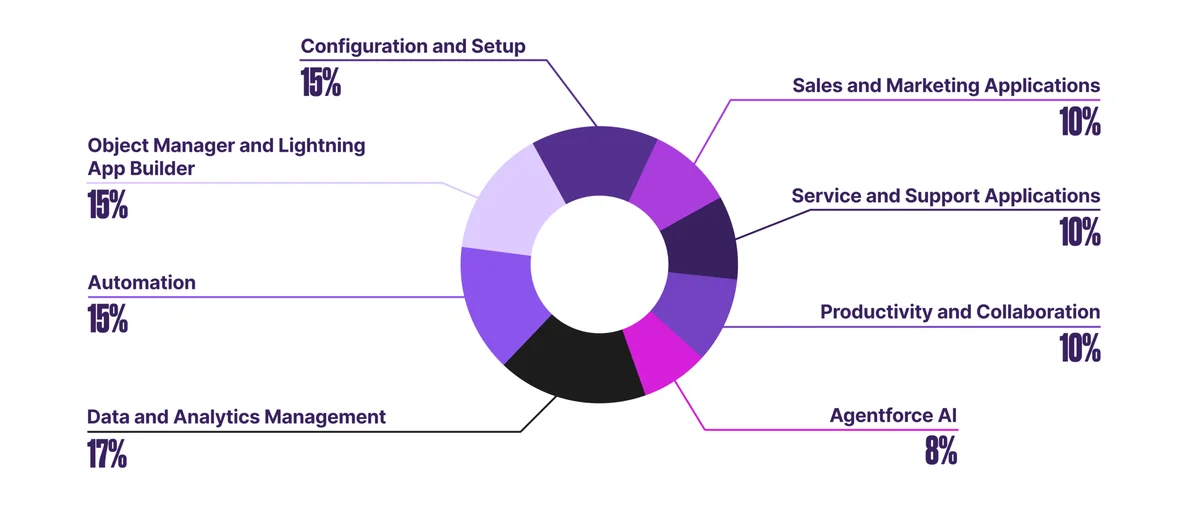
Configuration and Setup (15%)
This domain covers organizational security, user management, and system configuration. Key topics include:
- Security Model: Profiles, permission sets, roles, and sharing rules
- User Management: Creating users, managing licenses, and password policies
- Org Settings: Company information, business hours, and fiscal year
- Data Security: Field-level security and record access
Focus on understanding how Salesforce’s layered security model works together to control data access.
Object Manager and Lightning App Builder (15%)
Master Salesforce’s data architecture and user interface customization:
- Objects and Fields: Standard vs. custom objects, field types, and relationships
- Relationships: Lookup, master-detail, and many-to-many relationships
- Page Layouts: Field placement, sections, and related lists
- Lightning Pages: App Builder components and dynamic forms
Understanding object relationships is crucial for data modeling and reporting.
Sales and Marketing Applications (10%)
Learn how Salesforce supports sales processes:
- Lead Management: Lead conversion, assignment rules, and web-to-lead
- Opportunity Management: Sales stages, forecasting, and products
- Campaign Management: Campaign members and ROI tracking
- Sales Productivity: Path, Kanban views, and Einstein features
Service and Support Applications (10%)
Understand customer service functionality:
- Case Management: Case lifecycle, assignment rules, and escalation
- Knowledge Management: Articles, categories, and data categories
- Service Console: Workspace configuration and productivity tools
- Omni-Channel: Queue management and routing
Productivity and Collaboration (10%)
Cover tools that enhance user productivity:
- Activity Management: Tasks, events, and calendar integration
- Chatter: Groups, feeds, and collaboration features
- Mobile App: Configuration and mobile-specific features
- AppExchange: Managed vs. unmanaged packages
Data and Analytics Management (17%)
This heavily weighted section covers data operations and reporting:
- Data Import/Export: Data Import Wizard, Data Loader, and export options
- Data Quality: Validation rules, duplicate management, and data types
- Reports: Report types, formats, and formulas
- Dashboards: Components, filters, and running users
Practice creating reports and dashboards with different data scenarios.
Workflow/Process Automation (15%)
Master Salesforce automation tools:
- Flow Builder: Screen flows, record-triggered flows, and scheduled flows
- Process Builder: Criteria-based actions (being phased out)
- Approval Processes: Multi-step approvals and dynamic approval routing
- Workflow Rules: Field updates, email alerts, and tasks (legacy)
Focus on Flow Builder as it’s the current automation standard.
Agentforce AI (8%)
The newest exam domain covers AI-powered automation:
- Agent Builder: Creating and configuring AI agents
- Prompt Management: Writing effective prompts and instructions
- Security Considerations: Data access and permission requirements
- Use Cases: When to implement Agentforce solutions
Salesforce Admin Exam Study Guide Resources
Effective preparation combines multiple study methods and resources:
Official Salesforce Resources
- Trailhead: Complete the Administrator trail and related modules
- Exam Guide: Download the official exam guide from Salesforce
- Practice Exams: Use Salesforce’s official practice tests
- Documentation: Reference help.salesforce.com for detailed feature explanations
Hands-On Practice
Create a Developer Edition org and practice:
- Building custom objects and fields
- Creating reports and dashboards
- Setting up automation with Flow Builder
- Configuring security settings
- Testing different user scenarios
Study Materials and Methods
- Study Groups: Join Salesforce community study groups
- Flashcards: Create cards for key concepts and definitions
- Mock Exams: Take multiple practice tests to identify weak areas
- Video Training: Supplement reading with visual learning
Salesforce Administrator Certification Study Guide Tips
Follow these proven strategies to maximize your exam success:
Create a Study Schedule
Allocate 6-8 weeks for preparation with 10-15 hours per week of focused study time. Prioritize high-weight domains like Data and Analytics Management (17%) and spend extra time on areas where you lack experience.
Focus on Practical Application
The exam tests real-world scenarios, not just theoretical knowledge. Practice building solutions in your Developer Edition org and understand when to use different tools and features.
Master the Fundamentals
Ensure you understand core concepts like:
- Object relationships and their implications
- Security model layers and how they interact
- Automation tool selection criteria
- Report and dashboard best practices
Use Process of Elimination
Many exam questions have obviously incorrect answers. Eliminate these first, then choose the best remaining option based on Salesforce best practices.
SFDC Admin Exam Prep: Common Pitfalls to Avoid
Learn from common mistakes that trip up exam candidates:
Confusing Similar Features
- Lookup vs. Master-Detail: Understand cascade behavior and security inheritance
- Roles vs. Profiles: Know which controls record access vs. feature access
- Workflow vs. Process Builder vs. Flow: Learn when to use each automation tool
Overlooking Governor Limits
Understand Salesforce limits that affect your solutions:
- Maximum fields per object (800 custom fields)
- Report row limits (2,000 for tabular, 5,000 for summary)
- Dashboard component limits (20 per dashboard)
- Flow interview limits and bulkification requirements
Misunderstanding Security Concepts
Security questions often involve multiple layers. Remember that access is determined by the most restrictive setting across:
- Organization-wide defaults
- Role hierarchy
- Sharing rules
- Manual sharing
- Profile and permission set permissions
Salesforce Admin Cert Notes: Key Concepts
These essential concepts appear frequently on the exam:
Data Model Relationships
| Relationship Type | Characteristics | Use Cases |
|---|---|---|
| Lookup | Loose coupling, no cascade delete, separate security | Optional relationships, external references |
| Master-Detail | Tight coupling, cascade delete, inherits security | Parent-child data, roll-up summaries |
| Many-to-Many | Junction object with two master-detail relationships | Complex associations like contacts-to-opportunities |
Automation Decision Matrix
| Tool | Complexity | User Interaction | Best For |
|---|---|---|---|
| Flow Builder | Medium-High | Optional | Complex logic, screen flows, record updates |
| Process Builder | Medium | No | Simple field updates (being deprecated) |
| Workflow Rules | Low | No | Simple field updates (legacy) |
| Approval Process | Medium | Yes | Multi-step approvals with routing |
Report Types and Formats
- Tabular: Simple list format, best for exports
- Summary: Groups data with subtotals, supports charts
- Matrix: Groups by rows and columns, complex analysis
- Joined: Multiple report blocks, different object relationships
Post-Certification Career Path
The Salesforce Certified Administrator credential opens doors to various career opportunities:
Career Progression
- Salesforce Administrator: $65,000-$85,000 average salary
- Senior Administrator: $75,000-$95,000 with additional certifications
- Business Analyst: Bridge between technical and business teams
- Consultant: Work with multiple clients on implementations
Advanced Certifications
Use the Administrator certification as a stepping stone to:
- Advanced Administrator (requires Administrator prerequisite)
- Platform App Builder (declarative development)
- Sales Cloud or Service Cloud Consultant
- Platform Developer I (programmatic development)
Frequently Asked Questions
How long should I study for the Salesforce Certified Administrator exam?
Most candidates need 6-8 weeks of dedicated study time, spending 10-15 hours per week. If you have extensive Salesforce experience, 4-6 weeks may be sufficient. New users should allow 8-12 weeks to build both theoretical knowledge and hands-on skills.
What happens if I fail the Salesforce admin exam?
You can retake the exam immediately for $100. Salesforce provides a score report showing your performance in each domain, helping you identify areas for improvement. Many candidates pass on their second attempt after focused study on weak areas.
Do I need hands-on Salesforce experience before taking the exam?
While not required, Salesforce recommends 6+ months of platform administration experience. You can gain this through a Developer Edition org, Trailhead Playground, or volunteer work. Hands-on practice is crucial for understanding real-world scenarios tested on the exam.
Which Salesforce admin exam study guide materials are most effective?
Combine official Salesforce resources (Trailhead, exam guide, practice tests) with hands-on practice in a Developer Edition org. Third-party study guides and practice exams can supplement but shouldn’t replace official materials. Focus on understanding concepts rather than memorizing answers.
How often does Salesforce update the Administrator certification exam?
Salesforce typically updates certification exams 2-3 times per year to reflect new features and platform changes. The exam guide shows the last update date and version. Always use the most current exam guide and study materials to ensure you’re preparing for the latest version.
Can I use Notion for organizing my Salesforce admin cert notes?
Yes, Notion is excellent for organizing study materials. Create databases for exam topics, flashcards for key concepts, and templates for practice scenarios. Many candidates find success using Notion’s linking and tagging features to connect related concepts across different exam domains.