Salesforce Live Agent configuration controls how your organization’s customer service agents handle real-time chat interactions. These settings determine chat capacity, supervisor monitoring capabilities, and the overall customer experience through your chat console.
Live Agent configurations manage three core areas: user settings that control individual agent behavior, profile assignments that determine who can access chat features, and supervisor settings that enable monitoring and coaching capabilities.
What is Salesforce Live Agent Configuration?
Live Agent configuration defines the operational parameters for your chat service. When customers initiate chat requests, these settings control how notifications reach agents, what tools agents have available, and how supervisors can monitor interactions.
The configuration affects chat routing, agent capacity limits, message previews, and transfer capabilities. Proper setup ensures efficient customer service delivery while maintaining quality oversight.
How to Set Up Salesforce Live Agent Configuration
Follow these steps to configure Live Agent settings in your Salesforce org:
- Navigate to Setup → Build → Customize → Live Agent → Live Agent Configurations
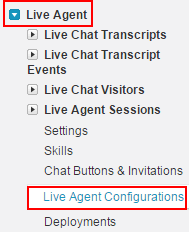
Select the Live Agent Configurations link to access customization options.
- Click the New button to create a new configuration
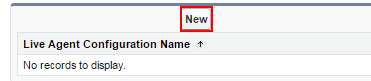
The configuration wizard presents three main sections that require customization:
- User Configuration Settings
- Assign Users and Profiles
- Supervisor Settings
User Configuration Settings
User configuration settings control individual agent capabilities and chat behavior. These settings directly impact agent productivity and customer experience.
Required Configuration Fields
- Live Agent Configuration Name: Descriptive name for internal reference
- Developer Name: API name used for programmatic access
- Chat Capacity: Maximum concurrent chats per agent (typically 1-5)
- Enable Sneak Peek: Allows agents to see customer messages before they’re sent
- Enable Request Sound: Audio notification for incoming chat requests
- Agent Name Display: How agent names appear to customers
- Greeting Message: Automated message sent when chat begins
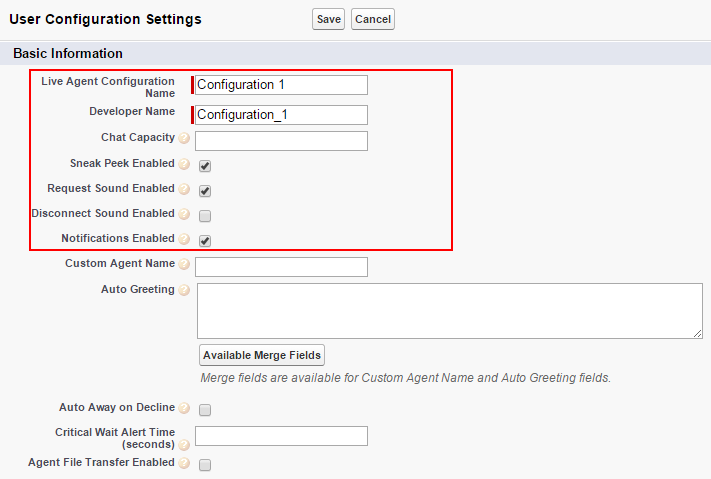
Best Practice: Set chat capacity based on agent experience level. New agents should handle 1-2 concurrent chats, while experienced agents can manage 3-5 depending on case complexity.
Assign Users and Profiles
User and profile assignment determines which team members can access Live Agent functionality and what permissions they have within the chat console.
User Assignment Process
- Select users from the Available Users list
- Move selected users to the Selected Users section
- Assign appropriate profiles that include Live Agent permissions
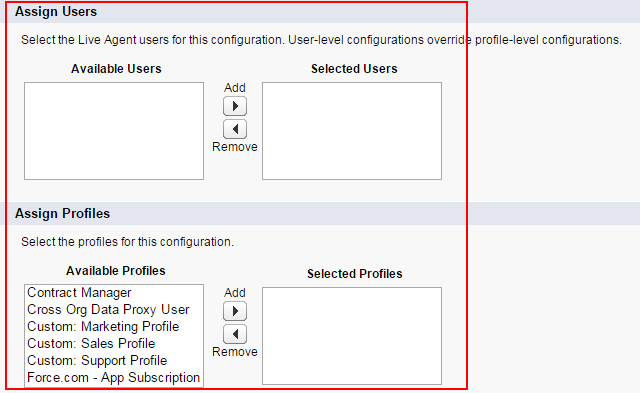
Permission Requirements: Users need the “Live Agent User” permission and access to relevant objects (Cases, Contacts, Accounts) to effectively handle customer inquiries.
Supervisor Settings
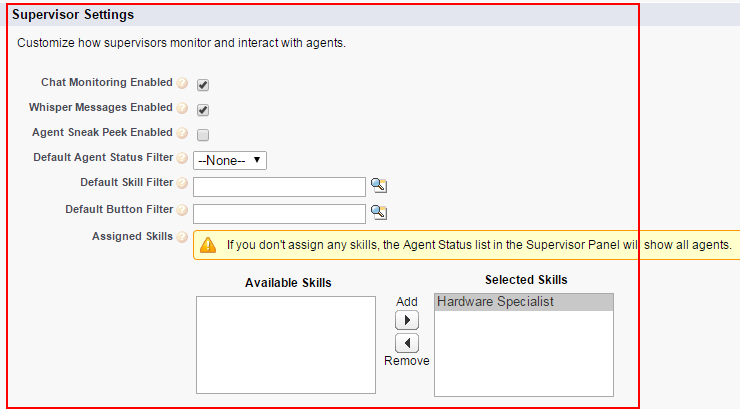
Supervisor settings enable management oversight and coaching capabilities during live chat sessions. These features help maintain service quality and provide real-time support to agents.
Available Supervisor Controls
- Enable Chat Monitoring: Allows supervisors to observe agent-customer conversations in real-time
- Enable Whisper Messages: Permits supervisors to send private messages to agents during active chats
- Enable Agent Sneak Peek: Gives supervisors visibility into customer messages before agents respond
Chat Transfer Settings
Configure chat transfer capabilities to enable seamless handoffs between agents or departments when specialized expertise is required.
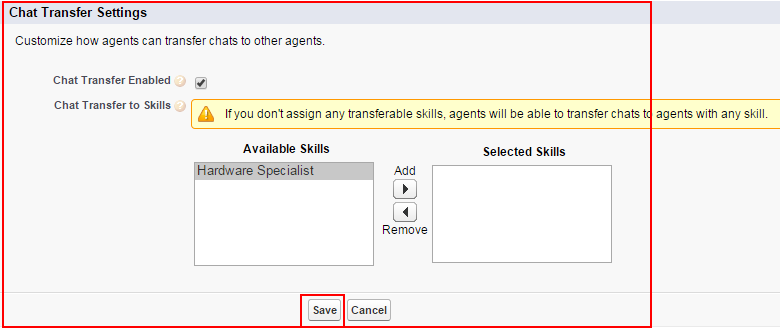
After completing all configuration sections, save your settings to activate the Live Agent configuration.
Live Agent Configuration Best Practices
Effective Live Agent configuration requires balancing agent productivity with customer service quality. Consider these recommendations:
Capacity Planning
- Start with conservative chat capacity limits (1-2 per new agent)
- Monitor agent performance metrics before increasing capacity
- Account for case complexity when setting limits
Supervisor Oversight
- Enable monitoring for quality assurance purposes
- Use whisper messages for coaching, not micromanaging
- Train supervisors on when to intervene in conversations
User Experience
- Craft professional greeting messages that set expectations
- Enable sneak peek to improve response quality
- Configure appropriate sound notifications to avoid agent fatigue
Common Live Agent Configuration Issues
Organizations frequently encounter these configuration challenges:
Permission Problems
Users cannot access Live Agent features due to missing permissions. Verify that assigned profiles include “Live Agent User” permission and access to necessary objects.
Capacity Overload
Setting chat capacity too high leads to poor customer service quality. Monitor agent performance and adjust limits based on actual capability.
Notification Issues
Agents miss chat requests when sound notifications are disabled or browser settings block audio. Test notification settings across different browsers and devices.
Integration with Salesforce Service Cloud
Live Agent configuration integrates with broader Service Cloud functionality, including:
- Case Management: Automatic case creation from chat transcripts
- Knowledge Base: Agent access to articles during conversations
- Omni-Channel: Unified routing across chat, email, and phone channels
- Einstein Case Classification: Automated case categorization from chat content
These integrations require additional configuration beyond basic Live Agent setup.
Frequently Asked Questions
What is the maximum chat capacity per agent in Salesforce Live Agent?
Salesforce does not enforce a hard limit on chat capacity, but best practice recommends 1-5 concurrent chats per agent depending on experience level and case complexity. Most organizations start with 2-3 chats per agent.
How do I enable Live Agent for specific users?
Enable Live Agent by assigning users to a Live Agent configuration and ensuring their profile includes the “Live Agent User” permission. Users also need access to relevant objects like Cases and Contacts.
Can supervisors monitor all agent chats in real-time?
Yes, when “Enable Chat Monitoring” is activated in supervisor settings, supervisors can observe agent-customer conversations in real-time. This feature supports quality assurance and coaching activities.
What happens when an agent reaches their chat capacity limit?
When an agent reaches their configured chat capacity, they will not receive new chat requests until they complete existing conversations. The system automatically routes new requests to available agents or queues them if no agents are available.
How do whisper messages work in Live Agent?
Whisper messages allow supervisors to send private messages to agents during active customer chats. These messages are visible only to the agent and supervisor, not to the customer, enabling real-time coaching and support.