MuleSoft Composer for Salesforce is a no-code integration platform that connects Salesforce orgs to external systems without custom development. Built directly into Salesforce, Composer enables administrators to create automated data flows between Salesforce and applications like Google Sheets, Tableau, Workday, and other Salesforce orgs. This tool addresses the growing need for mulesoft middleware integration capabilities within the Salesforce ecosystem.
Composer eliminates the complexity of traditional integration approaches by providing pre-built connectors and a visual flow builder. Organizations can achieve real-time data synchronization across systems while maintaining data integrity and security standards required for enterprise deployments.
How MuleSoft Composer Works
Composer operates through flows — automated processes that define data movement between connected systems. Each flow consists of three core components:
- Data Selection: Define source data from connected systems (Salesforce records, Google Sheets rows, Workday employee data, or Tableau extracts)
- Data Transformation: Apply business logic to modify, filter, or enrich data during transit
- Trigger Configuration: Set execution conditions (real-time events, scheduled intervals, or manual activation)
Flows support both batch and real-time processing patterns. Batch flows handle large data volumes efficiently, while real-time flows provide immediate synchronization for time-sensitive business processes.
Real-World Integration Example
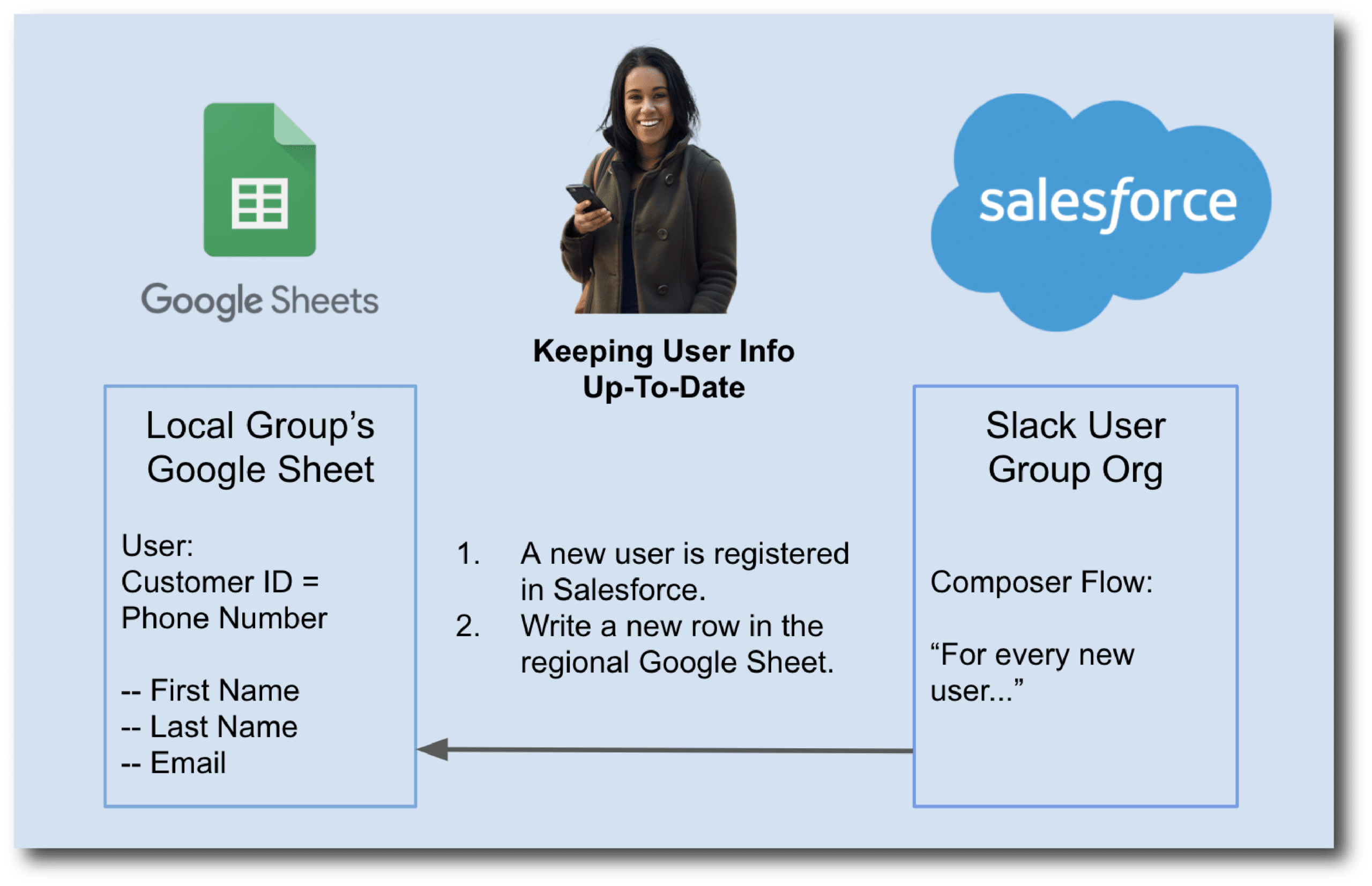
Consider a regional user group managing member data across Salesforce and Google Sheets. The national organization maintains member records in Salesforce, while regional coordinators track local activities in spreadsheets.
A Composer flow automates this process by:
- Monitoring Salesforce for new member registrations using real-time triggers
- Extracting relevant data (name, email, region, membership tier) from Contact or Lead records
- Updating Google Sheets with formatted member information, maintaining data consistency across platforms
This integration eliminates manual data entry, reduces errors, and ensures regional teams access current member information without delays.
MuleSoft Certification Path for Developers
Organizations implementing Composer often require mulesoft certified developer expertise for complex integrations. The MuleSoft certification program offers multiple paths:
MuleSoft Developer Certification Levels
- MuleSoft Certified Developer – Level 1 (MCD): Covers Anypoint Platform fundamentals, DataWeave transformations, and basic API development
- MuleSoft Certified Integration Architect – Level 1: Focuses on enterprise integration patterns and solution design
- MuleSoft Certified Platform Architect – Level 1: Advanced platform architecture and governance concepts
The mulesoft developer certification validates skills in Anypoint Studio, API design, and integration best practices. Certified developers understand Composer’s capabilities within the broader MuleSoft ecosystem.
Certification Preparation Resources
Preparing for mulesoft certifications requires hands-on experience with:
- Anypoint Platform navigation and project setup
- DataWeave syntax for data transformation
- Connector configuration and error handling
- API specification using RAML or OpenAPI
- Deployment strategies and monitoring
Many candidates use mulesoft certification practice test resources to validate readiness before attempting official exams. Practice tests cover scenario-based questions that mirror real-world integration challenges.
Composer vs Traditional MuleSoft Development
Composer serves as an entry point to mulesoft middleware integration without requiring full Anypoint Platform expertise. Key differences include:
| Aspect | MuleSoft Composer | Anypoint Platform |
|---|---|---|
| Target Users | Salesforce Admins | Certified MuleSoft Developers |
| Development Approach | No-code visual flows | Code-based with Anypoint Studio |
| Connector Library | Pre-built Salesforce-focused | Extensive third-party ecosystem |
| Deployment Model | Salesforce-hosted | CloudHub or on-premises |
| Complexity | Simple to moderate integrations | Enterprise-grade solutions |
Organizations often start with Composer for straightforward integrations, then migrate to full Anypoint Platform as requirements become more complex.
Implementation Best Practices
Successful Composer implementations follow established patterns:
Data Governance
- Define data ownership and stewardship roles
- Establish field mapping standards between systems
- Implement data validation rules at integration points
- Monitor data quality metrics across connected systems
Security Considerations
- Use named credentials for external system authentication
- Apply field-level security controls on synchronized data
- Audit integration activity through Salesforce Event Monitoring
- Implement error handling for failed authentication attempts
Performance Optimization
- Batch similar operations to reduce API call volume
- Schedule resource-intensive flows during off-peak hours
- Monitor flow execution times and optimize bottlenecks
- Use selective synchronization to limit data volume
Career Path: Salesforce MuleSoft Developer
The salesforce mulesoft developer role combines Salesforce platform expertise with integration architecture skills. These professionals design and implement data flows that connect Salesforce to enterprise systems.
Key responsibilities include:
- Analyzing business requirements for system integrations
- Designing data mapping between Salesforce and external systems
- Implementing Composer flows and monitoring performance
- Troubleshooting integration issues and optimizing data flows
- Collaborating with Salesforce administrators and business stakeholders
Career advancement often involves pursuing additional mulesoft certifications and gaining experience with complex integration scenarios.
Frequently Asked Questions
What MuleSoft certification should I pursue first?
Start with MuleSoft Certified Developer – Level 1 (MCD). This certification covers Anypoint Platform fundamentals and prepares you for more advanced certifications. The MCD exam focuses on practical skills like DataWeave transformations, connector usage, and basic API development.
How does MuleSoft Composer differ from Salesforce Flow?
Salesforce Flow handles automation within Salesforce, while MuleSoft Composer connects Salesforce to external systems. Flow excels at internal business processes, record updates, and user interactions. Composer specializes in data synchronization between different platforms and applications.
Can I use MuleSoft Composer without coding experience?
Yes, Composer is designed for no-code integration. Salesforce administrators can build flows using visual configuration tools without writing code. However, understanding data mapping concepts and basic integration patterns helps create more effective solutions.
What systems can MuleSoft Composer connect to Salesforce?
Composer includes pre-built connectors for Google Sheets, Tableau, Workday, NetSuite, SAP, and other Salesforce orgs. The connector library continues expanding based on customer demand and integration patterns.
How do I prepare for MuleSoft certification practice tests?
Focus on hands-on experience with Anypoint Platform, complete official MuleSoft training modules, and practice building integrations. Use scenario-based study materials that mirror real-world integration challenges you’ll encounter in the certification exam.